1
Check the installation
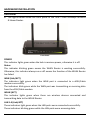
The control LEDs of the WLAN Router are clearly visible and the status of the
network link can be seen instantly:
1. With the power source on, once the device is connected to the broadband
modem, the Power, Status, LAN, WLAN and WAN port LEDs of the WLAN Router
will light up indicating a normal status.
2. When the WAN Port is connected to the ADSL/Cable modem, the WAN LED will
light up.
3. When the LAN Port is connected to the computer system, the LAN LED will light
up.
10