1
6.11 Time Mode
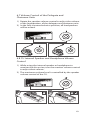
1) Press and hold the “Set” button for 2 seconds and the
“Set” icon will flash.
2) Press the “Up” or “Down” arrow buttons to choose “Time
Mode” on the Mode Status area of the LCD display.
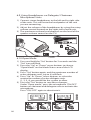
3) Press “Set” button again, and the maximum number of
active delegate units (up to 4) will flash.
4) Press “Up” or “Down” arrow buttons to select the maximum number of active delegate units (1, 2, 3, 4) you
would like the system to allow.
5) Press the “Set” button to save these changes.
Under “Time mode,” press the microphone “ON/OFF”
button on delegate units, to activate the microphone for
30 seconds. If the number of active delegate units is less
than the maximum allowed, more delegate units can be
activated for 30 seconds.
SET
1..4
SET
1..4
21