1
®
starter guide
Easy steps for getting the most
from your AT&T U-verse TV,
High Speed Internet, and Voice services.
Get answers 24/7
att.com/uversesupport
or chat live 1.800.288.2020
FC_UVE338_PostSaleStarter_WelcomeKit_RELEASE
• Create sub account voice mailboxes online
• Link your wireless number and your voice mailbox
• Change your PIN
• Get fast, affordable tech support
Support questions/additional resources..............27
pg_2_UVE338_PostSaleStarter_WelcomeKit_RELEASE
Please have your four-digit passcode available when calling.
click att.com/myuverse
call 1.800.288.2020
Upgrade or add services anytime.
AT&T U-verse TV, Internet, and phone.
Learn more at att.com/referUverse.
, AT&T UID
Your award-winning U-verse service was
installed by
Tech’s ID for promo code (P2R)
Router password
AT&T U-verse password hint
Note: Password is the same as your AT&T email password.
For your security, record account passwords separately
and keep them in a safe place.
Love your U-verse?
Tell a friend, and you’ll BOTH get up to $75
in gift cards when your friend orders
Your AT&T U-verse primary member ID
allows you to manage your account online.
You can view and pay your bill, enroll in
paperless billing, sign up for Autopay,
upgrade your account, get updates
regarding your AT&T U-verse service, and
so much more.
>Help Channel:
Tune your TV to ch-411
AT&T U-verse Voice..........................................................27
>24/7 care:
1.800.288.2020
Please have your four-digit passcode available when calling.
• Assure reliable security for your wireless home network
• Connect more computers to your wireless home network
>Getting started:
att.com/uversesupport
AT&T U-verse High Speed Internet........................ 26
VM Pin # and authentication code
• Resolve problems with your services
• Switch your TV screen setting from standard to
widescreen
• Program your remote to control up to four devices
• Change your TV’s input selection to match its
video source
• Three ways to connect your receiver to your TV
• Watch Help on Demand
We’re always
here to help:
AT&T U-verse TV.............................................................. 21
Wireless key # (required for home Wi-Fi access)
quick fix guide
AT&T U-verse primary member ID
(online account access ID)
• Set up your voice mailbox
• Listen to messages or change settings
• Access your mailbox online and by phone
• Turn off AT&T U-verse MessagingSM
• Change your PIN
• Link your wireless number and voice mailbox
• Important information
SSID #
AT&T U-verse VoiceSM....................................................... 16
Billing account number (BAN)
• Access your email from the Web
• Set up email on your home computer
• Access the entire national AT&T Wi-Fi Hot Spot network
• Get online protection with advanced safety features
Manufacturer
AT&T U-verse High Speed Internet......................... 12
Customer name on account
• How to use the AT&T U-verse remote control
• Direct the show with your Total Home DVR®
• Program the DVR from your computer or mobile phone
• AT&T U-verse OnlineSM
• AT&T U-verse MobileSM
• Find shows fast with Channel Shortcuts
• Watch four of your favorite shows at once with
My Multiview
• Other Multiview choices
• How to use Parental Controls
• Options menus offer bigger convenience
• U-verse Movies and Pay Per View programming
• Interactive features for TV, Internet, and Voice
• Quick tips about your AT&T U-verse service
RESIDENTIAL gateway information
AT&T U-verse TV.................................................................... 4
general information
• For quick reference, record your important AT&T U-verse
information here
With all your key information in one place, it’s a snap to manage your account and get support when you need it.
Your important AT&T U-verse® information...........3
For your own security, if you need
to record account passwords, write
them down separately and keep
them in a safe place.
starter guide
Record your important AT&T U-verse® information here for easy reference.
table of contents
3
pg_3_UVE338_PostSaleStarter_WelcomeKit_RELEASE
TV user guide
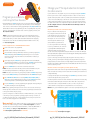
How to use the AT&T U‑verse® remote control
Power on/off devices
TV user guide
Control devices with
mode buttons
Rewind or fast-forward
program
Initiate program
recording
Allow navigation between
TV components (RGB,
HDMI, analog, other)
Stop program play
Start or resume
program play
Pause program play
• How to use the AT&T U-verse® remote control
• Direct the show with your Total Home DVR
®
• Program the DVR from your computer or mobile phone
• AT&T U-verse OnlineSM
• AT&T U-verse MobileSM
• Find shows fast with Channel Shortcuts
• Watch four of your favorite shows at once
with My Multiview
• Other Multiview choices
• How to use Parental Controls
• Options menus offer bigger convenience
• U-verse Movies and Pay Per View programming
• Interactive features for TV, Internet, and Voice
• Quick tips about your AT&T U-verse TV service
Go to Recorded TV
program list
Jump forward
or backward by
interval
View online weather,
sports, stocks, and traffic
info in the U-bar
Go to On
Demand library
Go to main menu
screen
Return to previous
menu screen
Navigate channels,
menus, and screens
Select onscreen
option
Display program
info screen
Return to live TV
Access applications
(if available)
Change volume
Channel/page guide
up or down
Go to interactive
program guide screen
Mute audio
Return to previously
viewed live TV
channel
Keypad for channel
and search functions
Edit text on the
Search screen
Access screen
viewing options
Upgrade to our
rechargeable Easy
Find Remote or our
RF Point Anywhere
Remote Control
for even more
convenience and cool
features. Learn more
at att.com/remotes.
Your remote can control up to four devices
At the time of installation, your remote was set up to control your AT&T HD-ready receiver.
The remote is also capable of controlling up to three other devices, such as the TV, DVD
player, or home theater system. You can access step-by-step instructions on how to
program your TV or other devices by pressing MENU on your remote control and scrolling
to Help and selecting System Set-up.
Visit att.com/uverse/newcustomer to learn more
pg_4_UVE338_PostSaleStarter_WelcomeKit_RELEASE
Find answers 24/7: att.com/uversesupport
pg_5_UVE338_PostSaleStarter_WelcomeKit_RELEASE
5
TV user guide
TV like you’ve never seen before
Have TV, will travel
Take the U-verse experience with you on your computer or mobile phone.
Watch hit TV shows and program the DVR
from your computer
One DVR, one experience, any receiver
Record up to four shows at once and record and play back shows in any room from a
single DVR.* Your AT&T U-verse HD-ready receiver with Total Home DVR®1 lets you:
>Record up to four shows at once on a single DVR and record and play back your
shows from any room in your home
>Schedule, update, or delete your recordings from any room in your home
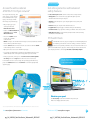
With AT&T U-verse OnlineSM you can watch TV shows, movies, and videos on
your computer, with thousands of titles to choose from, at no extra
charge. Log on to att.net/uverseonline and you can:
>> Watch hit TV shows, classic TV series, movies,
trailers, and other video clips online
>>Manage your DVR recordings and settings
>>Manage your AT&T U-verse account and
check your local TV listings
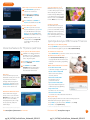
Here are the steps to program your DVR:
1 Go to att.net/uverseonline and log into your account by
>Pause your recorded show in one room and pick it up where you left off in another
clicking the U-verse Member Login button.
>Pause, fast-forward, and rewind live TV2 or recorded shows from any receiver
2 Click the What’s on U-verse TV link to see the Guide screen.
>Set Parental Controls for U-verse Movies, Pay Per View, and live or recorded shows
3 Here, you can use the onscreen Arrows to scroll the TV listings; select the day
or click Prime Time to jump to a specific day or evening-only viewing. You can also
type a title into the Search field to find a specific program.
>To learn more, visit att.com/uversesupport
NOTE: BLUE CAPITAL LETTERS refer to buttons on the remote control.
Pause, fast-forward, and rewind live TV from any receiver
Your Total Home DVR stores up to 60 minutes of the live TV channel you’re watching,
on up to four of your receiver-connected TVs2 at the same time! (When you change
channels, your DVR will begin storing the new program instead.) You can rewind live TV
by pressing REW. You can also freeze live TV for up to 60 minutes by pressing PAUSE
(press PLAY to restart).
Record the program you’re watching from any receiver
Press RECORD on your remote control to begin recording the program you’re
watching. The Record light on your receiver remains lit until recording stops
automatically at the program’s scheduled end time. You can also press STOP to end
recording at any time; press OK to confirm.
Watch hit TV shows and program the DVR
from your mobile phone
AT&T U-verse MobileSM lets you manage your DVR schedule and recordings, browse
the TV guide, and, with a qualifying AT&T U-verse TV plan, watch from a library of hit
TV shows on your smartphone.3 Take the AT&T U-verse experience with you! Learn more
at att.com/getuversemobile. The app is a free download from Apple iTunes®, BlackBerry®,
App World, or Android Market™. Once you have the app, here’s how to
use it to program your DVR:
1 Through the guide, browse to find the show you would
like to record.
Schedule program or series recordings from the Guide from any receiver
2 Select the show to bring up the Show Details page.
Press GUIDE, then use UP/DOWN arrows to scroll to the program you want to
record. Press RECORD once to record a single show (one red dot appears); press
RECORD twice to record the whole series (three red dots appear); press RECORD
three times to cancel recording.
3 Select Record This Episode to record only this one episode
Search for a show or series you want to record from any receiver
or Record Series to record the entire series.
4 You’ll receive confirmation that your recording is set when the
Show Detail page updates, replacing Record This Episode
with Cancel This Episode.
Press MENU, select Live TV, and use the down arrow to select Search. Press
OK. Choose Options to narrow your search, or type the show title (use arrows
to highlight a letter, then press OK to select it). Highlight the show you want when it
appears, and press INFO to record a single episode or the whole series.
Watch your recordings from any receiver
Press RECORDED TV and select Browse Recordings to see a list of your recorded
SD or HD programs and series. Highlight a show and press OK to see a Program Info
screen, then select Play to watch the program.
*DVR not included with U100 or U-basic packages. Models may vary. 1 Total Home DVR functionality is available on up to
eight TVs and requires a receiver for each additional TV at $7/mo. Pricing subject to change. 2 Available in select markets,
and coming to all markets by fall 2011.
3 Access to select content requires compatible device, qualifying U-verse TV plan or monthly subscription fee, and Wi-Fi
connection and/or cellular data connection. Available content may vary by device and/or U-verse TV subscription and is
subject to change. Data charges may apply.
Visit att.com/uverse/newcustomer to learn more
Find answers 24/7: att.com/uversesupport
pg_6_UVE338_PostSaleStarter_WelcomeKit_RELEASE
pg_7_UVE338_PostSaleStarter_WelcomeKit_RELEASE
7
TV user guide
Find shows fast with Channel Shortcuts
How to use Parental Controls
Browse channels grouped by category and easily find the type of programming you like.
Access Channel Shortcuts two ways:
Once you have a personal identification number (PIN), you can restrict viewing by TV or
movie rating, all adult-only programming, who can rent U-verse Movies, and more.
1 Press MENU. With Live TV selected, use down arrow to select Channel
Shortcuts. Press OK and use down arrow to select your category.
2 From the Guide screen, press ENTER.
With Display Channels selected, use
DOWN arrow to pick a category and
press OK.
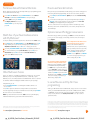
Watch four of your favorite shows at once
with My Multiview*
1 Press MENU, then right arrow to Options, then down to Parental Locking.
Press OK.
2 Use the remote’s number pad to enter your four-digit PIN and press OK (press
DELETE to clear an entry). You’ll have to enter your PIN twice. The Parental
Locking screen will appear with your locking options.
Be sure to scroll down to the second page if you want to lock adult-only content,
titles and posters from the standard channels, U-verse Movies, and purchases from
Account Manager.
Options menus offer bigger convenience
Watch TV the way you want by customizing your Guide screen view, what channels
you see, your onscreen language, sound settings, and more. There are two ways to
access Options:
See only the channels you watch most (you’ll still see all channels in the Guide screen).
Access Options from the Menu screen
to customize all your preferences
1 Press MENU and use the DOWN arrow to select My Multiview and press OK.
Begin watching four of your Favorites (if already set). Press INFO and select
Add/Remove Channels and press OK to set or change your Favorites.
Here you can set favorite channels or
channels to hide, choose a parental locking
PIN, set your audio preferences, aspect ratio,
closed captioning, language settings, and
more. Press MENU on your remote. Use
ARROWS to select Options. Use ARROWS
to select the category of preferences you
want to change, and press OK.
2 Scroll using up/down arrows and press OK to check channels you want to see.
3 See checked channels by selecting View Checked, then press OK. (Select
Uncheck All and press OK to clear the whole Favorite Channels list.)
4 Done? Select Save and then press OK.
Access Options without changing the
channel or leaving the Guide screen
Other Multiview1 choices
Tune to one channel to see available programming in a single genre—choose News
Multiview (ch-201, or 1201 HD), Kids Multiview (ch-301, or 1301 HD), or Sports
Multiview (ch-601, or 1601 HD). Subscribers to ESPN GamePlan can tune to channels
620 and 4400. Multiview will display all available channels in your TV package.
In any Multiview, you can:
>> Press up/down arrows to scroll through the available channels or to
select a channel
>> Press OK to replace the channel in the viewport with the selected channel
>> Record a program by selecting one of the Multiview screens and pressing RECORD
Check out ch-400 for seasonal Multiviews.
Note: If you hide channels from view in the Guide screen, they will still display
in Multiview windows unless you block them with Parental Controls.
Change your onscreen language or enlarge
your view while watching live TV. Change
your Guide view, see your favorite channels,
or access Shortcuts to view the category of
channels you want to watch while the Guide
is visible. Press ENTER on your remote while
watching TV or from the Guide, use ARROWS
to choose the category of preferences you
want to change, and press OK.
U-verse Movies and Pay Per View
programming
AT&T U-verse On Demand offers Free On Demand, 2 a huge selection of U-verse Movies
rentals, 3 plus Premium On Demand when you subscribe to HBO®, Cinemax®, Starz®,
or SHOWTIME®. Pay Per View offers you a front-row seat at exciting live sporting
events, concerts, and more.4 Visit att.net/uverseonline to see clips of some of
your favorite shows.
*A limited number of HD channels are not supported for display within My Multiview. 1 Channels/content available for
viewing in Multiview are based on TV package and additional programming purchased.
Features subject to change. Simulated screen images for demonstration purposes only. 2 Free on Demand programming varies by
package subscription. Subscription to appropriate package and HD Technology Fee are required to access FREE and/or PREMIUM
HD On Demand titles. 3 U-verse Movies: Customer responsible for applicable charges. Once a U-verse movie is ordered, it cannot
be cancelled by remote or customer care. HBO®, Cinemax® and related channels and service marks are the property of Home Box
Office, Inc. 4 Event schedules subject to change. Once a Pay Per View is ordered, it cannot be cancelled by remote or customer
care. You will be billed and the event will air on your TV set.
Visit att.com/uverse/newcustomer to learn more
Find answers 24/7: att.com/uversesupport
pg_8_UVE338_PostSaleStarter_WelcomeKit_RELEASE
pg_9_UVE338_PostSaleStarter_WelcomeKit_RELEASE
9
TV user guide
Three ways to access U-verse Movies
1 Press ON DEMAND on your remote
control for one-touch access.
2 Press MENU and use arrows to
select On Demand, then U-verse
Movies. Press OK.
3 Press GUIDE, then use arrows or
Caller ID notifications on TV1
With AT&T U-verse Voice, you can
see who’s calling on your TV screen
without changing the channel.
Includes a Message Waiting indicator
so you know if they’ve left a message.
Tune to ch-9901 or select Services
from the Menu screen to set it up.
CH/PG to select Channel 1. Press OK.
How to order Pay Per View
1 Press 1 0 2 on your remote to access
Pay Per View Channel 102, or press 1 0 6
to see PPV HD Channel 106, then press
OK. (You can also press GUIDE and use
ARROWS to select Channel 102 or 106.)
2 Select the program you want to order,
and press OK to reach a Program Info
screen with event time, pricing, and
how to order.
Call History ch-9900
Also with AT&T U-verse Voice, you
can view recent incoming calls on
your TV screen and initiate a call by
highlighting a number and pressing
OK on your remote control. Your
phone will ring and when you answer
it, your call will be connected.
Quick tips about your AT&T U-verse TV service
Best ways to locate channels quickly
Interactive features for TV, Internet, and Voice
Access your TV’s interactive features
1 Add AT&T U-verse High Speed Internet
and AT&T U-verse VoiceSM digital home
phone service to your AT&T U-verse TV
service—they work together.
2 Press MENU and use Right Arrow
to select Interactive.
3 Use ARROWS to select More
Interactive and then the application
you want to use. Learn more about
these innovative features below.
AT&T U-bar*
See the customized sports, stocks,
and weather content you’ve selected
on your AT&T U-verse Internet
homepage without leaving the TV
program you’re watching. Press the
GO INTERACTIVE button on your
remote control to launch U-bar.
>> Press any ARROW to access your onscreen Picture-in-Picture browse bar
>> Print a channel lineup guide for your area at att.com/channellineup
See what’s hot to watch now
>> Press ON DEMAND on your remote control to access U-verse Movies
Chat with other members online
>> Visit att.com/uversecommunity to post
messages and talk with other AT&T U-verse
members about TV features, programming,
and more
Watch exclusive AT&T U-verse channels
>>Front Row Channel 100
Learn what’s coming up on Pay Per View
>>Theatre Channel 200/1200
Watch U-verse Movies trailers,
interviews, and more
>>Buzz Channel 300/1300
Go behind the scenes of
your favorite TV shows
>>Sports Channel 600/1600
Get previews and an in-depth look
at all kinds of sports programming
>>Help Channel 411
Get AT&T U-verse TV service help
AT&T Weather On Demand ch-227
Tune to Channel 227 using your
remote control or select it from the
Interactive screen. Choose a city in
the U.S. to see local conditions,
hourly temperatures, and a six-day
forecast, plus video, radar, and
satellite images.
>>ATTention Channel 400
See news about our latest enhancements and more
Easy system setup
You can program your AT&T U-verse remote and set viewing aspect ratio
and Parental Controls using the System Set-up Tool:
>> Press MENU on your remote and use ARROWS to select Help
>> Press OK to select System Set-up
*AT&T U-verse High Speed Internet account required.
1 Caller ID on TV requires subscription to U-verse TV and U-verse Voice.
Visit att.com/uverse/newcustomer to learn more
Find answers 24/7: att.com/uversesupport
pg_10_UVE338_PostSaleStarter_WelcomeKit_RELEASE
pg_11_UVE338_PostSaleStarter_WelcomeKit_RELEASE
11
internet user guide
internet
user guide
• Access your email from the Web
• Set up email on your home computer
• Access the entire national AT&T Wi-Fi Hot Spot network
• Get online protection with advanced safety features
• Important information
Features and screen appearance subject to change.
AT&T U-verse High Speed Internet
Now that your AT&T High Speed Internet service is installed, every networked computer
in your home can share the same fast connection on a wireless home network. Use
this Starter Guide to access your email from the Web, set email up at home, use Wi-Fi
hotspots, and add free security software.
Access your email from the Web
Reading AT&T Mail via the Web is the preferred and recommended method for email
access. AT&T Mail via the Web lets you log into your email account anytime at home
and on the go from any computer via the Internet. Your emails, contacts, and calendar
are stored online without using space on your hard drive. Plus, you can set up your
AT&T Mail to collect messages from other email accounts so they’re all in one place.
Log in at att.net using your AT&T master ID or sub account member ID (email address)
and password, and click the Mail button.
Set up email on your home computer
Client-based email* (POP/SMTP) uses software like Outlook Express to download email
directly to your computer.
Open the email software you plan to use and enter the following information in the
account setup window:
> Email address: [email protected]
> Incoming (POP): pop.att.yahoo.com
> Outgoing (SMTP): smtp.att.yahoo.com (SMTP authentication required)
> Incoming mail server: POP3
> Incoming mail port number: 995 [make sure Secure Connection (SSL) is checked]
> Outgoing mail port number: 465 [make sure Secure Connection (SSL) is checked]
> Set password authentication for outgoing mail
Note: If your email software doesn’t support SMTP authentication, you won’t be able
to send email from your AT&T account.
For more email support information visit att.com/email support
*There are numerous client-based email products supplied by non–AT&T third-party vendors. Because of the variety of
products and versions available, support for some functionality by AT&T technical agents may incur a fee. Alternatively,
AT&T also provides online self-help for these applications. As always, we recommend that our customers use AT&T Mail
access via the Web, which provides a broad set of functionality to manage and access email anywhere and anytime.
Find answers 24/7: att.com/uversesupport
pg_12_UVE338_PostSaleStarter_WelcomeKit_RELEASE
pg_13_UVE338_PostSaleStarter_WelcomeKit_RELEASE
13
internet user guide
Access the entire national
AT&T Wi-Fi Hot Spot network*
Get online protection with advanced
safety features
Check your email, surf, shop, and
work on the go. If you’re running
Microsoft Windows® XP on your
laptop, connecting to an AT&T
Wi-Fi Hot Spot is quick and easy:
Visit att.software.yahoo.com to learn more about these security features:
> On your laptop, go to your
control panel and click
Network Connections.
> Firewall shields your computer from unauthorized access
> Anti-Spyware seeks out and removes programs that gather personal
information and slow down your computer
> Anti-Virus cleans and protects your computer against viruses, worms, and
Trojan horses
> Pop-Up Blocker stops many types of windows that open automatically
> Parental Controls let you put limits on what your children can do and see online
> Double-click Wireless Network
Connection and select View
Wireless Network.
> AT&T Mail Protection prevents junk mail, UCE (unsolicited commercial email),
and UBE (unsolicited bulk email)
Find thousands of AT&T Wi-Fi Hot Spots
> Choose the “attwifi” network
at attwifi.com/locations.
from the list of available
networks shown.
Note: You may see an alert that the Wi-Fi hotspot is an unsecured wireless network.
This is normal for public Wi-Fi hotspots.
> Click the Connect button at the bottom of the screen. Notice that the “attwifi”
network changes status to “Connected.”
> Open your browser. You’ll see an AT&T Wi-Fi login page.
PC Health Check
PC Health Check is a free, easy-to-use diagnostic tool that will quickly assess
the health of your PC and its connection settings, as well as recommend
solutions to fix potential performance issues. Come back often and use our
spam-free PC Health Check to get peace of mind to help prevent issues and check on
your computer performance. Visit us at pccheck.att.com/healthycomputer.
> Log in using your AT&T master account ID (your email address) and select your
domain name (the name to the right of the @ symbol in your account ID).
> Enter your password, click to agree to the Terms of Service and Acceptable
Use Policy, and click the login button. That’s it! You’re now connected.
For information on how to connect using other operating systems and devices,
please visit attwifi.com and click on Learn More to visit the Frequently Asked
Questions page.
See the complete AT&T U-verse High Speed
Internet Features Guide and more user guides
at att.com/userguides
Maximize your speed
Visit att.com/tips to learn how to maximize the speed of your
AT&T U-verse High Speed Internet service.
*Access includes AT&T Wi-Fi Basic. Wi-Fi–enabled device required. See www.attwifi.com for details and locations.
Visit att.com/uverse/newcustomer to learn more
pg_14_UVE338_PostSaleStarter_WelcomeKit_RELEASE
Find answers 24/7: att.com/uversesupport
pg_15_UVE338_PostSaleStarter_WelcomeKit_RELEASE
15
voice user guide
Set up your voice mailbox
Setting up your AT&T U-verse MessagingSM voice mailbox takes only a few minutes.
voice
user guide
• Set up your voice mailbox
2 Follow the prompts to set up a mailbox.
3 After creating your PIN, be sure to set up your authentication code. This will allow
you to reset your PIN over the phone if you forget it.
Listen to messages or change settings
Accessing your mailbox online
1 Go to att.com/myuverse. Enter your AT&T U-verse® member ID
• Listen to messages or change settings
• Access your mailbox online and by phone
• Turn off AT&T U-verse Messaging
*
1 Dial 98 from your home phone.
SM
• Change your PIN
• Link your wireless number and voice mailbox
(email address) and password.
2 On the AT&T U-verse Account Overview page, go to the AT&T U-verse Voice section.
3 Click on Check Voicemail to view and play your messages.
4 Click Voicemail Settings then Voice Mailbox Preferences to view your options.
Accessing your mailbox by phone
*
> Dial 98 from your home phone
> If you’re away from home, dial your home number and press
voicemail greeting
* to skip the
Turn off AT&T U-verse Messaging
1 Go to att.com/myuverse and enter your AT&T U-verse member ID
(email address) and password.
2 From the main page, go to the AT&T U-verse Voice section.
3 Click on the U-verse Voice Home Page.
4 Click the Voicemail link under Quick Settings in the left navigation bar.
5 Click the OFF button, then click Save.
Note: All Call Forwarding features that were set to go to voicemail will be disabled.
To change your Call Forwarding selections, select the Phone Features tab.
Change your PIN
(personal identification number)
1 To change your mailbox PIN at att.com/myuverse, enter your AT&T
U-verse member ID (email address) and password.
2 Locate the AT&T U-verse Voice section.
3 Select Change PIN.
4 Follow the instructions.
AT&T U-verse saging may not be fully compatible with all AT&T wireless voicemail systems. Caller ID and Call Waiting
might not work simultaneously with AT&T U-verse Voice. Caller ID: Some call information may be blocked or otherwise not
displayed, including information for some calls originating outside of the AT&T network and calls carried over facilities that
do not transmit Caller ID information.
Find answers 24/7: att.com/uversesupport
pg_16_UVE338_PostSaleStarter_WelcomeKit_RELEASE
pg_17_UVE338_PostSaleStarter_WelcomeKit_RELEASE
17
voice user guide
AT&T Voicemail Viewer
Get your AT&T U-verse MessagingSM delivered right to your desktop or smartphone,
listen to messages in any order, and even forward messages as email from your
smartphone.
AT&T Voicemail Viewer apps and desktop gadgets give you a simplified voice message
view from iPhone® and BlackBerry® devices, as well as iGoogle Homepage and
Windows® Vista Sidebar. To get started, visit att.com/vmviewer.
Important information
remote access
Although you can access your voicemail and manage your features while away from
home, calls can be placed only from your home. AT&T U-verse VoiceSM service is not
currently mobile.
Voicemail
When dialing into voicemail remotely, you may incur additional access charges for
non-local calls, hotel service charges, or cellular charges.
Call forwarding/call transfer
Per-minute rates apply if you forward or transfer to an international number or exceed
time under a defined minutes-per-month plan.
Linking Wireless from AT&T to your at&t U-verse mailbox
When you add a wireless number to your AT&T U-verse Messaging voice mailbox, it
replaces your current wireless voice mailbox and any existing messages will be lost.
Prepaid service cannot be added to AT&T U-verse Messaging. Landline and wireless
numbers must be within the same service area. The Social Security number or Tax ID
provided during setup must match the one on your wireless account. AT&T U-verse
Messaging may not be fully compatible with all AT&T wireless voicemail systems.
AT&T U-verse Voice
AT&T U-verse Voice, including 911 dialing, will not function during a power outage
without battery backup power. AT&T U-verse service is compatible with many
monitored home alarms and medical monitoring systems.
See the complete AT&T U-verse Voice
Features Guide and more user guides
at att.com/userguides
Link your wireless number and your
voice mailbox
When you have Wireless from AT&T, you can check your wireless and home phone
messages at the same time. To link up to two wireless numbers:
1
2
3
4
5
6
Go to att.com/myuverse.
Log in with your AT&T U-verse member ID (email address) and password.
Locate the AT&T U-verse Voice section.
Learn more
Visit att.com/uversevoicemail
for more information on setting up
and customizing your voicemail.
Para ver videos útiles en
español por Internet, visite
att.com/videosenespanol.
Select the U-verse Voice Home Page.
Go to the Voicemail Settings tab, and select Integrate Wireless Voice Mail.
Click on Launch Wireless Integration Wizard and follow the instructions.
Visit att.com/uverse/newcustomer to learn more
pg_18_UVE338_PostSaleStarter_WelcomeKit_RELEASE
Find answers 24/7: att.com/uversesupport
pg_19_UVE338_PostSaleStarter_WelcomeKit_RELEASE
19
quick fix guide
AT&T U-verse® TV
quick fix
guide
• AT&T U-verse® TV
• AT&T U-verse High Speed Internet
• AT&T U-verse Voice
Resolve problems with your AT&T
U-verse TV, Internet, or Voice services
Don’t have picture or sound, but TV and receiver are both turned on?
1 Press TV on your remote control.
2 Press TV/VIDEO to see TV programming.
If you’re still having trouble with your AT&T U-verse TV, Internet, or Voice services, try
resetting your TV receiver or residential/wireless gateway by unplugging it from the power
outlet in the wall. (See below for details for alternate reset if you have different equipment.)
NOTE: Unplugging the TV receiver or residential/wireless gateway will interrupt any
recordings in progress.
If the trouble is with only one TV
SM
1 Turn off the receiver connected to that TV and unplug it.
2 Wait at least two minutes before plugging the receiver back in. Turn it on and retry
what you want to do.
If the trouble is with more than one TV, or with Internet or Voice service
1 Unplug the residential/wireless gateway from the power source. (See below for
alternate reset.)
2 Wait at least two minutes, then plug the residential/wireless gateway back in and
retry what you want to do.
Alternate reset: If your service is supported with a Home Network Hub and Power
Supply Unit (PSU with battery backup), then you will need to press the Reset button on
the left side of the PSU to reset AT&T U-verse service. The PSU may be located in the
garage or a closet near an outside wall.
Want more help? AT&T U-verse Getting Started has answers all in one place online
at att.com/startuverse. You can also chat live with an agent while getting started, or
call 1.800.288.2020 and say “U-verse Technical Support.”
Switch your TV screen setting
from standard to widescreen
Aspect ratio is the relationship of the screen’s width to its height. Standard TVs have a
4:3 aspect ratio; widescreen and HDTVs are 16:9. The steps below show how to switch
your AT&T U-verse receiver’s aspect ratio.
Widescreen
Standard
1 Press MENU on your remote control, then use ARROWS to select Options,
then System Options, and then Aspect Ratio.
2 Use UP/DOWN ARROWS to choose 4:3 Standard Definition, Widescreen
Standard Definition, 720p High Definition, or 1080i High Definition depending
on your needs, then press OK.
3 Use ARROWS to select Continue, and press OK.
Find answers 24/7: att.com/uversesupport
pg_20_UVE338_PostSaleStarter_WelcomeKit_RELEASE
pg_21_UVE338_PostSaleStarter_WelcomeKit_RELEASE
21
P
FWD
P
TO
RE P
S
RD
CO
LAY
USE
LAY
RD
PIP
B
ON D
U
N
ME
AND
EM
SE
OW
BR
ED TV
GO INT
PA
EW
RECO
R
T
AT&
EO
TV/
PO
VID
FF
RE
quick fix guide
X
AU
D
DV
W ER
TV
K
AC
OK
INFO
C
EXIT T
O
TV
+
B
A
L
CH
PG
E
ID
GU
+
VO
Program your remote to
control up to four devices
Change your TV’s input selection to match
its video source
ACTIVE
ER
–
LAST
TE
MU
3
DEF
–
2
6
C
AB
1
O
MN
5
9
JKL
4
8
I
GH
TER
EN
V
TU
7
0
RS
Z
WXY
OM
ZO
E
AC
SP
PQ
ETE
DEL
During installation, the AT&T button was set up to control your AT&T U-verse HD-ready
receiver. You can also control a TV plus up to two other devices such as a DVD player,
stereo receiver, or home theater in a box by programming the TV, DVD, and AUX mode
buttons. Once the devices are programmed, press the corresponding mode key on the
remote to control that device. To watch a video on how to program your remote, visit
att.com/uverseremote.
ress and hold the mode key that matches the device you want to program (TV,
3 P
DVD, or AUX) along with the ENTER key. Hold both keys for one second, then
release. The four mode keys on the Remote Control flash twice to indicate you
are in search mode.
4 S earch by pressing the SCAN/FF key repeatedly until the device turns OFF (the
selected mode key will flash once for each press of the SCAN/FF key). Pause briefly
between each key press to allow your device enough time to respond.
5 Press the POWER button on the remote to turn the device back on.
NOTE: If the device does not turn off and you have searched all available codes, the
selected mode key will flash 8 times. If this happens, please start over.
NOTE: If the device does not turn on, you may have pressed the SCAN/FF key too many
times. Press the REW/SCAN key to scan backwards and test the POWER button again.
heck VOLUME and MUTE. Do not test using REW/SCAN, SCAN/FF, FWD, or
6 C
EXIT. If there is any problem with any of the keys, press the SCAN/FF button and
search until you find a code that will operate all the functions properly.
7 Press the ENTER key to save the programming. The appropriate mode key will give a
long flash, indicating successful programming.
NOTE: If the programming is interrupted or inactive for more than 30 seconds, the mode keys
will flash eight times. This indicates the remote has left the programming mode and returned to
normal operation without saving any changes.
TO
TOWALL
TV
(VIDEOOUT)
OUT)
(VIDEO
L
AUDIO
NETWORK
HDMI HDMI NETWORK
USB
R
R
HD/DVD IN
1080i/720p/480/480i
PC IN
S-Video cable
oint the remote control at the selected device.
2 P
Every TV is different in the way the ports
R
are configured on the back of the TV and
in the way the menus are presented on VIDEO IN
the TV screen. Most devices have ports
that require one or more of the cables
shown at right. The manuals for your
devices will have specific directions.
L
AUDIO
Coaxial cable
1 Power on the device to be programmed.
(MONO)
AUDIO
RCA cable
How to assign devices to TV-DVD-AUX mode buttons
L
Check how your devices are connected
to the TV
HDMI cable
NOTE: The instructions below don’t require you to enter a manufacturer’s device
code because most codes are stored in the AT&T U-verse remote’s memory. If you’re
unable to add a device, or want to learn about advanced features like reassigning
mode buttons, refer to the remote’s manual provided at installation. For more info,
visit att.com/userguides.
If you’re unable to see TV programs on your screen, first try pressing the TV/VIDEO
button on your remote control to change from Video 1 to Video 2 or Video 3. These
separate video inputs (Video 1, Video 2, and Video 3) must match the incoming video
source—the receiver, DVD player, orHDMI
other device connected to the TV. If this doesn’t
DIGITAL OUT
RGB
(OPTICAL)
solve the problem, depending on how your devices are connected,
it may be that the
Y
TV’s input selection does not correspond
to the input of the AT&T U-verse® TV receiver.
S VIDEO
Pb
See two examples of how to connect the AT&T U-verse
HD-ready receiver to
your HDTV set below.
VIDEO
Pr
AUDIO OUT
(VAR/FIX)
To connect your AT&T U-verse HD-ready
receiver to your HDTV set, the connection
is generally HDMI to HDMI (the highest
quality video/audio connection). You can
also use color-coded component RCA cables (some HDTV sets do not have an HDMI port)
that output audio/video signals from the receiver and plug into matching audio/video RCA
inputs on the back of your HDTV set.
If you’ve connected your TV input using Composite (yellow connector), S-Video, or
Coaxial, you won’t get an HD picture. HD is supported only via HDMI or Component
(red/green/blue). The same holds true for Dolby® Digital 5.1 surround sound, which is
available only via HDMI or TOS Link (optical). The Baseband (red and white connectors)
delivers sound only in stereo.
Check to see if the TV recognizes your video inputs correctly
Many newer TVs have an auto-detection system that will automatically detect everything
that’s connected to the various ports on the back of the TV. However, some TVs have to be
configured manually.
To change the video input selection manually, press TV/VIDEO on your remote control to
locate the video input menu for your specific TV.
The video input menu screen below shows checkboxes next to devices the TV is detecting.
This menu must match the inputs on the back of the TV where video components are
connected in order to correspond with Video 1, Video 2, or Video 3 on your remote
control. Follow the screen prompts to check/uncheck boxes for correct devices.
Note: Refer to your TV manufacturer’s guide to resolve issues specifically related to your TV.
If you have an integrated or combination unit such as TV-DVD, TV-DVD-VCR, etc., each component
of the unit may need to be programmed separately by using the mode keys. For instance, for
a TV-DVD, search for the device code of TV and program into TV mode key, then search for the
Device Code of DVD and program into the DVD mode key.
Want more help? If you’re unable to add a device or want to learn about controlling
the volume on all devices using your remote, visit att.com/userguides. You can also
check the remote’s user manual provided at installation, or watch Help On Demand on
TV: Press MENU, select Help, then Help On Demand to see all program titles.
Visit att.com/uverse/newcustomer to learn more
pg_22_UVE338_PostSaleStarter_WelcomeKit_RELEASE
Find answers 24/7: att.com/uversesupport
pg_23_UVE338_PostSaleStarter_WelcomeKit_RELEASE
23
quick fix guide
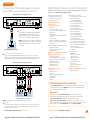
Choose one of three easy ways to connect
your AT&T U-verse receiver to your TV
AT&T U-verse receiver output connector
Pb
TO WALL
(VIDEO IN)
HDMI
L
Y
NETWORK
OPTICAL
Pr
R
TO TV
(VIDEO OUT)
USB
POWER
+12V
DC
AT&T U-verse receiver output
S VIDEO
DMI
1 H
Some HDTVs have a High-Definition Multimedia
Interface (HDMI) connector that provides the
digital and audio connection. This is the easiest
connection if your TV has an HDMI input port
NOTE: If your HDTV has an input port marked DVI (Digital Visual Interface), you will need an HDMI-to-
DVI adapter and separate component RCA audio connectors.
HDMI Input 1
olor-coded component connectors
2 C
If your TV doesn’t have an HDMI or DVI input port, you can use color-coded
component video cables (Pr, Pb, and Y) for HD video signals. For audio, plug red
and white RCA connectors into the left/right audio input and output ports.
AT&T U-verse receiver output connectors
Pb
HDMI
L
Y
NETWORK
OPTICAL
Pr
R
TO TV
(VIDEO OUT)
AUDIO OUT
VIDEO OUT
USB
POWER
+12V
DC
S VIDEO
Pr
Pb
Y
Pr
Pb
Y
L
R
L
R
Pb
L
R
•How to program your remote control
•How to use your DVR
•How to change channels
•How to use Program Guide
•How to use Picture-in-Picture
•How to use Search
•How to use Parental Locks
•How to use widescreen
•How to create favorite channels
•How to hide channels
•How to change languages
•How to record programs
•How to schedule recordings
•How to record series
•How to view recorded programs
•How to delete or cancel recordings
•How to use Web remote access
•How to order On Demand programs
•How to order PPV
•How to search for On Demand
programs
Help with AT&T U-verse
service issues
•Remote control issues
•No picture
•No service—gear or cog error
•No service—red X or other error message
•Email issues
•Sound issues
•Picture quality issues—aspect ratio/HD
settings
•Picture freezing
•Wireless connectivity—issues with a PC
•Wireless connectivity—issues with a Mac®
•Voice issues
Understanding my AT&T U-verse bill
AT&T U-verse digital video recorder
(DVR) & remote control
•How to use your DVR
•How to program your remote control
•Moving your AT&T U-verse equipment
•Equipment overview
•Remote control overview
•Total Home DVR®
•Remote control issues
AT&T U-verse features
•AT&T U-bar
•AT&T YP.com TV
•Games
•Public Education & Government
programming
•Media Share
•Multiview
Internet & email
•Email issues
•Wireless connectivity—
issues with a PC
•Wireless connectivity—
issues with a Mac
AT&T U-verse VoiceSM
•Voice issues
•AT&T U-verse MessagingSM
•AT&T U-verse Voice
Where’s my AT&T U-verse tech?
•Where’s my tech?
Visit Getting Started for online help!
Optical Input
Pr
AT&T U-verse how-to’s
•Introduction to AT&T U-verse
•See how U-verse TV works!
•AT&T U-verse VoiceSM
•AT&T U-verse billing
•AT&T U-verse online services &
paperless billing
Input connector on rear of TV
TO WALL
(VIDEO IN)
Get more out of your AT&T U-verse® service: Watch Help On Demand videos about
these topics on Channel 411, the Help Channel.
AT&T U-verse introduction
AUDIO OUT
VIDEO OUT
Watch Help On Demand—tune to Channel 411
Y
Component Input 1
lick att.com/startuverse to access step-by-step guidance and how-to tips at
C
our Getting Started page online. NOTE: AT&T U-verse online Help On Demand
videos require Windows Media® Player.
Questions?
Audio Input 1
Input connectors on rear of TV
Note: Your hardware may be slightly different than pictured.
-Video
3 S
If your TV has an S-Video port, you can connect your receiver to your TV using
an S-Video cable. For audio, you can use RCA cables or plug a single optical
cable into the optical ports.
Visit att.com/uverse/newcustomer to learn more
pg_24_UVE338_PostSaleStarter_WelcomeKit_RELEASE
Get answers 24/7 at att.com/uversesupport or talk live with an AT&T
representative. Or, download and install our free Troubleshoot & Resolve tool
at att.com/troubleshoot to manage your U-verse service online.
Sign up for free paperless billing! Conveniently store and retrieve up to 12
months of bills online while reducing your risk of identity theft. Log in now to your
online account or go to att.com/Ugreen and select Stop Paper Bills.
Find answers 24/7: att.com/uversesupport
pg_25_UVE338_PostSaleStarter_WelcomeKit_RELEASE
25
quick fix guide
AT&T U-verse
High Speed Internet
AT&T U-verse VoiceSM
Assure reliable security for your wireless
home network
Create up to eight sub account mailboxes, one for everyone in the family—
each with a unique PIN, greeting, and notification options.
Create sub account voice mailboxes online
The 10-digit number printed inside brackets on your residential/wireless gateway is
the encryption code (“pass key” or “Wireless Network Key”) needed to connect your
computers to the gateway. WPA (Wi-Fi Protected Access) is the underlying security
technology for the Wi-Fi (802.11b/g) standard on the residential/wireless gateway.
SN: 210811000079
Assembly Number 4200-001058-000
SN: 210811000079
Go to att.com/myuverse.
Log in with your AT&T U-verse® member ID (email address) and password.
Locate the AT&T U-verse Voice section.
Click on the U-verse Voice Home Page.
Go to the Voicemail Settings tab and select Voicemail Setup.
S
elect Create New Voice Mailbox to launch the voicemail setup wizard and follow
the instructions for setup.
For Advanced Configuration:
LD
REV:48
Location of
LD
your gateway’s REV:48
10-digit Wireless
Assembly Number 4200-001058-000
Network Key code
1
2
3
4
5
6
http://192.168.1.254
S y s t e m P a s s w o rd : 1 5 3 4 4 1 8 0 3 3
M a c A d d re s s : 0 0 2 1 7 C 3 C 7 9 F 0
W i re l e s s N e t w o r k K e y : 0 6 9 0 7 3 5 5 1 0
For Advanced Configuration:
Link your wireless number and your AT&T U-verse Voice mailbox
See page 17 for details.
Change your PIN (personal identification number)
See page 16 for details.
http://192.168.1.254
Get fast, affordable tech support
S y s t e m P a s s w o rd : 1 5 3 4 4 1 8 0 3 3
M a c A d d re s s : 0 0 2 1 7 C 3 C 7 9 F 0
W i re l e s s N e t w o r k K e y : 0 6 9 0 7 3 5 5 1 0
AT&T ConnecTech® offers installation, setup, and tech support for your wireless network,
regardless of your service provider or product manufacturer. Call 1.800.270.5103 to find
out more. Plus, get a complimentary PC health check! Visit pccheck.att.com/catalog.
Mac® OS X users: You may need to enter the “$” character on the Wireless Network Key
(for example, $0690735510). For directions on connecting Mac computers via USB cable, visit
att.com/startuverse and click Setup a Wireless Connection under U-verse Internet.
Connect more computers to your wireless
home network
You can connect more computers by Ethernet
or wirelessly.
See the complete AT&T U-verse TV, High Speed Internet, and Voice Features
Guides and more user guides at att.com/userguides.
Here are other ways you can quickly learn more:
> Tune to video tutorials on Help Channel 411
> Print a channel guide at att.com/channellineup
>Click att.com/uversesupport
>Chat support.att.com/chat
NOTE: You will need to use your 10-digit Wireless
Network Key code. (See illustration above.)
>Call 1.800.288.2020, then say “Order AT&T U-verse services,” “Pay my bill,”
or “AT&T U-verse technical support”
> Connect an Ethernet cable from any available
Ethernet port on the residential/wireless gateway
to your computer’s Ethernet port.
> Connect wirelessly with a wireless-enabled
notebook or a computer with an 802.11b/g wireless network adapter installed.
Questions?
>For current programming, visit att.net/uverseonline
Ethernet cable
If your PC does not have built-in wireless capability
Install and configure your wireless adapter according to the manufacturer’s instructions.
Enter the network name—it’s the word “2WIRE” (in all capital letters), followed by
the last three digits of the gateway serial number (for example, 2WIRE079)—and the
encryption code or Wireless Network Key. (See the illustration above for the Wireless
Network Key location.)
Esta práctica guía rápida también está en español en att.com/userguides
(en inglés). Para ver videos útiles en español por Internet, visite
att.com/videosenespanol.
More resources
Visit these links for news, customer care, and AT&T community discussions:
facebook.com/uverse
youtube.com/att
twitter.com/attcustomercare
att.com/uversecommunity
Mac and Macintosh are registered trademarks of Apple Inc.
Visit att.com/uverse/newcustomer to learn more
pg_26_UVE338_PostSaleStarter_WelcomeKit_RELEASE
Find answers 24/7: att.com/uversesupport
pg_27_UVE338_PostSaleStarter_WelcomeKit_RELEASE
27
©2011 AT&T Intellectual Property. All rights reserved. AT&T, the AT&T logo and all other AT&T marks
contained herein are trademarks of AT&T Intellectual Property and/or AT&T affiliated companies.
ATT102410735-3 (6/11)
28_BC_UVE338_PostSaleStarter_WelcomeKit_RELEASE