1
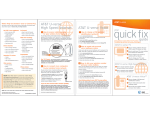
quick fix guide
AT&T U-verse
High Speed Internet
AT&T U-verse VoiceSM
Assure reliable security for your wireless
home network
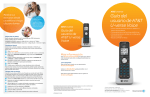
Create up to eight sub account mailboxes, one for everyone in the family—
each with a unique PIN, greeting, and notification options.
Create sub account voice mailboxes online
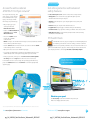
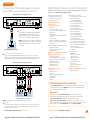
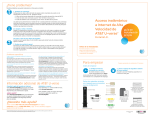
The 10-digit number printed inside brackets on your residential/wireless gateway is
the encryption code (“pass key” or “Wireless Network Key”) needed to connect your
computers to the gateway. WPA (Wi-Fi Protected Access) is the underlying security
technology for the Wi-Fi (802.11b/g) standard on the residential/wireless gateway.
SN: 210811000079
Assembly Number 4200-001058-000
SN: 210811000079
Go to att.com/myuverse.
Log in with your AT&T U-verse® member ID (email address) and password.
Locate the AT&T U-verse Voice section.
Click on the U-verse Voice Home Page.
Go to the Voicemail Settings tab and select Voicemail Setup.
S
elect Create New Voice Mailbox to launch the voicemail setup wizard and follow
the instructions for setup.
For Advanced Configuration:
LD
REV:48
Location of
LD
your gateway’s REV:48
10-digit Wireless
Assembly Number 4200-001058-000
Network Key code
1
2
3
4
5
6
http://192.168.1.254
S y s t e m P a s s w o rd : 1 5 3 4 4 1 8 0 3 3
M a c A d d re s s : 0 0 2 1 7 C 3 C 7 9 F 0
W i re l e s s N e t w o r k K e y : 0 6 9 0 7 3 5 5 1 0
For Advanced Configuration:
Link your wireless number and your AT&T U-verse Voice mailbox
See page 17 for details.
Change your PIN (personal identification number)
See page 16 for details.
http://192.168.1.254
Get fast, affordable tech support
S y s t e m P a s s w o rd : 1 5 3 4 4 1 8 0 3 3
M a c A d d re s s : 0 0 2 1 7 C 3 C 7 9 F 0
W i re l e s s N e t w o r k K e y : 0 6 9 0 7 3 5 5 1 0
AT&T ConnecTech® offers installation, setup, and tech support for your wireless network,
regardless of your service provider or product manufacturer. Call 1.800.270.5103 to find
out more. Plus, get a complimentary PC health check! Visit pccheck.att.com/catalog.
Mac® OS X users: You may need to enter the “$” character on the Wireless Network Key
(for example, $0690735510). For directions on connecting Mac computers via USB cable, visit
att.com/startuverse and click Setup a Wireless Connection under U-verse Internet.
Connect more computers to your wireless
home network
You can connect more computers by Ethernet
or wirelessly.
See the complete AT&T U-verse TV, High Speed Internet, and Voice Features
Guides and more user guides at att.com/userguides.
Here are other ways you can quickly learn more:
> Tune to video tutorials on Help Channel 411
> Print a channel guide at att.com/channellineup
>Click att.com/uversesupport
>Chat support.att.com/chat
NOTE: You will need to use your 10-digit Wireless
Network Key code. (See illustration above.)
>Call 1.800.288.2020, then say “Order AT&T U-verse services,” “Pay my bill,”
or “AT&T U-verse technical support”
> Connect an Ethernet cable from any available
Ethernet port on the residential/wireless gateway
to your computer’s Ethernet port.
> Connect wirelessly with a wireless-enabled
notebook or a computer with an 802.11b/g wireless network adapter installed.
Questions?
>For current programming, visit att.net/uverseonline
Ethernet cable
If your PC does not have built-in wireless capability
Install and configure your wireless adapter according to the manufacturer’s instructions.
Enter the network name—it’s the word “2WIRE” (in all capital letters), followed by
the last three digits of the gateway serial number (for example, 2WIRE079)—and the
encryption code or Wireless Network Key. (See the illustration above for the Wireless
Network Key location.)
Esta práctica guía rápida también está en español en att.com/userguides
(en inglés). Para ver videos útiles en español por Internet, visite
att.com/videosenespanol.
More resources
Visit these links for news, customer care, and AT&T community discussions:
facebook.com/uverse
youtube.com/att
twitter.com/attcustomercare
att.com/uversecommunity
Mac and Macintosh are registered trademarks of Apple Inc.
Visit att.com/uverse/newcustomer to learn more
pg_26_UVE338_PostSaleStarter_WelcomeKit_RELEASE
Find answers 24/7: att.com/uversesupport
pg_27_UVE338_PostSaleStarter_WelcomeKit_RELEASE
27