1
Release date: September 2014
9. Special RIN
In this chapter, you can find guidance on how to prepare and submit the different types of
special RIN request
9.1 Create a special RIN request
If you wish to export:
•
an Annex I or Annex V chemical for research and analysis in quantities of 10 kg or less,
per year and per importing country;
•
a chemical listed in Annex I part 3 and a positive import decision is published in the
PIC circular;
•
if the importing country has waived its right to receive an export notification for this/all
chemical(s)
a special RIN is required for administrative purposes. If approved by the DNA, a special RIN
will allow the export to proceed through customs, when leaving the European Union.
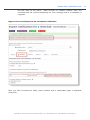
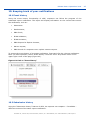
To begin creating a special RIN, click on “Request for chemical/mixture/article” (depending on
your need) in the Special RIN Request section of the left-hand side menu.
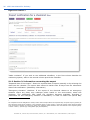
9.1.1 Export information
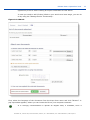
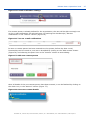
“Importing country”: Select the importing country from the drop-down list (mandatory field)
“Chemical to be exported”: In case the intended export is for an Annex I entry, that is
referring to a single substance, select the relevant chemical from the drop-down list. However,
if the export is for a substance that is covered by a group entry of Annex I, you can either
select the group from the drop-down list, or specify the CAS number of the substance in the
field labelled “CAS #”.
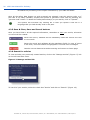
If your special RIN request is for a mixture or for an article, the drop-down list will
contain the mixtures/articles you have created.
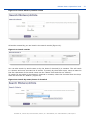
“CAS #”: If a selection has been made from the drop-down list of chemicals, this field becomes
read-only and the relevant information will be filled in automatically (if available). If exporting
a chemical belonging to a group entry, instead of selecting the group entry name from the
drop-down list, the exporter can specify the exact CAS number in this field. Once a CAS
number that is recognised by ePIC is entered, fields in the “Chemical information” section of
this page will be automatically populated with the correct information.
“CUS code: Enter the CUS code of the chemical or the mixture. Please note that completion of
the CUS code is mandatory for all substances and mixtures for which a CUS code has been
assigned.
“Expected date of export”: Select the intended date of export from the calendar that pops-up
once you click on the calendar icon right from the field.
“Intended use”: Select the intended use of the chemical in the importing country from the
drop-down list. (mandatory information)
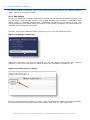
“Intended use details”: If available, provide further details on the intended use in the
importing country.
Annankatu 18, P.O. Box 400, FI-00121 Helsinki, Finland | Tel. +358 9 686180 | Fax +358 9 68618210 | echa.europa.eu
41