1
6. THE CONTROL SYSTEM – RUNNING A CYCLE
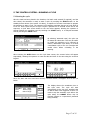
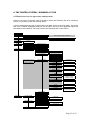
6.1 Menu access tree for supervisors and operators
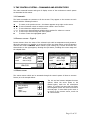
Access to the menu at Operator Level is limited to locking and unlocking the door, selecting a
cycle to run, starting a cycle, and viewing alarms.
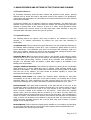
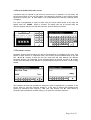
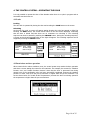
A person with Supervisor Level or higher status has wider access to the main menu. The access
tree is set out below. Highlighted areas are only present in the menu if the applicable option has
been fitted to the autoclave. The main functions are described later in this section.
Main Menu
Data Archiving
View/Print Cycles
Flash Card Status
Date Archiving Reprint
Status Screen
View / Print Last Cycle (out of cycle) | Abort Cycle (in cycle)
Set Time/Date
< Time >
< Date >
Status
Machine Information
View Analogs
View Inputs
View Outputs
Information Screen
Analogs Screen
<< >> Inputs Screens
<< >> Outputs Screens
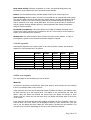
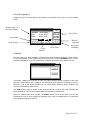
Cycle Setup
< > Select Cycle
(Cycle Menu)
Print Cycle
Cycle Name
Set Time/Date
Cycle Parameters
Stage Parameters available
will depend upon the
options on autoclave
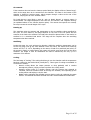
Stage Parameters
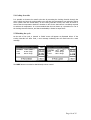
Data Archiving Option TC/IDA/01
View
Print
View Cycle Screen
Information sent to printer
Information sent to printer
Keypad Entry Screen
Set Time/Date Screen
< User level for Start >
< User level for Approve >
Print During Cycle
Batchcode Required
Keep Warm
Pre Vacuum
< Set Pressure >
< Hold Time >
Steam Purge
< Set Temp >
< Set Time >
Negative Pulsing
< Low Pressure Point >
< High Pressure Point >
< Pulse Quantity >
Positive Pulsing
< Low Pressure Point >
< High Pressure Point >
< Pulse Quantity >
Heatup
< Boost Enable >
Sterilization
< Sterilize Time >
< Sterilize Temp >
< Logging Interval >
Cooling
Cooling Type
< Cooling Temp >
< Cooling Interlock >
< Logging Interval >
Drying
< Drying Pressure >
< Drying Time >
Air Wash
< Low Pressure Point >
< High Pressure Point >
< Pulse Quantity >
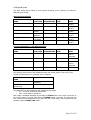
Cycle Options
Lock Cycle
Remove Cycle
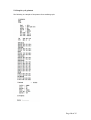
User Setup
Edit My Details
User Details Screen
Change
Rename
Edit Other Users
<< >> User Select
Change
Rename
Delete
New User
< Password >
< User Level >
Keypad Entry Screen
< Password >
< User Level >
Keypad Entry Screen
Keypad Entry Screen
Page 21 of 35