1
6.B. Creating a Casework Analysis Method with GeneMapper ® ID Software
These instructions loosely follow the Applied Biosystems GeneMapper® ID
software tutorial, pages 1–11.
1.
Select “Tools”, then “GeneMapper Manager”.
2.
Select the Analysis Methods tab.
3.
Select “New”, and a new analysis method dialog box will open.
4.
Select “HID”, and select “OK”.
Note: If you do not see the HID option, you do not have the
GeneMapper® ID software. Contact Applied Biosystems.
Enter a descriptive name for the analysis method, such as “PowerPlex16
advanced”.
6.
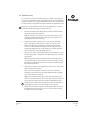
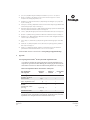
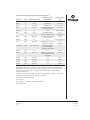
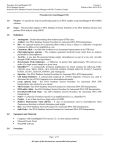
Select the Allele tab (Figure 3).
7.
Select the bin set corresponding to the PowerPlex® System
“Promega_Bins_ID3.2.X”, where “X” refers to the most recent version of
the bin set.
5724TA
5.
Figure 3. The Allele tab. Select the bin set “Promega_Bins_ID3.2.X.txt”, where “X” refers
to the most recent version of the bin set.
Promega Corporation · 2800 Woods Hollow Road · Madison, WI 53711-5399 USA · Toll Free in USA 800-356-9526 · Phone 608-274-4330 · Fax 608-277-2516 · www.promega.com
Part# TMD022
Page 20
Printed in USA.
1/09