1
Applying Power
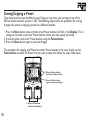
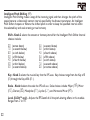
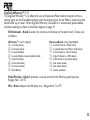
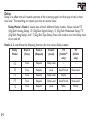
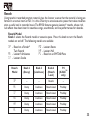
Before applying power to anything, set your amp(s) to a clean tone and set the tone controls to
a flat EQ response (on most amps, this would be 0 or 5 on the tone controls). Then follow the
steps listed below.
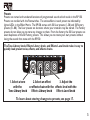
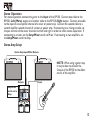
1. Turn the amp volume all the way down.
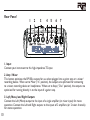
2. Connect the plug of the PS0913B power supply to the power jack on the rear panel of the
RP150.
3. Connect the other end of the PS0913B power supply to an AC outlet. Turn the RP150’s Master Level knob (Knob 4) down to “0”.
4. Turn the power of your amplifier(s) to the on position and adjust the volume(s) to a normal
playing level.
5. Gradually increase the RP150’s Master Level knob to achieve the desired volume.
2. Connect PS0913B to power jack
4.Turn amp volume up
3. Connect PS0913B to AC outlet
and turn the RP150’s Master
Level to “0”
5.Turn the RP150’s Master Level to the
desired listening volume
1.Turn amp volume down
15