1
EC001 - Records Maintenance report
EC001 - Records Maintenance report
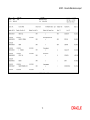
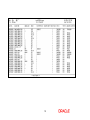
Using this report you can track the ECS transactions. The system will generate a report on the
daily basis for ECS Maintenance / Cancellation i.e. addition, modification or deletion for that
particular day (i.e. the current process date). It also states the reason for the same. This is an
adhoc report generated for all the branches.
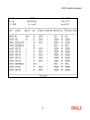
Each column of the report provides information on Account Number, Account Name, Branch
Code, ECS Mandate Maintenance Type, Company Code, Consumer Number, Upper Limit,
Mandate End Date, Mandate Stop Beginning Date, Mandate Stop End Date, Mandate Stop
Reason Description, Input ID and Authorisation ID.
To generate the record maintenance report
1.
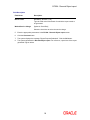
Access the Report Request (Fast Path: 7775) screen.
2.
Ensure that the Adhoc Reports button is selected.
3.
Navigate through Electronic Clearing> ECS Adhoc Listings > EC001 - Records
Maintenance report.
4.
The system displays the EC001 - Records Maintenance report screen.
9