1
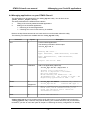
STM32-Primer2 user manual 4 Managing your CircleOS applications 4.4 Managing applications on your STM32-Primer2 The applications can be managed by the “circle_mgr.exe” utility. You will find it in the “[RIDE7_INSTALL_DIR]\Bin” directory. This utility dedicated to the STM32-Primer2 allows: 4 Listing of the currently loaded CircleOS applications. 5 Adding of new CircleOS applications. Removing of CircleOS applications. Checking how much FLASH memory is available. Refer to the http://www.stm32circle.com/ web site for more information about this utility. The following commands are available with the “circle_mgr.exe” utility: Command List Syntax L Description List the loaded applications. The following information will be output: circle_mgr.exe L Reading FAT table... App0: Name=Maze, Addr=0x08006000, Size=8KB App1: Name=Breakout, Size=4KB Addr=0x08008000, Largest free block= 92KB Add Afilename Add a new application (object file). circle_mgr.exe Ac:\tmp\level.o Linking file C:\tmp\level.o... Link of C:\tmp\level.o succeeded... Hex file generated... Blank-checking the FLASH area...OK Programming file _tmp_.ld.hex to flash...OK Registering application in FAT... OK Erase E* Eappname circle_mgr.exe EMaze circle_mgr.exe E* /*remove only 'Maze'*/ /*remove ALL apps */ Wait W When a command list is launched through a batch file, the W command allows you to pause the execution and to check the intermediate results. Start S Start CPU execution Caution: Any hex file can be programmed to the FLASH memory of your STM32-Primer2 using the “cortex_pgm.exe” utility. However, doing this will destroy your CircleOS firmware, and you will have to reinstall it if you wish to use it later (refer to chapter4.7 "Restoring the factory configuration" for details). - 15 -