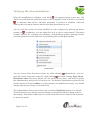
1
TM
W
NSE
E
LE K
&
UL
ERF
POW
Internet Security Suite
Anti-Virus & Content Security
User’s Guide
The software described in this guide is furnished under a license agreement and may be used only in
accordance with the terms of the agreement.
Document Number: 5BDRG/8.12.2010/11.x
Current Software Version: 11.x
Any technical documentation that is made available by MicroWorld is the copyrighted work of MicroWorld and is
owned by MicroWorld.
NO WARRANTY: The technical documentation is being delivered to you AS-IS and MicroWorld makes no warranty
as to its accuracy or use. Any use of the technical documentation or the information contained therein is at the risk of
the user.
Documentation may include technical or other inaccuracies or typographical errors. MicroWorld reserves the right to
make changes without prior notice.
No part of this publication may be copied without the express written permission of MicroWorld.
Trademarks: The terms MicroWorld, MicroWorld Logo, eScan, eScan Logo, MWL, MailScan are trademarks of
MicroWorld.
To view the eScan Brand Manual, visit the following link.
http://download1.mwti.net/download/New_Artworks/eScan11/BoxShots/brand_manual_eScan_300810.zip
To view the high-resolution box shots for eScan products, visit the following link.
http://download1.mwti.net/download/New_Artworks/eScan11/BoxShots/ISS_BOX_JPG.zip
Microsoft, MSN, Windows and Windows Vista are trademarks of the Microsoft group of companies. All product
names referenced herein are trademarks or registered trademarks of their respective companies. MicroWorld
disclaims proprietary interest in the marks and names of others. Although MicroWorld makes every effort to ensure
that this information is accurate, MicroWorld will not be liable for any errors or omission of facts contained herein.
MicroWorld reserves the right to modify specifications cited in this document without prior notice.
No part of this document may be reproduced or transmitted in any form or by any means, electronic or mechanical,
for any purpose, without the express written permission of MicroWorld.
Other product names mentioned in this manual may be trademarks or registered trademarks of their respective
companies and are hereby acknowledged.
Copyright Notice: Copyright © 2010. All rights reserved.
Technical Support:
Sales:
Forums:
eScan Wiki:
Live Chat:
Printed By:
Date:
Page 2 of 116
[email protected]
[email protected]
http://forums.escanav.com
http://www.escanav.com/wiki
http://www.escanav.com/ english/livechat.asp
MicroWorld
August, 2010
Table of Contents
Welcome
4
What Is this Guide All About?
5
Overview of eScan’s Features
6
Configuring the Test Environment
11
Overview of eScan’s Product Installation CD
13
Installing eScan
15
Managing the License Key
25
Verifying the eScan Installation
27
Overview of Scan Protection Center
28
•
File Anti-Virus
31
•
Mail Anti-Virus
41
•
Anti-Spam
55
•
Web Protection
65
•
Firewall
76
•
Endpoint Security
84
•
Privacy Control
90
•
Scan
96
•
Update
102
•
Tools
109
•
Feedback
112
•
Help
112
•
Password
113
•
License
113
Contact Details
Page 3 of 116
115
Welcome
MicroWorld’s eScan 11 is a revolutionary Anti-Virus Software and Information Security
product that is designed to provide Zero-Day protection to computers from malicious
software and several other security threats.
The new version of eScan is a feature-rich and user-friendly product that comes with
several customizable settings. It has a new design that is both intuitive and easy to
understand. In addition, eScan 11 introduces a host of new features that are aimed at
safeguarding your computer from new and emerging threats such as malware; phishing
Web sites and e-mails; and hackers. To achieve this, eScan employs cutting-edge
technologies, such as MicroWo rld Winsock Layer (MWL), Non Intrusive Learning
Patterns (NILP), and Domain IP Reputation Check (DIRC).
MicroWorld is committed to provide a safe and secure computing environment for all
eScan users. This guide is designed to help you use/evaluate the features and tools
included in eScan 11.
Thank you for choosing eScan.
The eScan Team
Page 4 of 116
What Is this Guide All About?
Over the past few years, several new software technologies have come into existence.
With their advent, the number of security threats in the computing world has grown
exponentially. As a result, individuals and organizations have started raising concerns
about the security of their data and personal information.
This self-explanatory guide contains detailed information on eScan Internet Security
Suite version 11. It is targeted at users, customers, software testers, and individual users
and aims at helping them use the product efficiently and effectively.
This guide is organized into three main sections: the first section provides an overview
of the new and enhanced features in eScan 11, the next section deals with the various
elements of eScan’s graphical user interface (GUI), and the last section discusses each
modules of eScan 11 in detail. These sections include detailed instructions and screen
shots, where necessary.
For any queries regarding eScan, please write to [email protected].
To contact our support team via Live Chat, please visit the following link.
http://www.escanav.com/english/livechat.asp .
Page 5 of 116
Overview of eScan’s Features
eScan epitomizes the next generation of Anti-Virus software products that handle
security threats from a new dimension without compromising the performance of your
computer. It uses powerful technologies such as the MicroWorld Winsock Layer (MWL)
technology, Domain and IP Reputation Checker (DIRC) technology, Non Intrusive
Learning Pattern (NILP) technology, and sophisticated Heuristics Algorithms to detect
and clean malware. In addition, it includes a comprehensive set of powerful
management tools, such as the eScan Management Console (EMC) and eScan Protection
Center (ePC). These tools help you configure eScan to safeguard your data and
computers based on your requirements.
New Features in eScan 11
eScan 11 includes several improvements over its predecessor in terms of its user
interface, performance, resource utilization, and data protection features. These new
features are described as follows:
?
New GUI
eScan 11 has a new GUI that is extremely simple and easy to use. It is elegant
in terms of its design and is well suited to the needs of both expert and
novice users. The new GUI is extremely light on system resources and requires
very less memory space to run efficiently. It thus provides the user with a secure
and pleasant computing experience without compromising on the performance
of the computer.
?
Product Installation CD with Bootable Rescue Disk
eScan 11’s product installation CD comes with a set of installation setup files and
a bootable Rescue Disk. The bootable Rescue Disk enables the user to clean boot
the computer if the operating system fails to load on it. When the user boots the
computer by using the Rescue Disk, the eScan Anti-Virus Toolkit (formerly
Page 6 of 116
MWAV) scans and cleans the computer’s memory, registry, startup
folders, system folders, and drives of viruses and spyware.
?
Gaming Mode
eScan 11 includes a Gaming Mode, which provides an uninterrupted gaming
experience to users while they are running gaming applications in the full screen
mode. The benefit of the Gaming Mode lies in how eScan handles alerts while a
user is playing a game. Normally, when a user switches on a computer running
eScan, the real-time protection module starts running in the background. Now,
when a user starts a game, eScan may display alerts and notifications, which may
affect the user’s game. The Gaming Mode in eScan 11 has been designed to
overcome this problem. Whenever a user runs a game on a computer, eScan 11
automatically enables the Gaming Mode, which prevents alerts and notifications
from being displayed. eScan automatically disables this mode when the user
exits the gaming application. Thus, the Gaming Mode provides the user with an
uninterrupted and seamless gaming experience.
?
Automatic Detection of Laptop Mode
eScan 11 includes the automatic detection of Laptop Mode feature, which is a
power-saving feature that increases the battery standby time for laptops.
Whenever a user switches to the Laptop Mode, eScan 11 automatically detects
this change and prevents memory intensive processes like scheduled scans from
running. Note that eScan’s real-time protection remains active even in the Laptop
Mode.
?
Virtual Keyboard
eScan 11 provides users with a Virtual Keyboard that helps them avoid using
their keyboard to enter confidential information. This is highly useful because it
has several security benefits. Malware writers create malware because of their
need to obtain a payload. The payload for a password-stealing Trojan may be the
authentication information of a user’s online banking account. Malware often
include keyloggers, which are programs designed to capture the keystrokes on
the computer on which they are installed. Whenever a user fills in details such as
user name or password on an online form, the keylogger obtains this information
and then sends it to the hacker. The user interface of eScan’s Virtual Keyboard
simulates the user’s keyboard and acts as a secure mechanism for the user to
Page 7 of 116
enter sensitive information, such as credit card details and banking
passwords, without any fear of data theft due to keyloggers.
?
Enhanced Self Protection
eScan 11 comes with the enhanced Self Protection feature that protects critical
eScan files and folders from being deleted or modified. Some new generation
malware try to infect computers by deactivating the Anti-Virus software running
on them. They try to achieve this by either disabling the Anti-Virus software or
by deleting critical files that are necessary for running the Anti-Virus software.
The enhanced Self Protection feature of eScan 11 prevents malware from either
disabling eScan or deleting its critical files thus keeps computers safe from
infections.
?
Folder Protection
eScan 11 includes the new Folder Protection feature. This feature helps users
protect specific files and folders from being modified or deleted. The main
advantage of this feature is that it prevents the specified files from being infected
by malicious software. Another advantage of this feature is that files and folders
that are protected cannot be deleted unless the folder protection is turned off.
This helps users safeguard their confidential data from unauthorized users and
infections by malware.
?
Web Phishing Filter
eScan 11 includes a Web Phishing Filter that protects the user from phishing Web
sites. When it is enabled, the Web Phishing Filter checks and informs the user
whether the Web site that the user is currently visiting is genuine or not. This
safeguards the user from inadvertently disclosing any digital identity details or
financial information on fraudulent Web sites.
?
Automatic Patching of Windows® Operating System Vulnerabilities
eScan 11 automatically checks the Microsoft® Web site and downloads critical
hotfixes and updates for the Windows® operating systems as and when they
become available. Most new strains of malicious software, such as
Rootkit.Stuxnet.A and Rootkit.TmpHider exploit the vulnerabilities in operating
systems. eScan 11 ensures that the computer on which it is installed has the latest
hotfixes and updates installed on it. Thus, eScan prevents malicious software that
Page 8 of 116
exploit vulnerabilities in the operating system from infecting the
computer and helps users protect their data from hackers and other
security threats.
Enhanced Features
eScan 11 includes several features that were a part of eScan 10. The enhanced features
are as follows:
•
•
•
•
•
•
•
•
•
•
•
Anti-Virus Engine: This engine is an intelligent malware-detection engine that
finds and cleans malicious software on the fly.
Heuristic Scan Engine: This engine detects unknown malicious software.
Web Protection: This feature helps you block objectionable content and harmful
Web sites.
Block Spam: This feature helps you block unsolicited e-mails from reaching your
inbox.
Block Attachment: This feature helps you specify e- mail attachment types that
eScan should block automatically.
Proactive Security: This feature prevents unknown or suspicious applications
from executing and compromising the security your computer.
Application Control: This feature prevents restricted applications from
executing on your computer.
USB Control: This feature prevents data theft by enabling password-protected
access to USB storage devices. It also helps you whitelist the USB storage devices
for which you do not require password protection. This feature provides you
with the facility to scan the USB devices before you can access them. In addition,
you can use this feature to block AUTORUN from executing automatically when
you access the portable storage devices.
Firewall: This feature prevents unauthorized access to or from any network. It
also includes the Network Traffic Monitor, which provides a graphical
representation of the incoming and outgoing network traffic on a real-time basis.
Auto-download Updates: This feature automatically downloads free updates
from eScan update servers.
Windows®-based Rescue Disk: This feature helps you create a bootable rescue
CD that could be used to remove sophisticated rootkit infections that do not
Page 9 of 116
•
•
•
allow the anti-virus software to remove the infections when the
computer is booted in regular mode.
eScan Remote Support: This feature helps you request the assistance of an eScan
Technical Support Representative through a remote connection to your
computer. It allows the eScan Technical Support Representative to remotely take
control and troubleshoot the eScan-related issues on your computer.
eScan Auto-backup and Restore: This feature helps you back up the critical files
of the Windows® operating system installed on your computer. It then
automatically restores the clean files when eScan finds an infection in any of the
system files that cannot be disinfected.
Download Latest Microsoft® Operating System Hotfix: This feature downloads
critical patches and hotfixes for the Windows® operating system.
To view the eScan product-comparison sheet, visit the following link.
http://escanav.com/documents/escan11/eScan_product_comparison.asp
Note: Depending on the product, some of the listed features may be unavailable.
Page 10 of 116
Configuring the Test Environment
This section provides you with information on configuring a test environment for using
eScan.
Software Requirements
eScan products (for the Small Office Home Office [SOHO] segment) run on the
32-bit or 64-bit editions of following operating systems. Your computer should have any
one of the following operating systems installed on it.
•
•
•
•
•
•
•
•
•
•
•
•
•
Windows® 2000 SP4 with KB891861
Windows® XP Professional with SP2 and above (For 32-bit edition only)
Windows® XP with SP1 and above (For 64-bit edition only)
Windows® Vista Ultimate
Windows® Vista Home Premium
Windows® Vista Home Basic
Windows® Vista Business
Windows® Vista Enterprise
Windows® 7 Ultimate
Windows® 7 Home Premium
Windows® 7 Home Basic
Windows® 7 Business
Windows® 7 Enterprise
In addition, it requires a PDF reader and Internet Explorer® version 5.0 or higher
installed on the computer.
Note: The SOHO product will not work on server-based operating systems.
Minimum Hardware Requirements
Page 11 of 116
Your computer must meet the following minimum requirements.
•
•
•
•
Processor: Pentium II 200 MHz
RAM: 256 Megabytes (MB) of RAM (recommended 512 MB)
Hard Disk Space: 700 MB of free hard disk space
Additional Drives: CD-ROM drive
Preinstallation Steps
Before installing eScan, please ensure that you perform the following tasks.
?
For First-time Installation
•
•
•
•
•
•
•
Ensure that you have administrator rights or equivalent privileges for the
user logged on to the computer.
Close all the open applications or programs.
Uninstall all other Anti-Virus or Anti-Spyware software.
Disable or uninstall Windows® Defender.
Disable or uninstall any existing firewall software, including Windows®
Firewall.
Determine the largest free drive or partition and then install eScan on it.
Additional tasks:
o Recommended: MicroWorld recommends that the computer on which
eScan is being installed is connected to the Internet during the
installation process. This will ensure that eScan downloads all the
latest updates from eScan update servers.
o Optional: Ensure that you know the IP address of the mail server to
which eScan should send warning messages. If authentication for the
mail server is mandatory for accepting e-mails, you will need
authentication user name and password to send e-mails.
o Optional: Ensure that the critical operating system and security
patches are installed on the computer.
?
For Renewal or Upgrade Installation
Page 12 of 116
•
You should perform the same set of tasks that were performed
while installing eScan for the first time. Then, you can upgrade to
the newer version without uninstalling the existing version.
?
For Reinstalling After Uninstalling the Existing Version
•
If you have uninstalled an existing version of eScan, you must restart the
computer before you can reinstall it.
Overview of eScan’s Product Installation CD
The eScan product installation CD comes with a set of installation setup files and a
bootable Rescue Disk. You can use the bootable Rescue Disk to boot your computer if
the operating system cannot be loaded.
The Rescue Disk also includes the eScan Anti-Virus Toolkit (formerly MWAV), which
runs automatically when you boot the computer using the disk. It helps you scan the
computer’s memory, registry, startup folders, system folders, and drives for viruses and
spyware. In addition, it helps you run the Command.exe file and execute commands for
formatting the hard disk, partitioning any drive, or checking the hard disk for errors.
The eScan product installation CD contains an AUTORUN.exe file. You can view the
contents of the CD and install eScan by using this CD.
When you double- click AUTORUN.exe, the Disclaimer is displayed. You can either
accept the disclaimer to view the CD’s menu or decline it to exit the screen.
Page 13 of 116
DISCLAIMER
The CD’s menu shows the following options.
•
•
Scan My System: You can click this button to scan your computer for viruses
and other malware by using the eScan Anti-Virus Toolkit.
Products: You can click this button to view information about eScan or install
it on your computer.
Note: You can click the Info button to view the Quick Reference Guide for
eScan in the .PDF format.
Page 14 of 116
Autorun Menu
•
•
•
Browse CD: You can click this button to view the contents of the CD.
Visit Web site: [Requires Internet connectivity.] You can click this button to
visit the eScan Web site i.e., http://www.escanav.com .
Contact Us: You can click this button to view the contact information for
MicroWorld’s offices.
Additional Requirements
1. Internet connectivity is required for a few buttons to function properly.
Page 15 of 116
Installing eScan
You can install eScan 11 either by using the eScan setup file or by using the eScan
product installation CD.
To download the eScan setup file, visit the following link.
http://www.escanav.com/downlo ads/soho11.asp
To begin the eScan installation, insert the eScan product installation CD into
the CD-ROM drive of your computer. This will start the setup automatically.
Some computers do not play the eScan product installation CD automatically. In such
cases, you can manually start the installation by double-clicking the AUTORUN.exe in
the CD-ROM drive window. This will display a dialog box containing options for
selecting the language.
eScan uses the Interactive Installation Wizard for its installation. This wizard has a
simple and intuitive GUI that guides you through the installation process.
Installation Steps
To install eScan on your computer, perform the following steps.
Special instructions for Installing eScan on computers running the Windows Vista®
operating system with User Access Control (UAC) enabled on them.
When you double-click the setup file for installing eScan 11, a User Access Control
message box asking you for permission to run a iwn2[xxxx].tmp file is displayed. Here,
the [xxxx] represents the last four characters, which may be arbitrary. This is a valid
eScan file. To proceed with the installation, click Continue.
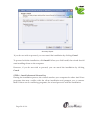
User Access Control message box
Page 16 of 116
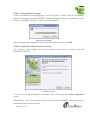
STEP 1 – Choosing the Language
eScan is available in many languages, such as English, German, French, Nederlands,
Italiano, Portuguese, Spanish, Turkish, Chinese Simplified, Chinese Traditional, Greek,
Korean, Norwegian, Russian, Polish, and Latin Spanish.
Selecting the Language
Select the preferred language from the drop down list, and then click OK.
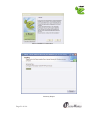
STEP 2 - Installation Wizard Welcome Screen
The welcome screen helps you decide whether you want to proceed with the
installation of eScan.
Welcome Screen
To proceed with the installation, click Next. This will display the License Agreement
screen.
Alternatively, if you do not wish to proceed, you can click Cancel. This will cancel the
installation and close the wizard.
Page 17 of 116
STEP 3 - License Agreement
This screen displays the EULA for eScan. Please read it carefully.
To accept the EULA, on the License Agreement screen, click I accept the agreement,
and then click Next. This will display the Select Destination Location screen.
EULA
Alternatively, if you do not wish to accept the EULA, you can click Cancel. This will
cancel the installation and close the wizard.
STEP 4 - Selecting the Installation Folder
In this step, you can select the drive and folder in which you want to install eScan.
To select the eScan installation folder on your computer, on the Select Destination
Location screen, in the box, either type the path of the folder or click Browse to browse
to the folder, and then click Next.
Note:
• The default path for 32-bit computer: [Disk Drive]\Program Files\eScan
• The default path for 64-bit computers: [Disk Drive]\Program Files (x86)\eScan
Page 18 of 116
Selecting the Installation Folder
STEP 5 – Viewing the Summary Report Before Installation
This window shows a summary of the options that you have selected on the previous
screens of the wizard. This step completes the preparation for installing the application
on your computer. You can click the Back button to review or change the settings that
you have made on the previous screens.
Page 19 of 116
Summary Report
If you do not wish to proceed, you can cancel the installation by clicking Cancel.
To proceed with the installation, click Install. When you click Install, the wizard should
start installing eScan on the computer.
However, if you do not wish to proceed, you can cancel the installation by clicking
Cancel.
STEP 6 – Install eScan and License Key
During the installation process, the wizard searches your computer for other Anti-Virus
programs that may conflict with the eScan installation and prompts you to remove
them. If there are no conflicting programs, the wizard proceeds with the installation.
Page 20 of 116
eScan Installation Confirmation
Summary Report
Page 21 of 116
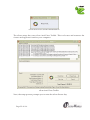
eScan Anti-Virus Toolkit Initialization
The eScan setup also runs eScan Anti-Virus Toolkit. This tool scans and removes the
viruses and spyware found on your computer.
eScan Anti-Virus Toolkit
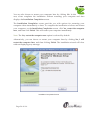
Next, the setup process prompts you to enter the eScan license key.
Page 22 of 116
X.XX.XX.XXX
The License Information window
In the License Information window, in the Enter License Key box, enter the 30character eScan license key. However, if you want to try eScan before buying it, click
Trial.
STEP 7 - Completing the Installation
After you have entered the license information, the eScan Install screen is displayed and
the
icon shows up in the notification area of the task bar.
To complete the installation of eScan and restart your computer, on the eScan Install
screen, click Yes.
Confirmation Screen
Page 23 of 116
You can also choose to restart your computer later by clicking No. In this
case, eScan completes the installation without restarting your computer and then
displays the Installation Completion screen.
The Installation Completion screen provides you with options for restarting your
computer either immediately or later. To complete the installation of eScan and restart
your computer, on the Installation Completion screen, click Yes, restart the computer
now, and then click Finish. This will restart your computer immediately.
Note: The Yes, restart the computer now option is selected by default.
Alternatively, you can choose to restart your computer later by clicking No, I will
restart the computer later, and then clicking Finish. The installation wizard will close
without displaying any message.
Installation Completion Screen
Page 24 of 116
Managing the License Key
Note:
?
During installation, if you are prompted to enter the license key, enter the new
30-character license key that you have received after purchasing or renewing the
eScan license.
?
Ensure that there are no spaces before, in between, or after the characters in the
key. For example: ABCD-EFGH-ABCD-EFGH-ABCD-EFGH-ABCD-EF
?
After entering the key, click Apply, and then click OK.
Adding the Standard License Key
1. Click Start, point to All Programs, point to eScan for Windows, and then click
eScan Registration.
2. In the License Information window, in the Enter License Key box, enter the
30-character license key in capital letters, and then click Apply.
3. In the Confirmation message box, click OK.
Activating the License Key
1. In the License Information window, select the license key that you have just
entered, and then click Activate Now. Alternatively, you can right-click the
license key displayed under the Standard Key (30 char) tab, and then click
Activate Now.
2. Ensure that the Activate Now option is selected, and then click OK.
Note: If you have received the eScan Activation code via an e- mail from
[email protected], you can select I have Activation Code. In this case, copy
the activation code, and then paste it in the Enter Activation Code box.
3. Provide your personal information, and then click Next.
Note: E- mail ID (Address) and Purchased From are the only mandatory fields
that you have to fill. If you do not want to disclose any other personal
information, you can leave the other fields blank.
4. In the next window, you will have three options to register your copy of eScan:
Online, Fax, and E-mail.
•
If you are activating eScan by using the Online method, ensure your computer
is connected to the Internet, and then click Activate. A new 51-character key
Page 25 of 116
will be automatically added to the License Information window
and your copy of eScan will be activated.
• If the Online method fails, you could either activate eScan via the E-mail or Fax
methods. Select either the E- mail option or the Fax option, and then click
Activate. Offline activations via the e-mail method or the Fax method may take
up to 48 hours to process. If you opt for the e-mail method, please ensure that
you send the e-mail to [email protected] .
• The Fax method will output a FaxRegister.TXT file, which you can print and
fax to the nearest MicroWorld office.
To view the fax numbers of all MicroWorld offices, visit the following Web
page.
http://www.escanav.com/contactus.asp
You can also save the FaxRegister.TXT file and e-mail it to
[email protected] .
OR
You can activate your standard key through the eScan Web site using the
following link.
http://www.escanav.com/Websiteactivation
For more information on how to register your copy of eScan, read the Know
how to register your product article on the following Web page.
http://www.escanav.com/register
After you receive the Activation Code either by fax or by e- mail, perform the
steps in Activating the License Key from Step 2 onwards.
Page 26 of 116
Verifying the eScan Installation
When the installation is complete, a red shield
icon appears in the system tray. The
shield icon indicates the protection status of the computer. If the icon has a cross mark
, it indicates that eScan’s real-time protection is paused or disabled, otherwise
without the cross mark it means that the real-time protection is active.
You can find the version of eScan installed on your computer by placing the mouse
pointer on
. In addition, you can right-click on it to view a context menu. This menu
contains options for scanning the computer, downloading updates, pausing eScan’s
real-time protection, and some tools for optimizing the system performance.
Context Menu
You can access eScan Protection Center by either clicking
. Alternatively, you can
open the eScan Protection center by right-clicking and then clicking Open eScan
Protection Center. However, before you can access this window, you need to specify
the Administrator password if it has been set. The default Administra tor password for
eScan Protection Center is admin. As a best practice, for additional security, you should
change the password, after you install eScan.
The Administrator Password window also contains a Read Only button. You should
click this button if you need to prevent changes or modifications from being made to
the settings. This mode enables users to access eScan Protection Center in the restricted
or read-only mode.
Page 27 of 116
Overview of Scan Protection Center
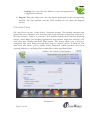
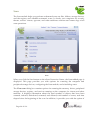
eScan Protection Center is the main application window of eScan. It has a new GUI that
is pleasantly straightforward and is designed to suit the needs of both novice and expert
users.
eScan Protection Center
In addition, it provides quick access to the following feature settings.
?
Protection: The GUI uses docking view for displaying the icons representing the
modules of the Protection feature. You can click the individual docking icons to
access the protection status settings for the File Anti-Virus, Mail Anti-Virus,
Anti-Spam, Web Protection, Firewall, Endpoint Security, and Privacy Control
modules. Out of these, the Mail Anti-Virus, Anti-Spam, Web Protection, and
Privacy Control modules are disabled by default.
Page 28 of 116
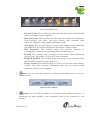
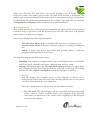
Icons in the Docking View
o File Anti-Virus: This module provides real-time protection to the files and
folders residing on your computer.
o Mail Anti-Virus: This module prevents infected e-mails and attachments
from reaching your inbox, and thus protects your computer from
malicious programs that propagate through e-mails.
o Anti-Spam: This module helps you create and configure filters that filter
spam based on keywords and phrases that appear within e-mails.
o Web Protection: This module helps you prevent offensive or
pornographic content from appearing within a Web browser.
o Firewall: This module helps you apply various expert rules for blocking
specific ports, programs, or services on your computer.
o Endpoint Security: This module helps you protect your computer from
infected USB or FireWire®-based devices.
o Privacy Control: This module helps you clear your browser cache, history,
cookies, and other personal information that may be stored within
temporary files on your computer.
?
Scan: You can click this button to configure scheduled scans or run ondemand scans.
Additional eScan Modules
?
Update: You can click this button to configure daily updates. However, to
download the latest updates, your computer needs to be connected to the
Internet.
Page 29 of 116
?
Tools: You can click this button to access the tools available in
eScan.
Note: Whenever you click any of the buttons or icons listed above, a tabbed page
containing settings related to that module is displayed.
The right-hand side top corner of the eScan Protection Center window provides you
with access to the following modules.
?
Feedback: You can click this button to visit the eScan Web site where you can
provide your feedback and send it to the eScan’s Quality Assurance team.
?
Help: You can click this button to view for the online technical help on eScan.
However, this requires your computer to be connected to the Internet.
?
Password: You can click this button to change the Administrator password for
eScan Protection Center.
?
License Information: You can click this button to register and activate the license
key.
Depending on whether a module is running or stopped, the icons in the Protection
module show the following status icons.
?
Tick-marked icons indicate that the module is running.
?
Cross-marked icons indicate the module is stopped or turned off.
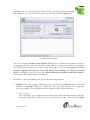
When you select an icon, the tabbed page shows you some information regarding the
selected module. It also provides you with buttons for configuring that module and
helps you view reports generated by eScan for that module. With the exception of Scan
and Tools, the tabbed pages belonging to all other modules show the following
information.
?
Configuration: This is the first section displayed in the tabbed page of each
module. This section displays the status of the module, whether it is running or
not. In addition, the eScan Protection Center window shows the following
buttons when an icon is clicked in the docking view.
o Start: You can click this button to start a particular module.
o Stop: You can click this button to stop a particular module.
Page 30 of 116
o Settings: You can click this button to open the application's
configuration window.
?
Reports: This pane helps you view the reports generated by the corresponding
module. The Scan module and the Tools module do not show the Reports
section.
File Anti-Virus
File Anti-Virus is a part of the eScan’s Protection feature. This module monitors and
safeguards your computer on a real-time basis from all kinds of malicious software as
files are accessed, copied, or executed. This module includes the Proactive Scanning
feature, which helps you blocking applications that perform suspicious activities. File
Anti-Virus also includes the Block Files feature. This feature allows you to block or
quarantine files from being accessed from local or network drives. In addition, File
Anti-Virus also allows you to enable Folder Protection, which prevents users from
creating, deleting, or updating files or subfolders within specified folders.
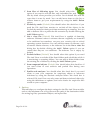
File Anti-Virus
Page 31 of 116
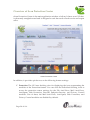
When you click the File Anti-Virus icon in the docking view of eScan
Protection Center, the tabbed page for the File Anti-Virus module is displayed. The
tabbed page contains information about the status of the module, settings, and buttons
for displaying the recent scans performed by the module. This page has two sections:
Configuration and Reports, both of which are described as follows:
Configuration
?
This section provides you with information regarding the status of File Anti-Virus and
Proactive Scan. It also shows you the default action that File Anti-Virus will perform
when it detects a malicious program.
This section displays the following information.
•
•
•
File Anti-Virus Status: It shows whether File Anti-Virus is running or not.
Proactive Scan Status: It displays whether proactive scanning is enabled or
not.
Action: It shows the action that eScan will perform when a malicious
program is detected by File Anti-Virus.
The page also displays the following buttons.
•
•
Start/Stop: This button is a toggle button. You can click this button to switch File
Anti-Virus easily from the start state to the stop state and vice versa.
Settings: This button opens the File Anti-Virus Settings dialog box, which helps
you configure the File Anti-Virus module for real-time monitoring. This dialog
box has two tabs: Objects and Options, which are described as follows:
1. Objects
This tab displays the available drives on the computer. It allows you to
configure the actions that File Anti-Virus should perform when it encounters
a security threat during the scan operation.
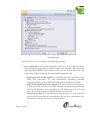
This tab is divided into two panes; they are described as follows.
pane: This pane displays all the removable and non-removable
drives, network drives, installed drives, and mapped drives that File
Anti-Virus can monitor or scan. All the drives displayed on the left pane
are selected by default.
?
The left
Page 32 of 116
The Objects Tab
The right
?
pane: This pane provides you with a number of settings for
fine-tuning the File Anti-Virus module as per your requirements. For
example, you can configure module to scan specific storage devices or
exclude files of a given file type.
Actions in case of virus detection: This section lists the different actions
that File Anti-Virus can perform when it detects a virus infection.
These actions are Report only, Disinfect, Quarantine, and Delete object.
Out of these, the Disinfect option is selected by default.
?
Scan local removable disk drives: [Default] You should select this
check box if you need to scan all the local removable drives attached to
the computer.
?
Scan local disk drives: [Default] You should select this check box if
you need to scan all the local drives installed to the computer.
?
Scan network drives: [Default] You should select this check box if you
need to scan all the network drives, including mapped folders and
drives, connected to the computer.
Page 33 of 116
?
Scan files of following types: You should select this
option if you need to scan all files, only infectable files, and
files by mask. eScan provides you with a list of default files and file
types that it scans by mask. You can add more items to this list or
remove items as per your requirements by using the Add / Delete
option.
?
Exclude by mask: [Default] You should select this check box if you
need the File Anti-Virus monitor to exclude all the objects in the
Exclude by mask list during real-time monitoring or scanning. You can
add or delete a file or a particular file extension by double-clicking the
Add / Delete option.
?
Not a virus list: [Default] File Anti-Virus is capable of detecting
riskware. Riskware refers to software that are originally not intended
to be malicious but somehow can pose as a security risk to critical
operating system functions. You can add the names of riskware, such
as remote admin software, to the riskware list in the Not a virus list
dialog box by double- clicking the Add / Delete option if you are
certain that they are not malicious. The riskware list is empty by
default.
?
Exclude folders: [Default] You should select this option if you need
File Anti-Virus to exclude all the listed folders and sub-folders while it
is monitoring or scanning folders. You can add or delete folders from
the existing list of folders by clicking the Add / Delete option.
?
Scan compound objects: [Default] You should select this check box if
you need eScan to scan archives and packed files during scan
operations.
?
Enable code analyzer: You should select this check box if you need
eScan to scan your computer for suspicious objects or unknown
infections by using the heuristic analyzer. When this check box is
selected, File Anti-Virus not only scans and detects infected objects by
using the definitions or updates, but it also checks for suspicious files
stored on your computer.
2. Options
This tab helps you configure the basic settings for the File Anti-Virus module,
such as the maximum size of log files and the path of the destination folder
for storing log files, quarantined objects, and report files.
Page 34 of 116
The Options Tab
This tab allows you to configure the following settings.
?
Save report file: You should select this check box if you need eScan to
save the reports generated by the File Anti-Virus module. The report file
logs information about the scanned files and the action taken by File
Anti-Virus when an infected file was found during the scan.
o Show pack info in the report: You should select this check box if you
need File Anti-Virus to add information regarding scanned
compressed files, such as .ZIP and .RAR files to the Monvir.log file.
o Show clean object info in the report: You should select this check box
if you need File Anti-Virus to add information regarding uninfected
files found during a scan operation to the Monvir.log file. You can
select this option to find out which files are not infected.
o Limit size to (Kb): You should select this check box if you need File
Anti-Virus to limit the size of the Monvir.log file. You can double-click
the size box and specify the size of the log file.
Page 35 of 116
?
For quarantining of infected objects: This option helps you
specify the destination for storing quarantined objects. By
default, the quarantined objects are stored in the C:\Program
Files\eScan\Infected folder. You can change the location of the
destination folder if required.
?
Enable Auto backup / Restore: This option helps you back up the critical
files of the Windows® operating system installed on your computer and
then automatically restore the clean files when eScan finds an infection in
any of the system files that cannot be disinfected. The following are some
of the settings that you can use with this option.
o For backup of clean objects: You can back up uninfected objects and
store them in a given folder. By default, these objects are stored in the
\FBackup folder. You can change the destination of the backed up
objects if necessary.
o Do not backup files above size (KB): This option helps you prevent
File Anti-Virus from creating backups of files that are larger than the
file size that you have specified.
o Minimum disk space (MB): This option helps you allot the disk space
for storing log files.
?
Limit file size to (KB): This option enables you to set a limit size for the
objects or files to be scanned. The default value is set to 1024 Kb.
?
Enable Proactive Scan: When you select this option, File Anti-Virus
monitors your computer for suspicious applications and prompts you to
block such applications when they try to execute.
?
Use sound effects for the following events: This option helps you
configure eScan to play a sound file and show you the details regarding
the infection within a message box when any malicious software is
detected by File Anti-Virus. However, while you need to ensure that the
computer’s speakers are switched on.
?
Display attention messages: When this option is enabled, eScan displays
an alert, which displays the path and name of the infected object and the
action taken by the File Anti-Virus module.
3. Block Files
This tab helps you configure settings for preventing executables and files,
such as autorun.inf, on network drives, USB drives, and fixed drives from
accessing your computer.
Page 36 of 116
The Block Files Tab
This tab allows you to configure the following settings.
?
Deny access of executables from Network: You should select this check
box if you need to prevent executables on your computer from being
accessed from the network.
?
Deny access of executables on USB Drives: You should select this check
box if you need to prevent executables stored on USB drives from being
accessed.
?
Deny access of AUTORUN.INF on USB and Fixed Drives: You should
select this check box if you need to prevent Autorun.ini on USBs and
fixed drives from executing.
?
Deny Access of following files: You should select this check box if you
need to prevent the files in the list from running on your computer.
?
Quarantine Access-denied files: You should select this check box if you
need to quarantine files that have been Access-denied.
Page 37 of 116
You can prevent specific files from running on your computer by
adding them to the Block Files list. By default, this list contains the
value %sysdir%\*.EXE@.
4. Folder Protection
This tab helps you protect specific folders from being modified or deleted by
adding them to the Folder Protection list. It allows you to configure the
following setting.
?
Protect files in following folders from modification and deletion:
[Default] This option is selected by default. You should select this check
box if you need the File Anti-Virus module to protect files in specific
folders from being modified or deleted.
The Folder Protection Tab
Reports
?
This section displays the following information.
Page 38 of 116
•
•
•
Total Files Scanned: It shows the total number of files scanned by
the real-time File Anti-Virus monitor.
Dangerous Objects Detected: It shows the total number of viruses or malicious
software detected by the File Anti-Virus monitor on a real-time basis.
Last File Scanned: It shows the name of the last file scanned by the File
Anti-Virus monitor on real-time basis.
In addition, you can view the following reports.
?
View
Statistics: This button displays the latest activity report of the real-time
monitor. The report contains information about the number of scanned objects,
number of clean objects, and last scanned object.
The Statistics Window
In addition, it displays the following information.
?
The current details of the system date, time, and whether the eScan Anti-Virus
monitor is running or not.
?
The number of viruses detected.
Page 39 of 116
?
The results of the most recent scan, such as the last object scanned
and the name of the virus detected.
View
?
Quarantined Objects: This button opens the Quarantine dialog box, which
displays the quarantined files and backup files. This dialog box has the following
tabs:
?
Quarantine: This tab displays the files that have quarantined. You can restore or
delete the quarantined objects by right clicking the object and then clicking the
appropriate option.
?
Backup: This tab displays the files that were backed up by File Anti-Virus before
it tried to disinfect them. You can restore or delete the objects that were backed
up by right clicking the object and then clicking the appropriate option. Before
clicking any of these buttons, you should ensure that you have selected the
appropriate the row in the table for which you need to perform the action.
?
View
Report: This button opens the Report for File Anti-Virus window. This
window displays the report for the File Anti-Virus module for a given range of dates
in a tabular format when you click the Generate Report button.
Report for File Anti-Virus
Page 40 of 116
Mail Anti-Virus
Mail Anti-Virus is a part of the Protection feature of eScan. This module scans all
incoming and outgoing e-mails for viruses, spyware, adware, and other malicious
objects. It also helps you send virus warnings to client computers and allows you to
view archived e- mails and reports on the Mail Anti-Virus activities. By default, Mail
Anti-Virus scans only the incoming e-mails and attachments but you can configure it to
scan outgoing e-mails and attachments as well. Moreover, it helps you notify the sender
or system administrator whenever you receive an infected e-mail or attachment.
In addition, Mail Anti-Virus lets you archive e-mails and e-mail attachments so that you
can restore them from the backup in case you lose your important e-mails. You can also
configure it to compress large e-mail attachments automatically to conserve bandwidth.
Mail Anti-Virus
Page 41 of 116
This module is disabled by default. When you click the Mail Anti-Virus
icon in the docking view of the eScan Protection Center, the tabbed page for
the module is displayed. This page shows you the options for configuring the module
and helps you view reports on the recent scans performed by eScan. The details
regarding each of the sections in the right pane are as follows:
Configuration
?
This section provides you with information regarding the status of Mail Anti-Virus and
the action that it will take when it detects a malicious object.
•
•
Mail Anti-Virus Status: It shows whether the Mail Anti-Virus module is running
or not.
Action: It shows the action that eScan will perform when it detects a malicious
object.
In addition, you can configure the following settings.
•
•
Start/Stop: This is a toggle button. You can click this button to switch the Mail
Anti-Virus module easily from the Start state to the Stop state and vice versa.
Settings: You can click this button to opens the Mail Anti-Virus Settings dialog
box. This dialog box helps you configure Mail Anti-Virus for real-time
monitoring. This dialog box contains several tabs that allow you to configure
settings for scanning e- mails; compressing and decompressing attachments;
addressing security vulnerabilities, and archiving e-mails.
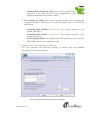
1. Scan Options
This tab allows you to select the e-mails to be scanned and action that should
be performed when a security threat is encountered during a scan operation.
Page 42 of 116
The Scan Options Settings
The Scan Options tab helps you configure the following settings.
?
Block Attachments Types: This section provides you with a predefined
list of file types that are often used by virus writers to embed viruses. Any
e-mail attachment having an extension included in this list will be blocked
or deleted by eScan at the gateway level. You can add file extensions to
this list as per your requirements. As a best practice, you should avoid
deleting the file extensions that are present in the Block Attachments
Types list by default. You can also configure advanced settings required
to scan e-mails for malicious code.
o Delete all Attachment in eMail if disinfection is not possible: You
should select this check box if you need to delete all the e- mail
attachments that cannot be cleaned.
o Delete entire eMail if disinfection is not possible: [Default] You
should select this check box if you need to delete the entire e- mail if
any attachment cannot be cleaned.
Page 43 of 116
o Delete entire eMail if any virus is found: You should
select this check box if you need to delete the entire e-mail if
any virus is found in the email or the attachmenit is infected.
The Advanced Scan Options Settings
o Quarantine blocked Attachments: [Default] You should select this
check box if you need to quarantine the attachment if it is has an
extension that is blocked by eScan.
o Delete entire eMail if any blocked attachment is found: [Default]
You should select this check box if you need to delete an e- mail if it
contains an attachment with an extension type that is blocked by
eScan.
o Quarantine eMail if attachments are not scanned: You should select
this check box if you need to quarantine an entire e-mail if it contains
an attachment that is not scanned by Mail Anti-Virus.
o Quarantine Attachments if they are not scanned: You should select
this check box if you need to quarantine attachments that are not
scanned by Mail Anti-Virus.
o Exclude Attachments (White List): This list is empty by default. You
can add file names and file extensions that should not be blocked by
eScan. You can also configure eScan to allow specific files even though
Page 44 of 116
if the file type is blocked. For example, if you have listed
*.PIF in the list of blocked attachments and you need to
allow an attachment with the name ABCD.PIF, you can add abcd.pif to
the Exclude Attachments list. Adding *.PIF files in this section will
allow all *.PIF to be delivered. MicroWorld recommends you to add
the entire file name like ABCD.PIF.
?
Action: This section helps you configure the actions to be performed on
infected e-mails. These operations are follows:
o Disinfect: [Default] This option is selected by default. You should
select this option if you need Mail Anti-Virus to disinfect infected
e-mails or attachments.
o Delete: You should select this option causes if you need Mail AntiVirus to delete infected e-mails or attachments.
o Quarantine Infected Files: [Default] This check box is selected by
default. You should select this check box if you need Mail Anti-Virus
to quarantine infected e- mails or attachments. The default path for
storing quarantined e-mails or attachments is C:\Program
Files\eScan\QUARANT. However, you can specify a different path
for storing quarantined files, if required.
?
Port Settings: You need to specify which ports on the SMTP Mail Server
should be used for incoming and outgoing e- mails so that eScan can scan
the e- mails sent or received via those ports. This setting also helps you
create outbreak alerts, and create warning messages and notifications that
eScan should send when it detects any security breach. If you configure
Mail Server settings, eScan will send e-mail notifications about the actions
that it should perform when it detects infected e- mails. The mail server
settings that you need to configure are as follows:
SMTP Mail Server: [Default: 127.0.0.1] You need to specify the IP
address of the SMTP Mail Server of your organization or Internet
Service Provider (ISP).
o SMTP Port: [Default: 25] You need to specify a port number for the
SMTP Mail Server of your organization or ISP.
o User Authentication (Opt.): You need to provide the user name if the
mail server of your organization or ISP requires authentication to send
e-mails.
o
Page 45 of 116
o Authentication Password (Opt.): You need to provide the
password if the mail server of your organization or ISP
requires authentication to send e-mails.
?
Port Settings for eMail: You can also specify the ports for incoming and
outgoing e- mails so that eScan can scan the e- mails sent or received via
those ports.
o Outgoing Mail (SMTP): [Default: 25] You need to specify a port
number for SMTP.
o Incoming Mail (POP3): [Default: 110] You need to specify a port
number for POP3.
o Scan Outgoing Mails: You should select this check box if you need to
Mail Anti-Virus to scan outgoing e-mails.
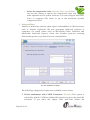
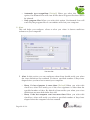
2. Compression / Decompression Options
You can configure the following settings to ensure that the available
bandwidth is effectively utilized.
The Compression/Decompression Options Settings
Page 46 of 116
This tab helps you configure the following settings.
?
Compress outbound attachments: This check box is disabled by default.
eScan reduces the size of all outgoing e-mail attachments by compressing
them when this check box is enabled.
?
Create self-extracting zip files: This check box is disabled by default.
eScan automatically creates a self-extracting .ZIP file containing the
attachment when this check box is enabled. The receiver can click this file
to uncompress it. The advantage of this feature is that it eliminates the
need for an unzipping tool to be installed on the user’s computer. As a
best practice, you should select this check box to ensure that the receiver
can uncompress the attachment even when a decompression tool is not
available.
?
Uncompress inbound attachments: You should select this check box
when you need eScan to automatically unpack compressed files in
inbound attachments, scan them, and then deliver them to you.
?
Uncompress inbound attachments (Local Domain): This check box is
disabled by default. When you enable this check box, it appears as
selected. You should select this check box when you need eScan to
automatically unpack compressed files in inbound attachments, scan
them, and then deliver them to the recipients in the local domain.
?
Do not compress files with extensions: You can exclude specific file types
within outgoing e- mail attachments from being compressed by adding
them to an excluded attachments list. For example: Excluding files that are
already compressed, such as .ZIP files.
?
Compress Options: This section contains options that help you configure
the various parameters for compressing files. These parameters include
the percentage up to which the file should be compressed, the minimum
size of the files to be compressed, and the compression ratio. This section
contains the following options.
o Compress only if compression % greater than: [Default: 25] You use
this setting to compress all e- mail attachments up to 25 percent or
more.
o Compress if Attachment size is above (Kb): [Default: 50] You use this
setting to compress all e- mail attachments that are larger than the
specified size.
Page 47 of 116
o Select the compression ratio: [Default: Max. Speed] You
can use this setting to specify the compression ratio and
make optimum use of system resources. You can configure Mail AntiVirus to compress files faster or up to the maximum possible
compression level.
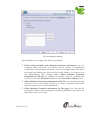
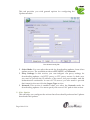
3. Vulnerabilities I
Authors of malicious software often exploit vulnerabilities in Web browsers,
such as Internet Explorer® (IE) and propagate malicious software to
computers via e-mail clients such as Microsoft® Office Outlook® and
Microsoft® Outlook® Express. eScan also includes proactive scanning
features that protect your data from such vulnerabilities.
The Vulnerabilities I Settings
The following configuration options are available on this screen.
?
Delete attachments with CLSID Extensions: [Default] This option is
selected by default. CLSID are hidden files that do not show the actual file
extension. If you select this option, Mail Anti-Virus deletes the
Page 48 of 116
attachments with CLSID file extensions to prevent dangerous
files from exploiting the vulnerabilities in Internet Explorer®.
?
Delete HTML attachments with Scripts: E-mail clients help you send and
receive in different formats, for example, the HTML format. HTML files
can include scripts, which are similar to batch files or BAT files. These
scripts are embedded within specialized tags and can be used to run
malicious code. Hackers often use scripts to execute malicious code on the
computers of their victims. You can configure Mail Anti-Virus to delete
HTML attachments with scripts by selecting the Delete HTML
attachments with Script option. You can also specify the tags that eScan
should check for in the attachments so that the attachments containing
those tags are deleted. By default, the Script Tags list, the Script and
Content Check Disabled for Mails From list, and the Script and Content
Check Disabled for Mails To list are disabled.
?
Script Tags: This section contains a list that contains script tags. eScan will
delete all e- mail attachments in the HTML format containing the tags
included in this list. You can configure this list to block HTML
attachments that contain these tags.
?
Script and Content check disabled for mails From: This section contains
a list of e-mail addresses or domain names that you consider as legitimate
senders. This feature of eScan is useful when you need to add a genuine
user and receive legitimate e-mails in the HTML format with scripts. You
can add e-mail addresses or domain names of such users to the list. All emails in the HTML format with scripts coming from those users or
domains are automatically delivered to your inbox.
?
Script and Content check disabled for mails To: This section contains a
list of e-mail addresses or domain names, which you consider as
legitimate recipients. This feature of eScan is useful when you need to
send e- mails in the HTML format with scripts to a legitimate user. You
can add e-mail addresses or domain names of such users to this list.
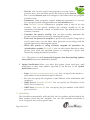
4. Vulnerabilities II
eScan helps you choose the action that you can take on mails containing
attachments with multiple extensions.
Page 49 of 116
The Vulnerabilities I Settings
This tab helps you configure the following settings.
?
Select Action on Mails with Multiple Extension Attachment: You can
configure Mail Anti-Virus to perform specific actions if attachments
contain files with multiple extensions. You can configure Mail Anti-Virus
to refrain from taking any action on the e-mail, delete it, or forward it to
the administrator. The settings under Allow Multiple Extension
attachment for ZIP file are disabled by default. They are enabled only
when you select the Delete Mail option or the Forward to Admin option.
?
Allow Multiple Extension attachment for ZIP file: You should select this
check box if you need Mail Anti-Virus to allow compressed files with
multiple extensions as e-mail attachments.
?
Allow Multiple Extension Attachment for file types: You can add file
extensions to allow such attachments containing multiple extensions to be
delivered to the user’s inbox.
Page 50 of 116
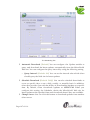
5. Archiving
This screen helps you configure settings for archiving e-mails and
e-mail attachments.
The Archiving Settings
The following configuration options are available on this screen.
?
Archive eMails: This option helps you archive or back up all e-mails that
you have sent or received. Mail Anti-Virus provides you with the facility
of backing up your e-mails to a given folder. The default path for storing
archived
e-mails
is
%UserProfile%\Application
Data\MicroWorld\eScan\Archive. The eMail Archive Directory box is
disabled by default. Therefore, to specify the path of the backup folder,
you need to select the Archive eMails check box.
?
Archive Attachments: You should select this check box if you need to
archive or back up all sent or received e-mail attachments to a given
folder. However, to specify the path of the backup folder, you need to
select the Archive Attachments check box because the Attachments
Archive Directory box is disabled by default. The default path for storing
Page 51 of 116
Notification:
archived e- mail attachments is %UserProfile%\Application
Data\MicroWorld\eScan\Archive\Attachments. At times, you
may not require e-mail attachments of a specific file type. In that case, you
can excluded certain file types, such as *.VCF, *.HTM, and *.HTML, from
being archived by adding them to the Do not Archive attachments of
type list.
•
Notification: You can click this button to open the The Notification Settings dialog
box, which helps you configure the notification settings for the Mail Anti-Virus
module. By configuring this module, you can send e-mails to specific recipients
when malicious code is detected in an e-mail or e-mail attachment. This dialog box
helps you configure the notification settings for sending alerts and warning
messages to the senders or recipients of an infected message.
Notification Settings
You can configure the following notification settings.
Page 52 of 116
?
Virus Alerts: [Default] You should select this check box if you
need Mail Anti-Virus to alert you when it detects a malicious object in an email.
?
Warning Mails: You configure this setting if you need Mail Anti-Virus to
send warning e- mails and alerts to a given sender or recipient. The default
sender is [email protected] and the default recipient is postmaster.
?
Attachment Removed Warning To Sender: [Default] You should select this
check box if you need Mail Anti-Virus to send a warning message to the
sender of an infected attachment. Mail Anti-Virus sends this e- mail when it
encounters a virus-infected attachment in an e-mail. The content of the e-mail
that is sent is displayed in the preview box.
?
Attachment Removed Warning To Recipient: [Default] You should select
this check box if you need Mail Anti-Virus to send a warning message to the
recipient when it removes an infected attachment. The content of the e- mail
that is sent is displayed in the preview box.
?
Virus Warning To Sender: [Default] You should select this check box if you
need Mail Anti-Virus to send a virus-warning message to the sender. The
content of the e-mail that is sent is displayed in the preview box.
?
Virus Warning To Recipient: [Default] You should select this check box if
you need Mail Anti-Virus to send a virus-warning message to the recipient.
The content of the e-mail that is sent is displayed in the preview box.
?
Content Warning To Sender: You should select this check box if you need
Mail Anti-Virus to send a content warning message to the sender. The content
of the e-mail that is sent is displayed in the preview box.
?
Content Warning To Recipient: [Default] You should select this check box if
you need Mail Anti-Virus to send a content warning message to the recipient.
The content of the e-mail that is sent is displayed in the preview box.
?
Delete Mails From User: You can configure eScan to automatically delete
e-mails that have been sent by specific users. For this, you need to add the
e-mail addresses of such users to the Delete Mails From User list. The Delete
Mails From User section is disabled by default. As you type in some text in
the Delete Mails From User box and add e- mail addresses, the appropriate
user interface elements will be enabled.
Reports
?
This section displays the following information.
Page 53 of 116
•
•
Total Mails Scanned: It shows the total number of e-mails scanned
by Mail Anti-Virus on a real-time basis.
Total Infected Objects: It shows the total number of infected objects found by
Mail Anti-Virus on a real-time basis.
In addition, you can view the following reports.
•
View Archived Mails: You can click this button to open the View Archived
eMails window.
(See the section on the View Archived eMails window under Archiving.)
•
View Report: You can click this button to open the Report for Mail Anti-Virus
window. This window displays the summary of infected e-mails and the action
taken by Mail Anti-Virus on such e-mails for a given range of dates in a tabular
format when you click the Generate Report button.
Reports for Mail An ti-Virus
Page 54 of 116
Anti-Spam
Anti-Spam is a part of eScan’s Protection feature. This module filters all your junk and
spam e-mails by using the NILP technology and sends content warnings to specified
recipients. It also provides reports about Anti-Spam activities and allows you to view
quarantined mails and ham mails.
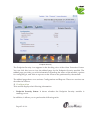
Anti-Spam
The Anti-Spam icon is disabled by default. When you click this icon in the docking view
of eScan Protection Center, the tabbed page for the Anti-Spam module is displayed.
This page provides you with the options for configuring the module and helps you
view reports on the recent scans performed by eScan. The details regarding each of
these sections are as follows:
?
Configuration
This section displays the following information.
•
Anti-Spam Status: It shows whether the Anti-Spam module is running or not.
Page 55 of 116
•
•
Anti-Phishing Status: It shows whether the Anti-Phishing module is
running or not.
Action: It shows the action that eScan will perform if a malicious object is
detected.
In addition, you can configure the following settings.
•
•
Start/Stop: This button is a toggle button. You can click this button to enable or
disable the Anti-Spam module.
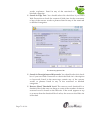
Settings: You can click this button to open the Anti-Spam Settings dialog box.
This dialog box contains options that help you configure Anti-Spam to prevent
spam e-mails from reaching your inbox. This dialog box has the following tabs.
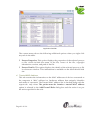
The Advanced Settings
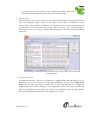
1. Advanced
This tab provides you with options for configuring the general e-mail options,
spam filter, and tagging e-mails in Anti-Spam.
?
General Options: This section helps you configure the general Anti-Spam
settings.
Page 56 of 116
o Send Original Mail to User: [Default] This check box is
selected by default. eScan creates the Spam folder within the e- mail
client. When an e- mail is tagged as SPAM, it is moved to this folder.
You should select this check box if you need to send original e- mail
that is tagged as spam to the recipient as well.
o Do not check content of Replied or Forwarded Mails: You can select
this check box if you need to ensure that eScan does not check the
contents of e-mails that you have either replied or forwarded to other
recipients.
o Check Content of Outgoing mails: You can select this check box if you
need Anti-Spam to check outgoing e-mails for restricted content.
o Phrases: You can click the Phrases button to open the Phrases dialog
box. This dialog box helps you configure additional e- mail-related
options. In addition, it allows you to specify a list of words that the
user can either allow or block. This list is called the user specified
whitelist. You can specify certain words or phrases so that mails
containing those words or phrases in the subject, header, or body are
recognized as spam and are quarantined or deleted. The dialog box
uses the following color codes to categorize e-mails.
•
•
•
User specified whitelist of words/phrases: (Color Code:
GREEN) You should click this option to list the words or
phrases that are present in the whitelist. A phrase that is added
to the whitelist cannot be edited, enabled, or disabled.
User specified List of Blocked words/phrases: (Color Code:
RED) You should click this option to list the words or phrases
that are defined in block list.
User specified words/phrases disabled: (Color Code: GRAY )
You should click this option to list the words or phrases that
are defined excluded during scans. The options in the Phrases
to Check dialog box are disabled by default.
?
Spam Filter Configuration: This section provides you with options for
configuring the spam filter. All options in this section are selected by
default.
Page 57 of 116
o Check for Mail Phishing: [Default] You should select this
check box if you need Anti-Spam to check for fraudulent emails and quarantine them.
o Treat Mails with Chinese /Korean character set as SPAM: [Default]
When this check box is selected, eScan scans e- mails with Chinese or
Korean characters. This check is based on the research data conducted
by MicroWorld’s various spam e- mail samples collected from around
the globe. From these samples, it was observed that spammers often
use Chinese or Korean characters in their e-mails.
o Treat Subject with more than 5 whitespaces as SPAM: [Default] In its
research, MicroWorld found that spam e- mails usually contain more
than five consecutive white spaces. When this check box is selected,
Anti-Spam checks the spacing between characters or words in the
subject line of e-mails and treats e-mails with more than five
whitespaces in their subject lines as spam e-mails.
o Check content of HTML mails: [Default] You should select this check
box when you need Anti-Spam to scan e-mails in HTML format along
with textual content.
o Quarantine Advertisement mails: [Default] You should select this
check box when you need Anti-Spam to check for advertisement types
of e-mails and quarantine them.
o Advanced: You can click the Advanced button to open the Advanced
Spam Filtering Options dialog box. This dialog box helps you
configure the following advanced options for controlling spam.
Page 58 of 116
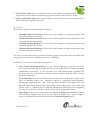
The Advanced Spam Filtering Options
•
•
•
Page 59 of 116
Enable Non Intrusive Learning Pattern (NILP) check:
[Default] NILP is MicroWorld’s revolutionary technology that
uses Bayesian Filtering and works on the principles of Artificial
Intelligence (AI) to analyze each e-mail and prevents spam and
phishing e- mails from reaching your inbox. It has self-learning
capabilities and it updates itself by using regular research feeds
from MicroWorld servers. It uses an adaptive mechanism to
analyze each e-mail and categorize it as spam or ham based on
the behavioral pattern of the user. You should select this check
box if you need to enable NILP check.
Enable eMail Header check: [Default] You should select this
check box if you need to check the validity of certain generic
fields like From, To, and CC in an e- mail and marks it as spam
if any of the headers are invalid.
Enable X-Spam Rules check: [Default] X-Spam Rules are rules
that describe certain characteristics of an e-mail. It checks
whether the words in the content of e- mails are present in
eScan’s database. This database contains a list of words and
phrases, each of which is assigned a score or threshold. The
X-Spam Rules Check technology matches X- Spam Rules with
the mail header, body, and attachments of each e-mail to
generate a score. If the score crosses a threshold value, the mail
•
•
•
•
•
is considered as spam. Anti-Spam refers to this
database to identify e-mails and takes action on them.
Enable Sender Policy Framework (SPF) check: SPF is a
world-standard framework that is adopted by eScan to prevent
hackers from forging sender addresses. It acts a powerful
mechanism for controlling phishing mails. You should select
this check box if you need Anti-Spam to check the SPF record of
the sender’s domain. However, your computer should be
connected to the Internet for this option to work.
Enable Spam URI Realtime Blacklist (SURBL) check: You
should select this option if you need Anti-Spam to check the
URLs in the message body of an e- mail. If the URL is listed in
the SURBL site, the e-mail will be blocked from being
downloaded. However, your computer should be connected to
the Internet for this option to work.
Enable Realtime Blackhole List (RBL) check: You should select
this option if you need Anti-Spam to check the sender’s IP
address in the RBL sites. If the sender IP address is blacklisted in
the RBL site, the e-mail will be blocked from being downloaded.
However, your computer should be connected to the Internet
for this option to work.
RBL Servers: RBL is a DNS server that lists IP addresses of
known spam senders. If the IP of the sender is found in any of
the blacklisted categories, the connection is terminated. The RBL
Servers list contains addresses of servers and sites that maintain
information regarding spammers. You can add or change
addresses to this list as per your requirements.
Auto-Spam Whitelist: Unlike normal RBLs, SURBL scans
e-mails for names or URLs of spam Web sites in the message
body. It terminates the connection if the IP of the sender is
found in any of the blacklisted categories. This contains a list of
valid e-mail addresses that can bypass the above Spam filtering
options. It thus allows e-mails from the whitelist to be
downloaded to the recipient’s inbox.
Note: If you have a direct connection to the Internet, the Enable Spam
URI Realtime Blacklist (SURBL) check and Enable Realtime
Blackhole List (RBL) check check boxes will be enabled.
Page 60 of 116
?
Mail Tagging Options: Anti-Spam also includes some mail
tagging options, which are described as follows:
o Do not change email at all: You should select this option when you
need to prevent Anti-Spam from adding the [Spam] tag to e-mails that
have been identified as spam.
o Both subject and body is changed: [Spam] tag is added in Subject:
Actual spam content is embedded in Body: This option helps you
identify spam e-mails. When you select this option, Anti-Spam adds a
[Spam] tag in the subject line and the body of the e-mail that has been
identified as spam.
o "X-MailScan-Spam: 1 " header line is added: Actual spam content is
embedded in Body: This option helps you add a [Spam] tag in the
body of the e-mail that has been identified as spam. In addition, it adds
a line in the header line of the e-mail.
o Only [Spam] tag is added in Subject: Body is left unchanged: This
option helps you add the [Spam] tag only in the subject of the e-mail,
which has been identified as spam.
o "X-MailScan-Spam: 1 " header line is added: Body and subject both
remain unchanged: [Default] This option helps you add a header line
to the e- mail. However, it does not add any tag to the subject line or
body of the e-mail.
2. Disclaimer
The disclaimer is a footer or signature that is appended to all e- mails. The
disclaimer can be added in the space provided.
Page 61 of 116
The Disclaimer Settings
The Disclaimer tab helps you configure the following settings.
?
Add Disclaimer to Outgoing e- mails: You should select this check box
when you need to add a disclaimer to all outgoing e-mails. This helps to
make the recipient aware that the e-mail is scanned and free of viruses.
?
Add Disclaimer to Incoming e- mails: You should select this check box
when you need to add a disclaimer to all incoming e- mails. Thus, you
make the recipient aware that the e- mail is scanned and free of viruses.
You can add a custom disclaimer by either typing the text of the
disclaimer in the Disclaimer box or by selecting the file containing the
disclaimer text by clicking Browse.
?
Outgoing mails excluded from adding Disclaimer: This section is
enabled when the Add Disclaimer to Outgoing e- mails check box is
selected. By selecting this check box, you can restrict Anti-Spam from
appending the disclaimer to specific e- mail addresses or domains by
adding them to a list.
y
Notification: This button opens the The Notification Settings You can
configure the notification settings for the Anti-Spam module by using this
Page 62 of 116
dialog box. By configuring this module, you can send e-mails to
specific recipients when a particular event occurs.
The Notification Settings
The warning notification settings that you can configure on this screen are as
follows:
?
Virus Alerts: You should select this check box if you need Anti-Spam to
display an alert box notifying you of a virus infection.
?
Warning Mails: You should select this check box if you need Anti-Spam
to send warning e-mails to a given recipient. The default sender is
[email protected] and the default recipient is postmaster. In
addition, you can configure Anti-Spam to send warning e-mails and alerts
to senders or recipients. When you click on any one of these options, the
corresponding e-mail message is displayed in the preview box.
?
Attachment Removed Warning To Sender: [Default] You should select
this check box if you need Anti Spam to send a warning message to the
sender of an infected attachment. Anti Spam sends this e- mail when it
Page 63 of 116
encounters a virus-infected attachment in an e-mail. The
content of the e-mail that is sent is displayed in the preview box.
?
Attachment Removed Warning To Recipient: [Default] You should select
this check box if you need Anti Spam to send a warning message to the
recipient when it removes an infected attachment. The content of the email that is sent is displayed in the preview box.
?
Virus Warning To Sender: [Default] You should select this check box if
you need Anti Spam to send a virus-warning message to the sender. The
content of the e-mail that is sent is displayed in the preview box.
?
Virus Warning To Recipient: [Default] You should select this check box
if you need Anti Spam to send a virus-warning message to the recipient.
The content of the e-mail that is sent is displayed in the preview box.
?
Content Warning To Sender: You should select this check box if you need
Anti Spam to send a content warning message to the sender. The content
of the e-mail that is sent is displayed in the preview box.
?
Content Warning To Recipient: [Default] You should select this check
box if you need Anti Spam to send a content warning message to the
recipient. The content of the e-mail that is sent is displayed in the preview
box.
?
Delete Mails From User: You can set eScan to automatically delete
e-mails that have been sent by specific users. For this, you need to add the
e-mail addresses of such users to the Delete Mails From User list.
Reports
?
This section displays the following information.
y
Total Quarantined Mails: It shows the total number of files scanned by the real-time
Anti-Spam monitor.
y
Total Clear Mails: It shows the total number of viruses or malicious software
detected by the Anti-Spam monitor on a real-time basis.
In addition, you can view the following reports.
?
View
Quarantined Mails: This button opens the View Quarantined Mails
window, which displays the list of quarantined e-mails that have been
quarantined by Anti-Spam. With the help of this window, you can configure the
following settings. You can specify the path of the folder where you need to store
the archived e- mails and can also specify the format for storing e-mails. In
addition, you can view the contents of e-mails, add the sender’s e-mail id to the
white list or add the reserve content of the selected e-mail to the Hide E-Mail List.
Page 64 of 116
?
View
Ham Mails: This button opens the View Ham Mails window,
which displays the report of all the ham e- mails identified by eScan and
have been archived by Mail Anti-Virus. As in the case of quarantined mails, you can
specify the path of the folder where you need to store the archived e-mails and can
also specify the format for storing e-mails.
?
View Report: This button displays the Report for the Anti-Spam window. This
window displays the report for the Anti-Spam module for a given range of dates in
a tabular format when you click the Generate Report button.
Web Protection
Web Protection is a part of eScan’s Protection feature. This module uses highly
advanced algorithms based the occurrence of specific words or phrases in the contents
of the Web site to block Web sites containing pornographic or offensive material. This
feature is extremely beneficial to parents because it prevents kids from accessing Web
sites containing harmful or restricted content. Administrators can also use this feature
to prevent employees from accessing non-work-related Web sites during work hours.
The Web Protection module also comes with advanced reporting features, which keep a
track of the Web sites that were blocked by eScan. You can view the Web Protection
feature logs and the Popup Filter logs from the Report section of the Web Protection
tab.
Page 65 of 116
Web Protection
The Web Protection module is disabled by default. When you click the Web Protection
icon in the docking view, the tabbed page for this module is displayed. This page
provides you with the information regarding the status of the Web Protection module,
options for configuring the module, and reports on the Web sites that were scanned or
blocked by the module.
The tabbed page shows two sections: Configuration and Reports. These two sections are
described as follows:
Configuration
?
This section displays the following information.
•
•
Web Protection Status: It shows whether the Web Protection module is running
or not.
Selected User Profile: It displays the selected user profile.
Page 66 of 116
•
Web Phishing Filter Status: It shows whether the Web Phishing
Filter is running or not.
In addition, you can configure the following settings.
•
•
•
Start/Stop: This button is a toggle button. You can click this button to enable or
disable the Web Protection module.
Stop Phishing Filter: You can click this button to enable or disable the Web
Phishing Filter.
Settings: You can click this button to open the The Web Protection Settings,
which helps you configure the Web Protection settings for monitoring Web
traffic. This dialog box shows you the list of all user accounts created on a
computer.
In addition, it shows the following options.
?
Start/Stop: This button is a toggle button. You can click this button to activate
or deactivate the selected user profile. You can activate a profile by selecting
the user name, and then clicking Start. Web Protection will then run as per
the rules that you have already defined for that profile.
?
Select Profile: This list shows the four main profile types available in eScan.
These profiles are as follows:
o Walled Garden: You should select this profile if you need to block all Web
sites except the ones that are present in the whitelist. MicroWorld
recommends this profile for children up to the age of 10.
Page 67 of 116
The Web Protection Settings
o Teenager: You should select this profile when you need to block
blacklisted Web sites. By selecting this profile, you can activate other
filters like the Web page Filter and the Domain Name Filter. This profile
uses a default threshold level of 1 and blocks HTML tags, page titles, and
all Java applets and ActiveX scripts except the ones from the predefined
Web site list. This profile works best for kids in the age group of 11 to 15.
Default status is Block Web Access.
o Adolescent Privileged: You should select this profile when you need to
block blacklisted Web sites and activate other filters like the Webpage
Filter and Domain Name Filter. By selecting this profile, you can block
HTML tags including page titles from rendering on the browser. This
profile has a reserved word threshold of five and works best for kids in
the age group of 16 to 18. Default status within Filtering Options is
Active.
o Adult: This profile allows all traffic except for the Web sites in the
blacklists. No reserved word threshold value is used. Default status
setting within Filtering Options is Active.
?
Profile Description: You can click this button to open the Profile Description
dialog box, which provides you information about each profile type.
Page 68 of 116
?
Edit Profile: You can click this button to open the Web
Protection dialog box, which helps you customize the following
profile settings for the selected user. This dialog box helps you customize the
following profile settings for the selected user.
The Filtering Options Tab
o Filtering Options: This tab has predefined categories that help you
control access to the Internet.
•
•
Status: This section helps you allow or block access to specific Web site
based on Filter Categories. You can set the status as Active, Inactive,
or Block Web Access. You should select the Block Web Access option
when you need to block all the Web sites except the ones that have
been listed in the Filter Categories. When you select this option, the
Filter Options section is disabled and only the Filtering Options,
Define Time-Restriction, and Popup Filter tabs are visible.
Filter Categories: This section uses the following color codes for
allowed and blocked Web sites.
Page 69 of 116
?
Green: It represents an allowed Web site.
?
Red: It represents a blocked Web site.
The filter categories used in this section include Pornography,
Gambling, Chat, Alcohol, Violence, Drugs, Ratings_block_category,
and Websites_Allowed. You can also add or delete filter categories
depending on your requirements.
•
•
Category: [Category name]: This section shows the Words / Phrases
list, which lists the words or phrases present in the selected category.
In addition, the section displays the Site Names list, which lists the
Web sites belonging to the selected category. You can also add or
delete filter categories depending on your requirements.
Filter Options: This section includes the Add sites rejected by the
filter to Block category check box. You should select this check box if
you need eScan to add Web sites that are denied access to the Block
category database automatically.
o Scanning Options: This tab helps you enable content matching and
content rating for Web site. It also helps you block images, ActiveX
controls, media components, and applications from appearing within the
browser.
•
Content Matching Options: This section allows you to configure the
settings for controlling and blocking access to Internet, based on
different criteria.
?
Search in Site Name: You should select this check box if you need
Web Protection to check whether the name of the Web site or its
URL contains any reserved word or phrase listed in any of the
restricted or blocked categories.
?
Search in HTML Tags: You should select this check box if you
need Web Protection to check whether any of the HTML tags used
to format the Web page contains reserve words or phrases listed in
any of the restricted or blocked categories.
?
Search in Title: You should select this check box if you need Web
Protection to check the title of a Web site for any of the reserve
Page 70 of 116
words or phrases listed in any of the restricted or
blocked categories.
?
Search in Page Text: You should select this check box if you need
Web Protection to check the content of Web sites for the occurrence
of any of the reserve words or phrases listed in any of the restricted
or blocked categories.
The Scanning Options Tab
?
Search in Description and Keywords: You should select this check
box if you need Web Protection to check the Web site’s description
or keywords listed in the meta tags contain any of the reserve
words or phrases listed in any of the restricted or blocked
categories.
?
Reserve Word Threshold Level: The reserve word threshold is a
threshold level that once set keeps a count of the number of times a
reserved word is found on the Web site. If the word appears as up
to or more than the threshold level value, the access to the Web site
is blocked.
Page 71 of 116
•
Rating Systems: This section contains rules and policies
defined by World-renowned organizations, such as
Recreational Software Advisory Council (RSACI), Internet Content
Rating Association (ICRA), and SafeSurf~~ Rating Standard (SafeSurf),
which cater to content filtering on the Internet.
?
Enable Filtering on the basis of RSACi rating: The RSACi rating is
based on the work of Dr. Donal F. Roberts of Stanford University,
who has studied the effects of media for nearly 20 years. This
service rates the content on Web sites.
?
Enable Filtering on the basis of ICRA rating: The ICRA rating is a
global, cross-cultural, rating, and filtering service for Web sites.
?
Enable Filtering on the basis of SafeSurf rating: The SafeSurf
rating is designed with inputs from thousands of parents and Net
Citizens to empower each family to make informed choices related
to online content.
?
Set Rating: This button opens the Set Ratings dialog box, which
contains tabs and options that help you customize the level of the
Ratings Systems that should be applied to the Web sites that you
visit.
•
ActiveX Blocking: An ActiveX control is component program that can
be automatically downloaded and executed by a Web browser. It is
similar to a Java applet. ActiveX controls may include malicious code
and therefore may pose as a security hazard.
?
Java Applets: Java Applets are programs that are written in the
Java programming language. These applets can be embedded in an
HTML page and can be viewed from a Java-enabled Web browser.
Applets enhance the interactivity in Web pages and provide users
with an enhanced Web experience. However, some applets contain
malicious code that may either disrupt the processes running on
your computer or steal sensitive information. You can select the
Java Applets check box to block applets from being downloaded to
your computer.
?
Scripts (Java & VB): Scripts are usually written in scripting
languages such as JavaScript and VBScript. A script is a list of
commands that can execute without user input. With the help of
scripts, you can automate certain tasks within an application to
Page 72 of 116
work in a particular computing scenario. Hackers often
use malicious script to steal information about the
victims. When you select the Scripts (Java & VB) check box, eScan
blocks script from being downloaded to your computer from the
Internet.
?
Check for Virus: [Default] This check box is selected by default.
You should select this check box if you need eScan to scan and
block all Web sites that contain malicious code.
•
Actions: This section helps you select the actions that eScan should
perform when it detects a security violation.
?
Log Violations: [Default] This check box is selected by default.
You should select this check box if you need Web Protection to log
all security violations for your future reference.
?
Shutdown Program in 30 Secs: You should select this check box if
you need Web Protection to shut down the browser automatically
in 30 seconds when any of the defined rules or policies is violated.
•
Port Setting: This section helps you specify the port numbers that
eScan should monitor for suspicious traffic.
?
Internet Access (HTTP Port): Web browsers commonly use the
port numbers 80, 88, 8080, 3128, 4480, and 6588 for accessing the
Internet. You can add port numbers to the Internet Access (HTTP
Port) box to monitor the traffic on those ports.
•
Content Type: This section helps you block content based on their
type, such as images, applications, e-mails, audio files, and video files.
?
Define Real-Time Restriction: This section helps you define policies to
restrict access to the Internet.
Page 73 of 116
The Define Time-Restriction Tab
o Enable Time Restrictions for Web Access: You should select this check
box if you need to place restrictions on when a user can access the
Internet. All the elements on this page are disabled by default. They are
enabled only when you select this option. In addition to this check box,
the Define Real-Time Restriction tab displays a table, which contains the
schedule for allowing Internet access. This section also contains the
following buttons.
?
Popup Filter: This section includes options for customizing notification alerts,
whitelist, and violation logs for pop-ups.
o Notification: In this section, you can configure the different ways of
notifying the user whenever a pop-up window is blocked, such as via a
beep or by playing a sound file.
o White List: This section helps you customize the list of Web sites whose
pop-ups will not be blocked by the Pop-up Filter.
Page 74 of 116
The Define Time-Restriction Tab
o Log Violations: You can also log all violations, add the Web sites to the
whitelist for which a pop-up was blocked by the pop-up filter, clear the
log, browse the Web sites listed in the log, and refresh the log. In addition,
you can assign a key to allow pop-ups temporarily for the Web site being
accessed.
Reports
?
This section displays the following information.
•
•
•
Total Sites Scanned: It shows the total number of Web sites scanned by Web
Protection.
Total Sites Blocked: It shows the total number of Web sites blocked by Web
Protection.
Last Site Scanned: It shows the name of the last Web site scanned by Web
Protection.
Page 75 of 116
In addition, you can view the following reports.
•
•
•
View Web Protection Log: This button opens the Web Protection View Log
Violations window, which displays information such as the user name, date and
time when the violation occurred, the URL of the Web site, the reason for the
violation, and the word or phrase that triggered the violation event.
View Popup Filter Log: This button opens the Web Protection View Popup
Filter Log window, which displays the details of the pop-up windows generated
by Web sites that you visited. This window displays information such as the user
name, date and time when the pop-up window was displayed, the URL of the
Web site.
View Report: This button displays the Report for Web Protection window. This
window displays the report for the Web Protection module for a given range of
dates in a tabular format when you click the Generate Report button.
Firewall
Firewall is a security feature of eScan’s Protection module. It is designed to monitor all
incoming and outgoing network traffic and protect your computer from all types of
network-based attacks. eScan includes a set of predefined access control rules that you
can remove or customize as per your requirements. These rules enforce a boundary
between your computer and the network. Therefore, the Firewall feature first checks the
rules, analyzes network packets, and filters them on the basis of the specified rules.
Page 76 of 116
Firewall
Benefits of the Firewall feature
When you connect to the Internet, you expose your computer to various security
threats. The Firewall feature of eScan protects your data when you:
•
•
•
•
•
•
•
Connect to Internet Relay Chat (IRC) servers and join other people on the
numerous channels on the IRC network.
Use Telnet to connect to a server on the Internet and then execute the commands
on the server.
Use FTP to transfer files from a remote server to your computer.
Use Network basic input/output system (NetBIOS) to communicate with other
users on the LAN that is connected to the Internet.
Use a computer that is a part of a Virtual Private Network (VPN).
Use a computer to browse the Internet.
Use a computer to send or receive e-mail.
By default, the firewall operates in the Limited Filter mode. In this mode, it filters only
the incoming traffic. However, you can customize the firewall by using options such as
Page 77 of 116
Turn Off and Block All and by changing the mode to Interactive Filter.
The eScan Firewall also allows you to specify different set of rules for
allowing or blocking incoming or outgoing traffic. These rules include zone rules,
expert rules, application rules, trusted Media Access Control (MAC) address, and local
IP list. You can also view detailed reports regarding the network traffic for your
computer in both graphical and text-only formats.
When you select the Firewall icon, the tabbed page of Protection Center provides you
with information regarding its status, options for configuring the module, and links to
reports on the recent scans performed by the module. This page shows two sections:
Configuration and Reports, which are described as follows:
Configuration
?
This section displays the following information.
•
•
Firewall Status: It shows whether the Firewall module is running or not. By default,
Firewall runs in the Allow All mode.
Filteration System: It shows the filtration system in use by the Firewall module.
In addition, you can configure the following settings.
•
•
•
•
•
Turn Off: [Default] You can click this button to disable the eScan Firewall. When
you select this option, eScan stops monitoring all incoming and outgoing network
traffic.
Limited Filter: You can click this button to enable the Limited Filter mode. When
the Firewall module is in this mode, it monitors all incoming traffic and helps you
allow or block traffic as per the defined conditions or rules.
Interactive Filter: You can click this button to enable the Interactive Filter mode.
When the Firewall module is in this mode, it needs user intervention. It monitors all
the incoming and outgoing network traffic and allows or blocks traffic as per the
user’s choice.
Block All: You can click this button to block all the incoming and outgoing network
traffic.
Settings: You can click this button to open the Firewall Settings dialog box, which
helps you configure the various firewall rules and settings. These tabs are described
as follows:
1. Zone Rule
Page 78 of 116
This tab contains settings that help you configure network access
rules that specify which IP address, host name, or IP range of
computers can access your computer.
Zone Rule Tab
This tab includes the following buttons.
?
Add Host Name: You can click this button to add a zone rule for a given host.
To add the zone rule, you must provide the name of the host for which you
are adding the zone rule; the type of zone, whether it is Trusted or Blocked;
and specify a name for the zone rule.
?
Add IP: You can click this button to add a zone rule for a given IP address. To
add the zone rule, you must provide the IP address for which you are adding
the zone rule, the type of zone, whether it is Trusted or Blocked; and specify a
name for the zone rule.
?
Add IP Range (New Zone): You can click this button to add a zone rule for a
range of IP addresses. To add the zone rule, you must provide the range of IP
address for which you are adding the zone rule, start IP address in the range,
end IP address in the range; the type of zone, whether it is Trusted or
Blocked; and specify a name for the zone rule.
?
Modify: You can click this button to modify the zone rules related to the host
name, IP address, or range of IP addresses. You can also perform these tasks
Page 79 of 116
by right clicking the table or row within the table, and then
choosing the appropriate option from the context menu.
2. Expert Rule
This tab allows you to specify advanced rules and settings for the eScan firewall.
You can configure expert rules on the basis of the source IP address or host
name, source port number, destination IP address or host name, and destination
port number. You can create new expert rules. However, you should configure
these rules only if you have a good understanding of firewalls and networking
protocols.
Expert Rule Tab
3. Application Rule
An application rule is based on programs or applications that are allowed to or
denied access to the Internet or any network-based service. The Application
Rule tab provides you with a default list of rules and options for configuring
application rules. While adding a new application rule, you must provide the
path of the application for which the rule is to be applied and to specify whether
the Firewall module should allow the application to run.
Page 80 of 116
Application RuleTab
The context menu shows the following additional options when you right click
any rule in the table.
?
Process Properties: This option displays the properties of the selected process
or file, which include the name of the file, owner of the file, copyright
information, version, and path of the file.
?
Process Details: This option displays the details of the selected process or file
in a browser window. This information is available on the MicroWorld Web
site.
4. Trusted MAC Address
This tab contains the information on the MAC addresses of devices connected to
the computer. A MAC address is a hardware address that uniquely identifies
each node of a network. The Trusted MAC address list is checked along with the
expert rule only when The packet must be from/to a trusted MAC address
option is selected in the Add Firewall Rule dialog box and the action is as per
the action specified in the rule.
Page 81 of 116
The Trusted MAC Address Tab
5. Local IP List
This tab contains the list of all the local IP addresses.
The Local IP List Tab
The other options available in this dialog box are as follows:
Page 82 of 116
Clear Alert Cache: You can click this link to clear all the information such
?
as previous actions taken or blocked programs stored in the firewall’s cache.
?
Show Application Alert: This option displays a firewall alert when an application is
blocked as per an application rule.
Reports
?
This section displays the following information.
•
•
•
•
Inbound Packets Allowed: It shows the total number of inbound packets that
were allowed by the firewall.
Outbound Packets Allowed: It shows the total number of outbound packets that
were allowed by the firewall.
Inbound Packets Blocked: It shows the total number of inbound packets that
were blocked by the firewall.
Outbound Packets Blocked: It shows the total number of outbound packets that
were blocked by the firewall.
The report section also shows a Network Traffic graph, which shows the incoming and
outgoing network traffic in Kilobytes per second (KBps).
In addition, you can view the following reports.
•
•
•
View Current Network Activity: You can click this button to open the ViewTCP
tool, which displays the real-time activity report of the all active connections and
established connections. It also provides you with information regarding the
process, protocol, local address, and the remote address and the status of each
network connection.
View Summary: You can click this button to view the firewall report either in the
form of detailed report or a summary report. A summary report displays
information regarding the rules that has been invoked and applied by the
firewall. These rules may include application rules, expert rules, zone rules, and
Trojan rules. A detailed report includes information about the rules regarding
the network activities and shows data in the form of graphs and charts.
View Report: You can click this button to open the Report for Firewall window.
This window displays the report for the Firewall module for a given range of
dates in a tabular format when you click the Generate Report button.
Page 83 of 116
The Report For Firewall Window
Endpoint Security
Endpoint Security is a part of eScan’s Protection feature. This module protects your
computer or Endpoints from data thefts and security threats via USB or
FireWire®-based portable devices. It comes with an Application control feature, which
helps you block unwanted applications from running on your computer. In addition,
this feature provides you with a comprehensive reporting feature that helps you
determine which applications and portable devices are allowed or blocked by eScan.
Page 84 of 116
Endpoint Security
The Endpoint Security icon appears in the docking view of the eScan Protection Center.
You can click this icon to view the tabbed page for the Endpoint Security module. The
tabbed page provides you with information regarding the status of the module, options
for configuring it, and links to reports on the recent scans performed by the module.
The tabbed page shows two sections: Configuration and Reports. These two sections are
described as follows:
?
Configuration
This section displays the following information.
•
Endpoint Security Status: It shows whether the Endpoint Security module is
running or not.
In addition, it allows you to perform the following tasks.
Page 85 of 116
•
•
Start/Stop: This button is a toggle button. You can click this button to
enable or disable the module.
Settings: You can click this button to open the Endpoint Security Settings dialog
box, which helps you configure the Endpoint Security module for real-time
monitoring. This dialog box has two tabs: Application Control and USB Control,
which are described as follows:
1. Application Control
This tab helps you control the execution of programs on the computer. All the
controls on this tab are disabled by default.
The Application Control Settings
This tab helps you configure the following settings.
?
Enable Application Control: You should select this check box if you need to
enable the Application Control feature of the Endpoint Security module.
?
Enter Application to Block: You should add the name of the application to be
blocked in this box. You will have to use the Browse button to select the name
of the executable that needs to be blocked from execution.
?
List of Blocked Applications: This list contains blocked executables of
applications that are predefined by MicroWorld. Each of the applications
listed in the predefined categories are blocked by default. In addition, you can
also add executables that you need to block to the Custom Group category.
Page 86 of 116
You can unblock an executable by clearing the check box next to
it. The predefined categories include computer games, instant
messengers, music video players, and P2P applications. You can right click
the list to allow or block a selected group or view the detailed information
regarding the selected process.
2. USB Control
The Endpoint Security feature of eScan protects your computer from
unauthorized portable storage devices prompting you for the password
whenever you plug in such devices. The devices are also scanned immediately
when connected to protect any infected files running and infecting the computer.
The USB Control tab helps you configure the following settings.
The USB Settings
?
Enable USB Control: [Default] You should select this check box if you need
to monitor all the USB storages devices connected to your computer. This will
enable all the options on this tab.
o Settings: This section helps you customize the settings for controlling
access to USB storage devices.
• Block USB Ports: You should select this check box if you need to block
all the USB ports.
Page 87 of 116
• Ask for Password: [Default] This check box is selected by
default. You should select this check box if you need eScan
to prompt for a password whenever a USB storage device is connected
to the computer. You will not be able to access the USB storage device
until you enter the correct password. As a best practice, you should
always keep this check box selected.
?
Use eScan Administrator: You should select this check box if you
need eScan to prompt you to enter the Protection Center password
whenever you try to access a USB storage device.
?
Use Other Password: You can also specify a unique password for
accessing USB Storage devices. You should select this check box if
you need eScan to prompt you for a password whenever you try to
access a USB storage device.
• Do Virus Scan: [Default] When you select this option, the Endpoint
•
•
Security module runs a virus scan if the USB storage device is
activated. As a best practice, you should always keep this option
selected.
Disable AutoPlay: [Default] When you select this option, eScan
disables the automatic execution of any program stored on a USB
storage device when you connect the device.
Read Only - USB: This option allows you to access the USB device in
read-only mode.
?
Whitelist: eScan provides a greater level of endpoint security by prompting
you for a password whenever you plug in a USB drive. To disable password
protection for a specific device, you can add it along with its serial number to
the whitelist. The next time you plug-in the device it will not ask for a
password but will directly display the files or folders stored on the device.
This section displays the serial number and device name of each of the
whitelisted devices in a list. You can add devices to this list by clicking on the
Add button. The Whitelist section displays the following buttons.
• Scan Whitelisted USB Devices: By default, eScan does not scan
whitelisted USB devices. You should select this option if you want
eScan to scan USB devices that have been added to the whitelist.
Reports
?
Page 88 of 116
This section displays the following information.
•
•
Total Applications Allowed: It shows the total number of applications allowed by
the Endpoint Security module.
Total Applications Blocked: It shows the total number of applications blocked by
the Endpoint Security module.
In addition, you can view the following reports.
?
View
Report: You can click this button to open the Report For Endpoint Security
window. This window includes the Generate Report button, which displays the
report for the Endpoint Security module for a given range of dates in a tabular
format.
Page 89 of 116
Privacy Control
Privacy Control is a part of eScan’s Protection feature. It protects your confidential
information from theft by deleting all the temporarily information stored on your
computer. This module comes with the eScan Browser Cleanup feature, which allows
you to use the Internet without leaving any history or residual data on your hard drive
by erasing details of sites and Web pages you have accessed while browsing.
Privacy Control
The Privacy Control icon appears in the docking pane of eScan’s Protection Center. It is
disabled by default.
When you click the Privacy Control icon, the Privacy Control tabbed page is displayed.
This page provides you with options for configuring the module and helps you view
information on the recent scans performed by the module.
Page 90 of 116
The tabbed page shows two sections: Configuration and Reports. These two
sections are described as follows:
?
Configuration
This section displays the following information.
•
•
Privacy Control Status: It shows the mode in which the Privacy Control module
is running. This mode can be either the Manual mode or the Scheduled mode.
Next Scheduled Cleanup: It displays when Privacy Control will run next.
In addition, you can perform the following tasks.
•
•
Clear Now: You can click this button to clear the information specified under
Options in the Browser Clean up dialog box.
Settings: You can click this button to open the Privacy Control Settings dialog
box. This dialog box has a Browser Cleanup tab, which helps you configure the
Privacy Control settings. The Browser Cleanup tab has several tabs, which are
described as follows:
?
Browsers: This tab displays information regarding all the browsers installed
on your computer.
?
General: This tab helps you specify the unwanted files created by Web
browsers or by other installed software that should be deleted.
o Scheduler: You can set the scheduler to run at specific times and erase
private information, such as your browsing history from your computer.
The following settings are available in the Scheduler Options section.
•
•
Run at System Startup: This enables and auto executes the Privacy
Control module and performs the desired auto-erase functions when
the computer starts up.
Run Everyday at: This enables and auto-executes the Privacy Control
module at specified times and performs the desired auto erase
functions. You can specify the time within the hours and minutes
boxes.
o Auto Erase Options: The browser stores traceable information of the Web
sites that you have visited, in certain folders. This information can be
viewed by others. eScan allows you to remove all traces of Web sites that
Page 91 of 116
you have visited. To do this, it auto detects the browsers that
are installed on your computer. It then displays the traceable
component and default path where the temporary data is stored on your
computer. You can select the following options based on your
requirements.
•
•
•
•
•
•
•
•
•
•
•
Clear Auto-Complete Memory: Auto-Complete Memory refers to the
suggested matches that appear when you type text in the Address bar,
the Run dialog box, or forms in Web pages. Hackers can use this
information to monitor your surfing habits. When you enable option,
Privacy Control will clear all this information from the computer.
Clear Last Run Menu: When you enable this option, Privacy Control
will clear this information in the Run dialog box.
Clear Temporary Folders: When you enable this option, Privacy
Control will clear the files in the Temporary folder. This folder
contains temporary files installed or saved by software. Clearing this
folder creates space on the hard drive of the computer and boosts the
performance of the computer.
Clear Last Find Computer: When you enable this option, Privacy
Control clears the name of the computer for which you searched last.
Clear Browser Address Bar History: When you enable this option,
Privacy Control clears the Web sites from the browser’s address bar
history.
Clear Last Search Menu: When you enable this option, Privacy
Control clears the name of the objects that you last searched for by
using the Search Menu.
Clear Recent Documents: When you enable this option, Privacy
Control clears the names of the objects found in Recent Documents.
Clear Files & Folders: When you enable this option, Privacy Control
deletes selected Files and Folders. You should use this option with
caution because it permanently deletes unwanted files and folders
from the computer to free space on the computer.
Clear Open/Save Dialogbox History: When you enable this option,
Privacy Control clears the links of all the opened and saved files.
Empty Recycle Bin: When you enable this option, Privacy Control
clears the Recycle Bin. You should use this option with caution because
it permanently clears the recycle bin.
Clear Cache: When you enable this option, Privacy Control clears the
Temporary Internet Files.
Page 92 of 116
•
•
•
•
Clear Cookies: When you enable this option, Privacy
Control clears the Cookies stored by Web sites in the
browser’s cache.
Clear Plugins: When you enable this option, Privacy Control removes
the browser plug-in.
Clear ActiveX: When you enable this option, Privacy Control clears the
ActiveX controls.
Clear History: When you enable this option, Privacy Control clears the
history of all the Web sites that you have visited.
In addition to these o ptions, the Auto Erase Options section has two
buttons:
•
•
Select All: You can click this button to select all the auto erase options.
Unselect All: You can click this button to clear all the selected auto
erase options. You can either schedule the auto erase tasks to run
automatically or remove the traces manually.
When you select the General tab, the Advanced button is displayed.
•
Advanced: This button opens the Advanced Browser Cleanup
Options dialog box. By using this dialog box, you can select the
unwanted or sensitive information stored in the browser’s cache that
you need to clear.
?
Cache: This tab displays the list of files stored in the Temporary Internet Files
folders in a tabular form. The table displays information such as the URL of
the Web page, number of hits, size of the Web page, date of creation, date of
modification, date of access, and the path where the page is downloaded and
stored on the computer.
?
Cookies: This tab displays the list of cookies installed on your computer. The
table displays information such as the name, number of hits, size, date of date
of modification, date of access, date of expiry, and full path of the cookie file.
?
ActiveX: This tab displays the list of ActiveX controls installed on your
computer. The table displays information such as the name, size, date of
creation, date of modification, date of access, full path, version, description,
company, and comments associated with the ActiveX control.
?
PlugIns: This tab displays the list of plug-in installed on your browser. The
table displays information such as the name, size, date of creation, date of
Page 93 of 116
modification, date of access, full path, version, description,
company, and comments associated with the PlugIn.
?
History: This tab displays the list of Web sites that you have visited and the
files that you have opened. The table displays information such as the name,
size, date of creation, date of modification, date of access, and full path of
each file.
?
Files and Folders: This tab helps you select the files and folders that you need
to delete.
o The drive list: You should select the drive on which the file that you need
to delete from this list.
o The directory list: You can select the directory in which the file that you
need to delete from this list.
o The file list: You should select the file that you need to delete from this
list.
o Select Files and Folders for deletion: This list contains the list of files and
folders that you have marked for deletion.
The tab also displays the following filters.
o Filter: This list provides you with a list of file types. The list of files
marked for deletion will be filtered based on the selected file type. The
types of filters available are as follows:
y
All Files
Text Files
y
y
Executables
Icon Files
y
Shell Links
y
URLs
y
Images
y
o System Files: You should select this check box if you need to view only
the system files in the list.
o Read Only: You should select this check box if you need to view only the
read-only files in the list.
o Hidden Files: You should select this check box if you need to view only
the hidden files in the list.
The tab displays the following buttons.
Page 94 of 116
o Add Folder: You can click this button to add the folder
selected in the directory list to the list of files and folders to be
deleted.
o Add Files: You can click this button to add the folder selected in the file
list to the list of files and folders to be deleted.
o Remove Entry: You can click this button to remove the selected file or
folder from the list of files and folders to be deleted.
o Save Entries: You can click this button to remove the selected file or folder
shown in the list of files and folders to be deleted.
?
Reports
This section displays the following information.
•
Last Cleaned On: It shows the date and time of the last activity of the Privacy
Control module.
Page 95 of 116
Scan
The Scan module helps you perform on-demand scans on files, folders, storage devices,
and the registry and schedule automatic scans. It checks your computer for security
threats, such as viruses, spyware, and other malicious software and creates logs of all
scan operations.
Scan
When you click the Scan button on the eScan Protection Center, the Scan tabbed page is
displayed. This page provides you with options for scanning the computer and
peripheral storage devices, configuring the Scan module, and scheduling scans.
The Virus scan dialog box contains options for scanning the memory, drives, peripheral
storage devices, registry, and services running on the computer for viruses and other
malware. It displays information about the total number of objects that have been
scanned, infected, disinfected, renamed, and deleted; total number of errors; and time
elapsed since the beginning of the scan. In addition, it provides you with the option of
Page 96 of 116
running scans as low-priority processes. After you have finished scanning
the computer, you can view the log files by clicking the Vie w log button.
The Virus Scan Dialog Box
You can click the Custom Scan Options dialog box to perform customized scans by
configuring eScan to scan the selected storage devices or objects for malicious software.
This dialog box provides you with several scan options, such as Scan spyware; Check
memory, registry and services; Scan USB drives, Scan startup, and Check local hard
drives. In addition, you can select the Check following directories and files option to
scan specific files and folders for malware.
In addition, the Scan tabbed pane shows the following buttons.
?
Options.
You can configur e Scan options by clicking the Options button. This will
display the Options dialog box, which provides you with options for configuring
the Scan module. This dialog box has two panes: Virus Check and Alert.
1. Virus Check
This tab helps you configure the actions that eScan should perform when an
infection is detected. It allows you to set the priority of the scan process as High,
Page 97 of 116
Normal, or Low. It also helps you configure eScan to automatically
recognize either all file types or only program files.
The Virus Check Tab
?
In the case of an infection: This list helps you configure the action that eScan
should perform on the file when it finds that it is infected. The actions are as
follows:
•
•
•
Log only: When you select this option, eScan only logs the occurrence of
the virus infection without taking any action.
Delete infected file: When you select this option, eScan deletes the
infected file.
Automatic: [Default] When you select this option, eScan first tries to clean
the file. If it is not possible to disinfect the file, eScan quarantines or
deletes the file.
?
Priority of scanner: This option helps you set the priority of the eScan
scanner in relation to other processes running on the computer. The priority
level can be high, normal, or low. By default, the scanner runs with low
priority.
?
File types: This option helps you select the type of files that should be
scanned by On-demand Scan.
Page 98 of 116
•
•
Automatic type recognition: [Default] When you select this
option, On-demand Scan will scan all files but will ignore files that cannot
be infected.
Only program files: When you select this option, On-demand Scan will
scan only the program files or executables stored on your computer.
2. Alert
This tab helps you configure eScan to alert you when it detects malicious
software on your computer.
The Alert Tab
?
Alert: In this section, you can configure when eScan should notify you when
the virus definitions are outdated or when a specified number of days have
elapsed since you have last scanned your computer.
•
•
Warn, if virus signature is more than: [Default] When you select this
check box, eScan will notify you if the virus signature is older than the
specified number of days. By default, eScan notifies you when your virus
definitions are more than three days old.
Warn, if the last computer scan was more than: When you select this
check box, eScan will notify you when a specified number of days have
elapsed since the computer was last scanned.
Page 99 of 116
?
Log Settings section: In this section, you can configure the log
settings for the Scan module.
•
•
•
Prepare log: [Default] When you select this check box, eScan creates an
On-demand Scan log file at the specified path. The default path is
c:\Program Files\eScan\LOG.
Only infection to be logged: [Default] When this option is selected, eScan
will log information only about infected files and the action taken on them
in the On-demand Scan log.
Full log: When this option is selected, the On-demand Scan log will
contain information about all the files scanned by eScan.
?
Scheduler:
In this section, you can schedule On-demand Scan to scan your
computer and storage devices for malicious objects. It contains a table, which
displays the name of the schedule, the frequency of occurrence, and the next time it
will be run. This dialog box includes an Add task button, which helps you add a
new scan task to the schedule.
?
Add task: When you click this button, eScan opens the Automatic virus scan
dialog box. This dialog box includes the Job, Analysis extent, Schedule, and
Virus check tabs.
o Job: This tab helps you specify the name, start type, and termination
condition for a new task. If you select the start type as Start in
foreground, the task will run in the foreground, otherwise, the task will
run in the background and its window will be minimized. You can also
select the termination condition for the task. For example, you can specify
that the On-demand Scan should always quit automatically after it has
finished scanning.
o Analysis extent: This tab presents you with options that help you select
the type of scanning, and the directories, folders, or local hard drives to be
scanned.
o Schedule: This tab helps you configure the options for scheduling system
scans. You can schedule scans to run either once or on a daily, hourly,
weekly, monthly basis, when the computer boots up, or on a given date at
a specific time.
o Virus check: This tab provides you with the same options as the ones
present on the Virus Check tab of the Scan module. You can configure
Page 100 of 116
On-demand Scan to perform a specific action when a virus
infection is detected. You can also set the priority of the eScan
scanner in relation to other processes running on the computer. The
priority level can be high, normal, or low. By default, the scanner runs
with low priority. In addition, you can configure On-demand Scan to scan
only program files or executable files.
?
Logs: You
can view the reports of the scheduled On-demand Scan scans performed
on your computer and storage devices in the Logs dialog box.
Page 101 of 116
Update
The Update module automatically keeps your virus definitions up-to-date and protects
your computer from emerging species of viruses and other malicious programs. You
can configure eScan to download updates automatically either from eScan update
servers or from the local network by using FTP or HTTP.
Update
You can access the tabbed page for the Update module from the Protection Center by
clicking the Update button. The Update tabbed page provides you with information
regarding the mode of updation and date on which the database was last updated. It
also provides you with options for configuring the module and helps you view reports
on the recent scans performed by the module.
The tabbed page shows two sections: Configuration and Reports. These two sections are
described as follows:
Page 102 of 116
Configuration
?
This section displays the following information.
•
•
Last Database Updated: It shows when the eScan database was last updated.
Run Mode: It displays mode of updation used by eScan. The run mode can be either
Automatic or Scheduled.
In addition, you can click any one of the following buttons.
•
Update Now: You can click this button to update the Anti-Virus and Anti-Spam
definitions via HTTP, FTP, or Network mode.
The Update via HTTP dialog box
•
Settings: You can click this button to open the Update Settings dialog box, which
helps you configur e the Update module to download updates automatically. This
dialog box has the following tabs.
1. General Config
Page 103 of 116
This tab provides you with general options for configuring the
Updater module.
The General Config Tab
?
Select Mode: You can select the mode for downloading updates from eScan
update servers. The available modes are FTP, HTTP, and Network.
?
Proxy Settings: In this section, you can configure the proxy settings for
downloading updates via HTTP proxy or FTP proxy servers. In both case,
you need to provide the IP address of the server, the port number, and the
authentication credentials. In case of FTP servers, you also need to provide
the format for the user id in the Logon Typ e section.
?
Network: This section is enabled when you select the Network mode for
downloading updates. You must specify the source UNC path in this section.
2. After Update
This tab helps you configure the actions that eScan should perform after Updater
downloads the updates.
Page 104 of 116
The After Update Tab
?
After Downloading updates make a Virus List: [Default] When you select
this check box, eScan automatically creates a virus list after the updates are
downloaded successfully.
?
Execute this Program, after downloading updates successfully: When you
select this check box, eScan runs a particular application or program after
eScan updates are downloaded successfully.
This section shows the following options.
•
Program Name: Sometimes, you may need a particular program to run
after you have downloaded updates for eScan. You can simply specify the
path of the program in the Program Name box. Alternatively, you can use
the Browse button to navigate to the path where the program executable
is stored.
Page 105 of 116
•
•
•
•
•
•
Start In: You can also specify the program to execute from a
given location. You can either specify the location in the Start In
box or use the Browse button to navigate to the folder where the program
should execute.
Parameters: Some programs require additional parameters to execute.
You can specify these start parameters in the Parameters box.
Run: [Default: Normal] Whenever a program runs, it runs in its own
window. You can specify whether the window should be in the
maximized, minimized, normal, or hidden state. The default state of the
window is normal.
Terminate the process forcibly: You can also forcibly terminate the
process to free system resources by selecting this option.
Don't wait for process to complete: A process may require a long time to
end. In such cases, you can allow other processes to run along with the
specified process by selecting this option.
While this process is being executed, suspend all operations for
<placeholder> seconds: [Default: 1] You can also ensure that the no other
process runs while the specified process is running for a given time
interval by setting the interval in the box.
Note: The options in the Execute this Program, after downloading updates
successfully section are disabled by default.
?
Update Notification: When you select this option, eScan sends an e- mail
notification to the e- mail address specified in the To box in the Update
Notification section.
•
•
•
•
From: [Default: [email protected]] You can specify the sender’s email address in the notification mail in this box.
To: You can specify the recipient’s e-mail address in the notification mail
in this box.
SMTP Server: [Default: 127:0:0:1] You can specify the IP address of the
SMTP server in this box.
SMTP Port: [Default: 25] You can specify the port number of the SMTP
port in this box.
3. Scheduling
The Scheduler automatically polls the Web site for updates and downloads the
latest updates when they are available. You can also schedule downloads to
occur on specific days or at a specific time.
Page 106 of 116
The Scheduling Tab
?
Automatic Download: [Default] You can configure the Update module to
query and download the latest updates automatically from the MicroWorld
Web site. You can configure the query interval by using the following setting.
•
Query Interval: [Default: 120] You can set the interval after which eScan
should query the Web site for latest updates.
?
Schedule Download: [Default: Daily] You can also schedule downloads to
occur on specific days or on a daily, weekly, or monthly basis. In addition,
eScan also provides you with the facility of downloading updates at a specific
time. By default, eScan downloads updates at 1:50:00 PM. When you
configure this setting, the Scheduler checks the MicroWorld Web site for
latest updates at the specified time and downloads them if they are available.
?
Change Server: You can click this button to download updates from another
eScan server.
Page 107 of 116
Reports
?
This section displays the following information.
•
View Log: When you click this link, the View Update Log window is displayed.
This window displays the latest activity report for the Update module.
This report includes the following information.
?
The timestamp,
session description, and host name or IP address.
?
The description of the file, such as the result of the download, the name of the
object, and its size.
?
The description of the event, such as the number of files downloaded, the time at
which the connection was established or terminated, and the errors, if any.
Page 108 of 116
Tools
Yo u can access the Tools tabbed page by clicking the Tools button in the eScan
Protection Center window. This page provides you with options for sending debug
information to the eScan Technical Support Team, creating the eScan rescue image,
downloading the latest hotfix, restoring the Windows® default settings, and contacting
the eScan Remote Support.
Tools
These options are described as follows:
?
Send Debug Information: You click this button to open the Please type your
Problem here! dialog box. This dialog box allows you to specify the eScan-related
problem and generate the debuges.zip file. The debuges.zip file is a special file
that contains critical eScan files and settings. It is stored in the Program
Files\eScan\Debug folder. You can send the problem description along with the
Page 109 of 116
debuges.zip file to eScan’s Technical Support Team so that they can
analyze it and assist you in resolving the problem.
To send the description of the problem, you need to specify the following
information.
•
•
•
•
•
•
•
Mail From: [Default: [email protected]] You can specify the e-mail
address of the sender in this box.
Mail To: [Default: [email protected]] You can specify the e-mail address of
the recipient in this box. The recipient of this e- mail is usually the eScan’s
Technical Support Team.
SMTP Server: [Default: mail.mwti.net] You can specify the IP address of the
SMTP server in this box.
SMTP Port: [Default: 25] You can specify the port number of the SMTP port in
this box.
User Authentication (Opt.): You can specify the user name in this box, however
adding this information is optional.
Authentication Password (Opt.): You can specify the user name in this box,
however adding this information is optional.
OK: When you click this button, the e-mail along with the debuges.zip file is sent
to eScan’s Technical Support team.
?
Create eScan Rescue ISO Image File: You can click this button to open the eScan
Rescue File Creation Wizard, which will help you create a Windows®-based Rescue
Disk file. The Rescue Disk file will help you create a clean bootable CD to provide
you a clean boot on infected computers running the Windows® operating system.
You can then eradicate rootkits and file infectors that cannot be cleaned in the
normal Windows® mode.
For more information on how to create the eScan Rescue Disk file, visit the following
link.
http://escanav.com/documents/escan11/escan_rescue_disk.asp
?
Download Latest Hotfix (eScan): [Requires Internet connectivity] When you click
this button, eScan opens the MicroWorld Download Manager and starts
downloading the latest hotfix from eScan update servers.
?
Restore Windows Default Settings: You can restore the Windows® operating
settings, such as desktop and background settings, to eliminate all the modifications
made by a virus attack by using this button. eScan automatically scans your
Page 110 of 116
computer for viruses when you click this button and sets the system
variables to their default values.
?
Download Latest Hotfix (Microsoft Windows OS): When you click this hyperlink,
eScan opens the MicroWorld Download Manager and starts downloading the latest
hotfix for the Windows® operating system from the Microsoft® Web site.
?
eScan Remote Support: eScan Remote Support works with the help of a special
software. This feature helps you request the assistance of an eScan Support
Technician. When you click this button, the eScan Remote Support service will start
on your computer and you will get a unique user id and a password. You can
provide this to the eScan Support Technician to take control of your computer
remotely and troubleshoot the eScan-related issues.
Note: To run eScan Remote Support, your computer should have the latest eScan
hotfix installed on it and it should be connected to the Internet.
Page 111 of 116
eScan Protection Center includes the following modules.
Feedback
The Feedback button is displayed on the top right-hand corner of the eScan Protection
Center window. You can click this button to visit the eScan Web site, where you can
provide your feedback on various eScan products and send it to the eScan’s Quality
Assurance team.
Feedback Form
Help
You can access the Help section by clicking the Help button on the top right-hand
corner of the eScan Protection Center window. This will open a tabbed page, which
contains the Live Chat, eScan Online Help, and the MicroWorld Forum buttons.
Live Chat [Requires Internet connectivity]: You can contact eScan’s 24 x 7 online
Technical Support team via chat either by clicking the Live Chat button or by
visiting the following link.
http://www.escanav.com/english/livechat.asp .
Page 112 of 116
eScan Online Help [Requires Internet connectivity]: eScan Online
Help is located on the MicroWorld’s wiki. It provides you with
comprehensive information about eScan’s products and features.
You can visit eScan Online Help pages either by clicking the eScan Online Help
button or by visiting the following link.
http://www.escanav.com/wiki
eScan Protection Center also provides you with context-sensitive help. If you need
information on a specific feature while viewing the eScan Protection Center
window, you can press F1. This will open the relevant page of eScan Online Help.
MicroWorld Forum [Requires Internet connectivity]: You can click this button to
join on the MicroWorld Forum and read the discussion threads on eScan.
Password
You can click this button to view the Change Administrator Password dialog. You can
use this dialog box to change the eScan administrator password for Protection Center.
Password
License
You should register your copy of eScan to prevent others from misusing your license.
To do this, you must activate the license key either while installing eScan or after
installation.
Page 113 of 116
You can enter the license key for eScan via the License information of eScan
dialog box. This dialog box is displayed when you click the License button on the top
right-hand corner of the eScan Protection Center window.
The License information of eScan dialog box
Page 114 of 116
Contact Details
We offer 24x7 FREE Online Techn ical Support to our customers through e- mail and
Live Chat. We also provide FREE Telephonic Support to our customers during business
hours.
Chat Support
The eScan Technical Support team is available round the clock to assist you with your
queries. You can contact our support team via Live Chat by visiting the following link.
http://www.esca nav.com/english/livechat.asp .
Forums Support
You can even join the MicroWorld Forum at http://forums.escanav.com to discuss all
your eScan related problems with eScan experts.
E-mail Support
Please send your queries, suggestions, and comments about our products about our
products or this guide to [email protected]
Registered Offices
Asia Pacific
MicroWorld Software Services Pvt. Ltd.
Plot No 80, Road 15, MIDC, Marol
Andheri (E), Mumbai
India
Tel : (91) (22) 2826-5701
Fax: (91) (22) 2830-4750
E-mail : [email protected]
Web site: http://www.escanav.com
Malaysia
MicroWorld Technologies Sdn.Bhd.
(Co.No. 722338-A)
E-8-6, Megan Avenue 1, 189, Jalan Tun Razak,
50400 Kuala Lumpur
Malaysia
Tel : (603) 2333-8909 or (603) 2333-8910
Fax: (603) 2333-8911
E-mail : [email protected]
Web site: http://www.escanav.com
South Africa
MicroWorld Technologies South Africa (PTY) Ltd.
376 Oak Avenue
Block C (Entrance from 372 Oak Avenue)
Ferndale, Randburg, Gauteng, South Africa
Tel : Local 08610 eScan (37226)
Fax: (086) 502 0482
International : (27) (11) 781-4235
E-mail : [email protected]
Web site: http://www.microworld.co.za
Page 115 of 116
USA
MicroWorld Technologies Inc.
33045 Hamilton Court East, Suite 105
Farmington Hills, MI 48334-3385
USA
Germany
MicroWorld Technologies GmbH
Drosselweg 1,
76327 Pfinztal,
Germany.
Page 116 of 116
Tel : (1) (248) 848 9081
Fax: (1) (248) 848 9085
E-mail : [email protected]
Web site: http://www.escanav.com
UH
Tel: (49) 72 40 94 49 0920
Fax: (49) 72 40 94 49 0992
UH
E-mail : [email protected]
Web site: http://www.escanav.de
UH
U