1
wireless network. AirTies Mesh Technology is used for this purpose. The AirTies
Mesh Technology resolves problems such as loss of wireless signal or limited
coverage area often encountered in multiple-story or reinforced concrete
buildings. To extend your wireless coverage, all you need to do is to add new
Air 4420 devices to your wireless network and add them to the Mesh network.
Computers on the network connect to the Air 4420 with the strongest signal
and reach the router on the wired network through the Mesh network.
This manual has been prepared by AirTies Wireless Networks Corporation. All
rights reserved.
Manual Overview
This manual guides you through the steps necessary for setting up and
configuring your AirTies device. Please read this manual carefully before
beginning the installation process.
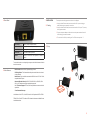
Using two Air 4420s, devices such as TVs, Set Top Boxes and games consoles
can be connected to the router by creating a wireless bridge between the two
Air 4420s.
The Warranty does not cover failure or damage as a result of not following
the instructions in the manual. AirTies will not be held responsible in such
circumstances.
The User Manual is an important resource you can refer to for safe and proper
use of your device. Please retain it for future reference.
1.1 Minimum
System
•
Safety and
Maintenance
•
•
•
•
•
•
•
•
•
1. INTRODUCTION
In order to prevent damage to your device, be sure to keep it in its
original box during transportation.
The device must be used solely with its original power adapter. Please
note that the adapter is 220V only. Do not use with 110V AC.
Do not insert a PSTN (phone) plug into the LAN port.
If you encounter any problems, do not open or disassemble the
device. Call AirTies Technical Support.
In order to prevent electric shock, do not operate the device in wet
or damp areas.
In the event of a gas leak, do not use the device. Do not turn the
device on or off. Do not plug or unplug the power cord.
Avoid using the device in dusty environments. If dust buildup should
occur, use a dry cloth to remove the dust.
To clean the exterior of the device use a dry cloth. Do not attempt to
clean the interior. There are no user serviceable components inside.
For information regarding the installation and configuration of the
device consult the remainder of this manual.
The average usage life of the device is 7 years as determined by the
Authority of Industry and Trade.
•
•
For installation an existing router is required.
For the AirTies Network Assistant utility a PC is required running Windows
XP (Service Pack 2 and above), Windows Vista or Windows 7.
Requirements
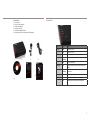
1.2 Package Contents
Please check to make sure the parts below are in the box:
For Air4420-TV, Air4420-STB, Air4420-GA
1. Two Air4420s
2. Two 12V Power Supplies
3. Two Ethernet Cables
4. One Easy Setup CD
5. One Quick Installation Guide
6. One Warranty Card and Certificate of Compliance
1
2
The AirTies Air 4420 is an IEEE 802.11b/g/n compliant, 300 Mbps wireless
communication device that can be used as a wireless access point, repeater or
as a bridge (using two Air 4420s).
As a repeater, the Air 4420 makes it possible to extend the coverage area of a
Wireless llife
Wireless life
One touch setup
Simple & easy to use
You can connect the AirTies Air 4420 to a wired modem or router through the
Ethernet port to setup a wireless local network and enable wireless computers
to access the Internet.
4
Three year warranty
Lifetime enjoyment
7/24 people support
+90 212 444 0 239
Quick Installation
Guide
3
6
Warranty Card
5
3