1
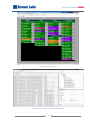
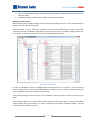
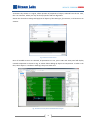
rectangles, which can change color depending on type of alert, received from Stream MultiScreen 4.X server. Stream MultiMonitor can show state of all services, selected for analysis on Stream MultiScreen servers. MultiMonitor also controls configuration of visualization server; Visualization server Stream MultiScreen 4.X is used for visualization of decoded services (video and audio streams) and sound reproduction. Capabilities of monitoring system Stream MultiMonitoring, which is part of Stream MultiScreen 4.X, allows centralized complex monitoring of all controlled services of the system. Main functions of Stream Multi Monitoring are as follows: Displays log of events, which could be filtered by date, event type, source of event, etc. Example is shown on Fig. 3; Displays configuration of entire system, objects tree, properties of objects. Example is shown on Fig. 3; Displays state of all controlled services, using interface «State panel». Example is shown on Fig. 2; Centralized visual and audio alarms about alert events. Stream Multi Monitor collects alerts from all Stream MultiScreen 4.X servers and generates alarms; Displays history of alerts using frames of corresponding color if event was completed before receipt of notification about new alert; Different colors could be assigned to various alerts; Control over Stream MultiScreen visualization server. Special buttons, associated with particular service allow sending corresponding service for displaying on visualization server. Audio also could be switched over quickly. 2