1
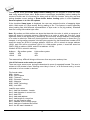
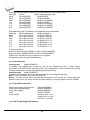
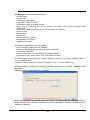
List of hot keys
<F1>
<F2>
<F3>
<F4>
<F5>
<Alt+F5>
<F6>
<F7>
<F8>
<F9>
<Alt+Q>
<Alt+X>
<Ctrl+F1>
<Ctrl+F2>
<Ctrl+Shift+F2>
Help
Save
Load
Edit
Select/default
Select/manual
Blank
Read
Verify
Program
Exit without save
Exit and save
Erase
Calls Help
Save file
Load a file into the buffer
Viewing/editing of buffer
Target-device selection from 10 last selected devices list
Target-device selection by typing device/vendor name
Blank check
Reads device's content into the buffer
Compares contents of the target device with the buffer
Programs target device
Terminates the Pg4uw
Terminates the Pg4uw and saving settings too
Displays additional information about current device
Fill's the buffer with a given value
Fill's the buffer with random values.
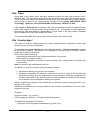
File
Menu File is used for source files manipulation, settings and viewing directory, changes
drives, changes start and finish address of buffer for loading and saving files by binary,
MOTOROLA, MOS Technology, Intel (extended) HEX, Tektronix, ASCII space, JEDEC,
and POF format. The menu commands for loading and saving projects are located in this
submenu too.
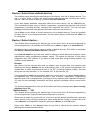
File / Load
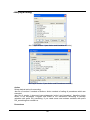
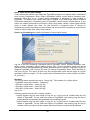
Analyse file format and loads the data from specified file to the buffer. You can choose the
format desired (binary, MOTOROLA, MOS Technology, Tektronix, Intel (extended) HEX,
ASCII space, JEDEC and POF). The control program stores a last valid mask for file listing.
You can save the mask into the config. file by command Options / Save options.
Checking the check box Automatic file format recognition tells program to detect file format
automatically. When program can't detect file format from one of supported formats, the
binary file format is assumed.
When the check box Automatic file format recognition is unchecked program allows user
to manually select wished file format from list of available file formats on panel Selected file
format. Default set is from Options / General options in panel Load file format at tab File
options.
Attention: Program doesn't know recognize files in ASCII Hex format automatically, it
recognizes them as binary. So download files in ASCII Hex format with disabled option for
automatic file format recognition.
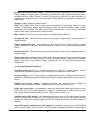
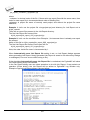
Checking the check box Buffer offset for loading tells the program to set buffer offset for all
data addresses, which will be written to buffer. This feature is useful for binary and all HEX
formats. Using this one-shot setting disables current setting of native offset in menu Options
/ General options in panel Negative offset for loading at tab Hex file options.
71