1
LensMeter ELM-9000
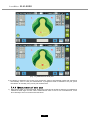
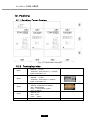
6.4 GUI (Graphic User Interface)/Displays
To be composed intuitive so that the user can do what they want faster and conveniently
6.4.1 Normal measurment mode
1
3
2
4
5
6
25
7
26
8
27
9
18
19
10
20
22
12
23
13
11
24
21
15
14
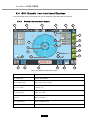
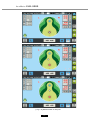
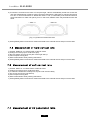
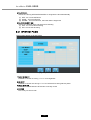
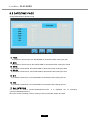
[ Fig. 6-4 ] Normal measurment Screen
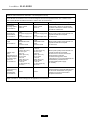
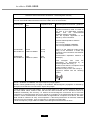
Name
Function
(1) Date/Time
Shows date and time
(2) Indication step
0.01, 0.06, 0.12 or 0.25 (D)
(3) CYL mode
+/-(MIX), + or -
(4) Prism mode
OFF, X-Y or P-B
(5) PD
Shows PD value
(6) HOME button
Carry out MENU mode
(7) Progressive mode button
Carry out Progressive measurment mode
17
16
17