1
function is enabled, the radio will automatically begin transmitting when you speak, and
terminate transmitting when you stop talking, with no need of PTT press.
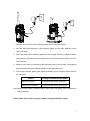
Operation Steps:
1.
Push the PTT/VOX switch on the earpiece to VOX.
2.
Plug the earpiece into the accessory jack of the radio.
3.
Press the programmed VOX key to activate the VOX feature.
4.
When no signal is received, speak through the microphone of the earpiece and your
voice will be transmitted.
Operation Instructions:
1.
Press the PTT key on you radio to disable the VOX during its operation, and release
PTT key to reactivate this function.
2.
Press the programmed VOX key to enable/disable the VOX feature, with
corresponding alert tone. When it is enabled, the alert tone sounds once; when it is
disabled, the alert tone sounds twice.
3.
The VOX feature will be disabled automatically after the radio is turned off or
programmed.
4.
The VOX function will work with a dedicated earpiece.
5.
Your dealer may set VOX sensitivity or disable the VOX feature through the
programming software. The VOX key will be null when the VOX feature is disabled.
Note:
1.
VOX / PTT function switch can be realized in this way: unplug the earpiece → switch
between VOX and PTT → plug the earpiece.
2.
After the above operations are completed, it takes approximately 2-3 seconds for the
radio to perform auto-detection until it operates normally. To avoid breakdown caused
by expected detection error, do not use the earpiece during auto-detection process.
3.
If the earpiece operates abnormally, please pull and plug it again as instructed above.
4.
You may select VOX levels according to the operating environment. Too much noise
and high VOX level may cause the radio to transmit continuously.
5.
Use only the VOX earpieces specified by HYT. Please plug a VOX earpiece into the
radio’s jack properly, or the VOX function may not work.
20