1
8
Geocentrix Repute 2 Quick-Start Guide
theory that underpins Repute’s calculations. The manual assumes you have a
working knowledge of the geotechnical design of single piles and pile groups, but
provides appropriate references for further study if you do not.
Help system
Repute’s help system contains detailed information about the program, including
most of the information contained in the Repute Quick-Start Guide, User Manual,
and Reference Manual – plus additional information regarding Repute that is not
found in any of these documents.
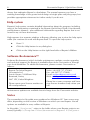
Help appears in a separate window to Repute, allowing you to view the help topics
while you continue to work with Repute itself. To open the help system:
!
Press F1
!
Click the Help button in any dialog box
!
Click on the Help button on the right hand side of Repute’s Ribbon
Software Re-Assurance™
Software Re-Assurance (which includes maintenance updates, version upgrades,
and technical support) for Repute is available direct from Geocentrix or through
your local distributor. To obtain Re-Assurance, please contact Geocentrix as
follows:
Repute Technical Support
Geocentrix Ltd
Scenic House, 54 Wilmot Way
Banstead, Surrey
SM7 2PY, United Kingdom
Please quote your licence number on
all correspondence
Voice: +44 (0)1737 373963
Fax: +44 (0)1737 373980
E-mail: [email protected]
Web: www.geocentrix.co.uk/support
Please be at your computer and have
your licence number ready when you
call
Maintenance updates are available free-of-charge from the Geocentrix website.
Notes
The screenshots in this guide were produced on Windows XP. Your screen may
differ, depending on the version of Windows on which you run Repute. Not all
options are available in every edition of Repute.
In this guide, ‘[Projects]’ refers to the folder where your Repute projects are
saved, typically C:\Program Files\Geocentrix\Repute 2\Projects.