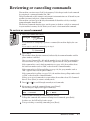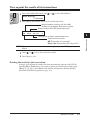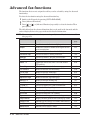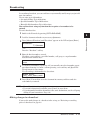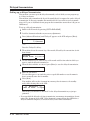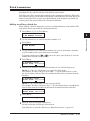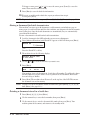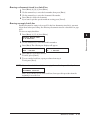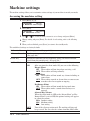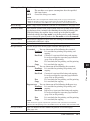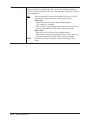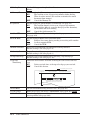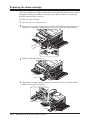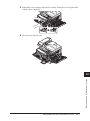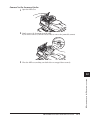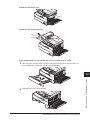
1
Super G3 is an extension of Group 3 fax technology standards, allowing the use of high-speed ITU-T V.34 modems for 33.6 Kbps transmission and high-speed protocols for rapid handshaking. JBIG — Joint Bi-level Image experts Group, the new ITU-T standard image data compression method. As JBIG compresses the data more efficiently than MMR, it is especially effective when transmitting halftone (grayscale) image document. Trademarks Imagistics is a registered trademark of Imagistics International Inc. The Imagistics logo is a registered trademark of Imagistics International Inc. All other products referenced are registered trademarks or trademarks of their respective companies. Welcome Thank you for choosing the Imagistics sx1480. This User Manual describes the functions, operating procedures, precautions, and basic troubleshooting for the Imagistics sx1480. Layout & Installation Before using this machine, be sure to read the User’s Manual thoroughly in order to ensure that you use the machine efficiently. After you have gone through the manual, keep it handy at all times. Getting Auto Note that some of the illustrations of the machine used in the User Manual may be different from what you actually see on your machine. The Manuals There are two manuals for this machine, the printed manual and the electronic manual. The description for each manual is as follows: started Using the dialer Sending faxes Receiving faxes F-code box feature Copying Special features Printed Manual (This operation manual) Precautions Setting the machine Sending & receiving faxes Copying Maintenance Troubleshooting Useful functions Digital Manual (located on the Printer & Scanner driver CD) Installing the printer and scanner driver PC printing Scanning Useful functions Restricting Machine Access User settings Report & Lists Maintenance & Troubleshooting Appendix and Index 1 2 3 4 5 6 7 8 9 10 11 12 AI Contents Regulatory information......................................................................................................................i United States of America..............................................................................................................i Canada..........................................................................................................................................ii Precautions.......................................................................................................................................iii Installation precautions..............................................................................................................iii Power requirements..................................................................................................................... iv Space requirements...................................................................................................................... v General precautions..................................................................................................................... v Storing and handling the toner and drum cartridges............................................................... vi Legal restrictions on copying.....................................................................................................vii Symbols and terms.........................................................................................................................viii Chapter 1 Layout & Installation...........................................................................................................................1-1 Packing contents........................................................................................................................1-2 Machine layout..........................................................................................................................1-3 Control panel overview..............................................................................................................1-4 Setting up the machine..................................................................................................................1-7 Attaching the document tray....................................................................................................1-7 Making connections...................................................................................................................1-7 Installing the drum and toner cartridges.................................................................................1-9 Plug in and power up...............................................................................................................1-11 Loading paper and adjusting the paper size setting.............................................................1-11 Adjusting the speaker volume................................................................................................1-12 Initial setup...................................................................................................................................1-13 Clearing stored settings..........................................................................................................1-13 Getting started.........................................................................................................................1-13 Specifying initial settings........................................................................................................1-14 Using the Energy Save mode..................................................................................................1-17 Installing drivers [CD].................................................................................................................1-18 Chapter 2 Getting started.......................................................................................................................................2-1 Operating tips.................................................................................................................................2-2 Switching the machine mode....................................................................................................2-2 Entering characters...................................................................................................................2-2 Backup memory.........................................................................................................................2-3 Selecting a function...................................................................................................................2-4 Function table............................................................................................................................2-5 Document and paper handling.....................................................................................................2-10 Document handling.................................................................................................................2-10 Paper handling.........................................................................................................................2-12 Chapter 3 Autodialler..............................................................................................................................................3-1 Autodialer basics............................................................................................................................3-2 Autodialers.................................................................................................................................3-2 Call groups.................................................................................................................................3-2 Destination names and phone directory dialing......................................................................3-2 Special dialing characters.........................................................................................................3-3 One-touch keys................................................................................................................................3-4 Adding or editing a one-touch number.....................................................................................3-4 Quick one-touch registration....................................................................................................3-5 Erasing a one-touch number.....................................................................................................3-5 How to dial using a one-touch key............................................................................................3-6 Speed-dial numbers........................................................................................................................3-7 Adding or editing a speed-dial number....................................................................................3-7 Erasing a speed-dial number....................................................................................................3-7 How to dial using a speed-dial number....................................................................................3-8 Call group dialing...........................................................................................................................3-9 Entering or changing a call group............................................................................................3-9 Erasing a call group.................................................................................................................3-10 How to dial using a call group................................................................................................3-10 Phone directory dialing................................................................................................................3-11 How to dial using the phone directory...................................................................................3-11 If the call fails..........................................................................................................................3-12 Chapter 4 Sending faxes.........................................................................................................................................4-1 Before sending................................................................................................................................4-2 Document handling...................................................................................................................4-2 Scanning resolution...................................................................................................................4-2 Scanning contrast......................................................................................................................4-2 Mixing the document resolution and contrast in multiple pages...........................................4-2 Sending method.........................................................................................................................4-3 Memory overflow message........................................................................................................4-3 Sending a fax...................................................................................................................................4-4 Memory transmission................................................................................................................4-4 Real-time transmission (non memory transmission)..............................................................4-5 Redialing.........................................................................................................................................4-6 Automatic fax redialing.............................................................................................................4-6 Manual redial.............................................................................................................................4-6 Reviewing or canceling commands................................................................................................4-7 To review or cancel command...................................................................................................4-7 Reviewing or canceling parts of a broadcast............................................................................4-8 Printing a delayed command list..............................................................................................4-8 Printing a stored document.......................................................................................................4-8 View or print the results of fax transactions...........................................................................4-9 Advanced fax functions................................................................................................................4-10 Broadcasting............................................................................................................................4-11 Delayed transmission..............................................................................................................4-12 Batch transmission..................................................................................................................4-13 Selecting the TTI.....................................................................................................................4-16 Polling transmission................................................................................................................4-17 Fax & Copy...............................................................................................................................4-18 Cover page................................................................................................................................4-19 Using alternative telephone network service providers (Dial prefix)...................................4-20 Chapter 5 Receiving faxes......................................................................................................................................5-1 Receiving a fax................................................................................................................................5-2 Selecting the reception mode....................................................................................................5-2 Manual reception mode.............................................................................................................5-2 Automatic reception mode.........................................................................................................5-2 Answering calls manually.........................................................................................................5-4 Switch between the automatic or manual reception mode.....................................................5-4 If the paper runs out during fax reception...............................................................................5-5 Settings for fax reception...............................................................................................................5-6 Setting the number of rings......................................................................................................5-6 Print settings.............................................................................................................................5-6 Advanced receiving functions........................................................................................................5-8 Block junk fax............................................................................................................................5-9 Receive polling.........................................................................................................................5-11 Fax forwarding.........................................................................................................................5-12 Separator page.........................................................................................................................5-14 Chapter 6 Using F-code box features...................................................................................................................6-1 F-code: an introduction..............................................................................................................6-2 Creating or modifying an F-code box........................................................................................6-2 Printing a list of F-code boxes...................................................................................................6-7 Printing a list of documents stored in your F-code boxes........................................................6-7 Erasing an empty F-code box....................................................................................................6-7 Storing a document in a bulletin box for polling.....................................................................6-8 Printing a document stored in a bulletin box..........................................................................6-9 Erasing a document stored in a bulletin box...........................................................................6-9 Printing a document received in the security box.................................................................6-10 Sending a document using a subaddress and password.......................................................6-11 Polling a document using a subaddress and password.........................................................6-12 Chapter 7 Copying....................................................................................................................................................7-1 Before copying.................................................................................................................................7-2 Document and paper handling.................................................................................................7-2 Changing your machine to the Copy mode..............................................................................7-2 Display in the copy standby mode............................................................................................7-2 Memory overflow message........................................................................................................7-2 Making copies.................................................................................................................................7-3 Making copies............................................................................................................................7-3 Basic copy settings..........................................................................................................................7-4 Selecting the document type.....................................................................................................7-4 Scanning the contrast................................................................................................................7-4 Zoom ratio..................................................................................................................................7-4 Number of copies.......................................................................................................................7-5 Sorting copies.............................................................................................................................7-5 Selecting paper size...................................................................................................................7-5 Advanced copy functions................................................................................................................7-6 Combine.....................................................................................................................................7-7 Copy resolution..........................................................................................................................7-8 Chapter 8 Special features.....................................................................................................................................8-1 Soft keys..........................................................................................................................................8-2 Functions you can assign to a soft key.....................................................................................8-2 Programming a soft key............................................................................................................8-3 Macro keys......................................................................................................................................8-4 Steps you can program into a macro key.................................................................................8-4 Creating or modifying a Macro.................................................................................................8-5 Erasing a Macro key..................................................................................................................8-6 Macro key speed.........................................................................................................................8-6 Fax dialing using a Macro key..................................................................................................8-7 Copying using Macro key..........................................................................................................8-7 Printing lists using the Macro key...........................................................................................8-7 Storing fax documents using Macro key..................................................................................8-7 Viewing counters............................................................................................................................8-8 Chapter 9 Security features...................................................................................................................................9-1 Security features.............................................................................................................................9-2 Passcode protection....................................................................................................................9-2 Security reception......................................................................................................................9-3 Masking the PIN........................................................................................................................9-5 Using department codes.................................................................................................................9-8 Turning department code protection on and off......................................................................9-8 Entering a department code......................................................................................................9-8 Erasing a department code.......................................................................................................9-9 Turning the department code setting on and off.....................................................................9-9 Fax charge setting...................................................................................................................9-10 Copy charge setting.................................................................................................................9-10 Sending a fax using a department code.................................................................................9-11 Making a copy using a department code................................................................................9-11 Printing the department code list...........................................................................................9-12 Resetting the department code counter.................................................................................9-12 Copy protection.............................................................................................................................9-13 Chapter 10 User settings.........................................................................................................................................10-1 Machine settings...........................................................................................................................10-2 Accessing the machine setting................................................................................................10-2 Fax settings...................................................................................................................................10-5 Accessing the fax settings.......................................................................................................10-5 Copy settings.................................................................................................................................10-7 Accessing the copy setting.......................................................................................................10-7 Scanner settings...........................................................................................................................10-9 Accessing the scanner setting.................................................................................................10-9 Chapter 11 Report & Lists......................................................................................................................................11-1 Table of the lists and journal.......................................................................................................11-2 Activity journal.............................................................................................................................11-4 Setting the activity journal.....................................................................................................11-4 Printing an activity journal manually....................................................................................11-4 Setting the printing order of the activity journal..................................................................11-5 Transmission Confirmation Report.............................................................................................11-5 Setting the transmission confirmation report........................................................................11-5 Stored document list.....................................................................................................................11-6 Erased document notification......................................................................................................11-6 Chapter 12 Maintenance & Problem solving......................................................................................................12-1 Maintenance..................................................................................................................................12-2 Cleaning tips............................................................................................................................12-2 Cleaning the scanning area....................................................................................................12-2 Cleaning the ADF rollers........................................................................................................12-3 Cleaning the drum charge wire and the print head..............................................................12-3 Replace the toner cartridge.....................................................................................................12-4 Replacing the drum cartridge.................................................................................................12-6 Troubleshooting............................................................................................................................12-8 Document jams........................................................................................................................12-8 Paper jams..............................................................................................................................12-10 LCD error messages..............................................................................................................12-13 “Check Message” printouts...................................................................................................12-16 Error code...............................................................................................................................12-17 Machine errors.......................................................................................................................12-19 Faxing errors..........................................................................................................................12-19 Copying errors.......................................................................................................................12-20 PC printing errors [CD].........................................................................................................12-20 Scanner errors [CD]...............................................................................................................12-20 Print quality problems..........................................................................................................12-20 If you cannot solve the problem............................................................................................12-23 Appendix & Index............................................................................................................................... AI-1 Specifications................................................................................................................................AI-2 General.....................................................................................................................................AI-2 Fax............................................................................................................................................AI-3 Copy..........................................................................................................................................AI-3 Printer......................................................................................................................................AI-3 Scanner.....................................................................................................................................AI-4 Consumable items...................................................................................................................AI-4 Index..............................................................................................................................................AI-5 Regulatory information 1 Customer information United States of America This equipment complies with Part 68 of FCC rules and the requirements adopted by the ACTA. On the rear panel of this equipment is a label that contains, among other information, a product identifier in the format US:IMGFA02B003C. If required, this number must be provided to the telephone company. The REN is used to determine the number of devices that may be connected to a telephone line. Excessive RENs on a telephone line may result in the devices not ringing in response to an incoming call. In most but not all areas, the sum of RENs should not exceed five (5.0). To be certain of the number of devices that may be connected to a line, as determined by the total RENs, contact the local telephone company. The REN for this product is part of the product identifier that has the format US:IMGFA02B003C. The digits represented by 02B are the REN without a decimal point. 2 3 4 5 Your fax is designed for use on standard-device telephone lines. The fax connects to the telephone line with a standard line called the USOC RJ-11C. 6 A plug and jack used to connect this equipment to the premises wiring and telephone network must comply with the applicable FCC Part 68 rules and requirements adopted by the ACTA. A compliant telephone cord and modular plug is provided with this product. It is designed to be connected to a compatible modular jack that is also compliant. See installation instructions for details. 7 If the equipment sx1480 causes harm to the telephone network, the telephone company will notify you in advance that temporary discontinuance of service may be required. But if advance notice isn’t practical, the telephone company will notify the customer as soon as possible. Also, you will be advised of your right to file a complaint with the FCC if you believe it is necessary. The telephone company may make changes in its facilities, equipment, operations or procedures that could affect the operation of the equipment. If this happens the telephone company will provide advance notice in order for you to make necessary modifications to maintain uninterrupted service. If trouble is experienced with the equipment sx1480, see operating instructions for details. For further repair or warranty information, please contact the Imagistics National Diagnostic Center at 1-800-243-5556. If the equipment is causing harm to the telephone network, the telephone company may request that you disconnect the equipment until the problem is resolved. Connection to party line service is subject to state tariffs. Contact the state public utility commission, public service commission or corporation commission for information. If your home has specially wired alarm equipment connected to the telephone line, ensure the installation of the sx1480 does not disable your alarm equipment. If you have questions about what will disable alarm equipment, consult your telephone company or a qualified installer. This equipment is hearing aid compatible. When programming emergency numbers and/or making test calls to emergency numbers: 1) Remain on the line and briefly explain to the dispatcher the reason for the call. 2) Perform such activities in the off-peak hours, such as early morning or late evenings. 8 9 10 11 12 A To protect your product against power surges, we recommend the use of a power protection device (Surge arrestor). The Telephone Consumer Protection Act of 1991 makes it unlawful for any person to use a computer or other electronic device, including FAX machines, to send any message unless such message clearly contains in a margin at the top or bottom of each transmitted page or on the first page of the transmission, the date and time it is sent and an identification of the business or other entity, or other individual sending the message and the telephone number of the sending machine or such business, other entity, or individual. (The telephone number provided may not be a 900 number or any other number for which charges exceed local or long-distance transmission charges.) For instructions on programming this information into your FAX machine, see “Initial Setup” on pages 1-13 to 1-16 of this manual. FCC Part 15 This equipment has been tested and found to comply with the limits for a Class A digital devices, pursuant to Part 15 of the FCC Rules. These limits are designed to provide reasonable protection against harmful interference when the equipment is operated in a commercial environment. This equipment generates, uses, and can radiate radio frequency energy and, if not installed and used in accordance with the instruction manual, may cause harmful interference to radio communications. Operation of this equipment in a residential area is likely to cause harmful interference in which case the user will be required to correct the interference at his own expense. Canada NOTICE: This equipment meets the applicable Industry Canada Terminal Equipment Technical Specifications. NOTICE: The Ringer Equivalence Number (REN) for this terminal equipment is 0.2. The REN assigned to each terminal equipment provides an indication of the maximum number of terminals allowed to be connected to a telephone interface. The termination on an interface may consist of any combination of devices subject only to the requirement that the sum of the Ringer Equivalence Numbers of all the devices does not exceed five. Canadian ICES-003 This Class A digital apparatus complies with Canadian ICES-003. Cet appareil numérique de la classe A est conforme à la norme NMB-003 du Canada. ii Precautions 1 Installation precautions Clean Dust buildup can damage your machine. However, do not use a dust cover, which can cause overheating. Periodically clean your machine as instructed in this manual. 3 4 Away from direct sunlight To avoid overheating, set up the machine away from direct sunlight or heating unit. 5 6 Level, and vibration-free To avoid damage to the machine or personal injury, set the machine up in a level, vibration-free location. 7 8 Near a phone jack & an AC power outlet Your machine uses a standard (modular) telephone jack. The power cord is about 6.5 feet long when stretched to its limit, and the power cord should never be stretched to its limit. 2 9 10 Away from a television or radio Many appliances and office equipment, including televisions, radios, copy machines, air conditioners and computers, can generate electronic noise that can interfere with the operation of your machine. 11 12 Avoid extreme high / low temperature 50 F to 89.6 F (10 C to 32 C) Use your machine within the temperature range of 10 °C to 32 °C (50 °F to 89.6 °F). iii A Power requirements Use a standard AC 120 V outlet AC 120V Use a standard three-pronged 120 V electrical outlet to power your machine. Using any other electrical outlet will damage to your machine. Do not share an extension cord connector with other plugs This could cause electrical shock. Do not share an outlet with a large appliance High-consumption appliances such as a refrigerator or air conditioner can cause “draw-downs” which could damage your machine. Plug in the power cord Plug the power cord carefully and completely into a wall outlet. Do not leave any portion of the electrical cord’s metal plugs exposed. Doing so could cause a fire and increases the risk of electrical shock. Make sure the outlet is not controlled by a wall switch If it is, you will risk occasional shutoffs to the machine, causing interruption or loss of fax service. Use an electrical surge suppressor, preferably one which guards both telephone and electrical lines. This device helps to shield your machine from damaging high-voltage electrical surges. iv Space requirements 1 To ensure proper ventilation and easy operation, set up the machine in an area that meets the minimum requirements for clearance as illustrated below. 2 15.7 in. (40 cm) 3.9 in. (10 cm) 15.7 in. (40 cm) 3.9 in. (10 cm) 3 11.8 in. (30 cm) 4 NOTE: In order to enable easy machine maintenance and replacement of consumables, maintain an adequate amount of space around the machine. When lifting the machine, be sure to grab the handles on the left and right sides of the cassette tray. General precautions 5 6 Never disassemble your machine 7 Disassembling your machine can cause serious injury to you and damage to your machine. 8 Never handle your machine or power cord with wet hands 9 Never touch your machine or power cord if your hands are wet. 10 During electrical storms, disconnect the plug from the outlet 11 Electrical storms can cause electrical shock or damage to the machine. 12 A Keep away from liquids Keep liquids and metal pins or other objects away from your machine. If something falls into the machine, remove the plug from the outlet, and then call the Imagistics National Diagnostic Center at 1-800-243-5556. Do not rest furniture or other equipment on the power cord Do not put anything on or over the electrical power cord, and do not route the power cord under rugs or carpets. Doing so can damage the power cord and/or machine, causing fire or electrical shock. Allow clearance around the outlet Do not stack boxes or furniture around the outlet. Transporting the Machine If you need to transport the machine over a long distance, consult your technical representative. Storing and handling the toner and drum cartridges To avoid damage to your machine and to assure the best performance possible, follow these guidelines when storing and handling the toner and drum cartridges: Use supplies manufactured specifically for Imagistics machines Using toner and drum cartridges or other supplies that are not manufactured specifically for your machine may affect the operation of your unit. Storing the cartridges Store the cartridges in a location that meets the following requirements: •Free from direct sunlight •Away from dusty conditions •Away from floppy disks or other computer media, computer screens, or other materials sensitive to magnetic fields. •Away from high humidity •Do not stand the cartridge on its end and do not store it upside down. •Do not open the protective bag containing the cartridge until you are ready to install the cartridge. Cartridge handling •Do not burn toner cartridges Toner powder is extremely flammable. Exposure to flame can cause the toner cartridge to burn or explode, causing serious injury. •Keep cartridges away from water and oil. •Do not expose cartridges to direct sunlight. •Do not subject cartridges to static or electrical shock. CAUTION: Be careful not to get the toner powder in your eyes. If toner powder gets in your eyes, immediately flush your eyes with water and seek medical assistance. vi Legal restrictions on copying Certain types of documents must not be copied with the purpose or intent to pass copies of such documents off as the originals. The following is not a complete list, but is meant to be used as a guide to responsible copying. Financial instruments 1 2 • Personal checks • Travelers checks • Money orders • Certificates of deposit • Bonds or other certificates of indebtedness • Stock certificates 3 Legal documents 5 4 • Food stamps • Postage stamps (canceled or uncanceled) • Checks or drafts drawn by government agencies • Internal revenue stamps (canceled or uncanceled) • Passports • Immigration papers • Motor vehicle licenses and titles • House and property titles and deeds 6 7 8 General • Identification cards, badges, or insignias • Copyrighted works without permission of the copyright owner In addition, it is prohibited under any circumstances to copy domestic or foreign currencies, or works of art, without permission of the copyright owner. When in doubt about the nature of a document, consult with legal counsel. 9 10 11 12 A vii Symbols and terms In this manual, the following symbols, terms and abbreviation are used. Please familiarize yourself with these. WARNING CAUTION This symbol indicates how to avoid fatal or critical injuries. This symbol indicates how to avoid personal injury. IMPORTANT: This instruction describes conditions or incorrect operations that could cause damage to your machine. A note describes helpful hints, restrictions and how to avoid problems. NOTE: [ “ ” LCD Document Paper Tx Denotes sending. Rx Denotes receiving. ] , The names of the keys on the control panel. Items that appear on the LCD. The Liquid Crystal Display shows messages and options during operation. Original sheet(s) of paper you send, copy and scan on your machine. Paper to be printed on. Shows the direction of the document and paper. Direction mark or Nothing Ex.) Letter Ex.) Half-letter viii Document placed on the ADF Paper loaded in the paper cassette Chapter 1 Layout & Installation Packing contents..................................................................................... 1-2 Machine layout....................................................................................... 1-3 Control panel overview.......................................................................... 1-4 Setting up the machine.................................................................................. 1-7 Attaching the document tray................................................................. 1-7 Making connections................................................................................ 1-7 Installing the drum and toner cartridges............................................. 1-9 Plug in and power up........................................................................... 1-11 Loading paper and adjusting the paper size setting.......................... 1-11 Adjusting the speaker volume............................................................. 1-12 Initial setup.................................................................................................. 1-13 Clearing stored settings....................................................................... 1-13 Getting started..................................................................................... 1-13 Specifying initial settings.................................................................... 1-14 Using the Energy Save mode............................................................... 1-17 Installing drivers [CD]................................................................................. 1-18 Packing contents Main unit with 500-sheet paper cassette Telephone line cable AC power cord Drum cartridge Toner cartridge Document tray Printer & scanner driver CD Documentation & labels User's guide (this book) Paper size label One-touch key label Soft key label . . . . Ferrite core NOTE: •The appearance of the AC power cord and telephone line cable vary according to countries. •The toner cartridge supplied with your machine is starter toner cartridge, which yields approximately 3,000 printouts. In the USA, call for supplies at 1-800-4626797 to purchase regular, full-yield toner cartridge. 1-2 Layout & Installation Machine layout Automatic document feeder (ADF) Document guides Document tray Document exit tray 1 Control panel Layout & Installation 2 3 Bypass tray 4 5 6 Paper cassette 7 2nd side cover 2nd paper cassette (Option) 8 1st side cover Front cover Paper level Indicator 9 Telephone Connectors 10 11 PHONE 1 PHONE 2 LINE 12 13 Second phone line (Option) USB connector Network connector (Option) 14 Paper exit tray PHON E1 PHON E2 LINE A AC power jack Power switch Layout & Installation 1-3 Control panel overview 1 2 345 6 7 10 11 12 1 Mode switch button 8 13 14 9 15 19 16 17 20 21 18 22 Press this button to switch the machine’s mode. 2 Paper source light Indicates the selected paper source. 3 Alarm light Glows when a errors occurs. 4 Comm. /Memory Rec. light Blinks when the machine is communicating with another machine. Glows when the machine has received documents into memory. 5 Machine mode light Indicates what mode the machine is in. 6 Paper Size Selects the paper you want to use for copying. 7 LCD (Liquid crystal display) Shows messages and selections prompted during operation. 8 Doc. Size Instructs the machine to scan Auto*, Letter, Half-letter or Legal size documents. *When you select Auto, custom size documents (up to 35.43 in. (900 mm) in length) can be automatically scanned. 9 Doc. Resolution Selects the fax and copy resolution. 10Contrast Adjusts the scanning contrast level. 11Menu /Back Accesses machine settings. Also, it allows you to go back to the previous menu level. 12Cursor keys (Redial): Scrolls through recently dialed numbers. (Page 4-6.) (Tel Index): Displays one-touch and speed-dial entries which are sorted alphanumerically, similar to a phone directory. (Page 3-11.) In copy and scan mode — : Adjusts the zoom ratio. Enter 13 Selects or confirms settings. 14Cancel Deletes characters on the LCD and cancel commands you have entered into the machine. 1-4 Layout & Installation 15Soft keys 1 16Advanced Functions You can choose any function that is not assigned as a soft key. The displayed functions may vary according to the mode the machine is in. 17Speed Dial /Group Press this key once and enter the three-digit code to dial a pre-registered fax or phone number. Also, press this key twice and enter a group number to perform group dialing. 18Job Confirm. /Fax Cancel Cancel or review fax jobs, or review the results of a fax transmission. 19Numeric keys Enter numerical values as well as fax/phone numbers and characters. 20Reset Returns the menu to the standby screen and resets all settings back to their defaults. 21Start Executes operation. 22Stop Stops the machine’s operation. However, to stop a fax transmission, press [Job Confirm. /Fax Cancel]. 2 Layout & Installation Frequently used functions can be assigned into the following keys. The following are the default settings: *Soft key 1 : Report Soft key 2 : Monitor Soft key 3 : Pause /Dial Opt (See “Soft keys” on page 8-2 for more information.) 3 4 5 6 7 8 9 10 11 12 13 14 A Layout & Installation 1-5 23Macro keys Programming the Macro keys can reduce a multi-step operation into a one-touch executable. 23 (See “Macro keys” on page 8-4 for more information.) 2 4One-Touch keys Instantly dials a pre-registered fax or phone number. 24 1-6 Layout & Installation Setting up the machine Attaching the document tray 1 Attach the document tray by inserting it into the appropriate holes, as shown below. Layout & Installation 2 3 4 5 6 Making connections 7 Telephone line connection Attach the supplied ferrite core to the telephone line cable as illustrated below. Plug the telephone line cable into the LINE jack and the other end to the wall jack. 8 9 10 PHO NE1 PHO NE2 11 LIN E PHONE 1 PHONE 2 LINE 12 Telephone wall jack 13 14 If you want to use your machine for receiving both faxes and voice calls, connect the optional handset or an external telephone to your machine. Layout & Installation A 1-7 Connecting the optional handset Attach the handset cradle and the spacer using the screws supplied with the cradle. Then plug the handset cord into the PHONE 1 jack of your machine. spacer PHON E1 PHON E2 LINE PHONE1 PHONE2 LINE PHONE1 PHONE2 LINE handset cradle Connecting an external phone Plug the external phone’s line into the PHONE 2 jack of your machine. PHO NE1 PHO NE2 LIN E PHONE1 PHONE2 LINE External phone (even an answering machine) 1-8 Layout & Installation Modular cap Installing the drum and toner cartridges 1 Pull the release lever to open the side cover. 1 Layout & Installation 2 3 4 2 Open the front cover. 5 6 7 8 3 Turn the toner cartridge locking lever to the left (unlock position). 9 10 11 12 4 Unpack the drum cartridge from its carton and slide it into the machine firmly until it locks into place. 13 14 A NOTE: Shield the drum cartridge from light. Layout & Installation 1-9 5 Unpack the starter toner cartridge from its carton. Then, holding the toner cartridge with both hands, gently shake it to distribute the toner evenly inside the cartridge. NOTE: Do not touch the roller of the toner cartridge. 6 Slide the toner cartridge into the machine firmly until it locks into place. 7 Turn the cartridge locking lever to the right until it locks into place. 8 Close the front and side covers. NOTE: The machine will not operate if the covers are not closed properly. 1-10 Layout & Installation Plug in and power up 1 Plug the non-pronged end of the supplied AC power cord into the AC socket on the machine and the pronged end into a properly grounded AC outlet. 1 Layout & Installation 2 3 4 2 Turn on the power switch. The markings are international standards: I means on, O means off. It will take a few seconds for the machine to warm up. The machine will show: Warming up NOTE: While the power is on, the scanner lamp will always lights, but this does not mean machine failure. See also “Scanner Sleep” on page 10-4. Loading paper and adjusting the paper size setting Please see “Paper handling” on pages 2-12 to 2-16. 5 6 7 8 9 10 11 12 13 14 A Layout & Installation 1-11 Adjusting the speaker volume 1 Press [COPY4FAX4SCAN] to switch the machine to the fax mode. Fax Ready Fev 10 2006 2:15pm 2 Press [Monitor]. Monitor //Enter 3 Press [Enter]. You will hear a dial tone. 4 Press [ ] or [ ] to adjust the volume. ** Tel Mode ** Volume :nnnnnn 5 Press [Monitor] to hang up. 1-12 Layout & Installation Initial setup Clearing stored settings IMPORTANT: After specifying the initial settings, do not clear the memory again without an authorized technician’s advice. To clear the memory: 1 Press [Menu], [ ], [0], then [2]. Clear User Settings Clear User Settings Yes Enter No Cancel 2 If you want to clear the memory, press [Enter]. If you do not want to clear the memory, just press [Cancel]. 1 2 Layout & Installation Before using your machine, clear the built-in user data. This ensures that the memory will hold only your settings. 3 4 5 6 Getting started In some countries you are required by law to indicate your name and fax number on every fax you send. You must therefore store your name (or company name) and fax number in your machine before using it. Every fax page you send arrives at the receiving machine with a single line of text at the very top of the page. This text lists a name, called the Transmit Terminal Identifier (TTI), and a fax number. Under “Specifying initial settings” below, you can stored the following items including your name and fax number. •Language •Current date and time •Automatic daylight saving time detection •Fax reception mode •Dial tone detection •Phone dialing type •Your fax number •TTI 1 / TTI 2 / TTI 3 •Usual TTI •Idle time before switching to the Energy Save mode The settings you adjust here can always be changed later. Layout & Installation 1-13 7 8 9 10 11 12 13 14 A Specifying initial settings If you press [Reset] during initial setup, your machine returns to Standby mode. But it will keep the settings you saved by pressing [Enter] as described below. 1 Switch to the Fax mode by pressing [COPY4FAX4SCAN]. Language 2 Press [Menu], [9], [Enter]. The machine will show the current language setting. Language :English / /Enter 3 Press [ ] or [ ] until your desired language appears. Then press [Enter] to save the setting and continue. Date & Time 4 The machine will show the current calendar/clock setting. Enter Time 01/01 '04 00:00 Month Day Year Time 5 Use the numeric keys to enter the correct date in the MMDDYY format and time in the 24-hour format. For instance, to set 2:15 PM on February 10, 2006, press [0], [2], [1], [0], [0], [6], [1], [4], [1], [5]: To change a digit, press [ ] to move the cursor left or [ ] to move it right. Then, enter the correct digit. 6 Press [Enter] to save the clock setting and continue. Daylight savings 7 The machine will now ask if you want to set the calendar/clock to automatically recognize daylight saving time (DST). Daylight Saving :Off / /Enter When the setting is “On,” your machine will automatically recognizes DST at 2 AM on the appropriate switch over Sundays each year. When the setting is “Off,” no automatic change will occur. 8 Press [ ] or [ ] to select “On” or “Off”, then press [Enter] to save the setting. Fax reception mode 9 The machine now shows the machine’s current reception mode. Fax Ready //Enter 10For now, select “Fax Ready”. (For details on the reception modes, see “Selecting the reception mode” on page 5-2.) 11Press [Enter] to save the setting and continue. 1-14 Layout & Installation Dial tone detection 12The machine asks you to set whether the machine should detect a dial tone before dialing. 13Normally select “Off”. If you need to detect a dial tone when dialling, select “On”, however you cannot send a fax if there is no dial tone. 14Press [Enter] to save the setting and continue. Phone dial type 15The machine will ask you to set the dialing type needed for the fax machine, either tone or pulse. Phone Type 2 3 4 :Tone //Enter 16Press [ ] or [ ] to select the dialing type on your phone line, then press [Enter] to save the setting. Your fax number 17The machine will not ask you to enter your fax number to display on the recipients display or printed fax documents. Your Fax Number +1-800-243-5556_ 18Use the numeric keys to enter your fax number. This number can contain up to 20 characters. •To enter a “+” symbol before your country code: Press [Pause /Dial Options]. •To enter the hyphen “–” to make long numbers easier to read: Press [Pause /Dial Options] twice. •If you make a mistake, press [Cancel] to erase the digit on the left. •To change just one number, press [ ] or [ ] to move the cursor, press [Cancel] to erase the number. Then re-enter the fax number correctly. 19Press [Enter] to save the number. TTI (your name) 20The machine will now ask you to enter the name (or company name) to be shown at the top of faxes you send. You can enter three different names. Each name can store up to 22 characters. TTI 1 _ 1 Layout & Installation DialTone Detect :Off / /Enter ;Upper Use the numeric keys to enter characters. (Refer to “Entering characters,” on page 2-2.) If you make a mistake, press [Cancel] to erase to the left. To change just one character, press [ ] or [ ] to move the cursor, press [Cancel] to erase it. Then re-enter the correct character. Layout & Installation 1-15 5 6 7 8 9 10 11 12 13 14 A 21 Press [Enter]. TTI 2 _ ;Upper If you do not want to enter TTI 2, skip to step 23. 22Use the numeric keys to enter the name for TTI 2. 23 Press [Enter]. TTI 3 _ ;Upper If you do not want to enter TTI 3, skip to step 25. 24Use the numeric keys to enter the name for TTI 3. 25 Press [Enter] to save the setting and continue. Default TTI selection 26 The machine now asks you to set the default TTI to be shown at the top of faxes you send. Usual TTI :TTI 1 //Enter 27 Press [ ] or [ ] to select TTI 1, TTI 2 or TTI 3. 28 Press [Enter] to save the setting and continue. Idle time setting for switching to the Energy Save mode 29The machine will now ask you to enter the time at which the machine will enter the energy save mode. Your machine will automatically enter the Energy save mode after your entered time has elapsed. The default value is 5 minutes. Energy Save Timing (001-240) 005 min. 30Enter the time (in minutes) using the numeric keys. 31Press [Enter] to save the setting. 32Press [Reset] to return to the standby mode. 1-16 Layout & Installation Using the Energy Save mode To change the Energy Save mode setting: 2 3 4 1 Press [Menu], [2], [1], [0], [5], then [Enter]. Energy Save Mode:On / /Enter 5 2 Press [ 1 Layout & Installation In order to conserve energy, your machine is initially set to enter the Energy Save mode automatically when the machine is left idle for a certain period. The machine will automatically enter the Energy Save mode after approx. 5 minutes of idle time. In the Energy Save mode, the machine will stop pre-heating for printing and display “Energy Save Mode” on the LCD. However, the indicators on the control panel and scanner lamp will not shut off even when the machine is in the Energy Save mode. To recover from Energy Save mode, press any key on the control panel. When your machine receives a fax message during energy save mode, the machine will wake up. ] or [ ] to select on or off. 6 3 Press [Enter] to save the setting. 4 Press [Reset] to exit and return to the standby mode. NOTE: The idle time setting can be changed. Refer to “Idle time setting for switching to the Energy Save mode” of “Specifying initial settings” on page 1-14. NOTE: If you assign “Energy Saving” to a soft key, you can switch your machine to Energy Save mode immediately by pressing the soft key, regardless of the on/off setting and time setting. For details of the soft key, see page 8-2. 7 8 9 10 11 12 13 14 A Layout & Installation 1-17 Installing drivers [CD] To use your machine as a printer or a scanner, install the drivers on the supplied CD to your computer. For further information of installing, printer driver and scanner driver, see the manuals on the CD. 1-18 Layout & Installation Chapter 2 Getting started Operating tips................................................................................................ 2-2 Switching the machine mode................................................................. 2-2 Entering characters................................................................................ 2-2 Backup memory...................................................................................... 2-3 Selecting a function................................................................................ 2-4 Function table......................................................................................... 2-5 Document and paper handling.................................................................... 2-10 Document handling.............................................................................. 2-10 Paper handling..................................................................................... 2-12 Operating tips Switching the machine mode To switch the machine mode, press [COPY4FAX4SCAN]. The mode light indicates what mode the machine is in. NOTE: You cannot switch the mode in any of the following cases: • When scanning a document. • During real time transmission. • When programming any function settings. Entering characters Certain settings allow you to enter characters; for your TTI (your name), remote fax’s name or others. To enter letters or other characters, use the following guidelines: By pressing the numeric key repeatedly, you can access the following characters as shown in the table below. When you want to enter a character that shares the same numeric key with other characters, press [ ] to move the cursor to the right. 2-2 Getting started Upper and lower case characters Press [ ] to toggle between upper and lower case. Your Name _ ;Upper Your Name _ ;Lower “Upper” means the machine will enter only upper-case letters, similar to the "Caps Lock" button on your PC. “Lower” means the machine will enter only lower-case letters. 1 2 ]. 3 or Getting Entering symbols 1 When the machine prompts you to enter a name, press [ The LCD will change to: started You can also enter special characters or symbols. 4 5 ////Enter 2 Select the character you want to enter using the , , 6 keys. 3 To enter a character, press [Enter]. 7 4 If you want to enter another character, repeat steps 1 to 3. Otherwise, go to next step. 8 5 Press [Enter] to save it. 9 Editing characters If you entered an incorrect letter or digit, press [Cancel] to erase the character on the left. To edit just one character or digit, press [ ] or [ ] to move the cursor to that character or digit. Then press [Cancel] to erase it. Re-enter the correct character or digit. 10 11 12 Backup memory 13 User data and auto-dialing settings are automatically backed up in memory. However, documents stored in memory will be lost after 72 hours if there is a power failure or if you disconnect the power cord. (See “Specifications,” page AI-2.) 14 A Getting started 2-3 Selecting a function To start setting a function, you must first press [Menu]. The two ways of selecting a function are described below. The procedures described in this manual are using short-cut operations. Short-cut operation with the numeric keys Press [Enter], then press a three- or four-digit numbers to select the function. For example, “Press [Menu], [2], [1], [0], [1], [Enter]”… … you would press [Menu] … then [2] … then [1] … then [0] (the numeric key zero) … then [1] … then [Enter] Searching for a function using the cursor key Even if you don’t remember the exact commands needed for an operation, you can search for and enter the function using the cursor key ( , , , ). To search for a function: 1 Press [Menu]. 2 Search for the function using [ ], [ ], [ ] or [ ]. The function table on the next page may be useful for your search. For example, if you want to set the “Cassette Size,” press [ ], [ ], [ ]. 3 Press [Enter] when you have found the function that you want to set. Going back to the previous screen by pressing [Back] Press [Back] to go back to the previous menu level. 2-4 Getting started Function table You can search for any function using the function table below. (The underlined settings are factory defaults.) 1.One-Touch Dial 2.Speed Dial 3.Group Dial 2.User Settings 1.Machine Settings Page Registers a one-touch number. 1. Enter One-Touch — 3-4 Erases a registered one-touch number. 2. Erase One-Touch — 3-5 Registers a speed-dial number. 1. Enter Speed-Dial — 3-7 Erases a registered speed-dial number. 2. Erase Speed-Dial — 3-7 Registers a dial group. 1. Enter Group Dial — 3-9 Erases a registered dial group. 2. Erase Group Dial — 3-10 01.Cassette Size Sets paper size for the paper cassette. Ltr Legl HLtr 2-16 02.Protect Passcode Sets the passcode for using the security features. — 9-2 03.Soft Key Assigns a function to a soft key, so the function can be activated or deactivated by pressing the soft key. Sort Copy Combine Zoom Broadcast Address Entry*1 Report Monitor Pause /Dial Opt. Delayed Batch Tx Select TTI Select Line*2 Cover Page Fax Forward Fax & Copy Security Separator page Memory Tx Auto Rx F-code Tx F-code Polling Polling Dial Prefix Bypass Page Counter Energy Save Online Mode Switch 8-2 Off On 10-2 Conserves power. 05.Energy Save Mode Off On 1-17 10-3 06.Fax & Copy Make a copy of your document each time it is transmitted. Off On 4-18 Default setting Soft key 1: Report Soft key 2: Monitor Soft key 3: Pause /Dial Options 04.Silent Mode Mutes your machine. started 2 3 4 5 6 7 8 9 10 11 12 13 14 A *1 The optional NIC is required. *2 The optional 2nd phone kit is required. Getting 1 started 1.Autodial Entries Setting Getting Function menu Function menu Function menu Description level one level two level three 2-5 Level one Level two Level three Description function menu function menu function menu 2.User Settings 1.Machine Settings 2.Fax Settings Scan Copy Fax 10-3 You can set the primary standby mode. 08.Service Mode For technical support. Do not turn this setting Off on unless an authorized technician asks you On to do so. 10-3 09.Date & Time Sets the current date and time 10-3 10.Paper Source Selects the paper source for faxing or copying. Fax Copy Fax/Copy Not Used 10-3 11.Page Counter Displays the total number of pages you have printed and scanned. 8-8 12.Scanner Sleep You can specify the sleep period of the scanOff ner lamp to prolong the life of your machine’s On scanner lamp. Start time: 22:00 Reset time: 06:00 You can set the following settings for fax 01.Scan Parameters sending. • Primary fax resolution • Super fine resolution You can set the following settings for fax 02.Print Parameters reception. • Reduction rate • Reduction margin Getting Page 07.Primary Mode • Primary scanning contrast 2-6 Setting — — 10-4 10-5 Normal, Fine, S-Fine, Gray Lightest, Light, Normal, Dark, Darkest 400dpi, 600dpi Auto, 100% 40 mm (0-85 mm) Off, On 5-7 10-5 03.# of Rings Sets the number of rings before your machine 2 times (1-10 times) answers. 5-6 10-6 04.Redial Sets the number of times and dial interval for 2 times (2-15 times) automatic fax redialing. 1 min. (1-5 min.) 10-6 05.Dialing Pause Sets the dialing pause length. 2 sec. (2-10 sec.) 10-6 06.Memory Tx Turns memory transmission on/off. Off On 4-3 10-6 07.Quick Tx Turns quick memory transmission on/off. Off On 4-3 10-6 08.Select TTI Selects the TTI you want to use. Default TTI1 TTI2 TTI3 Off 4-16 09.ECM Mode Turns ECM mode on/off. Off On 10-6 10.Block Junk Rejects unauthorized incoming faxes. Fax Off Mode1 Mode2 Mode3 5-9 11.Security Rx Keeps all received fax messages in memory until printed manually. Off On 9-3 12.Separator Page Partition each received documents by inserting a separator page. Off On 5-14 started Page 2.User Settings Prints the received date and time on the top 13.Receive TimeStamp of each received document Off On 10-6 14.PIN Mode Off Mode1 Mode2 9-5 $00.00 ($00.00-99.99) 9-10 2.Fax Settings Prevents unauthorized long-distance calls. 15.Fax Charge Sets the print charge for fax receptions. 3.Copy Settings 4.Scanner Settings 16.Dial Prefix Store the appropriate access number to access — the alternative telephone service provider. 4-20 You can set the following for copying. 1. Scan Parameters • Primary document type • Primary scanning contrast 10-7 Text, Photo&Text, Photo Lightest, Light, Normal, Dark, Darkest 2. Auto Reset Sets the time (minutes) for automatically restting the copying parameters. Time 3 min. (1-10 min.) 10-7 3. Copy Auto Selects item for auto selection. Paper size Reduction Doc. size 10-7 4. Copy Protect Turns copy protection on/off. Off On 9-13 5. Sort Copy Turns copy sorting on/off. Off On 10-7 6. Combine Turns combine copy on/off. Off On 7-8 10-7 7. Resolution Sets the copy resolution. 600 dpi 300 dpi 7-11 10-8 8. Copy Charge Sets the copy charge per page. $00.00 ($00.00-99.99) 9-10 Sets the followings: 1. Scan Parameters •Document type Text, Photo&Text, Photo 200, 300, 600 dpi Lightest, Light, Normal, Dark, Darkest •Scanning resolution •Scanning contrast 2. Auto Reset Sets the time (minutes) for the scan parameters return to their initial condition. 3.Other Settings 1.Journal & Reports 2.Cover Page 3 min. (1-10 min.) * * Prints the activity journal automatically after Off 100 transactions. On 11-4 2. Journal Line Up Changes the printing order of the activity journal. Off On 11-5 3. Report Auto Print Prints the Transmit Confirmation Report(TCR) automatically after every transmission. Off On 11-5 Turns cover page sending on/off. 1. Set Cover Page Off On 4-19 Enter your cover page message. 2. Enter Cover Page — 4-19 Off On 9-8 Stores a department code. 2. Enter Dept. Code — 9-8 Erases the stored document code. 3. Erase Dept. Code — 9-9 Protection for the department code settings. * For details of scanner settings, refer to the PDF manual on the Printer & Scanner driver CD. Getting started 2 3 4 5 6 7 8 9 10 11 1. Journal AutoPrt. 3.Department 1. Set Dept. Code Protect 1 started Setting Getting Level one Level two Level three Description function menu function menu function menu 2-7 12 13 14 A Level one Level two Level three Description function menu function menu function menu Setting 3.Other Settings Off On 9-9 Clear the department code counter. 5. Reset Dept.Count — 9-12 Sets up an F-code box. 1. Set F-Code Box — 6-3 Erases an empty F-code box. 2. Erase F-Code Box — 6-7 1. Set Batch Box Sets up a batch box. — 4-13 2. Erase Batch Box Erases an empty batch box. — 4-15 1. Set Fax Forward Turns fax forwarding on/off. Off On 5-12 2. Enter Fax Forward Set the forwarding rules. — 5-12 3. Erase Fax Forward Erases the forwarding rules. — 5-13 7.Scan Box 1. Set Scan Box Sets up a scan box. — * 1.Store Document 1. Polling Document Stores a document to be retrieved by other fax machine. — 4-17 2. F-Code Document Stores a document to be retrieved by other F-code compatible fax machine. — 6-8 1. Polling Document Erases a document stored for polling transmission. — 4-17 2. F-Code Document Erases a document stored in the F-code box. — 6-9 3. Batch Document Erases a document stored for a batch box transmission. — 4-15 4. Scan Box Document Erase a document stored in a scan box. — * 1. Polling Document Prints a document stored for polling transmission. — 4-17 2. F-Code Document Prints a document stored in an F-code box. — 6-9 3. Batch Document Prints a document stored in a batch box. — 4-15 4. Security Rx Prints a fax received during security reception. Doc. — 9-4 Prints a document stored for delayed trans5. Com. Stored Doc. mission. — 4-8 01.Function List Prints the list of functions. — 11-2 02.Machine Settings Prints the machine setting. — 11-2 03.Fax Settings Prints a list of fax settings. — 11-2 04.Copy Settings Prints a list of copy settings. — 11-2 3.Department 4. Set Dept. Code Setting 4.F-Code Box 5.Batch Tx 6.Fax Forward 4.Doc. Management 2.Erase Document 3.Print Document 5.Print 1.List Print Turns department code on/off. * For details of scanner settings, refer to the PDF manual on the Printer & Scanner driver CD. 2-8 Getting started Page Page 5.Print — 11-2 06.Commands Prints the list of delayed commands. List — 11-2 07.One-Touch Prints the list of one-touch dial keys. List — 11-2 08.Speed-Dial Prints the list of speed-dial numbers. List — 11-2 09.Group List Prints the list of group numbers. — 11-2 10.Block Junk Prints the list of blocked phone numbers. Dial List — 11-2 11.Cover Page Prints the cover page. — 11-2 12.Depart ment List — 11-2 13.F-Code Box Prints the list of F-code boxes. List — 11-3 14.F-Code Doc. Prints the list of documents stored in the F-code boxes. List — 11-3 15.Batch Box List Prints the list of batch boxes. — 11-3 16.Batch Doc. List Prints the list of documents stored in the batch boxes. — 11-3 17.Fax Forward Prints the list of forwarding rules. List — 11-3 18.Macros List Prints the list of Macro keys. — 11-3 19.Scanner Settings Prints the list of scanner settings. — 11-3 20.Store Doc. List Prints the list of documents stored in memory. — 11-3 — You can set up the following settings continuously. •Language English, French, German, Spanish •Current date and time. — •Automatic daylight saving time detection Off, On •Fax reception mode Tel ready, Fax ready, Fax/Tel ready, Tel/Fax ready, Ans/Fax ready •Dial tone detection Off, On •Phone dialing type Tone, Pulse •Your fax number — •Your TTI 1 (your name) — •Your TTI 2 (your name) — •Your TTI 3 (your name) — •Usual TTI TTI 1, TTI 2, TTI 3 •Idle time for entering the Energy Save mode 5 min. (1-240 min.) 1-14 1.List Print 9. User Install — 05.Journal Prints the activity journal manually. You can print the Tx report, Rx report, and Tx/Rx reports individually. Prints a total communication time and printed pages for each department code. Getting started 1 2 3 started Setting 4 Getting Level one Level two Level three Description function menu function menu function menu 5 6 7 8 9 10 11 12 13 14 A 2-9 Document and paper handling Document handling Be sure to read the following guidelines before you begin the sending, copying or scanning. Acceptable documents Single-sheet Multiple-sheet Size (W × L) Max. 8.5 × 35.43 in.* (216 × 900 mm)* Min. 4.72 × 3.94 in. (120 × 100 mm) Max. 8.5 × 14 in. (216 × 356 mm) Min. 8.5 × 5.49 in. (216 × 139.5 mm) Quantity 1 sheet Max. 80 sheets of Letter-, Legal-, or Half-letter - size sheets (75 g/m2 or 20lb. paper) Weight 35.0 to 128.0 g/m2 52.0 to 105.0 g/m2 Thickness 0.05 to 0.15 mm 0.07 to 0.12 mm Document type Plain paper Plain paper * In the real time transmission with super-fine resolution, 8.5 × 14 in. (216 × 356 mm). Things not to put in your machine To prevent jams and damage in the automatic document feeder, do not insert the following: •Folded, curled, torn, wrinkled or very thin pages •Documents with staples, glue, tape, paper clips or still-wet correction fluid •“Sticky notes” (or documents with “sticky notes” attached) •Cardboard, newspaper or fabric •Pages with duplicating carbon on either side •Credit cards or any small, thick items •OHP transparency film 2-10 Getting started Scanning area The scanned area is shown below. Fax : 0.1 in. (2.5 mm) Copy : 0 in. (0 mm) 1 Letter Legal 2 3 started Scanned area Fax : 0.08 in. (2.0 mm) Copy : 0 in. (0 mm) 4 Getting Fax : 8.2 in. (208 mm) Copy : 8.5 in. (216 mm) 5 Loading documents in the ADF 6 1 Insert the documents face up, top edge first. 7 2 Adjust the document guides to the document 8 size. 9 10 11 12 13 14 A Getting started 2-11 Paper handling Acceptable paper sizes Paper cassette Paper type Paper size Quantity Plain paper Letter, Legal, Half-letter 500 sheets Paper type Paper size Quantity Plain paper Letter, Legal, Half-letter A4, A5, A5 , A6, F4, (weight: 20–24 lbs.) (weight: 20 lbs.) Bypass tray (weight: 20–24 lbs.) , Executive 50 sheets (weight: 20 lbs.) Custom sizes • Width: 3.8 to 8.5 in. (97 to 216 mm) • Length: 5.5 to 14 in. (140 to 356 mm) 1 sheet Envelopes DL: 4.33 × 8.66 in. (110 × 220 mm) Com#10: 4.125 × 9.5 in. (105 × 241 mm) Monarch: 3.875 × 7.5 in. (98.4 × 190.5 mm) 1 envelope Postcard 3.94 × 5.83 in. (100 × 148 mm) 20 sheets Transparency Letter 20 sheets •Custom-sized paper can be used for PC printing only. •A5-sized paper cannot use for PC printing, but A5 is available. •Do not use envelopes with double flaps or pressure seals since these do not feed properly. •If using a transparency (OHP) film, be sure that the film does not have a paper backing and/or a leading strip. If it does, remove the paper backing and/or strip before loading. Only the film should go in, not film with any backing or strip. Paper to avoid: To prevent jams and damage to your machine, do not use the following: •Creased paper •Very thick paper •Wrinkled paper •Paper previously printed on by a printer •Folded paper •Paper with holes •Curled paper •Envelopes with pressure seals •Torn paper •Extremely shiny or highly textured paper •Carbon paper •Moist paper •Very thin paper 2-12 Getting started Printable area The printable area is shown below. 0.12 in (3 mm) 1 3 started Printable area 0.12 in (3 mm) 0.12 in (3 mm) 4 Loading paper into the paper cassettes NOTE: After you load paper into the paper cassettes, you need to set the paper size you loaded. See “Setting of the paper size” on page 2-16. 1 Pull the handle to open the paper cassette. Getting 0.12 in (3 mm) 2 5 6 7 8 9 10 11 2 Press down the paper lifting plate until it locks in position. 12 13 14 A 3 Adjust the rear paper guide to the desired paper length. Getting started 2-13 4 Load the paper into the cassette. •Before you insert paper in the cassette, stack it so the leading edge and sides of the paper are even. •Do not stack the paper over the limit mark inside of the cassette. NOTE: To prevent paper jams, do not refill this paper cassette without first removing any remaining paper. In other words, do not just add sheets to an already-loaded stack. 5 Pinch the side paper guide and adjust to the width of the stack. 6 Close the paper cassette. 7 After loading paper in the paper cassette, you need to set the paper size. (See “Setting of the paper size” on page 2-16.) 8 Attach the paper size sticker supplied with your machine to the front of the cassette. 2-14 Getting started Loading paper into the bypass tray When you need to use a paper size that is not currently loaded in the paper cassette, or when you want to print on a envelope, transparency film or custom sized paper, use the bypass tray. NOTE: Only use print media specified under “Acceptable paper size” on page 2-12 to avoid paper jams and print quality problems. 1 Open the bypass tray on the right side of your machine. Unfold the paper support extension. 1 2 started 3 2 To set the paper, 1) raise the flapper release lever 2) load paper until it comes to a stop. Getting 4 5 6 7 8 9 10 11 3 1) Adjust the paper guides to fit the paper, 2) then lower the flapper release lever. 12 13 14 A Getting started 2-15 4 After loading paper into the bypass tray, you need to set the correct paper size by pressing [Bypass]. (Press [Advanced functions] repeatedly until “Bypass” is displayed on the LCD and then press [Enter].) Bypass Tray :Ltr //Enter 5 Press [ ] or [ ] to select the paper size you want to use. Bypass Tray :Ltr //Enter 6 Press [Enter]. NOTE: You can set the default paper size for the bypass tray. See step 6 of “Setting of the paper size” below. Setting of the paper size Default setting: 1st cassette: Letter, 2nd cassette (option): Letter, Bypass Tray: Letter After loading paper into the paper cassette, you need to set the correct paper size by using the following procedure. 1 Press [Menu], [2], [1], [0], [1], [Enter]. 1st Cassette :Ltr / /Enter 2 Press [ ] or [ ] to select the paper size you will use in the first cassette. 3 Press [Enter]. If you have the optional second cassette, proceed to step 4. Otherwise, skip to step 6. 4 Press [ ] or [ ] to select the paper size you will use in the second cassette. 2nd Cassette :Ltr / /Enter 5 Press [Enter.] 6 Also, you can set the default paper size for the bypass tray. Press [ ] or [ ] to select the paper size for the bypass tray. After, you load the paper into the bypass tray, you need to set the correct paper size by pressing [Bypass]. Bypass Tray :Ltr //Enter 7 Press [Enter]. 8 Press [Reset] to exit and return to the standby mode. 2-16 Getting started Chapter 3 Autodialler Autodialer basics............................................................................................ 3-2 Autodialers............................................................................................. 3-2 Call groups.............................................................................................. 3-2 Destination names and phone directory dialing................................... 3-2 Special dialing characters...................................................................... 3-3 One-touch keys............................................................................................... 3-4 Adding or editing a one-touch number.................................................. 3-4 Quick one-touch registration................................................................. 3-5 Erasing a one-touch number................................................................. 3-5 How to dial using a one-touch key........................................................ 3-6 Speed-dial numbers....................................................................................... 3-7 Adding or editing a speed-dial number................................................. 3-7 Erasing a speed-dial number................................................................. 3-7 How to dial using a speed-dial number................................................. 3-8 Call group dialing.......................................................................................... 3-9 Entering or changing a call group......................................................... 3-9 Erasing a call group............................................................................. 3-10 How to dial using a call group............................................................. 3-10 Phone directory dialing................................................................................ 3-11 How to dial using the phone directory................................................ 3-11 If the call fails....................................................................................... 3-12 Autodialer basics Your machine’s autodialer stores your most frequently called phone and fax numbers for instant recall. Autodialers There are two kinds of autodialer numbers. The difference between the two is how you dial them. Type How to dial Numbers stored One-touch key Press one of the keys marked 1 to 40 on the left side of the control panel. 40 Press [Speed Dial /Group] followed by a Speed-dial number three-digit identifier between 001 and 160. 160 Call groups Call groups are sets of fax numbers that make it easy to send the same fax message to several locations. Your machine can store up to 200 numbers in each group, with up to 32 groups total. Also see “Call group dialing” on page 3-9. Destination names and phone directory dialing When you store numbers in your autodialer, you can give these numbers descriptive names, such as “Chicago office” or “Billing department”. The phone directory sorts these names alphabetically. Using phone directory dialing, you can look up these numbers by their descriptive names, just as if you were using a phone book. Also see “Phone directory dialing” on page 3-11. 3-2 Autodialler & Dialling options Special dialing characters Your machine allows you to enter special dialing characters when registering the autodialer. The chart below briefly describes each of these characters. It also tells you how to store those characters in your autodialer. Keystroke /P Each pause lasts two seconds. If you must wait for another dial tone or signal at any point in the dialing sequence, enter a pause. (You can change the pause length. See page 10-6.) Press once the soft key that “Pause /Dial Opt.” is assigned to. – Makes long numbers easier to be read. /T Switches from pulse-dialing to tone-dialing. No need to use this character when using a tone line. Press the “Pause /Dial Opt.” soft key until a “/T” appears. /N Enters a “Dial prefix code” to access the alternative telephone network. “/N” must be entered before the first of number. Press the “Pause /Dial Opt.” soft key until “/N” appears. Press the “Pause /Dial Opt.” soft key twice. 1 2 3 4 options Description 5 Autodialler & Dialling Character 6 7 8 9 10 11 12 13 14 A Autodialler & Dialling options 3-3 One-touch keys Adding or editing a one-touch number Your machine can store up to 40 one-touch numbers using the keys marked 1 to 40. 1 Press [Menu], [1], [1], [1], then [Enter]. The empty one-touch number will be shown. Select One-Touch 01:No Number Stored 2 Press [ ] or [ ] to select a one-touch number. You can also select a one-touch key by pressing that key. 3 Press [Enter]. 01:Fax Number _ 4 Use the numeric keys to enter the number exactly as you would enter it if performing a manual dial. The number can hold up to 40 digits. To change a dial number, press [ ] or [ ] to move the cursor and press [Cancel] to erase the number. Then enter the correct digit. 5 Press [Enter]. 01:Name _ ;Upper 6 Use the numeric keys to name the one-touch key. The name can hold up to 24 characters. (Regarding how to enter the characters, see “Entering character” on page 2-2.) To change the name, press [ ] or [ ] to move the cursor, and press [Cancel] to erase the name. Then re-enter the correct name. 7 Press [Enter] to save the setting. The next empty one-touch number will be shown. 8 To enter another one-touch number, repeat this procedure from step 2. To exit the operation and return to standby mode, press [Reset]. 9 Use the one-touch key labels supplied with your machine to label the one-touch keys for easy reference. NOTE: To print a list of one-touch numbers, press [Menu], [5], [1], [0], [7], [Enter]. 3-4 Autodialler & Dialling options Quick one-touch registration 1 Make sure that the machine is in the fax standby mode. 2:15pm 1 2 Press an empty one-touch key you want to register. The machine will show: 01:Enter One-Touch Yes Enter 01:Enter One-Touch No Cancel 2 To cancel this operation, press [Cancel]. 3 3 To store the one-touch number, press [Enter]. 01:Fax Number _ options 4 4 Use the numeric keys to enter the number as if performing a manual dial. The number can hold up to 40 digits. To change a number, press [ ] or [ ] to move the cursor and press [Cancel] to erase the number. Then enter the correct number. 5 Press [Enter]. 01:Name _ 5 Autodialler & Dialling Fax Ready Feb 10 2006 6 7 ;Upper 8 6 Use the numeric keys to name the one-touch key. The name can hold up to 24 characters. (Regarding how to enter the character, see “Entering character” on page 2-2.) To change a name, press [ ] or [ ] to move the cursor and press [Cancel] to erase the name. Then enter the name correctly. 7 Press [Enter] to save the setting. The machine will return to the standby mode. 8 Use the one-touch key labels supplied with your machine to label the one-touch keys for easy reference. Erasing a one-touch number 10 11 12 13 1 Press [Menu], [1], [1], [2], then [Enter]. 14 2 Press [ ] or [ ] to select a one-touch number. You can also select a one-touch key by pressing that key. A 3 Press [Enter] twice. If you want to exit without erasing, press [Cancel]. 4 To erase another one-touch number, repeat this procedure from step 2. Otherwise, press [Reset] to return to the standby mode. Autodialler & Dialling 9 options 3-5 How to dial using a one-touch key One-touch keys One-touch fax dialing 1 Switch to the Fax mode by pressing [COPY4FAX4SCAN]. 2 Place the document on the ADF. 3 Adjust the document resolution and contrast. 4 Open the one-touch key panel and press the desired one-touch key. One-touch phone dialing NOTE: To connect an external phone to your machine to make a phone call (see page 1-8). 1 Lift the telephone handset. 2 Press the desired one-touch key . 3-6 Autodialler & Dialling options Speed-dial numbers Adding or editing a speed-dial number Your machine can store up to 160 speed-dial numbers, each designated by a three-digit identifier codes (001 through 160.) 1 Press [Menu], [1], [2], [1], then [Enter]. The empty speed-dial number will be shown. 1 2 Press [ 3 Enter Speed Dial No. 001:No Number Stored ] or [ ] to select a speed-dial number. You can also select a speed-dial number by directly entering that three-digit identifier code (001-160). 4 Use the numeric keys to enter the number as if performing a manual dial. The number can hold up to 40 characters: To change the number, press [ ] or [ ] to move the cursor and press [Cancel] to erase the number. Then enter the correct number. 001:Name _ 5 Autodialler & Dialling 001:Fax Number _ 5 Press [Enter]. 4 options 3 Press [Enter]. 2 6 7 8 ;Upper 9 6 Use the numeric keys to enter the speed dial name. The name can hold up to 24 characters. (Regarding how to enter characters, see “Entering character,” on page 2-2.) To change the name, press [ ] or [ ] to move the cursor and press [Cancel] to erase the name. Then enter the name correctly. 7 Press [Enter] to save the setting. 11 12 The next empty speed-dial number will be shown. 8 To enter another speed-dial number, repeat this procedure from step 2. To exit the operation and return to the standby mode, press [Reset]. 13 NOTE: To print a list of speed-dial numbers, press [Menu], [5], [1], [0], [8], then [Enter]. 14 Erasing a speed-dial number A 1 Press [Menu], [1], [2], [2], then [Enter]. 2 Press [ ] or [ ] to select the speed-dial number. You can also select the speed-dial number by directly entering that three-digit identifier code. 3 Press [Enter] twice. If you want to exit without erasing, press [Cancel]. 4 To erase another speed-dial number, repeat this procedure from step 2. Otherwise, press [Reset] to return to the standby mode. Autodialler & Dialling 10 options 3-7 How to dial using a speed-dial number Press this key once. Enter three-digit code. Press Start. Fax dialing via speed-dial 1 Switch to the Fax mode by pressing [COPY4FAX4SCAN]. 2 Place the document on the ADF. 3 Adjust the document resolution and contrast. 4 Press [Speed Dial /Group] once. Enter Speed Dial No. S_ 5 Use the numeric keys to enter the three-digit identifier for the speed-dial number. The machine will show the name (or fax number) you have stored: Sales division S001_ 6 Press [Start]. Phoning via speed-dial NOTE: To connect an external phone to your machine to make a phone call (see page 1-8). 1 Lift the telephone handset. 2 Press [Speed Dial /Group] once. S_ ** Tel Mode ** 3 Use the numeric keys to enter the three-digit identifier for the speed-dial number. As the machine dials, it will show the number on the LCD. 3-8 Autodialler & Dialling options Call group dialing If you frequently send the same fax message to several destinations, use call group dialing. Call groups can store many one-touch keys and speed-dial numbers, so you can broadcast the fax message by simply performing the group dialing operation. 1 Entering or changing a call group Your machine can store up to 32 call groups. 1 Press [Menu], [1], [3], [1], then [Enter]. The empty call group number will be shown: 2 2 Press [ 4 ] or [ ] to select a call group number. You can also select a call group by directly entering that two-digit identifier code (01-32). 3 Press [Enter]. 4 Enter the one-touch and speed-dial numbers you want to store into the call group by pressing the one-touch key or [Speed Dial /Group] followed by three-digit code. A comma will automatically be inserted between each number. 01:Enter One-T/Speed [01],[03],S001_ If you want to enter all the one-touch and speed-dial numbers currently stored in your machine, press [ ] without any characters. 01:Enter One-T/Speed *_ 01:Name _ Autodialler & Dialling 5 01:Enter One-T/Speed _ 5 Press [Enter]. 3 options Enter Group No. 01:No Number Stored 6 7 8 9 10 11 ;Upper 12 6 Use the numeric keys to name the group number. The name can hold up to 24 characters. (Regarding how to enter characters, refer “Entering characters” on page 2-2.) To change the name, press [ ] or [ ] to move the cursor, and press [Cancel] to erase the name. Then enter the correct name. 7 Press [Enter] to save the setting. The next empty call group will be shown. 14 A 8 To enter another call group, repeat this procedure from step 2. To exit and return to the standby mode, press [Reset]. NOTE: To print a call group list, press [Menu], [5], [1], [0], [9], [Enter]. Then select group number and press [Enter]. Autodialler & Dialling 13 options 3-9 Erasing a call group 1 Press [Menu], [1], [3], [2], then [Enter]. 2 Press [ ] or [ ] to select the call group you want to erase. You can also select the call group by directly entering the two-digit identifier code (01-32). 3 Press [Enter] twice. If you want to exit without erasing, press [Cancel]. 4 To erase another call group, repeat the procedure from step 2. Otherwise, press [Reset] to exit and return to the standby mode. How to dial using a call group Press this key twice. Enter group number. To perform call group fax dialing 1 Switch to the Fax mode by pressing [COPY4FAX4SCAN]. 2 Place the document on the ADF 3 Adjust the document resolution and contrast. 4 Press [Speed Dial /Group] twice. Enter Group No. G_ 5 Use the numeric keys to enter the two-digit call group number. 6 Press [Start]. 3-10 Autodialler & Dialling options Press Start. Phone directory dialing Phone directory dialing is similar to an electronic phone book. The phone directory sorts and displays numbers alphabetically according to their names, so you can access them with ease. 1 How to dial using the phone directory 2 3 options 4 Press then search the name by pressing . 1 For a fax call: 6 7 Place the document in the ADF and adjust the document mode and contrast. For a regular phone call: Lift the telephone handset. NOTE: To connect an external phone to your machine to make a phone call. (See page 1-8.) 2 Press [ ] (tel index). The machine shows the first listing in your phone directory: 8 9 10 Telephone Index [A] Asian partner :[01] 11 The phone directory sorts entries in the following order: (1) alphabetically, (2) numerically and (3) by symbol. 3 Scroll through the listings to find the desired contact. Using the cursor keys:: • or to select the character set — alphabet, number or symbol — for the first character of the name you have stored in the autodialer. • or to check different listings within that character set. Use the cursor keys to perform a quick search. 4 When the name you want to dial is displayed, press [Start]. •If you have set the document in the ADF, your machine will start the fax transmission. •If you're making a regular phone call, the machine will dial the remote party. Autodialler & Dialling Autodialler & Dialling 5 options 3-11 12 13 14 A If the call fails If the call fails, what happens next depends upon the kind of call it was. If it was a fax call… …Your machine will automatically redial the number. It keeps trying until one of the following occurs: •It successfully reaches the other number •It has attempted the maximum number of redials and has still not connected. If it was a regular phone call… …You will have to redial manually: 1 Lift the handset. 2 Press [ ] (redial). View Redial History 01:1234567890 3 Your machine can remember the last 10 dialed numbers. Use [ ] or [ ] to select the dial number you want to redial. 4 Press [Start]. 3-12 Autodialler & Dialling options Chapter 4 Sending faxes Before sending................................................................................................ 4-2 Document handling................................................................................ 4-2 Scanning resolution................................................................................ 4-2 Scanning contrast................................................................................... 4-2 Mixing the document resolution and contrast in multiple pages........ 4-2 Sending method...................................................................................... 4-3 Memory overflow message..................................................................... 4-3 Sending a fax.................................................................................................. 4-4 Memory transmission............................................................................ 4-4 Real-time transmission (non memory transmission)........................... 4-5 Redialing........................................................................................................ 4-6 Automatic fax redialing......................................................................... 4-6 Manual redial......................................................................................... 4-6 Reviewing or canceling commands............................................................... 4-7 To review or cancel command................................................................ 4-7 Reviewing or canceling parts of a broadcast......................................... 4-8 Printing a delayed command list........................................................... 4-8 Printing a stored document................................................................... 4-8 View or print the results of fax transactions........................................ 4-9 Advanced fax functions................................................................................ 4-10 Broadcasting......................................................................................... 4-11 Delayed transmission........................................................................... 4-12 Batch transmission.............................................................................. 4-13 Selecting the TTI.................................................................................. 4-16 Polling transmission............................................................................. 4-17 Fax & Copy........................................................................................... 4-18 Cover page............................................................................................ 4-19 Using alternative telephone network service providers (Dial prefix).... 4-20 Before sending Document handling Before you begin please review the acceptable document sizes and proper loading methods on pages 2-10 to 2-11. Scanning resolution •Normal is suitable for most text documents and simple drawings. •Fine is ideal for maps, moderately complicated drawings, floorplans or handwritten documents. •Superfine (“S-Fine” on the LCD) reproduces the detail of extremely complicated drawings or line art. •Grayscale (“Gray” on the LCD) captures shades in photos and drawings. To change the scanning resolution: 1 Press [Doc. Resolution]. Set Resolution Normal 2 Press [ u ], [ ] or [Doc. Resolution] repeatedly to select the resolution. Scanning contrast Setting the scanning contrast allows you to compensate for any excessive lightness or darkness, as the case may be, of the document pages you are sending. To change the scanning contrast: 1 Press [Contrast]. Set Contrast Light v |||| u Dark 2 Press [ contrast. ] to lighten, press [ ] to darken, or press [Contrast] repeatedly to select the To avoid confusing the Light and Dark settings, just remember — “Light lightens” and “Dark darkens” — to keep it straight. Mixing the document resolution and contrast in multiple pages You can change the document resolution and contrast for each page of your documents. 1 Select the document resolution and contrast for the first page. 2 Press [Start]. 3 Prior to scanning the next page, select the document resolution and contrast for the next page. 4-2 Sending faxes Sending method The following three sending methods are available on your machine. Memory transmission: For a quick memory transmission, your machine doesn’t wait to scan all pages into memory before dialing. After it scans the first page of your document, your machine will dial the other fax machine. When it makes contact, your machine transmits the stored document from memory while at the same time scanning the remaining pages of your document into memory. The quick memory transmission is defaulted to On. However, you can turn it Off for the default. (See “Fax settings” on page 10-5.) Real-time transmission: In the following cases, the machine doesn’t use memory for fax sending •When memory transmission is turned off. •When you are sending a fax using on-hook dialing by pressing the soft key in which “Monitor” is assigned or by using an external telephone handset. •When the machine’s memory is full. In Real time transmission, the next page will not scan until the current page has been transmitted. Notes for real time transmissions: •Only one destination can be dialed 1 2 3 4 5 faxes Quick memory transmission: 6 Sending For a normal memory transmission, your machine: (1) scans the entire document into memory, (2) dials the other fax machine, and (3) transmits the document. 7 8 9 10 Memory overflow message 11 In normal memory transmission, if you have stored too much information in your machine’s memory, a “Memory Overflow” message will appear on the LCD: 12 Memory Overflow Start or Cancel This appears because (1) too many pages have been stored in the memory, or (2) the pages that are stored have too much information on them for your machine to remember. If this message appears, press [Start] to tell your machine to keep as many pages in memory as possible, or press [Cancel] to erase all pages stored during the current operation (but not previous operations). Dividing a large document into smaller batches will help you avoid this error. Use real time transmissions to avoid these problems. (See “Real-time transmission,” page 4-3 and 4-6.) NOTE: If the machine is idle for 3 minutes, the machine will automatically erase any document stored in memory during the last operation. Sending faxes 4-3 13 14 A Sending a fax Memory transmission 1 Switch to the Fax mode by pressing [COPY4FAX4SCAN]. Fax Ready Feb 10 2006 2:15pm 2 Place your document on the ADF. (See page 2-11 for details.) 3 Adjust the scanning resolution and contrast. (See page 4-2.) 4 Dial the fax number. •Use the numeric keys to dial the number. –or– •Press a one-touch key. (See page 3-6.) –or– •Press [Speed Dial /Group] and the three-digit code. (See page 3-8.) –or– •Use call group dialing. (See page 3-10.) –or– •Use the phone directory dialing. (See page 3-11.) 5 Press [Start]. (If you pressed a one-touch key, no need to press [Start].) By pressing [Start], you have given your machine a command. This command number appears on the first line of the LCD for a few seconds. You will need to know this command number if you want to cancel the transmission or print a stored document (See “Reviewing or canceling commands” on page 4-7). == Command:01 == 6 At the end of the operation, your machine beeps and displays: ** Complete ** Whenever you transmit a document, what actually appears on the top line of the LCD depends on the information stored in the remote fax machine. The line may even be blank. NOTE: If you want to cancel a transmission during document scanning, press [Stop]. If you want to cancel a transmission that is in progress, use the Review Commands feature. See “Reviewing or canceling commands” on page 4-7. NOTE: If the call fails, see “Redialing” on page 4-6. 4-4 Sending faxes Real-time transmission (non memory transmission) Your machine will simply dial the other fax and when it makes contact, your machine will feed the document through, scanning and transmitting real time •With real time transmission, you can watch each page as it is scanned and sent. To perform a real time transmission: 1 Switch to the Fax mode by pressing [COPY4FAX4SCAN]. 2 Place the document on the ADF. 3 Obtain a dial tone, either by: 2 3 •Pressing the "Monitor" soft key –or– •Lift the handset if you have connected an external telephone to your machine. 4 In either case, the machine shows: Tel Mode 5 ** – or – •Press [Advanced Functions] repeatedly until “Memory Tx” appears and press [Enter]. Then select “Off” and press [Enter] to turn off the memory transmission. – or – •If you assigned “Memory Tx” to a soft key (page 8-2), turn off the memory transmission by simply pressing that key. 4 Dial the fax number. •Use the numeric keys to dial the number. –or– •Press a one-touch key. (See page 3-6.) –or– •Press [Speed Dial /Group] and three-digit code. (See page 3-8.) –or– •Use the phone directory dialing. (See page 3-11.) 6 7 8 9 10 11 12 NOTE: With real time transmission, only one destination can be dialed. 5 When you hear fax tones from the remote unit, press [Start]. If a person answers the phone, use the handset to tell that person that you are trying to send a fax. When you hear fax tones, press [Start]. If the call fails and you used “Monitor” to dial, press the “Monitor” soft key to hang up. If you are using the handset, hang up after pressing [Start]. NOTE: To cancel the transmission, use Review commands features. (See page 4-7) Sending faxes ** Sending _ 1 faxes 4-5 13 14 A Redialing Automatic fax redialing When using memory transmission and the line is busy, your machine will automatically redial the number up to two times in one minute intervals. If the last redial attempt fails, your machine prints (and/or displays) an error message. While in the Auto Redial mode, “AutoRedial” appears on the first line of the LCD. ** Auto Redial ** Feb 10 2006 2:15pm You can change the redial time and interval settings. (See “Fax settings” on page 10-5.) If you want to end the redial procedure, delete the redial command of it from the command list. (See “Reviewing or canceling a command” on the next page.) Manual redial Press [ ] (redial) to redial the number entered using the numeric keys. 1 Press [ ] (redial). View Redial History 01:1234567890 2 Your machine will remember the last 10 dialed numbers. Press [ ] or [ ] to select the dial number you want to redial. 3 Press [Start]. 4-6 Sending faxes Reviewing or canceling commands Your machine can store many “Jobs” in its memory. It also keeps track of each command by assigning it a command number, like “C01.” Delayed commands, redial attempts and current fax transmissions are all stored in your machine’s memory and given a command number. Your machine can store up to 99 delayed commands. It identifies each by a two-digit command number from 01 to 99. The Review Commands function gives you the power to check on each job (or command) in your machine’s memory. It also allows you to cancel a fax transmission command. To review or cancel command 3 If your machine is attempting to perform a command, the machine display the command. If you want to cancel the command, go to step 3. 5 faxes 6 Sending Delayed Commands / /Enter 7 C01:5552009 / /Cancel 2 Press [Enter]. The machine shows the first command, indicated by its command number and the phone number it will dial. Here, you see Command No. : 01, and the number it’s set to dial. If the command is to send a broadcast (see page 4-11), “Broadcast” appears instead of the phone number. If the command is to send a batch transmission (see page 4-13), the machine shows the batch box number (such as “B01”) rather than the command number. If the command is for Call group dialing (see page 3-9), the group number (such as “G01”) appears instead of the phone number. If the command is for polling (see page 5-11), the machine shows polling number (such as “P01”) rather than the command number. If there are no stored commands in your machine, the machine shows “No Command Stored”. Press [Reset] to return to standby mode. ] or [ ] to scroll through currently stored commands. 9 10 11 12 13 A The following two displays will appear alternately: C01:5552009 No Back 5 To proceed with canceling the command, press [Cancel]. To keep this command and continue reviewing stored commands, press [Back]. In either case, the LCD will go back to step 2. 6 To stop reviewing or canceling commands, press [Reset]. Sending 8 14 4 If you want to cancel the command shown, press [Cancel]. C01:5552009 Yes Cancel 2 4 1 Press [Job Confirm./Fax Cancel]. 3 Press [ 1 faxes 4-7 Reviewing or canceling parts of a broadcast You also can review or cancel certain numbers within a broadcast: 1 Press [Job Confirm./Fax Cancel], then [Enter]. 2 Press [ ] or [ ] to scroll through currently stored broadcast commands. C01:Broadcast / //Cancel 3 When the command you want to cancel is shown, skip to step 6. If you want to review individual numbers within this broadcast, go on to step 4 without pressing [Cancel]. 4 To review individual numbers within this broadcast, press [ The machine shows: ] to see the first number. 9-5550388 / //Cancel 5 Press [ ] or [ ] until you find the number you want to cancel. 6 Press [Cancel], [Cancel]. The next number will appear and if you want to cancel this number, press [Cancel] twice. If you want to cancel a different number, go back to step 5. If you want to go back to reviewing or canceling another command, press [ ]. To stop reviewing or canceling commands, press [Reset]. Printing a delayed command list Your machine can print a command list which tells you: •The command’s identification number •The phone number, or “Remote location” •The start time (this appears in a DD,HH:MM format) •A “note” tells you if the command is a polling or F-Code operation. To print a delayed command list, press [Menu], [5], [1], [0], [6], then [Enter]. Printing a stored document Your machine can print out each document stored for delayed transmission. To print a stored document, you will need to know the document’s command number, which you can obtain by either reviewing the commands or printing a delayed command list (see above). 1 Press [Menu], [4], [3], [5], then [Enter]. Select Command No. C01:123-4567 2 Press [ ] or [ ] to select the command number. 3 Press [Enter]. 4-8 Sending faxes View or print the results of fax transactions You can view the results of the last 70 transactions. ] or [ ] to select “Show History”. Show History / /Enter 1 2 Press [Enter]. The machine will show the last fax transaction. 2 Assigned number, starting each day at 001 Tx denotes transmission, Rx denotes reception. Remote location called (The destination name) Tx001:ABC OK 10/2 14:15 3 NOTE: You can print the result of a fax transaction appearing on the LCD by pressing [Enter]. 3 Press [ 4 5 6 Sending Starting date and time (DD/MM HH:MM format) Result of fax transaction OK: Transaction was successful. Error code: Transaction failed. (Page 12-17.) faxes 1 Press [Job Confirm./Fax Cancel] and [ 7 ] or [ ] to view other transaction results. 8 4 Press [Reset] to exit. 9 Printing the result of a fax transaction: In step 2, you can print the result of the fax transaction that appears on the LCD by pressing [Enter]. Furthermore, if you want to print a list of transaction results, press [Menu], [5], [1], [0], [5], then [Enter]. Your machine will print the “Activity Journal.” For details of the Activity journal, see page 11-4. 10 11 12 13 14 A Sending faxes 4-9 Advanced fax functions The functions that are not assigned to soft keys can be selected by using the advanced function key. To select the fax function using the advanced function key: 1 Switch to the Fax mode by pressing [COPY4FAX4SCAN]. 2 Press [Advanced Functions]. 3 Press [ ] or [ ], or [Advanced Functions] repeatedly to select the function. Then press [Enter]. The table below lists the advanced functions that can be used in the fax mode and the order of display. Refer to the pages indicated for detailed information. NOTE: You can assign a function that you use frequently to a soft key for instant recall. (See page 8-2.) Advanced function Descriptions Reference page Broadcast Use this to send a fax to multiple parties.. 4-11 Report Prints the transmit confirmation report for the next transmission. 11-5 Monitor Obtains a dial tone for on-hook dialing. — Pause/Dial Opt. Use this to enter a dialing character. 3-2 Delayed Use this to make a delayed transmission. 4-12 Batch Tx Stores a document for batch transmission. 4-13 Select TTI Choose the TTI to use. This can also disable TTI sending. 4-16 Cover Page Whether or not to attach the cover page. 4-20 Fax Forward Enable or disable fax forwarding. 5-12 Fax & Copy Enable or disable Fax&Copy. 4-18 Security Enable or disable security reception. 9-3 Separator Page Enable or disable separator page. 5-14 Memory Tx Enable or disable memory Tx. 4-3 Auto Rx Toggle between the manual and auto reception mode. 5-2 F-Code Tx Use this to make an F-code transmission. 6-11 F-Code Polling Use this for F-code polling. 6-12 Polling Use this for polling reception. 5-11 Dial Prefix Use this to enter the “/N” symbol. 4-20 Bypass Use this to set the paper size on the bypass tray. 2-16 Page Counter Display the total printed and scanned page count. 8-8 Energy Save Switches to the energy save mode immediately. 1-17 Online Cancels PC printing. Mode Switch Switches the machine’s mode. * 2-2 * For details of printer settings, refer to the PDF manual on the Printer & Scanner driver CD. 4-10 Sending faxes Broadcasting The fastest way to fax one document to many recipients is to broadcast it. In an ordinary broadcast, you can send faxes as you normally would, except you just add more fax numbers. You can enter up to 230 numbers: •One-touch dialing: Up to 40 locations •Speed dial numbers: Up to 160 locations •Manually-dialed numbers: Up to 30 locations You can broadcast using any function that requires a fax number to be entered. To send a broadcast fax: 1 Switch to the Fax mode by pressing [COPY4FAX4SCAN]. 2 3 4 3 Press [Advanced Functions] until “Broadcast” appears on the LCD and press [Enter]. 5 faxes 2 Load the document and make any necessary adjustments. 6 //Enter Sending Broadcast 1 – or – 7 Press the “Broadcast”. soft key. 4 Enter the first fax number, as usual. Use either a one-touch key, a speed-dial number, a call group or a regular number dialed from the numeric keys. Press Start 1111 5 To add more fax numbers, repeat step 4. If you manually enter the fax number, repeat procedures from step 3 to insert a comma (pressing a one-touch key and [Speed Dial /Group] inserts its own comma). You can send up to 230 numbers for a broadcast. Press Start [01],1111,2222,S001 6 Press [Start]. Your machine scans the document into memory and then sends it to each number you entered. NOTE: •For soft key information, see page 8-2. •If you enter characters by mistake, press [Cancel] to erase them. •If you frequently broadcast documents to the same destinations, use the call group dialing for your convenience. (Page 3-9.) Making changes to a broadcast If you need to make changes to a broadcast after set-up, see “Reviewing or canceling parts of a broadcast” on page 4-8. Sending faxes 4-11 8 9 10 11 12 13 14 A Delayed transmission Setting up a delayed transmission Your machine can store up to 99 delayed commands, each of which you can program up to 31 days in advance. Your machine only remembers the day of the month that it is supposed to send a delayed transmission. It does not remember the month itself. So if you want to send a transmission at 2:15 p.m. on 10, March do not program the transmission sooner than 2:16 p.m. on 10 February. To set up a delayed transmission: 1 Switch to the Fax mode by pressing [COPY4FAX4SCAN]. 2 Load the document and make any necessary adjustments. 3 Press [Advanced Functions] until “Delayed” appears on the LCD and press [Enter]. Delayed //Enter – or – Press the “Delayed” soft key.. 4 The machine shows the current day of the month, followed by the current time (in 24hour format): Delayed Enter Time: 10,14:15 5 Use the numeric keys to enter the day of the month and the time when in which you want to send the delayed transmission. 6 When the date and time are entered, press [Enter] to save the delayed transmission. Enter Fax Number _ 7 Enter the fax number. You can either press a one-touch key, enter a speed-dial number or use the numeric keys to manually enter the fax number. 8 Press [Start]. Your machine will scan the document into memory, then it returns to the standby mode, while showing this on the LCD: ** Reserved ** Mar 10 2006 2:15pm This means your machine is “Reserved” for the delayed transmission you just programmed. •If you specified the delayed real time transmission (non-memory transmission), do not remove the document in the ADF. If the document is removed from the ADF before a delayed command completes, it cancels the delayed real time transmission. 4-12 Sending faxes Batch transmission Batch transmission allows you to store multiple documents in an electronic “basket” throughout the day and then fax that entire basket to one location. To do this, just tell the machine when and where the transmission should go. When that date and time arrives, your machine will transmit each document in the batch box to the remote fax machine. You can store up to 40 documents (each document can include one or more pages) into your machine’s five electronic batch boxes. Adding or editing a batch box Before sending a batch transmission, you have to add batch boxes in your machine. The steps below also let you modify the existing batch boxes. 1 2 1 Press [Menu], [3], [5], [1], then [Enter]. 3 2 Use the numeric keys to enter the batch box number (1–5). 5 4 faxes Select Batch Box 1:No Number Stored 3 Press [Enter]. 4 Use the numeric keys to enter the fax number as if you were performing a transmission. The number can be up to 40 characters in length. To change a number, press [ ] or [ ] to move the cursor, press [Cancel] to erase the number. Then enter the correct number. 5 Press [Enter]. 1:Transmit Time Enter Time: 10,14:15 Option 1 — Once at a certain time on a certain day of the month (For example: “Do this at 5:05 p.m. on the 30th.”) — Use the numeric keys to enter the date and time (24-hour format) the machine should send the documents from the batch box: 1:Transmit Time Enter Time: 30,17:05 Option 2 — At a certain time each day you press the key (For example: “Do this at 5:05 p.m. today.”) — Use the numeric keys to enter 0, 0, and then the time when the machine should send the documents from the batch box: 1:Transmit Time Enter Time: 00,17:05 7 Press [Enter]. 1:Box Name ;Upper _ 8 Enter the name by using the numeric keys. A batch box’s name can hold up to 24 characters. (Regarding how to enter the character, see “Entering character,” on page 2-2.) faxes 7 8 9 10 6 Instruct your machine to send from this batch box in one of the following ways: Sending Sending 6 1:Fax Number _ 4-13 11 12 13 14 A To change a name, press [ ] or [ ] to move the cursor, press [Cancel] to erase the name. Then enter the name correctly. 9 Press [Enter] to save the batch box information. 10To create or modify another batch box, repeat procedures from step 2. To exit, press [Reset]. NOTE: To print a list of batch boxes, press [Menu], [5], [1], [1], [5], [Enter]. (See page 11-3.) Storing a document for batch transmission Your machine can store up to 40 documents (each document can include one page or many pages) in each batch box until the date and time you designate the batch transmission to take place. Once the batch documents are transmitted, they are automatically erased from the batch box. To store a document in a batch box for batch transmission: 1 Load the document in the ADF, and make any necessary adjustments. 2 Press [Advanced Functions] until “Batch Tx” appears on the LCD then press [Enter]. Batch Tx //Enter – or – Press the “Batch Tx”. soft key 3 The machine shows the following display. Select Batch Box 1:111-1111 4 Use the or to select the batch box you want to use. 5 Press [Enter]. Press Start Box :5 File :1 Your machine gives each document in a batch box a file number. You will need to know this file number if you later wish to erase or print the stored document. Each batch box can hold up to 40 files. 6 Press [Start]. The machine shows “Reserved” on the top line of the LCD. This means the document is stored in memory. NOTE: To print a list of the documents stored in batch boxes, press [Menu], [5], [1], [1], [6], then [Enter]. (See page 11-3.) Printing a document stored in a batch box: 1 Press [Menu], [4], [3], [3], then [Enter]. 2 Use the numeric key to enter the box number, then press [Enter]. 3 Use the numeric key to enter the document’s file number, then press [Enter]. Your machine prints the document, and returns to the standby mode. 4-14 Sending faxes Erasing a document stored in a batch box: 1 Press [Menu], [4], [2], [3], then [Enter]. 2 Use the numeric key to enter the box number, then press [Enter]. 3 Use the numeric key to enter the document’s file number. 4 Press [Enter] to delete the document. 1 If you want to quit the operation without erasing, press [Cancel]. Erasing an empty batch box Batch boxes must be empty to be erased. If a box has documents stored in it, you must delete those before proceeding. (See “Erasing a document stored in a batch box” on page 4-15.) To erase an empty batch box: 1 Press [Menu], [3], [5], [2], then [Enter]. Select Batch Box 1:9-5551023 2 3 4 faxes 5 2 Use the numeric key to enter the batch box number. Sending 6 3 Press [Enter]. The following two displays will appear: 4 Press [Enter] to erase the batch box. 8 1:Erase Batch Box Yes Enter 7 1:Erase Batch Box No Cancel To cancel, press [Cancel]. 5 To erase another batch box, repeat procedures from step 2. 9 To exit, press [Reset]. NOTE: If you select a batch box which is not empty, the machine beeps and briefly shows: 10 11 Select Batch Box Document Stored Erase any documents stored in the batch box, then repeat this procedure from the beginning to erase the box. 12 13 14 A Sending faxes 4-15 Selecting the TTI The default setting is “Default”. Every fax page you send arrives at the receiving machine with a single line of text at the top of the page. This text lists your name, your fax number, date & time of transmission and page number as below. You can select the name either TTI 1, TTI 2 or TTI 3 Your name Your fax number Date and time of transmission Page number Fax: +1-123-456-7890 Feb 10 2006 2:15pm P. 001/001 TTI information THE SLEREXE COMPANY LIMITED SAPORS LANE - BOOLE - DORSET - BH25 8ER TELEPHONE BOOLE (94513) 51617 - TELEX 123456 You can select the three types of TTI (your name) stored in the “Specifying initial settings” (pages 1-14 to 1-16) for each transmission. Also, you can tell the machine whether or not to send the TTI information. IMPORTANT: In some countries you are required by law to indicate your name and fax number on every fax you send. 1 Press [Menu], [2], [2], [0], [8]. – or – Press [Advanced Functions] until “Select TTI” appears on the LCD. Select TTI //Enter 2 Press [Enter]. TTI Default //Enter 3 Press [ ] or [ ] to select one of following: •“TTI Default” — The machine will send the “Usual TTI” you have set in “Usual TTI selection” of “Specifying initial settings” on page 1-14. •“TTI 1:(your entered name)” — The machine will send TTI 1. •“TTI 2:(your entered name)” — The machine will send TTI 2. •“TTI 3:(your entered name)” — The machine will send TTI 3. •“TTI Off” — The TTI information will not be printed.. 4 Press [Enter] to save the setting. NOTE: If you assigned “Select TTI” to the soft key (page 8-2), you can select TTI by simply pressing that key. 4-16 Sending faxes Polling transmission Polling transmission allows someone to retrieve a document stored in your machine’s memory. The stored document will be sent when the other party calls you. Storing a document for polling transmission 1 Switch to the Fax mode by pressing [COPY4FAX4SCAN]. 2 If your machine is set for Tel Ready reception, change it to a reception mode other than Tel Ready. (Refer to “Selecting the reception mode” on page 5-2.) 3 Place the document on the ADF, and adjust the fax resolution and contrast. 4 Press [Menu], [4], [1], [1], then [Enter]. Your machine will scan the document into memory and return to the standby mode. 2 3 4 5 faxes NOTE: Once the remote fax machine polls the document you stored, your machine will automatically erase the document from memory. 1 To print a polling document without erasing it, press [Menu], [4], [3], [1], then [Enter]. 6 Sending Printing a stored polling document 7 Erasing a stored polling document: 8 To erase a polling document from your machine’s memory: 1 Press [Menu], [4], [2], [1], then [Enter]. 9 2 Press [Enter] to erase the document. If you want to quit the operation without erasing, press [Cancel]. 10 11 12 13 14 A Sending faxes 4-17 Fax & Copy With the Fax & Copy feature turned on, your machine asks if you want to make a copy of a document each time it transmits. Setting the Fax & Copy function 1 Press [Menu], [2], [1], [0], [6], then [Enter]. – or – Press [Advanced Functions] until “Fax & Copy” appears on the LCD then press [Enter]. Fax & Copy :Off //Enter 2 Press [ ] or [ ] to select on or off. 3 Press [Enter] to save the setting. 4 Press [Reset] to exit and return to the standby mode. NOTE: •The Fax & Copy function cannot be used for real time transmission •With this feature, the quick memory transmission (see page 4-3) will be canceled. •This feature does not work for polling (page 4-17) or F-code bulletin box polling (page 6-8). NOTE: If you assign “Fax & Copy” to a soft key (page 8-2), you can turn the Fax & Copy on or off by simply pressing that key. Using the Fax & Copy feature 1 Place the document and select the scanning resolution and contrast. 2 Enter the fax number. You may use a one-touch key, speed-dial number, call group or the numeric keys to enter the fax number manually. 3 Press [Start]. (If you are using one-touch key, no need to press [Start].) 4 The LCD will change to the copy mode and asks how many copies you want to make. Fax & Copy Auto Ltr 01 100% 5 Use the numeric keys to enter the number of copies you want. Choose from 01 to 99 copies. 6 Press [Start] to begin the transmission and copying process. 4-18 Sending faxes Cover page Your machine can store a cover page and send it at the beginning of each outgoing fax. Message Fro m: Feb 10 2006 2:15pm Name: Fax Number: [(Enter [(Enter [(Enter 1 (Your name) (Your fax number) your message) your message) your message) 2 ] ] ] 3 4 Turning the cover page on 1 Press [Menu], [3], [2], [1], then [Enter]. Cover Page :Off / /Enter 2 Press [ ] or [ ] to select on or off, then press [Enter]. Now the cover page feature is working but your message line is blank. To enter a message, see “Entering the cover page message,” below. The usual TTI and your fax number you have entered in the Initial settings (page 1-14 to 1-16) will be pre-populated in the cover page automatically. NOTE: If you assigned “Cover Page” to a soft key (page 8-2), you can turn the Cover page on or off by simply pressing that key. 6 7 8 9 10 11 Entering the cover page message The message can hold up to 120 characters divided into 3 lines. Each line can hold up to 40 characters. 12 1 Press [Menu], [3], [2], [2], then [Enter]. Line 1 _ 5 Sending – or – Press [Advanced Functions] until “Cover Page” appears on the LCD then press [Enter]. faxes Fax 13 ;Upper 14 2 Use the numeric keys to enter a message for the 1st line. (Regarding how to enter the character, see “Entering character,” on page 2-2.) A 3 Press [Enter] to save it. 4 To enter a message into another line, the procedure is same as the step 2 and 3. 5 When you finish entering a message, press [Reset] to exit. Printing the cover page To confirm that the cover page is set correctly, print a sample cover page from your machine. Press [Menu], [5], [1], [1], [1], then [Enter]. Sending faxes 4-19 Using alternative telephone network service providers (Dial prefix) When you make a call, you may want to use alternative telephone network service provider to take advantage of low rates. You can store the access codes in “Dial Prefix” key. The following information describes how to program the access number. 1 Press [Menu], [2], [2], [1], [6], then [Enter]. Dial Prefix No _ 2 Enter the telephone network access number using the numeric keys. Access numbers may contain up to 40 digits. If you must wait for another dial tone at the dialing, enter a pause at the end of the access number by pressing [Advanced Functions] repeatedly until “Pause /Dial Opt.” appears and press [Enter] or press the “Pause /Dial Opt.” soft key. (Refer to “Special dialing characters,” page 3-3.) 3 Press [Enter] to save it. 4 Press [Reset] to exit and return to standby mode. Sending faxes with the Dial prefix feature To dial using the numeric keys 1 Place the document on the ADF. 2 Press [Advanced Functions] repeatedly until “Dial Prefix(/N)” appears then press [Enter] to enter an “/N”. – or – If you assigned “Dial Prefix” to a soft key (page 8-2), simply press that key. This symbol indicates access to the alternative telephone network. Press Start /N_ 3 Enter the fax number using the numeric keys. 4 Press [Start]. NOTE: •You must enter the full National Code telephone number when dialing telephone numbers via any network. •You can assign the “Dial prefix” to a soft key (page 8-2) to enter an “/N”, but it cannot be combined with any one-touch key or speed-dial number for dialing. In order to send faxes using the one-touch key or speed-dial number, you must instruct your machine to access the alternative telephone network when you store the fax number into your autodialer. •To enter an access number into your autodialer: Before entering a fax number, press [Advanced Functions] repeatedly until “Dial Prefix(/N)” appears then press [Enter] to enter an “/N”. And then, enter the fax number. 4-20 Sending faxes Chapter 5 Receiving faxes Receiving a fax............................................................................................... 5-2 Selecting the reception mode................................................................. 5-2 Manual reception mode.......................................................................... 5-2 Automatic reception mode..................................................................... 5-2 Answering calls manually...................................................................... 5-4 Switch between the automatic or manual reception mode.................. 5-4 If the paper runs out during fax reception........................................... 5-5 Settings for fax reception............................................................................... 5-6 Setting the number of rings................................................................... 5-6 Print settings.......................................................................................... 5-6 Advanced receiving functions........................................................................ 5-8 Block junk fax......................................................................................... 5-9 Receive polling...................................................................................... 5-11 Fax forwarding..................................................................................... 5-12 Separator page..................................................................................... 5-14 Receiving a fax Selecting the reception mode 1 Press [Menu], [9], and then press [Enter] four times. The machine shows your current fax reception mode: Fax Ready 2 Press [ //Enter ] or [ ] to select your desired reception mode. Your machine has five different reception modes: •Tel Ready (see “Manual receive mode,” below) •Fax Ready (see “Automatic receive mode,” below) •Fax/Tel Ready (see next page) •Tel/Fax Ready (see next page) •Ans/Fax Ready (see next page) 3 Press [Enter] to save the setting. 4 Press [Reset] to exit. NOTE: If you assigned “Auto Rx” to a soft key (page 8-2), you can toggle between Manual reception (Tel Ready) and Automatic reception (you have set) by pressing that key. Manual reception mode Tel Ready mode Use it if: •You want to use the same line for both fax and phone calls •You mainly receive voice calls. In this mode: Your machine never answers calls automatically. You must answer each call as described in “Answering calls manually” (page 5-4). You will need to: •An external phone connection. (See page 1-8.) Automatic reception mode Fax Ready mode Use it if: Your machine uses its own phone line and doesn’t share it with a phone or an answering machine. In this mode: Your machine answers each call and attempts to receive a fax. 5-2 Receiving faxes Fax/Tel Ready mode Use it if: •You want to use the same line for both fax and phone calls •You are using the machine as both a fax machine and a telephone but its primary use will be as a telephone. In this mode: Your machine rings the number of times you have set (the default setting is twice). If you don’t answer the call while ringing, your machine answers the call automatically. If a caller sends a fax, your machine begins receiving it. If a voice call comes in, your machine sounds a special ring, telling you to answer using the handset. (But the telephone connected to your machine will not ring.) You will need to: •An external phone connection. (See page 1-8.) Ans./Fax Ready mode Use it if: You are using an answering machine connected to your machine. In this mode: An answering machine connected to your machine answers each call. If a voice call comes in, the answering machine begins to record the incoming message. If your machine hears a fax tone, it begins receiving the fax message. You will need to: •An external phone connection. (See page 1-8.) Using an answering machine with your machine: 1 Set the machine to Ans./Fax Ready. (See “Selecting the reception mode” on page 5-2.) 2 Set your answering machine to answer calls after no more than two rings. 3 Create a new outgoing message on your answering machine. Your answering machine’s outgoing message should be no longer than 10 seconds. Receiving faxes 5-3 2 3 4 5 6 faxes Tel/Fax Ready mode 1 7 Receiving Use it if: •You want to use the same line for both fax and phone calls •You are using the machine as both a fax machine and a telephone , but its primary use will be for faxing. In this mode: Your machine receives faxes silently but also alerts you when a regular voice call comes in. (Your machine also beeps once at the end of each reception.) When a voice call comes in, your machine sounds a special ring (but the telephone connected to your machine will not ring). If you hear it, answer using your handset. You will need to: •An external phone connection. (See page 1-8.) 8 9 10 11 12 13 14 A Answering calls manually NOTE: •To answer a call manually, you must install an external phone to your machine. •Make sure the document is not set on the ADF. Receiving a call manually with an external phone In “Tel Ready” or “Tel/Fax Ready” mode, when the external phone rings, pick up handset: •If you hear fax tones (“beep — beep — beep”), put the handset down, but do not hang up. Walk to your machine and press [Start]. After you press [Start], hang up the external phone’s handset. Because remote fax machines will wait several seconds to hear reception tones from your machine, you have about 30 seconds to walk to your machine and press [Start]. Switch between the automatic or manual reception mode 1 Make sure that the machine is in the fax mode. If not, press [COPY4FAX4SCAN] to switch to the Fax mode. 2 Press [Advanced Functions] until “Auto Rx” appears on the LCD then press [Enter]. Auto Rx :Off //Enter 3 Press [ ] or [ ] to select on or off. • To switch to manual reception mode, select “Off” • To switch to automatic reception mode, select “On” 4 Press [Enter] to save the setting. NOTE: If you assigned “Auto Rx” to a soft key (page 8-2), you can toggle Manual reception (Tel Ready) and Automatic reception (you have set) by pressing that key. 5-4 Receiving faxes If the paper runs out during fax reception 1st Cassette Please Supply Paper Out-of-paper reception If your machine runs out of paper, it stores up to 250 fax receptions in its memory. This is called “out-of-paper reception.” Once you refill the paper supply, the machine prints the stored messages automatically. NOTE: The number of pages (not receptions) your fax machine can store for out-of-paper reception will vary. It depends on: •Your machine’s memory capacity •Types of documents sent to your machine •Fax resolution of documents sent to your machine 1 2 3 4 5 6 faxes When your machine runs out of paper, it beeps, the alarm light glows and the machine shows which source has run out of paper — the 1st cassette, 2nd cassette (optional) or the bypass tray. In this example, the machine runs out of paper in the 1st cassette: Receiving 7 8 9 10 11 12 13 14 A Receiving faxes 5-5 Settings for fax reception Setting the number of rings Default setting: Twice. You can set how many times your machine will ring before answering a call. Choose from 1 to 10 rings. 1 Press [Menu], [2], [2], [0], [3], then [Enter]. # of Rings (01-10) 02 times 2 Use the numeric key to enter the number of rings you want. 3 Press [Enter] to save the setting. 4 Press [Reset] to exit. Print settings You can set three parameters for printing received fax documents: •Print reduction rate •Reduction margin •Paper save function You set all three in the same procedure, mentioned on next page. Each description is as follows: Print reduction rate: Print reduction lets you set the machine to reduce large incoming documents to a size that fits the paper in your machine. (This setting doesn’t affect copies you may make with your machine.) Below are the options for the print reduction rate for fax reception: Setting Description Auto Automatically reduces printouts at variable rates down to a minimum of 50%. Tries to reduce printout to fit on one sheet of your selected paper size. If it cannot, print the image at 100% size on two or more pages. 100% Does not reduce documents. (Due to the sender’s TTI, this may print two pages when receiving a one-page fax document.) Reduction margin: Your machine’s reduction margin is measured in millimeters (mm). We will define reduction margin by explaining how it is used: When a fax message enters your machine’s memory, the machine measures the message’s length and compares it to (a) the length of your selected paper (not include the print margins) plus (b) the reduction margin you set. If the length of the incoming message is shorter than (a) plus (b), your machine prints the message on just one sheet. If it is longer, your machine prints the message on two or more sheets. An Auto reduction setting and a reduction margin setting of 40 mm will print most incoming faxes as single pages. Try this combination first and then, only if you have problems with it, select different settings. 5-6 Receiving faxes Paper save function: •Half-page reception Half-page reception can conserve paper if some of the faxes you receive are half-page, “Memo-sized” messages. When activated, this feature tells the machine to combine two of these half-page receptions onto a single sheet. Half-page reception only combines half-page messages sent back-to-back during the same transmission. It won’t combine two half-page faxes from separate transmissions. To adjust the print settings Default setting: Rx reduction rate: Auto, Reduction margin: 40 mm, Half-page reception: Off (Paper save: Off). 1 Press [Menu], [2], [2], [0], [2], then [Enter]. The machine shows the current reduction rate for fax reception: Rx Reduc. Rate :Auto / /Enter 4 faxes 3 Press [Enter] to save the setting. 7 Receiving The machine shows the current reduction margin: 40 mm 8 4 Use the numeric keys to enter the reduction margin you want. 9 5 Press [Enter] to save the setting. The machine shows the current setting for half-page reception: 10 Half Page Recpt.:Off / /Enter 6 Press [ 3 6 ] or [ ] to select the reduction rate. Margin (00-85): 2 5 2 Press [ 1 11 ] or [ ] to select the paper save function. 12 7 Press [Enter] to save the setting. 8 Press [Reset] to return to the standby mode. 13 14 A Receiving faxes 5-7 Advanced receiving functions The function that are not assigned to the soft key can be selected by using advanced functions key. To select the fax function using advanced functions key: 1 Switch to the Fax mode by pressing [COPY4FAX4SCAN]. 2 Press [Advanced Functions]. 3 Press [ ] or [ ], or [Advanced Functions] repeatedly to select the function. Then press [Enter]. The table below lists the advanced functions that can be used in fax mode and order of display. Refer to the pages indicated for detail of function. NOTE: You can assign a function that you use frequently in the following table to the soft key to shorten the operation. (See page 8-2.) Advanced function Descriptions Reference page Broadcast Use this to make a broadcasting. 4-11 Report Prints the transmit confirmation report for only the next transmission. 11-5 Monitor Obtains a dial tone to on-hook dialing. — Pause/Dial Opt. Enter the special dialing character. 3-3 Delayed Use this to make a delayed transmission. 4-12 Batch Tx Stores a document for batch transmission. 4-13 Select TTI Choose the TTI to be sent. Also it can cancel TTI sending. 4-16 Cover Page Whether or not attach the cover page. 4-19 Fax Forward Enable or cancel the fax forwarding. 5-12 Fax & Copy Enable or cancel the Fax&Copy. 4-18 Security Enable or cancel the security reception. 9-3 Separator Page Enable or cancel the separator page. 5-14 Memory Tx Enable or cancel the memory Tx. 4-3 Auto Rx Enable or cancel the auto reception. 5-2 F-Code Tx Use this to make a F-code transmission. 6-11 F-Code Polling Use this to make a F-code polling. 6-12 Polling Use this to make a polling reception. 5-11 Dial Prefix Enter a “/N” symbol. 4-21 Bypass Use this to set the paper size on the bypass tray. 2-16 Page Counter Display total printed and scanned page. 8-8 Energy Save Enable or cancel the Energy save mode. 1-17 Online Cancels PC printing. * Mode Switch Switches the machine’s mode. 2-2 * For details of printer settings, refer to the PDF manual on the Printer & Scanner driver CD. 5-8 Receiving faxes Block junk fax To set the mode for block junk fax: 1 Press [Menu], [2], [2], [1], [0], then [Enter]. The machine shows the current setting: Block Junk Fax:Off / /Enter 3 4 5 6 7 8 9 2 Press [ 2 faxes But before you activate the Block Junk Fax feature, please consider: •Not all fax machine owners enter their phone numbers in their machine. — With Block Junk Fax activated, your machine would reject faxes from these machines. •Access codes can cause confusion. — If an autodialer entry ends with extra codes, such as long-distance codes, Block Junk Fax will block out calls from those faxes. 1 Receiving Your machine’s Block Junk Fax feature lets you bar the gates against unauthorized incoming faxes (“Junk fax”). But before you block junk fax, first understand how this feature works, to determine if it is right for you. There are four possible settings for Block Junk Fax: •Off — The feature is not activated. •Mode1 — Your machine checks whether the last four digits of any phone number in your autodialer matches the last four digits of the remote fax’s phone number. If it does not find a match, your machine disconnects the call. •Mode2 — This mode rejects any call from a number whose last four digits match any number in the blocked numbers list. Your machine can hold up to 50 blocked numbers. •Mode3 — This mode rejects numbers that are not in the autodialer and also rejects numbers that are in the blocked numbers list. This mode lets you keep a number on your autodialer for transmission to it, while still blocking its incoming calls by putting it in the blocked numbers list. 3 Press [Enter] to save the setting. 10 4 The machine shows: 12 ] or [ ] until the mode you want appears. 11 What you do next depends on what you selected in step 1: •If you selected “Off” or “Mode1”, press [Reset] to return to standby mode. •If you selected either “Mode2” or “Mode3”, go on to step 4. 13 Select BlockJunk No. 01: 5 Press [ ] or [ ] until you find an empty position in the list, then press [Enter]. If you want to modify an existing entry in the blocked numbers list, press [ ] or [ ] until you see the number you want to modify, then press [Enter]. To clear a number from the list, see “Erasing a number from the blocked numbers list,” next page. 6 Use the numeric keys to enter the last four-digit number of a fax number you want to block. You can enter the last eight-digit number to identify each fax number, but only the last four-digit number will be used for blocked number. For example, if you want to block a fax from someone with a number of 123-456-7890, you should enter 7, 8, 9, 0: 01:Enter Fax Number 7890_ Receiving faxes 5-9 14 A To change a specific digit, press [ ] to move left or [ ] to move right until the cursor is under the digit, then use the numeric key to enter the correct number. 7 Press [Enter] to save the setting. 8 If you do want to enter other number, repeat procedures from step 5. To exit, press [Reset]. Erasing a number from the blocked numbers list To clear a number from the list: 1 Press [Menu], [2], [2], [1], [0], then [Enter]. Block Junk Fax:Mode2 / /Enter 2 Press [Enter]. Select BlockJunk No. 01:5553038_ 3 Press [ ] or [ ] until you see the number you want to clear. 4 Press [Cancel]. 01:Erase Junk Fax Yes Enter 01:Erase Junk Dial No Cancel 5 Press [Enter] to erase the number. If you want to cancel the erasing, press [Cancel]. 6 To clear another number, repeat procedures from step 3. 7 Press [Reset] to return your machine to standby mode. Printing a list of the blocked numbers: To print a list of the blocked numbers, press [Menu], [5], [1], [1], [0], then [Enter]. 5-10 Receiving faxes Receive polling Polling allows someone to fax a document to you without having to make the call or pay for it. There are two kinds of polling: •Regular polling — Your machine retrieves a document from a remote fax machine. •F-Code polling — Your machine retrieves a document stored in a F-code boxes of the remote fax machine. To do this, you must be communicating with another Fcode-compatible machine. For more information of the F-code communication, see “Using F-code box features,” page 6-1. NOTE: For polling to work, the remote machine must also be set up to be polled. 2 3 Regular polling 4 To set up your machine for regular polling: 1 Make sure the document is inserted in the remote fax machine. 2 Press [Advanced Functions] until “Polling” appears on the LCD then press [Enter]. Use [ ] or [ ] to select “On”. 5 6 :On faxes Polling 1 //Enter 7 Receiving – or – Press the soft key to which “Polling” is assigned. 8 3 Enter the remote fax machine’s number. Enter Fax Number _ 9 4 To perform the regular polling now, skip to step 7. To perform delayed regular polling, go on to step 5. 5 Press [Advanced Functions] until “Delayed” appears on the LCD then press [Enter]. Delayed Enter Time: 15,17:05 6 Use the numeric keys to enter the date and time (use the 24-hour format) when your machine should perform the delayed regular polling. Then press [Enter]. 7 Press [Start]. When your machine polls for documents, it dials the number and, upon making contact with the other machine, begins receiving the document as if the other machine had placed the call. Receiving faxes 5-11 10 11 12 13 14 A Fax forwarding This feature tells the machine to forward the received document automatically to another fax machine. You can set the time period for the machine continue this process. NOTE: •Fax forwarding will not forward a polling reception and F-code reception documents. •Fax forwarding is not available with the “Tel Ready” reception mode. Turning the fax forwarding ON or OFF NOTE: To turn on the Fax forwarding, you must create at least one transfer rule. 1 Press [Menu], [3], [6], [1], then [Enter]. – or – Press [Advanced Functions] until “Fax Forward” appears on the LCD then press [Enter]. Fax Forward :Off //Enter 2 Press [ ] or [ ] to select on or off. To activate the fax forwarding, select “On”. 3 Press [Enter]. Create or modify the transfer rule You can make up to 10 transfer rules. 1 Press [Menu], [3], [6], [2], then [Enter]. Select Fax Forward # 01:No Number Stored 2 If you set up a transfer rule at your first time, skip to step 4. If you have already set up any transfer rules, proceed to step 3. 3 Select the number of the transfer rule you want to create or modify, then press [Enter]. 01:Forwarding Number _ 4 Enter the fax number for the remote fax machine to which you want documents to be transferred. Use either a one-touch number, a speed-dial number, a call group or regular number dialed from the numeric keys. 5 To add more fax numbers, enter the number as described in step 4. You can specify up to 201 numbers for transferring. 01:Forwarding Number [01],S002,G12,1234_ •By using the numeric keys, you can enter only one destination. •If you want to erase an existing number, press [ ] or [ ] to move the cursor, then press [Cancel] to erase the number. 6 Press [Enter]. Fax Forward :On //Enter 5-12 Receiving faxes 7 You can activate or not activate the rules individually. To activate the rule, select “On”. To cancel the rule, select “Off”. 8 Press [Enter]. The machine asks time period that the machine performs fax forwarding. 1 **:** 2 End transferring time End transferring day 3 9 Enter the day and time. •To enter the day, press [ ] or [ ]. •To enter the time, use the numeric keys with 24-hour format. •If you enter for day and time, the received faxes will be forwarded at all time. •Pressing [Cancel] will clear the specified day and time. •To change a digit, move the cursor by pressing [ ] or [ ] to that digit, then overwrite the correct digit. 10Press [Enter]. Auto Print :Off / /Enter Automatic printing determines whether the machine will print a document automatically upon receiving it: On: A copy of every document received and transferred is printed at your machine. Off: Received and transferred documents are not printed at your machine. NOTE: If the security reception (page 9-3) feature is activating, the machine dose not print received document even if this setting is on. 1 1Press [Enter]. To create or modify another transfer rule, repeat the procedure from step 3. 4 5 6 faxes Start transferring time Start transferring day 7 Receiving 01:Enter Time * **:**-- * 8 9 10 11 12 To finish, press [Reset]. 13 Erasing a transfer rule 14 1 Press [Menu], [3], [6], [3], then [Enter]. Select Fax Forward # 01:1234 A 2 Select the number of the transfer rule you want to erase, then press [Enter]. 01:Erase Fax Forward 01:Erase Fax Forward Yes Enter No Cancel 3 Press [Enter] to erase the rule. 4 To erase another transfer rule, repeat procedure from step 2. To return to the standby mode, press [Reset]. NOTE: To print a list of transfer rules, press [Menu], [5], [1], [1], [7], then [Enter]. (See page 11-3.) Receiving faxes 5-13 Separator page The separator page function can separate each received document by inserting blank paper on the top of the received document. For example, if you use the colored paper for the separator page, it is easy to see the individual received document. Setting the Separator page 1 Press [Menu], [2], [2], [1], [2], then [Enter]. Separator Page :Off / /Enter 2 Press [ ] or [ ] to select the mode you want. To turn the Separator page on, select “On” and proceed to step 3. To turn it off, select “Off” and skip to step 6. 3 Press [Enter]. 1st Cassette / /Enter NOTE: The paper source which has not been attached to your machine will be not displayed on the LCD. 4 To select the paper source for the separator page using the cursor key. 5 Press [Enter]. Print on S.Page :Off / /Enter Determine if the separator page will be printed blank or not. If you wish that the separator page will be printed blank, select “Off”. If you wish to print the first page of the received documents on the separator page, select “On”. Separator page separates each received document. 1 2 Blank 1 2 1 2 Print on the separator page: OFF 1 2 Print on the separator page: ON 6 Press [Enter] to save the settings. To return to the standby mode, press [Reset]. NOTE: After setting, you can turn on or off by pressing [Advanced Functions] until “Separator Page” appears on the LCD and press [Enter]. Then select on or off and press [Enter]. – or – If you assigned “Separator Page” to the soft key (page 8-2), you can turn the Separator page function on or off by simply pressing that key. 5-14 Receiving faxes Chapter 6 Using F-code box features F-code: an introduction.......................................................................... 6-2 Creating or modifying an F-code box.................................................... 6-2 Printing a list of F-code boxes............................................................... 6-7 Printing a list of documents stored in your F-code boxes.................... 6-7 Erasing an empty F-code box................................................................ 6-7 Storing a document in a bulletin box for polling.................................. 6-8 Printing a document stored in a bulletin box....................................... 6-9 Erasing a document stored in a bulletin box........................................ 6-9 Printing a document received in the security box.............................. 6-10 Sending a document using a subaddress and password.................... 6-11 Polling a document using a subaddress and password...................... 6-12 F-code: an introduction The ITU-T, the United Nations agency that standardizes international telecommunications, has created a fax industry standard for using subaddressing and password-based communication. With subaddressing, your machine can send secure transmissions, polling documents, and even perform relay broadcast initiations regardless of manufacturer. One name for the subaddressing is F-code, and that’s what we will call it in these instructions and on your machine’s LCD. Guidelines for using F-code (1) Before creating an F-code box, you must know the remote fax machine is compatible with the ITU-T subaddressing and they are using this feature. (2) To permit the other party to send or poll documents from your F-code boxes, you must create an F-code box in your machine and the other party must know your Fcode box’s subaddress and password. (3) To send or poll to remote fax machine’s F-code boxes, you have to know their subaddress and password. Creating or modifying an F-code box The elements of creating an F-code box are as follows: Box Number Enter the two-digit number (01-20) of the F-code box you want to create. (Up to 20 F-code boxes can be created.) Box Name You can assign an identifier name for the F-code box. (A name can be up to 16 characters in length.) Sub-address This is the ITU-T subaddress need to perform the F-code fax transaction. (A subaddress and password can be up to 20 digits in length and consists of numbers, or #.) Only when the subaddress and password (if you set) that is sent from remote fax machine match with your F-code box’s subaddress (and password), the remote fax machine can use your F-code box’s feature. Password This is a password for ITU-T subaddressing. Assigning a password is optional, but using a password will make your F-code communication much more secure. Box feature You can set up the F-code box as a bulletin box, a security reception box or a relay transmission box. • Bulletin box — Holds scanned or received documents and waits for a polling request from another F-code compatible fax machine. • Security box — The received documents in the security box are held for the specific amount of time you have set and they are not printed automatically. You will need to enter the I.D. code to print them. • Relay box — The received documents are relayed to other destinations. If you set the Auto print mode to on, your machine also print them. I.D. code This is a 4-digit I.D. code protects the F-code box settings from unauthorized access. Assigning the I.D. code is optional for a bulletin box and a relay box, but required for the security box. 6-2 Using F-code features Creating or modifying an F-code box: NOTE: If you want to change an existing F-code box type, you first must erase the old box, then create a new one. 1 Press [Menu], [3], [4], [1], then [Enter]. 1 Select F-Code Box 01:No Number Stored 2 Press [ ] or [ ] to select the F-code box. Then press [Enter]. What you do next depends on whether you are creating or modifying the F-code box: 2 3 • If creating — skip to step 4. • If modifying — go to the next step. 4 3 Use the numeric keys to enter the 4-digit I.D. code and press [Enter]. (If you have not set the I.D. code for operation protect, you can skip this step.) 5 01:Set F-Code Box Enter I.D. Code:**** 6 4 The machine is now asking you a name for this F-code box. 01:Box Name;Upper _ box features 7 Enter or modify a name by using the numeric keys. 8 An F-code box’s name can be stored up to 16 characters. (Regarding how to enter characters, see “Entering character” on page 2-2.) 10 5 Press [Enter]. 01:Sub-Address No. _ You must enter the ITU-T sub-address for the F-code box. This is the numerical identifier you must enter in order to communicate with any remote F-code compatible fax. The same subaddress cannot be set to other F-code box. 6 Use the numeric keys to enter a sub-address. The sub-address can be up to 20 characters in length and include any combination of numbers and the and # characters (but no other non-numeric characters). To change a number, press [ ] or [ ] to move the cursor, press [Cancel] to erase it. Then re-enter the number correctly. 7 Press [Enter]. 01:Password _ This is the password for ITU-T-compatible F-code fax transactions. You don’t need to have a password for the F-code box. However, using a password will make your F-code communication much more secure. If you do not want to enter ITU-T password, skip to step 9. Using F-code features Using F-code 9 To change a name, press [ ] or [ ] to move the cursor, press [Cancel] to erase a name. Then re-enter a correct name. 6-3 11 12 13 14 A 8 Use the numeric keys to enter the ITU-T-compatible password for this box. This password can be up to 20 characters in length and include any combination of numbers and the and # characters (but no other non-numerical characters). To change a number, press [ ] or [ ] to move the cursor and press [Cancel] to erase it. Then re-enter the number correctly. 9 Press [Enter]. Box Type 10Press [ :Bulletin //Enter ] or [ ] to select the box type, then press [Enter]. If you chose “Bulletin,” go on to step 11. If you chose “Relay,” skip to step 13. If you chose “Security,” skip to step 19. If you setup a Bulletin box: 11The bulletin box has the following settings: • Rx Protect — Determines whether or not the document is received in the bulletin box. Rx Protect :Off //Enter On (Rx protection is on): Documents are not received in the box. Off (Rx protection is off): Document are received in the bulletin box and you can set the two additional settings — “Auto print” and “Overwrite Doc.” below. Press [ ] or [ ] to select on or off, then press [Enter]. Go on to the next one. • Auto Print — Determines whether to print a received document. This setting appears only when the “Rx protect” is set to off. Auto Print :Off //Enter On: A document will be printed automatically when it is received in the bulletin box. Off: Received documents are not printed. You will have to print them manually. (See page 6-9.) Press [ ] or [ ] to select on or off, then press [Enter]. Go on to the next one. • Overwrite Doc — Determines whether to overwrite existing (erase) the documents when the box receives a new one. This setting appears only when the “Rx protect” is set to off. Overwrite Doc. :Off / /Enter On: The currently stored documents in the box will be replaced with a new received document. Off: A received document will be added in the box. Up to 30 documents (each document can include one or more pages) can be stored in each box. 6-4 Using F-code features Press [ ] or [ ] to select on or off, then press [Enter]. Go on to the next one. • Erase Tx Doc — Determines whether to erase a document from the box after it is sent to a polling request. Erase Tx Doc. :Off / /Enter On: Your machine erases the document from the box as soon as it sends it. If you choose “On”, this box can be polled only once per document. Off: Your machine does not erase a document from the box when it is polled. As long as your machine holds AC power and you do not erase the document from the box, the document is available indefinitely for polling. Press [ ] or [ ] to select on or off, then press [Enter]. 6 Enter Relay Number _ 14Press the one-touch key or press the [Speed Dial/Tel Index] followed by the three-digit identifier to enter the fax number. You cannot use the numeric keys to enter these numbers. Using F-code 10 :Sender //Enter 11 The machine asks you for the default TTI.. •Sender — Relay the document with originator’s TTI. •Both — Relay the document with both the originator’s TTI and your TTI. •Yours — Relay the document with your TTI instead of the originator’s TTI. 12 13 ] or [ ] to select TTI. Then press [Enter]. :Off 14 //Enter On: A document will be printed automatically when it is received in the box. Off: Received documents are not printed, only relayed to other destinations. 17Press [ 8 9 To add each fax number, press the “Broadcast” soft key. You can specify up to 200 numbers. For soft key information, see page 8-2. Auto Print 7 box features 13The machine asks the fax number where to relay the received documents. 16Press [ 3 5 If you setup a Relay box: Select TTI 2 4 12Go on to step 22. 15Press [Enter]. 1 A ] or [ ] to select on or off, then press [Enter]. 18Go on to step 22. Using F-code features 6-5 If you setup a Security box: 19The machine asks how long it should store documents in the F-code security box. F-Code Doc Hold Time (00-31) 00 days 20Use the numeric keys to enter a two-digit number indicating how many days (01–31), you want your machine to keep received documents in this security box. Your machine can store incoming documents in security boxes (up to 30 documents) as long as 31 days, after which it automatically erases the documents. But if your machine has plenty of memory, you may want to override the 31-day limit in order to keep the documents indefinitely. If so, enter 00. If you choose this, you will have to delete documents manually. 21Press [Enter]. 22The machine asks for your F-code box’s four-digit security I.D. code. 01:Set F-Code Box Enter I.D. Code:0000 This code prevents unauthorized access. After you enter it, you will have to enter this I.D. code to access the F-code box next time. If you are using the bulletin box or relay box, assigning an I.D. code is optional. However, if you are using the security box, an I.D. code is required to print the received document. Do not forget your I.D. code. 23Use the numeric keys to enter the four-digit I.D. code. (0001-9999) Then press [Enter]. Cannot use “0000” for the I.D. code. This number is used for canceling the I.D. code for bulletin box or relay box. 24To create or modify another F-code box, repeat procedures from step 3. To finish, press [Reset]. 6-6 Using F-code features Printing a list of F-code boxes To print a list of your F-code boxes, press [Menu], [5], [1], [1], [3], then [Enter]. Printing a list of documents stored in your F-code boxes To print a list of documents stored in F-code boxes, press [Menu], [5], [1], [1], [4], then [Enter]. Erasing an empty F-code box An F-code box must be empty in order to erase it. (If you select an F-code box in these steps which is not empty, the machine beeps. If this happens, print all documents in that box before erasing it.) 2 3 4 5 To erase an empty F-code box: 1 Press [Menu], [3], [4], [2], then [Enter]. 6 Select F-Code Box 01:Bulletin box 1 7 ] or [ ] to select the F-code box you want to erase. Then press [Enter]. box features 2 Press [ 1 03:Erase F-Code Box Enter I.D. Code:**** 8 3 Use the numeric keys to enter the four-digit I.D. code. 9 (If you have not set the I.D. code for operation protect, you can skip this step.) Using F-code 4 Press [Enter]. The following two displays will appear alternately: 10 01:Erase F-Code Box 01:Erase F-Code Box Yes Enter No Cancel 11 5 Press [Enter] to erase the F-code box. If you want to cancel the erasing this box, press [Cancel] and go back to step 2. 12 6 Press [Reset] to return to the standby mode. 13 14 A Using F-code features 6-7 Storing a document in a bulletin box for polling Each bulletin box can hold up to 30 documents. 1 Switch to the Fax mode by pressing [COPY4FAX4SCAN]. 2 Place a document on the ADF, and make any necessary adjustments. 3 Press [Menu], [4], [1], [2], then [Enter]. Select F-Code Box 01:Bulletin box 1 4 Press [ ] or [ ] to select the bulletin box. Then press [Enter]. 01:F-Code Document Enter I.D. Code:**** (If the I.D. code is not set for this box, you can skip to step 6.) 5 Use the numeric keys to enter the four-digit I.D. code. 6 Press [Enter]. Overwrite Doc. :Off / /Enter On: The document currently stored in the box will be replaced with a new scanned document. Off: A scanned document will be added in the box. Up to 30 documents (each document can include one or more pages) can be stored in each box. 7 Press [ ] or [ ] to select on or off. 8 Press [Enter]. 9 Your machine starts scanning the document into the bulletin box. F-Code Doc. Ltr File: 1 Mem 99% The file number (shown above as 1) tells you how many documents are in the bulletin box. You need to know the file’s number to erase or print it. 6-8 Using F-code features Printing a document stored in a bulletin box 1 Switch to the Fax mode by pressing [COPY4FAX4SCAN]. 2 Press [Menu], [4], [3], [2], then [Enter]. Select F-Code Box 01:Bulletin box 1 3 Press [ 1 ] or [ ] to select the bulletin box. Then press [Enter]. 2 01:F-Code Document Enter I.D. Code:**** 3 (If the I.D. code is not set for this box, you can skip to step 5.) 4 Use the numeric keys to enter your F-code box’s four-digit I.D. code. 4 5 Press [Enter]. 5 01:Select File No. 00:All Documents 6 Press [ ] or [ ] to select the file number (1-30) of the document you want to print. If you want to print all documents stored in the bulletin box, enter 0 (zero). 7 box features 7 Press [Enter]. Your machine prints the chosen document, then returns to the standby mode. 8 Erasing a document stored in a bulletin box 9 Using F-code 1 Switch to the Fax mode by pressing [COPY4FAX4SCAN]. 10 2 Press [Menu], [4], [2], [2], then [Enter]. 11 Select F-Code Box 01:Bulletin box 1 3 Press [ 12 ] or [ ] to select the bulletin box. Then press [Enter]. 01:F-Code Document Enter I.D. Code:**** 13 (If the I.D. Code is not set for this box, you can skip to step 5.) 14 4 Use the numeric keys to enter your F-code box’s four-digit I.D. code. 5 Press [Enter]. A 01:Select File No. 00:All Documents 6 Press [ ] or [ ] to select the file number (1-30) of the document you want to erase. If you want to erase all documents stored in the bulletin box, enter 0 (zero). 7 Press [Enter]. The following two displays will appear alternately: 01:F-Code Document Erase Enter 6 01:F-Code Document Not Erase Cancel 8 Press [Enter] to erase the document and to return to the standby mode. Press [Cancel] to quit without erasing and to return to the standby mode. Using F-code features 6-9 Printing a document received in the security box When your machine receives a document via ITU-T subaddressing to an F-code security box, your machine prints a message to let you know. The message lists: (1) the F-code box number that received the document, (2) the Box name, (3) the remote machine’s name (if any), and (4) the file numbers stored in the Fcode box. You then have a certain number of days (see steps 19 to 21 on page 6-6) in which to print out the document before your machine automatically erases it. To print a received documents: 1 Switch to the Fax mode by pressing [COPY4FAX4SCAN]. 2 Press [Menu], [4], [3], [2], then [Enter]. Select F-Code Box 01:Security box 3 Press [ ] or [ ] to select the security box. Then press [Enter]. 01:F-Code Document Enter I.D. Code:**** 4 Use the numeric keys to enter your security box’s four-digit I.D. code. 5 Press [Enter]. Your machine prints all documents in the F-code security box and then erases them. •If there is no documents in the security box, the machine briefly displays the “No Document Stored” message on the LCD before returning to step 2. •If you have entered an incorrect I.D. code, your machine aborts the operation and returns to the standby mode. 6-10 Using F-code features Sending a document using a subaddress and password 1 Switch to the Fax mode by pressing [COPY4FAX4SCAN]. 2 Place the document on the ADF. Adjust the document mode and contrast if necessary. 3 Press [Advanced Functions] until “F-Code Tx” appears on the LCD then press [Enter]. //Enter 1 2 – or – Press the “F-Code Tx” soft key. 3 Enter Sub-Address _ 4 4 Use the numeric keys to enter the appropriate ITU-T subaddress. 5 Enter Password _ The password setting is optional, but required if the other party has set a password on their F-code box. 5 Use the numeric keys to enter the ITU-T password. Then press [Enter]. If you do not need to enter ITU-T password, press [Enter] without entering any number. Enter Fax Number _ 6 Enter the fax number. You may use a one-touch key, speed-dial number or the numeric keys to enter the fax number. 7 Press [Start]. Your machine begins scanning the document. 7 8 9 10 11 12 == Command:01 == Then, your machine dials and sends the document with the subaddress and password. To cancel the sending in progress, press [Job Confirm./Fax Cancel] and [Cancel], [Cancel]. To cancel the delayed sending, press [Job Confirm./Fax Cancel], search the command number you want to cancel using the cursor key, then press [Cancel], [Cancel]. (See also “Reviewing or canceling command” on page 4-7.) NOTE: If you frequently dial the same destination with a subaddress (and password), use the macro key at your convenience. For details of the macro key, see page 8-4. Using F-code 6 box features Then press [Enter]. Using F-code F-Code Tx features 6-11 13 14 A Polling a document using a subaddress and password 1 Switch to the Fax mode by pressing [COPY4FAX4SCAN]. 2 Press [Advanced Functions] until “F-Code Polling” appears on the LCD then press [Enter]. F-Code Polling / /Enter – or – Press the “F-Code Polling”.soft key Enter Sub-Address _ 3 Use the numeric keys to enter the appropriate ITU-T subaddress. Then press [Enter]. Enter Password _ The password setting is optional, but required if the other party has set a password on their F-code box. 4 Use the numeric keys to enter the ITU-T password. Then press [Enter]. If you do not need to enter the ITU-T password, press [Enter] without entering any number. Enter Fax Number _ 5 Enter the fax number. You may use a one-touch key, speed-dial number or the numeric keys to enter the fax number. 6 Press [Start]. == Command:01 == Your machine dials the number and polling the document from the remote F-code compatible machine. To cancel the polling in progress, press [Job Confirm./Fax Cancel] and [Cancel], [Cancel]. To cancel the delayed polling, press [Job Confirm./Fax Cancel], search the command number you want to cancel using the cursor key, then press [Cancel], [Cancel]. (See also “Reviewing or canceling command,” on page 4-7.) 6-12 Using F-code features Chapter 7 Copying Before copying................................................................................................ 7-2 Document and paper handling.............................................................. 7-2 Changing your machine to the Copy mode........................................... 7-2 Display in the copy standby mode......................................................... 7-2 Memory overflow message..................................................................... 7-2 Making copies................................................................................................. 7-3 Making copies......................................................................................... 7-3 Basic copy settings......................................................................................... 7-4 Selecting the document type.................................................................. 7-4 Scanning the contrast............................................................................ 7-4 Zoom ratio............................................................................................... 7-4 Number of copies.................................................................................... 7-5 Sorting copies......................................................................................... 7-5 Selecting paper size................................................................................ 7-5 Advanced copy functions............................................................................... 7-6 Combine.................................................................................................. 7-7 Copy resolution....................................................................................... 7-8 Before copying Document and paper handling Before you begin making copies, please read the information mentioned on pages 2-10 to 2-16. Changing your machine to the Copy mode Press the [COPY4FAX4SCAN] key until the COPY light glows. Display in the copy standby mode Press [COPY4FAX4SCAN] to change the machine to the copy mode. When the machine is in the Copy mode, the machine shows: Copy Ready Auto Ltr 01 100% Numberofcopies Zoomratio Documentsize Recordingpapersize To change the settings, refer to “Basic copy settings” on page 7-4. Memory overflow message If you have stored too much information in your machine’s memory, a “Memory Overflow” message will appear on the LCD: Memory Overflow Start or Cancel This appears because (1) too many pages have been stored in the memory, or (2) the stored pages have too much information for your machine to remember. If this message appears, press [Start] to tell your machine to copy as many pages into memory, or press [Cancel] to delete the current job from memory (but not previous operations). NOTE: If the machine is idle for 3 minutes, it will automatically print the document stored in the memory during the current operation. 7-2 Copying Making copies Making copies 1 Switch the machine to copy mode by pressing [COPY4FAX4SCAN]. Copy Ready Auto Ltr 1 01 100% 2 Place your document face up on the ADF and adjust the document guides to the document size. 3 As needed, set the copy settings including the document type and scanning contrast, number of copies, zoom ratio and sort setting. See “Basic copy settings” on page 7-4. 2 3 4 To clear the settings, press [Reset]. 4 Press [Start] to begin copying. To stop copying, press [Stop]. 5 6 7 Copying 8 9 10 11 12 13 14 A Copying 7-3 Basic copy settings Selecting the document type •Text — Select this when copying letters. •Photo/Text — Select this when copying documents containing photographs or drawings with letters. •Photo — Select this when copying photographs or drawings. To select the document type: 1 Press [Doc. Resolution]. 2 Press [ ] or [ ] to select the document type. Scanning the contrast Setting the scanning contrast allows you to adjust the excessive light or darkness of the document pages you are copying. To change the contrast setting: 1 Press [Contrast]. 2 Press [ contrast. ] to lighten, press [ ] to darken, or press [Contrast] repeatedly to select the To avoid confusing the Light and Dark settings, just remember — “Light lightens” and “Dark darkens” — to keep it straight. Zoom ratio There are three ways to enter the zoom ratio. Using preset ratios Press [ ] or [ ] to select the following preset ratio. •50%: Min. •64%: Letter (8.5" × 11") Half-letter (5.5" × 8.5") •78%: Legal (8.5" × 14") Letter (8.5" × 11") •100% Adjusting the ratio in 1% steps 1 Press [Advanced Functions] until “Zoom” appears and press [Enter]. – or – Press “Zoom” soft key. 2 Adjust the ratio by using [ ] or [ [. (You can set the ratio from 25 to 100%.) 7-4 Copying Directly enter the ratio 1 Press [#]. 2 Use the numeric keys to enter your desired ratio. (You can set the ratio from 25 to 100%.) 3 Press [#] again. Number of copies 1 2 Sorting copies The copies can be assembled as sets in sequential order. •To make sorting copy available Press [Advanced Functions] once and press [Enter]. And turn on “Sort Copy” using the cursor key and press [Enter]. •To turn off the sorting copy Press [Advanced Functions] again and press [Enter]. And turn off “Sort Copy” using the cursor key. Selecting paper size As default, your machine selects the paper size automatically. The machine will show “Auto” for paper size when you set the paper both in the paper cassette and bypass tray or the optional second paper cassette. And the light of the available paper source will be lit. Copy Ready Auto Ltr 01 100% Also, you can select the paper source manually by pressing [Paper Size /Next Doc.]. The LCD toggles the paper size in the 1st cassette, in the 2nd cassette (if installed) and on the bypass tray. Ltr Legl None 01 ] 100% 7 8 9 12 13 A 01 [Legl ] 100% Ltr 6 14 01 100% [Ltr 5 11 01 100% Copy Ready Auto Ltr 4 10 However, if the bypass tray is empty or the optional 2nd paper cassette has not been installed, the machine will show the “[(Paper size)]” instead of “Auto”. Copy Ready [Ltr ] Ltr 3 Copying You can make up to 99 copies. Use the numeric keys to enter the desired number of copies (01-99). 01 100% If the bypass tray is empty, the machine shows “None” for the paper size of the bypass tray. Copying 7-5 Advanced copy functions The functions that are not assigned to a soft key can be selected by using the advanced functions key. To select a copy function using advanced functions key: 1 Switch to the copy mode by pressing [COPY4FAX4SCAN]. 2 Press [Advanced Functions]. 3 Press [ ] or [ ], or [Advanced Functions] repeatedly to select the function. Then press [Enter]. The table below lists the advanced functions that can be used in copy mode and their order of display. Refer to the pages indicated for detailed information. NOTE: You can assign a function that you use frequently as a soft key. (See page 8-2.) Advanced function Sort Copy Descriptions Enable or cancel the sort copy. Reference page 7-5 Combine Enable or cancel the combine copy. 7-7 Zoom Adjusts a zoom ratio in 1% steps. 7-4 Bypass Selects the paper size in the bypass tray 2-16 Page Counter Display total printed and scanned page. 8-8 Energy Save Enable or cancel the energy save mode. 1-17 Online Cancels PC printing. * Switches the machine’s mode. 2-2 Mode Switch * For details of PC printing, refer to the PDF manual on the Printer & Scanner driver CD. 7-6 Copying Combine This feature allows you to copy two one-sided documents to one sheet of Letter-sized paper. 1 2 3 Result image of combined copy 4 2 5 2 1 1 Document orientation 6 7 NOTE: •Enlargement copy is not available. •This machine has no image rotation function. Copying 8 9 1 Make sure the machine is in the Copy mode. 2 Place your document on the ADF face up. 3 Press [Advanced Functions] repeatedly until “Combine” appears, then press [Enter]. 4 Turn on “Combine” using the cursor key and press [Enter]. 10 11 12 5 Set the following as needed. (See “Basic copy settings” on page 7-4.) •Document type and scanning contrast •Number of copies •Zoom ratio (You can set the ratio from 25 to 100%.)) 13 14 To reset the copy parameter to the default setting, press [Reset]. 6 Press [Start]. A To stop the copying, press [Stop]. Copying 7-7 Copy resolution Both machines offer the highest copy quality available. However, this feature also requires more memory than with normal copy resolution. If you try to copy several pages at a time, memory overflow may occur. 1 Make sure the machine is in the Copy mode. 2 Place your document in ADF face up. 3 Press [Doc. Resolution]. Resolution :300dpi Photo&Text u 4 Press [ ], [ ] or [Doc. Resolution] to select “600dpi”. Resolution :600dpi Photo&Text u 5 Set the following as needed. (See “Basic copy settings” on page 7-4.) •Document type and scanning contrast •Number of copies To reset the copy parameter to default setting, press [Reset]. 6 Press [Start] to begin copying. To stop copying, press [Stop]. 7-8 Copying Chapter 8 Special features Soft keys......................................................................................................... 8-2 Functions you can assign to a soft key.................................................. 8-2 Programming a soft key......................................................................... 8-3 Macro keys...................................................................................................... 8-4 Steps you can program into a macro key.............................................. 8-4 Creating or modifying a Macro.............................................................. 8-5 Erasing a Macro key.............................................................................. 8-6 Macro key speed..................................................................................... 8-6 Fax dialing using a Macro key............................................................... 8-7 Copying using Macro key....................................................................... 8-7 Printing lists using the Macro key........................................................ 8-7 Storing fax documents using Macro key............................................... 8-7 Viewing counters............................................................................................ 8-8 Soft keys The soft key is a shortcut key. You can assign a function that you frequently use into a soft key for instant recall from the control panel. When the soft key function is activated the light above it will glow. However, according to the function you assigned, the light above the soft key will be not used. Soft key 1 Soft key 2 Soft key 3 Functions you can assign to a soft key The following table lists the functions you can assign to the soft key. Function name Descriptions Light indication Reference page Sort Copy Makes on /off setting for sort copying. on 7-5 Combine Makes on /off setting for combine copy. on 7-8 Zoom Use this to adjust a zoom ratio by 1% steps. on 7-4 Use this to make a broadcasting. — 4-12 Broadcast Use this to enter a e-mail address. — — Report Makes on /off setting for print the transmit confirmation report. on 11-5 Monitor Use this to obtain a dial tone for on-hook dialing. on — Pause /Dial Opt. Use this to enter a dialing character. — 3-2 Delayed Use this to make a delayed transmission. — 4-13 Batch Tx Use this to store a document for batch transmission. — 4-14 Select TTI Select the TTI to be sent. Also it can disable TTI sending. on 4-17 Select Line Note 2 Select telephone line when sending a fax. — — Cover Page Makes on /off setting for cover page. on 4-20 Fax Forward Makes on /off setting for fax forward. on 5-12 Fax & Copy Makes on /off setting for Fax&Copy. on 4-19 Security Makes on /off setting for security reception. on 9-3 Separator page Makes on /off setting for separator page. on 5-14 Memory Tx Makes on /off setting for memory transmission. on 4-3 Auto Rx Makes on /off setting for automatic reception. on 5-2 F-code Tx Use this to make a F-code transmission. — 6-11 F-code Polling Use this to make a F-code polling. — 6-12 Polling Use this to make a polling reception. — 5-11 Address Entry 8-2 Special Note 1 features Function name Descriptions Light indication Reference page Dial Prefix Use this to enter a “/N” symbol. — 4-20 Bypass Use this to set the paper size on the bypass tray. — 2-16 Page Counter Displays total printed and scanned page. — 8-8 Energy Save Switches to the energy save mode immediately. on 1-17 Online Cancels PC printing. on Note 3 Mode Switch Switches the machine’s mode. — 2-2 1 2 Note 1: The optional NIC (network interface card) is required. Note 2: The optional 2nd phone kit is required. Note 3: For details of PC printing, refer to the PDF manual on the Printer & Scanner driver CD. 3 The following functions are the default settings: Soft key 1 : Report Soft key 2: Monitor Soft key 3 : Pause /Dial Opt. 4 5 NOTE: When “Report”, “Fax & Copy”, “Memory Tx”, “Cover Page” or “Select TTI” are selected, the function is only valid for the following transmission. Once that transmission is complete, the setting returns to its default setting. If you want to change the default setting, see “User settings” on pages 10-1 to 10-9. 9 features 1 Press [Menu], [2], [1], [0], [3], then [Enter]. Select Soft Key No. 1:Sort Copy 10 The machine shows the function currently assigned to the soft key. Special 11 ] or [ ] to select the soft key (1 to 3) you want to change. 12 3 Press [Enter]. 1:Sort Copy //Enter 4 Press [ 7 8 Programming a soft key 2 Press [ 6 13 ] or [ ] to select the function you want to assign. 14 5 Press [Enter]. 6 If you want to program another soft key, repeat this procedure from step 2. To exit the operation, press [Reset]. 7 Use the soft key labels supplied with your machine to label the soft key for easy reference. NOTE: Default settings cannot be set into another soft key. Special features 8-3 A Macro keys If you perform the same operation repeatedly, you can automate the operation using a macro. A macro is a series of the several steps that you group together as a single command to accomplish the operation automatically. A macro key faithfully records up to 60 steps. Macro keys Steps you can program into a macro key You can “teach” the Macro keys to carry out any of the following jobs. Copy: •All copying procedures Printouts: •List printing ([Menu], [5], [1], [01] to [19]) •Document stored for polling ([Menu], [4], [3], [1]) •F-code document stored in bulletin box ([Menu], [4], [3], [2]) •Document stored in a batch box ([Menu], [4], [3], [3]) •Security receive document ([Menu], [4], [3], [4]) •Document stored for delayed command ([Menu], [4], [3], [5]) Document storage: •Regular polling documents ([Menu], [4], [1], [1]) •F-code box (bulletin box) documents ([Menu], [4], [2], [2]) Communications functions: •Delayed transmission (pages 4-12) •Broadcasting (page 4-11) •Regular polling (page 4-17) •Batch transmission (page 4-13) •F-code transmission (page 6-11) •F-code polling (page 6-12) NOTE: One Macro key can hold only one job. It cannot combine two or more jobs. 8-4 Special features Creating or modifying a Macro 1 Press [Macro Program]. 1.Set Macro //Enter 1 2 Press [Enter]. Select Macro Key M1:No Command Stored 2 3 Press the Macro key you want to create or modify. Then press [Enter]. 4 If you are creating a new macro, skip to next step. If you are modifying a macro already stored, the following two displays will appear. M1:Overwrite? No Cancel 5 5 The copy standby display appears and the machine begins to beep which indicates the machine is in the macro programming mode. 01 100% 6 Press the keys exactly as you would if performing a normal operation. •The machine beeps during programming to confirm macro programming mode. •You can program up to 60 steps. When you exceed 60 steps, the machine asks if you want to register the operations you have entered. Too Many Steps Yes Enter Too Many Steps No Cancel If you want to register them, press [Enter]. If you want to abort, press [Cancel]. • When you press [Enter] or [Start] at the end of the operation you are programming, the machine shows: Include Start/Enter? Include Start/Enter? Yes Enter No Cancel If you want the machine to start the programmed operation immediately by pressing the macro key, press [Enter]. If you want the machine to prompt you press [Start] or [Enter] before starting the recorded operation, press [Cancel]. Then go to the step 8. 7 Press [Macro Program]. M1:Name _ ;Upper The machine prompts you to enter the name of macro. If you do not want to enter or change it, skip to the step 9. Special features 8-5 6 7 8 9 features •To overwrite the recording, press [Enter]. •To change only the macro name, press [Cancel] and go to the step 9. Copy Ready Auto Ltr 4 10 11 Special M1:Overwrite? Yes Enter 3 12 13 14 A 8 Enter the macro name by using the numeric keys. (If necessary, review “Entering character,” page 2-2) It can be store up to 130 characters. 9 Press [Enter] to finish. NOTE: To print a list of macro keys, press [Menu], [5], [1], [1], [8], then [Enter]. Erasing a Macro key 1 Press [Macro Program] twice. 2.Erase Macro / /Enter 2 Press [Enter]. 3 Press the macro key you want to erase. 4 Press [Enter]. The following two displays will appear: M1:Erase Macro Yes Enter M1:Erase Macro No Cancel 5 Press [Enter] to erase the macro. If you want to quit without erasing, press [Cancel]. 6 To erase another macro, repeat procedures from step 3. Press [Reset] to return to standby mode. Macro key speed You can adjust the Macro key speed. 1 Press [Macro Program] three times. 3.Macro Speed / /Enter 2 Press [Enter]. 3 Press [ ] or [ ] to select the mode you want appears. The possible settings are “Normal”, “Slow” or “Fast”. 4 Press [Enter] to save the setting. 5 Press [Reset] to exit. 8-6 Special features Fax dialing using a Macro key To dial a fax number using a Macro key: 1 Set the document. 2 Press the Macro key in which you have stored the fax communication command. 3 Press [Start], if you have not registered “Start” in the Macro key. Your machine will perform the operation now, or at whatever time you programmed. If you programmed this key to delay its operation, the LCD shows: ** Reserved ** Feb 10 2006 2:15pm If you programmed this key to perform the operation immediately after you press it, the LCD shows the number: 1-800-243-5556 Ltr Mem 99% 1 2 3 4 5 6 Copying using Macro key 7 To copy using a Macro key: 1 Set the document. 8 2 Press the Macro key in which you have stored the copy command. features 9 3 Press [Start], if you have not registered “Start” in the Macro key. 10 Printing lists using the Macro key Special 11 To print a list using a Macro key: 1 Press the Macro key that is programmed for list printing. 12 2 Press [Enter], if you have not registered “Enter” in the Macro key. 13 14 Storing fax documents using Macro key To store a fax document for either polling or F-Code polling using a Macro key: A 1 Set the document. 2 Press the Macro key that is programmed for the storing operation. 3 Press [Enter], if you have not registered “Enter” in the Macro key. Special features 8-7 Viewing counters You can view the following counters. Total Print Shows the total number of copies, fax receptions, lists and PC printouts made. Copy Shows the total number of copies printed. Fax/List Shows the total number of fax receptions and lists printed. PC Print Shows the total number of printouts. Total Scan Shows the total number of scanned pages. Copy Shows the total number of copy scans.. Fax Shows the total number of fax scans.. PC Scan Shows the total number of PC scans. 1 Press [Menu], [2], [1], [1], [1], [Enter]. •Press [ ] or [ ] to toggle between the total printed and scanned pages. TotalPrint:100000000 Total Scan:100000000 / /Enter / /Enter •Press [Enter] and then [ ] or [ ] to confirm the details. Copy :030000000 Fax/List:040000000 Copy Fax :030000000 :040000000 PC Print:030000000 PC Scan :030000000 2 Press [Reset] to the exit and return to the standby mode. 8-8 Special features Chapter 9 Security features Security features............................................................................................ 9-2 Passcode protection................................................................................ 9-2 Security reception.................................................................................. 9-3 Masking the PIN.................................................................................... 9-5 Using department codes................................................................................ 9-8 Turning department code protection on and off................................... 9-8 Entering a department code.................................................................. 9-8 Erasing a department code.................................................................... 9-9 Turning the department code setting on and off.................................. 9-9 Fax charge setting................................................................................ 9-10 Copy charge setting.............................................................................. 9-10 Sending a fax using a department code.............................................. 9-11 Making a copy using a department code............................................. 9-11 Printing the department code list....................................................... 9-12 Resetting the department code counter.............................................. 9-12 Copy protection............................................................................................ 9-13 Security features Your machine has a number of security features to keep your private fax documents private, avoid unwanted outside communication and even protect against unauthorized use of your machine. These security features include: (1) Security reception, (2) PIN mask, (3) Block junk fax, and (4) Department codes. Passcode protection Your machine has a passcode protection system which must be turned on in order to use the security features listed below: • Security reception • PIN mask • Department code protection To set the passcode: 1 Press [Menu], [2], [1], [0], [2], then [Enter]. Protect Passcode Old Passcode :**** 2 If you are creating a passcode, use the numeric keys to enter 0000. If you want to change or turn off the passcode, enter the current passcode. 3 Press [Enter]. Protect Passcode New Passcode :0000 4 Enter the new four-digit passcode between 0001 to 9999 and press [Enter]. – or – To turn off passcode protection, enter 0000 and press [Enter]. 5 Write down the passcode, and put it in a safe place. 6 Press [Reset] exit and to return to the standby mode. 9-2 Security features Security reception Security reception tells your machine to keep all received faxes in memory (but not print them). You can print them out later at your convenience. For example, you could use this if you are concerned about workers reading documents intended for your eyes only. NOTE: For this feature to work, you must have activated the passcode protection as described in the left column. You must also know the passcode. 1 1 Press [Menu], [2], [2], [1], [1], then [Enter]. 2 2 Use the numeric keys to enter the protection passcode. 4 Activating security reception 3 Security Rx Enter Passcode :**** Security Rx 5 :Off / /Enter 4 Press [ 6 ] or [ ] to select “On”. 7 5 Press [Enter]. The machine shows the machine’s current clock setting: Security Rx Enter Time: 15:42 6 Use the numeric keys to enter the time (use a 24-hour format) for the machine enter the security reception mode in every day. 8 9 10 features To change a digit, press [ ] to move to the left, or [ ] to move right. Then enter the correct digit. 7 Press [Enter]. 11 Turning the security reception on immediately The machine will enter the security reception mode automatically at the predetermined time. However, if you want to put the machine into security reception mode immediately, you can do this by the following procedure: NOTE: To enable the following procedure, the security reception feature must be set to active. (See “Activating security reception” above.) 1 Press [Advanced Functions] repeatedly until “Security” appears, then press [Enter]. – or – Press the soft key in which “Security” is assigned. Security Enter Passcode :**** 2 Enter the four-digit passcode. If you are using the soft key, skip to step 5 after you entered the passcode. features 13 14 To turn the security reception on immediately: Security 12 Security 3 Press [Enter]. 9-3 A 3 Press [Enter]. Security 4 Press [ :Off //Enter ] or [ ] to select “On”. 5 Press [Enter]. The machine briefly shows the following display and begins the security reception mode. ** Sec. Rx Active ** Turning security reception off and Printing the document stored in memory During security reception mode, an incoming fax goes directly into your machine’s memory and the memory receive light comes on. But the incoming fax message is not printed. To print the documents received during the security reception mode (and to return your machine to normal reception until the security reception beginning time): 1 Press [Menu], [4], [3], [4], then [Enter]. If you are using the soft key, press the soft key. In which way, the machine shows: Security Rx Doc. Enter Passcode :**** 2 Use the numeric keys to enter the four-digit passcode and press [Enter]. •Your machine will print all the documents received in the memory and then erase them from memory. Then the machine turns the security reception off until the next time you have scheduled security reception. NOTE: •If you enter incorrect passcode, your machine refuses to print, and security reception remains on. •To turn the security reception off completely, select “Off” in step 4 of “Activating security reception,” on page 9-3. 9-4 Security features Masking the PIN To prevent unauthorized long-distance calls, some PBX (private branch exchanger) systems require a PIN (personal identification number) entry when dialing a number. Your machine’s PIN mask feature helps you keep that PIN number private. With the PIN mask feature activated, you can dial a number plus a PIN, but the PIN will not appear in a journal, error message printout, delayed command list or a TCR (transmit confirmation report). There are three possible settings for the PIN mask: •Off — Turns off the PIN mask feature. Any PIN you enter will appear on any display or printout which shows the number you dial. •Mode 1 — Each remote fax unit has a departmental PIN access code. •Mode 2 — Each fax user has a departmental PIN access code. NOTE: •If you select Mode 1 and you will use a one-touch key or speed-dial number, you must store the remote unit’s PIN access code within that number. (See “Autodialing while using the PIN mask,” below for further details.) •If you select either Mode 1 or Mode 2 and will be using batch transmission, you must store the PIN access code within the appropriate batch box. NOTE: For this feature to work, you must have activated the passcode protection as described on page 9-2. And you must know the passcode. 3 4 5 6 8 1 Press [Menu], [2], [2], [1], [4], then [Enter]. 9 PIN Mode Enter Passcode :**** features 10 2 Use the numeric keys to enter the four-digit passcode and press [Enter]. 11 :Off //Enter 12 Security 3 Press [ 2 7 Activating the PIN mask PIN Mode 1 ] or [ ] until the mode you want appears. 4 Press [Enter]. 13 Autodialing while using the PIN mask 14 NOTE: The following instructions presume you understand how to set and use your machine’s autodialer. If you need to review, see pages 3-4 and 3-7. If you choose “Mode 1” In Mode 1, before dialing a number for the first time, you must add the PIN to the stored one-touch key or speed-dial number. 1 Begin by creating or changing an entry in the autodialer (see page 3-4 and 3-7). While you are setting this up, the machine asks you to enter the PIN: Set PIN Number Enter Passcode :**** Security features 9-5 A 2 Use the numeric keys to enter the four-digit protection passcode and press [Enter]. 001:PIN Number _ 3 Use the numeric keys to enter the PIN and press [Enter]. 4 When you finish, press [Reset]. NOTE: While in Mode 1, any autodialer numbers you use must include the PIN. This also applies to autodialer numbers used with batch transmission (see page 4-13). If you choose “Mode 2” In Mode 2, you do not have to add the PIN to the autodialer setting. Instead, you can enter the PIN manually each time you autodial: 1 Dial the number as you normally would, using the autodialer. The machine now asks for the PIN: Enter PIN Number _ 2 Use the numeric keys to enter the PIN and press [Start]. Your machine will dial the number. Dialing from the numeric keypad while using the PIN mask If you choose “Mode 1” 1 Enter the phone number, then press the [ ] key and enter the PIN. The PIN always goes last. For example, to dial 19725550911 with a PIN of “123456,” enter 19725550911 123456: Press Start 13725550911*123456_ 2 Press [Start]. The PIN disappears from the display, and your machine dials the desired phone number. If you choose “Mode 2” 1 Enter the phone number as usual. Press Start 13725550911_ 2 Press [Start]. Enter PIN Number _ 3 Use the numeric keys enter the PIN and press [Start]. Your machine dials the number. 9-6 Security features Performing a batch transmission while using the PIN mask NOTE: The following instructions presume you are familiar with how to set and use both your machine’s autodialer and the batch transmission feature. If you need to review, see pages 3-1 to 3-12 for more on the autodialer and/or pages 4-13 to 4-15 for more on batch transmission. If you chose “Mode 1” or “Mode 2” NOTE: Any autodialer number you use with batch transmission must include the PIN. (To review how to include this information in an autodialer number, review the Mode 1 instructions under “Autodialing while using the PIN mask,” page 9-5.) Before sending a batch transmission for the first time, you must store the PIN within its batch box. 1 Follow the steps for creating or modifying a batch box (page 4-13). The machine asks for the fax number. 1 2 3 4 5 2 Enter an autodialer number or use the numeric keys to manually enter the fax number, to which the batch transmission should go. NOTE: If you are entering a number using the numeric keys, enter the fax number, followed by the [ ] key and then the PIN. 3 Press [Enter] to save the setting. 4 Continue with the steps for creating or modifying a batch box. Now you can perform a batch transmission to this box while the PIN mask is activated. 6 7 8 9 10 features 1:Fax Number _ 11 Security 12 13 14 A Security features 9-7 Using department codes When the department code setting is activated, the machine reminds each user to enter the department code before sending a document or making copies. With this feature, the fax transaction time and the copy charge can be managed by department. After this setting is turned on, assign a specific code to each user/department and tell them to enter these department codes before sending faxes or making copies. Turning department code protection on and off This feature protects the department code settings from unauthorized access. After you set it, you will have to enter a passcode to access the department code settings. NOTE: This feature will work only if you have activated the passcode protection (see page 9-2). 1 Press [Menu], [3], [3], [1], then [Enter]. Set Dept. Protect Enter Passcode: **** 2 Use the numeric keys to enter the four-digit passcode. 3 Press [Enter]. Dept. Protect :Off / /Enter 4 Press [ ] or [ ] to select on or off. 5 Press [Enter]. To cancel, press [Reset]. Entering a department code Your machine can hold up to 100 separate department codes. To enter a department code: 1 Press [Menu], [3], [3], [2], then [Enter]. Select Department No 001: NOTE: If the department code operation is protected, the machine beeps briefly and then returns to the standby mode. You will have to turn off the protection first (see “Turning department code protection on and off” on this page). 2 Press [Enter]. 001:Enter Dept. Code 000000000 3 Use the numeric keys to enter the department code. 9-8 Security features 4 Press [Enter]. 01:Name _ ;Upper 5 Use the numeric keys to enter the one-touch key name. The name can hold up to 20 characters. (Regarding how to enter characters, see “Entering character” on page 2-2.) To change the name, press [ ] or [ ] to move the cursor, press [Cancel] to erase the name. Then enter the correct name. 6 Press [Enter] to save the setting. To stop entering department codes, press [Reset]. 4 Erasing a department code 5 1 Press [Menu], [3], [3], [3], then [Enter]. 6 Select Department No 001:987654321 NOTE: If the department code operation is protected, the machine beeps briefly and then returns to the standby mode. You will have to turn off the protection first. ] or [ ] to select the code you want to erase. 001:Erase Dept. Code 001:Erase Dept. Code Yes Enter No Cancel 8 features 10 11 4 Press [Enter] to erase the code. To cancel, press [Cancel]. 5 To erase another department code, repeat procedures from step 2. Security 12 To cancel, press [Reset]. 13 Turning the department code setting on and off NOTE: To turn the department code setting on, at least one department code must exist in your machine. 1 Press [Menu], [3], [3], [4], then [Enter]. Fax Department :Off / /Enter NOTE: If the department code operation is protected, the machine beeps briefly and then returns to the standby mode. You will have to turn off the protection first. ] or [ ] to select on or off for fax department management. Security 7 9 3 Press [Enter]. The following two displays will appear alternately: 2 Press [ 2 3 7 To enter another department code, repeat procedures from step 2. 2 Press [ 1 features 9-9 14 A 3 Press [Enter]. Copy Department :Off / /Enter 4 Press [ ] or [ ] to select on or off for copy department management. 5 Press [Enter] to save the setting. To exit and return to the standby mode, press [Reset]. Fax charge setting You can manage the print charge for each fax reception. To enter the charge per page: 1 Press [Menu], [2], [2], [1], [5], then [Enter]. Fax Charge (00.00–99.99) :00.00 2 Use the numeric keys to enter the charge per page. 3 Press [Enter]. Copy charge setting You can manage the copy charge for each copy. To enter the copy charge per page: 1 Press [Menu], [2], [3], [8], then [Enter]. Copy Charge (00.00–99.99) :00.00 2 Use the numeric keys to enter the charge per page. 3 Press [Enter]. 9-10 Security features Sending a fax using a department code For this operation to work, make sure: •The department code should exist on your machine •You know the department code 1 Place your document on the ADF. 1 (See page 2-11 for details.) 2 Adjust the document resolution and contrast. 3 Enter the fax number by either pressing a one-touch key, entering a speed-dial number or manually dialing it. 4 Press [Start]. (If you pressed a one-touch key, no need to press [Start].) Enter Dept.Code _ 2 3 4 5 6 Use the numeric keys to enter the appropriate department code. 7 Press [Start]. 6 Making a copy using a department code 7 For this operation to work, make sure: •The department code should exist on your machine •You know the department code 8 9 1 Place your document on the ADF and adjust settings. 2 Use the numeric keys to enter the number of copies. features 10 4 Press [Start]. 11 Enter Dept.Code _ Security 12 6 Use the numeric keys to enter the appropriate department code. 13 7 Press [Start]. 14 A Security features 9-11 Printing the department code list The department code list includes the following information for each department code: •Department code •Department name •Total communication time (in hours, minutes and seconds; h:mm:ss) Counts the communication time up to 999:59:59 (999 hours:59 minutes:59 seconds). If the fax exceeds the maximum time, it will not count further. •Total printed pages for fax reception Counts the pages up to 999999 pages. If the fax exceeds the maximum page, it will not count further. •Total print charge for fax reception Counts the charge up to 99.99. If the fax reception exceeds the maximum charge, it will not count further. •Total printed pages of copying Counts the pages up to 999999 pages. If the copy exceeds the maximum page, it will not count further. •Total copy charge Counts the copy charge up to 99.99. If the copy exceeds the maximum charge, it will not count further. •Total charge for copy and fax receptions The sum of the copy charge and print charge for fax reception will be printed. NOTE: If you want to reset the total counts for each department code, see “Resetting the counter for department code list” below. To print the list: Press [Menu], [5], [1], [1], [2], then [Enter]. The department code list will be printed. NOTE: If the department code operation is protected (see page 9-8), the machine beeps briefly and then returns to the standby mode. You will have to turn off the protection first. Resetting the department code counter To clear the current counts for each department code: 1 Press [Menu], [3], [3], [5], then [Enter]. 2 The following two displays will appear alternately: Reset Dept.Count Yes Enter Reset Dept.Count No Cancel 3 Press [Enter] to reset the counter of each department code. Press [Cancel] to cancel the resetting. 4 Press [Reset] to exit and return to the standby mode. 9-12 Security features Copy protection Limit the use of your machine to only sending and receiving faxes — in other words, to activate copy protection: 1 Press [Menu], [2], [3], [4], then [Enter]. 1 Copy Protect Enter Passcode :**** 2 Press [ 2 ] or [ ] to select on or off. Copy Protect :Off / /Enter 3 3 Press [Enter] to save the setting. If the copy protection is active, whenever someone tries to switch the machine to copy mode, the machine will sound a brief alarm tone and display: Fax Ready Copy Off 4 5 6 7 8 9 features 10 11 Security 12 13 14 A Security features 9-13 9-14 Security features Chapter 10 User settings Machine settings.......................................................................................... 10-2 Accessing the machine setting............................................................. 10-2 Fax settings.................................................................................................. 10-5 Accessing the fax settings.................................................................... 10-5 Copy settings................................................................................................ 10-7 Accessing the copy setting................................................................... 10-7 Scanner settings........................................................................................... 10-9 Accessing the scanner setting.............................................................. 10-9 Machine settings The machine settings allows you to customize various settings of your machine to match your needs. Accessing the machine setting 1 Press [Menu], [2], [1]. [Program] No.21_ 1 Machine Settings 2 Press [Enter]. [Program] No.2101 01 Cassette Size 3 Use [ ] or [ ] to search the item you want to set or change and press [Enter]. 4 Change setting and press [Enter]. For details of each setting, refer to the following table: 5 When you have finished, press [Reset] to return to the standby mode. The underlined settings are factory defaults. 01.Cassette Size Set the paper size. (See page 2-16.) 02.Protect Passcode Set the protect passcode for using the security features. (See page 9-2.) 03.Soft Key Assign the functions you use frequently, giving you instant function access from the control panel. (See page 8-2.) 04.Silent Mode Mute or select the volume of the ringer, the alarm and the key tones. ON After you turn the silent mode ON, you can set the following: Ringer Silent ON The machine will not ring when receiving a call. OFF The machine will ring normally. Alarm Silent ON The machine will not sound any alarms including an error alarm. OFF The machine sounds an alarm when an error occurs or makes after fax reception or copying. KeyBuzzer Silent ON The machine will not sound the key touch tone. OFF The machine make a sound when the keys are pressed. Alarm & Key Volume When the silent mode is OFF, or the “Alarm Silent” or “Key Buzzer Silent” is set to OFF, this optional setting will appear to adjust the volume. Max Loudest setting Mid Medium setting Min Low setting OFF Turn off the silent operation mode. The machine will ring and beep as usual. You can select the volume from Max, Mid or Min. 10-2 User settings 05.Energy Save Mode Set the machine to conserve power when not in use. ON The machine saves power consumption after the specified idle time elapses. OFF Cancel the energy save mode. 06.Fax & Copy Make a copy of your document each time it is transmitted. (See page 4-18.) 07.Primary Mode The machine returns to the primary mode when the standby status continues for longer than 3 minutes after finishing the sending or printing jobs. With this setting, the machine always starts up in the primary mode. In default settings, the Copy mode is set for the primary mode. However, you can change the primary mode to the Fax mode or to the Scan mode. 08.Service Mode For technical support. Do NOT turn this setting to ON without an authorized technician’s advice. 09.Date & Time Enter the current date and time using 24-hour format. 10.Paper Source Set the usage rules for the paper cassettes and bypass tray. Cassette1 You can choose one of the following for cassette 1. Fax/Copy It is used for fax printing, list printing and copying. Not Used Cassette 1 is not used for faxing and copying. It can be used for the separator page function (page 5-14) or PC printing. Fax It is used only for fax printing and list printing. Copy It is used only for copying. Cassette2 You can choose one of the following for cassette 2. Fax/Copy It is used for fax printing, list printing and copying. Not Used Cassette 2 is not used for faxing and copying. It can be used for the separator page function (page 5-14) or PC printing. Fax It is used only for fax printing and list printing. Copy It is used only for copying. Bypass tray You can choose one of the following for Bypass tray. Fax/Copy It is used for fax printing, list printing and copying. Not Used Bypass tray is not used for faxing and copying. It can be used for the separator page function (page 5-14) or PC printing. Fax It is used only for fax printing and list printing. Copy It is used only for copying. NOTE: •The “Cassette2” appears only when the optional second cassette has been installed. •For details of PC printing, refer to the PDF manual on the Printer & Scanner driver CD. 11.Page Counter You can confirm the total number of printed and scanned page. (See page 8-8.) User settings 10-3 1 2 3 4 5 6 7 8 9 10 11 settings •The idle time can be changed in the “Initial setting” mode (see pages 1-14 to 1-16.) •While the machine is in the energy saving mode, the machine shows “Energy Save Mode” on the LCD, but all the LED on the control panel and scanner lamp will not be off. 12 User NOTE: 13 14 A 12.Scanner Sleep 10-4 User You can specify the sleep period of the scanner lamp to prolong the life of your machine’s scanner lamp. You can use the machine during the scanner sleep mode, but it will take a few moments to light the scanner lamp completely. ON After you turn the scanner sleep mode ON, you can set the scanner lamp sleep start time and sleep reset time. Start time Enter the sleep start time using 24-hour format. (e.g. 10:00 p.m. as 22:00) The machine automatically turns off the scanner lamp at the time specified here. The default setting is 22:00. Reset time Enter the sleep end time using 24-hour format. The machine automatically turns on the scanner lamp at the time specified here. The default setting is 06:00. OFF Disables the scanner sleep mode. The scanner lamp always lights. settings Fax settings The fax settings allows you to customize various fax settings to match your needs. Accessing the fax settings 1 1 Press [Menu], [2], [2]. [Program] No.22_ 2 Fax Settings 2 2 Press [Enter]. 3 [Program] No.2201 01 Scan Parameters 3 Use [ ] or [ ] to search the item you want to set or change and press [Enter]. 4 Change settings and press [Enter]. For details of each setting, refer to the following table: 5 When you have finished, press [Reset] to return to the standby mode. 7 Resolution You can choose one of the following. Normal Scan at 8 dots/mm × 3.85 lines/mm. Fine Scan at 8 dots/mm × 7.7 lines/mm. S-Fine Scan at 8 dots/mm × 15.4 lines/mm. Gray Scan at 8 dots/mm × 7.7 lines/mm. Contrast You can choose one of the following. Normal, Dark, Darkest, Light or Lightest. S-Fine Resol. You can choose one of the following. 400dpi, 600dpi 8 9 10 03 # of Rings Set the number of rings (01 to 10 rings) before your machine answers. # of Rings 02 times 04 Redial Set the number of times (2 to 15 times) and interval (1 to 5 min.) for automatic fax redialing. # of Redials 2 times Redial Interval 1 min. settings 10-5 settings 11 12 User 02 Print Parameters Rx Reduc. Rate (Refer to the page 5-6.) Auto Automatically reduces printouts at variable rates down to a minimum of 50%. Tries to reduce printout to fit on one sheet of your selected paper size. If it can’t, print the received document at 100% size on two or more pages. 100% Does not reduce the received documents. Margin Set the reduction margin for Auto reduction. (00 to 85 mm) 40 mm Half Page Recpt. OFF Not combine the half-page receptions. ON Combines two of half-page receptions onto a single sheet. User 5 6 The underlined settings are factory defaults. 01 Scan Parameters 4 13 14 A 05 Dialing Pause Set the dialing pause length. (02 to 10 sec.) 02 sec. 06 Memory Tx Default setting for Memory transmission (see page 4-3). ON The machine scans all pages into memory before dialing. When it makes contact, the machine transmits the stored document from memory OFF Cancel the Memory Tx. 07 Quick Tx Default setting for Quick Memory transmission (see page 4-3). ON The machine doesn’t wait to scan all pages into memory before dialing. After it scans the first page of the document, the machine will start sending. OFF Cancel the Quick memory Tx. 08 Select TTI Select the TTI that will print to the top of each page you send. See page 4-16. 09 ECM Mode Default setting of ECM (error correction mode). ON Reduces line errors during sending or receiving with another fax that supports ECM. OFF Cancel the ECM. 10 Block Junk Fax Reject fax receptions from unauthorized incoming numbers. Default setting is Off. (See page 5-9.) 11 Security Rx Keep all received fax messages in memory and print them later. Default setting is Off. (See page 9-3.) 12 Separator Page Partition each received document by inserting a separator page. Default setting is Off. (See page 5-14.) 13 Receive TimeStamp Prints the received date and time at the top of each received fax message ON Prints received time at the top of each page you received. OFF Cancel this feature. Received Time your machine prints. Sender name Received Feb 10 2006 2:16 pm Fax: Sender fax number Feb 10 2006 2:15 pm P. 001/001 THE SLEREXE COMPANY LIMITED SAPORS LANE - BOOLE - DORSET - BH25 8ER TELEPHONE BOOLE (94513) 51617 - TELEX 123456 Sender information send from the remote fax. 14 PIN Mode Prevent unauthorized long-distance calls. (See page 9-5.) 15 Fax Charge Enter the per page fax charge. ($00.00-99.99) (See page 9-10.) $00.00 16 Dial Prefix Store the appropriate access number to access the alternative telephone service provider. (See page 4-20.) 10-6 User settings Copy settings The copy settings allows you to customize various copy settings to match your needs. Accessing the copy setting 1 1 Press [Menu], [2], [3]. [Program] No.23_ 3 Copy Settings 2 2 Press [Enter]. 3 [Program] No.231 1 Scan Parameters 4 ] or [ ] to search the item you want to set or change and press [Enter]. 4 Change settings and press [Enter]. For details of each setting, refer to the following table: 6 5 When you have finished, press [Reset] to return to the standby mode. 7 The underlined settings are factory defaults. 1 Scan Parameters Doc. Type You can choose one of the following for the default. Text, Photo&Text, Photo Contrast You can choose one of the following for the default. Normal, Dark, Darkest, Light , Lightest 2 Auto Reset Time The machine returns to its initial condition automatically in a certain period of time. You can change this time from 1 to 10 minutes. 03 min. 3 Copy Auto The machine automatically selects the recording paper size according to the document size and enlargement/reduction rate. You can change it to select the document size or enlargement/reduction rate automatically, instead of the recording paper size. Paper Size The paper will be selected automatically according to the document size and copy ratio. Reduction Copy ratio will be set automatically according to the paper size and document size. Doc. Size Document size will be set automatically according to the paper size and copy ratio. 8 4 Copy Protect Protects when switching to the copy mode. See page 9-13. 5 Sort Copy Default sort copy setting. ON The copies can be assembled as sets in sequential order. OFF The copies will be printed on a page-by-page basis. 6 Combine Default combine copy setting. ON The machine always performs combine copies. OFF The machine only makes combine copies when set manually. User settings 5 10-7 9 10 settings 11 12 User 3 Use [ 13 14 A 7 Resolution Default setting for copy resolution. 600dpi The machine makes a high resolution copy (600 dpi × 600 lpi), but it also requires more memory than the normal copy resolution. 300dpi The machine makes copies with normal resolution (600 dpi × 300 lpi). 8 Copy Charge Set the copy charge per page. ($00.00-99.99) (See page 9-10.) $00.00 10-8 User settings Scanner settings The scanner settings allow you to customize various scanner functions to match your needs. Accessing the scanner setting 1 1 Press [Menu], [2], [4]. [Program] No.24_ 4 Scanner Settings 2 2 Press [Enter]. 3 [Program] No.241 1 Scan Parameters 3 Use [ 4 ] or [ ] to search the item you want to set or change and press [Enter]. 4 Change settings and press [Enter]. For details of each setting, refer to the following table: 6 5 When you have finished, press [Reset] to return to the standby mode. 7 The underlined settings are factory defaults. 8 9 10 Auto Reset Time Set the time (minutes) for the scan parameters to return to their default condition. You can change this time from 01 to 10 minutes. 03 min. Reset After Scan You can program the settings to return to their default condition as soon as scanning has been completed. On, Off 11 settings 3 Auto Reset Doc. Type You can choose one of the following. Text, Photo/&Text, Photo Resolution You can choose one of the following. 200 dpi, 300 dpi, 600 dpi Contrast You can choose one of the following. Normal, Dark, Darkest, Light, Lightest 12 User 1 Scan Parameters 5 13 14 For details of scanner settings, refer to the PDF manual on the Printer & Scanner driver CD. A User settings 10-9 10-10 User settings Chapter 11 Report & Lists Table of the lists and journal....................................................................... 11-2 Activity journal............................................................................................ 11-4 Setting the activity journal.................................................................. 11-4 Printing an activity journal manually................................................ 11-4 Setting the printing order of the activity journal............................... 11-5 Transmission Confirmation Report............................................................ 11-5 Setting the transmission confirmation report.................................... 11-5 Stored document list.................................................................................... 11-6 Erased document notification...................................................................... 11-6 Table of the lists and journal The following table lists the report and lists that your machine can print out. Name Description Refer page Function List Lists the functions available on your machine and the keystrokes needed to complete them. To print this list, press [Menu], [5], [1], [0], [1], [Enter]. 2-5 Machine Settings List Lists the current machine settings. To print this list, press [Menu], [5], [1], [0], [2], [Enter]. 10-2 Fax Settings List Lists the current fax settings. To print this list, press [Menu], [5], [1], [0], [3], [Enter]. 10-5 Copy Settings List Lists the current copy settings. To print this list, press [Menu], [5], [1], [0], [4], [Enter]. 10-7 Activity Journal Prints recent fax transactions performed by your machine. To print the activity journal, press [Menu], [5], [1], [0], [5], [Enter]. You can also set the machine to print activity journal automatically every 100 fax transactions. 11-4 Commands List Lists the following items: • The command number • The number or name of the destination • The start time (dd,hh:mm format) • A note — telling if the command is a polling or F-Code operation. To print this list, press [Menu], [5], [1], [0], [6], [Enter]. 4-8 One-Touch List Lists each one-touch key’s number, name and fax/phone number you have stored. To print this list, press [Menu], [5], [1], [0], [7], [Enter]. 3-4 Speed-Dial List Lists each number’s three-digit identifier, name and fax/ phone number you have stored. To print this list, press [Menu], [5], [1], [0], [8], [Enter]. 3-7 Group List Lists one-touch speed-dial numbers you have stored into group numbers. To print this list, press [Menu], [5], [1], [0], [9], [Enter], then select the group number and press [Enter]. 3-9 Block Junk Dial List Lists blocked phone numbers. To print this list, press [Menu], [5], [1], [1], [0], [Enter]. 5-10 Cover Page Prints a sample cover page. To print this list, press [Menu], [5], [1], [1], [1], [Enter]. 4-19 Department List Lists total communication time, printed pages of fax reception, print charge of fax reception, total copy page, copy charge and the sum of copy charge and print charge of fax reception for each department code. To print this list, press [Menu], [5], [1], [1], [2], [Enter]. 9-12 11-2 Report & Lists Name Refer page Description F-Code Box List Lists each box’s identifier number, box name (if any), subaddress, password, box type and each box’s settings. To print this list, press [Menu], [5], [1], [1], [3], [Enter]. 6-1 to 6-12 F-Code Doc. List Lists the each box’s identifier number, box name (if any), box type and each file number (or document number) that is stored. To print this list, press [Menu], [5], [1], [1], [4], [Enter]. 6-1 to 6-12 Batch Box List Lists each box’s identifier number, destination name, fax number and day and time the transmission should start. To print this list, press [Menu], [5], [1], [1], [5], [Enter]. 4-13 to 4-15 Batch Doc. List Lists the documents’ file numbers. To print this list, press [Menu], [5], [1], [1], [6], [Enter]. 4-13 to 4-15 Fax Forward List List the each transfer rule’s identifier number, remote fax’s 5-12 to number where you want documents to be transferred, on/off 5-13 setting, time period and auto print setting. To print a program list, press [Menu], [5], [1], [1], [7], [Enter]. Macros List Lists the each key’s Macro key number and the name of the job stored in the Macro key. To print a program list, press [Menu], [5], [1], [1], [8], [Enter]. Scanner Settings List Lists the current scanner settings. To print this list, press [Menu], [5], [1], [1], [9], [Enter]. Store Doc. List Prints how much memory each stored document is using. To print this list, press [Menu], [5], [1], [2], [0], [Enter]. 11-6 Tx confirmation report Prints after each document transmission. 11-5 8-4 * * For details of scanner settings, refer to the PDF manual on the Printer & Scanner driver CD. 1 2 3 4 5 6 7 8 9 10 11 Report & Lists 12 13 14 A Report & Lists 11-3 Activity journal Just as a checkbook records your daily financial transactions, your machine keeps an activity journal which records the 100 most recent fax transactions. The activity journal lists the following information for each transaction: •Assigned number, starting each day at 001 •Remote location called •Resolution mode •Starting date and time •Duration, in minutes and seconds •Length, in number of pages •Department code (see page 9-8) •Result of the call — If preceded by an asterisk (*), this signifies an ECM communication. If preceded by a pound (#), this signifies communication was via the high-speed V.34 modem. •Any special operations — For example, a fax call made using an external telephone will appear as “Manual”. Setting the activity journal Your fax machine will print the activity journal automatically after 100 transactions. To toggle this automatic printing to on or off: 1 Press [Menu], [3], [1], [1], [Enter]. Journal AutoPrt.:Off / /Enter 2 Press [ ] or [ ] to select on or off and press [Enter]. Printing an activity journal manually To print an activity journal immediately without waiting for 100 transmissions to be completed: 1 Press [Menu], [5], [1], [0], [5], [Enter]. Tx Report 2 Press [ //Enter ] or [ ] to select the journal type you want to print. •“Tx Report” prints transmission reports only. •“Rx Report” prints reception reports only. •“Tx/Rx Report” prints both transmission and reception reports. 3 Press [Enter]. 11-4 Report & Lists Setting the printing order of the activity journal Your machine prints the activity journal for every fax transaction. For example, if your machine has to redial a call, it will list those redials on the journal. If you want to list those activities in the order of their assigned numbers, you can change the printing order of the activity journal. To change the printing order: 1 Press [Menu], [3], [1], [2], [Enter]. 2 2 Press [ ] or [ ] to select on or off. If you want the activity journal to print in the order of assigned number, choose “On”. Otherwise, the machine will list every fax transaction of the same command and same location. 3 Press [Enter] to save the setting. Transmission Confirmation Report Setting the transmission confirmation report Your machine can print a transmit confirmation report (TCR) after sending a fax to any Group 3 fax machine. The TCR lists the following information for each communication: •Date and time of the TCR’s printout •Remote location called •Resolution mode •Starting date and time •Duration, in minutes and seconds •Length, in number of pages •Result of the call •Any special operations — For example, a fax call made using an external telephone will appear as “Manual”. •Sample of the document — An reduced image of the first page of the document If an error occurs, the TCR tells you the remote location which was called, the error code (page 12-17) and error message (page 12-13). To set the printing of TCR: 1 Press [Menu], [3], [1], [3], [Enter]. Report AutoPrint:Off / /Enter ] or [ ] until the setting you want appears and press [Enter]. NOTE: By pressing [Report], you can change the present setting to the opposite for only one transmission by the following procedure. Report & Lists 11-5 3 4 5 6 7 8 9 10 11 12 Report & Lists Journal Line Up :Off / /Enter 2 Press [ 1 13 14 A Stored document list Your machine can print a list of documents stored in memory. It will tell you how much memory each document is using. The list includes: •Type — The type of the document, such as “Batch box”. •Data (in Kbyte) — How much memory is used for the document. •Page — The number of pages. •Note — Other information, such as the box number. To print the list of documents stored in memory: Press [Menu], [5], [1], [2], [0], then [Enter]. Erased document notification •When the image data stored in memory is erased by accident, a notification will be printed as soon as the power comes back, listing information about the erased image data. •The following is an example of a received file that has been erased. In addition, “Command erased”, “Erased Poll Documents” and “F-Code box document erased” may be printed. 1 2 3 4 1. No. — The number of the communication 2. Name — Registered in the following order (1) TTI number registered for the destination name (2) Space 3. Mode — Resolution in the communication 4. Start Time — The time the communication started 5. Time — The time required for the communication 6. Page — The number of pages received 7. Dept. — When “Department code” has been set, the department number is recorded here. 8. Result — Communications results. OK: Completed normally *: Communicated in ECM mode #: Communicated via super G3 Error code:Finished abnormally (For information regarding error codes, refer to page 12-17.) 11-6 Report & Lists 5 6 7 9. Remarks — Polling: Manual: F-Polling: Security: Relay: Bulletin: 8 9 Polling reception Manual reception Indicates F-Code polling Received in F-code security box Received by F-code relay Received in F-code bulletin box Chapter 12 Maintenance & Problem solving Maintenance................................................................................................. 12-2 Cleaning tips......................................................................................... 12-2 Cleaning the scanning area................................................................. 12-2 Cleaning the ADF rollers..................................................................... 12-3 Cleaning the drum charge wire and the print head........................... 12-3 Replace the toner cartridge................................................................. 12-4 Replacing the drum cartridge.............................................................. 12-6 Troubleshooting........................................................................................... 12-8 Document jams..................................................................................... 12-8 Paper jams.......................................................................................... 12-10 LCD error messages........................................................................... 12-13 “Check Message” printouts................................................................ 12-16 Error code........................................................................................... 12-17 Machine errors................................................................................... 12-19 Faxing errors...................................................................................... 12-19 Copying errors.................................................................................... 12-20 PC printing errors [CD]..................................................................... 12-20 Scanner errors [CD]........................................................................... 12-20 Print quality problems....................................................................... 12-21 If you cannot solve the problem......................................................... 12-23 Maintenance Cleaning tips Some things to keep in mind about cleaning your machine: •Do clean it! Dust and dirt, especially around the fax machine’s air vents can shorten your machine’s life. •Always unplug the machine before you clean it. •Never spray any cleaner directly onto your machine. The drifting spray could damage components inside. •Never try to clean sealed areas inside your machine. They are sealed for both your safety and the safety of your machine. •For cleaning the machine’s exterior, use a mild cleaning solution sprayed onto a lintfree cloth. •In areas you cannot reach with swabs, always use dry, dust-free compressed air to gently blow away dust and other material. Cleaning the scanning area 1 Wipe the ADF glass with a clean, soft, lint-free cloth moistened with water. 2 Then wipe it with a clean, soft, dry, lint-free cloth until it is clean and dry. ADF glass 12-2 Maintenance & Problem solving Cleaning the ADF rollers If you are having trouble with getting your documents to feed properly, try this procedure: 1 Turn off the power and disconnect the power cable from the wall outlet. 2 Open the ADF cover. 3 Use a cloth moistened with a rubber roller cleaner to clean the face of the rollers. Rotate the rollers by hand to allow cleaning of the entire roller surface. 1 2 3 4 5 6 7 Cleaning the drum charge wire and the print head When the following message appears on the LCD or if there are any poor print quality on your print, the charge wire of the drum cartridge requires cleaning. Open Front Cover Follow Instruction A NOTE: Your machine can print about 100 sheets after this message appears, but afterwards the machine displays “Printer Not Usable” message and it cannot print any page until the charge wire is cleaned. 8 9 10 11 12 To clean the charge wire 1 Open the front cover. 2 Gently pull the blue cleaning rod toward you, making sure it fully extends. Then solving 13 return the rod to its original position. This operation also clean the print head. Maintenance & Problem 14 A Instruction A Pull the blue rod toward you,making sure it fully extends. 2 Return the rod to its original position. 1 3 Close the front cover. Maintenance & Problem solving 12-3 Replace the toner cartridge When the toner runs out, your machine shows “Toner Empty” on the LCD and it cannot print any page until the toner cartridge is replaced to the new one. To replace the toner cartridge: 1 Open the front cover. 2 Turn the toner cartridge locking lever to the left (unlock position). 3 Pull the used toner cartridge out. 12-4 Maintenance & Problem solving 4 Unpack the toner cartridge from its carton. Then, holding the toner cartridge with both hands, gently shake it to distribute the toner evenly inside the cartridge. NOTE: Do not touch the roller of the toner cartridge. 1 2 3 5 Slide the toner cartridge into the machine firmly until it locks into place completely. 4 5 6 7 8 9 10 6 Turn the cartridge locking lever to the right until it locks into place completely. 11 12 solving 13 Maintenance & Problem 14 A 7 Close the front cover. Maintenance & Problem solving 12-5 Replacing the drum cartridge The drum cartridge yields approximately 20,000 pages. When the drum is near the end of life, the machine shows “Replace Drum Soon” on the LCD. You should obtain a replacement drum cartridge soon. When the machine shows “Replace Drum”, it cannot print until the drum cartridge is replaced. To replace the drum cartridge: 1 Open the side cover and front cover. 2 Turn the toner cartridge locking lever to the left (unlock position), then pull the toner cartridge out. The toner cartridge must be removed to replace the drum cartridge. 3 Pull the used drum cartridge out. 4 Unpack the new drum cartridge from its carton and slide it into the machine firmly until it locks into place completely. 12-6 Maintenance & Problem solving 5 Reinstall the toner cartridge and turn the cartridge locking lever to the right until it locks into place completely. 1 2 3 4 6 Close the front and side cover. 5 6 7 8 9 10 11 12 solving 13 Maintenance & Problem 14 A Maintenance & Problem solving 12-7 Troubleshooting Document jams Case 1: If a document jams in the ADF, the following message will be displayed. Open&Close ScanCover Reset Document Also, if a document jam occurs during a quick memory transmission or real time transmission, the following check message will be printed to tell you which page is jammed. Case 2: If a document jams while scanning into memory for sort copy or normal memory transmission, the machine will show: Document Jam ContStor Enter/Cancl 1 If you want to continue the operation, press [Enter] and proceed to step 2. To abort the operation, press [Cancel]. NOTE: If the machine is left idle for 3 minutes, the machine will abort the operation automatically 2 The machine will show which page (i.e., which page number) is jammed. Clear the document jam and reset document in the ADF from the jammed page forward, then press [Start]. p 2. Reset Document Press Start key NOTE: •If the machine is left idle for 3 minutes, the machine will begin to send or copy the document(s) it has. •If you wish to cancel this operation, press [Stop]. The machine will delete all pages from memory and then return to the standby mode. 12-8 Maintenance & Problem solving Jammed in the document feeder 1 Open the ADF cover. 1 2 3 2 Gently remove the document from the ADF. 4 If you cannot remove it, turn the release knob to remove the jammed document. 5 6 7 8 9 3 Close the ADF cover, making sure both sides are snapped down securely. 10 11 12 solving 13 Maintenance & Problem 14 A Maintenance & Problem solving 12-9 Paper jams If a paper jam occurs, the following message will appear on the LCD. Open 1st Side Cover Please Remove Paper Follow these procedures to clear the paper jam. If a paper jam occurs during fax reception, the machine will store the received document into memory and print them automatically when you clear the paper jam. CAUTION: When you open the side cover to remove the paper, DO NOT touch the fuser roller. The fuser unit is very hot. IMPORTANT: Do not touch the drum cartridge surface. Scratches or smudges will result in poor print quality. Removing jammed paper 1 Pull the release lever to open the side cover. If the optional second cassette is attached, also open the 2nd side cover. 2 Carefully remove the jammed paper in the direction shown. NOTE: Avoid getting loose toner on your hands and clothes when removing jammed paper. Jammed in the feed area 12-10 Maintenance & Problem solving Jammed in the fuser area 1 2 3 Jammed in the paper exit area 4 5 6 7 8 If the jammed paper was partially fed and you cannot seize it easily: 3 Open the paper cassette. After you pull it out completely, lift the front part of the cassette slightly up to release the cassette from the machine. 9 10 11 12 solving 13 Maintenance & Problem 14 A 4 Carefully remove the jammed paper. Maintenance & Problem solving 12-11 5 Close the side cover and insert the paper cassette. Lower the rear part of the cassette to align the rear edge to the slot of the machine, then insert it completely. Removing jammed paper from the bypass tray If the paper does not properly fed into the machine through the bypass tray, the following message will be displayed. Remove Bypass Paper Open&CloseFrontCover 1 Pull the flapper release lever and pull the paper out of the machine. 2 Open the front cover and then close it to clear the message on the LCD. 12-12 Maintenance & Problem solving LCD error messages Occasionally, your machine encounters some trouble transmitting or receiving documents. When it does, it alerts you with an alarm. You can identify the problem with LCD messages and printed check messages. All Commands In Use Already Stored You tried to enter the same fax (or phone) number already entered in your machine. Enter a different fax (or phone) number. Box In Use You tried to erase a F-Code box which contains at least one document. Erase the document(s), then try again. Call For Service The scanner lamp is dim or not operating. Check Paper Size Open&CloseFrontCover The loaded paper does not match the paper registered in the machine. Set correct sized paper or change the paper size setting (see page 2-16). Open and close the front cover to reset the printer. Close XXX Cover The cover indicated on the LCD is open or has not been closed securely. Close it properly. Close XXX Cassette The paper cassette indicated on the LCD is open or has not been closed securely. Close it properly. Communication Error A communication error disrupted the reception or transmission. If you were transmitting, press [Stop] to clear the error message and then re-try the transmission. If you were receiving a fax, try to contact the other person and have him/her re-try the transmission. (The problem may be entirely with his/her machine, phone line, etc.) Copy Off The copy protection feature is on. Turn off the copy protection (see page 9-13). Document Full You tried to enter a document into the F-Code box, but the machine has reached its capacity (30 documents). Delete unnecessary documents stored in the F-Code boxes or use other F-code box. Document Jam ContStor Enter/Cancl A document jams while you are using the ADF. See pages 12-8 to 12-10 for clearing the document jam. Document Stored You tried to erase a batch box which contains at least one document. To erase a batch box, erase all the documents stored in the box. Drum Near End Your drum will need to be replaced soon. In the USA, please call for supplies 1-800-462-6797. Enter No. (00-32) You tried to enter a call group number that exceeds 32. Your machine can maintain 32 call groups, numbered 1–32 (call group 0 covers all the groups). Enter the correct call group identifier number. Enter Reduce/Enlarge You tried to copy your document on the paper other than Letter, Half-letter or Legal size using the bypass tray, or the calculated zoom ratio is out of the acceptable range (25 – 100 %). Enter the zoom ratio manually although a part of the image might be lacked, or change the paper for copying. Make repeated copies to help evaporate any internal moisture. If that doesn’t resolve the problem, call the Imagistics National Diagnostic Center at 1-800-243-5556. Maintenance & Problem solving 12-13 1 2 3 4 5 6 7 8 9 10 11 12 13 solving Description / Solution Your machine has all of its 99 possible delayed commands (automatic redialing counts as one) stored in memory and cannot accept another. Wait until your machine has completed one of the delayed commands or delete an existing command (see “Reviewing or canceling commands” on page 4-7). 14 Maintenance & Problem Message on the LCD A Message on the LCD Description / Solution Feeder In Use The command you are trying to enter requires the use of the ADF, which is already in use. Wait for the machine to stop using the ADF, then try again. Hang Up Phone The external telephone is not settled completely on its cradle. In Relay Box or In Secure Box You tried to store a document into the F-code box which is set to be a relay box or security box. Select the F-code box which is set to be a bulletin box. Invalid Number You pressed a key which has no function for the current operation. Invalid Passcode The protection passcode (see page 9-2) you entered is not valid. Repeat the operation, entering the correct protection passcode. Line Busy You tried to erase a document which someone is currently polling from your machine. Wait for the fax to complete the polling operation. Macro In Use You tried to change the function for a Soft key, but that Soft key has been programmed in a Macro key. You cannot change the Soft key function until erase the Macro key that contains the Soft key you want to change. Erase the Macro, then try again. Memory Overflow Start or Cancel You tried to enter more pages into memory than your machine could store. Press [Start] to tell your machine to keep as many pages in memory as possible, or press [Cancel] to delete from memory all pages stored during this operation (but not previous operations). Memory Overflow Press Stop In PC printing, the machine received data more than it can fit in memory. Press [Stop] to cancel the printing job. Either delete unnecessary documents, retry after more memory becomes available, or split the printing into more than one operation. Memory Overflow Rx Memory has overflowed during the fax reception. Press [Stop] to return the standby screen. No Command Stored You pressed [Job Confirm./Fax Cancel] to review upcoming commands, but your machine had no stored. – or – You pressed a macro key which is not programmed with any command. No Department Code You tried to turn on the department code setting but there are no department codes stored in your machine. Store at least one department code. – or – You entered an incorrect department code during fax Tx while the department feature is on. Enter correct department code. No Document Stored You tried to print a document from memory, but your machine has no documents in storage. No Drum Unit The drum cartridge is missing or has not been properly installed in your machine. Please properly install the drum cartridge. No Number Stored You selected an autodialer, batch box or F-code box number for which there is no number programmed. Either choose another number or manually dial the number. No Passcode You tried to program a security feature (see page 9-2), but there are no protection passcode stored in your machine. Store a protection passcode (see page 9-2). No PIN Number You selected “Mode1” in the PIN mask feature and tried to call an autodialer number in which no PIN has been entered, or to call using numeric keys without a PIN. Enter a PIN. No Report You requested an activity journal or transmit confirmation report, but your machine has no record of any fax jobs occurring. No Toner Cartridge The toner cartridge is missing or has not been properly installed in your machine. Please properly install the toner cartridge. Not Allowed in Macro During macro registration, you pressed the key which cannot be registered in Macro. Open Front Cover Follow Instruction A The charge wire of drum cartridge is dirty. Clean the charge wire. (See page 12-3.) Your machine can print about 100 sheets after this message appears, but afterwards the machine displays “Printer Not Usable” message and cannot print any page until the charge wire is cleaned. 12-14 Maintenance & Problem solving Description / Solution Open&Close ScanCover Reset Document Either your document was not inserted correctly, or the fax to which you are sending cannot handle the document’s page length. Reset the page and try again. Paper Mismatch Set XXX paper Press Stop In PC printing, the size of paper in the paper cassette does not match up the paper size you specified by the printer driver. Press [Stop] to cancel a print job. Then load the correct paper size and try printing the document again. Please Call Service XXX The printer unit of your machine does not work. Please contact the Imagistics National Diagnostics Center. Please Supply Paper The paper cassette or bypass tray is out of paper. Supply paper to the cassette and/or the bypass tray. Please Replace Drum Your drum cartridge is not functioning. Your machine cannot print until it is replaced with a new drum cartridge. Please Replace Toner Your toner cartridge is empty. Replace the toner cartridge. Your machine cannot print until it is replaced with a new toner cartridge. Please Wait Your machine’s printer is either warming up or busy. Please wait until the machine is finished printing and then re-try your command or operation. Printer In Use The command you are trying to enter requires the use of the printer, which is currently in use. Wait for the machine to finish printing. Protect Doc. Stored A received document was in your machine’s memory when you tried to turn off the security reception passcode. Print the received document from your machine’s memory, then retry the desired operation. Scanner In Use The command you are trying to enter requires the use of the scanner, which is currently in use. Wait for the machine to complete the scan, then re-try the desired command. SecurityRx is Off You tried to turn the security reception on by pressing a soft key to which “security” is assigned, but the security reception setting is not set to on. To set the security reception setting to on, see page 9-3. Select Paper Size You tried to make a copy in the following conditions: • Paper size selection is set to “Auto”. • The bypass tray has paper other than Letter, Half-letter or Legal. • Paper cassette is out of paper. Press [Paper Size /Next Doc.] to select your desired paper. Sub-Address In Use You tried to enter a subaddress identical to one already used in another F-code box. Enter a different subaddress. Toner Low Your machine is almost out of toner. In the USA, please call for supplies 1-800-462-6797. Too Many Characters You attempted to enter too many numbers or other characters in the current operation. Press [Cancel] to delete the extra characters, then try again. Too Many Locations You tried to enter too many numbers for a broadcast. You can enter up to 200 autodialer number and up to 30 numbers entered through the numeric keys. Press [Cancel] to delete the extra numbers. Too Many Steps You tried to enter too many steps in a macro. You can enter up to 60 steps into a macro key. Maintenance & Problem solving 12-15 1 2 3 4 5 6 7 8 9 10 11 12 13 solving The paper jammed in your machine. Open the side cover and remove the jammed paper gently and carefully. (See pages 12-10 to 12-12.) 14 Maintenance & Problem Message on the LCD Open 1st Side Cover Please Remove Paper A “Check Message” printouts When there is a problem with a fax call and your machine detects an error, it produces an error printout headed by the words “Check Message”. This printout lists the following information about the fax transaction: •The resulting error code (See “Error code” next page.) •A communications error message (See “What error messages can mean” below.) •The TTI (or phone number) of the fax machine with which your machine had attempted to communicate. What error messages can mean The error messages on Check Message printouts can mean a variety of things. Here is a brief summary: Possible meanings Error message Check condition of remote fax. • Remote machine malfunctioned • No “Handshake” signals from remote fax • Wrong phone number reached Repeat transmission. • • • • Line is busy. • Remote machine’s line was busy • Remote machine’s line didn’t answer Check received documents. • Remote confirmation signal not received from remote fax • Poor line conditions caused a poor image Memory full. • Remote fax’s memory is full Dialing number is not set. • Stored phone number failed to dial properly Stopped. • Someone pressed [Stop] at the remote fax in the middle of the “Handshake” 12-16 Maintenance & Problem solving Poor phone line conditions No “Handshake” signals from remote fax Document misfeed or miscount Unable to reach remote machine after attempting specified number of redial tries Error code Dialing errors Reception errors R.1.1 R.1.2 R.1.4 R.2.3 R.3.1 R.3.3 R.3.4 R.4.1 R.4.2 R.4.4 R.5.1, R.5.2 R.8.1 R.8.10 R.8.11 The calling fax machine didn’t respond to your fax machine. This can happen if someone dials a wrong number or if the remote machine restricts access through use of a passcode. The two fax machines were incompatible. Your machine sends and receives only ITU-T Group 3 fax communication, the industry standard since the early 1980s. [Stop] was pressed at the receiving fax machine. Poor phone line conditions made fax communication impossible. Call someone at the remote machine’s location. The sending fax machine detected too many errors from the receiving fax machine. The sending fax machine is incompatible or had a document feeder problem during transmission. Poor phone line conditions may have prevented your fax machine from properly printing some or all of the pages it received. The machine received too large length data that over your machine’s limit. Either the line disconnected before transmission or the transmitting fax machine needs maintenance. The machine has reached its memory capacity. ECM reception failed (perhaps due to line noise). T.1.4 T.2.1 T.2.2 T.2.3 T.3.1 solving 3 4 5 6 7 8 9 10 11 13 The remote fax machine didn’t respond to your machine. Call someone at the remote machine’s location. [Stop] was pressed during transmission. Either the phone line disconnected during transmission or fax communication became impossible due to bad phone line conditions. Try the call again. The two fax machines were incompatible. Your machine sends and receives only ITU-T Group 3 fax communication, the industry standard since the early 1980s. Bad phone line conditions made fax communication impossible. Conditions can change rapidly, so try the call again later. The page counter in your fax machine detected a document feeder error during transmission. Carefully re-insert the document into the feeder and re-try the call. Maintenance & Problem 2 12 A compatibility error occurred. Line noise or other problems prevented line probing. The fax machine timed out while waiting for the retrain signal. Transmission errors T.1.1 1 12-17 solving D.0.2 D.0.6, D.0.7 The remote unit didn’t respond, the call couldn’t be completed or [Stop] was pressed during dialing. Re-try the call. If your machine repeats the message, call the remote fax unit’s operator and verify that unit is operating properly. The remote unit is busy. Try the call again. Either the remote unit didn’t respond, the call somehow didn’t go through or [Stop] was pressed during dialing. Try the call again. 14 Maintenance & Problem D.0.3, D.0.8 A T.4.1 T.4.2 T.4.4 T.5.1, T.5.2, T.5.3 T.8.1 T.8.10 T.8.11 The telephone line disconnected during transmission because of excessive modem errors or because the remote unit ran out of paper. Try the call again. After transmission began, poor line conditions developed. Try the call again. Poor line conditions prevented transmission. Try the call again. ECM transmission failed (perhaps due to line noise). Conditions can change rapidly, so try the call again later. A compatibility error occurred. Line noise or other problems prevented line probing. The remote fax machine didn’t complete the equalizer training phase. 12-18 Maintenance & Problem solving Machine errors Suggested solutions The LCD shows nothing, and the keys are not working. Check that the power switch is turned on. The machine is not activated when the power switch is turned on. Check that the power cord is connected properly. The machine beeps and shows an error message. See “LCD error messages,” on page 12-13. 2 3 • Check for the ADF cover is closed properly. • If there is a foreign matter in the ADF, remove it. • Ensure that the document is an acceptable weight. (See “Document handling,” page 2-10.) • Clean the ADF rollers (see page 12-3.) Paper Jams Frequently • Ensure that the paper is an acceptable weight. (See “Paper handling,” page 2-12.) Cannot send 7 Suggested solutions 8 • Check that the phone line is connected properly. • Check that the number stored in your autodialer is correct. • Make sure that the machine is in fax mode. If not, change to the mode to the fax mode by pressing [COPY4FAX4SCAN]. Cannot stop transmission Your machine cannot cancel a transmission by pressing [Stop]. To cancel a transmission, press [Job Confirm./Fax Cancel] and select a job you want to cancel, then press [Enter]. (See “Reviewing or canceling commands,” page 4-7 for more details.) Cannot receive automatically • Check that the phone line is connected properly. • Check that the machine is in the automatic receiving mode (page 5-2). • The memory may be full. If there is no paper in the cassette, set a paper to print the received document stored in the memory. Cannot receive manually • Make sure that the external phone is attached to your machine to receive a fax manually. • In manual receive mode, you must press [Start] before you hang up the phone. • The memory may be full. If there is no paper in the cassette, set paper. Cannot store a document into memory 5 6 Faxing errors Symptom 4 • Make sure that the machine is in fax mode. If not, change to the mode to the fax mode by pressing [COPY4FAX4SCAN]. • The memory may be full. If there is no paper in the cassette, set the paper to print the received document stored in the memory. • The number of document can be stored in the current operation is full. Delete unnecessary documents. Maintenance & Problem solving 12-19 9 10 11 12 13 solving Documents jam frequently 1 14 Maintenance & Problem Symptom A Copying errors Symptom Cannot make a copy Suggested solutions • Make sure that the machine is in copy mode. If not, change to the copy mode by pressing [COPY4FAX4SCAN]. • Make sure that the document is loaded correctly. When placing the document in the ADF, the side to be copied should be face up. Copy quality is poor See “Print quality problems,” on page 12-21. PC printing errors [CD] Symptom Cannot print from your computer Suggested solutions • The USB cable is not connected properly. Check the cable connection. • The port setting is incorrect. Check the printer port setting in your computer. • The printer driver may not be installed properly. Reinstall the printer driver. Printing is too slow • Computer may not have enough memory. Install more RAM in your computer. • The print job is large or complex. The machine takes a lot of times when printing a large print jobs. Please wait until the machine finishes the job. Print quality is poor See “Print quality problems,” on page 12-21. The printing option does not effect for the printouts. Some software applications will overwrite the option set on the printer property page. Choose your printing options from the application. Scanner errors [CD] Symptom Suggested solutions Cannot scan a document • The TWAIN driver may not be installed properly. Reinstall the printer driver. “Imagistics sx1480 Scanner” does not appear in the list of the available scanner device on your application software. • The TWAIN driver may not be installed properly. Reinstall the printer driver. Cannot retrieve the scanned document from the scan box. • Make sure a scanning application is installed on your computer. • The USB cable is not connected properly. Check the cable connection. • The TWAIN driver may not be installed properly. Reinstall the printer driver. Scanned image looks dirty • The ADF glass may be dirty. Clean the glass (see page 12-2.) • Change the scanning contrast by pressing [Contrast]. • Change the scanning resolution by pressing [Doc. Resolution]. Print quality problems 12-20 Maintenance & Problem solving Pages are blank • The document is loaded incorrectly. Set the document face up on the ADF. • The toner cartridge may be defective. Remove the toner cartridge and check it for damage. If the problem persists, replace the toner cartridge. • The drum charge wire may be dirty. Open the front cover. To clean the drum charge wire, pull the blue rod toward you, making sure it fully extends. Then return the rod to its original position. (See page 12-3.) • The toner cartridge may be defective. Remove the toner cartridge and check it for damage. If the problem persists, please call the Imagistics National Diagnostic Center at 1-800-243-5556. ABCDE ABCDE ABCDE ABCDE ABCDE Printouts are too dark ABCDE ABCDE ABCDE ABCDE ABCDE Printouts have a blurred background ABCDE ABCDE ABCDE ABCDE ABCDE Printouts are of uneven density A B CDE A B CDE A B CDE A B CDE A B CDE Printouts have irregularities ABCDE ABCDE ABCDE ABCDE ABCDE • Contrast selected was too light. Select a darker contrast setting. 2 3 4 5 • The toner cartridge may be out of toner, or the toner may be very low. Replace the toner cartridge. 6 • The paper is damp. Replace the paper. • Contrast selected was too dark. Select a lighter contrast setting. 7 8 • The ADF glass is dirty. Wipe the glass with a dry soft cloth. • The drum charge wire may be dirty. Open the front cover. To clean the drum charge wire, pull the blue rod toward you, making sure it fully extends. Then return the rod to its original position. (See page 12-3.) • The toner cartridge may be defective. Remove the toner cartridge and check it for damage. If the problem persists, replace the toner cartridge. 9 10 11 12 • The drum cartridge may be defective. Remove the drum cartridge and check it for damage. If the problem persists, replace the drum cartridge. 13 solving Printouts are too light 1 14 • The paper you are using may have absorbed moisture, perhaps due either to high humidity or water having been spilled on the paper supply. Toner will not adhere well to wet paper. Replace the paper with dry paper. Maintenance & Problem solving 12-21 Maintenance & Problem Pages are black A Printouts have white and/or black lines ABCDE ABCDE ABCDE ABCDE ABCDE Printouts have toner smudges ABCDE ABCDE ABCDE ABCDE ABCDE • The ADF glass or rollers of the ADF may be dirty. Clean the ADF glass and/or the rollers of the ADF. (See pages 12-2 to 12-3.) • The drum charge wire may be dirty. Open the front cover. To clean the drum charge wire, pull the blue rod toward you, making sure it fully extends. Then return the rod to its original position. (See page 12-3.) • The toner cartridge or drum cartridge may be defective. Remove the cartridges and check them for damage. If the problem persists, replace either or both of the cartridges as indicated. • The drum charge wire may be dirty. Open the front cover. To clean the drum charge wire, pull the blue rod toward you, making sure it fully extends. Then return the rod to its original position. (See page 12-3.) • The toner cartridge or drum cartridge may be defective. Remove the cartridges and check them for damage. If the problem persists, replace either or both of the cartridges as indicated. • If you find smudges on the back of the printouts, the transport roller may be dirty. Your machine normally cleans the transport roller automatically. If other solutions fail, please call the Imagistics National Diagnostic Center at 1-800-243-5556. The image is not aligned properly on the paper. ABCDE ABCDE ABCDE ABCDE ABCDE • The document is not positioned correctly. Correctly adjust the document guides for the size of the document. • The ADF glass is dirty. Wipe the ADF glass with a dry soft cloth. (See page 12-2.) • The document guides are not slid up against the edges of the document. Slide the document guides against the edges of the document. • Curled paper was loaded into the paper cassette. Flatten the paper before loading it. 12-22 Maintenance & Problem solving If you cannot solve the problem If you have a problem with your machine that you cannot solve with the information provided in this chapter, call the Imagistics National Diagnostics Center at 1-800 243-5556. CAUTION: If the machine makes strange noises, emits smoke or strange smells, unplug it immediately and contact the Imagistics National Diagnostics Center. Do not attempt to disassemble or repair the machine yourself. 1 2 IMPORTANT: Attempting to repair the machine yourself may void the limited warranty. 3 If you contact the Imagistics National Diagnostics Center, make sure you have the following information ready; • Product name: sx1480 • Serial number (located on the label located at the back of the machine) • Details of the problem • Steps taken to try resolve the problem and the results Bar code label 4 5 6 7 8 sx1480 sx1480 XX00001 Assembled in China Assembl en Chine Close up, the bar code label looks something like this, but with a different set of numbers. 9 10 11 12 solving 13 Maintenance & Problem 14 A Maintenance & Problem solving 12-23 12-24 Maintenance & Problem solving Chapter AI Appendix & Index Specifications................................................................................................ AI-2 General................................................................................................. AI-2 Fax......................................................................................................... AI-3 Copy...................................................................................................... AI-3 Printer................................................................................................... AI-3 Scanner................................................................................................. AI-4 Consumable items................................................................................ AI-4 Index............................................................................................................. AI-5 Specifications General 4.7in. (120mm) 17.6in(446mm) 17.7in.(450mm) 13.8in.(350mm) Multitasking Quad Access Scanning method Flatbed CCD Printing method LED scanning, Electrophotographic printing Acceptable document size (See page 2-10) Document weight (See page 2-10) Printing paper size (See page 2-12) Power requirement 120 V±10 % AC 50/60 Hz. Power consumption Energy save mode: 10 W Standby: 40 Wh Maximum: 1040 W Environmental temperature10 oC to 32 oC Relative humidity 20 to 80% RH LCD (Liquid Crystal Display) 20 characters × 2 lines Image memory capacity 8 MB (650 pages* approx.) plus optional 32MB (additional 2,720 pages* approx.) *Using the ITU-T test document 1 with normal resolution. Image memory backup time 8 MB: 72 hours* 40 MB: 24 hours* *Must be charged for at least 24 hours to reach full charge Weight Approx. 55 lbs. (Including consumables and tray) ADF capacity Up to 80 sheets (Letter, 75 g/m2 or 20 lbs. paper) Paper cassette capacity Paper cassette; 500 sheets (80 g/m2 or 20 lbs. paper) Bypass tray; 50 sheets (80 g/m2 or 20 lbs. paper) Exit paper tray capacity 250 sheets (80 g/m2 or 20 lbs. paper) Dimensions (W×D×H) 20.5 × 17.7 × 17.6 in. (520 × 450 × 446 mm) 20.5in.(520mm) AI-2 Appendix & Index Fax One-touch dial Speed-dial Call group Broadcasting Transmission speed ITU-T Group 3 and Super Group 3 Public Switched Telephone Network (PSTN) or equivalent ITU-T-standard MMR, MR, MH and JBIG 33,600, 31,200, 28,800, 26,400, 24,000, 21,600, 19,200, 16,800, 14,400, 12,000, 9,600, 7,200, 4,800, 2,400 bps Automatic fallback 40 destinations 160 destinations 32 groups 230 destinations Approx. 3 seconds/page.* * Based on memory-to-memory transmission of ITU-T test document 1 to an Imagistics fax machine. Your transmission times will vary, but your machine always will provide the fastest transmission speeds possible under ITU-T guidelines and phone-line conditions. Scanning width Grayscale Scanning resolution 8.2 in. (208 mm) 256-levels Normal (8 dots/mm × 3.85 lines/mm) Fine (8 dots/mm × 7.7 lines/mm) Super-fine (16 dots/mm × 15.4 lines/mm) * * In the case that the remote fax has the ability of “16 dots/mm × 15.4 lines/ mm”. Otherwise, the superfine resolution is “8 dots/mm × 15.4 lines/mm”. Receive reduction ratio Grayscale (8 dots/mm × 7.7 lines/mm) Auto (50% to 100%) or Fixed (100%) Copy Scanning resolution Scanning width First copy time Print speed Zoom ratio Preset ratio 600 dots/in. × 300 lines/in. 8.5 in. (216 mm) Approx. 12 seconds (using Letter-sized paper in 1st paper cassette) 13 cpm (using Letter-sized paper in 1st paper cassette) 25% to 100 % 100%, 78%, 64%, 50% Printer Print resolution Print speed Color /Mono Operating system Printer language Interface 600 dpi 13 ppm (using Letter-sized paper in 1st paper cassette) Monochrome Windows 95, 98, Me, NT 4.0, 2000, XP (English version) GDI, PCL (option) USB port Ethernet port (option) Appendix & Index AI-3 1 2 3 4 5 6 7 8 9 10 11 12 AI 14 Appendix & Index Compatibility Applicable line Coding method Modem speed AI Scanner Compatibility Color/Mono Scanning resolution Scanning width Grayscale Scan boxes Operating system TWAIN (Version 1.9) Color or Monochrome 600 dpi, 300 dpi, 200 dpi 208 mm 256-level 20 boxes Windows 98, Me, 2000, XP (English version) Consumable items Drum cartridge life Approx. 20,000 pages* Toner cartridge life Approx. 16,000 pages* Starter toner cartridge life Approx. 3,000 pages* *Based on 6% document coverage and letter-sized two-page interval printing. NOTE: Specifications are subject to change without notice. AI-4 Appendix & Index A Energy save mode .............. 1-17, 10-3 Error code ................................... 12-17 Error messages .......................... 12-13 external phone ............................... 1-8 F Activity journal ............................ 11-4 Advanced functions copying . ..................................... 7-6 fax reception .............................. 5-8 fax sending .............................. 4-10 Auto Reset .................................... 10-9 Auto Reset Time . ......................... 10-7 F-code box ....................................... 6-2 Fax & Copy ................................... 4-18 Fax charge setting . ...................... 9-10 Fax reception mode .............. 1-14, 5-2 Function table ................................ 2-5 B I Batch transmission ...................... 4-13 Broadcasting ................................ 4-11 Idle time setting ........................... 1-16 Initial settings Idle time setting ...................... 1-16 Language ................................. 1-14 TTI (Your name) . .................... 1-15 Usual TTI ................................ 1-16 Your fax number ..................... 1-15 C Call group dialing .......................... 3-9 Cassette size . ............................... 10-2 Character correcting . ................................. 2-3 entering ..................................... 2-2 Cleaning ADF rollers .............................. 12-3 drum charge wire .................... 12-3 LED print head ....................... 12-3 scanning area .......................... 12-2 Combine . ........................................ 7-7 Commands . .................................... 4-7 Confirmation report ..................... 11-5 Copy Auto ..................................... 10-7 Copy charge setting ..................... 9-10 Copy protection ............................ 9-13 Counters ......................................... 8-8 Cover page .................................... 4-19 D Date & Time ....................... 1-14, 10-3 Delayed transmission .................. 4-12 Department code ............................ 9-8 Dialing pause setting ................... 10-6 Document handling . .................... 2-10 acceptable document . ............. 2-10 Document type ............................... 7-4 Drum cartridge replace ..................................... 12-6 E ECM Mode . .................................. 10-6 L Language setting ......................... 1-14 Lists Batch box list .......................... 11-3 Batch document list ................ 11-3 Block junk dial list .................. 11-2 Commands list ........................ 11-2 Copy settings list .................... 11-2 Department list . ..................... 11-2 F-code box list ......................... 11-3 F-code document list ............... 11-3 Fax forwarding list . ................ 11-3 Fax settings list . ..................... 11-2 Function list ............................ 11-2 Group list . ............................... 11-2 Machine settings list .............. 11-2 Macros list ............................... 11-3 One-touch dial list .................. 11-2 Scanner settings list ............... 11-3 Speed dial list . ........................ 11-2 Stored document list ..... 11-3, 11-6 Loading paper in bypass tray . ........................ 2-15 in cassette . .............................. 2-13 Loading the documents . .............. 2-11 M Machine setting . .......................... 10-2 Macro keys ..................................... 8-4 Appendix & Index AI-5 1 2 3 4 5 6 7 8 9 10 11 12 AI 14 Appendix & Index Index AI Memory overflow message . ... 4-3, 7-2 Memory transmission .......... 4-3, 10-6 sending using the ADF ............. 4-4 Mixing document resolution and contrast .............................. 4-2 N Non memory transmission ............ 4-5 Number of rings ........................... 10-5 O One-touch keys . ............................. 3-4 Out-of-paper reception . ................. 5-5 P Page counter ................................... 8-8 Paper handling ............................. 2-12 acceptable paper ..................... 2-12 paper size setting .................... 2-16 Paper Source ................................ 10-3 Phone directory dialing ............... 3-11 Polling transmission .................... 4-17 Primary Mode .............................. 10-3 Printer driver ............................... 1-18 Print parameters . ........................ 10-5 Protection passcode . .................... 10-2 Q Quick memory transmission 4-3, 10-6 R Real time transmission . ........ 4-3, 4-5 Receive time stamp ...................... 10-6 Redialing ........................................ 4-6 Redial setting ............................... 10-5 Report ........................................... 11-5 Resetting the counter for department code list ............... 9-12 S Scanner driver . ............................ 1-18 Scanning contrast .................. 4-2, 7-4 Scanning resolution ....................... 4-2 Scan parameters ....... 10-5, 10-7, 10-9 Searching the function . ................. 2-4 Short-cut operation ........................ 2-4 Silent mode . ................................. 10-2 Soft keys ......................................... 8-2 AI-6 Appendix & Index Sort ................................................. 7-5 Speaker volume . .......................... 1-12 Special dialing characters ............. 3-3 Speed-dial numbers ....................... 3-7 T Toner cartridge replace ..................................... 12-4 Troubleshooting ........................... 12-8 TTI (Your name) ........................... 1-15 TTI sending .................................. 4-16 U Usual TTI selection ...................... 1-16 Y Your fax number . ......................... 1-15 Z Zoom ratio ...................................... 7-4 DA7-90590-60