1
Playing a game
Com-
Dash-
puter dialog
board
Player
List
Planet
Message dialog
Torps
Other
Mes-
Player
sage List
You
Ga-
Game-
lactic Map
View
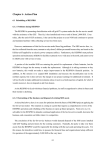
The game in full action
Game view
The first thing that springs into view is called the game view. It is your main view on the action. Depicting yourself in
the center of the view at all times. It will show the ships, weapons when fired and the planets.
Each planet has a long name which appears on the local window, and a three letter abbreviation which appears on the
map. The color of the planet indicates its owner, which can be one of four team colors or gray for neutral.
Some planets will also have symbols near them. A person symbol means there are more than 4 armies on that planet
(and hence it can be bombed if it’s an enemy planet or beamed up from if its a friendly planet). A wrench symbol
means that the planet is a repair planet; while in orbit around this planet you will repair damage much faster that
usual. A gas can (looks like a sort of little box) means that the planet in question is a fuel planet, and you can refuel on
that planet. This is important, because although you regenerate fuel automatically if you are not constantly using it, a
fuel planet will fill you up much faster.
M a c Tr e k
14