1
Device configuration
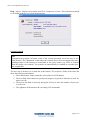
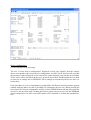
See the snapshot on the next page.
The text “Current device configuration” displayed on this page signifies that the settings
shown correspond to the current device configuration. In other words: this text tells you that
the parameter values displayed are the same as the values presently saved in the device RAM.
These values will be lost when the device is powered down. Most Tandberg Data devices hold
an extra set of settings also in EEPROM. These settings are assumed by the device after it is
powered up.
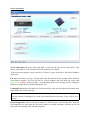
Each time these two sets of configuration settings differ, the Restore and Save buttons appears
enabled implying that a user has a possibility to synchronize the two sets. When pressing the
Save button, the current configuration will be saved in EEPROM and will thus be used at the
next boot. On the other hand, clicking the Restore button sets the device into the EEPROM
stored configuration. In either case both buttons will be disabled to confirm the synchronization.