1
Specifications
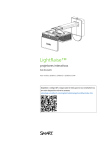
LightRaise™ 60wi2 interactive projector
Models SLR60wi2 and SLR60wi2-SMP
Overview
The LightRaise™ 60wi2 interactive projector is a wall-mounted, ultra-short-throw
projector that transforms any wall or dry-erase whiteboard into an interactive surface.
The interactive projector provides touch and pen-enabled input, enabling two users to
simultaneously write, draw and manipulate content in SMART Notebook™ collaborative
learning software using a finger and the interactive pens.
The LightRaise 60wi2-SMP interactive projector includes SMART Meeting Pro™
software, a SMART GoWire™ auto-launch cable with SMART Meeting Pro PE (Personal
Edition) software and a LightRaise projector control (XCP).
See smarttech.com for more information on this product.
smarttech.com/kb/170603
1
SPECIFICATIONS
LightRaise 60wi2 interactive projector – Models SLR60wi2 and SLR60wi2-SMP
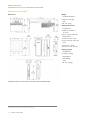
Dimensions and weights1
Dimensions
Weight
Projector and boom
35 lb. 8 oz. (16.1 kg)
XCP
2 lb. 3 oz. (1 kg)
Shipping dimensions
Projector box
23 5/8" W × 19 5/8" H ×
15 1/2" D
(60 cm × 50 cm × 39.5 cm)
Boom kit box
18 1/2" W × 10" H × 8" D
(47 cm × 25.4 cm × 20.3 cm)
XCP
18" W × 6" H × 19" D
(45.5 cm × 15 cm × 48 cm)
Shipping weight
Projector box
34 1/2 lb. (15.6 kg)
Boom kit box
15 lb. (6.8 kg)
XCP
4 lb. 3 oz. (1.9 kg)
LightRaise projector control (XCP) is included with the SLR60wi2-SMP
1 All dimensions ± 1/8" (0.3 cm). All weights ± 2 lb. (0.9 kg).
2
smarttech.com/kb/170603
SPECIFICATIONS
LightRaise 60wi2 interactive projector – Models SLR60wi2 and SLR60wi2-SMP
System requirements
SLR60wi2 system
requirements
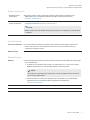
Windows® operating systems or Mac OS operating system sofware as detailed in the
SMART Notebook 11.4 software for Windows and Mac computers release notes
(smarttech.com/kb/170617).
SLR60wi2-SMP
system requirements
Windows® operating systems as detailed in the SMART Meeting Pro 4 software for Windows
computers release notes (smarttech.com/kb/170521).
NOTE
SMART GoWire cable with SMART Meeting Pro PE software is compatible only with Windows
computers.
USB connection
USB 1.1 full-speed for HID multitouch and SMART Support.
Projector features
Four-touch interaction
Four-touch interaction enables two people to draw, gesture and manipulate content on the
surface at the same time. The interactive surface can be touched simultaneously by a
combination of fingers and pens.
USB connection
USB 1.1 full-speed for HID multitouch and SMART Support.
Standard features
Software
Interact with applications, perform mouse functions and write and erase digital ink using a finger
or the interactive pen.
l For basic mouse operations with a finger or an interactive pen, you don’t need to install
SMART Product Drivers on computers with Windows operating systems.
NOTE
If your Windows operating system is Windows 7 or later, it supports dual touch and has
pen and finger differentiation.
l
Advanced features, including the calligraphic pen, are available if you install SMART
software from the included DVD. Software upgrades are available from
smarttech.com/downloads.
Aspect ratio
16:10 with support for 16:9, 4:3 and 5:4 with scaling.
Contrast ratio
2900:1
smarttech.com/kb/170603
3
SPECIFICATIONS
LightRaise 60wi2 interactive projector – Models SLR60wi2 and SLR60wi2-SMP
Projected image size range and ceiling clearance
NOTE
The interactive areas listed are for projecting onto a blank, vertical wall. When projected onto an existing whiteboard, the
maximum diagonal area size reduces by 1 1/2" (3.8 cm) for each 1/2" (1.3 cm) of whiteboard thickness. For more
information about interactive area sizes and ceiling clearances, see the LightRaise interactive projector user's guide
(smarttech.com/kb/170295).
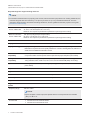
Minimum interactive
area on a blank wall
67" (170.2 cm) diagonal (4:3 aspect ratio)
35 1/2" H × 56 3/4" W (90.2 cm × 144.1 cm)
Minimum 15 1/2" (39.4 cm) clearance required from top of image area to ceiling
Maximum interactive
area on a blank wall
100" (254 cm) diagonal (16:10 aspect ratio)
84 3/4" H × 53" W (215.3 cm × 134.6 cm)
Minimum 19 1/4" (48.9 cm) clearance required from top of image area to ceiling
Throw ratio
0.35:1
Display resolution
WXGA 1280 × 800
Display technology
The projection engine uses DLP® technology by Texas Instruments™, providing
BrilliantColor™ performance and quality Gamma 2.2 correction with Bright Room, Dark Room,
sRGB, User and SMART Presentation modes.
Video interface
compatibility
HDCP compliant HDMI™, Composite, VESA® RGB with additional interface support for
Component YPbPr and Component YCbCr inputs with the proper adapters (not included)
Video system
compatibility
HDTV (720p and 1080p) video system compatibility and HD Ready (HDMI technology and
720p) available, NTSC, NTSC 4:43, PAL, PAL-N, PAL-M and SECAM (480i/p and 576i/p)
Synchronization
Auto image synchronization (auto tracking, frequency, position adjustment, source detect and
phase detect)
Keystone correction
Corrects for projector tilt ±15º
Brightness
Standard
3000 lumens 230 W mode at a CCT of 6500 K by the IEC method
Economy
2400 lumens 190 W mode at a CCT of 6500 K by the IEC method
Lamp life
3000 hours in Standard 230 W mode. 4000 hours in Economy 190 W mode.
Integrated loud
speaker
9 W rms
Frequency range
100 Hz to 5 kHz
NOTE
At power amplifier nominal output, the speaker delivers a sound pressure level of 80 dB
(SPL) ± 3 dB at 1 m.
Acoustic THD
l
l
4
smarttech.com/kb/170603
Less than 3% from 100 Hz to 500 Hz
Less than 2% from 500 Hz to 5 kHz
SPECIFICATIONS
LightRaise 60wi2 interactive projector – Models SLR60wi2 and SLR60wi2-SMP
External management
Infrared remote control, RS-232 control port, internal web page, Crestron® RoomView®
management via Ethernet
SMART GoWire cable
When you connect your SMART GoWire cable to a computer with a Windows operating system,
SMART Meeting Pro PE software starts automatically. For more information, see the
SMART GoWire cable specifications (smarttech.com/kb/151506).
LightRaise projector
control (XCP)
Connect a single USB cable to the SMART connect port for an all-in-one audio, video and data
connection to your computer. The XCP features built-in composite connectors, as well as a
multi-pin recessed connector used to connect VGA or HDMI adapters. DisplayLink™ drivers are
required and are included with every XCP. For more information, see the LightRaise interactive
projector user's guide (smarttech.com/kb/170295).
Projector connections and included cables
Theft protection
The projector system features a padlock ring to prevent theft. A padlock isn’t included. The
Kensington® security slot can function as a visual and physical theft deterrent.
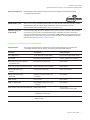
Connector
Connects to
Cable provided
8 pin TDM socket
Touch detection module (TDM)
Light curtain, Pigtail (strain relief)
Touch USB
Computer for touch detection
16' (5m) USB A to mini-B cable
Balanced 3.5 mm phono jack for
microphone input
Microphone (not included)
Not included
Stereo 3.5 mm phono jack for line output
External speakers (not included)
Not included
DB15F RGB video input
(VGA 1)
Computer (not included)
16' (5 m) VGA cable
DB15F RGB video output
(VGA Out)
Optional secondary display (not
included)
Not included
DB9F RS-232
Room control
Not included
HDMI 1.4 digital input
High-definition video source (not
included)
Not included
Power (100 V–240 VAC at 50 Hz–60 Hz)
Mains power source
14' 9" (4.5 m)
country-specific power cable
Service USB
Computer for projector firmware
upgrading (not included)
Not included
RJ45 (Ethernet connector)
Network (for web page management and
SNMP access)
Not included
smarttech.com/kb/170603
5
SPECIFICATIONS
LightRaise 60wi2 interactive projector – Models SLR60wi2 and SLR60wi2-SMP
Connector
Connects to
Cable provided
7-pin mini-DIN for XCP data
LightRaise projector control (XCP)
harness cable (cable connected to
XCP)
Included with SLR60wi2-SMP
4-pin power mini-DIN 5V/2A output for
XCP USB HUB/switch power
LightRaise projector control (XCP) (cable
connected to XCP)
Included with SLR60wi2-SMP
RCA composite video input (and left and
right RCA audio input)
Video source (not included)
Not included
Stereo 3.5 mm phone jack audio input for
stereo input associated with the VGA
input
Computer (not included)
Not included
Interactive touch and pen features
Interactive technology
Pen features
A computer vision-based SMART touch detection system tracks dual finger touch using an
infrared source, as well as dual interactive and synchronized infrared pen, on any reasonably
flat surface.
l
Active tip switch
l
Power switch
l
Pen automatically turns off when not in use to prolong battery life
l
One tri-colored LED: green (operational), amber (battery charging required), red (fault)
l
SoftTouch texture for improved finger grip
l
USB mini-B connection for battery charging
l
9' 10" (3 m) USB cable for battery charging
Power requirements
Approximately two hours to charge the lithium-ion battery using the included 9' 10" (3 m) USB
mini-B cable and USB charger. A complete charge typically provides at least two days of
continuous use.
Pen holder
The lockable pen holder protects up to two interactive pens while they charge. It also has a
magnetic mounting option and storage space for the remote control.
Pen battery charger
USB charger for direct pen charging.
Installation
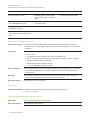
Installation instructions Installation instructions are included in the projector box and are online at
smarttech.com/support.
Electrical requirements and interface details
Power cable
Country-specific IEC 60320 C14 power cable
Power requirements
100V–240V AC at 50 Hz–60 Hz
6
smarttech.com/kb/170603
SPECIFICATIONS
LightRaise 60wi2 interactive projector – Models SLR60wi2 and SLR60wi2-SMP
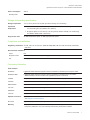
Power consumption
Standby mode
360 W
0.5 W
Storage and operating specifications
Storage temperature
-4°F to 122°F (-20°C to 50°C) with up to 80% humidity, non-condensing
Operational
temperature
Projector fan noise
l
At standard fan speed 41°F to 95°F (5°C to 35°C) with up to 80% humidity,
non-condensing from 0' to 6000' (0 m to 1800 m)
l
At high fan speed: 41°F to 95°F (5°C to 35°C) with up to 80% humidity, non-condensing
from 6000' to 6800' (1800 m to 2100 m)
32 dBA standard fan speed. 37 dBA high speed fan speed.
Compliance and certification
Regulatory certification CE, CB, CCC, CE, C-Tick, FCC, GOST-R, NOM, PSB, PSE, TUV-GS, UL/CSA (U.S./Canada)
and VCCI
Environmental compliance
China
EIP
European Union
REACH, RoHS, WEEE, Battery, Packaging and ErP Standby
U.S.
Packaging and Conflict Minerals
Purchasing information
Order numbers
SLR60wi2
LightRaise 60wi2 interactive projector with touch detection, interactive pens and pen holder
SLR60wi2-SMP
LightRaise 60wi2 interactive projector with touch detection, interactive pens, pen holder,
SMART GoWire auto-launch cable and LightRaise projector control XCP
1020991
Lamp module replacement kit for the LightRaise 60wi2 interactive projector
1018949
Replacement touch detection module
RPEN-SLR60
Replacement interactive pen for the LightRaise 60wi2 interactive projector
1017709
Replacement pen holder for the LightRaise 60wi2 interactive projector
GW-MPPE
SMART GoWire auto-launch cable with SMART Meeting Pro PE software
1013576
Projector hardware kit (smarttech.com/kb/160505)
Optional accessories
For more information on additional accessories for your LightRaise 60wi2 interactive projector,
see smarttech.com/accessories.
SLR-XCP
LightRaise projector control (XCP)
Warranty
The projector and interactive pens have a three-year limited equipment warranty. The projector
lamp has a 1000-hour / one-year warranty. See warranty documents for details.
smarttech.com/kb/170603
7
SPECIFICATIONS
LightRaise 60wi2 interactive projector – Models SLR60wi2 and SLR60wi2-SMP
smarttech.com/support
smarttech.com/contactsupport
© 2012-2014 SMART Technologies ULC. All rights reserved. LightRaise, SMART Notebook, SMART Meeting Pro, SMART GoWire, smarttech, the SMART logo and all SMART taglines are
trademarks or registered trademarks of SMART Technologies ULC in the U.S. and/or other countries. All third-party product and company names may be trademarks of their respective owners. This
product and/or use thereof covered by one or more of the following U.S. patents. www.smarttech.com/patents. Contents are subject to change without notice. 01/2014.
8
smarttech.com/kb/170603