1
EUROPEAN
SOUTHERN
OBSERVATORY
Organisation Européenne pour des Recherches Astronomiques dans l’Hémisphère Austral
Europäische Organisation für astronomische Forschung in der südlichen Hemisphäre
VERY LARGE TELESCOPE
Data Flow System
OLAS Operator’s Guide
Doc.No. VLT-MAN-ESO-19400-1557
Issue 2
Date 19/6/02
Prepared
S. Zampieri
Name
Approved
Signature
M.Peron
Name
Released
Date
Date
Signature
P.Quinn
Name
Date
Signature
ESO
Doc: VLT-MAN-ESO-19400-1557
Issue 2
Date: 19/6/02
Page: 2
OLAS Operator’s Guide
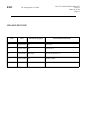
CHANGE RECORD
Issue
Date
Affected Paragraph(s)
Reason/Initiation/Remarks
1.0
20 Jan 1998
All
First Issue
1.1
22 Feb 1999
All
Second Issue
1.2
19 Jan 2000
Man Pages
Revised for OLAS-3.6.6
2.0
12 Apr 2002
All
General Update
ESO
OLAS Operator’s Guide
1 Introduction
1.1
1.2
1.3
4.2
9
VCS-OLAS interface . . . . . . . . . . . . . . . . . . . . . . . . . . . . . . . . . . . . . . . . . . . . . . . . . . . . . . . . . . .9
OLAS-Pipeline interface . . . . . . . . . . . . . . . . . . . . . . . . . . . . . . . . . . . . . . . . . . . . . . . . . . . . . . . .9
Pipeline-OLAS interface . . . . . . . . . . . . . . . . . . . . . . . . . . . . . . . . . . . . . . . . . . . . . . . . . . . . . . . .9
OLAS-User Workstation interface. . . . . . . . . . . . . . . . . . . . . . . . . . . . . . . . . . . . . . . . . . . . . . .10
OLAS-ASTO interface . . . . . . . . . . . . . . . . . . . . . . . . . . . . . . . . . . . . . . . . . . . . . . . . . . . . . . . . .10
4 Component Description
4.1
7
The OLAS Applications . . . . . . . . . . . . . . . . . . . . . . . . . . . . . . . . . . . . . . . . . . . . . . . . . . . . . . . .8
3 System Context
3.1
3.2
3.3
3.4
3.5
5
Purpose and Scope. . . . . . . . . . . . . . . . . . . . . . . . . . . . . . . . . . . . . . . . . . . . . . . . . . . . . . . . . . . . .5
Applicable Documents . . . . . . . . . . . . . . . . . . . . . . . . . . . . . . . . . . . . . . . . . . . . . . . . . . . . . . . . .5
Abbreviations and Acronyms . . . . . . . . . . . . . . . . . . . . . . . . . . . . . . . . . . . . . . . . . . . . . . . . . . .5
2 System Overview
2.1
Doc: VLT-MAN-ESO-19400-1557
Issue 2
Date: 18/6/02
Page: 3
11
Processes . . . . . . . . . . . . . . . . . . . . . . . . . . . . . . . . . . . . . . . . . . . . . . . . . . . . . . . . . . . . . . . . . . . .11
4.1.1 vcsolac (sendDHS). . . . . . . . . . . . . . . . . . . . . . . . . . . . . . . . . . . . . . . . . . . . . . . . . . . . . .11
4.1.2 DHS . . . . . . . . . . . . . . . . . . . . . . . . . . . . . . . . . . . . . . . . . . . . . . . . . . . . . . . . . . . . . . . . . .12
4.1.3 DhsSubscribe . . . . . . . . . . . . . . . . . . . . . . . . . . . . . . . . . . . . . . . . . . . . . . . . . . . . . . . . . .14
4.1.4 FrameIngest . . . . . . . . . . . . . . . . . . . . . . . . . . . . . . . . . . . . . . . . . . . . . . . . . . . . . . . . . . .15
OLAS Tasks Interfaces. . . . . . . . . . . . . . . . . . . . . . . . . . . . . . . . . . . . . . . . . . . . . . . . . . . . . . . . .16
4.2.1 Message file naming convention . . . . . . . . . . . . . . . . . . . . . . . . . . . . . . . . . . . . . . . . . .16
4.2.2 FITS files naming convention . . . . . . . . . . . . . . . . . . . . . . . . . . . . . . . . . . . . . . . . . . . .17
4.2.3 Non FITS files naming convention . . . . . . . . . . . . . . . . . . . . . . . . . . . . . . . . . . . . . . . .17
4.2.4 Erroneous Files naming convention . . . . . . . . . . . . . . . . . . . . . . . . . . . . . . . . . . . . . . .18
4.2.5 Messages . . . . . . . . . . . . . . . . . . . . . . . . . . . . . . . . . . . . . . . . . . . . . . . . . . . . . . . . . . . . . .18
5 Environment Variables
21
6 Increasing the OLAS cache
23
7 Starting - stopping a subscriber
25
7.1
7.2
7.3
Starting a subscriber . . . . . . . . . . . . . . . . . . . . . . . . . . . . . . . . . . . . . . . . . . . . . . . . . . . . . . . . . .25
Shutting down a subscriber . . . . . . . . . . . . . . . . . . . . . . . . . . . . . . . . . . . . . . . . . . . . . . . . . . . .25
Shutting down manually . . . . . . . . . . . . . . . . . . . . . . . . . . . . . . . . . . . . . . . . . . . . . . . . . . . . . .26
8 Requesting old data (backlog)
8.1
27
Backlog directory . . . . . . . . . . . . . . . . . . . . . . . . . . . . . . . . . . . . . . . . . . . . . . . . . . . . . . . . . . . . .27
9 How the supervisor (watch-dog) works
29
10 Deleting temporary files
31
ESO
OLAS Operator’s Guide
11 Troubleshooting
11.1
11.2
11.3
11.4
11.5
11.6
Doc: VLT-MAN-ESO-19400-1557
Issue 2
Date: 18/6/02
Page: 4
33
DHS filesystem full . . . . . . . . . . . . . . . . . . . . . . . . . . . . . . . . . . . . . . . . . . . . . . . . . . . . . . . . . . .33
dhsSubscribe filesystem full . . . . . . . . . . . . . . . . . . . . . . . . . . . . . . . . . . . . . . . . . . . . . . . . . . . .33
Network or workstation is down . . . . . . . . . . . . . . . . . . . . . . . . . . . . . . . . . . . . . . . . . . . . . . .33
Backlog does not work . . . . . . . . . . . . . . . . . . . . . . . . . . . . . . . . . . . . . . . . . . . . . . . . . . . . . . . .34
Database is down . . . . . . . . . . . . . . . . . . . . . . . . . . . . . . . . . . . . . . . . . . . . . . . . . . . . . . . . . . . . .34
Files in BAD_DIR . . . . . . . . . . . . . . . . . . . . . . . . . . . . . . . . . . . . . . . . . . . . . . . . . . . . . . . . . . . . .34
Appendix: Application Manual Pages
37
ESO
1
OLAS Operator’s Guide
Doc: VLT-MAN-ESO-19400-1557
Issue 2
Date: 18/6/02
Page: 5
Introduction
1.1
Purpose and Scope
This document is the operator’s guide for the On-Line Archive System (OLAS). In the first chapters
(2-5) a general description of OLAS is given, while the second part of this document (6-11) is about
the operational aspects of running OLAS, like starting and stopping the processes, troubleshooting
etc. The Appendix contains the UNIX man pages of the various OLAS tasks.
While reading this document, you will notice the following conventions:
• courier font: used for commands and filenames.
• Italic or bold or underlined: used for special terminology or to highlight words.
1.2
Applicable Documents
The following documents are referenced in this document
[1] VLT-ICD-ESO-17240-19400 - Interface Control Document between VLT Control Software and
VLT Archive System
[2] VLT-SPE-ESO-19400-1530 - OLAS Architectural Design Document
[3] VLT-SPE-ESO-19000-1614 - VLT Data Flow System Database Design Document
[4] VLT-SPE-ESO-19000-1780 - Data Flow System High Level User’s guide
[5] VLT-MAN-ESO-19000-2050 - DFS Software FTU Fits Translation Utility User Manual
[6] VLT-MAN-ESO-19300-2367 - dataSubscriber User Guide
[7] VLT-MAN-ESO-19000-1827 - DFSLog User’s Guide
[8] VLT-MAN-ESO-19300-2363 - astoControl User’s Guide
1.3
Abbreviations and Acronyms
The following abbreviations and acronyms are used in this document:
ASM
Astronomical Site Monitor
ASTO
Archive Storage Subsystem
CCS
(VCS) Central Control System
DICB
Data Interface Control Board
DFS
Data Flow System
DHS
Data Handling Server
DMD
Data Management Division
FTU
Fits Translation Utility
FITS
Flexible Image Transport System
FWHM
Full Width at Half Maximum
GUI
Graphical User Interface
ICD
Interface Control Document
ESO
OLAS Operator’s Guide
ICS
Instrument Control Software
LAN
Local Area Network
LCU
Local Control Unit
N/A
Not Applicable
OLAC
On-Line Archive Client
OLAF
On-Line Archive Facility
OLAS
On-Line Archive Subsystem
OS
Observation Software
PAF
VLT Parameter File
SW
Software
TBC
To be Confirmed
TBD
To be Defined
TCS
Telescope Control Software
VCS
VLT Control Software
VLT
Very Large Telescope
VOLAC
VCS OLAC Client
WS
Workstation
Doc: VLT-MAN-ESO-19400-1557
Issue 2
Date: 18/6/02
Page: 6
ESO
2
Doc: VLT-MAN-ESO-19400-1557
Issue 2
Date: 18/6/02
Page: 7
OLAS Operator’s Guide
System Overview
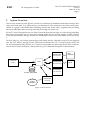
The On-Line Archive System (OLAS) consists of a collection of distributed tasks that exchange messages and “bulk data” (e.g. FITS frames) over the network. The architecture of OLAS can be represented as a graph, with a DHS (Data Handling Server) task at the centre, supplier tasks providing
data and subscriber tasks receiving data and processing it in some way.
Each VLT Unit Telescope has its own DHS, where the data files are kept on a safe storage until they
have been successfully put on long-term storage media by the Archive Storage System (ASTO).
From the intermediate storage, the data are distributed to the on-line subscribers, as shown in Fig.
1.
All new data (e.g. raw frames, meteorology and seeing records, other files from VCS) are ingested
into the VLT archive through OLAS. The interface between the VLT Control System (VCS) and
OLAS is implemented by VOLAC, a CCS process responsible for delivering all new files to the OnLine Archive Client (VCSOLAC). Please refer to [1] for a detailed description of this interface.
dhsSubscribe
(RAW subscriber)
VCSOLAC
dhsSubscribe
DHS
(supplier)
(ASTO subscriber)
dhsSubscribe
(User subscriber)
Storage Intermediate
frameIngest
On-line
Archive
Database
(subscriber)
Figure 1: OLAS System
Data
Organizer
ASTO
ESO
2.1
OLAS Operator’s Guide
Doc: VLT-MAN-ESO-19400-1557
Issue 2
Date: 18/6/02
Page: 8
The OLAS Applications
A general description of the OLAS applications is given below:
• vcsolac is the entry point for bulk data (FITS frames, log and control files). It polls a given
directory for symbolic links to read-only files with any suffix (special suffixes are .fits, .paf or
.*log) and transfers each file to the DHS task on a given host. After a file has been successfully
transferred, the link is removed and the original file permissions are changed to read-write. In
case the transfer fails, vcsolac attempts to send again the file until it has been successfully
transferred. See [1] for a detailed description of the interface between VCS and OLAS.
• dhs the role of DHS is the intermediate storage of files and their delivery to the subscribers.
DHS keeps a list of subscriber tasks for a given file type (FITS, PAF or LOG files). Each file
received from vcsolac is forwarded to the subscribers for that file type. Client authentication is
performed by DHS on every subscribe/supply request in order to enforce data rights.
• frameIngest prepares a summary record for each new frame and ingests it into the
observations database. It also inserts into the ambient database all new meteorological and
seeing measurements delivered by the Astronomical Site Monitor (ASM).
• dhsSubscribe is the subscriber task designed for a generic use. This task provides the
possibility to run, on each received bulk message, a user-defined command (e.g. gzip). With
the backlog option it is possible to request backlog data, i.e. already processed data belonging
to a specified time range.
• dataSubscriber is a front end tool to dhsSubscribe that simplify the subscription to the DHS
task. It allows to configure the dhsSubscribe process, including the definition of the file
renaming schema, the creation of the fits translation table and the specification of the time
range for backlog operations. Moreover, with the dataSubscriber GUI it is possible to monitor
the file transfer and to start and stop the subscription, in a safe and user friendly way. For more
details about the dataSubscriber see [6].
The following tool is not part of OLAS, but it’s worth to mention because it can be used to monitor
the OLAS operations.
• dfslog is the front end tool to the DFSLog System, that is the system responsible for logging all
the DFS events and messages. The dfslog GUI allows easy browsing, filtering and reporting of
archived messages and can be used in particular to monitor the OLAS operations. For more
information about the DFSLog System, please refer to [7].
ESO
3
Doc: VLT-MAN-ESO-19400-1557
Issue 2
Date: 18/6/02
Page: 9
OLAS Operator’s Guide
System Context
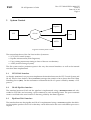
Pipeline
VCS
OLAS
User
ASTO
Figure 2: OLAS System Context
The external interfaces of the On Line Archive System are:
• VCS (VLT Control System)
• Pipeline infrastructure (Data Organizer)
• User (visiting astronomer sitting in front of the user workstation)
• ASTO (Archive Storage System)
The file system used as persistent queue is the way the external interfaces as well as the internal
ones have been implemented.
3.1
VCS-OLAS interface
As already mentioned, two processes implement the interface between the VLT Control System and
OLAS. The On-Line Archive Client (vcsolac) manages the transfer of new data to the OLAS Data
Handling Server (dhs). On the instrument workstation the OLAC queue is filled by volac, a CCS
process.
3.2
OLAS-Pipeline interface
The interface between OLAS and the pipeline is implemented using a dhsSubscribe task subscribed to FITS files and executing a post-command on each incoming frame. The post-command
creates a soft link to the new frame in a directory polled by the Data Organizer.
3.3
Pipeline-OLAS interface
The interface between the pipeline and OLAS is implemented using a vcsolac supplier that delivers the pipeline products to OLAS so that they can be delivered to the user workstation upon user’s
request.
ESO
3.4
OLAS Operator’s Guide
Doc: VLT-MAN-ESO-19400-1557
Issue 2
Date: 18/6/02
Page: 10
OLAS-User Workstation interface
Raw and reduced files are delivered to the user workstation using two dhsSubscribe applications that implement optional header translation by running fitsTranslate (FITS Translation
Utility) as a post-command. For more information about FTU, please refer to [5].
3.5
OLAS-ASTO interface
All new frames are delivered to ASTO for permanent archiving. The interface between OLAS and
ASTO is implemented using a dhsSubscribe application to copy the frames to the ASTO workstation. On each received frame the postArrival command is applied, to detect the frame type
(FITS, LOG, ...) and category (for FITS only, Science or Calibration), to move the frame to the relevant ASTO staging area (segregation) after compression and to write an entry in the database asto,
which is the acknowledgment that the file is ready for being archived.
The standard way of starting and stopping the subscriber task on the ASTO workstation is through
the GUI astoControl, as described in [8].
ESO
4
OLAS Operator’s Guide
Doc: VLT-MAN-ESO-19400-1557
Issue 2
Date: 18/6/02
Page: 11
Component Description
This chapter contains a detailed description of the OLAS components. In paragraph 4.1 the OLAS
tasks (vcsolac, dhs, frameIngest, dhsSubscribe) are described, while paragraph 4.2 is about the
OLAS protocol, in particular the file naming conventions and the messages exchanged between the
various applications.
4.1
Processes
The On-Line Archive System is based on a client-server architecture, with one server task and three
client tasks. The OLAS tasks are:
• vcsolac
• dhs
• dhsSubscribe
• frameIngest
At run time, each process is uniquely identified by its hostname and, optionally, by a supplementary identification string, so that multiple instances of the same process can run on the same host under the same user account.
The server task is dhs: it receives the incoming bulk messages from the supplier task vcsolac and
forwards them to the running subscriber tasks dhsSubscribe and frameIngest.
The various tasks exchange three types of messages: bulk, plain and ctrl. The bulk messages contain
the actual data (FITS, PAF, LOG or other files). The plain messages can contain a request to the server or some information returned by the server. The ctrl messages follow some plain messages and
contain information needed by the server task to locate its clients. All the messages are transferred
using the rcp (remote copy) command. In the OLAS protocol, the filenames of the message files are
also used to convey information, e.g. the type of message, the sending task, the target task, etc. To
prevent that the receiving task reads the message before the transfer has been completed, the files
are first transferred with a temporary name, obtained by adding the suffix .tmp to the original
name, then, if the transfer has been successfully completed, the file is renamed through a remote
shell command. For a detailed description of the OLAS messages and of the file naming conventions, see paragraph 4.2.
For a detailed description of the specific usage of the various tasks, please refer to the relevant manual pages in appendix A.
4.1.1
vcsolac (sendDHS)
The task vcsolac belongs to the category of supplier tasks. At start up, it sends a plain message to dhs
containing a SUPPLY request, followed by a ctrl message containing the information needed by dhs
to locate the supplier task. In order to deliver messages to the Data Handling Server, vcsolac needs
to read the relevant information (user, host, directory) from the command line option -supply or
from the environment variable $DHS_CONFIG. Vcsolac polls a given directory (usually the one
identified by the environment variable $DHS_DATA) looking for soft links to read-only files. The
files are processed in chronological order, older first, according to the time of last modification. In
case the link does not point to a read-only file, it is removed and an error message is written in the
log file. Before delivering a FITS frame, vcsolac loads it with standard library cfitsio, where some
format consistency checks are also performed. In case of detection of a bad frame, an error message
ESO
OLAS Operator’s Guide
Doc: VLT-MAN-ESO-19400-1557
Issue 2
Date: 18/6/02
Page: 12
is written into the log file but the file is delivered anyway. All the files processed by vcsolac are transferred to dhs.
Once the transfer has been successfully completed, the soft-link in the polling directory is removed
and the file permission are changed to read-write, so that the VCS knows that the file was safely archived and can be removed from the OLAC queue. In case the transfer fails, vcsolac attempts to
send the file again, until it is successfully transferred. At each attempt, the time interval between
one attempt and the following is incremented of 30 seconds until a maximum of 5 minutes is
reached.
When the task receives a signal (e.g. via the UNIX kill command), it sends to DHS a plain message with an UNSUBSCRIBE request and exits. In case of SIGQUIT signal, it terminates to process
the current message before quitting.
Another task performed by vcsolac is to transfer its log file to DHS once a day, at noon, when the
current log file is closed and a new one is created.
Vcsolac can optionally (see option -logdb) record its operations in the database table olas_log (see
[3]): for each file processed it logs the exit status in this table. For FITS files, the task records in the
info field the name of the original file. In case of failure, the error message will be stored in the info
field. This operation is executed by a child process, spawned each time, in order not to block the operations of vcsolac.
sendDHS is the command line version of vcsolac. Its task is to send one file to a given DHS and
then exit, even if the transfer failed. The required options are -filename to specify the pathname
of the file to be transferred and -supply to specify where to deliver the file. The file is transferred
according to the specifications of the OLAS protocol. For more details about the usage of sendDHS,
please refer to its man page.
4.1.2
DHS
DHS is the server task of the OLAS application. It receives incoming bulk messages from the suppliers and sends them to the registered subscribers. A DHS task can also subscribe to another DHS,
and then act as a client.
DHS accepts subscription messages from suppliers and subscribers: the suppliers must provide
only a password in order to be registered, while the subscribers must provide, at least, the password, the type of bulk messages requested (FITS frames, Operations Log files, PAF files, All files)
and the address where the messages should be delivered. DHS will process the bulk messages received by the suppliers and forward them to the registered subscribers.
DHS polls its polling directory (usually the one identified by the environment variable $DHS_LOG)
looking for messages addressed to itself with the suffix .bulk, .ctrl or .plain. The messages are sorted
first by file type (.ctrl and .plain messages are processed before .bulk messages) and then by sequence number (see chapter 4.2).
The plain files contain the requests coming from the client tasks, while the ctrl files contain the information needed by DHS to localize the clients (see chapter 4.2). The bulk messages contain the actual
data (FITS frames, Operations Log files or PAF files).
DHS generates the archive file name for the FITS frames. The archive file name must be unique
across the Data Flow System and within the ESO Science Archive. For this reason, the archive file
name is based on the observation date time, read from the keyword MJD-OBS, and on the supplier
ID, read by the supplier from the variable $OLAS_ID and delivered to DHS together with the bulk
ESO
OLAS Operator’s Guide
Doc: VLT-MAN-ESO-19400-1557
Issue 2
Date: 18/6/02
Page: 13
message. The format of the archive filename is then $OLAS_ID.YYYY-MM-DDThh:m:ss.mss.fits and
this is enough to guarantee its uniqueness, at least for the instruments that can generate only one
frame at a time. Some multi-chip VLT instruments can actually produce two or more files at the
same time, with the same MJD-OBS and same supplier ID, thus the same archive filename would be
generated by DHS, according to the schema described above. In such cases of filename collision, in
order to determine whether the incoming file is just a duplicate of an already archived file or a different file with the same archive file name, DHS reads the keyword DET.CHIP1.ID (or
DET.CHIP.ID or DET.NAME, if the previous are not defined). If the chip ID is the same, the new
frame is considered a duplicate and will be moved to $BAD_DIR with the prefix EDUP, otherwise
one or more milliseconds are added to the datetime part of the filename until a unique filename is
found. In case the keyword MJD-OBS is not present or its value is not valid (it must be greater than
48347.0, that corresponds to 01 Apr 1991) or the frame is corrupted or it isn’t a valid FITS file (according to the standard library cfitsio used to read the file) or it is a duplicate file (according to the
procedure described above), the file is not processed and it is moved to $BAD_DIR with a special
filename in order to allow an easy classification of erroneous frames (see chapter 4.2). For files other
than FITS frames, the uniqueness is guaranteed by adding a numerical suffix to the filename in case
a file with the same name is already present under $DHS_DATA.
DHS adds 4 keywords to the header of raw FITS files: ORIGFILE (“original” filename at the instrument WS), ARCFILE (archive filename), CHECKSUM (ASCII 1’s complement checksum) and
ARC.DID (Archive Dictionary). If the frame was delivered by another DHS task (DHS can act as a
client of another DHS), the keywords ORIGFILE and ARCFILE are not added, while the checksum
is computed again and compared to the one written in the file header, in order to verify the file integrity.
FITS tables (pipeline products with extension .tfits) are handled as type “other”, no check is done.
After having checked the file, created the archive filename and added the keywords to the FITS
header, DHS stores the received frame in the data directory ($DHS_DATA), by creating a hard link
to the bulk message. The bulk message under $DHS_LOG is then kept until it has been delivered to
all the registered subscribers, then it is removed.
The bulk messages are delivered to the subscribers, depending on the subscription options (see filetype and -where options). A generic subscriber can subscribe to only one type of bulk messages (FITS frames, Operations logs, PAF files) or to all types of bulk messages. FrameIngest receives all types of files. In case of problems (e.g. network down or file system full on the target host)
while sending a bulk message to a subscriber, DHS will remove the client from the subscriber’s list
and send a RESUBSCRIBE message (see chapter 4.2) to it, so it can continue to process the incoming
messages without blocking. The delivery of the RESUBSCRIBE message is executed by a child process of DHS.
One of the most important tasks performed by DHS is the delivery of backlog data to the subscribers. Upon subscription, a subscriber can request the missing files already processed by DHS. DHS
sends then the list of available files within the specified period, and the subscriber can actually request the missing files among those. By default, the backlog activity is performed for the current UT
night, but a different time range can be specified through the options -backsince and -backto.
An example of backlog activity is when DHS sends a RESUBSCRIBE command to a subscriber, after
an error has occurred during the delivery of a message. In this case, the subscriber needs to request
backlog data to DHS upon a new subscription, to guarantee that no messages are lost. The backlog
is performed following this protocol:
1. upon subscription to DHS, the subscriber can specify the time range for backlog operations
(see options -backsince and -backto).
ESO
OLAS Operator’s Guide
Doc: VLT-MAN-ESO-19400-1557
Issue 2
Date: 18/6/02
Page: 14
2. DHS sends back to the subscriber a message (see HAVE message in chapter 4.2) containing the
list of files belonging the period specified by the subscriber and still available in the DHS data
directory. This list can be empty.
3. the subscriber checks the HAVE message for files missing from the local data repository, and
sends to DHS a REQUEST message containing the list of missing files. Instead of the local data
repository, frameingest checks the database tables data_products and dp_others (see [3]).
4. upon reception of the REQUEST message, DHS delivers the missing files to the subscriber.
When the task receives a signal (e.g. UNIX kill command), it exits. In case of signal SIGQUIT, it
terminates to process the current message before quitting.
DHS can optionally record its operations in the database table olas_log (see [3]). For each file processed, a row is created in this table, containing the exit status and some other information. In case of
failure, the error message and, if applicable, the bad file name (see the paragraph Erroneous Files
naming convention in chapter 4.2) are also logged. This operation is executed by a child process,
spawned each time, in order not to block the nominal operations of DHS.
4.1.3
DhsSubscribe
DhsSubscribe is the generic subscriber task. It provides the possibility to run, on each received bulk
message, a user-defined command (e.g. gzip). It also allows to receive only the frames that satisfy a
given combination of keyword-value pairs, specified through the option -where (see man page for
the details). It is possible to run several instances of dhsSubscribe on the same host under the same
account, by assigning a different identifier to them (see option -id). Reserved IDs are the ones that
contains the following substrings: “RAW” (subscriber to raw data), “RED” (subscriber to reduced
data), “ASTO” (subscriber on ASTO machine), “PIPE” (subscriber on Pipeline machine).
At start-up, dhsSubscribe processes the left-over messages from the previous run, then it subscribes
to a DHS task (see SUBSCRIBE message in chapter 4.2) by specifying which type of bulk messages it
wants to receive (FITS frames, Operations logs, PAF files or All files) and the options related to the
backlog. By default, the backlog is requested only for the current night, but another time range can
be specified through the options -backsince and -backto.
In case the filesystem where dhsSubscribe receives the incoming messages gets full, DHS will remove the subscriber from its clients list and sends a RESUBSCRIBE message to dhsSubscribe.
DhsSubscribe will terminate to process the pending messages and then wait until at least 100 MB of
disk space are made available, before subscribing again to DHS with the same backlog options as
defined at start-up.
Through the option -backlogdir it is possible to specify a directory where a soft link is created
for each file successfully processed by dhsSubscribe. This allows to keep a record of the received
files in order not to request them again during the next backlog operation. The soft links have
unique (archive) filenames, while the physical files could have been moved or renamed by the postcommand. For this reason, it is mandatory to specify a backlog directory different from the data directory
when the option -run or -rename is used.
The -run option is used to apply a user-defined command on each incoming file. For example, the
dhsSubscribe tasks running on the ASTO machine apply the postArrival script to the incoming files
in order to forward them to the ASTO subsystem, according to the OLAS-ASTO interface described
above.
The -rename option can be used to rename the FITS frames according to one of the following pos-
ESO
OLAS Operator’s Guide
Doc: VLT-MAN-ESO-19400-1557
Issue 2
Date: 18/6/02
Page: 15
sible schemes:
• with “-rename 0”, no file renaming is requested: the archive file name is used.
• with “-rename 1”, the file basename will be of the form <prefix>_ <nnnn>.fits, where
<prefix> is a string specified through the option -renamestring and <nnnn> is a 4 digits
number starting from 0001 and incremented until a non existing filename is found. In case the
maximum number (9999) is reached and no more filenames are available within this schema,
the archive file name will be used instead.
• with “-rename 2”, the frame will be renamed after the value of the FITS keyword specified
through the option -renamestring (e.g. ORIGFILE). In case a file with the same name
already exists in the data directory, a 4 digits suffix is added to the filename following the same
rule already explained for the previous schema. If the specified keyword does not exist or it is
empty, the archive file name will be used instead.
• with “-rename -1”, the rename schema is read from the database table rename_schema (see
[3]). This table must contain one and only one row. The column schema_id must have the value
1 or 2. The column schema_string must contain the file prefix if schema_id=1, or the FITS
keyword if schema_id=2.
When the task receives a signal, it exits and sends to DHS a plain messages with an UNSUBSCRIBE
request. In case of SIGQUIT signal, it terminates to process the current message before quitting.
DhsSubscribe can optionally record its operations in the database table olas_log (see [3]). For each
file processed, a row is created in this table, containing the exit status and some other information.
If the file renaming is enabled, the new name will be ingested in the info field. In case of failure
while processing the file (e.g. error during the execution of the post-command), the task will record
the error message in the info field. This operation is executed by a child process, spawned each time,
in order not to block the nominal operations of dhsSubscribe.
4.1.4
FrameIngest
FrameIngest is a subscriber task that subscribes to all files (FITS, PAF, LOG, OTH). For each file received it ingests a summary record into a given database table, as described below.
For FITS files, frameIngest reads a selection of header keywords and ingests their values into the table data_products of the database observations (see [3]).
For PAF files coming from the Astronomical Site Monitor, frameIngest reads a selection of keywords and ingests their values into the table seeing_paranal or into the table meteo_paranal of the
database ambient, depending on the type of data contained in the file (seeing or meteo information).
For files other than FITS or PAF, a record is ingested into the table observations..dp_others, containing only the file ID and the ingestion date.
The information needed to communicate with the Sybase database server (DB server, DB name,
user name, user password) are read from the file .dbrc in the user’s home directory. This file can
contain more lines, to support different database connections. Each connection is labelled with an
alias, which is the last field of each line. Frameingest will use the connection specified by the alias
DPREP, unless something different is specified with the option -dbalias.
Like dhsSubscribe, at start-up frameIngest processes the left-over messages from the previous run,
then it subscribes to a DHS task (see SUBSCRIBE message in chapter 4.2). By default, frameIngest
ESO
OLAS Operator’s Guide
Doc: VLT-MAN-ESO-19400-1557
Issue 2
Date: 18/6/02
Page: 16
requests to DHS the backlog data of the current UT night, following the protocol described in section 4.1.2 for backlog operations. Note that, unlike dhsSubscribe, frameIngest will use the database,
not the filesystem, to check for missing files, as already mentioned in paragraph 4.1.2. FrameIngest
can specify another time range for the backlog through the options -backsince and -backto.
When the task receives a signal, it exits and sends to DHS a plain messages with an UNSUBSCRIBE
request. In case of SIGQUIT signal, it waits for the completion of the processing of the current message before quitting.
FrameIngest can optionally record its operations in the database table olas_log (see [3]): in particular, the exit status and the error message (if any) are logged into this table for each file processed.
This operation is executed by a child process, spawned each time, in order not to block the nominal
operations of frameIngest.
FrameIngest can be also executed as a command line application to ingest just one file into the database. The pathname of the file to be ingested should be specified with the option -file. The command will read the relevant keywords from the file header, insert their values in the database and
quit immediately.
4.2
4.2.1
OLAS Tasks Interfaces
Message file naming convention
The OLAS tasks use the filesystem to exchange messages, i.e. the OLAS communication protocol is
based on files. The message files are created in a directory (polling directory) where the task is waiting for incoming messages to process (see [2] for more details). Hereafter a brief description of the
naming convention used for the message files is given. The file name of the messages is structured
as follow:
.<origin>,<seq>,<type>,<filename>,<from>,<to>.<suffix>
where:
• <origin>: for the plain and ctrl messages holds the dummy value "rcp". For the bulk messages
coming from a supplier task (vcsolac) it holds the source identifier (read by vcsolac from the
environment variable $OLAS_ID), which is a string of maximum 5 characters representing the
instrument that originated the file. For the bulk messages coming from a DHS task it holds the
corresponding night in the format YYYY-MM-DD (name of the directory where the file is
stored under $DHS_DATA).
• <seq>: contains a sequential number that uniquely identifies the message in the queue. The
start number is the UNIX process identifier (PID) of the corresponding task.
• <type>: is a number that indicates the type of message: 0 for PLAIN and CTRL messages, 1 for
FITS frames, 2 for PAF files, 3 for operations LOG files, and 5 for OTHER files.
• <filename>: for plain and ctrl message it holds the dummy value "xxx". For PAF and LOG files
it contains the file basename. For FITS frames coming from a supplier it contains the original
filename, otherwise it contains the value of the header keyword MJD-OBS.
• <from>: name of the task that originated the message.
• <to>: name of the target task.
ESO
OLAS Operator’s Guide
Doc: VLT-MAN-ESO-19400-1557
Issue 2
Date: 18/6/02
Page: 17
• <suffix>: string identifying the file category, i.e. whether the file contains bulk data or just a
message. The possible values are bulk, ctrl or plain.
The task names have the following format:
<task name>-<hostname>-<task id>
where:
• <task name> can have one of the following values: DHS, VCSOLAC, DhsSubscribe,
FrameIngest.
• <hostname> is the name of the host where the task is running.
• <task id> is an optional identification string, which is appended to the task name. It is
mandatory for those tasks that can have multiple instances running on the same host (e.g.
dhsSubscribe).
4.2.2
FITS files naming convention
As already described in section 4.1.2, DHS generates the archive filename (ARCFILE) for the incoming raw FITS frames, based on the MJD-OBS value. This name is then used to uniquely identify the
raw frames throughout the DFS. In OLAS, the processed files are stored under the directory identified by $DHS_DATA, with the following filename:
<UT-night>/<id>.<YYYY-MM-DDThh:mm:ss.mss>.fits
where:
• <UT-night> is the UT night of the observation in the format YYYY-MM-DD. The night is
obtained by subtracting 0.5 days (12 hours) from the MJD-OBS value and converting it to the
given format.
• <id> is a string of max 5 characters identifying the instrument that generated the frame (e.g.
“ISAAC”).
• <YYYY-MM-DDThh:mm:ss.mss> is the ISO8601 representation of the observation date time
(MJD-OBS).
DHS does not rename the reduced FITS frames, see [4] for a detailed description of the naming convention for reduced FITS frames.
4.2.3
Non FITS files naming convention
The following naming convention is used for non FITS files:
<UT-night>/<original_name><_xxx>.<suffix>
where:
• <UT-night>: for PAF files it is derived from the keyword PAF.LCHG.DAYTIM or, in case such
keyword is not defined or invalid, from PAF.CRTE.DAYTIM. For the other files it corresponds
to the UT night when the file was received.
• <original_name>: original basename of the file as delivered by vcsolac.
• <_xxx>: numerical suffix added by DHS when a file with the same name already exists in
$DHS_DATA. This guarantees the uniqueness of filenames.
ESO
OLAS Operator’s Guide
Doc: VLT-MAN-ESO-19400-1557
Issue 2
Date: 18/6/02
Page: 18
• <suffix>: original suffix of the file as delivered by vcsolac.
4.2.4
Erroneous Files naming convention
When an erroneous file is delivered to DHS, the file is not forwarded to the subscribers and it is
moved to the directory identified by $BAD_DIR. A FITS frame can be rejected if, for example, it has
a wrong FITS header or an invalid value of MJD-OBS. DHS renames the bad files as follows:
$BAD_DIR/<UT-night>/<error code>-<supplier id>-<sequence number>-<original file>
where:
• <UT-night>: it’s the current UT night in the format YYYY-MM-DD.
• <error code>: depending on the error type, it may have one of the following values:
EFITS: wrong FITS file format (e.g. some of the mandatory keywords are missing or the
file size is wrong according to the keywords values)
ENULL: zero length file
EMJD: the keyword MJD-OBS is missing or it holds an invalid value
E: generic error code
• <supplier id>: is a string of max 5 characters identifying the instrument that generated the
frame (e.g. “ISAAC”).
• <sequence number>: sequential number, starting from one and incremented whenever a new
bad filename is generated.
• <original file>: original file name as it was generated on the instrument workstation.
4.2.5
Messages
As already mentioned, the messages exchanged between the OLAS tasks are ASCII files containing
a tab separated list of fields. The character “*” is used to indicate a null value for a field.
The ctrl message is sent by the subscribers to DHS and contains the following information:
• task name: name of the task
• rcp string: used by DHS to transfer the messages to the subscriber task. The rcp string has
the following format: <remote user>@<remote host>:< polling dir>
This message is always associated with a plain message containing a SUBSCRIBE request.
The plain messages are exchanged between the client tasks and the DHS task. There are several
types of plain messages, namely:
• HAVE: message sent by DHS to a subscriber task upon a request of backlog activity. It contains
the list of files belonging to the period requested by the subscriber and still available under
$DHS_DATA. The list can be empty.
• REQUEST: message sent by the subscriber to DHS after the reception of a HAVE message. It
contains the list of requested filenames. The pathnames are relative to the directory identified
by $DHS_DATA.
• SHUTDOWN: request to cleanup and exit.
ESO
OLAS Operator’s Guide
Doc: VLT-MAN-ESO-19400-1557
Issue 2
Date: 18/6/02
Page: 19
• SUBSCRIBE: request sent by a subscriber task to DHS. This message is always followed by a
ctrl message containing a string of the form user@host:<polling dir> in order to inform the
server about the location of the client task. The message contains the following fields:
• passwd: the access password provided by the subscriber
• priority: the subscriber’s priority
• filetype: not used
• compressOption: desired compressing algorithm (not used)
• backlog: boolean value, tells whether the backlog is requested or not
• slave: not used
• where: logical expression based on keyword names and values. It is used to filter the
frames to be delivered to the given subscriber.
• backsince: starting date (time is optional) for the backlog activity, in the format YYYYMM-DD[Thh:mm:ss]. By default it is the current UT night
• backto: ending date (time is optional) for the backlog activity, in the format YYYY-MMDD[Thh:mm:ss]. By default it is the current UT night
• SUPPLY: notification sent by a supplier task to DHS, to say that the client is ready to supply
messages to the server. This message is always followed by a ctrl message containing a string
of the form user@host:<polling dir> in order to inform the server about the location of the client
task. It contains the following field:
• passwd: the access password provided by the supplier
• UNSUBSCRIBE: when DHS receives this message, it unsubscribes the given task from the
clients’ list. The unsubscribe request can be generated either from a client task, before quitting,
or from a DHS child, when it encounters an error while delivering backlog data to a client. In
the latter case, the DHS child requests the DHS father to unsubscribe the client from its clients
list. The message contains the following field:
• task name: name of the task to be unsubscribed
• RESUBSCRIBE: when an error occours during the delivery of a message to a client, DHS
unsubscribes it and tries to re-establish the connection by sending a RESUBSCRIBE message
every 30 seconds, until succesful or a maximum of 600 attempts is reached. The only field
contained in this message is the string "RESUBSCRIBE".
ESO
OLAS Operator’s Guide
Doc: VLT-MAN-ESO-19400-1557
Issue 2
Date: 18/6/02
Page: 20
ESO
5
OLAS Operator’s Guide
Doc: VLT-MAN-ESO-19400-1557
Issue 2
Date: 18/6/02
Page: 21
Environment Variables
A number of runtime parameters used by the various OLAS tasks can be configured through the
following environment variables:
• $BAD_DIR: points to the directory where the files that generated an error are stored.
• $DHS_DATA: points to the directory where the incoming data files are stored. For the DHS
task, the data directory is also called “olas cache” and plays the important role of central data
repository.
• $DHS_LOG: points to the directory where the log files are created. Usually this is also the
polling directory where each task looks for incoming messages.
• $DHS_HOST: specify the hostname where a DHS task is running.
• $DHS_CONFIG: is a string of the form dhsuser@dhshost:polldir to indicate how to deliver
messages to the DHS task. Since the OLAS tasks use the remote copy protocol (rcp) to
exchange messages, the appropriate permissions should be set at the operating system level
(e.g. .rhosts).
• $INS_ROOT: points to the root directory of the directory tree currently used by the OSLX
library. In particular the repository of data dictionaries is under $INS_ROOT/SYSTEM/
Dictionary. This variable is needed only by FrameIngest.
• $OLAS_ID: used to identify uniquely a supplier of data, in particular an instrument. If not
defined, the default value of “NTT” is used. The maximum lenght of the string specified by
$OLAS_ID is 5. It is used only by the task VCSOLAC.
• $OLAS_VERBOSE: controls the amount of log messages reported by the given OLAS task.
Level can be:
• 0
report errors and only important messages (default)
• 1
report errors and more messages
• 2
report all the messages and errors: used for debugging
• $OLAS_MGR: contain the e-mail address of the OLAS operator that will receive the warning
e-mail in case one task is restarted by the watch-dog. Its default value is:
[email protected]
IMPORTANT: for performance reasons, the directories pointed by $DHS_DATA, $DHS_LOG and
$BAD_DIR should belong to the same file system.
The OLAS tasks use also a set of UNIX shell and Sybase environment variables. In this way the application can be customized by changing their values. These environment variables are described
hereafter:
• $HOST: this variable contains the name of the host where the application is running. It must
be set explicitly when the application is started by a cron job.
• $USER: this variable contains the name of the user who execute (and own) the application. It
must be set explicitly when the application is started by a cron job.
• $SYBASE: this variable contains the root path of the directory tree where the sybase libraries,
binaries and configuration files are stored. The default value is /opt/sybase.
• $DSQUERY: contains the name of the Sybase server used by default by the Sybase client
library.
ESO
OLAS Operator’s Guide
Doc: VLT-MAN-ESO-19400-1557
Issue 2
Date: 18/6/02
Page: 22
• $PATH: contains the search path for executables. The directory where the OLAS binaries are
stored should be added to this variable.
• $LD_LIBRARY_PATH: contains the search path for shared libraries. The directory where the
shared libraries used by OLAS are stored should be added to this variable.
ESO
6
OLAS Operator’s Guide
Doc: VLT-MAN-ESO-19400-1557
Issue 2
Date: 18/6/02
Page: 23
Increasing the OLAS cache
Should a single partition be insufficient to support the operations in terms of data storage, it is possible to set up a second partition and make it available to DHS. The secondary partition will be then
used in the following way: when the amount of available disk space under $DHS_DATA goes below a given threshold (configurable), DHS will start moving data files to the secondary partition
and replace them with soft links, until enough disk space is made. Please be aware that while DHS
is moving files to the secondary partition, the normal operations (e.g. data distribution to the clients) will be slowed down. To overcome this problem, it is possible to configure the system to free
more disk space during idle time rather than during the observing night. The following environment variables can be used to control the usage of the secondary partition, when available:
• $DHS_SECONDARY_DATA : is the directory to be used as a secondary storage area for the
data files. To be useful, it should belong to a different filesystem than $DHS_DATA.
• $DHS_CRITICAL_DISK_SPACE : when the amount of disk space available under
$DHS_DATA goes below this threshold (expressed in MB), DHS will start moving frames to
the secondary data area, in chronological order (oldest first). The moved files will be replaced
by soft links with the same name, so it will be still possible to access them through their
original pathname. DHS will stop moving data as soon as the available disk space comes back
to a value greater than this threshold. It is suggested to give a value between 500 and 2000
(MB) to this variable. The default is 500. This variable is ignored if
$DHS_SECONDARY_DATA is not defined.
• $DHS_OPERATIONAL_DISK_SPACE : if an idle period is defined (see below), this variable
is used to define the threshold in terms of required free disk space during idle time. It is
suggested to set it to a value greater than the data volume delivered by the suppliers in one
night. E.g. if the data suppliers deliver an average of 10 GB/night, a reasonable value for
$DHS_OPERATIONAL_DISK_SPACE could be 12000 (MB). This variable is ignored if
$DHS_SECONDARY_DATA is not defined. Besides, it will be used only if both
$DHS_IDLE_TIME_START and DHS_IDLE_TIME_STOP are defined.
• $DHS_IDLE_TIME_START : it is the start time (HH:MM) of the idle period of DHS (UTC).
During the idle period, DHS will try to make enough space free under $DHS_DATA for the
next observing night, according to the value of $DHS_OPERATIONAL_DISK_SPACE. Should
be between 00:00 and 23:59.
• $DHS_IDLE_TIME_STOP : it is the end time (HH:MM) of the idle period of DHS (UTC).
Should be between $DHS_IDLE_TIME_START and 23:59.
ESO
OLAS Operator’s Guide
Doc: VLT-MAN-ESO-19400-1557
Issue 2
Date: 18/6/02
Page: 24
ESO
7
OLAS Operator’s Guide
Doc: VLT-MAN-ESO-19400-1557
Issue 2
Date: 18/6/02
Page: 25
Starting - stopping a subscriber
This chapter describes how to start and stop an OLAS subscriber using the OLAS control scripts.
Please note that in a standard DFS environment the OLAS tasks are started and stopped using
higher level scripts, that know about the roles of the various machines and tasks and can be easily integrated into the UNIX sequencer for starting and killing system services. It is strongly recommended to use such scripts whenever possible, rather than the OLAS scripts directly. Please
refer to [4] for more details about the DFS control scripts.
7.1
Starting a subscriber
First of all, log into the workstation dedicated to the subscriber application as the user who has access to the OLAS environment. Verify that the environment variables $DHS_DATA, $DHS_LOG,
$DHS_HOST, $DSH_CONFIG and $BAD_DIR (see chapter 6) are correctly set.
Check that the subscriber application is not already running, using the command show-olas or
show-dhsSubscribe. If the application is running, it can be shut down with the command
cleanup-dhsSubscribe or cleanup-olas.
Use the command start-dhsSubscribe to start the subscriber application. In order to override
the default behaviour, command line options can be passed to dhsSubscribe through the control
script. See the dhsSubscribe man page for a detailed description of the available options. For example, the options -backsince and -backto can be used to request backlog data belonging to a given period, as described in chapter 4.
7.2
Shutting down a subscriber
To shut down a subscriber the following command should be used:
cleanup-dhsSubscribe
that will produce an output like the following:
using DHS_DATA = /data/raw for data files
using BAD_DIR = /data/bad for bad files
using DHS_LOG = /data/msg for log files
using DHS_HOST = wu1dhs
using DHS_CONFIG = archeso@wu1dhs:/data/msg
DhsSubscribe:
killed watch-dog DhsSubscribe-wu1off-RAW-watchdog (pid 12830)
killed DhsSubscribe-wu1off-RAW (pid 12821)
WARNING: if there are more subscribers running on the same host under the same user, the cleanup command will shutdown all of them. In order to shutdown one specific subscriber only, its id
(see 4.1.3) should be specified as argument of the cleanup command:
cleanup-dhsSubscribe <id>
Before exiting, the subscriber sends to DHS a plain message containing an UNSUBSCRIBE request,
so that DHS will remove it from the clients list and will stop sending files to it.
ESO
OLAS Operator’s Guide
Doc: VLT-MAN-ESO-19400-1557
Issue 2
Date: 18/6/02
Page: 26
After shutting down the subscriber, you may want to execute show-olas or show-dhsSubscribe in order to verify that the application is actually not running any more. If, for any reason,
the subscriber is still up and running you may want to try the cleanup command once more or use
directly the UNIX kill command to shut it down, as described in the next section.
In order to shut down all OLAS applications running on the host (and user) you are logged in, the
command cleanup-olas can also be used.
7.3
Shutting down manually
If you need to shut down an OLAS process by hand because the cleanup command doesn’t work
properly, you can follow the procedure described hereafter.
First of all you should kill the watchdog task. In order to do that, you must first get its process id
(PID):
% ps -ef | grep watchdog-DhsSubscribe
The watchdog can be killed with the UNIX kill command:
% kill -9 <pid>
Now you can kill the subscriber task, using the same commands as before:
% ps -ef | grep dhsSubscribe
% kill -9 <pid>
Of course, the same procedure can be applied to shutdown any OLAS application.
ESO
8
OLAS Operator’s Guide
Doc: VLT-MAN-ESO-19400-1557
Issue 2
Date: 18/6/02
Page: 27
Requesting old data (backlog)
By default when a subscriber is started, it requests to DHS the missing files of the current UT night,
as already described in chapter 4. DHS will deliver to the subscriber also the new incoming data.
You can use the options -backsince and -backto to override the default behaviour and specify
a different period of time for backlog data, like in the following example:
start-dhsSubscribe -backsince <YYYY-MM-DD[Thh:mm:ss]> -backto <YYYY-MMDD[Thh:mm:ss]>
If only backsince is used, the default value for backto is the current UT night and DHS will deliver
both the backlog data and the new incoming data to the subscriber. In case the -backto option is
also specified, the subscriber will receive ONLY the missing data belonging to the period backsincebackto. The new incoming data will NOT be delivered to the subscriber.
8.1
Backlog directory
The backlog directory (see option -backlogdir) is used to keep track of the files received by the
subscriber, since the ones under $DHS_DATA could have been renamed or deleted by the post-command. This is achieved simply by creating a soft link for each file processed, under the backlog directory. If you need to retrieve again a set of files belonging to a given period, you should delete the
corresponding entries from the backlog directory first.
ESO
OLAS Operator’s Guide
Doc: VLT-MAN-ESO-19400-1557
Issue 2
Date: 18/6/02
Page: 28
ESO
9
OLAS Operator’s Guide
Doc: VLT-MAN-ESO-19400-1557
Issue 2
Date: 18/6/02
Page: 29
How the supervisor (watch-dog) works
For each running OLAS task (except vcsolac), there is a watchdog process that looks after it. In case
the monitored task is killed or dies for any reason (except when this is done by a cleanup script), the
watchdog will restart it using the same options.
When the watchdog restarts a task, it sends also an e-mail to the address specified by the variable
$OLAS_MGR, in order to notify to the operator that a problem occurred.
When a normal shutdown of a process is performed through the standard cleanup procedure, the
relevant watchdog task is killed before the monitored task.
Example: on the DHS workstation, the output of the command “ps -ef | grep archeso”
should look like the following:
archeso 13033
archeso 13050
archeso 13035
archeso 13054
1
1
1
1
0 19:49:30 pts/0
1 19:49:36 pts/0
0 19:49:35 pts/0
0 19:49:41 pts/0
0:00 dhs -dhsdata /data/raw ...
0:00 frameIngest -dhsdata /data/raw ...
0:00 /bin/sh ./watchdog-DHS
0:00 /bin/sh ./watchdog-FrameIngest
The command show-olas should return something like the following output:
using DHS_DATA = /data/raw for data files
using BAD_DIR = /data/bad for bad files
using DHS_LOG = /data/msg for log files
using DHS_HOST = wu1dhs
using DHS_CONFIG = archeso@wu1dhs:/data/msg
FrameIngest:
FrameIngest-wu1dhs-watchdog (pid 13054)
FrameIngest-wu1dhs (pid 13050)
DHS:
DHS-wu1dhs-watchdog (pid 13035)
DHS-wu1dhs (pid 13033)
that shows all the running tasks and watchdogs with the corresponding process ids.
ESO
OLAS Operator’s Guide
Doc: VLT-MAN-ESO-19400-1557
Issue 2
Date: 18/6/02
Page: 30
ESO
OLAS Operator’s Guide
Doc: VLT-MAN-ESO-19400-1557
Issue 2
Date: 18/6/02
Page: 31
10 Deleting temporary files
It could happen that after an unexpected error condition in some part of a running OLAS system,
some temporary files remain in the working directory $DHS_LOG. You can use the command “ls
-la $DHS_LOG” to check the contents of the message directory.
Removing files under $DHS_LOG is not a standard operation and should NEVER be done under
normal circumstances. Only under special conditions the $DHS_LOG directory can be cleaned up
by an expert user, by hand or with the following command:
cleanup-olas -clean
The above command will shut down all OLAS applications running on the same host (and user)
and remove all the working files and messages under the $DHS_LOG directory.
ESO
OLAS Operator’s Guide
Doc: VLT-MAN-ESO-19400-1557
Issue 2
Date: 18/6/02
Page: 32
ESO
OLAS Operator’s Guide
Doc: VLT-MAN-ESO-19400-1557
Issue 2
Date: 18/6/02
Page: 33
11 Troubleshooting
11.1
DHS filesystem full
Symptom
The supplier (vcsolac) can’t deliver messages to DHS and reports in the log file error messages like
the following: "[ERROR] error executing command [...] No space left on device"
Description
This is a very critical situation. When the DHS working filesystem gets full, the suppliers will not be
able to deliver data to DHS until some disk space is made free under $DHS_LOG: in this situation,
the working directory of the supplier might get full as well, because it can’t be cleaned until the files
are correctly delivered to the on-line archive. The situation just described could seriously affect the
operations at the VLT, that’s why it’s very important to take the following action as soon as possible:
Action
use the command dpmkspace (see dpmkspace man page) to free some disk space under
$DHS_DATA by removing the data files already archived on permanent media.
11.2
dhsSubscribe filesystem full
Symptom
DHS can’t deliver messages to the subscriber and reports in the log file error messages like the following: "[ERROR] error executing command [...] No space left on device"
Description
This situation is less critical than the previous one, but still serious. When a subscriber’s working
filesystem gets full, the following events take place:
1. DHS fails to deliver a message to the subscriber
2. DHS removes the subscriber from its client list and tries to send a RESUBSCRIBE message to it
3. the subscriber checks the available disk space every 60 seconds
4. when at least 100 MB are available, the subscriber sends a SUBSCRIBE message to DHS and
requests the missing files to it
The scenario just described shows that OLAS is able to recover from a filesystem full error, provided that some disk space is made free at some point. Since there isn’t a specific tool to free disk space
on the subscriber’s workstation, this operation has to be performed by hand.
Action
free at least 100 MB of disk space under $DHS_DATA, by deleting older data files
11.3
Network or workstation is down
Symptom
An OLAS task is not able to deliver messages to another task and the following error messages are
reported in the log file: "[ERROR] error executing command [...] Connection timed out [...]".
Description
For a distributed system like OLAS, this is one of the most critical situations. The first consequence
ESO
OLAS Operator’s Guide
Doc: VLT-MAN-ESO-19400-1557
Issue 2
Date: 18/6/02
Page: 34
is that some tasks will not be able to exchange messages over the network. Hereafter the two possible scenarios are described:
1. network down between a supplier and DHS (or DHS machine down). When this situation occurs, the supplier will fail to deliver the current message to DHS, and will keep trying forever (every 30,60,90,...,300 seconds) until the network connection or the DHS workstation is up again and the
transfer is successful.
2. network down between DHS and a subscriber (or subscriber machine down). In this case DHS
will fail to deliver the current message to the subscriber, and will remove it from its clients list so it
won’t try to deliver messages to it until the connection is up again and the subscriber send a new
SUBSCRIBE message to DHS, requesting the missing files.
In other words, when the network or a workstation goes down, the OLAS processes will wait until the situation is normal again, and should be able to restore the communication once the problem is solved. Anyway, after a network/machine down event, it is strongly suggested to verify
that the system is working as expected.
11.4
Backlog does not work
In case the subscriber doesn’t get the backlog data as you would expect, please try the following:
1. check that DHS is up and running: if not, restart DHS
2. check if the backlog directory contains already the references (soft links) to the expected files:
if so delete from the backlog directory the soft links corresponding to the expected files and
restart the subscriber with the same options
11.5
Database is down
Symptom
FrameIngest can’t ingest data into the database and reports in the log file error messages like the
following: "[ERROR] Error number: 20017 [VENDORLIB] Vendor Library Error: Unexpected EOF
from SQL Server. Severity: 9 [...] Frame ingest failed on [...] Waiting 30 seconds".
Description
When the database server is down or not reachable from the DHS workstation, frameIngest will not
be able to process the incoming messages, that will therefore accumulate in the frameIngest message queue, until the database is restarted. The following events will take place:
1. frameIngest fails to ingest a frame into the database and reports an error message in the log file
2. frameIngest will try to reconnect to the database server and to ingest the pending frames again
and again, every 30 seconds
In other words, when the database goes down, there is no need to take any recovery action on the
OLAS side because frameIngest is able to reconnect by itself: of course, some actions have to be
taken in order to restore the database services.
11.6
Files in BAD_DIR
As already described, when DHS receives a “bad file”, it generates a new name for it and moves it
to the directory pointed by $BAD_DIR. The files under the bad directory should be checked by
hand in order to verify whether it is possible to fix them and send them again to DHS. It may also
ESO
OLAS Operator’s Guide
Doc: VLT-MAN-ESO-19400-1557
Issue 2
Date: 18/6/02
Page: 35
help to retrieve from the log file the error message generated by DHS when the bad file was received.
Some examples of erroneous files moved to $BAD_DIR are given hereafter, together with the possible actions to be taken in order to fix and reprocess them.
Message: Invalid MJD-OBS=[...] for file [...] File not processed
Cause: DHS received a FITS frame with an invalid MJD-OBS value, which is a fundamental piece of
information for generating the archive filename and for processing the frame correctly.
Action: try to determine the correct value of MJD-OBS and change the FITS header accordingly,
then transfer again the frame to DHS.
Message: [...] error reading FITS file: first line is not SIMPLE [...]
Cause: DHS received a FITS frame with an invalid header.
Action: try to fix the frame header by hand, if possible, then transfer it again to DHS.
Message: no CHIP1 ID value in [...], impossible to check uniqueness [...]
Cause: the archive filename generated by DHS for the current frame clashes with an already existing file under $DHS_DATA. DHS needs to check whether the current file is just a duplicated frame
or a different one with same MJD-OBS (and OLAS_ID, see chapter 4.1.2), by comparing the values
of CHIP1.ID. If this keyword is not defined in the FITS header, a decision can’t be taken and DHS
will reject the file.
Action: try to determine whether the frame is a new one or just a duplicate. In the latter case,
simply remove it, otherwise add the keyword CHIP1.ID to its FITS header and transfer it again
to DHS.
ESO
OLAS Operator’s Guide
Doc: VLT-MAN-ESO-19400-1557
Issue 2
Date: 18/6/02
Page: 36
ESO
A
OLAS Operator’s Guide
Doc: VLT-MAN-ESO-19400-1557
Issue 2
Date: 18/6/02
Page: 37
Appendix: Application Manual Pages
This appendix contains the manual pages of the OLAS applications.
#
#
#
#
#
#
#
#
#
#
#
#
#
E.S.O. - VLT project
"@(#) $Id: vcsolac.man1,v 1.6 1999/10/14 12:25:11 szampier Exp $"
This file is processed by the ESO/VLT docDoManPages command to
produce a man page in nroff, TeX and MIF formats.
See docDoManPages(1) for a description of the input format.
who
-------------Allan Brighton
Stefano Zampieri
when
--------17 Jan 97
30 Sep 99
what
---------------------------------------Created
Modified
NAME
vcsolac - VLT Control Software On-Line Archive Client
SYNOPSIS
vcsolac [command_line_option]*
Command line options:
-supply
<user@host:dir>
-dhshost
<host>
-dhsid
<string>
-dhsdata
<dir>
-polldir
<dir>
-baddir
<dir>
-logpath
<dir>
-id
<string>
-logdb
{1|0}
-verbose
{0|1|2}
-version
show-vcsolac
cleanup-vcsolac
start-vcsolac
DESCRIPTION
The vcsolac application is used to send files (images, control files,
etc.) to the Data Handling System (DHS). DHS then forwards the files
to the "subscriber" applications, such as the Pipeline. The files to
be sent are found by polling a given directory for links to read-only
files with *.fits suffix (FITS files), *.*log suffixes (Operations Log files) and
*.paf suffix (PAF files), the other suffixes are OTHER files.
Links to read-write or non existing files are removed and an error messages is
written in the log file.
Links are used to avoid reading the file before it is completed. Once the file
has been succesfully transferred to DHS, the link is removed and the
file permissions changed to read-write. Errors are reported to stderr
or to a log file, depending on the options given.
The links are sorted by the last modification time of the file.
ESO
OLAS Operator’s Guide
Doc: VLT-MAN-ESO-19400-1557
Issue 2
Date: 18/6/02
Page: 38
A general check is done on the FITS file, in case of failure, the links to these
files
are moved in the BAD_DIR directory.
OPTIONS
The options are described below:
-supply <user@host:dir>
Indicate how to rcp messages to the DHS. If not specified
the environment variable DHS_CONFIG is used. If that is
not set vcsolac will exit with an error message.
-dhshost <host>
Specify the machine running DHS. Its use is deprecated, as the same
information can be given using the option -supply or
the environment variable DHS_CONFIG. If both -supply and -dhshost
are used, the latter will be ignored.
-dhsid <string>
Indicate the id used by the Data Handling Server.
-dhsdata <dir>
Specify the directory in which to place incoming new frames
(mmap'ed files). If this is not specified, the environment
variable DHS_DATA is used. If that is not set, the current
directory is used. The file name of a new frame is the date
and time string corresponding to the arrival time of the frame
to the archive system and it is the same for all
subscribers. The format is
YYYY-MM-DD/OXXX.YYYY-MM-DDThh:mm:ss.mss.fits
or
YYYY-MM-DD/<sourceFilename>
where
YYYY-MM-DD/
corresponds to the date of the
beginning of the night (noon UTC)
of the MJD-OBS keyword's value
XXX
corresponds to the instrumentation ID
(e.g. UT1 )
YYYY-MM-DDThh:mm:ss.mss.fits
corresponds to the MJD-OBS keyword's value
<sourceFilename> corresponds to the original Filename in case
it is not possible to get the MJD-OBS value
The subdirectory YYYY-MM-DD/ will hold all new frames that
arrived during the night both before and after midnight (UT night).
The script start-vcsolac utilizes the DHS_DATA environment variable.
-polldir <dir>
This option specifies the path name of a directory containing
ESO
OLAS Operator’s Guide
Doc: VLT-MAN-ESO-19400-1557
Issue 2
Date: 18/6/02
Page: 39
links to read-only files with the suffix ".fits" (other file
types will be added later). When such a link is found, the
file to which it points will be archived by sending it to the
DHS process on the DHS host (see -dhshost option). If this is
successfull, the link will be removed and the file permissions
changed to read-write. If an error occurs, the link is moved
to the BAD directory. Errors are reported to stderr or to
the log file, if the -logpath option was specified. If
-polldir is not specified, the value of the -dhsdata option is
used, or the $DHS_DATA environment variable, if set, otherwise
the current directory.
The script start-vcsolac utilizes the DHS_DATA environment variable.
-baddir <dir>
Specify the directory in which to place incoming new frames
that generated an error. If this is not specified, the environment
variable DHS_DATA is used. If that is not set, the current
directory is used. The file name of a new frame is the date
and time string corresponding to the arrival time of the frame
to the archive system and it is the same for all
subscribers. The format is
YYYY-MM-DD/OXXX.YYYY-MM-DDThh:mm:ss.mss.fits
or
YYYY-MM-DD/<sourceFilename>
where
YYYY-MM-DD/
corresponds to the date of the
beginning of the night (noon UTC)
XXX
corresponds to the instrumentation ID
(e.g. UT1 )
YYYY-MM-DDThh:mm:ss.mss.fits
corresponds to the MJD-OBS keyword's value
<sourceFilename> corresponds to the original Filename in case
it is not possible to get the MJD-OBS value
The subdirectory YYYY-MM-DD/ will hold all new frames that
arrived during the night both before and after midnight (UT night).
The script start-vcsolac utilizes the BAD_DIR environment variable.
-logpath <dir>
Specify the directory path name where the log file should go.
The actual filename is the path plus the task name plus the id
(if given) plus the date. This option should be combined with the
-verbose option to control how much information is included in the log
file. The file name is changed at noon.
If "-" is given as logpath, then the messages will be printed on the
standard output. This is the default behaviour.
The script start-vcsolac utilizes the DHS_DATA environment variable.
-id <string>
ESO
OLAS Operator’s Guide
Doc: VLT-MAN-ESO-19400-1557
Issue 2
Date: 18/6/02
Page: 40
Specify a unique id to identify the data source. The id string should not
be longer than 6 characters.
The id will be appended to the task name and used to send bulk
messages. If more than one instance of this task should run on
the same host, they should be given different ids.
The script start-vcsolac utilizes the OLAS_ID environment variable.
-logdb {1|0}
When enabled (-logdb 1), this option logs in the database table olas_log
the files processed by the task and the exit status of the operations.
The default value is 0.
-verbose {0|1|2}
Print diagnostic messages on the log. With "-verbose 0",
only errors and important messages are logged. With "-verbose 1"
or "-verbose 2" more information is also included.
The script start-vcsolac utilizes the OLAS_VERBOSE environment variable.
-version
Print the OLAS version and quit.
STARTUP
A simple shell script "start-vcsolac" is provided for starting vcsolac
with the correct options and environment variables. Example usage:
%
%
%
%
%
%
setenv OLAS_ID
setenv DHS_DATA
setenv DHS_LOG
setenv BAD_DIR
setenv DHS_CONFIG
start-vcsolac
id-string
data-dir
log-dir
bad-dir
user@host:dir
Where:
OLAS_ID is a 6-char (max) string containing the instrument id
DHS_DATA is the directory to contain the data files
BAD_DIR is the directory to contain the erroneous files
DHS_LOG
is the directory to use for log and temp files and polling
DHS_CONFIG
is a string of the form user@host:dir to indicate
how to rcp messages to the DHS.
Any options are passed on to the vcsolac application. If more than one
instance of vcsolac should run on a single host, the -id option
should be added to give them unique names, for example, based on the
source telescope names.
STATUS AND CLEANING UP
To find out whether vcsolac is properly running, type
% show-vcsolac
ESO
OLAS Operator’s Guide
Doc: VLT-MAN-ESO-19400-1557
Issue 2
Date: 18/6/02
Page: 41
Should you ever need to kill the vcsolac application, please type
% cleanup-vcsolac -wait
If a fast shutdown is required, type
% cleanup-vcsolac
These scripts will also kill the corresponding watch-dog application.
The -wait option wait until the end of the processing of current message
before quitting.
It is OK to use "kill" to kill the vcsolac process (but not kill -9),
since it catches the signal and exits gracefully.
AUTHORS
Allan Brighton <[email protected]>
Miguel Albrecht <[email protected]>
Elisabetta Angeloni <[email protected]>
SEE ALSO
dhs(1), RCPW(3)
----------------------------------------------------------------------
#
#
#
#
#
#
#
#
#
#
#
#
#
E.S.O. - VLT project
"@(#) $Id: dhs.man1,v 1.7 2001/10/17 13:24:10 szampier Exp $"
This file is processed by the ESO/VLT docDoManPages command to
produce a man page in nroff, TeX and MIF formats.
See docDoManPages(1) for a description of the input format.
who
-------------Allan Brighton
Stefano Zampieri
when
--------17 Jan 97
20 Sep 99
what
---------------------------------------Created
Modified
NAME
dhs - Data Handling Server for the On-Line Archive System (OLAS)
SYNOPSIS
dhs [command_line_option]*
Command line options:
-subscribe <user@host:dir>
-dhshost
<host>
-dhsid
<string>
-dhsdata
<dir>
-polldir
<dir>
-baddir
<dir>
-logpath
<dir>
-id
<string>
ESO
-backlog
-backsince
-backto
-filetype
-logdb
-verbose
-version
OLAS Operator’s Guide
Doc: VLT-MAN-ESO-19400-1557
Issue 2
Date: 18/6/02
Page: 42
{1|0}
<YYYY-MM-DD>
<YYYY-MM-DD>
{ALL|FITS|PAF|LOG|OTH}
{1|0}
{0|1|2}
DESCRIPTION
This application is a data handling server that communicates with
clients. Each client should be a subclass of the OLAC (On-Line Archive
Client) class.
DHS CLIENT TYPES
There are 3 types of DHS clients: suppliers, subscribers and
slaves. A supplier task sends data (FITS, PAF, LOG or OTH files) to DHS
to be forwarded to each subscriber task. The DHS and OLAC clients
implement a message protocol and the DHS keeps a sorted list of
subscribers (sorted by priority). A monitor task is for use in a user
interface for monitoring the progress of the other tasks.
When a client first connects to the DHS, it sends a message containing
a password and some options. For subscribers, the options specify
their priority, what types of files they are interested in (either
FITS, PAF or LOG files) and how or if they should be compressed.
Whenever DHS receives a file, it forwards it to all subscribers who
are interested in that type of file (in order of subscriber priority).
OPTIONS
The options are described below:
-subscribe <user@host:dir>
If this option is specified the DHS becomes a subscriber (slave) of
another DHS (master).
Indicate how to rcp messages to the DHS master.
-dhshost <host>
If this option is specified the DHS becomes a subscriber (slave) of
another DHS (master).
Specify the machine running DHS master.
Its use is deprecated and the option -subscribe is to be preferred
instead.
-dhsid <string>
In case the DHS is executed as a slave task, this option indicates
the id used by the master DHS.
-dhsdata <dir>
Specify the directory in which to place incoming new frames
(mmap'ed files). If this is not specified, the environment
variable DHS_DATA is used. If that is not set, the current
directory is used. The file name of a new frame is the date
and time string corresponding to the arrival time of the frame
ESO
OLAS Operator’s Guide
Doc: VLT-MAN-ESO-19400-1557
Issue 2
Date: 18/6/02
Page: 43
to the archive system and it is the same for all
subscribers. The format is
YYYY-MM-DD/OXXX.YYYY-MM-DDThh:mm:ss.mss.fits
or
YYYY-MM-DD/<sourceFilename>
where
YYYY-MM-DD/
corresponds to the date of the
beginning of the night (noon UTC)
of the MJD-OBS keyword's value
XXX
corresponds to the instrumentation ID
(e.g. UT1 )
YYYY-MM-DDThh:mm:ss.mss.fits
corresponds to the MJD-OBS keyword's value
<sourceFilename> corresponds to the original Filename in case
it is not possible to get the MJD-OBS value
The subdirectory YYYY-MM-DD/ will hold all new frames that
arrived during the night both before and after midnight (UT night).
The script start-dhs or start-olas utilize the DHS_DATA environment
variable.
-polldir <dir>
Specify the directory path name where the application shall
look for incoming messages.
The script start-dhs or start-olas utilize the DHS_LOG environment
variable.
-baddir <dir>
Specify the directory in which to place incoming new frames
that generated an error. If this is not specified, the environment
variable DHS_DATA is used. If that is not set, the current
directory is used. The file name of a new frame is the date
and time string corresponding to the arrival time of the frame
to the archive system and it is the same for all
subscribers. The format is
YYYY-MM-DD/OXXX.YYYY-MM-DDThh:mm:ss.mss.fits
or
YYYY-MM-DD/<sourceFilename>
where
YYYY-MM-DD/
corresponds to the date of the
beginning of the night (noon UTC)
XXX
corresponds to the instrumentation ID
(e.g. UT1 )
YYYY-MM-DDThh:mm:ss.mss.fits
corresponds to the MJD-OBS keyword's value
ESO
OLAS Operator’s Guide
Doc: VLT-MAN-ESO-19400-1557
Issue 2
Date: 18/6/02
Page: 44
<sourceFilename> corresponds to the original Filename in case
it is not possible to get the MJD-OBS value
The subdirectory YYYY-MM-DD/ will hold all new frames that
arrived during the night both before and after midnight (UT night).
The script start-dhs or start-olas utilize the BAD_DIR environment
variable.
-logpath <dir>
Specify the directory path name where the log file should go.
The actual filename is the path plus the task name plus the id
(if given) plus the date. This option should be combined with the
-verbose option to control how much information is included in the log
file. The file name is changed at noon.
If "-" is given as logpath, then the messages will be printed on the
standard output. This is the default behaviour.
The script start-dhs or start-olas utilize the DHS_LOG environment
variable.
-id <string>
Specify a unique id to identify a particular instance of the process.
The id will be appended to the task name and used in the messages exchanged
with the other processes.
-backlog {1|0}
This option should be used only for DHS slaves (see -subscribe option).
By default dhs runs the given command also for any
files for the current night that are not already in the
datadir directory (see -dhsdata option).
With -backlog 0, the command will only be run on newly arriving
frames.
With -backlog 1, that it is the default value, you
can indicate a range period using the options -backsince and
-backto. By default the range period is the current UT night.
The subscriber shall request to DHS all the frames already processed
in the specified period that are not in datadir directory (see -dhsdata
option).
-backsince YYYY-MM-DD
This option indicate the starting day for the backlog operations.
By default it got the value of the current UT night.
-backto YYYY-MM-DD
This option indicate the ending day for the backlog operations.
By default it got the value of the current UT night.
-filetype { ALL | FITS | PAF | LOG | OTH }
Specify the kind of file to subscribe. This option makes sense only for
the DHS acting as a client of another DHS (see -subscribe option).
ALL: request all files whose suffix is .fits, .paf or .*log
FITS: request only those files whose suffix is .fits
PAF: request only those files whose suffix is .paf
LOG: request only those files whose suffix is .*log
ESO
OLAS Operator’s Guide
Doc: VLT-MAN-ESO-19400-1557
Issue 2
Date: 18/6/02
Page: 45
OTH:
request only those files whose suffix is NOT
.fits or .paf or .*log
Only one of the above strings can be given as argument.
Default value is ALL.
-logdb {1|0}
When enabled (-logdb 1), this option logs in the database table olas_log
the files processed by the task and the exit status of the operations.
The default value is 0.
-verbose {0|1|2}
Print diagnostic messages on the log. With "-verbose 0",
only errors and important messages are logged. With "-verbose 1"
or "-verbose 2" more information is also included.
The script start-dhs utilizes the OLAS_VERBOSE environment variable.
-version
Print the OLAS version and exit.
SETTING UP A SECONDARY STORAGE AREA
Should a single storage area be insufficient to support
the operations in terms of data storage, it is possible to
set up a secondary partition and have dhs using it to expand the
capacity of DHS_DATA. The secondary partition will be then used in the
following way: when the amount of available disk space under DHS_DATA
goes below a given threshold (see below), some data files (only FITS) are moved
to the secondary storage area and replaced by soft links, until
enough disk space is made. While moving files to the secondary partition,
dhs will suspend processing incoming frames, and the normal operations
will be slowed down. It is therefore advisable to avoid moving
files to the secondary partition during peak time. A solution is provided,
that allows to free more disk space during idle time in order to have
enough disk space available during the observing night.
The behaviour of dhs when a secondary storage area is available, is controlled
by the following environment variables:
- DHS_SECONDARY_DATA : is the directory to be used as a secondary storage area
for the data files. To be useful, it should belong to a different filesystem
than DHS_DATA.
- DHS_CRITICAL_DISK_SPACE : when the amount of available disk space under
DHS_DATA
goes below this threshold (expressed in MB), dhs will start moving
frames from DHS_DATA to the secondary data area, starting from the oldest
ones.
The data files moved from DHS_DATA will be replaced by soft links with the
same name, pointing to the corresponding physical files.
This operation will stop only when the amount of available
disk space returns to be greater than this threshold. It is suggested to
give a value between 500 and 2000 (MB) to this variable. The default is 500.
This variable is ignored if DHS_SECONDARY_DATA is not defined.
- DHS_OPERATIONAL_DISK_SPACE : if an idle period is defined (see below), this
ESO
OLAS Operator’s Guide
Doc: VLT-MAN-ESO-19400-1557
Issue 2
Date: 18/6/02
Page: 46
variable
will be used to define the disk space threshold during the idle time.
It is suggested to set it to a value greater than the data volume
delivered by the suppliers to DHS in one night.
E.g. if the data suppliers deliver an average of 10 GB/night,
a reasonable value for DHS_OPERATIONAL_DISK_SPACE could be 12000 (MB).
This variable is ignored if DHS_SECONDARY_DATA is not defined. Besides,
it will
be used only if both DHS_IDLE_TIME_START and DHS_IDLE_TIME_STOP are defined.
- DHS_IDLE_TIME_START : it is the start time (HH:MM) of the idle period of DHS
(UTC).
During the idle period, dhs will try to make enough space free under DHS_DATA
for the next observing night, according to the value of
DHS_OPERATIONAL_DISK_SPACE.
Should be between 00:00 and 23:59.
- DHS_IDLE_TIME_STOP : it is the end time (HH:MM) of the idle period of DHS (UTC).
Should be between DHS_IDLE_TIME_START and 23:59.
STARTUP
A simple shell script "start-dhs" is provided for starting
dhs with the correct options and environment
variables. Example usage:
%
%
%
%
%
%
setenv DHS_DATA
setenv DHS_LOG
setenv BAD_DIR
setenv DHS_LOG
setenv DHS_CONFIG
start-dhs
dhsdir
logdir
baddir
logdir
dhsuser@dhshost:dhslog
This script will also start a watch-dog application, that will restart
the dhs task in case of crash.
dhs is also started by the more general script
% start-olas
This script will start also frameIngest and the application for ingesting
operations log files.
Where:
DHS_DATA is the directory to contain the data files
DHS_LOG
is the directory to use for log and temp files and polling
BAD_DIR
is the directory to use for bad files
DHS_CONFIG
is a string of the form dhsuser@dhshost@dhslog to indicate
how to rcp files to the DHS. .rhosts file must be configured
in order to allow the remote login to the DHS clients.
ESO
OLAS Operator’s Guide
Doc: VLT-MAN-ESO-19400-1557
Issue 2
Date: 18/6/02
Page: 47
WARNING: DHS_DATA, DHS_LOG and BAD_DIR must reside on the same file system.
Any options are passed on to the dhs application via the script start-dhs.
STATUS AND CLEANING UP
To find out whether dhs is properly running, type
% show-dhs
or, if a more general view is required,
% show-olas
Should you ever need to kill the dhs application, please type
% cleanup-dhs -wait
or, if a total shutdown is required,
% cleanup-olas -wait
If a fast shutdown is required, type
% cleanup-dhs
or, if a total shutdown is required,
% cleanup-olas
These scripts will also kill the corresponding watch-dog application.
The -wait option wait until the end of the processing of current message
before quitting.
It is ok to use "kill" to kill the dhs process (but not kill -9),
since it catches the signal and exits gracefully, but it must also be
killed the corresponding watch-dog application (use show-olas or
show-dhs in order to know the processes ids).
If the cleanup is executed, while the application is working,
it could leave some temporary files in the DHS_LOG directory.
In order to purge it, please type
% cleanup-olas -clean
A deeper cleaning is done by the command
% cleanup-olas -realclean
CAUTION: if you specify the "-realclean" option, this script will
delete all of the files and directories under $DHS_DATA and all
log files under $DHS_LOG!
AUTHORS
Elisabetta Angeloni <[email protected]>
Allan Brighton <[email protected]>
Miguel Albrecht <[email protected]>
SEE ALSO
vcsolac(1), RCPW(3), dhsSubscribe(1), frameIngest(1)
----------------------------------------------------------------------
ESO
#
#
#
#
#
#
#
#
#
#
#
#
#
OLAS Operator’s Guide
Doc: VLT-MAN-ESO-19400-1557
Issue 2
Date: 18/6/02
Page: 48
E.S.O. - VLT project
"@(#) $Id: frameIngest.man1,v 1.8 2001/07/19 09:34:52 szampier Exp $"
This file is processed by the ESO/VLT docDoManPages command to
produce a man page in nroff, TeX and MIF formats.
See docDoManPages(1) for a description of the input format.
who
-------------Miguel Albrecht
Stefano Zampieri
when
--------19 Jan 97
30 Sep 99
what
---------------------------------------Created
Modified
NAME
frameIngest - database server application for the On-Line Archive System (OLAS)
SYNOPSIS
Usage as background task
frameIngest [command_line_option]*
Command line options:
-subscribe <user@host:dir>
-dhshost
<host>
-dhsid
<string>
-dhsdata
<dir>
-polldir
<dir>
-baddir
<dir>
-logpath
<dir>
-id
<string>
-backlog
{1|0}
-backsince <YYYY-MM-DD(Thh:mm:ss)>
-backto
<YYYY-MM-DD(Thh:mm:ss)>
-oslxdict <string>
-dbalias
<string>
-hdrpath
<dir>
-logdb
{1|0}
-verbose
{0|1|2}
-version
Usage as command line
frameIngest -file <filename> [command_line_option]*
Command line options:
-logname
<pathname>
-oslxdict <string>
-dbalias
<string>
ESO
OLAS Operator’s Guide
-hdrpath
-verbose
-version*
Doc: VLT-MAN-ESO-19400-1557
Issue 2
Date: 18/6/02
Page: 49
<dir>
{0|1|2}
start-frameIngest
show-frameIngest
cleanup-frameIngest
DESCRIPTION
This application is designed to run both in the background as a DHS
subscriber task or as a command line. As a background task, it
receives all the files from the OLAS DHS task and ingests them into
the database. As a command line, it ingests into the database
the file given using the -file option. The use of -file option
determines the usage of frameIngest as command line.
The task of frameIngest is to ingest a summary description of the
frame into the On-line Archive Database (data_products table). The
content of Ambient PAF files is inserted into seeing_paranal and
meteo_paranal tables. For all the files other than FITS files an
entry is inserted in dp_others table in order to trace the reception
of the file. Every data file is also inserted into asto..mdfiles in
order to be retrieved by the PI dppacker command.
OPTIONS
The options are described below:
-subscribe <user@host:dir>
Indicate how to rcp messages to the DHS. If not specified
the environment variable $DHS_CONFIG is used. If that is
not set frameIngest will exit with an error message.
-dhshost <host>
Specify the machine running DHS. Its use is deprecated, as the same
information can be given using the option -subscribe or
the environment variable DHS_CONFIG. If both -subscribe and -dhshost
are used, the latter will be ignored.
-dhsid <string>
Indicate the id used by the Data Handling Server.
-dhsdata <dir>
Specify the directory in which to place incoming new frames
(mmap'ed files). If this is not specified, the environment
variable DHS_DATA is used. If that is not set, the current
directory is used. The file name of a new frame is the date
and time string corresponding to the arrival time of the frame
to the archive system and it is the same for all
subscribers. The format is
YYYY-MM-DD/XXX.YYYY-MM-DDThh:mm:ss.mss.fits
or
YYYY-MM-DD/<sourceFilename>
ESO
OLAS Operator’s Guide
Doc: VLT-MAN-ESO-19400-1557
Issue 2
Date: 18/6/02
Page: 50
where
YYYY-MM-DD/
corresponds to the date of the
beginning of the night (noon UTC)
of the MJD-OBS keyword's value
XXX
corresponds to the instrumentation ID
(e.g. UT1 )
YYYY-MM-DDThh:mm:ss.mss.fits
corresponds to the MJD-OBS keyword's value
<sourceFilename> corresponds to the original Filename for
all teh files other than FITS
The subdirectory YYYY-MM-DD/ will hold all new frames that
arrived during the night both before and after midnight (UT night).
The script start-frameIngest utilizes the DHS_DATA environment variable.
-polldir <dir>
Specify the directory path name where the application shall
look for incoming messages.
This value shall be notified to the DHS.
The script start-frameIngest utilizes the DHS_LOG environment variable.
-baddir <dir>
Specify the directory in which to place incoming new frames
that generated an error. If this is not specified, the environment
variable DHS_DATA is used. If that is not set, the current
directory is used. The file name of a new frame is the date
and time string corresponding to the arrival time of the frame
to the archive system and it is the same for all
subscribers. The format is
YYYY-MM-DD/XXX.YYYY-MM-DDThh:mm:ss.mss.fits
or
YYYY-MM-DD/<sourceFilename>
where
YYYY-MM-DD/
corresponds to the date of the
beginning of the night (noon UTC)
XXX
corresponds to the instrumentation ID
(e.g. UT1 )
YYYY-MM-DDThh:mm:ss.mss.fits
corresponds to the MJD-OBS keyword's value
<sourceFilename> corresponds to the original Filename for
all the files other than FITS
The subdirectory YYYY-MM-DD/ will hold all new frames that
arrived during the night both before and after midnight (UT night).
The script start-frameIngest utilizes the BAD_DIR environment variable.
ESO
OLAS Operator’s Guide
Doc: VLT-MAN-ESO-19400-1557
Issue 2
Date: 18/6/02
Page: 51
-logpath <dir>
Specify the directory path name where the log file should go.
The actual filename is the path plus the task name plus the id
(if given) plus the date. This option should be combined with the
-verbose option to control how much information is included in the log
file. The file name is changed at noon.
If "-" is given as logpath, then the messages will be printed on the
standard output. This is the default behaviour.
The script start-frameIngest utilizes the DHS_LOG environment variable.
-id <string>
Specify a unique id to identify a particular instance of the process.
The id will be appended to the task name and used in the messages
exchanged with DHS.
The script start-frameingest utilizes the OLAS_ID environment variable.
-backlog {1|0}
By default frameIngest runs the given command also for any
files for the current night that are not already in the
data_products table.
With -backlog 0, the command will only be run on newly arriving
frames.
With -backlog 1, that it is the default value, you
can indicate a range period using the options -backsince and
-backto. By default the range period is the current UT night.
The subscriber shall request to DHS all the frames already processed
in the specified period that are not in the data_products table.
-backsince YYYY-MM-DD(Thh:mm:ss)
This option indicate the starting date for the backlog operations.
A full datetime string can be specified, so it is possible to request
only a part of the data produced during the night.
By default it got the value of the current UT night.
-backto YYYY-MM-DD(Thh:mm:ss)
This option indicate the ending date for the backlog operations.
A full datetime string can be specified, so it is possible to request
only a part of the data produced during the night.
By default it got the value of the current UT night.
-oslxdict <string>
Dictionaries to use for OSLX (default: all)
-dbAlias <string>
Database alias to be used with $DSQUERY environment variable.
-hdrpath <dir>
If given, frameIngest will save the FITS header of the file
on this directory. The header will be saved as ASCII
under the same name of the file but with the extension .hdr
-logdb {1|0}
When enabled (-logdb 1), this option logs in the database table olas_log
ESO
OLAS Operator’s Guide
Doc: VLT-MAN-ESO-19400-1557
Issue 2
Date: 18/6/02
Page: 52
the files processed by the task and the exit status of the operations.
The default value is 0.
-verbose {0|1|2}
Print diagnostic messages on the log. With "-verbose 0",
only errors and important messages are logged. With "-verbose 1"
or "-verbose 2" more information is also included.
The script start-frameIngest utilizes the OLAS_VERBOSE environment variable.
-version
Print the OLAS version and exit.
-file <filename>
Name of the file to be ingested. When this option is used frameIngest
is being executed as a command line and not as a background task.
-logname <logpathname>
This option is used only if frameIngest is used as a command line task.
It specifies the directory path name or logfile where the log file should go.
In case logpathname is a directory, the actual filename is the path
plus the task name plus the date.
This option should be combined with the -verbose option
to control how much information is included in the log
file. With "-verbose 0", only errors and important messages
are logged. With "-verbose 1" or "-verbose 2" more information
is also included.
If this option is not used, by default the messages are printed
in the standard output.
STARTUP
When used as a command line option, take care that OSLX environment
variables INS_ROOT and INS_USER are correctly set.
Example usage:
% setenv INS_ROOT /vlt/dflow/lib/oslx
% setenv INS_USER /MASTER
% frameIngest -file ONTT.1998-05-03T22:23:05.644.fits -logname mylog.log
A simple shell script "start-frameIngest" is provided for starting
frameIngest as background task with the correct options and environment
variables. Example usage:
%
%
%
%
%
setenv DHS_DATA
setenv DHS_LOG
setenv BAD_DIR
setenv DHS_CONFIG
start-frameIngest
data-dir
log-dir
bad-dir
user@host:dir
This script will also start a watch-dog application, that will restart
the frameIngest task in case of crash.
frameIngest is also started by the more general script
ESO
OLAS Operator’s Guide
Doc: VLT-MAN-ESO-19400-1557
Issue 2
Date: 18/6/02
Page: 53
% start-olas
This script will start also dhs and the application for ingesting
operations log files.
Where:
DHS_DATA is the directory to contain the data files
DHS_LOG
is the directory to use for log and temp files and polling
BAD_DIR
is the directory to use for bad files
DHS_CONFIG
is a string of the form user@host:dir to indicate
how to rcp messages to the DHS.
Any options are passed on to the frameIngest application via the script startframeIngest.
STATUS AND CLEANING UP
To find out whether frameIngest is properly running, type
% show-frameIngest
or, if a more general view is required,
% show-olas
Should you ever need to kill the frameIngest application, please type
% cleanup-frameIngest -wait
or, if a total shutdown is required,
% cleanup-olas -wait
If a fast shutdown is required, type
% cleanup-frameIngest
or, if a total shutdown is required,
% cleanup-olas
These scripts will also kill the corresponding watch-dog application.
The -wait option wait until the end of the processing of current message
before quitting.
It is OK to use "kill" to kill the frameIngest process (but not kill -9),
since it catches the signal and exits gracefully, but it must also be
killed the corresponding watch-dog application (use show-olas or
show-frameIngest in order to know the processes ids).
AUTHORS
Elisabetta Angeloni <[email protected]>
Allan Brighton <[email protected]>
Miguel Albrecht <[email protected]>
Jay Girvan <[email protected]>
SEE ALSO
ESO
OLAS Operator’s Guide
Doc: VLT-MAN-ESO-19400-1557
Issue 2
Date: 18/6/02
Page: 54
RCPW(3), dhs(1)
----------------------------------------------------------------------
#
#
#
#
#
#
#
#
#
#
#
#
#
E.S.O. - VLT project
"@(#) $Id: dhsSubscribe.man1,v 1.9 2001/10/17 11:49:26 szampier Exp $"
This file is processed by the ESO/VLT docDoManPages command to
produce a man page in nroff, TeX and MIF formats.
See docDoManPages(1) for a description of the input format.
who
-------------Miguel Albrecht
Stefano Zampieri
when
--------17 Mar 97
20 Sep 99
what
---------------------------------------Created
Modified
NAME
dhsSubscribe - Generic OLAS Subscriber
SYNOPSIS
dhsSubscribe [command_line_option]*
Command line options:
-subscribe
<user@host:dir>
-dhshost
<host>
-dhsid
<string>
-dhsdata
<dir>
-polldir
<dir>
-baddir
<dir>
-filetype
{FITS|PAF|LOG|ALL}
-where
<where-clause>
-run
<command>
-logpath
<dir>
-id
<string>
-rename
{-1|0|1|2}
-renamestring <string>
-lookuptab
<lookuptable-basename>
-backlog
{1|0}
-backsince
<YYYY-MM-DD[Thh:mm:ss]>
-backto
<YYYY-MM-DD[Thh:mm:ss]>
-backlogdir
<dir>
-logdb
{1|0}
-verbose
{0|1|2}
-version
show-dhsSusbscribe
cleanup-dhsSusbscribe
start-dhsSubscribe
DESCRIPTION
ESO
OLAS Operator’s Guide
Doc: VLT-MAN-ESO-19400-1557
Issue 2
Date: 18/6/02
Page: 55
This application is an interface process that implements the delivery
of new files (FITS, PAF, LOG, OTHERS) from the On-line Archive System
(OLAS) to any host.
dhsSubscribe uses the OLAC (On-Line Archive Client) class to
communicate with the OLAS Data Handling Server (DHS).
DhsSubscribe could run a user defined UNIX command for each new file
received and apply a renaming schema to each FITS file received.
OPTIONS
The options are described below:
-subscribe <user@host:dir>
Indicate how to rcp messages to the DHS. If not specified
the environment variable $DHS_CONFIG is used. If that is
not set dhsSubscribe will exit with an error message.
-dhshost <host>
Specify the machine running DHS. Its use is deprecated, as the same
information can be given using the option -subscribe or
the environment variable DHS_CONFIG. If both -subscribe and -dhshost
are used, the latter will be ignored.
-dhsid <string>
Indicate the id used by the Data Handling Server.
-dhsdata <dir>
Specify the directory in which to place incoming new frames
(mmap'ed files). If this is not specified, the environment
variable DHS_DATA is used. If that is not set, the current
directory is used. The file name of a new frame is the date
and time string corresponding to the arrival time of the frame
to the archive system and it is the same for all
subscribers. The format is
YYYY-MM-DD/XXX.YYYY-MM-DDThh:mm:ss.mss.fits
or
YYYY-MM-DD/<sourceFilename>
where
YYYY-MM-DD/
corresponds to the date of the
beginning of the night (noon UTC)
of the MJD-OBS keyword's value
XXX
corresponds to the instrumentation ID
(e.g. UT1 )
YYYY-MM-DDThh:mm:ss.mss.fits
corresponds to the MJD-OBS keyword's value
<sourceFilename> corresponds to the original Filename for files
otehr than FITS
ESO
OLAS Operator’s Guide
Doc: VLT-MAN-ESO-19400-1557
Issue 2
Date: 18/6/02
Page: 56
The subdirectory YYYY-MM-DD/ will hold all new frames that
arrived during the night both before and after midnight (UT night).
The script start-dhsSubscribe utilizes the DHS_DATA environment
variable.
-polldir <dir>
Specify the directory path name where the application shall
look for incoming messages.
This value shall be notified to the DHS.
The script start-dhsSubscribe utilizes the DHS_LOG environment
variable.
-baddir <dir>
Specify the directory in which to place incoming new frames
that generated an error. If this is not specified, the environment
variable DHS_DATA is used. If that is not set, the current
directory is used. The file name of a new frame is the date
and time string corresponding to the arrival time of the frame
to the archive system and it is the same for all
subscribers. The format is
YYYY-MM-DD/XXX.YYYY-MM-DDThh:mm:ss.mss.fits
or
YYYY-MM-DD/<sourceFilename>
where
YYYY-MM-DD/
corresponds to the date of the
beginning of the night (noon UTC)
XXX
corresponds to the instrumentation ID
(e.g. UT1 )
YYYY-MM-DDThh:mm:ss.mss.fits
corresponds to the MJD-OBS keyword's value
<sourceFilename> corresponds to the original Filename in case
it is not possible to get the MJD-OBS value
The subdirectory YYYY-MM-DD/ will hold all new frames that
arrived during the night both before and after midnight (UT night).
The script start-dhsSubscribe utilizes the BAD_DIR environment
variable.
-filetype { FITS | PAF | LOG | OTH}
Specify the kind of file to which to subscribe.
FITS: request only those files whose suffix is .fits
PAF: request only those files whose suffix is .paf
LOG: request only those files whose suffix is .*log
OTH: request only those files whose suffix is NOT
.fits or .paf or .*log
Only one of the above strings can be given as argument.
Default value is FITS.
-where "<where-clause>"
ESO
OLAS Operator’s Guide
Doc: VLT-MAN-ESO-19400-1557
Issue 2
Date: 18/6/02
Page: 57
Subscribe only to FITS images where the given FITS keywords
have (do not have) the given values. The whole expression
must be quoted with " ". ESO hierarchical keywords are given
in their "short-FITS" notation i.e. with dots instead of
spaces and omitting the "HIERARCH ESO" prefix.
The <where-clause> has the following syntax:
"kwd1<compar oper>val1 [<logical oper>kwdN<compar oper>valN]"
<compar oper> can be:
=
equal
!=
not equal
<
less
<=
less-equal
>
greater
>=
greater-equal
<logical oper> can be:
&
AND
|
OR
:
OR
the operator AND has higher priority than OR.
In order to obtain the correct priority, parenthesis ( ) can be used.
Values can be:
A literal string enclosed by ' '.
Any of the special following characters
' " & : | \ > < = ! ( )
must be escaped with the escape char '\'
Example: PI-COI='D\'Odorico'
A boolean value: F for false or T for true
A numerical value: either integer or double, where
double values must contain a dot '.'
-run "<command>"
Specify an external unix command to be executed after
receiving every frame. The command may include the string "%s"
which then gets replaced by the filename of the file on the
local disk. Example:
-run "gzip -3 %s"
By default (see -backlog option), when started, dhsSubscribe
uses the file names in datadir (see -dhsdata option above) to
asses which frames have not yet been transferred from DHS for
the night. This is also done upon recovery after being
disconnected. For this reason, the -backlogdir option must be
given a value different from datadir when the -run option is
used. Otherwise, if the external command (e.g. gzip)
ESO
OLAS Operator’s Guide
Doc: VLT-MAN-ESO-19400-1557
Issue 2
Date: 18/6/02
Page: 58
modifies the name of the file, the backlog functionality is
corrupted (all files are re-transferred at every startup).
-logpath <dir>
Specify the directory path name where the log file should go.
The actual filename is the path plus the task name plus the id
(if given) plus the date. This option should be combined with the
-verbose option to control how much information is included in the log
file. The file name is changed at noon.
If "-" is given as logpath, then the messages will be printed on the
standard output. This is the default behaviour.
The script start-dhsSubscribe utilizes the DHS_LOG environment
variable.
-id <string>
Specify a unique id string to be appended to the default task
name. The complete task name will then be "task-host-id" (by
default it is just "task-host"). If more than one instance of
this task should run on the same host, they should be given
different ids.
The following IDs got special behaviours:
- ASTO identifies a subscriber from the ASTO station:
With this id the column olas_log.ctrl_mask is filled with value '1'.
- PIPE identifies a subscriber from the pipeline station:
With this id the column olas_log.ctrl_mask is filled with value '100'.
- RAW identifies a subscriber to RAW data:
It generates the lookup table (file $DHS_LOG/.lookupTable).
Each row of this file shall contains the processed archive file id
and the generated new filename according to the rename schema chosen
(see options -rename, -renamestring).
With this id the column olas_log.ctrl_mask is filled with value '10'.
- RED identifies a subscriber to REDUCED data:
With this id the column olas_log.ctrl_mask is filled with value '10'.
-rename { 0 | 1 | 2 | -1 }
Specify the renaming schema to be applied to the incoming FITS files.
0
No file renaming is requested: the archive filename is used.
1
The rename schema requested is the one with a file prefix.
The option -renamestring must contain the target prefix.
2
The rename schema requested is the one that use the content
of a specific keyword contained in the received FITS file.
The option -renamestring must contain the target keyword.
-1
The rename
This table
The column
The column
schema is read from the database table rename_schema.
must contain one and only one row.
rename_schema.schema_id must have the value 1 or 2.
rename_schema.schema_string must contain the prefix
ESO
OLAS Operator’s Guide
Doc: VLT-MAN-ESO-19400-1557
Issue 2
Date: 18/6/02
Page: 59
if rename_schema.schema_id=1.
The column rename_schema.schema_string must contain the FITS keyword
if rename_schema.schema_id=2.
-renamestring <string>
Specify the string to be used for the renaming schema to be applied
to the incoming FITS files. See -rename option.
-lookuptab <lookuptable-basename>
Basename of the lookup table to be written by the subscriber to
raw data (see -id option).
-backlog {1|0}
By default dhsSubscribe runs the given command also for any
files for the current night that are not already in the
"-backlogdir" directory. With -backlog 0, the command will
only be run on newly arriving frames.
With -backlog 1, that it is the default value, you can
indicate a range period using the options -backsince and
-backto. By default the range period is the current UT night.
The subscriber shall request to DHS all the frames already
processed in the specified period that are not in
"-backlogdir" directory.
-backsince YYYY-MM-DD(Thh:mm:ss)
This option indicate the starting date for the backlog operations.
A full datetime string can be specified, so it is possible to request
only a part of the data produced during the night.
By default it got the value of the current UT night.
-backto YYYY-MM-DD(Thh:mm:ss)
This option indicate the ending date for the backlog operations.
A full datetime string can be specified, so it is possible to request
only a part of the data produced during the night.
By default it got the value of the current UT night.
-backlogdir <dir>
Specify the directory in which to place the backlog database
for new frames or LOG or PAf files. This directory is
used for backlog operations. If this is not specified, the
environment variable DHS_DATA is used. If that is not set, the
current directory is used. The file name of a new frame is
the date and time string corresponding to the arrival time of
the frame to the archive system and it is the same for all
subscribers. The format is
YYYY-MM-DD/XXX.YYYY-MM-DDThh:mm:ss.mss.fits
or
YYYY-MM-DD/<sourceFilename>
where
YYYY-MM-DD/
corresponds to the date of the
beginning of the night (noon UTC)
of the MJD-OBS keyword's value
ESO
OLAS Operator’s Guide
XXX
Doc: VLT-MAN-ESO-19400-1557
Issue 2
Date: 18/6/02
Page: 60
corresponds to the instrumentation ID
(e.g. UT1 )
YYYY-MM-DDThh:mm:ss.mss.fits
corresponds to the MJD-OBS keyword's value
<sourceFilename> corresponds to the original Filename in case
it is not possible to get the MJD-OBS value
The subdirectory YYYY-MM-DD/ will hold all new frames that
arrived during the night both before and after midnight (UT night).
This option must be used when an external command (e.g. gzip) is
used with the -run option. In most of the cases the external command
modifies the name of the received files and, if not backlog dir
has been specified, the backlog functionality is corrupted.
backlogdir must be different from datadir when the -run and/or
-rename options are used.
-logdb {1|0}
When enabled (-logdb 1), this option logs in the database table olas_log
the files processed by the task and the exit status of the operations.
The default value is 0.
-verbose {0|1|2}
Print diagnostic messages on log file. Level can be
0
report only errors and important messages (default)
1
report information messages and errors
2
report all the messages and errors: used for debugging
The script start-dhsSubscribe utilizes the OLAS_VERBOSE environment
variable.
STARTUP
A simple shell script "start-dhsSusbscribe" is provided for starting
dhsSusbscribe with the correct options and environment
variables. Example usage:
%
%
%
%
%
%
setenv DHS_HOST
setenv DHS_DATA
setenv BAD_DIR
setenv DHS_LOG
setenv DHS_CONFIG
start-dhsSusbscribe
dhshost
datadir
baddir
logdir
dhsuser@dhshost:dhslog
This script will also start a watch-dog application, that will restart
the dhsSubscribe task in case of crash.
This subscriber is also started by the more general procedure:
% start-olas
Where:
DHS_DATA is the directory to contain the data files
DHS_LOG
is the directory to use for log and temp files and polling
ESO
BAD_DIR
OLAS Operator’s Guide
Doc: VLT-MAN-ESO-19400-1557
Issue 2
Date: 18/6/02
Page: 61
is the directory to use for bad files
DHS_HOST is the host where DHS is running.
DHS_CONFIG
is a string of the form dhsuser@dhshost:dhslog to indicate
how to rcp files to the DHS. .rhosts file must be configured
in order to allow the remote login to DHS user.
NOTE: DHS_DATA, DHS_LOG and BAD_DIR must reside on the same file system.
Any options are passed on to the dhsSubscribe application. If more
than one instance of dhsSusbscribe should run on a single host, the
-id option should be added to give them unique names, for example,
based on the source telescope names.
Example, if a backlog operation is required from 1st January 1998
until the 20th January 1998, please type:
% start-dhsSubscribe -backsince 1998-01-01 -backto 1998-01-20
STATUS AND CLEANING UP
To find out whether dhsSubscribe is properly running, type
% show-dhsSubscribe
or, if a more general view is required and dhs is running on the same host, too
% show-olas
Should you ever need to kill the dhsSubscribe application, please type
% cleanup-dhsSubscribe -wait
or, if a total shutdown is required,
% cleanup-olas -wait
These scripts will also kill all the dhsSubscribe task running
and the corresponding watch-dog applications.
Should you ever need to kill one specific dhsSubscribe, please type
% cleanup-dhsSubscribe <id> -wait
or, if a total shutdown is required,
% cleanup-olas -wait
If a fast shutdown is required, type
% cleanup-dhsSubscribe
or, if a total shutdown is required,
% cleanup-olas
The -wait option wait until the end of the processing of current message
before quitting.
It is OK to use "kill" to kill the dhsSubscribe process (but not kill -9),
since it catches the signal and exits gracefully, but it must also be
killed the corresponding watch-dog application (use show-olas or
show-dhsSubscribe in order to know the processes ids).
ESO
OLAS Operator’s Guide
Doc: VLT-MAN-ESO-19400-1557
Issue 2
Date: 18/6/02
Page: 62
AUTHORS
Elisabetta Angeloni <[email protected]>
Miguel Albrecht <[email protected]>
Allan Brighton <[email protected]>
SEE ALSO
vcsolac(1), RCPW(3), dhs(1)
----------------------------------------------------------------------