1
Asteroid user’s manual
Table of contents
1. Introduction...............................................................................................................................................5
1.1 TDMoE module internals ...................................................................................................................7
1.2 The Ethernet connection notes............................................................................................................8
2. Technical characteristics...........................................................................................................................9
2.1. General parameters ............................................................................................................................9
2.2. E1 parameters ....................................................................................................................................9
2.3. Ethernet parameters ...........................................................................................................................9
2.4. FXS and FXO ports parameters.........................................................................................................9
2.5. Console port parameters (RS232)....................................................................................................10
3. Bank installation .....................................................................................................................................11
3.1. Sockets, indicators, switches............................................................................................................11
3.2. Sockets description ..........................................................................................................................11
4. Device configuration...............................................................................................................................13
4.1. Connecting console..........................................................................................................................13
4.2. The main configuration menu..........................................................................................................13
4.3. General settings................................................................................................................................13
4.4. E1 port settings ................................................................................................................................14
4.5. FXS/FXO ports settings...................................................................................................................14
4.6. Saving and restoring parameters......................................................................................................15
4.7. Testing and diagnostic tools ............................................................................................................15
5. Device monitoring ..................................................................................................................................16
6. Attaching to PBX/Asterisk .....................................................................................................................17
6.1 Introduction.......................................................................................................................................17
6.2 Configuring DAHDI for Asteroid attaching .....................................................................................17
6.3 DAHDI synchronization ...................................................................................................................18
6.3.1 Synchronizing DAHDI – Asteroid is master .............................................................................19
6.3.1 Synchronizing DAHDI – Asteroid is slave................................................................................20
6.4 DAHDI/dahdi_dynamic statistics .....................................................................................................20
6.5 Step by step configuration ................................................................................................................21
6.6 Attaching Asteroid with help of E1 port...........................................................................................23
6.7 Patches for DAHDI...........................................................................................................................23
7. Point to point connection ........................................................................................................................25
7.1. Variant of Ethernet connection ........................................................................................................25
7.2. Variant of E1 connection .................................................................................................................25
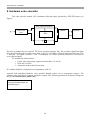
8. Hardware echo canceller.........................................................................................................................26
9. Updating firmware ..................................................................................................................................27
10. Asteroid delivery...................................................................................................................................27
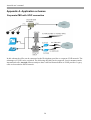
Appendix А. Application schemes .............................................................................................................28
Corporate PBX with VOIP connection...................................................................................................28
Appendix B. Example of system.conf file ..................................................................................................29
Appendix C. Asteroid + DAHDI – steps to check.....................................................................................30
4