1
CPC® CONTROLLER - OVERVIEW / ESC3 CONTROLLER OPERATION (PAGE 1 of 2)
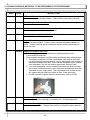
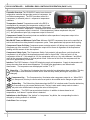
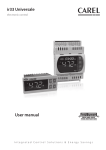
Controller Overview: The CPC® ESC3 series is an electronic
refrigeration controller that provides control of compressor, fan
and defrost management. The ESC3 provides control of a
compressor (or solenoid) valve in response to temperature
variations.
Temperature Control: Temperature control in the ESC3 is
accomplished by comparing the temperature reading of case
temperature probe against temperature set point. Compressor
output is used to control temperature. If temperature is above temperature set point (LI) + the hysteresis
set point (rd), compressor output is turned on. If the temperature is below temperature set point
(L1) - the hysteresis set point (rd), compressor output is turned off.
Compressor Control: Several set points are available to allow operation of compressor output to be
tailored to match individual needs.
Min ON/Off Times and Minimum Cycle Time: Minimum ON/OFF compressor times can be specified, as
well as a minimum time delay between compressor cycles. These parameters help prevent short cycling.
Compressor Power On Delay: Compressor power on delay setpoint (c0) allows user to specify a delay
after power-up of the controller. The compressor output will not come on regardless of the temperature
reading until this amount of time has expired.
Compressor Safety Cycle: The Compressor Safety Cycle setpoint (c4) specifies a cycle time that the
compressor is to be cycled if the temperature sensor used for control fails. If this set point is 0, the
compressor will be off. If this setpoint is 100, the compressor will be on. Any value between 1 and 99 will
result in the compressor being on for that period of time. At the end of this time, the compressor will be
shut off for approximately 15 minutes.
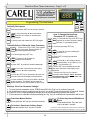
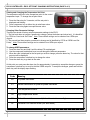
Interface: The ESC3 features a 3 digit LED displaying supply air temperature. Supply air temperature will
always be cooler than actual case temperature. For actual case temperature, see internal case
thermometer. The temperature can be displayed in either 0C or 0F.
Alarm Key - The Alarm key illuminates when the controller has detected an alarm condition. This key
is also used to reset an alarm condition and to enter the setup mode (allowing the set points to be
changed).
Compressor Key - The Compressor key illuminates when compressor output is on. When ESC3
is in setup mode, this key is used to select a set point to be modified and to change set point value.
Defrost Key - The Defrost key illuminates when the ESC3 is in defrost mode. Press the defrost key
for 5 seconds to go into manual defrost mode. The key is also used in setup mode to select a
set point to be modified and to change the value of the set point.
Alarm Operation - The ESC3 has several alarm functions. In addition to alarms based on air
temperatures, it will alarm if a probe failure is detected.
Indications on the Display: If the “defrost” or “compressor” key blinks, the corresponding function is
delayed by a timing routine or is inhibited.
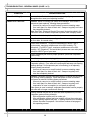
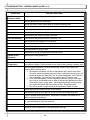
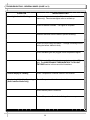
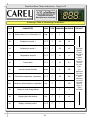
Code Chart: See next page.
39