1
OPTIONAL NIGHT AIR CURTAIN INSTALLATION & OPERATING INSTRUCTIONS (MODEL HVLD(L)RSS)
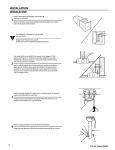
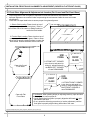
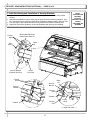
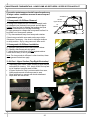
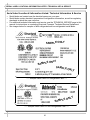
Night Air Curtain Installation & Operating Instructions
1. Use caution when handling Night Air Curtain.
2. Display case may come with Night Curtain already attached. If not, a retrofit kit will be
provided. If using SCC-supplied retrofit kit, place night curtain on top of case as
shown. Mark “keyslot” locations using night curtain as a template (you may have to
retract the curtain from housing to reveal “keyslots”. Drill Ø11/32” holes in top board
1/2” deep. Press the “finserts” (shown below) into holes. Carefully tap in with flat
object to prevent top board damage. Attach Night Air Curtain with #10-32 screws.
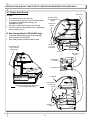
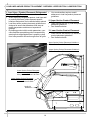
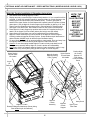
3. Grasp the handle and pull downward to desired location INSIDE acrylic air deflector.
4. To return Night Air Curtain to its retracted position, grasp handle, lift up and away from
its magnetic attachment and carefully wind Night Air Curtain back into roll.
5. Caution! Do not allow spring-loaded Night Air Curtain to freely snap back into roll.
Doing so can eventually destroy Night Air Curtain’s tension and retractability.
6. To entirely detach Night Air Curtain from case, retract curtain (to access keyslots),
remove screws. Lift Night Air Curtain upward and away from case.
NOTE: THE
BELOW
ILLUSTRATION
MAY NOT
EXACTLY
REFLECT
EVERY
PARTICULAR
CASE’S
FEATURES OR
OPTIONS.
Night Air Curtain
Retraction Magnets
View of Night Air Curtain
(Underside / Detached)
View of Night Air Curtain
(Topside / Attached)
Night Air Curtain
Keyslots
Night Air Curtain
Retraction Magnets
“Finsert” (to
be inserted in
top board)
Acrylic
Air Deflector)
Night Air Curtain
Retraction Magnets Attachment Points
(Along Plate Inside Acrylic Sneeze Guard)
16
#10-32 screw
(to be inserted
through Night
Air Curtain
Keyslots and
into “Finsert”)












![HMBC[L]_Spanish_56571 [From English 54383].pub](http://vs1.manualzilla.com/store/data/006216602_1-cfe031224017a12fd1747226d4724f03-150x150.png)