1
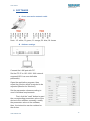
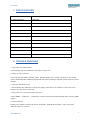
RACKMOUNT 7'' 3G-SDI DUAL LCD MONITORS USER MANUAL UMEN-081013-V1.0 User manual SUMMARY 1. INTRODUCTION ............................................................................................................................... 3 2. PACKAGES CONTENT ....................................................................................................................... 3 3. PRODUCT DESCRIPTION .................................................................................................................. 3 4. PANEL FUNCTION AND BUTTON OPERATING INSTRUCTION .......................................................... 4 5. OSD OPERATING INSTRUCTION ....................................................................................................... 6 A. Shortcut buttons: ........................................................................................................................ 6 a. The image menu ...................................................................................................................... 6 b. FN user-definable function button .......................................................................................... 6 B. 6. MENU Operation ......................................................................................................................... 6 a. Picture ..................................................................................................................................... 6 b. Marker ..................................................................................................................................... 7 c. Display ..................................................................................................................................... 8 d. DSLR Aux& Audio..................................................................................................................... 9 e. System ..................................................................................................................................... 9 SOFTWARE ..................................................................................................................................... 10 A. Cross-connection network cable ............................................................................................... 10 B. Software settings ....................................................................................................................... 10 7. SPECIFICATIONS ............................................................................................................................. 11 8. TROUBLE SHOUTING ..................................................................................................................... 11 9. WARRANTY AND CONTACTS ......................................................................................................... 12 2 www.newhank.com User manual 1. INTRODUCTION This monitor is a multirack panel with two 7'' LCD monitors with HDMI, 3G-SDI, YUV and video composite inputs. It is a high quality product, made for any professional display applications in different markets such as broadcast, industry, security, ... 2. PACKAGES CONTENT Rackmount monitor Power supply Tally Connector Power cord User manual 3. PRODUCT DESCRIPTION This dual LED screen display provide video monitoring. The monitor with high resolution 1280x800, to receive the 3G-SDI, HDMI,Y/Pb/Pr and analog composite video signal. It can also provides 3G-SDI, HDMI, YUV, composite video signal output. All video signals by digital processing, high quality scaling on the screen. This monitor is dedicated to be used in the TV news production, editing, broadcast and television, special vehicles in areas such as video surveillance. 3G-SDI, HDMI, YUV, CVBS inputs and outputs 178° Wide view angles High resolution 1280x800 Brightness of 400 cd/m² Contrast ratio: 800:1 Fast response time Tally Interface with indicating light Thin design 3 www.newhank.com User manual 4. PANEL FUNCTION AND BUTTON OPERATING INSTRUCTION 1. INPUT: circularly switch among of HDMI, YPbPr, Video and SDI. 2. MENU: To activate OSD (on-screen display) menu. Press to switch among the brightness, sharpness, contrast, saturation, Tint, MENU and Exit. 3. ◄ Left selection button: to select item on OSD menu and adjust its value; Press to decrease the value of brightness, sharpness, contrast, saturation and Tint. 4. ► Right selection button: to select item on OSD menu, adjust its value and confirm it; Press to increase the value of brightness, sharpness, contrast, saturation and Tint. 5. ENTER. 6. FN: Function button; to launch function menu quickly. Note: The interfaces within Monitor 1 provide signal source for monitor 1. The interfaces within Monitor 2 provide signal source for monitor 2. TALLY interface, Mini USB interface, power supply interface and LAN port are common interfaces. 4 www.newhank.com User manual 1. 2. TALLY interface and interface definition. Mini USB input (Only used for program upgrades, do NOT use if nonprofessionals). 3. 12V DC power input. 4. YPbPr input. 5. YPbPr output. 6. Video input. 8. HDMI input. 9. HDMI output. 10. SDI input. 11. SDI output. 12. 7. Video output. The LAN port. (Connected to PC network interface for function adjustment.) 5 www.newhank.com User manual 5. OSD OPERATING INSTRUCTION Before setting the functions, please make sure the device is connected correctly. A. Shortcut buttons: a. The image menu Power on, press “◄ / ►” buttons on the device, brightness display bar will appear at the bottom of the screen, then press the MENU button to switch among brightness, sharpness, contrast, saturation, tint, MENU and Exit. User can adjust the parameters of the selected item with “◄ / ►”buttons to meet their needs. b. FN user-definable function button Press FN button to pop up the default options, Use “◄ / ►” buttons to adjust the value of selected item. Long press FN button for 3-5 seconds to pop up shortcut menu directly. As shown in right Figure (default menu is displayed in white font). Use “◄ / ►” buttons to select the desired item. Finally, use the “ENTER” button to confirm the selected item as default. Functions of FN button can be customized: Center Marker, Safety Marker, Check Field, Color Bar, Aspect Ratio, Camera, PIP, Image Flip, Zoom, Pixel-toPixel, Freeze Input, Underscan, H/V delay. B. MENU Operation Press “MENU” button on the device after power on. The menu used for setting function will display on the screen. Press ◄/► buttons to select the sub-menu; then press ENTER to confirm it; after that, press MENU to return to main menu. a. Picture 6 www.newhank.com User manual ITEMS OPTIONS Brightness 0 - 100 Contrast 0 - 100 Saturation 0 – 100 Tint 0 – 100 Sharpness 0 – 100 Color Temp 6500ºK, 7500 ºK, 9300 ºK, User Red Note: Available only in “User” mode to choose the color value you need. b. Marker ITEMS OPTIONS Center Marker ON, OFF Safety Marker OFF, 95%, 93%, 90%, 88%, 85%, 80% 7 www.newhank.com User manual c. Display ITEMS OPTIONS Aspect Ratio Full Screen, 16:9, 4:3, 1.85:1, 2.35:1 H / V delay OFF, H&V Delay, V Delay, H Delay Check Field OFF, Mono, Red, Green, Blue Pixel-to-Pixel OFF, ON Underscan OFF, ON Color Bar OFF, ON Zoom OFF, ×2, ×4, ×6, ×8 Image Flip OFF, ON Freeze Input OFF, Freeze PIP Small, Medium, Large, PBP, POP 8 www.newhank.com User manual d. DSLR Aux& Audio ITEMS OPTIONS Camera 480P (5D-II Mode), 1080I (5D-Ⅲ Mode) Volume 0 – 100 e. System ITEMS OPTIONS LOGO OFF, ON Language English, Chinese Manufacturer Default OFF, ON Back Light 0 – 100 ISP For program upgrades 9 www.newhank.com User manual 6. SOFTWARE A. Cross-connection network cable Note:W: white, G: green, O: orange, Bl: blue, Br: brown B. Software settings Connect the LAN port with PC. Set the PC IP to 192.168.1.XXX network segment(XXX is a user-definable parameter). Open the application program, then select the monitor which is needed to be adjusted (Monitor1or Monitor2). Set the parameter values according to user's individual requirements. First, click the "read" button to read the corresponding parameter value of the device to the software, secondly, modify the parameter value on the software, then, the instruction can be realized on the device. 10 www.newhank.com User manual 7. SPECIFICATIONS Panel 7” LED IPS Physical Resolution 1280×800 Brightness 400 cd/m² Contrast 800: 1 Viewing Angle 178°/ 178°(H/V) Input Voltage DC 12V Input Signal HDMI, YPbPr, SDI, Video Power Consumption ≤18W Operating Temperature -20℃~60℃ Storage Temperature -30℃~70℃ Dimension (LWD) 482.5×133.5×25.3mm Weight 2885g 8. TROUBLE SHOUTING 1. Only black-and-white display: Check whether the color saturation is properly set up or not. 2. Power on but no pictures: Check whether the cables of HDMI, YPbPr, SDI and VIDEO are correctly connected or not. Please use the standard power adapter equipped with the product package. Improper power input may cause damage. 3. Wrong or abnormal colors: Check whether the cables are correctly and tightly connected or not. Broken or loose pins of the cables may cause a bad connection. 4. When power on, the picture shows size error: Press “MENU → DISPLAY → Underscan” to zoom in/out pictures automatically when receiving HDMI signals. 5. Other problems: Please press “MENU” button and choose “SYSTEM→ Manufacturer Default →ON”, then press "ENTER" button to confirm it. 11 www.newhank.com User manual 6. According to the ISP, the machine can not function properly: ISP is used for program upgrades, non-professionals do not use. The device will reboot if selected accidentally! Note: due to constant effort to improve products and product features, specifications may change without prior notice. 9. WARRANTY AND CONTACTS The warranty of this product is 1 year Parts and Labor from the date of purchase. If the fault in the product is due to improper use of the product or operations carried out by third parties, the warranty is lost. If the product frame is open, the warranty is lost. During the warranty period, the unit will be repaired free of charge. Return shipping are the responsibility of the customer. Return shipping have to be made through your local distributor/dealer. For any question during the installation, contact our after sales service on the following address: [email protected] 12 www.newhank.com