1
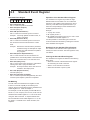
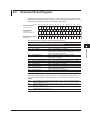
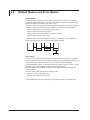
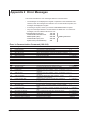
DL6000/DLM6000 Series
Digital Oscilloscope/
Mixed Signal Oscilloscope
Communication Interface
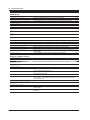
IM DLM6054-17EN
1st Edition
Thank you for purchasing the DL6000/DLM6000 Series Digital Oscilloscope/Mixed Signal Oscilloscope
(DL6054/DL6104/DL6154/DLM6054/DLM6104, hereafter referred to as the DL6000/DLM6000). This
Communication Interface User’s Manual describes the functions and commands of the following
communication interfaces.
• USB Interface
• Ethernet Interface (Optional)
• GB-IB Interface
To ensure correct use, please read this manual thoroughly before beginning operation.
After reading the manual, keep it in a convenient location for quick reference whenever a question
arises during operation.
The following manuals are provided for the DL6000/DLM6000. Please read all of them.
Manual Title
DL6000/DLM6000 Series
Digital Oscilloscope/
Mixed Signal Oscilloscope
User’s Manual
DL6000/DLM6000 Series
Digital Oscilloscope/
Mixed Signal Oscilloscope
Communication Interface User’s Manual
(in CD)
DL6000/DLM6000 Series
Digital Oscilloscope/
Mixed Signal Oscilloscope
Serial Bus Signal Triggering and
Analysis Function User’s Manual
DL6000/DLM6000 Series
Digital Oscilloscope/
Mixed Signal Oscilloscope
Power Supply Analysis Function User’s
Manual
Manual No.
Description
IM DLM6054-01EN Explains all functions and procedures of the DL6000/
DLM6000 series excluding the communication
functions.
IM DLM6054-17EN This manual. Explains the communication interface
functions of the DL6000/DLM6000 series.
IM DLM6054-51EN Explains the optional I2C bus signal, CAN bus
signal, LIN bus signal, SPI bus signal, and UART
bus signal triggering and analysis features and how
to use them.
IM DLM6054-61EN Explains the optional power supply analysis features
and how to use them.
Notes
• You can check the firmware version of your DL6000/DLM6000 on the overview screen. For
instructions on how to open the overview screen, see section 18.4 in the User’s Manual IM
701331-01E.
To upgrade to the latest firmware version, go to the following Web page, and then browse to the
download page.
http://tmi.yokogawa.com/service-support/downloads/
• The contents of this manual are subject to change without prior notice as a result of continuing
improvements to the instrument’s performance and functions.
• Every effort has been made in the preparation of this manual to ensure the accuracy of its
contents. However, should you have any questions or find any errors, please contact your nearest
YOKOGAWA dealer.
• Copying or reproducing all or any part of the contents of this manual without the permission of
Yokogawa Electric Corporation is strictly prohibited.
1st Edition: October 2009 (YK)
All Rights Reserved, Copyright © 2009 Yokogawa Electric Corporation
IM DLM6054-17EN
USB Interface and Ethernet Interface
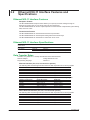
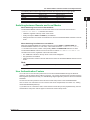
• The items below are needed on the PC to use the communication functions via the USB interface.
• DL Series Library (TMCTL)
• USB device driver for connecting the PC and the DL9000 series
• The items below are needed on the PC to use the communication functions via the Ethernet
interface.
• DL Series Library (TMCTL)
To download the libraries and drivers listed above, go to the following Web page, and then browse
to the download page.
http://tmi.yokogawa.com/service-support/downloads/
Sample Programs
To download sample programs, go to the following Web page, and then browse to the download page.
http://tmi.yokogawa.com/service-support/downloads/
Trademarks
• DLM is pending trademark of Yokogawa Electric Corporation.
• Microsoft, MS-DOS, Visual C++, Windows, and Windows NT are registered trademarks of Microsoft
Corporation in the United States and/or other countries.
• Adobe and Acrobat are trademarks of Adobe Systems Incorporated.
• For purposes of this manual, the TM and ® symbols do not accompany their respective trademark
names or registered trademark names.
• Other company and product names are trademarks or registered trademarks of their respective
holders.
Revisions
1st Edition: October 2009
ii
IM DLM6054-17EN
How to Use This Manual
Structure of This Manual
This user’s manual consists of the following sections.
Chapter 1 Overview of the USB Interface
Describes the functions and specifications of the USB interface.
Chapter 2 Overview of the Ethernet Interface (Optional)
Describes the functions and specifications of the Ethernet interface.
Chapter 3 Overview of the GP-IB Interface
Describes the functions and specifications of the GP-IB interface.
Chapter 4 Before Programming
Describes the syntax used to transmit commands.
Chapter 5 Command
Describes all the commands one by one.
Chapter 6 Status Reports
Describes the status byte, various registers, and queues.
Appendix
IM DLM6054-17EN
Describes reference material such as an ASCII character code table.
iii
How to Use This Manual
Symbols and Notations Used in This Manual
Communication Command Notation
In the detailed explanations of the communication commands in chapter 5, DLM6000-specific
commands are written in blue italics.
These commands are not available on the DL6000.
Safety Markings
The following markings are used in this manual.
CAUTION
Calls attentions to actions or conditions that could cause light injury to the user
or damage to the instrument or the user’s data, and precautions that can be
taken to prevent such occurrences.
Note Calls attention to information that is important for proper operation of the
instrument.
Notation Used in the Procedural Explanations
On pages that describe the operating procedures in chapters 1 through 3, the following notations are
used to distinguish the procedures from their explanations.
Procedure
Carry out the procedure according to the step numbers. All procedures are
written with inexperienced users in mind; experienced users may not need to
carry out all the steps.
Explanation
This section describes the setup items and the limitations regarding the
procedures.
Notation of User Controls
Operation/Soft Key Names and Menu Items Set in Boldface
Boldface type indicates the names of user-controlled operation keys on the instrument panel, and soft key items
and menu items displayed on screen.
SHIFT+Panel Key
The SHIFT+Panel key means you will press the SHIFT key to turn ON the indicator of SHIFT key and then
press the panel key. The menu marked in purple above the pressed key appears on the screen.
Unit
k: Denotes “1000.”
K: Denotes “1024.”
Example: 100 kS/s (sample rate)
Example: 720 KB (file data size)
Symbols Used in the Syntax
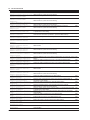
The following table indicates symbols that are used in the syntax mainly in chapters 4 and 5. These
symbols are referred to as BNF (Backus-Naur Form) symbols. For details on the data, see pages 4-5
and 4-6.
Symbol
< >
{}
|
[]
iv
Meaning
Defined value
Select from values given in { }
Exclusive OR
Can be omitted
Example
CHANnel<x> <x> = 1 to 4
COUPling {AC|DC|DC50|GND}
Example of Input
CHANNEL2
COUPLING AC
TRIGger [:SIMPle]:SLOPe
TRIGger:SLOPe
IM DLM6054-17EN
Contents
1
How to Use This Manual................................................................................................................... iii
2
Chapter 1 Overview of the USB Interface
1.1
1.2
1.3
1.4
Part Names and Functions................................................................................................ 1-1
USB Interface Functions and Specifications..................................................................... 1-2
Connection via the USB Interface..................................................................................... 1-4
Setting the DL6000/DLM6000 (USB)................................................................................ 1-5
Chapter 2 Overview of the Ethernet Interface (Optional)
2.1
2.2
2.3
2.4
Part Names and Functions................................................................................................ 2-1
Ethernet/VXI-11 Interface Features and Specifications..................................................... 2-2
Connecting to the Ethernet/VXI-11 Interface..................................................................... 2-4
Setting the DL6000/DLM6000 (Network).......................................................................... 2-5
3
4
5
Chapter 3 Overview of the GP-IB Interface
3.1
3.2
3.3
3.4
3.5
3.6
Part Names and Functions................................................................................................ 3-1
Connecting the GP-IB Card............................................................................................... 3-2
GP-IB Interface Functions................................................................................................. 3-3
GP-IB Interface Specifications.......................................................................................... 3-4
Setting the DL6000/DLM6000 (GP-IB).............................................................................. 3-5
Responses to Interface Messages.................................................................................... 3-6
6
App
Chapter 4 Before Programming
4.1
4.2
4.3
4.4
4.5
Messages.......................................................................................................................... 4-1
Commands........................................................................................................................ 4-3
Response.......................................................................................................................... 4-5
Data................................................................................................................................... 4-6
Synchronization with the Controller................................................................................... 4-8
Chapter 5 Commands
5.1
5.2
5.3
5.4
5.5
5.6
5.7
5.8
5.9
5.10
5.11
5.12
5.13
5.14
5.15
5.16
5.17
5.18
5.19
IM DLM6054-17EN
List of Commands............................................................................................................. 5-1
ACQuire Group................................................................................................................ 5-35
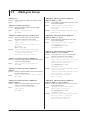
ANALysis Group.............................................................................................................. 5-36
ASETup Group................................................................................................................ 5-58
CALibrate Group............................................................................................................. 5-59
CHANnel Group.............................................................................................................. 5-60
CLEar Group................................................................................................................... 5-62
COMMunicate Group...................................................................................................... 5-63
CURSor Group................................................................................................................ 5-65
DISPlay Group................................................................................................................ 5-74
FILE Group...................................................................................................................... 5-77
GONogo Group............................................................................................................... 5-81
HCOPy Group................................................................................................................. 5-90
HISTory Group................................................................................................................. 5-92
IMAGe Group................................................................................................................ 5-101
INITialize Group............................................................................................................. 5-102
LOGic Group................................................................................................................. 5-103
MATH Group................................................................................................................. 5-106
MEASure Group............................................................................................................. 5-111
Index
Contents
5.20
5.21
5.22
5.23
5.24
5.25
5.26
5.27
5.28
5.29
5.30
5.31
5.32
5.33
REFerence Group......................................................................................................... 5-120
SEARch Group.............................................................................................................. 5-121
SNAP Group.................................................................................................................. 5-132
SSTart Group................................................................................................................. 5-133
STARt Group................................................................................................................. 5-134
STATus Group............................................................................................................... 5-135
STOP Group.................................................................................................................. 5-136
SYSTem Group............................................................................................................. 5-137
TELecomtest (Mask) Group.......................................................................................... 5-139
TIMebase Group........................................................................................................... 5-143
TRIGger Group.............................................................................................................. 5-144
WAVeform Group........................................................................................................... 5-170
ZOOM Group................................................................................................................. 5-173
Common Command Group........................................................................................... 5-175
Chapter 6 Status Reports
6.1
6.2
6.3
6.4
6.5
Appendix
Overview of the Status Report.......................................................................................... 6-1
Status Byte........................................................................................................................ 6-3
Standard Event Register................................................................................................... 6-4
Extended Event Register................................................................................................... 6-5
Output Queue and Error Queue........................................................................................ 6-6
Appendix 1
Appendix 2
Appendix 3
Appendix 4
ASCII Character Codes....................................................................................... App-1
Error Messages................................................................................................... App-2
Waveform Parameter Name Table...................................................................... App-4
Eye Pattern Parameter Name Table................................................................... App-5
Index
vi
IM DLM6054-17EN
Chapter 1
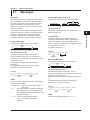
1.1
Overview of the USB Interface
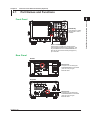
Part Names and Functions
1
Overview of the USB Interface
2
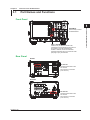
Front Panel
CURSOR
MEASURE
ANALYSIS
MATH/REF
MASK
FFT
FFT
REST
SET
SHIFT
ESC
PRINT
ZOOM
MENU
FILE
ZOOM1
UTILITY
ZOOM2
AUTO
SETUP
SETUP
MENU
DISPLAY
ACQUIRE
X-Y
SEARCH
3
HISTORY
RUN / STOP
SINGLE
VERTICAL
1
HORIZONTAL
POSITION
POSITION
2
DELAY
4
SNAP
LOGIC
TIME/DIV
SCALE
PUSH
FINE
TRIG’D
LEVEL
PUSH
50%
PUSH
50%
0s
PUSH
ODIV
3
CLEAR
TRIGGER
EDGE
ENHANCED
MODE
B TRIG
SYSTEM key
Press this key to select
the USB interface.
4
ACTION
GO / NO-GO
1
2
4
3
5
SHIFT + CLEAR key
Press this key to clear the remote mode
(controlled via communications) and enter the
local mode in which key operations are
enabled. However, this act is invalid if the
instrument has been set to Local Lockout mode
(see page 1-3) by the controller.
Rear Panel
App
DL6000
Index
ETHERNET
100BASE-TX
GO/NOGO
USB
ACT
LINK
No Auto-MDIX
MAIN POWER
WARNING
警告
CAUTION
注意
OFF
MODEL
SUFFIX
ON
NO.
Made in Japan
VIDEO OUT
(XGA)
PROBE POWER( 12 V DC
100 - 120/220 - 240 V AC
300 VA MAX 50/60 Hz
)
USB interface connector
Connector used to connect the
DL6000/DLM6000 to the
controller (such as a PC) using a
USB cable.
TRIG OUT
TRIG IN
6
DLM6000
PROBE POWER (±12 V DC
)
MAIN POWER
WARNING
OFF
警告
ON
Do not operate without reading safety precautions in user’s manual.
安全にご私用していただくために、取扱説明書に記載の注意事項を必ずお守りください。
CAUTION
注意
Protect the instrument from vibration or shock when power is ON.
故障を防ぐために、電源投入中は、振動/衝撃を避けてください。
N200
USB
VIDEO OUT
(XGA)
GO/NOGO
100 - 120/220 - 240 V AC
300 VA MAX 50/60 Hz
ETHERNET
100BASE-TX
ACT
LINK
No Auto-MDIX
TRIG IN
TRIG OUT
A
B
C
LOGIC PROBE
IM DLM6054-17EN
D
USB interface connector
Connector used to connect the
DL6000/DLM6000 to the
controller (such as a PC) using a
USB cable.
1-1
1.2
USB Interface Functions and Specifications
USB Interface Functions
Reception Function
You can specify the same settings as those specified by front panel key operations.
Receives output requests for measured and computed data, setup parameters of the panel, and
error codes.
Transmission Function
Outputs measured and computed data.
Outputs panel setup parameters and the status byte.
Outputs error codes that have occurred.
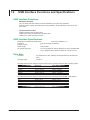
USB Interface Specifications
Electrical and mechanical specifications:
Conforms to USB Rev. 2.0
Connector:
Type B connector (receptacle)
Number of ports:
1
Power supply:
Self-powered
PC system supported:PC running Windows 2000 or Windows XP with a standard USB
port (a separate device driver is needed to connect to a PC).
Data Rate
Controller:PC (Pentium4 3.4 GHz, USB2.0) and OS (Windows XP Professional
SP1)
Language used:
Visual C++
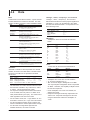
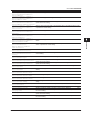
The table below lists the reference response times when outputting waveform data of analog signals.
Number of Data Points
2500
125000
1250000
2500000
6250000
Word Data
Approx. 51 ms
Approx. 193 ms
Approx. 1606 ms
Approx. 3188 ms
Approx. 7841 ms
ASCII Data
Approx. 0.469 s
Approx. 22.766 s
Approx. 224.890 s
Approx. 451.297 s
Approx. 1127.625 s
The table below lists the reference response times when outputting waveform data of logic signals.
Number of Data Points
2500
125000
1250000
2500000
6250000
1-2
Word Data
Approx. 78 ms
Approx. 625 ms
Approx. 5547 ms
Approx. 11156 ms
Approx. 27812 ms
ASCII Data
Approx. 0.141 s
Approx. 3.516 s
Approx. 34.531 s
Approx. 69.375 s
Approx. 173.266 s
IM DLM6054-17EN
1.2 USB Interface Functions and Specifications
1
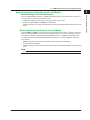
Switching between Remote and Local Modes
When Switching from Remote to Local Mode
Pressing SHIFT + CLEAR in remote mode puts the instrument in local mode. However, this is void
when the DL6000/DLM6000 has received a “:COMMunicate:LOCKout ON” command from the PC
(local lockout condition). When the DL6000/DLM6000 receives a “:COMMunicate:REMote OFF”
command from the PC, the DL6000/DLM6000 switches to the local mode regardless of the local
lock condition.
• REMOTE indication in the center of the upper section of the screen disappears.
• Key operations are enabled.
• Settings entered in remote mode are retained even when the DL6000/DLM6000 switches to local
mode.
Overview of the USB Interface
When Switching from Local to Remote Mode
If the DL6000/DLM6000 receives a “:COMMunicate:REMote ON” command from the PC when it is
in the local mode, it switches to the remote mode.
• REMOTE is displayed in the center of the upper section of the screen.
• All keys except the SHIFT + CLEAR key are disabled.
• Settings entered in local mode are retained even when the DL6000/DLM6000 switches to remote
mode.
2
3
4
5
6
Note
The USB interface cannot be used simultaneously with another interface (Ethernet or GP-IB interface).
App
Index
IM DLM6054-17EN
1-3
1.3
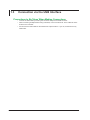
Connection via the USB Interface
Precautions to Be Taken When Making Connections
• Connect the USB cable by inserting the connector firmly into the USB connector.
• When connecting multiple devices using USB hubs, connect the DL9710L to the USB hub that is
closest to the controller.
• Do not insert the USB cable into the GO/NO-GO output terminal. If you do, the instrument may
malfunction.
1-4
IM DLM6054-17EN
1.4
Setting the DL6000/DLM6000 (USB)
1
Overview of the USB Interface
2
Procedure
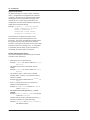
UTILITY_Remote Control_UBS Menu
Press UTILITY, the Remote Control soft key, and then the USB soft key to display the following.
3
4
5
To remotely control the
DL6000/DLM6000 using
communication commands
through the USB port, select
USBTMC and then enable the
setting by restarting the
DL6000/DLM6000.
6
Note
• Only the communication interface selected by Remote Control is enabled. The DL6000/DLM6000 does
not accept commands that are transmitted to other unselected communication interfaces.
• To control the DL6000/DLM6000 remotely using communication commands through the USB port, select
“TMC” in the menu above, and carry out the procedure below.
• You must restart the DL6000/DLM6000 to activate the TMC or Mass Storage setting. Wait at least 10
seconds after you turn the power switch OFF, and then turn the switch back ON.
• Install YOKOGAWA’s TMC (Text and Measurement Class) driver into your PC. To obtain YOKOGAWA’
s USB TMC driver, contact your nearest YOKOGAWA dealer or access the following USB driver page
at our Web site and download it.
http://www.yokogawa.com/tm/tm-softdownload.htm
• Only use the USB TMC driver (or software) provided by YOKOGAWA.
• You cannot use keys to perform file operations when a PC is connected to the DL6000/DLM6000 and the
Mass Storage setting is enabled. You cannot use communication commands to perform file operations
either. To perform file operations, you must restart the DL6000/DLM6000 after disconnecting the PC or
enabling the TMC setting.
IM DLM6054-17EN
1-5
App
Index
Chapter 2
Overview of the Ethernet Interface (Optional)
2.1
Part Names and Functions
1
2
Front Panel
MEASURE
ANALYSIS
MATH/REF
MASK
FFT
FFT
REST
SET
SHIFT
PRINT
ZOOM
MENU
FILE
ZOOM1
UTILITY
ZOOM2
AUTO
SETUP
SETUP
MENU
DISPLAY
ACQUIRE
X-Y
SEARCH
3
HISTORY
RUN / STOP
SINGLE
VERTICAL
1
HORIZONTAL
DELAY
TIME/DIV
SCALE
4
SNAP
LOGIC
PUSH
FINE
TRIG’D
LEVEL
PUSH
50%
PUSH
50%
0s
PUSH
ODIV
3
CLEAR
TRIGGER
POSITION
POSITION
2
EDGE
ENHANCED
MODE
B TRIG
SYSTEM key
Press this key to select
the Ethernet or VXI-11
interface.
ACTION
GO / NO-GO
1
2
4
3
6
App
Rear Panel
DL6000
Index
ETHERNET
100BASE-TX
GO/NOGO
USB
ACT
LINK
No Auto-MDIX
MAIN POWER
WARNING
警告
CAUTION
注意
OFF
MODEL
SUFFIX
ON
NO.
Made in Japan
VIDEO OUT
(XGA)
PROBE POWER( 12 V DC
100 - 120/220 - 240 V AC
300 VA MAX 50/60 Hz
)
Ethernet port
This port is for connecting the
DL6000/DLM6000 to a controller
(such as a PC) using an
Ethernet cable.
TRIG OUT
TRIG IN
DLM6000
PROBE POWER (±12 V DC
)
MAIN POWER
WARNING
OFF
警告
ON
Do not operate without reading safety precautions in user’s manual.
安全にご私用していただくために、取扱説明書に記載の注意事項を必ずお守りください。
CAUTION
注意
Protect the instrument from vibration or shock when power is ON.
故障を防ぐために、電源投入中は、振動/衝撃を避けてください。
N200
USB
VIDEO OUT
(XGA)
GO/NOGO
100 - 120/220 - 240 V AC
300 VA MAX 50/60 Hz
ETHERNET
100BASE-TX
ACT
LINK
No Auto-MDIX
TRIG IN
TRIG OUT
A
B
C
LOGIC PROBE
IM DLM6054-17EN
4
5
SHIFT + CLEAR key
Press this key to switch from remote mode to
local mode and enable the front panel keys. This
key is disabled when the DL6000/DLM6000 has
been set to Local Lockout mode (see page 2-3)
by a controller.
Overview of the Ethernet Interface (Optional)
CURSOR
ESC
D
Ethernet port
This port is for connecting the
DL6000/DLM6000 to a controller
(such as a PC) using an
Ethernet cable.
2-1
2.2
Ethernet/VXI-11 Interface Features and
Specifications
Ethernet/VXI-11 Interface Features
Reception Feature
The DL6000/DLM6000 reception feature allows you to specify the same settings through an
Ethernet connection that you can specify using the front panel keys.
The DL6000/DLM6000 can receive output requests for measured and computed data, panel setting
data, and error codes.
Transmission Feature
The DL6000/DLM6000 can transmit measured and computed data.
The DL6000/DLM6000 can transmit panel setting data and the status byte.
The DL6000/DLM6000 can transmit error codes when errors occur.
Ethernet/VXI-11 Interface Specifications
Electrical and mechanical IEEE802.3 compliant
specifications
Simultaneous connections 1
Port number
Ethernet:
10001/tcp
VXI-11:
10240/tcp, 10250/tcp, 111/tcp, and 111/udp
Data Transfer Rates
Controller: PC (Pentium 4 3.4-GHz) with Windows XP Professional SP1
Network adapter:
Corega FEther PCI-TXL
Programming language:
Visual C++
Ethernet Interface (/C8, /C9, /C10 and /C12 options)
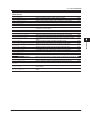
The following table contains approximate waveform data response times for analog signals.
Number of Data Points
2500
125000
1250000
2500000
6250000
Word Data
Approx. 16 ms
Approx. 259 ms
Approx. 2313 ms
Approx. 4595 ms
Approx. 10400 ms
ASCII Data
Approx. 0.391 s
Approx. 19.063 s
Approx. 189.812 s
Approx. 379.750 s
Approx. 950.532 s
The following table contains approximate waveform data response times for logic signals.
Number of Data Points
2500
125000
1250000
2500000
6250000
Double Word Data
Approx. 31 ms
Approx. 704 ms
Approx. 6768 ms
Approx. 14081 ms
Approx. 34523 ms
ASCII Data
Approx. 0.078 s
Approx. 3.530 s
Approx. 35.327 s
Approx. 70.952 s
Approx. 177.313 s
VXI-11 Ethernet Interface (/C8, /C9, /C10 and /C12 options)
The following table contains approximate waveform data response times for analog signals.
Number of Data Points
2500
125000
1250000
2500000
6250000
2-2
Word Data
Approx. 31 ms
Approx. 235 ms
Approx. 2286 ms
Approx. 4541 ms
Approx. 11150 ms
ASCII Data
Approx. 0.406 s
Approx. 19.172 s
Approx. 191.876 s
Approx. 383.012 s
Approx. 958.128 s
IM DLM6054-17EN
2.2 Ethernet/VXI-11 Interface Features and Specifications
1
The following table contains approximate waveform data response times for logic signals.
Double Word Data
Approx. 31 ms
Approx. 828 ms
Approx. 6938 ms
Approx. 13344 ms
Approx. 32126 ms
ASCII Data
Approx. 0.094 s
Approx. 3.906 s
Approx. 37.345 s
Approx. 74.143 s
Approx. 184.894 s
2
Switching between Remote and Local Modes
3
When Switching from Local to Remote Mode
The DL6000/DLM6000 switches to remote mode when it is in local mode and it receives a
:COMMunicate:REMote ON command from the PC.
• “REMOTE” appears at the top center of the screen.
• All keys except the SHIFT + CLEAR key are disabled.
• Settings entered in local mode are retained even when the DL6000/DLM6000 switches to remote
mode.
When Switching from Remote to Local Mode
When the DL6000/DLM6000 is in remote mode and you press SHIFT + CLEARCLEAR, the
DL6000/DLM6000 switches to Local mode, unless it has received a :COMMunicate:LOCKout
ON command from the PC, in which case pressing SHIFT + CLEARCLEAR will have no effect.
The DL6000/DLM6000 switches to local mode when it receives a :COMMunicate:REMote OFF
command from the PC, regardless of the local lockout state.
• The “REMOTE” indicator at the top center of the screen disappears.
• Key operations are enabled.
• Settings entered in remote mode are retained even when the DL6000/DLM6000 switches to local
mode.
Note
The Ethernet/VXI-11 interface cannot be used simultaneously with another interface (USB or GP-IB
interface).
User Authentication Feature
You must enter a user name and password to access the DL6000/DLM6000 through the Ethernet
interface. If the DL Series Library (TMCTL) version is 1.40 or later, the password is encrypted using the
MD5 algorithm (RSA Data Security, Inc. MD5 Message-Digest Algorithm) and then sent to the DL6000/
DLM6000.
Set the user name and password in the Remote Control setup screen in the DL6000/DLM6000
UTILITY menu. For instructions on how to set the user name and password, see section 2.4, “Setting
the DL6000/DLM6000 (Network).”
If you select VXI-11 in the Device menu of the Remote Control setup screen (explained later), the user
authentication setup menu will not appear in the Remote Control setup screen.
IM DLM6054-17EN
Overview of the Ethernet Interface (Optional)
Number of Data Points
2500
125000
1250000
2500000
6250000
2-3
4
5
6
App
Index
2.3
Connecting to the Ethernet/VXI-11 Interface
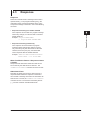
Connection Procedure
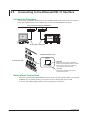
Connect a UTP (Unshielded Twisted-Pair) or STP (Shielded Twisted-Pair) cable that is connected to a
hub or other network device to the 100BASE-TX port on the DL6000/DLM6000 rear panel.
Hub or router that supports 100BASE-TX
PC
DL6000/
DLM6000
Straight UTP or STP cable
100BASE-TX Ethernet port
RJ-45 modular jack
ETHERNET
100BASE-TX
ACT
LINK
No Auto-MDIX
LINK LED
Illuminates when a link is established
between the DL9500/DL9700 and another
device and the devices are capable of
communicating with each other
ACT LED
Blinks when packets are being sent
and received normally
Notes about Connections
• Be sure to connect the DL6000/DLM6000 to a PC through a hub using straight cables. The DL6000/
DLM6000 may not operate properly if you connect it to a PC directly using a cross cable.
• If you use UTP cables (straight cables), make sure that they are category 5.
2-4
IM DLM6054-17EN
2.4
Setting the DL6000/DLM6000 (Network)
1
2
Procedure
Press UTILITY, the Remote Control soft key, and then the Network or Network(VXI-11) soft key to
display the following menu.
Overview of the Ethernet Interface (Optional)
UTILITY_Remote Control_Network Menu
3
4
Select to use the
Ethernet interface.
Set the user name.
5
Select to use the
VXI-11 interface.
6
Set the password.
Set the timeout value.
Set the timeout value.
App
Note
• Only the interface that you select after pressing Remote Control is valid. The DL6000/DLM6000 does not
accept commands that are transmitted to other unselected communication interfaces.
• For details on how to operate the soft keyboard, see section 4.2, “Entering Values and Strings” in the
DL6000/DLM6000 User’s Manual (IM DLM6054-01EN).
• User names and passwords are case-sensitive.
Explanation
To use a controller to configure the same settings that you can configure using the DL6000/DLM6000
keys or to send setting parameters and waveform data to a controller, you must configure the settings
described below.
User Name and Password
The Ethernet interface has a user authentication feature. Set the DL6000/DLM6000 user name and
password in advance.
If you select VXI-11 in the Device menu of the Remote Control setup screen, the user authentication
setup menu will not appear in the Remote Control setup screen.
User Name
Set the user name using up to 30 characters. The default setting is “anonymous.”
Password
Set the password using up to 30 characters.
IM DLM6054-17EN
2-5
Index
2.4 Setting the DL6000/DLM6000 (Network)
Timeout Value
The DL6000/DLM6000 disconnects itself from the controller if it is not accessed for the period of time
that you specify using the timeout value.
TCP/IP
To use the Ethernet interface, you must specify the following TCP/IP settings.
• IP address
• Subnet mask
• Default gateway
For details on how to specify these settings, see section 14.2, “Setting Up the TCP/IP” in the DL6000/
DLM6000 User’s Manual (IM DLM6054-01EN).
Note
• The DL6000/DLM6000 terminates the connection if there is an error in the user authentication process.
• You do not need to enter a password when the user name is set to “anonymous.”
2-6
IM DLM6054-17EN
Chapter 3
3.1
Overview of the GP-IB Interface
Part Names and Functions
1
2
Front Panel
CURSOR
MEASURE
ANALYSIS
MATH/REF
MASK
FFT
FFT
REST
SET
SHIFT
ESC
PRINT
ZOOM
MENU
FILE
ZOOM1
SETUP
MENU
DISPLAY
ACQUIRE
X-Y
SEARCH
3
HISTORY
RUN / STOP
SINGLE
1
VERTICAL
HORIZONTAL
POSITION
POSITION
2
3
DELAY
CLEAR
4
SNAP
LOGIC
TIME/DIV
SCALE
PUSH
FINE
TRIGGER
TRIG’D
LEVEL
PUSH
50%
PUSH
50%
0s
PUSH
ODIV
EDGE
ENHANCED
MODE
B TRIG
SYSTEM key
Press this key to select
the USB interface.
ACTION
GO / NO-GO
1
2
4
3
6
App
DL6000
Index
ETHERNET
100BASE-TX
GO/NOGO
USB
ACT
LINK
No Auto-MDIX
MAIN POWER
WARNING
警告
CAUTION
注意
OFF
MODEL
SUFFIX
ON
NO.
Made in Japan
VIDEO OUT
(XGA)
PROBE POWER( 12 V DC
100 - 120/220 - 240 V AC
300 VA MAX 50/60 Hz
)
PC card slot
Connect a GP-IB card to the
PC card slot
and connect to a controller
(such as a PC).
TRIG OUT
TRIG IN
DLM6000
PROBE POWER (±12 V DC
)
MAIN POWER
WARNING
OFF
警告
ON
Do not operate without reading safety precautions in user’s manual.
安全にご私用していただくために、取扱説明書に記載の注意事項を必ずお守りください。
CAUTION
注意
Protect the instrument from vibration or shock when power is ON.
故障を防ぐために、電源投入中は、振動/衝撃を避けてください。
N200
USB
VIDEO OUT
(XGA)
GO/NOGO
100 - 120/220 - 240 V AC
300 VA MAX 50/60 Hz
ETHERNET
100BASE-TX
ACT
LINK
No Auto-MDIX
TRIG IN
TRIG OUT
A
B
C
LOGIC PROBE
IM DLM6054-17EN
4
5
SHIFT + CLEAR key
Press this key to clear the remote mode
(controlled via communications) and enter the
local mode in which key operations are
enabled. However, this act is invalid if the
instrument has been set to Local Lockout mode
(see page 3-3) by the controller.
Rear Panel
Overview of the GP-IB Interface
UTILITY
ZOOM2
AUTO
SETUP
D
PC card slot
Connect a GP-IB card to the
PC card slot
and connect to a controller
(such as a PC).
3-1
3.2
Connecting the GP-IB Card
GP-IB Card
Use the NI PCMCIA-GPIB card by National Instruments.
GP-IB Cable
Use the GP-IB cable that comes with the GP-IB card.
Connection Procedure
Insert the GP-IB card into the DL6000/DLM6000 PC card slot.
To the PC card slot of the DL6000/DLM6000
GP-IB cable
GP-IB card
Precautions to Be Taken When Making Connections
• For the handling of the GP-IB card, see the manual that comes with the GP-IB card.
• Attach the GP-IB correctly with the front face up.
• Connect the GP-IB card to the DL6000/DLM6000 PC card slot first. Then, turn the DL6000/
DLM6000 ON.
• Multiple cables can be used to connect multiple devices. However, no more than 15 devices
including the controller can be connected on a single bus.
• When connecting multiple devices, each device must have its own unique address.
• Use a cable of length 2 m or less for connecting the devices.
• Make sure the total cable length does not exceed 20 m.
• When communicating, have at least two-thirds of the devices turned ON.
• When connecting multiple devices, connect them in a star or linear configuration (see the figure
below). Do not wire them in a loop or parallel configuration.
CAUTION
When connecting or disconnecting communication cables, make sure to turn OFF the PC and
the DL6000/DLM6000. Otherwise, erroneous operation or damage to the internal circuitry
may result.
3-2
IM DLM6054-17EN
3.3
GP-IB Interface Functions
1
2
GP-IB Interface Functions
Listener Capability
Talker Capability
Outputs setup information, waveform data, and other information.
3
Overview of the GP-IB Interface
• All of the information that you can set with the panel keys can be set through the GP-IB interface
except for turning ON/OFF the power and setting the communication parameters.
• Receives commands from a controller requesting the output of setup information, waveform data,
and other information.
• Also receives status report commands.
4
5
Note
Listen-only, talk-only, and controller capabilities are not available on the DL6000/DLM6000.
6
Switching between Remote and Local Modes
When Switching from Local to Remote Mode
Receiving a REN (Remote Enable) message from the PC when the DL6000/DLM6000 is in the local
mode causes the DL6000/DLM6000 to switch to the remote mode.
• REMOTE is displayed in the center of the upper section of the screen.
• All keys except the SHIFT + CLEAR key are disabled.
• Settings entered in local mode are retained even when the DL6000/DLM6000 switches to remote
mode.
When Switching from Remote to Local Mode
Pressing SHIFT + CLEAR in remote mode puts the DL6000/DLM6000 in local mode. However, this
act is invalid if the DL6000/DLM6000 has been set to Local Lockout mode (see page 3-6) by the
controller.
• REMOTE indication in the center of the upper section of the screen disappears.
• Key operations are enabled.
• Settings entered in remote mode are retained even when the DL6000/DLM6000 switches to local
mode.
Note
The GP-IB interface cannot be used simultaneously with another interfaces (USB or network interfaces).
IM DLM6054-17EN
3-3
App
Index
3.4
GP-IB Interface Specifications
GP-IB Interface Specifications
Electrical and mechanical specifications:
Conforms to IEEE St’d 488-1978
Functional specifications:
See table below.
Protocol:
Conforms to IEEE St’d 488.2-1992
Code used:
ISO (ASCII) code
Mode:
Addressable mode
Address setting:The address can be set in the range from 0 to 30 on
the GP-IB setting screen that is played using the MISC
menu.
Clear remote mode:Remote mode can be cleared by pressing SHIFT +
CLEAR except when the DL6000/DLM6000 has been
set to Local Lockout mode by the controller.
Functional specifications
Function
Source handshaking
Acceptor handshaking
Talker
Subset Name
SH1
AH1
T6
Listener
L4
Service request
Remote local
Parallel polling
Device clear
Device trigger
Controller
Electrical characteristics
SR1
RL1
PP0
DC1
DT0
C0
E1
Data Rate
Controller:
Language used:
Description
Full source handshaking capability
Full acceptor handshaking capability
Basic talker capability, serial polling, untalk on MLA (My
Listen Address), and no talk-only capability
Basic listener capability, unlisten on MTA (My Talk
Address), and no listen-only capability.
Full service request capability
Full remote/local capability
No parallel polling capability
Full device clear capability
No device trigger capability
No controller capability
Open collector
PC (Pentium4 3.4 GHz, USB 2.0), OS (Windows XP Professional SP1)
Visual C++
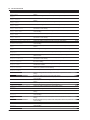
The table below lists the reference response times when outputting waveform data of analog signals.
Number of Data Points
2500
125000
1250000
2500000
6250000
Word Data
Approx. 16 ms
Approx. 344 ms
Approx. 3172 ms
Approx. 6282 ms
Approx. 15641 ms
ASCII Data
Approx. 0.390 s
Approx. 19.453 s
Approx. 194.516 s
Approx. 389.047 s
Approx. 971.985 s
The table below lists the reference response times when outputting waveform data of logic signals.
Number of Data Points
2500
125000
1250000
2500000
6250000
3-4
Word Data
Approx. 32 ms
Approx. 859 ms
Approx. 8707 ms
Approx. 17365 ms
Approx. 43678 ms
ASCII Data
Approx. 0.078 s
Approx. 3.609 s
Approx. 36.172 s
Approx. 72.500 s
Approx. 182,000 s
IM DLM6054-17EN
3.5
Setting the DL6000/DLM6000 (GP-IB)
1
2
Procedure
UTILITY_Remote Control_GP-IB Menu
Press UTILITY, the Remote Control soft key, and then the GPIB soft key to display the following
menu.
3
Overview of the GP-IB Interface
4
Select GP-IB.
5
6
Set the address.
App
Note
Only the communication interface selected by Remote Control is enabled. The DL6000/DLM6000 does not
accept commands that are transmitted to other unselected communication interfaces.
Explanation
Enter the following settings when using a controller to set information that can be specified through key
operation on the DL6000/DLM6000 or when outputting setting parameters or output waveform data to
the controller.
Setting the Address
Set the address of the DL6000/DLM6000 within the following range for the addressable mode.
0 to 30
Each device that can be connected via GP-IB has a unique address within the GP-IB system. This
address is used to distinguish the device from others. Therefore, when you connect the DL6000/
DLM6000 to a PC, for example, make sure to assign a unique address to the DL6000/DLM6000.
Note
Do not change the address while the controller is communicating with the DL6000/DLM6000 or other devices
over the GP-IB.
IM DLM6054-17EN
3-5
Index
3.6
Responses to Interface Messages
Responses to Interface Messages
Responses to a Uni-Line Message
• IFC (Interface Clear)
Clears the talker and listener functions. Stops output if data are being output.
• REN (Remote Enable)
Switches between the remote and local modes.
IDY (Identify) is not supported.
Responses to a Multi-Line Message (Address Command)
• GTL (Go To Local)
Switches to the local mode.
• SDC (Selected Device Clear)
• Clears the program message (command) being received and the output queue (see page 6-5).
• *OPC and *OPC? commands in execution are void.
• The *WAI and COMMunicate:WAIT commands are immediately terminated.
PPC (Parallel Poll Configure), GET(Group Execute Trigger), and TCT (Take Control) are not
supported.
Responses to a Multi-Line Message (Universal Command)
• LLO (Local Lockout)
Disables CLEAR on the front panel to prohibit switching to the local mode.
• DCL (Device Clear)
Same operation as the SDC message.
• SPE (Serial Poll Enable)
Sets the talker function on all devices on the bus to serial polling mode. The controller polls the
devices in order.
• SPD (Serial Poll Disable)
Clears the serial polling mode of the talker function on all devices on the bus.
PPU (Parallel Poll Unconfigure) is not supported.
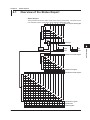
What Are Interface Messages
Interface messages are also referred to as interface commands or bus commands. They are
commands that are issued by the controller. They are classified as follows:
Uni-Line Messages
A single control line is used to transmit uni-line messages. The following three types are available.
• IFC (Interface Clear)
• REN (Remote Enable)
• IDY (Identify)
3-6
IM DLM6054-17EN
3.6 Responses to Interface Messages
1
Multi-Line Messages
Eight data lines are used to transmit multi-line messages. The messages are classified as follows:
• Address Commands
2
These commands are valid when the instrument is designated as a listener or as a talker. The
following five types are available.
3
Overview of the GP-IB Interface
Commands that are valid on an instrument that is designated as a listener
• GTL (Go To Local)
• SDC (Selected Device Clear)
• PPC (Parallel Poll Configure)
• GET (Group Execute Trigger)
4
Commands that are valid on an instrument that is designated as a talker
• TCT (Take Control)
5
• Universal commands
These commands are valid on all instruments regardless of the listener and talker designations.
The following five types are available.
• LLO (Local Lockout)
• DCL (Device Clear)
• PPU (Parallel Poll Unconfigure)
• SPE (Serial Poll Enable)
• SPD (Serial Poll Disable)
6
App
In addition, listener address, talker address, and secondary commands are also considered interface
messages.
Uni-line
messages
Interface messages
Multi-line messages
Address
commands
Universal
commands
♦HGTL
♦HSDC
PPC
GET
TCT
♦HLLO
♦HDCL
PPU
♦HSPE
♦HSPD
♦HIFC
♦HREN
IDY
Listener
address
Talker
address
Secondary
commands
Interface messages that DL6000/DLM6000 supports are indicated with ♦ marks.
Note
The Differences between SDC and DCL
In multi-line messages, SDC messages are those that require talker or listener designation and DCL
messages are those that do not require the designation. Therefore, SDC messages are directed at a
particular instrument while DCL messages are directed at all instruments on the bus.
IM DLM6054-17EN
3-7
Index
Chapter 4
Before Programming
4.1
Messages
1
Messages
Program Messages
The program message format is shown below
;
<Program message unit>
<PMT>
<Program Message Unit>
A program message consists of zero or more
program message units; each unit corresponds to
one command. The instrument executes the received
commands in order.
Each program message unit is separated by a
semicolon (;).
For details regarding the format of the program
message unit, see the next section.
Example
:ACQuire:MODE NORMal;HRMode 1<PMT>
Unit
Unit
<PMT>
PMT is a program message terminator. The following
three types are available.
NL (New Line):Same as LF (Line Feed). ASCII
code “0AH”
^EOM:
The END message as defined by USBTMC
(The data byte that is sent simultaneously
with the END message is the last data of the
program message.)
NL^EOM: NL with an END message added
(NL is not included in the program
message.)
IM DLM6054-17EN
Program Message Unit Format
2
The program message unit format is shown below
,
<Program header>
Space
<Program data>
3
<Program Header>
The program header indicates the command type. For
details, see page 4-3.
4
<Program Data>
If certain conditions are required in executing a
command, program data is added. A space (ASCII
code “20H”) separates the program data from the
header. If there are multiple sets of program data, they
are separated by commas (,).
For details, see page 4-5.
Before Programming
Messages are used to exchange information between
the controller and the instrument. Messages that are
sent from the controller to the instrument are called
program messages and messages that are sent
back from the instrument to the controller are called
response messages.
If a program message contains a message unit that
requests a response (a query), the instrument returns
a response message upon receiving the program
message. A single response message is always
returned in response to a single program message.
Example
:ACQuire:MODE NORMal<PMT>
Header
5
6
App
Data
Response Messages
Index
The response message format is shown belo.
;
<Response message unit>
<RMT>
<Response Message Unit>
A response message consists of one or more
response message units; each response message unit
corresponds to one response.
Response message units are separated by a semicolon
(;).
For details regarding the format of the response
message unit, see the next section.
Example
:ACQUIRE:MODE NORMAL;HRMode 1<RMT>
Unit
Unit
<RMT>
A response message terminator. It is NL^EOM.
4-1
4.1 Messages
Response Message Unit Format
The response message unit format is shown belw.
,
<Response header>
Space
<Response data>
<Response Header>
A response header sometimes precedes the response
data. A space separates the data from the header. For
details, see page 4-4.
<Response Data>
Response data contains the content of the response.
If there are multiple sets of response data, they are
separated by commas (,). For details, see page 4-5.
Example
1.25E-02<RMT>
Data
:ACQUIRE:MODE NORMAL<RMT>
Header
Data
If there are multiple queries in a program message,
responses are made in the same order as the queries.
In most cases, a single query returns a single response
message unit, but there are a few queries that return
multiple units. The first response message unit always
corresponds to the first query, but the nth response
unit may not necessarily correspond to the nth query.
Therefore, if you want to make sure that every
response is retrieved, divide the program messages
into individual messages.
• If a program message containing multiple message
units is sent, and the message contains incomplete
units, the instrument attempts to execute the ones
that are believed to be complete. However, these
attempts may not always be successful. In addition,
if the message contains queries, the responses may
not be returned.
Deadlock
The instrument can store in its buffer program and
response messages of length 1024 bytes or more
(The number of available bytes varies depending on
the operating conditions). When both the transmit
and receive buffers become full at the same time, the
instrument can no longer continue to operate. This
state is called a deadlock. In this case, operation can
be resumed by discarding the program message.
Deadlock will not occur if the program message
(including the <PMT>) is kept below 1024 bytes.
Furthermore, deadlock never occurs if a program
message does not contain a query.
Precautions to Be Taken when Transferring
Messages
• If a program message that does not contain a query
is sent, the next program message can be sent at
any time.
• If a program message that contains a query is sent,
a response message must be received before the
next program message can be sent. If the next
program message is sent before the response
message is received in its entirety, an error occurs.
The response message that was not received is
discarded.
• If the controller tries to receive a response message
when there is none, an error occurs. If the controller
tries to receive a response message before the
transmission of the program message is complete,
an error occurs.
4-2
IM DLM6054-17EN
4.2
Commands
Commands
There are three types of commands (program headers)
that are sent from the controller to the instrument.
They differ in their program header formats.
Common Command Header
Commands that are defined in the USBTMC-USB488
are called common commands. The header format of
a common command is shown below. An asterisk (*) is
always placed in the beginning of a cmmand.
?
<Mnemonic>
Common command example: *CLS
Compound Header
Dedicated commands used by the instrument are
classified and arranged in a hierarchy according to
their functions. The format of a compound header is
shown below. A colon (:) must be used to specify a
lower hiearchy.
:
:
?
<Mnemonic>
Compound header example: :ACQuire:MODE
Simple Header
These commands are functionally independent and do
not have a hierarchy. The format of a simple header is
shownbelow.
:
<Mnemonic>
?
Simple header example: :STARt
Note
A <mnemonic> is a character string made up of
alphanumeric characters.
When Concatenating Commands
• Command Group
A command group is a group of commands that have
common compound headers arranged in a hierarchy.
A command group may contain sub-groups.
• When Concatenating Commands of the Same
Group
The instrument stores the hierarchical level of the
command that is currently being executed, and
performs analysis on the assumption that the next
command sent will also belong to the same level.
Therefore, common header sections can be omitted
for commands belonging to the same group.
Example :ACQuire:MODE NORMal;
INTERLeave 1<PMT>
• When Concatenating Commands of Different
Groups
If the following command does not belong to the
same group, a colon (:) is placed in front of the
header (cannot be omitted).
Example :ACQuire:MODE NORMal;:DISPlay:
FORMat SINGle<PMT>
• When Concatenating Simple Headers
If a simple header follows another command, a
colon (:) is placed in front of the simple header
(cannot be omitted).
Example :ACQuire:MODE NORMal;:
STARt<PMT>
3
4
5
6
App
Index
• When Concatenating Common Commands
Common commands that are defined in the
USBTMC-USB488 are independent of hierarchy.
Colons (:) are not needed before a common
command.
Example :ACQuire:MODE NORMal;*CLS;
INTERLeave 1<PMT>
• When Separating Commands with <PMT>
If a terminator is used to separate two commands,
each command is a separate message. Therefore,
the common header must be specified for each
command even when commands belonging to the
same command group are being concatenated.
Example :ACQuire:MODE NORMal<PMT>:
ACQuire:INTERLeave 1<PMT>
Example Group of commands related to acquisition
:ACQuire:AVERage:COUNt
:ACQuire:MODE
:ACQuire:AVERage:EWEight
:ACQuire:REPetitive
:ACQuire:RLENgth
:ACQuire:INTERLeave
IM DLM6054-17EN
2
Before Programming
*
1
4-3
4.2 Commands
Upper-Level Query
An upper-level query is a query in which a question
mark (?) is appended to the highest level command
of a group. Execution of an upper-level query allows
all settings that can be specified in the group to be
received at once. Some query groups which are
comprised of more than three hierarchical levels can
output all the lower level settings.
Example :ACQUIRE? -> :ACQUIRE:AVERAGE:
COUNT 2;EWEIGHT 16;:ACQUIRE:
HRMODE 0;INTERLEAVE 0;
INTERPOLATE 1;MODE NORMAL;
REPETITIVE 0;RLENGTH 12500
The response to an upper-level query can be
transmitted as a program message back to the
instrument. In this way, the settings that existed when
the upper-level query was made can be restored.
However, some upper-level queries do not return setup
information that is not currently in use. It is important
to remember that not all the group’s information is
necessarily returned as part of a response.
Header Interpretation Rules
The instrument interprets the header that is received
according to the rules below.
• Mnemonics are not case sensitive.
Example “CURSor” can also be written as “cursor”
or “Cursor.”
• The lower-case section of the header can be
omitted.
Example “CURSor” can also be written as “CURSO”
or “CURS.”
• The question mark (?) at the end of a header
indicates that it is a query. The question mark (?)
cannot be omitted.
Example The shortest abbreviation for CURSor? is
CURS?.
• If the <x> (value) at the end of a mnemonic is
omitted, it is interpreted as a 1.
Example If “CHANnel<x>” is written as “CHAN,” it
means “CHANnel1.”
• The section enclosed by braces ([]) can be
omitted.
Example HISTory[:CURRent]:MODE can also be
written as HIST:MODE.
However, the last section enclosed by braces ([])
cannot be omitted in an upper-level query.
Example “HISTory?” and “HISTory:CURRent?”
are different queries.
4-4
IM DLM6054-17EN
4.3
Response
1
Response
2
When the controller sends a message unit that has a
question mark (?) in its program header (query), the
instrument returns a response message to the query.
A response message is returned in one of the following
two forms.
3
• Response Consisting of a Header and Data
If the response can be used as a program message
without any change, it is returned with a command
header attached.
Example :ACQUire:MODE?<PMT>
-> :ACQUire:MODE NORMAL<RMT>
4
Before Programming
5
• Response Consisting of Data Only
If the response cannot be used as a program
message unless changes are made to it (queryonly command), only the data section is returned.
However, there are query-only commands that
return responses with the header attached.
Example :MEASure:TRACe1:AREA1:PTOPeak:
VALue?<PMT> -> 10.0E+00<RMT>
6
App
Index
When You Wish to Return a Response without
a Header
Responses that return both header and data can be
set so that only the data section is returned. The
“COMMunicate:HEADer” command is used to do this.
Abbreviated Form
Normally, the lower-case section is removed from a
response header before the response is returned to
the controller. Naturally, the full form of the header can
also be used. For this, the “COMMunicate:VERBose”
command is used. The sections enclosed by braces
([]) are also omitted in the abbreviated form.
IM DLM6054-17EN
4-5
4.4
Data
Data
A data section comes after the header. A space must be
included between the header and the data. The data
contains conditions and values. Data is classified as below.
Data
<Decimal>
<Voltage><Time>
<Frequency>
<Current>
<Register>
<Character Data>
<Boolean>
<String data>
<Filename>
<Block data>
Meaning
A value expressed as a decimal number
(Example: Probe attenuation of CH1
-> CHANnel1:PROBe 100)
A physical value
(Example: Time axis range
-> TIMebase:TDIV 1US)
Register value expressed as binary, octal, decimal or hexadecimal.
(Example: Extended event register value
-> STATUS:EESE #HFE)
Predefined character string (mnemonic). Can be selected from { }.
(Example: Select the input coupling of CH1
-> CHANnel1:COUPling
{AC|DC|DC50|GND})
Indicates ON and OFF. Set using ON, OFF or a value
(Example: Turn ON the CH1 display
-> CHANnel1:DISPlay ON)
An arbitrary character string
(Example: Comment to a screen data output
-> MATH1:UNIT:USERdefine "VOLT")
Indicates a file name.
(Example: Save file name
−> FILE:SAVE:WAVeform:NAME "CASE1")
Arbitrary 8-bit data
(Example: Response to acquired waveform data
-> #800000010ABCDEFGHIJ)
<Decimal>
<Decimal> indicates a value expressed as a decimal
number, as shown in the table below. Decimal values
are given in the NR form as specified in the ANSI
X3.42-1975.
Symbol
<NR1>
<NR2>
<NR3>
<NRf>
Meaning
Example
125-1
+1000
Integer
125.0
-.90
Fixed-point number
125.0E+0 -9E-1
Floating-point number
Any of the forms <NR1> to <NR3> is allowed.
+001.
+.1E4
• The instrument can receive decimal values that are
sent from the controller in any of the forms, <NR1>
to <NR3>. This is represented by <NRf>.
• For response messages that the instrument returns
to the controller, the form (<NR1> to <NR3> to be
used) is determined by the query. The same form is
used regardless of the size of the value.
• For the <NR3> format, the “+” sign after the “E” can
be omitted. However, the “-” sign cannot be omitted.
• If a value outside the setting range is entered, the
value is normalized so that it is just inside the range.
• If a value has more significant digits than the
available resolution, the value is rounded.
4-6
<Voltage>, <Time>, <Frequency>, and <Current>
<Voltage>, <Time>, <Frequency>, and <Current>
indicate decimal values that have physical significance.
<Multiplier> or <Unit> can be attached to the <NRf>
form that was described earlier. It is expressed in one
of the following forms.
Form
<NRf><Multiplier><Unit>
<NRf><Unit>
<NRf><Multiplier>
<NRf>
Example
5MV
5E-3V
5M
5E-3
<Multiplier>
<Multipliers> which can be used are indicated
below.
Symbol
EX
PE
T
G
MA
K
M
U
N
P
F
A
Word
Exa
Peta
Tera
Giga
Mega
Kilo
Milli
Micro
Nano
Pico
Femto
Ato
Multiplier
1018
1015
1012
109
106
103
10–3
10–6
10–9
10–12
10–15
10–18
<Unit>
<Units> that can be used are indicated below.
Symbol
V
S
HZ
MHZ
A
Word
Volt
Second
Hertz
Megahertz
Ampere
Meaning
Voltage
Time
Frequency
Frequency
Current
• <Multiplier> and <Unit> are not case sensitive.
• “U” is used to indicate micro “µ”.
• “MA” is used for Mega to distinguish it from Milli.
The only exception is Megahertz which is expressed
as “MHZ.” Therefore, the “M (Milli)” multiplier cannot
be used for frequencies.
• If both <Multiplier> and <Unit> are omitted, the
default unit is used.
• Response messages are always expressed in the
<NR3> form. Response messages are returned
using the default unit without the <Multiplier> or
<Unit>.
IM DLM6054-17EN
4.4 Data
<Register>
<Register> indicates an integer, and can be expressed
in hexadecimal, octal, or binary as well as a decimal
number. It is used when each bit of the value has
a particular meaning. It is expressed in one of the
following forms.
Form
<NRf>
#H<Hexadecimal value made up of the digits 0 to 9 and A to F>
#Q<Octal value made up of the digits 0 to 7>
#B<Binary value made up of the digits 0 and 1>
Example
1
#H0F
#Q777
#B001100
<Character Data>
<Character Data> is a specified string of character data
(a mnemonic). It is mainly used to indicate options
and is chosen from the character strings given in { }.
For interpretation rules, refer to “Header Interpretation
Rules” on page 4-4.
Form
{AC|DC|DC50|GND}
Example
AC
• As with the header, the “COMMunicate:VERBose”
command can be used to select whether to return
the response in the full form or in the abbreviated
form.
• The “COMMunicate:HEADer” setting does not
affect the character data.
<Boolean>
<Boolean> is data that indicates ON or OFF. It is
expressed in one of the following forms.
Form
{ON|OFF|<NRf>}
Example
ON
OFF
1
0
• When <Boolean> is expressed in the <NRf> form,
“OFF” is selected if the rounded integer value is 0,
and ON for all other cases.
• A response message is always returned with a 1 if
the value is ON and 0 if the value is OFF.
<String data>
<String data> is not a specified character string like
<Character data>. It is an arbitrary character string.
The character string must be enclosed in single
quotation marks (') or double quotation marks (").
Form
<String data>
IM DLM6054-17EN
Example
'ABC' "IEEE488.2-1987"
<Filename>
<Filename> is data that indicates a file name. It is
expressed in one of the following forms.
Form
Example
{<NRf>|<Character data>|<String data>} 1 CASE "CASE"
• <NRf> is rounded to an 8-digit integer and converted
to ASCII code. The result is the file name (example:
1 becomes "00000001"). Negative values are not
allowed.
• Response messages are always returned in the
<String data> form.
• For <Character data>, the first 12 characters
become the file name.
• For <String data>, the first 259 characters become
the file name.
• For a description of the number of characters of the
<String data> file name, see the DL9500/DL9700
User’s Manual.
<Block data>
<Block data> is arbitrary 8-bit data. It is only used in
response messages on the DL9500/DL9700. Below is
the syntax.
Form
#N<N-digit decimal number>
<Data byte sequence>
Example
#800000010ABCDEFGHIJ
• #N
Indicates that the data is <Block data>. “N”
indicates the number of succeeding data bytes
(digits) in ASCII code characters.
• <N-digit decimal number>
Indicates the number of bytes of data (example:
00000010 = 10 bytes).
• <data byte sequence>
Expresses the actual data (example: ABCDEFGHIJ).
• Data is comprised of 8-bit values (0 to 255). This
means that the ASCII code “0AH,” which stands for
“NL,” can also be a code used for data. Hence, care
must be taken when programming the controller.
4-7
1
2
3
4
Before Programming
• <Register> is not case sensitive.
• Response messages are always expressed as
<NR1>.
• If a character string contains a double quotation mark
('), the double quotation mark is replaced by two
double quotation marks (""). This rule also applies
to a single quotation mark within a character string.
• A response message is always enclosed in double
quotation marks (").
• <String data> is an arbitrary character string.
Therefore the instrument assumes that the
remaining program message units are part of the
character string if no single (') or double quotation
mark (") is encountered. As a result, no error is
detected if a quotation mark is omitted.
5
6
App
Index
4.5
Synchronization with the Controller
Overlap Commands and Sequential Commands
There are two types of commands, overlap commands
and sequential commands. In the case of overlap
commands, the execution of the next command may
start before the execution of the previous command is
completed.
For example, if the next program message is
transmitted when specifying the V/div value and
querying the result, the response always returns the
most recent setting (5 V in this case).
:CHANnel1:VDIV 5V;VDIV?<PMT>
This is because the next command is forced to wait
until the processing of “CHANnel1:VDIV” itself
is completed. This type of command is called a
sequential command.
On the contrary, let us assume that you send the next
program message when you wish to load a file and
query the V/div value of the result.
:FILE:LOAD:SETup:EXECute "CASE1";:
CHANnel1:VDIV?
In this case, “CHANnel1:VDIV?” is executed before
the loading of the file is completed, and the V/div value
that is returned is the value before the file is loaded.
The act of executing the next command before the
processing of itself is completed such as with “FILE:
LOAD:SETup:EXECute "CASE1"” is called an
overlap operation. A command that operates in this
way is called an overlap command.
In such case, the overlap operation can be prevented
by using the methods below.
Synchronizing with Overlap Commands
• Using the *WAI Command
The *WAI command holds the subsequent
commands until the overlap command is completed.
Example :COMMunicate:OPSE #H0040;:
FILE:LOAD:SETup:
EXECute "CASE1";*WAI;:
CHANnel1:VDIV?<PMT>
COMMunicate:OPSE
” is a command used to select
“
the “*WAI” target. Here, media access is specified.
Because “*WAI” is executed immediately before
“CHANnel1:VDIV?,” “CHANnel1:VDIV?” is not
• Using the COMMunicate:OVERlap command
The COMMunicate:OVERlap command enables (or
disables) overlap operation.
Example :COMMunicate:OVERlap #HFFBF;:
FILE:LOAD:SETup:
EXECute "CASE1";:CHANnel1:
VDIV?<PMT>
COMMunicate:OVERlap
#HFFBF” enables
“
overlap operation on commands other than media
access. Because the overlap operation of file
loading is disabled, “FILE:LOAD:SETup:EXECute
"CASE1"” operates in the same way as a sequential
command. Therefore, CHANnel1:
VDIV? is not executed until the file loading is
complete.
• Using the *OPC Command
The *OPC command sets the OPC bit, bit 0 of the
standard event register (see page 6-4), to 1 when
the overlap operation is completed.
Example :COMMunicate:OPSE #H0040;
*ESE 1;
*ESR?;*SRE 32;:FILE:LOAD:SETup:
EXECute "CASE1";*OPC<PMT>
(Read the response to *ESR?)
(Wait for a service request)
:CHANnel1:VDIV?<PMT>
COMMunicate:OPSE
” is a command used to select
“
the “*OPC” target. Here, media access is specified.
“*ESE 1” and “*SRE 32” indicate that a service
request is generated only when the OPC bit is 1.
“*ESR?” clears the standard event register.
In the example above, “CHANnel1:VDIV?” is not
executed until a service request is generated.
executed until the file loading is complete.
4-8
IM DLM6054-17EN
4.5 Synchronization with the Controller
• Using the *OPC? Query
The *OPC? query generates a response when an
overlap operation is completed.
Example :COMMunicate:OPSE #H0040;:FILE:
LOAD:SETup:EXECute "CASE1";
*OPC?<PMT>
(Read the response to *OPC?)
:CHANnel1:VDIV?<PMT>
“COMMunicate:OPSE” is a command used to
select the “*OPC?” target. Here, media access is
Note
Most commands are sequential commands. Overlap
commands are indicated as overlap commands
in chapter 5. All other commands are sequential
commands.
Achieving Synchronization without Using
Overlap Commands
Even for sequential commands, synchronization is
sometimes required for non communication-related
reasons such as a trigger occurrence.
For example, if the next program message is
transmitted to make an inquiry about the waveform
data which has been acquired with the trigger mode
set to single, the WAVeform:SEND? command may
be executed regardless of whether the acquisition has
been completed or not and may result in command
execution error.
TRIGger:MODE SINGle;:STARt;:WAVeform:
SEND?<PMT>
In this case, the following method must be used to
synchronize with the end of the acquisition.
• Using the STATus:CONDition? Query
The “STATus:CONDition?” query is used to query
the contents of the condition register (page 6-5).
Whether waveforms are being retrieved can be
determined by reading bit 0 of the condition register.
If bit 0 of the condition register is “1,” waveforms are
being retrieved. Otherwise, it is stopped.
Example TRIGger:MODE SINGle;:STARt<PMT>
:STATus:CONDition?<PMT>
(Wait for a service request)
:WAVeform:SEND?<PMT>
STATus:FILTer1
FALL” command sets
The “
the transition filter so that bit 0 (FILTer1) of the
extended event register is set to 1 when bit 0 of the
condition register changes from 1 to 0.
The “:STATus:EESE 1” command is used to
reflect only bit 0 of the extended event register to
the status byte.
The “STATus:EESR?” command is used to clear the
extended event register.
The “*SRE 8” command is used to generate a
service request solely on the cause of the extended
event register.
The “WAVeform:SEND?” command is not executed
until a service request is generated.
• Using the COMMunicate:WAIT Command
The “COMMunicate:WAIT” command halts
communications until a specific event is generated.
Example :STATus:FILTer1 FALL;:
STATus:EESR?;:TRIGger:
MODE SINGle<PMT>
(Read the response to STATus:EESR?)
:COMMunicate:WAIT 1;:WAVeform:
SEND?<PMT>
For a description of “STATus:FILTer1 FALL”
and “STATus:EESR?” see the previous section
regarding the extended event register.
The “COMMunicate:WAIT 1” command indicates
that the program will wait for bit 0 of the extended
event register to be set to “1.”
The WAVeform:SEND? command will not be
executed until bit 0 of the extended event register is
set to “1.”
(Read the response. If bit 0 is 1, repeat
this command until it becomes 1.)
:WAVeform:SEND?<PMT>
WAVeform:SEND?
command will not be
The
executed until bit 0 of the condition register is set to
“0.”
IM DLM6054-17EN
4-9
1
2
3
4
Before Programming
specified.
Because “*OPC?” does not generate a response
until the overlap operation is completed, the loading
of the file will have been completed by the time the
response to “*OPC?” is read.
• Using the Extended Event Register
The changes in the condition register can be
reflected in the extended event register (page 6-5).
Example :STATus:FILTer1 FALL;:
STATus:EESE 1;EESR?;*SRE 8;:
TRIGger:MODE SINGle;:STARt<PMT>
(Read the response to STATus:EESR?)
5
6
App
Index
Chapter 5
5.1
Commands
List of Commands
Commnd
ACQuire Group
:ACQuire?
:ACQuire:AVERage?
:ACQuire:AVERage:COUNt
:ACQuire:HRMode
:ACQuire:INTERLeave
:ACQuire:MODE
:ACQuire:REPetitive
:ACQuire:RLENgth
:ACQuire:SAMPling
ANALysis Group
IM DLM6054-17EN
Function
Page
Queries all settings related to the waveform acquisition.
Queries all settings related to averaging and the waveform acquisition count.
Sets the waveform acquisition count of averaging mode or queries the
current setting.
Turns ON/OFF the high resolution mode or queries the current setting.
Turns ON/OFF interleave or queries the current setting.
Sets the waveform acquisition mode or queries the current setting.
Turns ON/OFF the repetitive sampling or queries the current setting.
Sets the record length or queries the current setting.
Sets or queries the sampling mode.
5-35
5-35
5-35
5-35
5-35
5-35
5-35
5-35
5-35
2
3
4
5
Queries all settings related to the analysis function.
Queries all settings related to the accumulated histogram function.
Sets the horizontal range of the accumulated histogram or queries the
current setting.
Queries all settings related automated measurement of the accumulated
histogram.
Queries all settings related to cursor measurement of the accumulated
histogram.
Queries all settings related to basic items of the cursor of the accumulated
histogram.
Turns ON/OFF all basic items of the cursor of the accumulated histogram.
5-36
5-36
5-36
Queries all settings related to the cursor of the accumulated histogram.
5-36
Turns ON/OFF the cursor of the accumulated histogram or queries the
current setting.
5-36
Queries the measured value of the cursor of the accumulated histogram.
5-36
5-36
5-36
5-36
Commands
:ANALysis?
:ANALysis:AHIStogram<x>?
:ANALysis:AHIStogram<x>:
HORizontal
:ANALysis:AHIStogram<x>:
MEASure?
:ANALysis:AHIStogram<x>:
MEASure:CURSor?
:ANALysis:AHIStogram<x>:
MEASure:CURSor:BASic?
:ANALysis:AHIStogram<x>:
MEASure:CURSor[:BASic]:ALL
:ANALysis:AHIStogram<x>:
MEASure:CURSor[:BASic]:C<x>?
:ANALysis:AHIStogram<x>:
MEASure:CURSor[:BASic]:C<x>:
STATe
:ANALysis:AHIStogram<x>:
MEASure:CURSor[:BASic]:C<x>:
VALue?
:ANALysis:AHIStogram<x>:
MEASure:CURSor[:BASic]:DC?
:ANALysis:AHIStogram<x>:
MEASure:CURSor[:BASic]:DC:STATe
:ANALysis:AHIStogram<x>:
MEASure:CURSor[:BASic]:DC:
VALue?
:ANALysis:AHIStogram<x>:
MEASure:CURSor:CALCulation?
:ANALysis:AHIStogram<x>:
MEASure:CURSor:CALCulation:ALL
:ANALysis:AHIStogram<x>:
MEASure:CURSor:CALCulation:
DEFine<x>
:ANALysis:AHIStogram<x>:
MEASure:CURSor:CALCulation:
STATe<x>
:ANALysis:AHIStogram<x>:
MEASure:CURSor:CALCulation:
VALue<x>?
:ANALysis:AHIStogram<x>:
MEASure:CURSor:HLINkage
1
6
App
5-36
Queries all settings related to measured values between cursors of the
5-37
accumulated histogram.
Turns ON/OFF the measured values between cursors of the accumulated
5-37
histogram or queries the current setting.
Queries the measured value between cursors of the accumulated histogram. 5-37
Queries all settings related to calculation items of the cursor of the
accumulated histogram.
Turns ON/OFF all calculation items of the cursor of the accumulated
histogram.
Sets the equation of the calculation item of the cursor of the accumulated
histogram or queries the current setting.
5-37
Turns ON/OFF the calculation item of the cursor of the accumulated
histogram or queries the current setting.
5-37
Queries the measured value of the calculation item of the cursor of the
accumulated histogram.
5-37
Turns ON/OFF the ΔV cursor link of the accumulated histogram or queries
the current setting.
5-38
5-37
5-37
5-1
Index
5.1 List of Commands
Commnd
:ANALysis:AHIStogram<x>:
MEASure:CURSor:HPOSition<x>
:ANALysis:AHIStogram<x>:
MEASure:CURSor:VLINkage
:ANALysis:AHIStogram<x>:
MEASure:CURSor:VPOSition<x>
:ANALysis:AHIStogram<x>:
MEASure:MODE
:ANALysis:AHIStogram<x>:
MEASure:PARameter?
:ANALysis:AHIStogram<x>:
MEASure:PARameter:AREA<x>?
:ANALysis:AHIStogram<x>:
MEASure:PARameter:AREA<x>:ALL
:ANALysis:AHIStogram<x>:
MEASure:PARameter:
AREA<x>:<Parameter>?
:ANALysis:AHIStogram<x>:
MEASure:PARameter:
AREA<x>:<Parameter>:STATe
:ANALysis:AHIStogram<x>:
MEASure:PARameter:
AREA<x>:<Parameter>:VALue?
:ANALysis:AHIStogram<x>:
MEASure:PARameter:CALCulation?
:ANALysis:AHIStogram<x>:
MEASure:PARameter:CALCulation:
ALL
:ANALysis:AHIStogram<x>:
MEASure:PARameter:CALCulation:
DEFine<x>
:ANALysis:AHIStogram<x>:
MEASure:PARameter:CALCulation:
STATe<x>
:ANALysis:AHIStogram<x>:
MEASure:PARameter:CALCulation:
VALue<x>?
:ANALysis:AHIStogram<x>:
MEASure:PARameter:HRANge<x>
:ANALysis:AHIStogram<x>:
MEASure:PARameter:VRANge<x>
:ANALysis:AHIStogram<x>:MODE
:ANALysis:AHIStogram<x>:TRACe
:ANALysis:AHIStogram<x>:
VERTical
:ANALysis:AHIStogram<x>:WINDow
:ANALysis:FFT<x>?
:ANALysis:FFT<x>:AVERage?
:ANALysis:FFT<x>:AVERage:
EWEight
:ANALysis:FFT<x>:HORizontal?
:ANALysis:FFT<x>:HORizontal:
CSPan?
:ANALysis:FFT<x>:HORizontal:
CSPan:CENTer
:ANALysis:FFT<x>:HORizontal:
CSPan:SPAN
:ANALysis:FFT<x>:HORizontal:
LRIGht?
:ANALysis:FFT<x>:HORizontal:
LRIGht:RANGe
5-2
Function
Sets the ΔV cursor position of the accumulated histogram or queries the
current setting.
Turns ON/OFF the ΔT cursor link of the accumulated histogram or queries
the current setting.
Sets the ΔT cursor position of the accumulated histogram or queries the
current setting.
Sets the automated measurement mode of the accumulated histogram or
queries the current setting.
Queries all settings related to the automated measurement of waveform
parameters of the accumulated histogram.
Queries all settings related to the area of the accumulated histogram.
Page
5-38
5-38
Turns ON/OFF all waveform parameters of the accumulated histogram.
5-39
Queries all settings related to the waveform parameter of the accumulated
histogram.
5-39
Turns ON/OFF the waveform parameter of the accumulated histogram or
queries the current setting.
5-39
Queries the automated measured value of the waveform parameter of the
accumulated histogram.
5-39
5-38
5-38
5-38
5-38
Queries all settings related to the calculation items of waveform parameters 5-39
of the accumulated histogram.
Turns ON/OFF all calculation items of the waveform parameters of the
5-39
accumulated histogram.
Sets the equation of the calculation items of the waveform parameter of the
accumulated histogram or queries the current setting.
5-39
Turns ON/OFF the calculation items of the waveform parameter of the
accumulated histogram or queries the current setting.
5-40
Queries the automated measured value of the calculation items of the
waveform parameter of the accumulated histogram.
5-40
Sets the horizontal range of the waveform parameter of the accumulated
histogram or queries the current setting.
Sets the vertical range of the waveform parameter of the accumulated
histogram or queries the current setting.
Sets the accumulated histogram mode or queries the current setting.
Sets the source trace of the accumulated histogram or queries the current
setting.
Sets the vertical range of the accumulated histogram or queries the current
setting.
Sets the measurement target window of the accumulated histogram or
queries the current setting.
Queries all settings related to the FFT computation function.
Queries all FFT analysis averaging settings.
Sets or queries the attenuation constant of exponential averaging in FFT
analysis.
Queries all settings related the horizontal axis of the FFT computation.
Queries all settings related to the center and span of the horizontal axis of
the FFT computation.
Sets the horizontal center of the FFT computation or queries the current
setting.
Sets the horizontal span of the FFT computation or queries the current
setting.
Queries all settings related the left and right edges of the horizontal axis of
the FFT computation.
Sets the range of the horizontal left and right edges of the FFT computation
or queries the current setting.
5-40
5-40
5-40
5-40
5-40
5-41
5-41
5-41
5-41
5-41
5-41
5-41
5-41
5-41
5-41
IM DLM6054-17EN
5.1 List of Commands
Commnd
:ANALysis:FFT<x>:HORizontal:
MODE
:ANALysis:FFT<x>:LENGth
:ANALysis:FFT<x>:MEASure?
1
5-42
5-42
2
5-42
5-42
3
5-42
Queries all settings related to the frequency value between marker cursors
of the FFT computation.
Turns ON/OFF the frequency value between marker cursors of the FFT
computation or queries the current setting.
Queries the frequency value between marker cursors of the FFT
computation.
5-42
Queries all settings related to the power value between marker cursors of
the FFT computation.
Turns ON/OFF the power value between marker cursors of the FFT
computation or queries the current setting.
Queries the power value between marker cursors of the FFT computation.
5-42
5-42
4
5-42
5-43
5-43
Queries all settings related to the frequency value of the marker cursor of the 5-43
FFT computation.
Turns ON/OFF the frequency value of the marker cursor of the FFT
5-43
computation or queries the current setting.
Queries the frequency value of the marker cursor of the FFT computation.
5-43
Sets the marker cursor position of the FFT computation or queries the
current setting.
5-43
Queries all settings related to the power value of the marker cursor of the
5-43
FFT computation.
Turns ON/OFF the power value of the marker cursor of the FFT computation 5-43
or queries the current setting.
Queries the power value of the marker cursor of the FFT computation.
5-44
Queries all settings related to calculation items of the marker cursor of the
FFT computation.
Turns ON/OFF all calculation items of the marker cursor of the FFT
computation.
Sets the equation of the calculation items of the marker cursor of the FFT
computation or queries the current setting.
Turns ON/OFF the calculation items of the marker cursor of the FFT
computation or queries the current setting.
Queries the measured value of the calculation items of the marker cursor of
the FFT computation.
Sets the automated measurement mode of the FFT computation or queries
the current setting.
:ANALysis:FFT<x>:MEASure:PEAK? Queries all settings related to the peak value measurement of the FFT
computation.
:ANALysis:FFT<x>:MEASure:PEAK: Queries all settings related to basic items of the peak value of the FFT
BASic?
computation.
:ANALysis:FFT<x>:MEASure:PEAK[: Turns ON/OFF all basic items of the peak value of the FFT computation.
BASic]:ALL
:ANALysis:FFT<x>:MEASure:PEAK[: Queries all settings related to the frequency value between peak values of
BASic]:DFRequency?
the FFT computation.
IM DLM6054-17EN
Page
5-42
5-44
5-44
5-44
5-44
5-44
5-44
5-44
5-44
5-45
5-45
5-3
5
Commands
:ANALysis:FFT<x>:MEASure:
MARKer?
:ANALysis:FFT<x>:MEASure:
MARKer:BASic?
:ANALysis:FFT<x>:MEASure:
MARKer[:BASic]:ALL
:ANALysis:FFT<x>:MEASure:
MARKer[:BASic]:DFRequency?
:ANALysis:FFT<x>:MEASure:
MARKer[:BASic]:DFRequency:STATe
:ANALysis:FFT<x>:MEASure:
MARKer[:BASic]:DFRequency:
VALue?
:ANALysis:FFT<x>:MEASure:
MARKer[:BASic]:DV?
:ANALysis:FFT<x>:MEASure:
MARKer[:BASic]:DV:STATe
:ANALysis:FFT<x>:MEASure:
MARKer[:BASic]:DV:VALue?
:ANALysis:FFT<x>:MEASure:
MARKer[:BASic]:FREQuency<x>?
:ANALysis:FFT<x>:MEASure:
MARKer[:BASic]:FREQuency<x>:
STATe
:ANALysis:FFT<x>:MEASure:
MARKer[:BASic]:FREQuency<x>:
VALue?
:ANALysis:FFT<x>:MEASure:
MARKer[:BASic]:POSition<x>
{<NRf>}
:ANALysis:FFT<x>:MEASure:
MARKer[:BASic]:V<x>?
:ANALysis:FFT<x>:MEASure:
MARKer[:BASic]:V<x>:STATe
:ANALysis:FFT<x>:MEASure:
MARKer[:BASic]:V<x>:VALue?
:ANALysis:FFT<x>:MEASure:
MARKer:CALCulation?
:ANALysis:FFT<x>:MEASure:
MARKer:CALCulation:ALL
:ANALysis:FFT<x>:MEASure:
MARKer:CALCulation:DEFine<x>
:ANALysis:FFT<x>:MEASure:
MARKer:CALCulation:STATe<x>
:ANALysis:FFT<x>:MEASure:
MARKer:CALCulation:VALue<x>?
:ANALysis:FFT<x>:MEASure:MODE
Function
Sets the horizontal mode of the FFT computation or queries the current
setting.
Sets the number of FFT points of the FFT computation or queries the current
setting.
Queries all settings related to the automated measurement of the FFT
computation.
Queries all settings related to the marker cursor measurement of the FFT
computation.
Queries all settings related to basic items of the marker cursor of the FFT
computation.
Turns ON/OFF all basic items of the marker cursor of the FFT computation.
6
App
Index
5.1 List of Commands
Commnd
:ANALysis:FFT<x>:MEASure:PEAK[:
BASic]:DFRequency:STATe
:ANALysis:FFT<x>:MEASure:PEAK[:
BASic]:DFRequency:VALue?
:ANALysis:FFT<x>:MEASure:PEAK[:
BASic]:DV?
:ANALysis:FFT<x>:MEASure:PEAK[:
BASic]:DV:STATe
:ANALysis:FFT<x>:MEASure:PEAK[:
BASic]:DV:VALue?
:ANALysis:FFT<x>:MEASure:PEAK[:
BASic]:FREQuency<x>?
:ANALysis:FFT<x>:MEASure:PEAK[:
BASic]:FREQuency<x>:STATe
:ANALysis:FFT<x>:MEASure:PEAK[:
BASic]:FREQuency<x>:VALue?
:ANALysis:FFT<x>:MEASure:PEAK[:
BASic]:RANGe<x>
:ANALysis:FFT<x>:MEASure:PEAK[:
BASic]:V<x>?
:ANALysis:FFT<x>:MEASure:PEAK[:
BASic]:V<x>:STATe
:ANALysis:FFT<x>:MEASure:PEAK[:
BASic]:V<x>:VALue?
:ANALysis:FFT<x>:MEASure:PEAK:
CALCulation?
:ANALysis:FFT<x>:MEASure:PEAK:
CALCulation:ALL
:ANALysis:FFT<x>:MEASure:PEAK:
CALCulation:DEFine<x>
:ANALysis:FFT<x>:MEASure:PEAK:
CALCulation:STATe<x>
:ANALysis:FFT<x>:MEASure:PEAK:
CALCulation:VALue<x>?
:ANALysis:FFT<x>:MODE
:ANALysis:FFT<x>:RANGe
:ANALysis:FFT<x>:RPOSition (Ref
Position)
:ANALysis::FFT<x>:TRACe
:ANALysis::FFT<x>:TYPE
:ANALysis:FFT<x>:VERTical?
:ANALysis:FFT<x>:VERTical:LEVel
:ANALysis:FFT<x>:VERTical:MODE
:ANALysis:FFT<x>:VERTical:
SENSitivity
:ANALysis:FFT<x>:WINDow
:ANALysis:TYPE<x>
:ANALysis:VTDisplay
:ANALysis:WAIT<x>?
:ANALysis:WPARameter<x>?
:ANALysis:WPARameter<x>:BIT<x>?
:ANALysis:WPARameter<x>:BIT<x>:
AREA<x>?
:ANALysis:WPARameter<x>:BIT<x>:
AREA<x>:TYPE
:ANALysis:WPARameter<x>:
CALCulation
5-4
Function
Turns ON/OFF the frequency value between peak values of the FFT
computation or queries the current setting.
Queries the frequency value between peak values of the FFT computation.
Queries all settings related to the power value between peak values of the
FFT computation.
Turns ON/OFF the power value between peak values of the FFT
computation or queries the current setting.
Queries the power value between peak values of the FFT computation.
Page
5-45
5-45
5-45
5-45
5-45
Queries all settings related to the peak frequency value of the FFT
5-45
computation.
Turns ON/OFF the peak frequency value of the FFT computation or queries 5-45
the current setting.
Queries the peak frequency value of the FFT computation.
5-46
Sets the measurement range of the peak value of the FFT computation or
queries the current setting.
Queries all settings related to the peak value of the FFT computation.
5-46
5-46
Turns ON/OFF the peak value of the FFT computation or queries the current 5-46
setting.
Queries the peak value of the FFT computation.
5-46
Queries all settings related to calculation items of the FFT computation.
5-46
Turns ON/OFF all calculation items of the FFT computation.
5-46
Sets the equation of the calculation item of the FFT computation or queries 5-46
the current setting.
Turns ON/OFF the calculation items of the FFT computation or queries the 5-47
current setting.
Queries the measured value of the calculation item of the FFT computation. 5-47
Sets or queries the waveform display mode for FFT analysis.
Sets the measurement source window used in the FFT computation or
queries the current setting.
Sets the center point of magnification of the vertical axis of the FFT
computation or queries the current setting.
Sets or queries the source waveform for FFT analysis.
Sets or queries the spectrum for FFT analysis.
Queries all settings related the vertical axis of the FFT computation.
Sets the display position of the vertical axis of the FFT computation or
queries the current setting.
Sets the vertical axis mode of the FFT computation or queries the current
setting.
Sets the vertical sensitivity of the FFT computation or queries the current
setting.
Sets the window function of the FFT computation or queries the current
setting.
Sets the analysis function type or queries the current setting.
Turns ON/OFF the VT waveform display or queries the current setting.
Waits for the completion of the automated measurement with a timeout
option.
Queries all settings related to the waveform parameter measurement
function.
Queries all settings related to each logic bit of logic waveform parameter
measurement.
Queries all settings related to each area of logic waveform parameter
measurement.
Sets the logic waveform parameters for logic waveform parameter
measurement or queries the current setting.
Sets the calculation items of the automated measurement of waveform
parameters or queries the current setting.
5-47
5-47
5-47
5-47
5-47
5-48
5-48
5-48
5-48
5-48
5-48
5-48
5-48
5-48
5-49
5-49
5-49
5-49
IM DLM6054-17EN
5.1 List of Commands
:ANALysis:WPARameter<x>:LIST:
ITEM?
:ANALysis:WPARameter<x>:LIST:
MODE
:ANALysis:WPARameter<x>:LIST:
SCRoll
:ANALysis:WPARameter<x>:LIST:
VALue?
:ANALysis:WPARameter<x>:MODE
:ANALysis:WPARameter<x>:
TRACe<x>?
:ANALysis:WPARameter<x>:
TRACe<x>:AREA<x>?
:ANALysis:WPARameter<x>:
TRACe<x>:AREA<x>:TYPE
IM DLM6054-17EN
Function
Queries all settings related to the histogram display of the waveform
parameter measurement.
Queries all settings related to the automated measurement of the histogram
display of the waveform parameter measurement.
Queries all settings related to the cursor measurement on the histogram of
the waveform parameter measurement.
Turns ON/OFF all histogram cursors of waveform parameter measurement.
Page
5-49
5-49
5-49
2
5-49
Queries all settings related to the cursor measurement on the histogram of
the waveform parameter measurement.
Sets the cursor position on the trend of the waveform parameter
measurement or queries the current setting.
5-49
Turns ON/OFF the cursor on the histogram of the waveform parameter
measurement or queries the current setting.
5-50
5-50
Queries the measured value of the cursor on the histogram of the waveform 5-50
parameter measurement.
Queries all settings related to the measurement between cursors on the
histogram of the waveform parameter measurement.
Turns ON/OFF the measurement between cursors on the histogram of the
waveform parameter measurement or queries the current setting.
5-50
Queries the measured value between cursors on the histogram of the
waveform parameter measurement.
5-50
Turns ON/OFF the histogram cursor link of the waveform parameter
measurement or queries the current setting.
5-50
Sets the automated measurement mode of the histogram display of the
waveform parameter measurement or queries the current setting.
Queries all settings related to the automated measurement of histogram
parameters of the waveform parameter measurement.
Turn ON/OFF all histogram parameters of the waveform parameter
measurement.
Queries all settings related to the histogram parameter of the waveform
parameter measurement.
5-51
Turns ON/OFF the histogram parameter of the waveform parameter
measurement or queries the current setting.
5-51
Queries the measured value of the histogram parameter of the waveform
parameter measurement.
5-51
Queries all settings related to the list display of the waveform parameter
measurement.
Queries list display items of the waveform parameter measurement.
5-51
Sets the list display mode of the waveform parameter measurement or
queries the current setting.
Sets the scroll direction of the list display of the waveform parameter
measurement or queries the current setting.
Queries the automated measured value of the list display number of the
waveform parameter measurement.
Sets the mode of the waveform parameter measurement or queries the
current setting.
Queries all settings related to the trace of the waveform parameter
measurement.
Queries all settings related to the area of the waveform parameter
measurement.
Sets the waveform parameter of the waveform parameter measurement or
queries the current setting.
1
5-50
5-51
5-51
5-51
5-51
5-52
5-52
5-52
5-52
5-52
5-52
5-52
5-5
3
4
5
Commands
Commnd
:ANALysis:WPARameter<x>:
HISTogram?
:ANALysis:WPARameter<x>:
HISTogram:MEASure?
:ANALysis:WPARameter<x>:
HISTogram:MEASure:CURSor?
:ANALysis:WPARameter<x>:
HISTogram:MEASure:CURSor:ALL
:ANALysis:WPARameter<x>:
HISTogram:MEASure:CURSor:C<x>?
:ANALysis:WPARameter<x>:
HISTogram:MEASure:CURSor:C<x>:
POSition
:ANALysis:WPARameter<x>:
HISTogram:MEASure:CURSor:C<x>:
STATe
:ANALysis:WPARameter<x>:
HISTogram:MEASure:CURSor:C<x>:
VALue?
:ANALysis:WPARameter<x>:
HISTogram:MEASure:CURSor:DC?
:ANALysis:WPARameter<x>:
HISTogram:MEASure:CURSor:DC:
STATe
:ANALysis:WPARameter<x>:
HISTogram:MEASure:CURSor:DC:
VALue?
:ANALysis:WPARameter<x>:
HISTogram:MEASure:CURSor:
LINKage
:ANALysis:WPARameter<x>:
HISTogram:MEASure:MODE
:ANALysis:WPARameter<x>:
HISTogram:MEASure:PARameter?
:ANALysis:WPARameter<x>:
HISTogram:MEASure:PARameter:ALL
:ANALysis:WPARameter<x>:
HISTogram:MEASure:
PARameter:<Parameter>?
:ANALysis:WPARameter<x>:
HISTogram:MEASure:
PARameter:<Parameter>:STATe
:ANALysis:WPARameter<x>:
HISTogram:MEASure:
PARameter:<Parameter>:VALue?
:ANALysis:WPARameter<x>:LIST?
6
App
Index
5.1 List of Commands
Commnd
:ANALysis:WPARameter<x>:TRENd?
Function
Queries all settings related to the trend display of the waveform parameter
measurement.
:ANALysis:WPARameter<x>:TRENd: Executes the auto scaling of the trend display of the waveform parameter
ASCale[:EXECute]
measurement.
:ANALysis:WPARameter<x>:TRENd: Sets the target window for trend display of measured waveform parameters
HRANge
or queries the current setting.
:ANALysis:WPARameter<x>:TRENd: Sets the horizontal span of the trend display of the waveform parameter
HSPan
measurement or queries the current setting.
:ANALysis:WPARameter<x>:TRENd: Queries all settings related to the automated measurement of the trend
MEASure?
display of the waveform parameter measurement.
:ANALysis:WPARameter<x>:TRENd: Queries all settings related to the cursor measurement of the trend of the
MEASure:CURSor?
waveform parameter measurement.
:ANALysis:WPARameter<x>:TRENd: Turns ON/OFF all cursors of the trend of the waveform parameter
MEASure:CURSor:ALL
measurement.
:ANALysis:WPARameter<x>:TRENd: Queries all settings related to the measured value of the cursor of the trend
MEASure:CURSor:C<x>?
of the waveform parameter measurement.
:ANALysis:WPARameter<x>:TRENd: Sets the cursor position of the trend of the waveform parameter
MEASure:CURSor:C<x>:POSition
measurement or queries the current setting.
:ANALysis:WPARameter<x>:TRENd: Turns ON/OFF the cursor of the trend of the waveform parameter
MEASure:CURSor:C<x>:STATe
measurement or queries the current setting.
:ANALysis:WPARameter<x>:TRENd: Queries the measured value of the cursor of the trend of the waveform
MEASure:CURSor:C<x>:VALue?
parameter measurement.
:ANALysis:WPARameter<x>:TRENd: Queries all settings related to the measurement between cursors on the
MEASure:CURSor:DC?
trend of the waveform parameter measurement.
:ANALysis:WPARameter<x>:TRENd: Turns ON/OFF the measurement between cursors on the trend of the
MEASure:CURSor:DC:STATe
waveform parameter measurement or queries the current setting.
:ANALysis:WPARameter<x>:TRENd: Sets the measured value between cursors on the trend of the waveform
MEASure:CURSor:DC:VALue?
parameter measurement or queries the current setting.
:ANALysis:WPARameter<x>:TRENd: Turns ON/OFF the trend cursor link of the waveform parameter
MEASure:CURSor:LINKage
measurement or queries the current setting.
:ANALysis:WPARameter<x>:TRENd: Sets the automated measurement mode of the trend of the waveform
MEASure:MODE
parameter measurement or queries the current setting.
:ANALysis:WPARameter<x>:TRENd: Sets the vertical range of the trend of the waveform parameter measurement
VERTical
or queries the current setting.
:ANALysis:XY<x>?
Queries all settings related to the XY display function.
:ANALysis:XY<x>:GATE?
Queries all settings related to the gate function of the XY display.
:ANALysis:XY<x>:GATE:ALEVel
Sets the active level of the gate of the XY display or queries the current
setting.
:ANALysis:XY<x>:GATE:
Sets the hysteresis of the gate of the XY display or queries the current
HYSTeresis<x>
setting.
:ANALysis:XY<x>:GATE:LEVel<x>
Sets the level of the gate of the XY display or queries the current setting.
:ANALysis:XY<x>:GATE:TRACe
Sets the gate trace of the XY display or queries the current setting.
:ANALysis:XY<x>:MEASure?
Queries all settings related to the automated measurement of the XY display.
:ANALysis:XY<x>:MEASure:CURSor? Queries all settings related to the cursor measurement of the XY display.
:ANALysis:XY<x>:MEASure:CURSor: Turns ON/OFF the ΔV cursor link on the XY display or queries the current
XLINkage
setting.
:ANALysis:XY<x>:MEASure:CURSor: Queries all settings related to the ΔV cursor of the XY display.
X<x>?
:ANALysis:XY<x>:MEASure:CURSor: Sets the ΔV cursor position of the XY display or queries the current setting.
X<x>:POSition
:ANALysis:XY<x>:MEASure:CURSor: Queries the voltage value at the ΔV cursor of the XY display.
X<x>:VALue?
:ANALysis:XY<x>:MEASure:CURSor: Turns ON/OFF the ΔT cursor link on the XY display or queries the current
YLINkage
setting.
:ANALysis:XY<x>:MEASure:CURSor: Queries all settings related to the ΔT cursor of the XY display.
Y<x>?
:ANALysis:XY<x>:MEASure:CURSor: Sets the ΔT cursor position of the XY display or queries the current setting.
Y<x>:POSition
:ANALysis:XY<x>:MEASure:CURSor: Queries the voltage value at the ΔT cursor of the XY display.
Y<x>:VALue?
:ANALysis:XY<x>:MEASure:MODE
Sets the automated measurement mode of the XY display or queries the
current setting.
:ANALysis:XY<x>:MEASure:
Queries all settings related to the integration of the XY display.
XYINteg?
5-6
Page
5-52
5-53
5-53
5-53
5-53
5-53
5-53
5-53
5-53
5-54
5-54
5-54
5-54
5-54
5-54
5-54
5-55
5-55
5-55
5-55
5-55
5-55
5-55
5-55
5-55
5-55
5-56
5-56
5-56
5-56
5-56
5-56
5-56
5-56
5-56
IM DLM6054-17EN
5.1 List of Commands
Commnd
:ANALysis:XY<x>:MEASure:
XYINteg:LOOP
:ANALysis:XY<x>:MEASure:
XYINteg:POLarity
:ANALysis:XY<x>:MEASure:
XYINteg:VALue?
:ANALysis:XY<x>:TRANge (Time
Range)
:ANALysis:XY<x>:WINDow
:ANALysis:XY<x>:XTRace
:ANALysis:XY<x>:YTRace
ASETup Group
:ASETup:EXECute
:ASETup:UNDO
CALibrate Group
CHANnel Group
:CHANnel<x>?
:CHANnel<x>:BWIDth
:CHANnel<x>:COUPling
:CHANnel<x>:DESKew
:CHANnel<x>:DISPlay
:CHANnel<x>:INVert
:CHANnel<x>:LABel?
:CHANnel<x>:LABel[:DEFine]
:CHANnel<x>:LABel:MODE
:CHANnel<x>:LSCale?
:CHANnel<x>:LSCale:AVALue
:CHANnel<x>:LSCale:BVALue
:CHANnel<x>:LSCale:MODE
:CHANnel<x>:LSCale:UNIT
:CHANnel<x>:OFFSet
:CHANnel<x>:POSition
:CHANnel<x>:PROBe?
:CHANnel<x>:PROBe[:MODE]
:Channal<x>:PROBe:AUTO?
:CHANnel<x>:PZCalibrate[:
EXECute]
:CHANnel<x>:VDIV
IM DLM6054-17EN
Page
5-57
Sets the integration polarity of the XY display or queries the current setting.
5-57
Queries the integral value of the XY display.
5-57
1
2
Sets the measurement range of the XY display or queries the current setting. 5-57
Sets the measurement source window of the XY display or queries the
current setting.
Sets the X-axis trace of the XY display or queries the current setting.
Sets the Y-axis trace of the XY display or queries the current setting.
5-57
5-57
5-57
Execute auto setup.
Cancels auto setup that has been executed.
5-58
5-58
Queries all settings related to the calibration.
Executes calibration.
Turns ON/OFF the auto calibration or queries the current setting.
5-59
5-59
5-59
Queries all settings related to the channel.
Sets the input filter of the channel or queries the current setting.
Sets the input coupling of the channel or queries the current setting.
Sets the skew correction of the channel or queries the current setting.
Turns ON/OFF the display of the channel or queries the current setting.
Turns ON/OFF the inverted display of the channel or queries the current
setting.
Queries all settings related to the waveform label of the channel.
Sets the waveform label of channel or queries the current setting.
Turns ON/OFF the waveform label display of the channel or queries the
current setting.
Queries all the linear scaling settings of a channel.
5-60
5-60
5-60
5-60
5-60
5-60
Sets or queries an offset B value.
Sets or queries the on/off status of linear scaling.
Sets or queries a unit that is attached to linear scaling results.
Sets the offset voltage of the channel or queries the current setting.
Sets the vertical position of the channel or queries the current setting.
Queries all settings related to the probe attenuation of the channel.
Sets the probe attenuation of the channel or queries the current setting.
Queries the probe attenuation of the channel when set to AUTO.
Execute the zero adjustment of the current probe of the channel.
5-61
5-61
5-61
5-61
5-61
5-61
5-61
5-61
5-61
Sets the vertical sensitivity (V/div) of the channel or queries the current
setting.
5-61
5-60
5-60
5-60
5-60
5-7
3
4
5
Commands
:CALibrate?
:CALibrate:EXECute
:CALibrate:MODE
Function
Sets the integration mode of the XY display or queries the current setting.
6
App
Index
5.1 List of Commands
Commnd
CLEar Group
:CLEar
Function
Page
Clears traces.
5-62
COMMunicate Group
:COMMunicate?
:COMMunicate:HEADer
Queries all settings related to communications.
Sets whether to add a header to the response to a query (example
CHANNEL1:VOLTAGE:PROBE 10) or not add the header (example 10) or
queries the current setting.
:COMMunicate:LOCKout
Sets or clears local lockout.
:COMMunicate:OPSE (Operation
Sets the overlap command that is used by the *OPC, *OPC?, and *WAI
Pending Status Enable register) commands or queries the current setting.
:COMMunicate:OPSR? (Operation
Queries the value of the operation pending status register.
Pending Status Register)
:COMMunicate:OVERlap
Sets the commands to operate as overlap commands or queries the current
setting.
:COMMunicate:REMote
Sets remote or local. ON is remote mode.
:COMMunicate:STATus?
Queries line-specific status.
:COMMunicate:VERBose
Sets whether to return the response to a query using full spelling (example
CHANNEL1:VOLTAGE:PROBE 10) or using abbreviation (example CHAN:
PROB 10) or queries the current setting.
:COMMunicate:WAIT
Waits for one of the specified extended events to occur.
:COMMunicate:WAIT?
Creates the response that is returned when the specified event occurs.
CURSor Group
:CURSor?
:CURSor:DISPlay
:CURSor:HORizontal?
:CURSor:HORizontal:BASic?
:CURSor:HORizontal[:BASic]:ALL
:CURSor:HORizontal[:BASic]:DV?
:CURSor:HORizontal[:BASic]:DV:
STATe
:CURSor:HORizontal[:BASic]:DV:
VALue?
:CURSor:HORizontal[:BASic]:
LINKage
:CURSor:HORizontal[:BASic]:
V<x>?
:CURSor:HORizontal[:BASic]:
V<x>:JUMP
:CURSor:HORizontal[:BASic]:
V<x>:POSition
:CURSor:HORizontal[:BASic]:
V<x>:STATe
:CURSor:HORizontal[:BASic]:
V<x>:VALue?
:CURSor:HORizontal:CALCulation?
:CURSor:HORizontal:CALCulation:
ALL
:CURSor:HORizontal:CALCulation:
DEFine<x>
:CURSor:HORizontal:CALCulation:
STATe<x>
:CURSor:HORizontal:CALCulation:
VALue<x>?
:CURSor:HORizontal:TRACe
:CURSor:MARKer?
:CURSor:MARKer:CALCulation?
:CURSor:MARKer:CALCulation:ALL
:CURSor:MARKer:CALCulation:
DEFine<x>
5-8
5-63
5-63
5-63
5-63
5-63
5-63
5-63
5-64
5-64
5-64
5-64
Queries all settings related to the cursor measurement.
Turns ON/OFF the cursor or queries the current setting.
Queries all settings related to the ΔV cursors.
Queries all settings related to basic items of the ΔV cursors.
Turns ON/OFF all basic items of the ΔV cursors.
Queries all settings related to the ∆V measurement of the ΔV cursors.
Turns ON/OFF the ∆V measurement of the ΔV cursors or queries the current
setting.
Queries the voltage value between the ΔV cursors.
5-65
5-65
5-65
5-65
5-65
5-65
5-65
Turns ON/OFF the ΔV cursor link or queries the current setting.
5-65
Queries all settings related to the ΔV cursor.
5-66
Jumps the ΔV cursor to the center position of the zoom waveform.
5-66
Sets the ΔV cursor position or queries the current setting.
5-66
Turns ON/OFF the ΔV cursor or queries the current setting.
5-66
Queries the voltage value at the ΔV cursor.
5-66
Queries all settings related to calculation items of the ΔV cursors.
Turns ON/OFF all calculation items of the ΔV cursors.
5-66
5-66
Sets the equation of the calculation item of the ΔV cursor or queries the
current setting.
Turns ON/OFF the calculation item of the ΔV cursor or queries the current
setting.
Queries the measured value of the calculation item of the ΔV cursor.
5-66
Sets the source trace of the ΔV cursor or queries the current setting.
Queries all settings related to the marker cursors.
Queries all settings related to calculation items of the marker cursors.
Turns ON/OFF all calculation items of the marker cursors.
Sets the equation of the calculation item of the marker cursors or queries the
current setting.
5-67
5-67
5-67
5-67
5-67
5-65
5-66
5-66
IM DLM6054-17EN
5.1 List of Commands
:CURSor:MARKer:CM<x>:T:VALue?
:CURSor:MARKer:CM<x>:TRACe
:CURSor:MARKer:CM<x>:V?
:CURSor:MARKer:CM<x>:V:STATe
:CURSor:MARKer:CM<x>:V:VALue?
:CURSor:MARKer:FORM
:CURSor:SERial?
:CURSor:SERial:SCURsor<x>?
:CURSor:SERial:SCURsor<x>:
ACTive
:CURSor:SERial:SCURsor<x>:
BCOunt
:CURSor:SERial:SCURsor<x>:
BITRate
:CURSor:SERial:SCURsor<x>:
BITorder
:CURSor:SERial:SCURsor<x>:
FORMat
:CURSor:SERial:SCURsor<x>:
HYSTeresis
:CURSor:SERial:SCURsor<x>:JUMP
:CURSor:SERial:SCURsor<x>:LEVel
:CURSor:SERial:SCURsor<x>:MODE
:CURSor:SERial:SCURsor<x>:
POSition
:CURSor:SERial:SCURsor<x>:TRACE
:CURSor:SERial:SCURsor<x>:TRACK
:CURSor:SERial:SCURsor<x>:
VALue?
:CURSor:TYPE
:CURSor:VERTical?
:CURSor:VERTical:BASic?
:CURSor:VERTical[:BASic]:ALL
:CURSor:VERTical[:BASic]:DT?
:CURSor:VERTical[:BASic]:DT:
STATe
:CURSor:VERTical[:BASic]:DT:
VALue?
IM DLM6054-17EN
Function
Turns ON/OFF the calculation item of the marker cursors or queries the
current setting.
Queries the measured value of the calculation item of the marker cursors.
Page
5-67
1
5-67
Queries all settings related to the marker cursor.
Turns ON/OFF all items of the marker cursor.
Queries all settings related to the ∆T measurement of the cursor marker.
Turns ON/OFF the ∆T measurement of the maker cursor or queries the
current setting.
Queries the ∆T value of the marker cursor.
5-67
5-67
5-67
5-67
Queries all settings related to the ∆V measurement of the cursor marker.
Turns ON/OFF the ∆V measurement of the maker cursor or queries the
current setting.
Queries the ∆V value of the marker cursor.
5-67
5-68
Jumps the marker cursor to the center position of the zoom waveform.
Sets the marker cursor position or queries the current setting.
Queries all settings related to the time measurement of the marker cursor.
Turns ON/OFF the time measurement of the maker cursor or queries the
current setting.
Queries the time value at the marker cursor position.
Sets the source trace of the marker cursor or queries the current setting.
Queries all settings related to the voltage measurement of the marker cursor.
Turns ON/OFF the voltage measurement of the maker cursor or queries the
current setting.
Queries the voltage value at the marker cursor position.
Sets the marker cursor form or queries the current setting.
Queries all settings related to the serial cursors.
Queries all settings related to the serial cursor.
Sets the active level of the serial cursor or queries the current setting.
5-68
5-68
5-68
5-68
5-67
5-68
5-68
5-68
5-68
5-68
5-68
5-68
5-68
5-69
5-69
Sets the bit length of the serial cursor or queries the current setting.
5-69
Sets the bit rate of the serial cursor or queries the current setting.
5-69
Sets the bit order of the serial cursor or queries the current setting.
5-69
Sets the display format of the serial cursor or queries the current setting.
5-69
Sets the hysteresis of the serial cursor or queries the current setting.
5-69
Moves the serial cursor to the specified direction.
Sets the threshold level of the serial cursor or queries the current setting.
Turns ON/OFF the serial cursor or queries the current setting.
Sets the serial cursor position or queries the current setting.
5-69
5-69
5-69
5-70
Sets the trace of the serial cursor or queries the current setting.
Jumps the serial cursor onto the zoom waveform.
Queries the measured value of the serial cursor.
5-70
5-70
5-70
Sets the cursor type or queries the current setting.
Queries all settings related to the ΔT cursors.
Queries all settings related to basic items of the ΔT cursors.
Turns ON/OFF all basic items of the ΔT cursors.
Queries all settings related to the ∆T measurement of the ΔT cursors.
Turns ON/OFF the ∆T measurement of the ΔT cursors or queries the current
setting.
Queries the ∆T value of the ΔT cursors.
5-70
5-70
5-70
5-70
5-70
5-70
5-70
5-9
2
3
4
5
Commands
Commnd
:CURSor:MARKer:CALCulation:
STATe<x>
:CURSor:MARKer:CALCulation:
VALue<x>?
:CURSor:MARKer:CM<x>?
:CURSor:MARKer:CM<x>:ALL
:CURSor:MARKer:CM<x>:DT<x>?
:CURSor:MARKer:CM<x>:DT<x>:
STATe
:CURSor:MARKer:CM<x>:DT<x>:
VALue?
:CURSor:MARKer:CM<x>:DV<x>?
:CURSor:MARKer:CM<x>:DV<x>:
STATe
:CURSor:MARKer:CM<x>:DV<x>:
VALue?
:CURSor:MARKer:CM<x>:JUMP
:CURSor:MARKer:CM<x>:POSition
:CURSor:MARKer:CM<x>:T?
:CURSor:MARKer:CM<x>:T:STATe
6
App
Index
5.1 List of Commands
Commnd
:CURSor:VERTical[:BASic]:
LINKage
:CURSor:VERTical[:BASic]:PERDt?
:CURSor:VERTical[:BASic]:PERDt:
STATe
:CURSor:VERTical[:BASic]:PERDt:
VALue?
:CURSor:VERTical[:BASic]:T<x>?
:CURSor:VERTical[:BASic]:T<x>:
JUMP
:CURSor:VERTical[:BASic]:T<x>:
POSition
:CURSor:VERTical[:BASic]:T<x>:
STATe
:CURSor:VERTical[:BASic]:T<x>:
VALue?
:CURSor:VERTical:CALCulation?
:CURSor:VERTical:CALCulation:
ALL
:CURSor:VERTical:CALCulation:
DEFine<x>
:CURSor:VERTical:CALCulation:
STATe<x>
:CURSor:VERTical:CALCulation:
VALue<x>?
:CURSor:VT?
:CURSor:VT:BASic?
:CURSor:VT[:BASic]:ALL
:CURSor:VT[:BASic]:GROup<x>?
:CURSor:VT[:BASic]:GROup<x>:
BITorder
:CURSor:VT[:BASic]:GROup<x>:
FORMat
:CURSor:VT[:BASic]:GROup<x>:
STATe
:CURSor:VT[:BASic]:GROup<x>:
VALue?
:CURSor:VT[:BASic]:POSition
:CURSor:VT[:BASic]:T?
:CURSor:VT[:BASic]:T:STATe
:CURSor:VT[:BASic]:T:VALue?
:CURSor:VT[:BASic]:V<x>?
:CURSor:VT[:BASic]:V<x>:STATe
Function
Turns ON/OFF the ΔT cursor link or queries the current setting.
Page
5-70
Queries all settings related to the 1/∆T measurement of the ΔT cursors.
Turns ON/OFF the 1/∆T measurement of the ΔT cursors or queries the
current setting.
Queries the 1/∆T value of the ΔT cursors.
5-70
5-71
Queries all settings related to the ΔT cursor.
Jumps to the center position of the zoom waveform of the ΔT cursor.
5-71
5-71
Sets the ΔT cursor position or queries the current setting.
5-71
Turns ON/OFF the ΔT cursor or queries the current setting.
5-71
Queries the time value at the ΔT cursor.
5-71
Queries all settings related to calculation items of the ΔT cursors.
Turns ON/OFF all calculation items of the ΔT cursors.
5-71
5-71
Sets the equation of the calculation item of the ΔT cursor or queries the
current setting.
Turns ON/OFF the calculation item of the ΔT cursor or queries the current
setting.
Queries the measured value of the calculation item of the ΔT cursor.
5-71
Queries all settings related to the VT cursor.
Queries all settings related to basic items of the VT cursor.
Turns ON/OFF all basic items of the VT cursor.
Queries all settings related to the logic group of the VT cursor.
Sets the measurement bit order of the logic group of the VT cursor or queries
the current setting.
Sets the display format of the measured value of the logic group of the VT
cursor or queries the current setting.
Turns ON/OFF the measured value of the logic group of the VT cursor or
queries the current setting.
Queries the measured value of the logic group of the VT cursor.
5-72
5-72
5-72
5-72
5-72
Sets the VT cursor position or queries the current setting.
Queries all settings related to the time value of the VT cursor.
Turns ON/OFF the time value of the VT cursor or queries the current setting.
Queries the time value at the VT cursor.
Queries all settings related to the voltage value of the VT cursor.
Turns ON/OFF the voltage value of the VT cursor or queries the current
setting.
:CURSor:VT[:BASic]:V<x>:VALue? Queries the voltage value at the VT cursor.
:CURSor:VT:CALCulation?
Queries all settings related to calculation items of the VT cursor.
:CURSor:VT:CALCulation:ALL
Turns ON/OFF all calculation items of the VT cursor.
:CURSor:VT:CALCulation:
Sets the equation of the calculation item of the VT cursor or queries the
DEFine<x>
current setting.
:CURSor:VT:CALCulation:STATe<x> Turns ON/OFF the calculation item of the VT cursor or queries the current
setting.
:CURSor:VT:CALCulation:
Queries the measured value of the calculation item of the VT cursor.
VALue<x>?
:CURSor:VT:JUMP
Jumps the VT cursor to the center position of the zoom waveform.
5-72
5-72
5-72
5-72
5-72
5-72
5-10
5-71
5-71
5-71
5-72
5-72
5-72
5-73
5-73
5-73
5-73
5-73
5-73
5-73
IM DLM6054-17EN
5.1 List of Commands
Commnd
DISPlay Group
:DISPlay?
:DISPlay:ACCumulate?
:DISPlay:ACCumulate:GRADe
:DISPlay:ACCumulate:MODE
:DISPlay:ACCumulate:
PERSistence?
:DISPlay:ACCumulate:
PERSistence:COUNt
:DISPlay:ACCumulate:
PERSistence:MODE
:DISPlay:ACCumulate:
PERSistence:TIME
:DISPlay:BLIGht?
:DISPlay:BLIGht:AUTooff
Function
Page
Queries all settings related to the display.
Queries all settings related to the accumulated display of waveforms.
Sets the accumulate mode or queries the current setting.
Turns ON/OFF the accumulate mode or queries the current setting.
Queries all settings related to persistence.
5-74
5-74
5-74
5-74
5-74
Sets the persistence count or queries the current setting.
5-74
Sets the persistence mode or queries the current setting.
5-74
Sets the persistence time or queries the current setting.
5-74
IM DLM6054-17EN
5-74
5-74
5-74
5-75
5-75
5-75
5-75
5-75
5-75
5-75
5-75
5-75
5-75
5-75
5-76
5-76
5-76
5-76
5-11
2
3
4
5
Commands
Queries all settings related to the backlight.
Sets the function that automatically turns the backlight off or queries the
current setting.
:DISPlay:BLIGht:BRIGhtness
Sets the brightness of the backlight or queries the current setting.
:DISPlay:BLIGht:LCD
Turns ON/OFF the backlight or queries the current setting.
:DISPlay:BLIGht:TIMeout
Sets the timeout of the backlight or queries the current setting.
:DISPlay:COLor?
Queries all settings related to the waveform display color.
:DISPlay:COLor:{CHANnel<x>|LOGi Sets the color of the waveform or queries the current setting.
c|LSTate|MATH<x>|REFerence<x>}
:DISPlay:FORMat
Sets the display format or queries the current setting.
:DISPlay:GRATicule
Sets the graticule (grid) or queries the current setting.
:DISPlay:INTENsity?
Queries all settings related to the intensity of the displayed items.
:DISPlay:INTENsity[:WAVeform]
Sets the intensity of the waveform or queries the current setting.
:DISPlay:INTENsity:{CURSor|GRID Sets the intensity of the display item or queries the current setting.
|MARKer|ZBOX}
:DISPlay:INTERpolate
Sets the display interpolation format or queries the current setting.
:DISPlay:MAPPing?
Queries all settings related to the waveform mapping to the split screen.
:DISPlay:MAPPing[:MODE]
Sets the waveform mapping mode for the split screen or queries the current
setting.
:DISPlay:MAPPing:TRACe<x>
Sets the mapping of the waveform to the split screen or queries the current
setting.
:DISPlay:SVALue (Scale VALUE)
Sets or queries the on/off status of the scale value display.
:DISPlay:TRANslucent
Turns ON/OFF the translucent mode or queries the current setting.
1
6
App
Index
5.1 List of Commands
Commnd
FILE Group
:FILE?
:FILE:DIRectory?
:FILE[:DIRectory]:CDIRectory
(Change Directory)
:FILE[:DIRectory]:FREE?
:FILE[:DIRectory]:MDIRectory
(Make Directory)
:FILE:INTernal?
:FILE:INTernal:RECall:SETup[:
EXECute]
:FILE:INTernal:STORe?
:FILE:INTernal:STORe:SETup?
Function
Page
Queries all settings related to the specified storage medium or internal
memory.
Queries all settings related to the specified storage medium.
Sets the current directory or queries the current setting.
5-77
5-77
5-77
Queries the free disk space in bytes on the specified storage medium.
Creates a directory under the specified directory. This is an overlap
command.
Queries all settings related to the internal memory.
Executes the loading of the setup data from the internal memory. This is an
overlap command.
Queries all settings related to the saving to the internal memory.
Queries all settings related to the saving of the setup data to the internal
memory.
:FILE:INTernal:STORe:SETup:
Sets the comment to the setup data to be saved to the internal memory or
COMMent<x>
queries the current setting.
:FILE:INTernal:STORe:SETup:
Queries the date/time when the setup data was saved to the internal
DATE<x>?
memory.
:FILE:INTernal:STORe:SETup[:
Executes the saving of the setup data to the internal memory. This is an
EXECute]
overlap command.
:FILE:INTernal:STORe:SETup:
Turns ON/OFF the read-only attribute of the setup data in the internal
LOCK<x>
memory or queries the current setting.
:FILE:LOAD?
Queries all settings related to the loading of files on the specified storage
medium.
:FILE:LOAD:{BINary|ZPOLYGON|ZWA Queries all settings related to the loading of specific data.
Ve}?
:FILE:LOAD:{BINary|MASK|SETup
Aborts the loading of specific data.
|SNAP|SYMBol|ZPOLygon|ZWAVe}:
ABORt
:FILE:LOAD:{BINary|MASK|SETup
Executes the loading of specific data. This is an overlap command.
|SNAP|SYMBol|ZPOLygon|ZWAVe}[:
EXECute]
:FILE:LOAD:BINary:REFerence
Sets the load destination of the binary data or queries the current setting.
:FILE:LOAD:{ZPOLygon|ZWAVe}:
Sets the load destination of the zone data of specific data or queries the
ZONE
current setting.
:FILE:SAVE?
Queries all settings related to the saving of data.
:FILE:SAVE:{AHIStogram|ASCii|BI Queries all settings related to the saving of specific data.
Nary|FFT|FLOat|SBUS|ZWAVe}?
:FILE:SAVE:{AHIStogram|ASCii|BI Aborts the save operation of specific data.
Nary|FFT|FLOat|SETup|SBUS|SNAP|
WPARameter|ZWAVe}:ABORt
:FILE:SAVE:{AHIStogram|ASCii|BI Executes the saving of specific data by specifying a file name. This is an
Nary|FFT|FLOat|SETup|SBUS|SNAP| overlap command.
WPARameter|ZWAVe}[:EXECute]
:FILE:SAVE:{AHIStogram|FFT|SBUS Sets the trace of specific data to be saved or queries the current setting.
}:ANALysis
:FILE:SAVE:ANAMing
Sets the type of auto naming of file names of the saved data or queries the
current setting.
:FILE:SAVE:{ASCii|BINary|FLOat} Sets the compression method for saving specific data or queries the current
:COMPression
setting.
:FILE:SAVE:{ASCii|BINary|FLOat} Sets whether to save the entire data or the selected data of specific data or
:HISTory
queries the current setting.
:FILE:SAVE:{ASCii|BINary|FLOat} Sets the size of waveform data to save for each type of data or queries the
:LENGth
current setting.
:FILE:SAVE:ASCii:RANGe
Sets the ASCII data saving range or queries the current setting.
:FILE:SAVE:{ASCii|BINary|FLOat} Sets the trace of specific data to be saved or queries the current setting.
:TRACe
:FILE:SAVE:COMMent
Sets the comment of data to be saved or queries the current setting.
:FILE:SAVE:NAME
Sets the name of the data file to be saved or queries the current setting.
:FILE:SAVE:ZWAVe:ZONE
Sets the zone of the zone data to be saved or queries the current setting.
5-12
5-77
5-77
5-77
5-77
5-77
5-77
5-78
5-78
5-78
5-78
5-78
5-78
5-78
5-78
5-78
5-78
5-78
5-79
5-79
5-79
5-79
5-79
5-79
5-79
5-79
5-80
5-80
5-80
5-80
5-80
IM DLM6054-17EN
5.1 List of Commands
Commnd
GONogo Group
:GONogo?
:GONogo:ABORt
:GONogo:ACTion?
:GONogo:ACTion:BUZZer
:GONogo:ACTion:HCOPy
:GONogo:ACTion:MAIL?
:GONogo:ACTion:MAIL:INTerval
:GONogo:ACTion:MAIL:MODE
:GONogo:ACTion:SAVE
:GONogo[:SCONdition]:STOPcount
:GONogo:TELecomtest?
:GONogo:TELecomtest:SELect<x>?
:GONogo:TELecomtest:SELect<x>:
EYEPattern?
:GONogo:TELecomtest:SELect<x>:
EYEPattern:<Parameter>
:GONogo:TELecomtest:SELect<x>:
MASK?
:GONogo:TELecomtest:SELect<x>:
MASK:ELEMent<x>?
:GONogo:TELecomtest:SELect<x>:
MASK:ELEMent<x>:PSPCount (Sample
Point Count %)
:GONogo:TELecomtest:SELect<x>:
MASK:ELEMent<x>:PWCount (Wave
Count %)
:GONogo:TELecomtest:SELect<x>:
MASK:ELEMent<x>:SPCount (Sample
Point Count)
:GONogo:TELecomtest:SELect<x>:
MASK:ELEMent<x>:WCOunt (Wave
Count)
:GONogo:ZPARameter?
:GONogo:ZPARameter:SELect<x>?
:GONogo:ZPARameter:SELect<x>:
MODE
:GONogo:ZPARameter:SELect<x>:
PARameter?
:GONogo:ZPARameter:SELect<x>:
PARameter:CATegory
:GONogo:ZPARameter:SELect<x>:
PARameter:FFT<x>?
IM DLM6054-17EN
Page
Queries all settings related to GO/NO-GO determination.
Aborts the GO/NO-GO determination.
Queries all settings related to the action taken when the determination result
is NO-GO and the criteria values.
Sets whether to sound a buzzer when the determination result is NO-GO or
queries the current setting.
Sets whether to print the screen image on the printer when the determination
result is NO-GO or queries the current setting.
Queries all settings related to the mail transmission when the determination
is NO-GO.
Sets the interval at which to send mail when the determination is NO-GO or
queries the current setting.
Sets whether to send mail when the determination is NO-GO or queries the
current setting.
Sets whether to save the waveform data to the storage medium when the
determination result is NO-GO or queries the current setting.
Sets the GO/NO-GO determination criteria or queries the current setting.
Queries the actual number of GO/NO-GO determinations.
Executes the GO/NO-GO determination. This is an overlap command.
Sets the GO/NO-GO determination logic or queries the current setting.
Sets the GO/NO-GO determination type or queries the current setting.
Queries the actual number of NO-GOs of the GO/NO-GO determination.
Queries all settings related to the determination termination condition.
5-81
5-81
5-81
Sets the number of NO-GOs that terminates the GO/NO-GO determination
or queries the current setting.
Sets the acquisition count that terminates the GO/NO-GO determination or
queries the current setting.
Queries all settings related to mask test determination.
Queries all settings related to the condition of the mask test determination.
Queries all settings related to the eye pattern determination of the condition.
1
2
5-81
5-81
3
5-81
5-81
5-81
5-81
5-81
5-81
5-81
5-81
5-82
5-82
5-82
5-82
4
5
Commands
:GONogo:CONDition<x>
:GONogo:COUNt?
:GONogo:EXECute
:GONogo:LOGic
:GONogo:MODE
:GONogo:NGCount?
:GONogo:SCONdition? (Stop
Condition)
:GONogo[:SCONdition]:NGCount
Function
6
App
5-82
5-82
5-82
5-82
Sets the upper and lower limits of the waveform parameter of the eye pattern 5-82
determination or queries the current setting.
Queries all settings related to the mask determination of the condition.
5-82
Queries all settings related to the element used in the mask determination.
5-82
Sets the upper and lower limits of the error rate for the number of sampled
data points of the element or queries the current setting.
5-83
Sets the upper and lower limits of the error rate for the number of
acquisitions of the element or queries the current setting.
5-83
Sets the upper and lower limits of the number of sampled data points for the 5-83
element that results in error or queries the current setting.
Sets the upper and lower limits of the number of acquisitions for the element 5-83
that results in error or queries the current setting.
Queries all settings related to zone/parameter determination.
Queries all settings related to the condition of the zone/parameter
determination.
Sets the mode of the condition or queries the current setting.
5-83
5-83
Queries all settings related to the condition parameter.
5-84
Sets the parameter category or queries the current setting.
5-84
Queries all settings related to the FFT determination.
5-84
5-84
5-13
Index
5.1 List of Commands
Commnd
:GONogo:ZPARameter:SELect<x>:
PARameter:FFT<x>:CALCulation<x>
:GONogo:ZPARameter:SELect<x>:
PARameter:FFT<x>:PEAK?
:GONogo:ZPARameter:SELect<x>:
PARameter:FFT<x>:PEAK:
DFREquency
:GONogo:ZPARameter:SELect<x>:
PARameter:FFT<x>:PEAK:DV
:GONogo:ZPARameter:SELect<x>:
PARameter:FFT<x>:PEAK:
FREQuency<x>
:GONogo:ZPARameter:SELect<x>:
PARameter:FFT<x>:PEAK:V<x>
:GONogo:ZPARameter:SELect<x>:
PARameter:MEASure?
:GONogo:ZPARameter:SELect<x>:
PARameter:MEASure:BIT<x>?
:GONogo:ZPARameter:SELect<x>:
PARameter:MEASure:BIT<x>:
AREA<x>?
:GONogo:ZPARameter:SELect<x>:
PARameter:MEASure:BIT<x>:
AREA<x>:TYPE?
:GONogo:ZPARameter:SELect<x>:
PARameter:MEASure:BIT<x>:
AREA<x>:TYPE:<parameter>
:GONogo:ZPARameter:
SELect<x>:PARameter:MEASure:
CALCulation<x>
:GONogo:ZPARameter:SELect<x>:
PARameter:MEASure:STATistics
:GONogo:ZPARameter:SELect<x>:
PARameter:MEASure:TRACe<x>?
:GONogo:ZPARameter:SELect<x>:
PARameter:MEASure:TRACe<x>:
AREA<x>?
:GONogo:ZPARameter:SELect<x>:
PARameter:MEASure:TRACe<x>:
AREA<x>:TYPE?
:GONogo:ZPARameter:SELect<x>:
PARameter:MEASure:TRACe<x>:
AREA<x>:TYPE:<Parameter>
:GONogo:ZPARameter:SELect<x>:
PARameter:XY<x>?
:GONogo:ZPARameter:SELect<x>:
PARameter:XY<x>:XYINteg
:GONogo:ZPARameter:SELect<x>:
RECTangle?
:GONogo:ZPARameter:SELect<x>:
RECTangle:HORizontal
:GONogo:ZPARameter:SELect<x>:
RECTangle:VERTical
:GONogo:ZPARameter:SELect<x>:
TRACe
:GONogo:ZPARameter:SELect<x>:
WAVE?
:GONogo:ZPARameter:SELect<x>:
WAVE:EDIT<x>:EXIT
:GONogo:ZPARameter:SELect<x>:
WAVE:EDIT<x>:PART
:GONogo:ZPARameter:SELect<x>:
WAVE:EDIT<x>:WHOLe
:GONogo:ZPARameter:SELect<x>:
WAVE:TRANge
5-14
Function
Sets the upper and lower limits of the calculation item of the FFT
determination or queries the current setting.
Queries all settings related to the peak value of the FFT determination.
Page
5-84
5-84
Sets the upper and lower limits between the peak frequencies of the FFT
determination or queries the current setting.
5-84
Sets the upper and lower limits between the peak voltages of the FFT
determination or queries the current setting.
Sets the upper and lower limits of the peak frequency of the FFT
determination or queries the current setting.
5-85
5-85
Sets the upper and lower limits of the peak voltage of the FFT determination 5-85
or queries the current setting.
Queries all settings related to the determination using automated
5-85
measurement of waveform parameters (measure determination).
Queries all settings related to each logic bit of measure determination.
5-85
Queries all settings related to each area of measure determination.
5-85
Queries all settings related to logic waveform parameters of measure
determination.
5-86
Sets the upper and lower limits of the logic waveform of measure
determination or queries the current setting.
5-86
Sets the upper and lower limits of the calculation item of the measure
determination or queries the current setting.
5-86
Sets the statistical value of the measure determination or queries the current 5-86
setting.
Queries all settings related to the trace of the measure determination.
5-86
Queries all settings related to the area of the measure determination.
5-87
Queries all settings related to the waveform parameters of the measure
determination.
5-87
Sets the upper and lower limits of the waveform parameter of the measure
determination or queries the current setting.
5-87
Queries all settings related to the XY determination.
5-87
Sets the upper and lower limits integral value of the XY determination or
queries the current setting.
Queries all settings related to the rectangle determination.
5-88
Sets the horizontal position of the rectangle used in the rectangle
determination or queries the current setting.
Sets the vertical position of the rectangle used in the rectangle determination
or queries the current setting.
Sets the source trace of the zone/parameter determination or queries the
current setting.
Queries all settings related to the wave determination.
5-88
Exits the edit menu of the wave determination zone.
5-88
Editing the portion of the zone of the wave determination.
5-89
Sets the editing of the entire zone of the waveform zone.
5-89
Sets the determination range of the zone determination or queries the
current setting.
5-89
5-88
5-88
5-88
5-88
IM DLM6054-17EN
5.1 List of Commands
Commnd
:GONogo:ZPARameter:SELect<x>:
WINDow
HCOPy Group
:HCOPy? (Hard COPY)
:HCOPy:ABORt
:HCOPy:DIRection
:HCOPy:EXECute
:HCOPy:EXTPrinter?
:HCOPy:EXTPrinter:TONE
:HCOPy:EXTPrinter:TYPE
:HCOPy:FILE?
:HCOPy:FILE:FORMat
:HCOPy:FILE:SAVE?
:HCOPy:FILE:SAVE:ANAMing
:HCOPy:NETPrint:TONE
:HCOPy:NETPrint:TYPE
:HCOPy:PRINter?
:HCOPy:PRINter:HRMode
Page
5-89
Queries all settings related to the output of screen data.
Aborts data output and paper feeding.
Sets the data output destination or queries the current setting.
Executes the data output. This is an overlap command.
Queries all settings related to the external printer output.
Sets the half tone of the external printer output or queries the current setting.
Sets the type of output commands to send to the external printer or queries
the current setting.
Queries all settings related to file output.
Sets the file output image format or queries the current setting.
Queries all settings related to the saving of file output.
Sets the type of auto naming of save destination file names or queries the
current setting.
Sets the save destination directory name or queries the current setting.
5-90
5-90
5-90
5-90
5-90
5-90
5-90
Sets the save destination file name or queries the current setting.
Queries all settings related to network printer output or queries the current
setting.
Sets the half tone for the network printer or queries the current setting.
Sets the output command type for the network printer or queries the current
setting.
Queries all settings related to the built-in printer output.
Turns ON/OFF the high resolution mode of the built-in printer output or
queries the current setting.
5-91
5-91
5-90
5-90
5-90
5-90
5-91
5-91
5-91
5-91
5-91
1
2
3
4
5
Commands
:HCOPy:FILE:SAVE:CDIRectory
(Change Directory)
:HCOPy:FILE:SAVE:NAME
:HCOPy:NETPrint?
Function
Sets the source window of the zone determination or queries the current
setting.
6
App
Index
IM DLM6054-17EN
5-15
5.1 List of Commands
Commnd
HISTory Group
:HISTory?
:HISTory:CURRent?
:HISTory[:CURRent]:DISPlay
:HISTory[:CURRent]:DMODe
(Display Mode)
:HISTory[:CURRent]:MODE
:HISTory[:CURRent]:RECord
:HISTory[:CURRent]:RECord?
MINimum
:HISTory[:CURRent]:REPLay?
:HISTory[:CURRent]:REPLay:JUMP
:HISTory[:CURRent]:REPLay:SPEed
:HISTory[:CURRent]:REPLay:STARt
:HISTory[:CURRent]:REPLay:STOP
:HISTory[:CURRent]:SEARch?
:HISTory[:CURRent][:SEARch]:
ABORt
:HISTory[:CURRent][:SEARch]:
EXECute
:HISTory[:CURRent][:SEARch]:
LOGic
:HISTory[:CURRent][:SEARch]:
RESet
:HISTory[:CURRent][:SEARch]:
SELect<x>?
:HISTory[:CURRent][:SEARch]:
SELect<x>:CONDition
:HISTory[:CURRent][:SEARch]:
SELect<x>:MODE
:HISTory[:CURRent][:SEARch]:
SELect<x>:PARameter?
:HISTory[:CURRent][:SEARch]:
SELect<x>:PARameter:CATegory
:HISTory[:CURRent][:SEARch]:
SELect<x>:PARameter:FFT<x>?
:HISTory[:CURRent][:SEARch]:
SELect<x>:PARameter:FFT<x>:
CALCulation<x>
:HISTory[:CURRent][:SEARch]:
SELect<x>:PARameter:FFT<x>:
PEAK?
:HISTory[:CURRent][:SEARch]:
SELect<x>:PARameter:FFT<x>:
PEAK:DFREquency
:HISTory[:CURRent][:SEARch]:
SELect<x>:PARameter:FFT<x>:
PEAK:DV
:HISTory[:CURRent][:SEARch]:
SELect<x>:PARameter:FFT<x>:
PEAK:FREquency<x>
:HISTory[:CURRent][:SEARch]:
SELect<x>:PARameter:FFT<x>:
PEAK:V<x>
:HISTory[:CURRent][:SEARch]:
SELect<x>:PARameter:MEASure?
:HISTory[:CURRent][:SEARch]:
SELect<x>:PARameter:MEASure:
BIT<x>?
5-16
Function
Page
Queries all settings related to the history function.
Queries all settings related to the history function of the current waveform
(CH1 to 4, M1 to 8).
Sets the start number and end number of the display record of the history
waveform or queries the current setting.
Sets the display mode of the history waveform or queries the current setting.
5-92
5-92
5-92
5-92
Sets the highlight display mode of the history waveform or queries the
5-92
current setting.
Sets the target record of the history waveform or queries the current setting. 5-92
Queries the minimum record number of the history waveform.
5-92
Queries all settings related to the replay function of the history function.
Jumps the history waveform to the specified record number.
Sets the replay speed of the history waveform or queries the current setting.
Starts the replay of the history waveform in the specified direction.
Stops the replay of the history waveform.
Queries all settings related to the history search function.
Aborts the history search.
5-92
5-92
5-92
5-93
5-93
5-93
5-93
Executes the history search. This is an overlap command.
5-93
Sets the history search logic or queries the current setting.
5-93
Resets the search conditions of the history search.
5-93
Queries all settings related to the history search condition.
5-93
Sets determination criteria of the history search condition or queries the
5-93
current setting.
Sets the mode of the history search condition or queries the current setting. 5-93
Queries all settings related to the parameter of the history search condition. 5-93
Sets the parameter category or queries the current setting.
5-93
Queries all settings related to the FFT search.
5-94
Sets the upper and lower limits of the calculation item of the FFT search or
queries the current setting.
5-94
Queries all settings related to the peak value of the FFT search.
5-94
Sets the upper and lower limits between the peak frequencies of the FFT
search or queries the current setting.
5-94
Sets the upper and lower limits between the peak voltages of the FFT search 5-94
or queries the current setting.
Sets the upper and lower limits of the peak frequency of the FFT search or
queries the current setting.
5-95
Sets the upper and lower limits of the peak voltage of the FFT search or
queries the current setting.
5-95
Queries all settings related to the search using automated measurement of
waveform parameters (measure search).
Queries all settings related to each logic bit of measure search.
5-95
5-95
IM DLM6054-17EN
5.1 List of Commands
:HISTory:REFerence<x>:RECord
IM DLM6054-17EN
Function
Queries all settings related to each area of measure search.
Page
5-95
Queries all settings related to logic waveform parameters of measure search. 5-95
Sets the upper and lower limits of the logic waveform of measure search or
queries the current setting.
2
5-96
Sets the upper and lower limits of the calculation item of the measure search 5-96
or queries the current setting.
Queries all settings related to the trace of the measure search.
5-96
Queries all settings related to the area of the measure search.
5-96
Queries all settings related to the waveform parameters of the measure
search.
5-96
Sets the upper and lower limits of the waveform parameter of the measure
search or queries the current setting.
5-97
Queries all settings related to the XY search.
5-97
3
4
5
6
Sets the upper and lower limits integral value of the XY search or queries the 5-97
current setting.
Queries all settings related to the rectangle search.
5-97
Sets the horizontal position of the rectangle used in the rectangle search or
queries the current setting.
Sets the vertical position of the rectangle used in the rectangle search or
queries the current setting.
Sets the source trace of the history search or queries the current setting.
5-97
5-98
5-98
Queries all settings related to the search in the waveform zone (wave
search).
Exits the zone edit menu of the wave search.
5-98
Sets the editing of the portion of the zone of the wave search.
5-98
Sets the editing of the entire zone of the wave search.
5-98
5-98
Sets the range over which to perform the wave search or queries the current 5-98
setting.
Sets the source window of the history search or queries the current setting. 5-99
Queries the time of the source record number of the history waveform.
Queries all settings related to the history function of the reference.
Sets the display mode of the history waveform of the reference or queries
the current setting.
Sets the highlight display mode of the history waveform of the reference or
queries the current setting.
Sets the source record of the history waveform of the reference or queries
the current setting.
1
Commands
Commnd
:HISTory[:CURRent][:SEARch]:
SELect<x>:PARameter:MEASure:
BIT<x>:AREA<x>?
:HISTory[:CURRent][:SEARch]:
SELect<x>:PARameter:MEASure:
BIT<x>:AREA<x>:TYPE?
:HISTory[:CURRent][:SEARch]:
SELect<x>:PARameter:MEASure:
BIT<x>:AREA<x>:TYPE:<parameter>
:HISTory[:CURRent][:SEARch]:
SELect<x>:PARameter:MEASure:
CALCulation<x>
:HISTory[:CURRent][:SEARch]:
SELect<x>:PARameter:MEASure:
TRACe<x>?
:HISTory[:CURRent][:SEARch]:
SELect<x>:PARameter:MEASure:
TRACe<x>:AREA<x>?
:HISTory[:CURRent][:SEARch]:
SELect<x>:PARameter:MEASure:
TRACe<x>:AREA<x>:TYPE?
:HISTory[:CURRent][:SEARch]:
SELect<x>:PARameter:
MEASure:TRACe<x>:AREA<x>:
TYPE:<Parameter>
:HISTory[:CURRent][:SEARch]:
SELect<x>:PARameter:XY<x>?
:HISTory[:CURRent][:SEARch]:
SELect<x>:PARameter:XY<x>:
XYINteg
:HISTory[:CURRent][:SEARch]:
SELect<x>:RECTangle?
:HISTory[:CURRent][:SEARch]:
SELect<x>:RECTangle:HORizontal
:HISTory[:CURRent][:SEARch]:
SELect<x>:RECTangle:VERTical
:HISTory[:CURRent][:SEARch]:
SELect<x>:TRACe
:HISTory[:CURRent][:SEARch]:
SELect<x>:WAVE?
:HISTory[:CURRent][:SEARch]:
SELect<x>:WAVE:EDIT<x>:EXIT
:HISTory[:CURRent][:SEARch]:
SELect<x>:WAVE:EDIT<x>:PART
:HISTory[:CURRent][:SEARch]:
SELect<x>:WAVE:EDIT<x>:WHOLe
:HISTory[:CURRent][:SEARch]:
SELect<x>:WAVE:TRANge
:HISTory[:CURRent][:SEARch]:
SELect<x>:WINDow
:HISTory[:CURRent]:TIME?
:HISTory:REFerence<x>?
:HISTory:REFerence<x>:DMODe
(Display Mode)
:HISTory:REFerence<x>:MODE
5-99
5-99
5-99
5-99
5-99
5-17
App
Index
5.1 List of Commands
Commnd
:HISTory:REFerence<x>:RECord?
MINimum
:HISTory:REFerence<x>:REPLay?
:HISTory:REFerence<x>:REPLay:
JUMP
:HISTory:REFerence<x>:REPLay:
SPEed
:HISTory:REFerence<x>:REPLay:
STARt
:HISTory:REFerence<x>:REPLay:
STOP
:HISTory:REFerence<x>:TIME?
IMAGe Group
:IMAGe?
:IMAGe:FORMat
:IMAGe:SEND?
:IMAGe:TONE
INITialize Group
:INITialize:EXECute
:INITialize:UNDO
5-18
Function
Queries the minimum record number of the history waveform of the
reference.
Queries all settings related to the replay function of the history function of the
reference.
Jumps to the specified record number of the history waveform of the
reference.
Sets the replay speed of the history waveform of the reference or queries the
current setting.
Starts the replay of the history waveform of the reference.
Page
5-99
Stops the replay of the history waveform of the reference.
5-100
Queries the time of the source record number of the reference waveform.
5-100
Queries all settings related to the output of screen image data.
Sets the output format of the screen image data or queries the current
setting.
Queries the screen image data.
Sets the tone of the screen image data or queries the current setting.
5-101
5-101
5-101
5-101
Execute the initialization.
Cancels the initialization that was executed.
5-102
5-102
5-99
5-99
5-99
5-100
IM DLM6054-17EN
5.1 List of Commands
Commnd
LOGic Group
:LOGic?
:LOGic:AWINdow?
:LOGic:AWINdow[:DISPlay]
:LOGic:AWINdow:RATio
:LOGic:DESKew
:LOGic:GROup<x>?
:LOGic:GROup<x>:BUNDle?
:LOGic:GROup<x>:BUNDle:FORMat
Function
IM DLM6054-17EN
5-103
5-103
5-103
5-103
5-103
5-103
5-103
5-103
5-103
5-103
5-103
5-104
5-104
5-104
5-104
5-104
5-104
5-104
5-104
5-104
5-104
5-104
5-105
5-105
5-105
5-105
5-105
5-105
5-105
5-105
5-19
1
2
3
4
5
Commands
Queries all settings related to the logic.
Queries all settings related to analog waveform display.
Turns ON/OFF the analog waveform display or queries the current setting.
Sets the analog waveform display ratio or queries the current setting.
Sets the skew correction of the logic signal or queries the current setting.
Queries all settings related to the logic group.
Queries all settings related to the bundle of the logic group.
Sets the display format (bus display) of the bundled value of the logic group
or queries the current setting.
:LOGic:GROup<x>:BUNDle:MODE
Sets the bundle mode of the logic group or queries the current setting.
:LOGic:GROup<x>:BUNDle:SYMBol
Sets the symbol item of the bundle value of each logic group.
:LOGic:GROup<x>:DISPlay
Turns ON/OFF the display of the logic group or queries the current setting.
:LOGic:GROup<x>:MAPPing
Sets the bit mapping of the logic group or queries the current setting.
:LOGic:GROup<x>:ORDer
Sets the displayed order of the logic group or queries the current setting.
:LOGic:GROup<x>:STATe
Turns ON/OFF the state display of the logic group or queries the current
setting.
:LOGic:LABel?
Queries all settings related to the label of the logic signal.
:LOGic:LABel:BNAMe?
Queries all settings related to the bit name of the logic signal.
:LOGic:LABel:BNAMe:{A<x>|B<x>|C Sets the bit name of the logic signal or queries the current setting.
<x>|D<x>}
:LOGic:LABel:LNAMe?
Queries all settings related to the group name of the logic signal.
:LOGic:LABel:LNAMe:GROup<x>
Sets the group name of the logic signal or queries the current setting.
:LOGic:LABel:MODE
Turns ON/OFF the logic signal label or queries the current setting.
:LOGic:MODE
Turns ON/OFF the logic signal or queries the current setting.
:LOGic:POSition
Sets the vertical position of the logic signal or queries the current setting.
:LOGic:SCLock?
Queries all settings related to the state clock of the logic signal.
:LOGic:SCLock:POLarity
Sets the state clock polarity of the logic signal or queries the current setting.
:LOGic:SCLock:SOURce
Sets the state clock source of the logic signal or queries the current setting.
:LOGic:SIZE
Sets the display size of the logic signal or queries the current setting.
:LOGic:THReshold?
Queries all settings related to the threshold level of the logic signal.
:LOGic:THReshold:{PODA|PODB|POD Queries all settings related to the threshold level of the specified pod (port).
C|PODD}?
:LOGic:THReshold:{PODA|PODB|POD Sets the type of threshold level of the specified pod (port) or queries the
C|PODD}:TYPE
current setting.
:LOGic:THReshold:{PODA|PODB|POD Sets the threshold level of the specified pod (port) or queries the current
C|PODD}:USERlevel
setting.
Page
6
App
Index
5.1 List of Commands
Commnd
MATH Group
:MATH<x>?
:MATH<x>:DA?
:MATH<x>:DA:ARANging
:MATH<x>:DA:BFORmat
:MATH<x>:DA:HISTory:ABORt
:MATH<x>:DA:HISTory:EXECute
:MATH<x>:DA:RESCaling?
:MATH<x>:DA:RESCaling:AVALue
:MATH<x>:DA:RESCaling:BVALue
:MATH<x>:ECOunt?
:MATH<x>:ECOunt:HYSTeresis
:MATH<x>:ECOunt:POLarity
Function
Page
Queries all settings related to the computation.
Queries all settings related to the D/A conversion.
Executes the auto range of the D/A conversion.
Sets the binary format of D/A conversion or queries the current setting.
Aborts the history computation of the D/A conversion.
Executes the auto range of the D/A conversion.
Queries all settings related to the rescaling of the D/A conversion.
Sets rescaling coefficient A of the D/A conversion or queries the current
setting.
Sets rescaling offset B of the D/A conversion or queries the current setting.
Queries all settings related to the edge count computation.
Sets the hysteresis of the edge detection level of the edge count computation
or queries the current setting.
Sets the edge detection polarity of the edge count computation or queries
the current setting.
Queries all settings related to the filter.
Queries all settings related to the delay computation.
Sets the delay value of the delay computation or queries the current setting.
Queries all settings related to the IIR filter computation.
Sets the filter order of the IIR filter computation or queries the current setting.
5-106
5-106
5-106
5-106
5-106
5-106
5-106
5-106
:MATH<x>:FILTer?
:MATH<x>:FILTer:DELay?
:MATH<x>:FILTer:DELay:TIME
:MATH<x>:FILTer:IIR?
:MATH<x>:FILTer:IIR:FORDer
(Filter Order)
:MATH<x>:FILTer:IIR:HIPass?
Queries all settings related to the IIR high pass filter computation.
:MATH<x>:FILTer:IIR:HIPass:COFF Sets the cutoff frequency of the IIR high pass filter computation or queries
the current setting.
:MATH<x>:FILTer:IIR:LOWPass?
Queries all settings related to the IIR low pass filter computation.
:MATH<x>:FILTer:IIR:LOWPass:
Sets the cutoff frequency of the IIR low pass filter computation or queries the
COFF
current setting.
:MATH<x>:FILTer:MAVG?
Queries all settings related to the moving average computation.
:MATH<x>:FILTer:MAVG:WEIGht
Sets the weight of the moving average computation or queries the current
setting.
:MATH<x>:FILTer:TYPE
Sets the filter type or queries the current setting.
:MATH<x>:IPOint? (Initial Point) Queries all settings related to the computation reference point.
:MATH<x>:IPOint:JUMP
Moves the computation reference point to the specified position.
:MATH<x>:IPOint:POSition
Sets the computation reference point or queries the current setting.
:MATH<x>:LABel?
Queries all settings related to the label of the computed waveform.
:MATH<x>:LABel[:DEFine]
Sets the label of the computed waveform or queries the current setting.
:MATH<x>:LABel:MODE
Turns ON/OFF the label display of the computed waveform or queries the
current setting.
:MATH<x>:OPERation
Sets the operator or queries the current setting.
:MATH<x>:SCALe?
Queries all settings related to scaling.
:MATH<x>:SCALe:CENTer
Sets the offset of the computed waveform or queries the current setting.
:MATH<x>:SCALe:MODE
Sets the scaling mode or queries the current setting.
:MATH<x>:SCALe:SENSitivity
Sets the vertical sensitivity of the computed waveform or queries the current
setting.
:MATH<x>:SELect
Sets the display option or queries the current setting.
:MATH<x>:THReshold<x>
Sets the edge detection level of the count computation or queries the current
setting.
:MATH<x>:UNIT?
Queries all settings related to the computation unit.
:MATH<x>:UNIT[:DEFine]
Sets the computation unit or queries the current setting.
:MATH<x>:UNIT:MODE
Sets the automatic/manual addition of the computation unit or queries the
current setting.
:MATH<x>:USERdefine?
Queries all settings related to user-defined math or queries the current
setting.
:MATH<x>:USERdefine:ARANging
Executes auto ranging for user-defined math.
:MATH<x>:USERdefine:AVERage?
Queries all averaging settings for user-defined computation.
:MATH<x>:USERdefine:AVERage:
Sets or queries the attenuation constant of exponential averaging in userEWEight
defined computation.
:MATH<x>:USERdefine:AVERage:
MODE
:MATH<x>:USERdefine:CONStant<x> Sets a user-defined math constant or queries the current setting.
5-20
5-106
5-106
5-106
5-106
5-106
5-106
5-107
5-107
5-107
5-107
5-107
5-107
5-107
5-107
5-107
5-107
5-107
5-107
5-108
5-108
5-108
5-108
5-108
5-108
5-108
5-108
5-109
5-109
5-109
5-109
5-109
5-109
5-109
5-109
5-109
5-109
5-110
IM DLM6054-17EN
5.1 List of Commands
Commnd
:MATH<x>:USERdefine:DEFine
:MATH<x>:USERdefine:FILTer<y>?
:MATH<x>:USERdefine:FILTer<y>:
BAND
:MATH<x>:USERdefine:FILTer<y>:
CUToff<z>
:MATH<x>:USERdefine:FILTer<y>:
TYPE
:MATH<x>:USERdefine:HISTory:
ABORt
:MATH<x>:USERdefine:HISTory:
EXECute
MEASure Group
:MEASure?
IM DLM6054-17EN
Page
5-110
5-110
5-110
Sets or queries the cutoff frequency for user-defined computation.
5-110
Sets or queries the filter type for user-defined computation.
5-110
Cancels history computation for user-defined math.
5-110
Executes history computation for user-defined math.
5-110
Queries all settings related to the automated measurement of waveform
parameters.
Queries all settings related to each logic bit.
Queries all settings related to each area.
Turns ON/OFF all logic waveform parameters.
Queries all settings related to logic waveform parameters.
5-111
Queries the count for continuous statistical processing of logic waveform
parameters.
Queries each statistical value of logic waveform parameters.
5-111
5-111
5-111
5-111
5-111
5-111
Turns ON/OFF the logic waveform parameters or queries the current setting. 5-111
Queries automatically measured values of logic waveform parameters.
5-112
Queries all settings related to the measurement conditions for the source
waveform of delay measurement between channels.
Sets the edge detection count for the source waveform of delay
measurement between channels or queries the current setting.
Sets the polarity of the source waveform of delay measurement between
channels or queries the current setting.
Queries all settings related to the reference waveform of delay measurement
between channels.
Sets the edge detection count for the reference waveform of delay
measurement between channels or queries the current setting.
Sets the polarity of the reference waveform of delay measurement between
channels or queries the current setting.
Sets the trace for the reference waveform of delay measurement between
channels or queries the current setting.
Sets the reference of delay measurement between channels or queries the
current setting.
Queries all settings related to calculation items.
Turns ON/OFF all calculation items.
Queries the statistical processing count of the calculation item.
Sets the equation of the calculation item or queries the current setting.
Queries the statistical value of the calculation item.
5-112
Turns ON/OFF the calculation item or queries the current setting.
Queries the automated measured value of the calculation item.
Queries all settings related to the continuous statistical processing.
Sets the continuous statistical processing count or queries the current
setting.
5-112
5-112
5-112
5-112
5-113
5-113
5-113
5-113
5-113
5-113
5-113
5-113
5-113
5-114
5-114
5-114
5-21
1
2
3
4
5
Commands
:MEASure:BIT<x>?
:MEASure:BIT<x>:AREA<x>?
:MEASure:BIT<x>:AREA<x>:ALL
:MEASure:BIT<x>:
AREA<x>:<parameter>?
:MEASure:BIT<x>:
AREA<x>:<parameter>:COUNt?
:MEASure:BIT<x>:AREA<x>:<parame
ter>:{MAXimum|MEAN|MINimum|SDEV
iation}?
:MEASure:BIT<x>:
AREA<x>:<parameter>:STATe
:MEASure:BIT<x>:
AREA<x>:<parameter>:VALue?
:MEASure:BIT<x>:AREA<x>:DELay:
MEASure?
:MEASure:BIT<x>:AREA<x>:DELay:
MEASure:COUNt
:MEASure:BIT<x>:AREA<x>:DELay:
MEASure:POLarity
:MEASure:BIT<x>:AREA<x>:DELay:
REFerence?
:MEASure:BIT<x>:AREA<x>:DELay:
REFerence:COUNt
:MEASure:BIT<x>:AREA<x>:DELay:
REFerence:POLarity
:MEASure:BIT<x>:AREA<x>:DELay:
REFerence:TRACe
:MEASure:BIT<x>:AREA<x>:DELay:
SOURce
:MEASure:CALCulation?
:MEASure:CALCulation:ALL
:MEASure:CALCulation:COUNt<x>?
:MEASure:CALCulation:DEFine<x>
:MEASure:CALCulation:{MAXimum<x
>|MEAN<x>|MINimum<x>|SDEViation
<x>}?
:MEASure:CALCulation:STATe<x>
:MEASure:CALCulation:VALue<x>?
:MEASure:CONTinuous?
:MEASure:CONTinuous:COUNt
Function
Sets a user-defined math equation or queries the current setting.
Queries all filter settings for user-defined computation.
Sets or queries the filter band (frequency band) for user-defined computation.
6
App
Index
5.1 List of Commands
Commnd
:MEASure:CONTinuous:RESTart
:MEASure:CYCLe?
:MEASure:CYCLe:ABORt
:MEASure:CYCLe:EXECute
:MEASure:CYCLe:TRACe
:MEASure:DISPlay
:MEASure:HISTory:ABORt
:MEASure:HISTory:EXECute
:MEASure:MODE
:MEASure:THReshold?
:MEASure:THReshold:TRACe<x>?
:MEASure:THReshold:TRACe<x>:
AUTO
:MEASure:THReshold:TRACe<x>:
LHYSteresis?
:MEASure:THReshold:TRACe<x>:
LHYSteresis:HYSTeresis
:MEASure:THReshold:TRACe<x>:
LHYSteresis:LEVel
:MEASure:THReshold:TRACe<x>:
MODE
:MEASure:THReshold:TRACe<x>:
ULOWer?
:MEASure:THReshold:TRACe<x>:
ULOWer:RANGe
:MEASure:TRACe<x>?
:MEASure:TRACe<x>:AREA<x>?
:MEASure:TRACe<x>:AREA<x>:ALL
:MEASure:TRACe<x>:
AREA<x>:<Parameter>?
:MEASure:TRACe<x>:
AREA<x>:<Parameter>:COUNt?
:MEASure:TRACe<x>:AREA<x>:<Para
meter>:{MAXimum|MEAN|MINimum|SD
EViation}?
:MEASure:TRACe<x>:
AREA<x>:<Parameter>:STATe
:MEASure:TRACe<x>:
AREA<x>:<Parameter>:VALue?
:MEASure:TRACe<x>:AREA<x>:
DELay:MEASure?
:MEASure:TRACe<x>:AREA<x>:
DELay:MEASure:COUNt
:MEASure:TRACe<x>:AREA<x>:
DELay:MEASure:POLarity
:MEASure:TRACe<x>:AREA<x>:
DELay:REFerence?
:MEASure:TRACe<x>:AREA<x>:
DELay:REFerence:COUNt
:MEASure:TRACe<x>:AREA<x>:
DELay:REFerence:POLarity
:MEASure:TRACe<x>:AREA<x>:
DELay:REFerence:TRACe
:MEASure:TRACe<x>:AREA<x>:
DELay:SOURce
:MEASure:TRACe<x>:DPRoximal?
:MEASure:TRACe<x>:DPRoximal:
MODE
:MEASure:TRACe<x>:DPRoximal:
PERCent
5-22
Function
Restarts the continuous statistical processing.
Queries all settings related to the cycle statistical processing.
Aborts the execution of the cycle statistical processing.
Executes the cycle statistical processing. This is an overlap command.
Sets the cycle source trace of the continuous statistical processing count or
queries the current setting.
Turns ON/OFF the display of the automated measurement of waveform
parameters or queries the current setting.
Aborts the execution of the statistical processing of the history data.
Executes the statistical processing of the history data. This is an overlap
command.
Sets the mode of the automated measurement of waveform parameters or
queries the current setting.
Queries all settings related to the threshold levels of the automated
measurement of waveform parameters.
Queries the threshold levels of the trace.
Sets the detection mode when the auto setting of the threshold level is
enabled or queries the current setting.
Queries all settings related to the level and hysteresis of the threshold level.
Page
5-114
5-114
5-114
5-114
5-114
5-115
Sets the hysteresis of the threshold level or queries the current setting.
5-115
Sets the level of the threshold level or queries the current setting.
5-115
Sets the setup mode of the threshold level or queries the current setting.
5-115
Queries all settings related to the upper and lower limits of the threshold
level.
Sets the upper and lower limits of the threshold level or queries the current
setting.
Queries all settings related to the trace.
Queries all settings related to the area.
Turns ON/OFF all waveform parameters.
Queries all settings related to the waveform parameter.
5-116
Queries the continuous statistical processing count of the waveform
parameter.
Queries the statistical value of the waveform parameter.
5-116
Turns ON/OFF the waveform parameter or queries the current setting.
5-117
Queries the automated measured value of the waveform parameter.
5-117
Queries all settings related to the measurement conditions of the source
waveform of the delay measurement between channels.
Sets the edge detection count of the source waveform of the delay
measurement between channels or queries the current setting.
Sets the polarity of the source waveform of the delay measurement between
channels or queries the current setting.
Queries all settings related to the reference waveform of the delay
measurement between channels.
Sets the edge detection count of the reference waveform of the delay
measurement between channels or queries the current setting.
Sets the polarity of the reference waveform of the delay measurement
between channels or queries the current setting.
Sets the trace of the reference waveform of the delay measurement between
channels or queries the current setting.
Sets the reference of the delay measurement between channels or queries
the current setting.
Queries all settings related to the distal and proximal values.
Sets the unit of the distal and proximal values or queries the current setting.
5-117
5-114
5-114
5-114
5-114
5-115
5-115
5-115
5-116
5-116
5-116
5-116
5-116
5-116
Sets the distal and proximal values as a percentage or queries the current
setting.
5-117
5-117
5-117
5-118
5-118
5-118
5-118
5-118
5-118
5-119
IM DLM6054-17EN
5.1 List of Commands
Commnd
:MEASure:TRACe<x>:DPRoximal:
UNIT
:MEASure:TRACe<x>:METHod
Function
Sets the distal and proximal values in the specified unit or queries the current
setting.
Sets the method for detecting the High/Low level for automated
measurement of waveform parameters or queries the current setting.
:MEASure:TRANge<x> (Time Range) Sets the measurement range or queries the current setting.
:MEASure:WAIT?
Waits for the completion of the automated measurement with a timeout
option.
:MEASure:WINDow<x>
Sets the measurement source window of the area or queries the current
setting.
REFerence Group
:REFerence<x>?
:REFerence<x>:LABel?
:REFerence<x>:LABel[:DEFine]
:REFerence<x>:LABel:MODE
:REFerence<x>:LOAD
:REFerence<x>:POSition
:REFerence<x>:SELect
:SEARch<x>?
:SEARch<x>:ABORt
:SEARch<x>:CLOCk?
:SEARch<x>:CLOCk:POLarity
:SEARch<x>:CLOCk:SOURce
:SEARch<x>:DECimation
:SEARch<x>:EXECute
:SEARch<x>:HOLDoff
:SEARch<x>:LOGic
:SEARch<x>:MARK
:SEARch<x>:POLarity
:SEARch<x>:SELect
:SEARch<x>:SELect? MAXimum
:SEARch<x>:SLOGic?
:SEARch<x>:SLOGic:CLOCk?
:SEARch<x>:SLOGic:CLOCk:
POLarity
:SEARch<x>:SLOGic:CLOCk:SOURce
:SEARch<x>:SLOGic:POLarity
:SEARch<x>:SLOGic:SOURce
:SEARch<x>:SLOGic:SPATtern?
(Serial Pattern)
:SEARch<x>:SLOGic:SPATtern:
CLOCk?
:SEARch<x>:SLOGic:SPATtern:
CLOCk:MODE
:SEARch<x>:SLOGic:SPATtern:
CLOCk:POLarity
:SEARch<x>:SLOGic:SPATtern:
CLOCk:SOURce
:SEARch<x>:SLOGic:SPATtern:CS
:SEARch<x>:SLOGic:SPATtern:
LATCh?
:SEARch<x>:SLOGic:SPATtern:
LATCh:POLarity
IM DLM6054-17EN
1
5-119
5-119
5-119
2
5-119
3
Queries all settings related to the reference.
Queries all settings related to the waveform label of the reference.
Sets the waveform label of the reference or queries the current setting.
Turns ON/OFF the waveform label display of the reference or queries the
current setting.
Loads the waveform to the reference.
Sets the vertical position of the reference or queries the current setting.
Sets the waveform (computation or reference) to the computation channel
or queries the current setting.
5-120
5-120
5-120
5-120
4
5-120
5-120
5-120
5
Queries all settings related to the search function.
Aborts the search.
Queries all settings related to the clock channel.
Sets the polarity of the clock channel or queries the current setting.
Sets the clock trace of the search or queries the current setting.
Sets the decimation detection of the skip mode or queries the current setting.
Executes the search. This is an overlap command.
Sets the hold off detection or queries the current setting.
Sets the search logic or queries the current setting.
Turns ON/OFF the search mark or queries the current setting.
Sets the search polarity or queries the current setting.
Sets the detection waveform number of the search function and queries the
position that corresponds to the detection waveform number.
Queries the detection count of the search function.
Queries all settings related to the logic search.
Queries all settings related to the logic search clock.
Sets the polarity of the clock of the logic search or queries the current
setting.
Sets the clock for the logic search or queries the current setting.
Sets the logic search polarity or queries the current setting.
Sets the logic search source or queries the current setting.
Queries all settings related to logic serial pattern search.
5-121
5-121
5-121
5-121
5-121
5-121
5-122
5-122
5-122
5-122
5-122
5-122
Queries all settings related to the clock for the logic serial pattern search.
5-123
Enables/disables the clock for the logic serial analysis pattern search or
queries the current setting.
Sets the polarity of the clock trace of the logic serial pattern search or
queries the current setting.
Sets the clock trace for the logic serial pattern search or queries the current
setting.
Enables/disables the chip select for the logic serial analysis pattern search
or queries the current setting.
Queries all settings related to the latch for the logic serial pattern search.
5-123
5-122
5-122
5-122
5-123
5-123
5-123
5-123
5-123
5-123
5-124
5-124
5-124
Sets the polarity of the latch trace of the logic serial pattern search or queries 5-124
the current setting.
5-23
Commands
SEARch Group
Page
5-119
6
App
Index
5.1 List of Commands
Commnd
:SEARch<x>:SLOGic:SPATtern:
LATCh:TRACe
:SEARch<x>:SLOGic:SPATtern[:
SETup]?
:SEARch<x>:SLOGic:SPATtern[:
SETup]:BITRate
:SEARch<x>:SLOGic:SPATtern[:
SETup]:CLEar
:SEARch<x>:SLOGic:SPATtern[:
SETup]:DATA?
:SEARch<x>:SLOGic:SPATtern[:
SETup]:DATA:ACTive
:SEARch<x>:SLOGic:SPATtern[:
SETup]:DATA:TRACe
:SEARch<x>:SLOGic:SPATtern[:
SETup]:HEXA
:SEARch<x>:SLOGic:SPATtern[:
SETup]:PATTern
:SEARch<x>:SLOGic:STATe?
:SEARch<x>:SLOGic:STATe:BIT?
:SEARch<x>:SLOGic:STATe:BIT:{A<
x>|B<x>|C<x>|D<x>}
:SEARch<x>:SLOGic:STATe:BIT:
CLEar
:SEARch<x>:SLOGic:STATe:BIT:
LOGic
:SEARch<x>:SLOGic:STATe:
GROup<x>?
:SEARch<x>:SLOGic:STATe:
GROup<x>:CLEar
:SEARch<x>:SLOGic:STATe:
GROup<x>:CONDition
:SEARch<x>:SLOGic:STATe:
GROup<x>:DATA<x>
:SEARch<x>:SLOGic:STATe:
GROup<x>:HEXA
:SEARch<x>:SLOGic:STATe:
GROup<x>:PATTern
:SEARch<x>:SLOGic:STATe:
GROup<x>:SYMBol
:SEARch<x>:SLOGic:STATe:TYPE
Function
Sets the latch trace for the logic serial pattern search or queries the current
setting.
Queries all settings related to the setup for the logic serial pattern search.
Page
5-124
5-124
Sets the bit rate for the logic serial pattern search or queries the current
setting.
Clears (Don't care) all patterns of the logic serial pattern search.
5-125
Queries all settings related to the data for the logic serial pattern search.
5-125
Sets the active trace level of the data for the logic serial pattern search or
queries the current setting.
Sets the trace of the data for the logic serial pattern search or queries the
current setting.
Sets the pattern of the logic serial pattern search in hexadecimal notation.
5-125
5-125
5-125
5-125
Sets the pattern of the logic serial pattern search in binary notation, or
queries the current setting.
Queries all settings related to the logic state search.
Queries all settings related to the bits of the logic state search.
Sets the truth conditions for each bit of the logic state search or queries the
current setting.
Clears (Don't care) all truth conditions for each bit of the logic serial pattern
search.
Sets the logic of the logic state search or queries the current setting.
5-126
Queries all settings related to each group of the logic state search.
5-126
Clears (Don't care) all truth conditions for each group of the logic serial
pattern search.
Sets the determination condition for each group of the logic state search or
queries the current setting.
Sets the comparison data for each group of the logic state search or queries
the current setting.
Sets the truth conditions for each group of the logic serial pattern search in
hexadecimal notation.
Sets the truth condition for each group of the logic state search in binary
notation or queries the current setting.
Sets the symbol item for each group of the logic state search.
5-126
Sets the setting method of the logic state search or queries the current
setting.
:SEARch<x>:SLOGic:WIDTh?
Queries all settings of the logic pulse width search.
:SEARch<x>:SLOGic:WIDTh:MODE
Sets the determination mode of the logic pulse width search or queries the
current setting.
:SEARch<x>:SLOGic:WIDTh:TIME<x> Sets the pulse width of the logic pulse width search or queries the current
setting.
:SEARch<x>:SLOGic:WIDTh:TYPE
Sets the logic pulse width search type or queries the current setting.
:SEARch<x>:SMODe
Sets the skip mode or queries the current setting.
:SEARch<x>:SPATtern? (Serial
Queries all settings related to the serial pattern search.
Pattern)
:SEARch<x>:SPATtern:CLOCk?
Queries all settings related to clock of the serial pattern search.
:SEARch<x>:SPATtern:CLOCk:MODE Enables/Disables the clock of the serial pattern search or queries the current
setting.
:SEARch<x>:SPATtern:CLOCk:
Sets the polarity of the clock trace of the serial pattern search or queries the
POLarity
current setting.
:SEARch<x>:SPATtern:CLOCk:
Sets the clock trace of the serial pattern search or queries the current
SOURce
setting.
:SEARch<x>:SPATtern:CS
Enables/Disables the chip select of the serial pattern search or queries the
current setting.
:SEARch<x>:SPATtern:LATCh?
Queries all settings related to latch of the serial pattern search.
:SEARch<x>:SPATtern:LATCh:
Sets the polarity of the latch trace of the serial pattern search or queries the
POLarity
current setting.
:SEARch<x>:SPATtern:LATCh:TRACe Sets the latch trace of the serial pattern search or queries the current setting.
5-127
5-24
5-125
5-125
5-126
5-126
5-126
5-126
5-126
5-127
5-127
5-127
5-127
5-127
5-127
5-128
5-128
5-128
5-128
5-128
5-128
5-128
5-128
5-128
5-128
5-129
IM DLM6054-17EN
5.1 List of Commands
SNAP Group
:SNAP
SSTart Group
:SSTart?
STARt Group
:STARt
STATus Group
:STATus?
:STATus:CONDition?
:STATus:EESE
:STATus:EESR?
:STATus:ERRor?
:STATus:FILTer<x>
:STATus:QENable
:STATus:QMESsage
:STATus:SPOLl? (Serial Poll)
IM DLM6054-17EN
Function
Queries all settings related to setup of the serial pattern search.
Sets the bit rate of the serial pattern search or queries the current setting.
Page
5-129
5-129
Clears the entire pattern of the serial pattern search (to don’t care).
5-129
Queries all settings related to data of the serial pattern search.
5-129
Sets the active level of the data trace of the serial pattern search or queries 5-129
the current setting.
Sets the data trace of the serial pattern search or queries the current setting. 5-129
Sets the pattern of the serial pattern search in hexadecimal notation.
5-129
Sets the pattern of the serial pattern search in binary notation or queries the
current setting.
Sets the search start position or queries the current setting.
Sets the search source trace or queries the current setting.
Queries all settings related to the search conditions of the trace.
Sets the condition to be satisfied for the trace or queries the current setting.
Sets the hysteresis of the trace or queries the current setting.
Sets the threshold level of the trace or queries the current setting.
Sets the search type or queries the current setting.
Queries all settings related to the pulse width search.
Sets the pulse width determination mode or queries the current setting.
Sets the pulse width of the pulse width search or queries the current setting.
Sets the pulse width search type or queries the current setting.
5-129
5-130
5-130
5-130
5-130
5-130
5-130
5-130
5-130
5-130
5-131
5-131
1
2
3
4
5
Commands
Commnd
:SEARch<x>:SPATtern:SETup?
:SEARch<x>:SPATtern[:SETup]:
BITRate
:SEARch<x>:SPATtern[:SETup]:
CLEar
:SEARch<x>:SPATtern[:SETup]:
DATA?
:SEARch<x>:SPATtern[:SETup]:
DATA:ACTive
:SEARch<x>:SPATtern[:SETup]:
DATA:TRACe
:SEARch<x>:SPATtern[:SETup]:
HEXA
:SEARch<x>:SPATtern[:SETup]:
PATTern
:SEARch<x>:SPOint
:SEARch<x>:STRace
:SEARch<x>:TRACe<x>?
:SEARch<x>:TRACe<x>:CONDition
:SEARch<x>:TRACe<x>:HYSTeresis
:SEARch<x>:TRACe<x>:LEVel
:SEARch<x>:TYPE
:SEARch<x>:WIDTh?
:SEARch<x>:WIDTh:MODE
:SEARch<x>:WIDTh:TIME<x>
:SEARch<x>:WIDTh:TYPE
6
App
Executes the snapshot.
5-132
Starts the waveform acquisition with the trigger mode set to single. If the
waveform acquisition stops within the specified time period, 0 is returned at
that point.
5-133
Starts the waveform acquisition.
5-134
Queries all settings related to the communication status function.
Queries the contents of the condition register.
Sets the extended event enable register or queries the current setting.
Queries the content of the extended event register and clears the register.
Queries the error code and message information (top of the error queue).
Sets the transition filter or queries the current setting.
Sets whether to store messages other than errors to the error queue or
queries the current setting.
Sets whether or not to attach message information to the response to the
"STATus:ERRor?" query or queries the current setting.
Executes serial polling.
5-135
5-135
5-135
5-135
5-135
5-135
5-135
5-135
5-135
5-25
Index
5.1 List of Commands
Commnd
STOP Group
:STOP
SYSTem Group
:SYSTem?
:SYSTem:CLICk
:SYSTem:CLOCk?
:SYSTem:CLOCk:DTIMe
:SYSTem:CLOCk:MODE
:SYSTem:FORMat:IMEMory[:
EXECute]
:SYSTem:FORMat:SDELete[:EXECute]
(Sure Delete)
:SYSTem:LANGuage
:SYSTem:MFSize
:SYSTem:MLANguage
:SYSTem:OCANcel (Offset Cancel)
:SYSTem:OVERview
:SYSTem:USBKeyboard
TELecomtest (Mask) Group
Function
Page
Stops the waveform acquisition.
5-136
Queries all settings related to the system.
Turns ON/OFF the click sound or queries the current setting.
Queries all settings related to the date, time, and time difference with respect
to GMT.
Sets the date, time, and time difference with respect to GMT or queries the
current setting.
Turns ON/OFF the date, time, and time difference with respect to GMT or
queries the current setting.
Formats the internal memory.
5-137
5-137
5-137
Clears and formats the internal memory.
5-137
Sets the message language or queries the current setting.
Sets the menu font size or queries the current setting.
Sets the menu language or queries the current setting.
Sets or queries whether or not the specified offset voltage will be applied to
measurement and computation (on/off).
Displays system information.
Sets the USB keyboard type or queries the current setting.
5-137
5-137
5-137
5-137
:TELecomtest?
Queries all settings related to the mask test.
:TELecomtest:CATegory
Sets the mask test type or queries the current setting.
:TELecomtest:DISPlay
Turns ON/OFF the mask test display or queries the current setting.
:TELecomtest:EYEPattern?
Queries all settings related to the eye pattern.
:TELecomtest:EYEPattern:ALL
Turns ON/OFF all eye pattern parameters.
:TELecomtest:
Queries all settings related to the waveform parameter of the eye pattern.
EYEPattern:<Parameter>?
:TELecomtest:
Turns ON/OFF the waveform parameter of the eye pattern or queries the
EYEPattern:<Parameter>:STATe
current setting.
:TELecomtest:
Queries the waveform parameter value of the eye pattern.
EYEPattern:<Parameter>:VALue?
:TELecomtest:EYEPattern:
Queries all settings related to the threshold level of the eye pattern.
TLEVels?
:TELecomtest:EYEPattern:
Sets the unit of the threshold level of the eye pattern or queries the current
TLEVels:MODE
setting.
:TELecomtest:EYEPattern:
Sets the threshold level of the eye pattern as a percentage or queries the
TLEVels:PERCent
current setting.
:TELecomtest:EYEPattern:
Sets the threshold level of the eye pattern in UNIT or queries the current
TLEVels:UNIT
setting.
:TELecomtest:EYEPattern:VDARk
Sets the dark level (zero light level) or queries the current setting.
:TELecomtest:MASK?
Queries all settings related to the mask test.
:TELecomtest:MASK:ELEMent<x>?
Queries all settings related to the element used in the mask test.
:TELecomtest:MASK:ELEMent<x>:
Turns ON/OFF all items of the element.
ALL
:TELecomtest:MASK:ELEMent<x>:
Queries the settings related to the error rate for the number of sampled data
PSPCount? (Sample Point Count %) points of the element.
:TELecomtest:MASK:ELEMent<x>:
Turns ON/OFF the measurement of the error rate for the number of sampled
PSPCount:STATe
data points of the element or queries the current setting.
:TELecomtest:MASK:ELEMent<x>:
Queries the error rate for the number of sampled data points of the element.
PSPCount:VALue?
:TELecomtest:MASK:ELEMent<x>:
Queries the settings related to the error rate for the acquisition count of the
PWCount? (Wave Count %)
element.
:TELecomtest:MASK:ELEMent<x>:
Turns ON/OFF the measurement of the error rate for the acquisition count of
PWCount:STATe
the element or queries the current setting.
:TELecomtest:MASK:ELEMent<x>:
Queries the error rate for the acquisition count of the element.
PWCount:VALue?
5-26
5-137
5-137
5-137
5-137
5-138
5-139
5-139
5-139
5-139
5-139
5-139
5-139
5-139
5-139
5-139
5-140
5-140
5-140
5-140
5-140
5-140
5-140
5-140
5-140
5-140
5-141
5-141
IM DLM6054-17EN
5.1 List of Commands
Commnd
:TELecomtest:MASK:ELEMent<x>:
SPCount? (Sample Point Count)
:TELecomtest:MASK:ELEMent<x>:
SPCount:STATe
:TELecomtest:MASK:ELEMent<x>:
SPCount:VALue?
:TELecomtest:MASK:ELEMent<x>:
WCOunt? (Wave Count)
:TELecomtest:MASK:ELEMent<x>:
WCOunt:STATe
:TELecomtest:MASK:ELEMent<x>:
WCOunt:VALue?
:TELecomtest:MMODe
:TELecomtest:TRACe
:TELecomtest:TRANge (Time Range)
:TELecomtest:WINDow
TIMebase Group
TRIGger Group
:TRIGger?
:TRIGger:ACTion?
:TRIGger:ACTion:ACQCount
:TRIGger:ACTion:BUZZer
:TRIGger:ACTion:HCOPy
:TRIGger:ACTion:MAIL?
:TRIGger:ACTion:MAIL:INTerval
:TRIGger:ACTion:MAIL:MODE
:TRIGger:ACTion:MODE
:TRIGger:ACTion:SAVE
:TRIGger:ACTion:STARt
:TRIGger:ACTion:STOP
:TRIGger:BTRigger?
:TRIGger:BTRigger:COMBination
:TRIGger:BTRigger:COUNt
:TRIGger:BTRigger:DELay
:TRIGger:BTRigger:EDGE
:TRIGger:BTRigger:EDGE:SLOPe
:TRIGger:BTRigger:EDGE:SOURce
:TRIGger:CLOCk?
:TRIGger:CLOCk:POLarity
:TRIGger:CLOCk:SOURce
:TRIGger:DELay?
:TRIGger:DELay[:TIME]
:TRIGger:EDGE?
:TRIGger:EDGE:COUPling
:TRIGger:EDGE:HFRejection
(HighFrequencyREJECTION)
IM DLM6054-17EN
Turns ON/OFF the computed waveform or queries the current setting.
Sets the source trace of the mask test or queries the current setting.
Sets the measurement range of the mask test or queries the current setting.
Sets the measurement source window of the mask test or queries the current
setting.
Page
5-141
1
5-141
5-141
2
5-141
5-141
5-141
5-142
5-142
5-142
5-142
3
4
5
Queries all settings related to the time base.
Queries the sample rate or queries the current setting.
Sets the T/div value or queries the current setting.
5-143
5-143
5-143
Queries all settings related to the trigger.
Queries all settings related to action-on-trigger.
Sets the action count of action-on-trigger or queries the current setting.
Sets whether to sound a buzzer when an action is activated or queries the
current setting.
Sets whether or not to output screen image data (ON/OFF) when an action
is activated, or queries the current setting.
Queries all settings related to the mail transmission when an action is
activated.
Sets the interval at which to send mail when an action is activated or queries
the current setting.
Sets whether to send mail when an action is activated or queries the current
setting.
Sets the action-on-trigger mode or queries the current setting.
Sets whether to save the waveform data to the storage medium (ON/OFF)
when an action is activated or queries the current setting.
Starts the action-on-trigger.
Stops the action-on-trigger.
Queries all B trigger condition settings.
Sets or queries the trigger combination.
Sets or queries the number of times condition B must be met for the A->B(n)
trigger.
Sets or queries the delay time for condition B for the A Delay B trigger.
5-144
5-144
5-144
5-144
Sets or queries the B edge trigger slope.
Sets or queries the B edge trigger source.
Queries all settings related to the clock channel.
Sets the polarity of the clock channel or queries the current setting.
Sets the source waveform of the clock channel or queries the current setting.
Queries all settings related to the trigger delay.
Sets the delay value the trigger delay or queries the current setting.
Queries all edge trigger settings.
Sets or queries the edge trigger source trigger coupling.
Sets or queries the on/off status of the trigger source low-pass filter (HF
rejection) for edge triggering.
5-145
5-145
5-145
5-145
5-145
5-145
5-145
5-145
5-146
5-146
Commands
:TIMebase?
:TIMebase:SRATe? (Sample RATE)
:TIMebase:TDIV
Function
Queries the settings related to the number of sampled data points for the
element that results in error.
Turns ON/OFF the measurement of the number of sampled data points for
the element that results in error or queries the current setting.
Queries the number of sampled data points for the element that resulted in
error.
Queries the settings related to the acquisition count for the element that
results in error.
Turns ON/OFF the measurement of the acquisition count for the element
that results in error or queries the current setting.
Queries the acquisition count for the element that resulted in error.
6
App
5-144
5-144
5-144
5-144
5-144
5-144
5-144
5-144
5-144
5-144
5-145
5-145
5-27
Index
5.1 List of Commands
Commnd
:TRIGger:EDGE:HYSTeresis
:TRIGger:EDGE:LEVel
:TRIGger:EDGE:PROBe
:TRIGger:EDGE:SLOPe
:TRIGger:EDGE:SOURce
:TRIGger:EDGE:WIDTh
:TRIGger:EDGE:WINDow
:TRIGger:EINTerval?
:TRIGger:EINTerval:EVENt<x>?
:TRIGger:EINTerval:EVENt<x>:
CLOCk?
:TRIGger:EINTerval:EVENt<x>:
CLOCk:POLarity
:TRIGger:EINTerval:EVENt<x>:
CLOCk:SOURce
:TRIGger:EINTerval:EVENt<x>:
ESTate?
:TRIGger:EINTerval:EVENt<x>:
ESTate:POLarity
:TRIGger:EINTerval:EVENt<x>:
LOGic?
:TRIGger:EINTerval:EVENt<x>:
LOGic:CLOCk?
:TRIGger:EINTerval:EVENt<x>:
LOGic:CLOCk:POLarity
:TRIGger:EINTerval:EVENt<x>:
LOGic:CLOCk:SOURce
:TRIGger:EINTerval:EVENt<x>:
LOGic:ESTate?
:TRIGger:EINTerval:EVENt<x>:
LOGic:ESTate:POLarity
:TRIGger:EINTerval:EVENt<x>:
LOGic:ESTate:SOURce
:TRIGger:EINTerval:EVENt<x>:
LOGic:SPATtern? (Serial Pattern)
:TRIGger:EINTerval:EVENt<x>:
LOGic:SPATtern:BITRate
:TRIGger:EINTerval:EVENt<x>:
LOGic:SPATtern:CLEar
:TRIGger:EINTerval:EVENt<x>:
LOGic:SPATtern:CLOCk?
:TRIGger:EINTerval:EVENt<x>:
LOGic:SPATtern:CLOCk:MODE
:TRIGger:EINTerval:EVENt<x>:
LOGic:SPATtern:CLOCk:POLarity
:TRIGger:EINTerval:EVENt<x>:
LOGic:SPATtern:CLOCk:SOURce
:TRIGger:EINTerval:EVENt<x>:
LOGic:SPATtern:CS
:TRIGger:EINTerval:EVENt<x>:
LOGic:SPATtern:DATA?
:TRIGger:EINTerval:EVENt<x>:
LOGic:SPATtern:DATA:ACTive
:TRIGger:EINTerval:EVENt<x>:
LOGic:SPATtern:DATA:SOURce
:TRIGger:EINTerval:EVENt<x>:
LOGic:SPATtern:HEXA
:TRIGger:EINTerval:EVENt<x>:
LOGic:SPATtern:LATCh?
:TRIGger:EINTerval:EVENt<x>:
LOGic:SPATtern:LATCh:POLarity
5-28
Function
Sets or queries the noise rejection setting for the edge trigger source trigger
level.
Sets or queries the edge trigger source trigger level.
Sets or queries the external trigger source probe setting for edge triggering.
Sets or queries the trigger source trigger slope (the polarity when window is
set to ON) for edge triggering.
Sets or queries the edge trigger source.
Sets or queries the edge trigger source window width.
Sets or queries the edge trigger source window.
Queries all settings related to the event interval.
Queries all settings related to the event.
Queries all settings related to the clock channel of the event.
Page
5-146
5-146
5-146
5-146
5-146
5-147
5-147
5-147
5-147
5-147
Sets the polarity of the clock channel of the event or queries the current
setting.
Sets the source waveform of the clock channel of the event or queries the
current setting.
Queries all settings related to the edge/state trigger.
5-147
Sets the polarity of the edge/state trigger or queries the current setting.
5-148
Queries all settings related to the logic trigger of the event.
5-148
Queries all settings related to the logic trigger clock.
5-148
Sets the polarity of the logic trigger clock or queries the current setting.
5-148
Sets the clock source of the logic trigger or queries the current setting.
5-148
Queries all settings related to the edge/state trigger of the logic.
5-148
5-148
5-148
Sets the polarity of the edge/state trigger of the logic or queries the current 5-149
setting.
Sets the edge/state trigger source of the logic or queries the current setting. 5-149
Queries all settings related to the logic serial pattern trigger of each event.
5-149
Sets the bit rate for the logic serial pattern trigger or queries the current
setting.
Clears (set to don't care) all patterns of the logic serial pattern trigger.
5-149
5-149
Queries all settings related to the clock for the logic serial pattern trigger.
5-149
Enables/disables the clock for the logic serial analysis pattern trigger or
queries the current setting.
Sets the polarity of the clock trace of the logic serial pattern trigger or queries
the current setting.
Sets the clock trace for the logic serial pattern trigger or queries the current
setting.
Enables/disables the chip select for the logic serial analysis pattern trigger or
queries the current setting.
Queries all settings related to the data for the logic serial pattern trigger.
5-149
5-150
5-150
5-150
5-150
Sets the active level of the data for the logic serial pattern trigger or queries
the current setting.
Sets the data rate for the logic serial pattern trigger or queries the current
setting.
Sets the pattern of the logic serial pattern trigger in hexadecimal notation.
5-150
5-151
Queries all settings related to the latch for the logic serial pattern trigger.
5-151
5-151
Sets the polarity of the latch trace of the logic serial pattern trigger or queries 5-151
the current setting.
IM DLM6054-17EN
5.1 List of Commands
IM DLM6054-17EN
Function
Sets the latch trace for the logic serial pattern trigger or queries the current
setting.
Sets the pattern of the logic serial pattern trigger in binary notation, or
queries the current setting.
Queries all settings related to the logic state trigger.
Page
5-151
Queries all settings related to the bit of the logic state trigger.
5-152
Sets the condition to be satisfied for the bit of the logic state trigger or
queries the current setting.
5-152
Clears the entire condition to be satisfied for the bit of the logic state trigger
(set to don’t care) or queries the current setting.
Sets the logic of the logic state trigger or queries the current setting.
5-152
5-152
Queries all settings related to the group of the logic state trigger.
5-152
Clears the entire condition to be satisfied for the group of the logic state
trigger (set to don’t care) or queries the current setting.
Sets the determination condition for the group of the logic state trigger or
queries the current setting.
Sets the condition to be satisfied for the group of the logic state trigger in
hexadecimal notation.
Sets the condition to be satisfied for the group of the logic state trigger in
binary notation or queries the current setting.
Sets the symbol item for each group of the logic state trigger.
5-152
Sets the setup type of the logic state trigger or queries the current setting.
5-153
Queries all settings related to the logic pulse width trigger.
5-153
5-152
5-152
5-153
5-153
5-153
5-153
Sets the determination mode of the logic pulse width trigger or queries the
5-153
current setting.
Sets the polarity of the logic pulse width trigger or queries the current setting. 5-154
Sets the trigger source of the logic pulse width trigger or queries the current 5-154
setting.
Sets the logic pulse width of the pulse width trigger or queries the current
5-154
setting.
Queries all settings related to the serial pattern trigger of the event.
5-154
Sets the bit rate of the serial pattern trigger or queries the current setting.
5-154
Clears the entire pattern of the serial pattern trigger (to don’t care).
5-154
Queries all settings related to clock of the serial pattern trigger.
5-154
Enables/Disables the clock of the serial pattern trigger or queries the current 5-155
setting.
Sets the polarity of the clock trace of the serial pattern trigger or queries the 5-155
current setting.
Sets the clock trace of the serial pattern trigger or queries the current setting. 5-155
Enables/Disables the chip select of the serial pattern trigger or queries the
current setting.
Queries all settings related to data of the serial pattern trigger.
1
5-155
5-155
Sets the active level of the data of the serial pattern trigger or queries the
5-155
current setting.
Sets the data trace of the serial pattern trigger or queries the current setting. 5-155
5-29
2
3
4
5
Commands
Commnd
:TRIGger:EINTerval:EVENt<x>:
LOGic:SPATtern:LATCh:SOURce
:TRIGger:EINTerval:EVENt<x>:
LOGic:SPATtern:PATTern
:TRIGger:EINTerval:EVENt<x>:
LOGic:STATe?
:TRIGger:EINTerval:EVENt<x>:
LOGic:STATe:BIT?
:TRIGger:EINTerval:EVENt<x>:
LOGic:STATe:BIT:{A<y>|B<y>|C<y>
|D<y>}
:TRIGger:EINTerval:EVENt<x>:
LOGic:STATe:BIT:CLEar
:TRIGger:EINTerval:EVENt<x>:
LOGic:STATe:BIT:LOGic
:TRIGger:EINTerval:EVENt<x>:
LOGic:STATe:GROup<x>?
:TRIGger:EINTerval:EVENt<x>:
LOGic:STATe:GROup<x>:CLEar
:TRIGger:EINTerval:EVENt<x>:
LOGic:STATe:GROup<x>:CONDition
:TRIGger:EINTerval:EVENt<x>:
LOGic:STATe:GROup<x>:HEXA
:TRIGger:EINTerval:EVENt<x>:
LOGic:STATe:GROup<x>:PATTern
:TRIGger:EINTerval:EVENt<x>:
LOGic:STATe:GROup<x>:SYMBol
:TRIGger:EINTerval:EVENt<x>:
LOGic:STATe:TYPE
:TRIGger:EINTerval:EVENt<x>:
LOGic:WIDTh?
:TRIGger:EINTerval:EVENt<x>:
LOGic:WIDTh:MODE
:TRIGger:EINTerval:EVENt<x>:
LOGic:WIDTh:POLarity
:TRIGger:EINTerval:EVENt<x>:
LOGic:WIDTh:SOURce
:TRIGger:EINTerval:EVENt<x>:
LOGic:WIDTh:TIME<x>
:TRIGger:EINTerval:EVENt<x>:
SPATtern? (Serial Pattern)
:TRIGger:EINTerval:EVENt<x>:
SPATtern:BITRate
:TRIGger:EINTerval:EVENt<x>:
SPATtern:CLEar
:TRIGger:EINTerval:EVENt<x>:
SPATtern:CLOCk?
:TRIGger:EINTerval:EVENt<x>:
SPATtern:CLOCk:MODE
:TRIGger:EINTerval:EVENt<x>:
SPATtern:CLOCk:POLarity
:TRIGger:EINTerval:EVENt<x>:
SPATtern:CLOCk:SOURce
:TRIGger:EINTerval:EVENt<x>:
SPATtern:CS
:TRIGger:EINTerval:EVENt<x>:
SPATtern:DATA?
:TRIGger:EINTerval:EVENt<x>:
SPATtern:DATA:ACTive
:TRIGger:EINTerval:EVENt<x>:
SPATtern:DATA:SOURce
6
App
Index
5.1 List of Commands
Commnd
:TRIGger:EINTerval:EVENt<x>:
SPATtern:HEXA
:TRIGger:EINTerval:EVENt<x>:
SPATtern:LATCh?
:TRIGger:EINTerval:EVENt<x>:
SPATtern:LATCh:POLarity
:TRIGger:EINTerval:EVENt<x>:
SPATtern:LATCh:SOURce
:TRIGger:EINTerval:EVENt<x>:
SPATtern:PATTern
:TRIGger:EINTerval:EVENt<x>:
STATe?
:TRIGger:EINTerval:EVENt<x>:
STATe:CHANnel<x>
:TRIGger:EINTerval:EVENt<x>:
STATe:LOGic
:TRIGger:EINTerval:EVENt<x>:
TYPE
:TRIGger:EINTerval:EVENt<x>:
WIDTh?
:TRIGger:EINTerval:EVENt<x>:
WIDTh:MODE
:TRIGger:EINTerval:EVENt<x>:
WIDTh:POLarity
:TRIGger:EINTerval:EVENt<x>:
WIDTh:SOURce
:TRIGger:EINTerval:EVENt<x>:
WIDTh:TIME<x>
:TRIGger:EINTerval:MODE
:TRIGger:EINTerval:TIME<x>
:TRIGger:EINTerval:TRY?
:TRIGger:EINTerval:TRY:MODE
:TRIGger:EINTerval:TRY:SELect
:TRIGger:ENHanced?
:TRIGger:ENHanced:SPATtern?
(Serial Pattern)
:TRIGger:ENHanced:SPATtern:
BITRate
:TRIGger:ENHanced:SPATtern:
CLEar
:TRIGger:ENHanced:SPATtern:
CLOCk?
:TRIGger:ENHanced:SPATtern:
CLOCk:MODE
:TRIGger:ENHanced:SPATtern:
CLOCk:POLarity
:TRIGger:ENHanced:SPATtern:
CLOCk:SOURce
:TRIGger:ENHanced:SPATtern:CS
:TRIGger:ENHanced:SPATtern:
DATA?
:TRIGger:ENHanced:SPATtern:
DATA:ACTive
:TRIGger:ENHanced:SPATtern:
DATA:SOURce
:TRIGger:ENHanced:SPATtern:HEXA
:TRIGger:ENHanced:SPATtern:
LATCh?
:TRIGger:ENHanced:SPATtern:
LATCh:POLarity
5-30
Function
Sets the pattern of the serial pattern trigger in hexadecimal notation.
Page
5-156
Queries all settings related to latch of the serial pattern trigger.
5-156
Sets the polarity of the latch trace of the serial pattern trigger or queries the 5-156
current setting.
Sets the latch trace of the serial pattern trigger or queries the current setting. 5-156
Sets the pattern of the serial pattern trigger in binary notation or queries the 5-156
current setting.
Queries all settings related to condition to be satisfied of the event.
5-156
Sets the condition to be satisfied of the channel or queries the current
setting.
Sets the logic of the condition to be satisfied or queries the current setting.
5-157
5-157
Sets the trigger type of the event or queries the current setting.
5-157
Queries all settings related to the pulse width trigger of the event.
5-157
Sets the determination mode of the pulse width trigger or queries the current 5-157
setting.
Sets the polarity of the pulse width trigger or queries the current setting.
5-158
Sets the trigger source of the pulse width trigger or queries the current
5-158
setting.
Sets the pulse width of the pulse width trigger or queries the current setting. 5-158
Sets the determination mode of the event interval or queries the current
setting.
Sets the interval time of the event interval or queries the current setting.
Queries all settings related to the event interval trial.
Sets the trial mode or queries the current setting.
Sets the source event of the trial mode or queries the current setting.
Queries all settings related to the enhanced trigger.
Queries all settings related to the serial pattern trigger.
5-158
5-158
5-158
5-159
5-159
5-159
5-159
Sets the bit rate of the serial pattern trigger or queries the current setting.
5-159
Clears the entire pattern of the serial pattern trigger (to don’t care).
5-159
Queries all settings related to clock of the serial pattern trigger.
5-159
Enables/Disables the clock of the serial pattern trigger or queries the current 5-159
setting.
Sets the polarity of the clock trace of the serial pattern trigger or queries the 5-159
current setting.
Sets the clock trace of the serial pattern trigger or queries the current setting. 5-159
Enables/Disables the chip select of the serial pattern trigger or queries the
current setting.
Queries all settings related to data of the serial pattern trigger.
5-159
5-160
Sets the active level of the data of the serial pattern trigger or queries the
5-160
current setting.
Sets the data trace of the serial pattern trigger or queries the current setting. 5-160
Sets the pattern of the serial pattern trigger in hexadecimal notation.
Queries all settings related to latch of the serial pattern trigger.
5-160
5-160
Sets the polarity of the latch trace of the serial pattern trigger or queries the
current setting.
5-160
IM DLM6054-17EN
5.1 List of Commands
Commnd
:TRIGger:ENHanced:SPATtern:
LATCh:SOURce
:TRIGger:ENHanced:SPATtern:
PATTern
:TRIGger:ENHanced:TV?
:TRIGger:ENHanced:TV:COUPling?
:TRIGger:ENHanced:TV:CUSTomize
Function
Page
Sets the latch trace of the serial pattern trigger or queries the current setting. 5-160
IM DLM6054-17EN
5-160
5-160
5-161
5-161
5-161
5-161
5-161
5-161
2
3
4
5-161
5-161
5
5-161
5-162
5-162
5-162
5-162
Commands
Sets the pattern of the serial pattern trigger in binary notation or queries the
current setting.
Queries all settings related to the TV trigger.
Queries the trigger coupling of the TV trigger.
Turns ON/OFF the sync guard function of the TV trigger or queries the
current setting.
:TRIGger:ENHanced:TV:FIELd
Sets the field of the TV trigger or queries the current setting.
:TRIGger:ENHanced:TV:FRAMe
Sets the frame skip function of the TV trigger or queries the current setting.
:TRIGger:ENHanced:TV:{HDTV|NTSC Queries all settings related to the TV trigger mode.
|PAL|SDTV|USERdefine}?
:TRIGger:ENHanced:
Queries the low pass filter (HF rejection) of the TV trigger.
TV:{HDTV|NTSC|PAL|SDTV}:
HFRejection?
(HighFrequencyREJECTION)
:TRIGger:ENHanced:TV:{HDTV|NTSC Sets the line for activating the TV trigger or queries the current setting.
|PAL|SDTV|USERdefine}:LINE
:TRIGger:ENHanced:TV:{HDTV|NTSC Sets the input polarity of the TV trigger or queries the current setting.
|PAL|SDTV|USERdefine}:POLarity
:TRIGger:ENHanced:TV:LEVel
Sets the trigger level of the TV trigger or queries the current setting.
:TRIGger:ENHanced:TV:SGUard
Sets the sync guard of the TV trigger or queries the current setting.
:TRIGger:ENHanced:TV:SOURce
Sets the trigger source of the TV trigger or queries the current setting.
:TRIGger:ENHanced:TV:TYPE
Sets the input type of the TV trigger or queries the current setting.
:TRIGger:ENHanced:TV:
Sets the user-defined resolution or queries the current setting.
USERdefine:DEFinition
:TRIGger:ENHanced:TV:
Sets the user-defined low pass filter (HF rejection) or queries the current
USERdefine:HFRejection
setting.
(HighFrequencyREJECTION)
:TRIGger:ENHanced:TV:
Sets the user-defined horizontal sync signal or queries the current setting.
USERdefine:HSYNc (Hsync Freq)
:TRIGger:ESTate?
Queries all settings related to the edge/state trigger.
:TRIGger:ESTate:EOR?
Queries all settings related to the OR trigger.
:TRIGger:ESTate:EOR:CHANnel<x> Sets the channel polarity of the OR trigger or queries the current setting.
:TRIGger:ESTate:POLarity
Sets the polarity of the edge/state trigger or queries the current setting.
:TRIGger:ESTate:SOURce
Sets the trigger source of the edge/state trigger or queries the current
setting.
:TRIGger:HOLDoff
Sets the hold off time or queries the current setting.
:TRIGger:LOGic?
Queries all settings related to the logic trigger.
:TRIGger:LOGic:CLOCk?
Queries all settings related to the logic trigger clock.
:TRIGger:LOGic:CLOCk:POLarity
Sets the polarity of the logic trigger clock or queries the current setting.
:TRIGger:LOGic:CLOCk:SOURce
Sets the clock source of the logic trigger or queries the current setting.
:TRIGger:LOGic:ESTate?
Queries all settings related to the edge qualify/state trigger of the logic.
:TRIGger:LOGic:ESTate:POLarity Sets the polarity of the edge qualify/state trigger of the logic or queries the
current setting.
:TRIGger:LOGic:ESTate:SOURce
Sets the edge qualify/state trigger source of the logic or queries the current
setting.
:TRIGger:LOGic:SPATtern? (Serial Queries all settings related to logic serial pattern trigger.
Pattern)
:TRIGger:LOGic:SPATtern:BITRate Sets the bit rate for the logic serial pattern trigger or queries the current
setting.
:TRIGger:LOGic:SPATtern:CLEar
Clears (set to don't care) all patterns of the logic serial pattern trigger.
:TRIGger:LOGic:SPATtern:CLOCk? Queries all settings related to the clock for the logic serial pattern trigger.
:TRIGger:LOGic:SPATtern:CLOCk: Enables/disables the clock for the logic serial analysis pattern trigger or
MODE
queries the current setting.
1
5-162
6
App
5-162
5-162
5-162
5-162
5-163
5-163
5-163
5-163
5-163
5-163
5-163
5-163
5-163
5-163
5-164
5-164
5-164
5-164
5-164
5-31
Index
5.1 List of Commands
Commnd
:TRIGger:LOGic:SPATtern:CLOCk:
POLarity
:TRIGger:LOGic:SPATtern:CLOCk:
SOURce
:TRIGger:LOGic:SPATtern:CS
Function
Sets the polarity of the clock trace of the logic serial pattern trigger or queries
the current setting.
Sets the clock trace for the logic serial pattern trigger or queries the current
setting.
Enables/disables the chip select for the logic serial analysis pattern trigger or
queries the current setting.
:TRIGger:LOGic:SPATtern:DATA?
Queries all settings related to the data for the logic serial pattern trigger.
:TRIGger:LOGic:SPATtern:DATA:
Sets the active level of the data for the logic serial pattern trigger or queries
ACTive
the current setting.
:TRIGger:LOGic:SPATtern:DATA:
Sets the data rate for the logic serial pattern trigger or queries the current
SOURce
setting.
:TRIGger:LOGic:SPATtern:HEXA
Sets the pattern of the logic serial pattern trigger in hexadecimal notation.
:TRIGger:LOGic:SPATtern:LATCh? Queries all settings related to the latch for the logic serial pattern trigger.
:TRIGger:LOGic:SPATtern:LATCh: Sets the polarity of the latch trace of the logic serial pattern trigger or queries
POLarity
the current setting.
:TRIGger:LOGic:SPATtern:LATCh: Sets the latch trace for the logic serial pattern trigger or queries the current
SOURce
setting.
:TRIGger:LOGic:SPATtern:PATTern Sets the pattern of the logic serial pattern trigger in binary notation, or
queries the current setting.
:TRIGger:LOGic:STATe?
Queries all settings related to the logic state trigger.
:TRIGger:LOGic:STATe:BIT?
Queries all settings related to the bit of the logic state trigger.
:TRIGger:LOGic:STATe:BIT:{A<x>| Sets the condition to be satisfied for the bit of the logic state trigger or
B<x>|C<x>|D<x>}
queries the current setting.
:TRIGger:LOGic:STATe:BIT:CLEar Clears the entire condition to be satisfied for the bit of the logic state trigger
(set to don’t care) or queries the current setting.
:TRIGger:LOGic:STATe:BIT:LOGic Sets the logic of the logic state trigger or queries the current setting.
:TRIGger:LOGic:STATe:GROup<x>? Queries all settings related to the group of the logic state trigger.
:TRIGger:LOGic:STATe:GROup<x>: Clears the entire condition to be satisfied for the group of the logic state
CLEar
trigger (set to don’t care) or queries the current setting.
:TRIGger:LOGic:STATe:GROup<x>: Sets the determination condition for the group of the logic state trigger or
CONDition
queries the current setting.
:TRIGger:LOGic:STATe:GROup<x>: Sets the condition to be satisfied for the group of the logic state trigger in
HEXA
hexadecimal notation.
:TRIGger:LOGic:STATe:GROup<x>: Sets the condition to be satisfied for the group of the logic state trigger in
PATTern
binary notation or queries the current setting.
:TRIGger:LOGic:STATe:GROup<x>:
Sets the symbol item for each group of the logic state trigger.
SYMBol
:TRIGger:LOGic:STATe:TYPE
Sets the setup type of the logic state trigger or queries the current setting.
:TRIGger:LOGic:WIDTh?
Queries all settings related to the logic pulse width trigger.
:TRIGger:LOGic:WIDTh:MODE
Sets the determination mode of the logic pulse width trigger or queries the
current setting.
:TRIGger:LOGic:WIDTh:POLarity
Sets the polarity of the logic pulse width trigger or queries the current setting.
:TRIGger:LOGic:WIDTh:SOURce
Sets the trigger source of the logic pulse width trigger or queries the current
setting.
:TRIGger:LOGic:WIDTh:TIME<x>
Sets the logic pulse width of the pulse width trigger or queries the current
setting.
:TRIGger:MODE
Sets the trigger mode or queries the current setting.
:TRIGger:POSition
Sets the trigger position or queries the current setting.
:TRIGger:SCOunt (Single(N)
Sets the number of times the trigger is to be activated when the trigger mode
Count)
is Single(N) or queries the current setting.
:TRIGger:SOURce?
Queries all settings related to the trigger source.
:TRIGger:SOURce:CHANnel<x>?
Queries all settings related to the channel of the trigger source.
:TRIGger:SOURce:CHANnel<x>:
Sets the trigger coupling of the channel or queries the current setting.
COUPling
:TRIGger:SOURce:
Sets the low pass filter (HF rejection) of the channel or queries the current
CHANnel<x>:HFRejection
setting.
(HighFrequencyREJECTION)
:TRIGger:SOURce:CHANnel<x>:
Sets the hysteresis of the channel or queries the current setting.
HYSTeresis
5-32
Page
5-164
5-164
5-164
5-164
5-164
5-164
5-165
5-165
5-165
5-165
5-165
5-165
5-165
5-165
5-165
5-165
5-166
5-166
5-166
5-166
5-166
5-166
5-166
5-166
5-166
5-167
5-167
5-167
5-167
5-167
5-167
5-167
5-167
5-167
5-167
5-168
IM DLM6054-17EN
5.1 List of Commands
Commnd
:TRIGger:SOURce:CHANnel<x>:
LEVel
:TRIGger:SOURce:CHANnel<x>:
STATe
:TRIGger:SOURce:CHANnel<x>:
WIDTh
:TRIGger:SOURce:CHANnel<x>:
WINDow
:TRIGger:SOURce:EXTernal?
:TRIGger:SOURce:EXTernal:LEVel
:TRIGger:SOURce:EXTernal:PROBe
:TRIGger:SOURce:LOGic
:TRIGger:TYPE
:TRIGger:WIDTh?
:TRIGger:WIDTh:MODE
:TRIGger:WIDTh:TIME<x>
WAVeform Group
:WAVeform?
:WAVeform:BITS?
:WAVeform:BYTeorder
:WAVeform:END
:WAVeform:FORMat
:WAVeform:LENGth?
:WAVeform:OFFSet?
:WAVeform:POSition?
:WAVeform:RANGe?
:WAVeform:RECord
:WAVeform:RECord? MINimum
:WAVeform:SEND?
:WAVeform:SIGN?
:WAVeform:SRATe? (Sample RATE)
:WAVeform:STARt
:WAVeform:TRACe
:WAVeform:TRIGger?
:WAVeform:TYPE?
IM DLM6054-17EN
Page
5-168
Sets the condition to be satisfied of the channel or queries the current
setting.
Sets the window trigger width of the channel or queries the current setting.
5-168
5-168
Turns ON/OFF the window of the channel or queries the current setting.
5-168
Queries all settings related to the external trigger.
Sets the trigger level of the external trigger or queries the current setting.
Sets the probe attenuation of the external trigger or queries the current
setting.
Sets the trigger source logic or queries the current setting.
Sets the trigger type or queries the current setting.
Queries all settings related to the pulse width trigger.
Sets the determination mode of the pulse width trigger or queries the current
setting.
Sets the polarity of the pulse width trigger or queries the current setting.
Sets the trigger source of the pulse width trigger or queries the current
setting.
Sets the pulse width of the pulse width trigger or queries the current setting.
5-168
5-168
5-169
Queries all information about the waveform data.
Queries the bit length of the waveform data specified by ":WAVeform:
TRACe".
Sets the transmission order when using word format of two bytes or more or
queries the current setting.
Sets the last data point of the waveform specified by :WAVeform:TRACe or
queries the current setting.
Sets the format of the data to be transmitted or queries the current setting.
Queries the total number of points of the waveform specified by ":WAVeform:
TRACe".
Queries the offset value when converting the waveform data specified by :
WAVeform:TRACe to physical values.
Queries the vertical axis position used for converting to voltage when RBYTe
is specified with: WAVeform:FORMat.
Queries the range value when converting the waveform data specified by :
WAVeform:TRACe to physical values.
Sets the target record number for the commands in the WAVeform group or
queries the current setting.
Queries the minimum record number of the history of the target channel.
Queries the waveform data specified by ":WAVeform:TRACe".
Queries the existence of a sign when querying the waveform data specified
by :WAVeform:TRACe using binary data.
Queries the sample rate of the record specified by :WAVeform:RECord.
Sets the first data point of the waveform specified by :WAVeform:TRACe or
queries the current setting.
Sets the target waveform or queries the current setting.
Queries the trigger position of the record specified by :WAVeform:RECord.
Queries the acquisition mode of the waveform specified by :WAVeform:
TRACe.
5-170
5-170
5-169
5-169
5-169
5-169
1
2
3
4
5-169
5-169
5
5-169
Commands
:TRIGger:WIDTh:POLarity
:TRIGger:WIDTh:SOURce
Function
Sets the trigger level of the channel or queries the current setting.
5-170
6
App
5-170
5-170
5-170
5-170
5-170
5-170
5-171
5-171
5-171
5-171
5-172
5-172
5-172
5-172
5-172
5-33
Index
5.1 List of Commands
Commnd
ZOOM Group
:ZOOM?
:ZOOM:ALLocation<x>?
:ZOOM:ALLocation<x>:ALLon
:ZOOM:ALLocation<x>:TRACe<x>
:ZOOM:FORMat<x>
:ZOOM:HLINkage
:ZOOM:HORizontal<x>?
:ZOOM:HORizontal<x>:ASCRoll?
:ZOOM:HORizontal<x>:ASCRoll:
JUMP
:ZOOM:HORizontal<x>:ASCRoll:
SPEed
:ZOOM:HORizontal<x>:ASCRoll:
STARt
:ZOOM:HORizontal<x>:ASCRoll:
STOP
:ZOOM:HORizontal<x>:MAG
:ZOOM:HORizontal<x>:POSition
:ZOOM:MODE
:ZOOM:VERTical<x>?
:ZOOM:VERTical<x>:MAG
:ZOOM:VERTical<x>:POSition
:ZOOM:VERTical<x>:TRACe
:ZOOM:VLINkage
Common Command Group
*CAL? (CALibrate)
*CLS (CLear Status)
*ESE (standard Event Status
Enable register)
*ESR? (standard Event Status
Register)
*IDN? (IDeNtify)
*OPC (OPeration Complete)
*OPC? (OPeration Complete)
*OPT? (OPTion)
*PSC (Power-on Status Clear)
*RST (ReSeT)
*SRE (Service Request Enable
register)
*STB? (STatus Byte)
*TST?
*WAI (WAIt)
5-34
Function
Page
Queries all settings related to the waveform zoom.
Queries all settings related to the zoom source waveform.
Sets all waveforms to be zoomed.
Turns ON/OFF the trace you wish to zoom or queries the current setting.
Sets the display format of the zoom waveform or queries the current setting.
Turns ON/OFF the horizontal link or queries the current setting.
Queries all settings related to the horizontal zoom.
Queries all settings related to the auto scroll function.
Moves the zoom center position to the left or right edge of the main screen.
5-173
5-173
5-173
5-173
5-173
5-173
5-173
5-173
5-173
Sets the auto scroll speed or queries the current setting.
5-173
Starts auto scrolling.
5-173
Stops auto scrolling.
5-173
Sets the horizontal zoom magnification or queries the current setting.
Sets the horizontal zoom center position or queries the current setting.
Sets the zoom waveform display format or queries the current setting.
Queries all settings related to the vertical zoom.
Sets the vertical zoom magnification or queries the current setting.
Sets the vertical zoom position or queries the current setting.
Sets the trace you wish to display on the vertical zoom screen or queries the
current setting.
Turns ON/OFF the vertical link or queries the current setting.
5-173
5-174
5-174
5-174
5-174
5-174
5-174
5-174
Performs calibration and queries the result.
5-175
Clears the standard event register, extended event register, and error queue. 5-175
Sets the standard event enable register or queries the current setting.
5-175
Queries the standard event register and clears the register.
5-175
Queries the instrument model.
Sets bit 0 (OPC bit) of the standard event register to 1 upon the completion
of the specified overlap command.
If *OPC? is transmitted and the specified overlap command is completed,
ASCII code 1 is returned.
Queries the installed options.
Sets whether or not to clear the registers below at power on or queries the
current setting. The register is cleared when the value rounded to an integer
is a non-zero value.
Initializes the settings.
Sets the service request enable register or queries the current setting.
5-175
5-175
5-176
5-176
5-176
5-176
5-176
Queries the status byte register.
5-176
Performs a self-test and queries the result. The self test involves internal
5-176
memory tests.
Holds the subsequent command until the completion of the specified overlap 5-177
operation.
IM DLM6054-17EN
5.2
ACQuire Group
:ACQuire?
Function
Syntax
Queries all settings related to the waveform
acquisition.
:ACQuire?
:ACQuire:AVERage?
Function
Syntax
Queries all settings related to averaging and the
waveform acquisition count.
:ACQuire:AVERage?
:ACQuire:AVERage:COUNt
Function
<NRf> = 2 to 1024 in 2n steps
Example :ACQUIRE:AVERAGE:COUNT 2
:ACQUIRE:AVERAGE:COUNT? -> :ACQUIRE:
AVERAGE:COUNT 2
:ACQuire:HRMode
Function
Turns ON/OFF the high resolution mode or queries
the current setting.
Syntax :ACQuire:HRMode {<Boolean>}
:ACQuire:HRMode?
Example :ACQUIRE:HRMODE ON
:ACQUIRE:HRMODE? -> :ACQUIRE:HRMODE 1
:ACQuire:REPetitive
Function
Turns ON/OFF the repetitive sampling or queries the
current setting.
Syntax :ACQuire:REPetitive {<Boolean>}
:ACQuire:REPetitive?
Example :ACQUIRE:REPETITIVE ON
:ACQUIRE:REPETITIVE? -> :ACQUIRE:
REPETITIVE 1
:ACQuire:RLENgth
Function
Syntax
Sets the record length or queries the current setting.
:ACQuire:RLENgth {<NRf>}
:ACQuire:RLENgth?
<NRf> = See the DL6000/DLM6000 User’s Manual.
Example :ACQUIRE:RLENGTH 6250000
:ACQUIRE:RLENGTH?
-> :ACQUIRE:RLENGTH 6250000
:ACQuire:SAMPling
Function
Syntax
Sets or queries the sampling mode.
:ACQuire:SAMPling {REAL|INTerpolate|REP
etitive}
:ACQuire:SAMPling?
Example :ACQUIRE:SAMPLING REAL
:ACQUIRE:SAMPLING? -> :ACQUIRE:SAMPLING
REAL
:ACQuire:INTERLeave
Function
Turns ON/OFF interleave or queries the current
setting.
Syntax :ACQuire:INTERLeave {<Boolean>}
:ACQuire:INTERLeave?
Example :ACQUIRE:INTERLEAVE ON
:ACQUIRE:INTERLEAVE? -> :ACQUIRE:
INTERLEAVE 1
:ACQuire:MODE
Function
Sets the waveform acquisition mode or queries the
current setting.
Syntax :ACQuire:MODE {AVERage|ENVelope|NORMal}
:ACQuire:MODE?
Example :ACQUIRE:MODE NORMAL
:ACQUIRE:MODE? -> :ACQUIRE:MODE NORMAL
IM DLM6054-17EN
5-35
2
3
4
5
Commands
Syntax
Sets the waveform acquisition count of averaging
mode or queries the current setting.
:ACQuire:AVERage:COUNt {<NRf>}
:ACQuire:AVERage:COUNt?
1
6
App
Index
5.3
ANALysis Group
:ANALysis?
Function
Syntax
Queries all settings related to the analysis function.
:ANALysis?
:ANALysis:AHIStogram<x>:MEASure:
CURSor[:BASic]:ALL
Function
Turns ON/OFF all basic items of the cursor of the
accumulated histogram.
:ANALysis:AHIStogram<x>:MEASure:
CURSor[:BASic]:ALL {<Boolean>}
:ANALysis:AHIStogram<x>?
Syntax
Syntax
<x> = 1 or 2
Example :ANALYSIS:AHISTOGRAM1:MEASURE:CURSOR:
BASIC:ALL ON
Function
Queries all settings related to the accumulated
histogram function.
:ANALysis:AHIStogram<x>?
<x> = 1 or 2
:ANALysis:AHIStogram<x>:HORizontal
Function
Syntax
Example
Sets the horizontal range of the accumulated
histogram or queries the current setting.
:ANALysis:AHIStogram<x>:HORizontal
{<NRf>,<NRf>}
:ANALysis:AHIStogram<x>:HORizontal?
<x> = 1 or 2
<NRf> = –4 to 4 (div)
:ANALYSIS:AHISTOGRAM1:HORIZONTAL 0,1
:ANALYSIS:AHISTOGRAM1:HORIZONTAL?
-> :ANALYSIS:AHISTOGRAM1:
HORIZONTAL 0.000E+00,0.000E+00
:ANALysis:AHIStogram<x>:MEASure?
Function
Syntax
Queries all settings related automated measurement
of the accumulated histogram.
:ANALysis:AHIStogram<x>:MEASure?
<x> = 1 or 2
:ANALysis:AHIStogram<x>:MEASure:
CURSor?
Function
Syntax
Queries all settings related to cursor measurement of
the accumulated histogram.
:ANALysis:AHIStogram<x>:MEASure:CURSor?
<x> = 1 or 2
:ANALysis:AHIStogram<x>:MEASure:
CURSor[:BASic]:C<x>?
Function
Syntax
Queries all settings related to the cursor of the
accumulated histogram.
:ANALysis:AHIStogram<x>:MEASure:
CURSor[:BASic]:C<x>?
<x> of AHIStogram<x> = 1 or 2
<x> of C<x> = 1 or 2
:ANALysis:AHIStogram<x>:MEASure:
CURSor[:BASic]:C<x>:STATe
Function
Syntax
Turns ON/OFF the cursor of the accumulated
histogram or queries the current setting.
:ANALysis:AHIStogram<x>:MEASure:
CURSor[:BASic]:C<x>:STATe {<Boolean>}
:ANALysis:AHIStogram<x>:MEASure:
CURSor[:BASic]:C<x>:STATe?
<x> of AHIStogram<x> = 1 or 2
<x> of C<x> = 1 or 2
Example :ANALYSIS:AHISTOGRAM1:MEASURE:CURSOR:
BASIC:C1:STATE ON
:ANALYSIS:AHISTOGRAM1:MEASURE:CURSOR:
BASIC:C1:STATE? -> :ANALYSIS:
AHISTOGRAM1:MEASURE:CURSOR:
BASIC:C1:STATE 1
:ANALysis:AHIStogram<x>:MEASure:
CURSor:BASic?
:ANALysis:AHIStogram<x>:MEASure:
CURSor[:BASic]:C<x>:VALue?
Syntax
Syntax
Function
5-36
Queries all settings related to basic items of the
cursor of the accumulated histogram.
:ANALysis:AHIStogram<x>:MEASure:
CURSor:BASic?
<x> = 1 or 2
Function
Queries the measured value of the cursor of the
accumulated histogram.
:ANALysis:AHIStogram<x>:MEASure:
CURSor[:BASic]:C<x>:VALue?
<x> of AHIStogram<x> = 1 or 2
<x> of C<x> = 1 or 2
Example :ANALYSIS:AHISTOGRAM1:MEASURE:CURSOR:
BASIC:C1:VALUE? -> :ANALYSIS:
AHISTOGRAM1:MEASURE:CURSOR:
BASIC:C1:VALUE 1.000E+00
IM DLM6054-17EN
5.3 ANALysis Group
:ANALysis:AHIStogram<x>:MEASure:
CURSor[:BASic]:DC?
Function
Syntax
Queries all settings related to measured values
between cursors of the accumulated histogram.
:ANALysis:AHIStogram<x>:MEASure:
CURSor[:BASic]:DC?
<x> = 1 or 2
:ANALysis:AHIStogram<x>:MEASure:
CURSor[:BASic]:DC:STATe
Function
Syntax
Turns ON/OFF the measured values between cursors
of the accumulated histogram or queries the current
setting.
:ANALysis:AHIStogram<x>:MEASure:
CURSor[:BASic]:DC:STATe {<Boolean>}
:ANALysis:AHIStogram<x>:MEASure:
CURSor[:BASic]:DC:STATe?
:ANALysis:AHIStogram<x>:MEASure:
CURSor[:BASic]:DC:VALue?
Function
Queries the measured value between cursors of the
accumulated histogram.
:ANALysis:AHIStogram<x>:MEASure:
CURSor[:BASic]:DC:VALue?
Function
Syntax
1
Sets the equation of the calculation item of the cursor
of the accumulated histogram or queries the current
setting.
:ANALysis:AHIStogram<x>:MEASure:CURSor:
CALCulation:DEFine<x> {<String>}
:ANALysis:AHIStogram<x>:MEASure:CURSor:
CALCulation:DEFine<x>?
<x> of AHIStogram<x> = 1 or 2
<x> of DEFine<x> = 1 to 4
<String> = Up to 128 characters
Example :ANALYSIS:AHISTOGRAM1:MEASURE:CURSOR:
CALCULATION:DEFINE1 "C1"
:ANALYSIS:AHISTOGRAM1:MEASURE:CURSOR:
CALCULATION:DEFINE1? -> :ANALYSIS:
AHISTOGRAM1:MEASURE:CURSOR:
CALCULATION:DEFINE1 "C1"
:ANALysis:AHIStogram<x>:MEASure:
CURSor:CALCulation:STATe<x>
Function
Syntax
Turns ON/OFF the calculation item of the cursor of
the accumulated histogram or queries the current
setting.
:ANALysis:AHIStogram<x>:MEASure:CURSor:
CALCulation:STATe<x> {<Boolean>}
:ANALysis:AHIStogram<x>:MEASure:CURSor:
CALCulation:STATe<x>?
<x> = 1 or 2
Example :ANALYSIS:AHISTOGRAM1:MEASURE:CURSOR:
BASIC:DC:VALUE? -> :ANALYSIS:
AHISTOGRAM1:MEASURE:CURSOR:
BASIC:DC:VALUE 1.000E+00
<x> of AHIStogram<x> = 1 or 2
<x> of STATe<x> = 1 to 4
Example :ANALYSIS:AHISTOGRAM1:MEASURE:CURSOR:
CALCULATION:STATE1 ON
:ANALYSIS:AHISTOGRAM1:MEASURE:CURSOR:
CALCULATION:STATE1? -> :ANALYSIS:
AHISTOGRAM1:MEASURE:CURSOR:
CALCULATION:STATE1 1
:ANALysis:AHIStogram<x>:MEASure:
CURSor:CALCulation?
:ANALysis:AHIStogram<x>:MEASure:
CURSor:CALCulation:VALue<x>?
Syntax
Syntax
Syntax
Function
Queries all settings related to calculation items of the
cursor of the accumulated histogram.
:ANALysis:AHIStogram<x>:MEASure:CURSor:
CALCulation?
<x> = 1 or 2
:ANALysis:AHIStogram<x>:MEASure:
CURSor:CALCulation:ALL
Function
Syntax
Turns ON/OFF all calculation items of the cursor of
the accumulated histogram.
:ANALysis:AHIStogram<x>:MEASure:CURSor:
CALCulation:ALL {<Boolean>}
Function
Queries the measured value of the calculation item of
the cursor of the accumulated histogram.
:ANALysis:AHIStogram<x>:MEASure:CURSor:
CALCulation:VALue<x>?
<x> of AHIStogram<x> = 1 or 2
<x> of VALue<x> = 1 to 4
Example :ANALYSIS:AHISTOGRAM1:MEASURE:CURSOR:
CALCULATION:VALUE1? -> :ANALYSIS:
AHISTOGRAM1:MEASURE:CURSOR:
CALCULATION:VALUE1 1.000E+00
<x> = 1 or 2
Example :ANALYSIS:AHISTOGRAM1:MEASURE:CURSOR:
CALCULATION:ALL ON
IM DLM6054-17EN
5-37
2
3
4
5
Commands
<x> = 1 or 2
Example :ANALYSIS:AHISTOGRAM1:MEASURE:CURSOR:
BASIC:DC:STATE ON
:ANALYSIS:AHISTOGRAM1:MEASURE:CURSOR:
BASIC:DC:STATE? -> :ANALYSIS:
AHISTOGRAM1:MEASURE:CURSOR:BASIC:DC:
STATE 1
:ANALysis:AHIStogram<x>:MEASure:
CURSor:CALCulation:DEFine<x>
6
App
Index
5.3 ANALysis Group
:ANALysis:AHIStogram<x>:MEASure:
CURSor:HLINkage
:ANALysis:AHIStogram<x>:MEASure:
CURSor:VPOSition<x>
Syntax
Syntax
Function
Turns ON/OFF the ΔV cursor link of the accumulated
histogram or queries the current setting.
:ANALysis:AHIStogram<x>:MEASure:CURSor:
HLINkage {<Boolean>}
:ANALysis:AHIStogram<x>:MEASure:CURSor:
HLINkage?
<x> = 1 or 2
Example :ANALYSIS:AHISTOGRAM1:MEASURE:CURSOR:
HLINKAGE ON
:ANALYSIS:AHISTOGRAM1:MEASURE:CURSOR:
HLINKAGE? -> :ANALYSIS:AHISTOGRAM1:
MEASURE:CURSOR:HLINKAGE 1
Function
Example
:ANALysis:AHIStogram<x>:MEASure:
CURSor:HPOSition<x>
Function
Syntax
Example
Sets the ΔV cursor position of the accumulated
histogram or queries the current setting.
:ANALysis:AHIStogram<x>:MEASure:CURSor:
HPOSition<x> {<NRf>}
:ANALysis:AHIStogram<x>:MEASure:CURSor:
HPOSition<x>?
<x> of AHIStogram<x> = 1 or 2
<x> of HPOSition<x> = 1 or 2
<NRf> = –5 to 5 div
:ANALYSIS:AHISTOGRAM1:MEASURE:CURSOR:
HPOSITION1 1
:ANALYSIS:AHISTOGRAM1:MEASURE:CURSOR:
HPOSITION1? -> :ANALYSIS:AHISTOGRAM1:
MEASURE:CURSOR:
HPOSITION1 1.000E+00
:ANALysis:AHIStogram<x>:MEASure:
CURSor:VLINkage
Function
Syntax
Turns ON/OFF the ΔT cursor link of the accumulated
histogram or queries the current setting.
:ANALysis:AHIStogram<x>:MEASure:CURSor:
VLINkage {<Boolean>}
:ANALysis:AHIStogram<x>:MEASure:CURSor:
VLINkage?
<x> = 1 or 2
Example :ANALYSIS:AHISTOGRAM1:MEASURE:CURSOR:
VLINKAGE ON
:ANALYSIS:AHISTOGRAM1:MEASURE:CURSOR:
VLINKAGE? -> :ANALYSIS:AHISTOGRAM1:
MEASURE:CURSOR:VLINKAGE 1
5-38
Sets the ΔT cursor position of the accumulated
histogram or queries the current setting.
:ANALysis:AHIStogram<x>:MEASure:CURSor:
VPOSition<x> {<NRf>}
:ANALysis:AHIStogram<x>:MEASure:CURSor:
VPOSition<x>?
<x> of AHIStogram<x> = 1 and 2
<x> of VPOSition<x> = 1 and 2
<NRf> = –4 to 4 (div)
:ANALYSIS:AHISTOGRAM1:MEASURE:CURSOR:
VPOSITION1 1
:ANALYSIS:AHISTOGRAM1:MEASURE:CURSOR:
VPOSITION1? -> :ANALYSIS:AHISTOGRAM1:
MEASURE:CURSOR:
VPOSITION1 1.000E+00
:ANALysis:AHIStogram<x>:MEASure:MODE
Function
Syntax
Sets the automated measurement mode of the
accumulated histogram or queries the current setting.
:ANALysis:AHIStogram<x>:MEASure:MODE
{CURSor|OFF|PARameter}
:ANALysis:AHIStogram<x>:MEASure:MODE?
<x> = 1 or 2
Example :ANALYSIS:AHISTOGRAM1:MEASURE:
MODE CURSOR
:ANALYSIS:AHISTOGRAM1:MEASURE:MODE?
-> :ANALYSIS:AHISTOGRAM1:MEASURE:
MODE CURSOR
:ANALysis:AHIStogram<x>:MEASure:
PARameter?
Function
Syntax
Queries all settings related to the automated
measurement of waveform parameters of the
accumulated histogram.
:ANALysis:AHIStogram<x>:MEASure:
PARameter?
<x> = 1 or 2
:ANALysis:AHIStogram<x>:MEASure:
PARameter:AREA<x>?
Function
Syntax
Queries all settings related to the area of the
accumulated histogram.
:ANALysis:AHIStogram<x>:MEASure:
PARameter:AREA<x>?
<x> of AHIStogram<x> = 1 and 2
<x> of AREA<x> = 1 or 2
IM DLM6054-17EN
5.3 ANALysis Group
:ANALysis:AHIStogram<x>:MEASure:
PARameter:AREA<x>:ALL
:ANALysis:AHIStogram<x>:MEASure:
PARameter:AREA<x>:<Parameter>:VALue?
Syntax
Syntax
Function
Turns ON/OFF all waveform parameters of the
accumulated histogram.
:ANALysis:AHIStogram<x>:MEASure:
PARameter:AREA<x>:ALL {<Boolean>}
<x> of AHIStogram<x> = 1 or 2
<x> of AREA<x> = 1 or 2
Example :ANALYSIS:AHISTOGRAM1:MEASURE:
PARAMETER:AREA1:ALL ON
:ANALysis:AHIStogram<x>:MEASure:
PARameter:AREA<x>:<Parameter>?
Function
Syntax
<x> of AHIStogram<x> = 1 or 2
<x> of AREA<x> = 1 or 2
<Parameter> = {MAXimum|MEAN|MEDian|
MINimum|PEAK|RMS|SD2integ|SD3integ|
SDEViation|SDINteg}
:ANALysis:AHIStogram<x>:MEASure:
PARameter:AREA<x>:<Parameter>:STATe
Function
Syntax
Turns ON/OFF the waveform parameter of the
accumulated histogram or queries the current setting.
:ANALysis:AHIStogram<x>:MEASure:
PARameter:AREA<x>:<Parameter>:
STATe {<Boolean>}
:ANALysis:AHIStogram<x>:MEASure:
PARameter:AREA<x>:<Parameter>:STATe?
<x> of AHIStogram<x> = 1 or 2
<x> of AREA<x> = 1 or 2
<Parameter> = {MAXimum|MEAN|MEDian|
MINimum|PEAK|RMS|SD2integ|SD3integ|
SDEViation|SDINteg}
Example (The following is an example for the maximum value
of area 1.)
:ANALYSIS:AHISTOGRAM1:MEASURE:
PARAMETER:AREA1:MAXIMUM:STATE ON
:ANALYSIS:AHISTOGRAM1:MEASURE:
PARAMETER:AREA1:MAXIMUM:STATE?
-> :ANALYSIS:AHISTOGRAM1:MEASURE:
PARAMETER:AREA1:MAXIMUM:STATE 1
Queries the automated measured value of the
waveform parameter of the accumulated histogram.
:ANALysis:AHIStogram<x>:MEASure:
PARameter:AREA<x>:<Parameter>:VALue?
<x> of AHIStogram<x> = 1 or 2
<x> of AREA<x> = 1 or 2
<Parameter> = {MAXimum|MEAN|MEDian|
MINimum|PEAK|RMS|SD2integ|SD3integ|
SDEViation|SDINteg}
Example (The following is an example for the maximum value
of area 1.)
:ANALYSIS:AHISTOGRAM1:MEASURE:
PARAMETER:AREA1:MAXIMUM:VALUE?
-> :ANALYSIS:AHISTOGRAM1:MEASURE:
PARAMETER:AREA1:MAXIMUM:VALUE 1.000E+00
:ANALysis:AHIStogram<x>:MEASure:
PARameter:CALCulation?
Function
Syntax
Queries all settings related to the calculation items of
waveform parameters of the accumulated histogram.
:ANALysis:AHIStogram<x>:MEASure:
PARameter:CALCulation?
<x> = 1 or 2
:ANALysis:AHIStogram<x>:MEASure:
PARameter:CALCulation:ALL
Function
Syntax
Turns ON/OFF all calculation items of the waveform
parameters of the accumulated histogram.
:ANALysis:AHIStogram<x>:MEASure:
PARameter:CALCulation:ALL {<Boolean>}
<x> = 1 or 2
Example :ANALYSIS:AHISTOGRAM1:MEASURE:
PARAMETER:CALCULATION:ALL ON
:ANALysis:AHIStogram<x>:MEASure:
PARameter:CALCulation:DEFine<x>
Function
Syntax
Sets the equation of the calculation items of the
waveform parameter of the accumulated histogram or
queries the current setting.
:ANALysis:AHIStogram<x>:MEASure:
PARameter:CALCulation:
DEFine<x> {<String>}
:ANALysis:AHIStogram<x>:MEASure:
PARameter:CALCulation:DEFine<x>?
<x> of AHIStogram<x> = 1 or 2
<x> of DEFine<x> = 1 to 4
<String> = Up to 128 characters
Example :ANALYSIS:AHISTOGRAM1:MEASURE:
PARAMETER:CALCULATION:DEFINE1 "MEAN"
:ANALYSIS:AHISTOGRAM1:MEASURE:
PARAMETER:CALCULATION:DEFINE1?
-> :ANALYSIS:AHISTOGRAM1:MEASURE:
PARAMETER:CALCULATION:DEFINE1 "MEAN"
IM DLM6054-17EN
5-39
2
3
4
5
Commands
Queries all settings related to the waveform
parameter of the accumulated histogram.
:ANALysis:AHIStogram<x>:MEASure:
PARameter:AREA<x>:<Parameter>?
Function
1
6
App
Index
5.3 ANALysis Group
:ANALysis:AHIStogram<x>:MEASure:
PARameter:CALCulation:STATe<x>
:ANALysis:AHIStogram<x>:MEASure:
PARameter:VRANge<x>
Syntax
Syntax
Function
Turns ON/OFF the calculation items of the waveform
parameter of the accumulated histogram or queries
the current setting.
:ANALysis:AHIStogram<x>:MEASure:
PARameter:CALCulation:STATe<x>
{<Boolean>}
:ANALysis:AHIStogram<x>:MEASure:
PARameter:CALCulation:STATe<x>?
<x> of AHIStogram<x> = 1 or 2
<x> of STATe<x> = 1 to 4
Example :ANALYSIS:AHISTOGRAM1:MEASURE:
PARAMETER:CALCULATION:STATE1 ON
:ANALYSIS:AHISTOGRAM1:MEASURE:
PARAMETER:CALCULATION:STATE1?
-> :ANALYSIS:AHISTOGRAM1:MEASURE:
PARAMETER:CALCULATION:STATE1 1
:ANALysis:AHIStogram<x>:MEASure:
PARameter:CALCulation:VALue<x>?
Function
Syntax
Queries the automated measured value of the
calculation items of the waveform parameter of the
accumulated histogram.
:ANALysis:AHIStogram<x>:MEASure:
PARameter:CALCulation:VALue<x>?
<x> of AHIStogram<x> = 1 or 2
<x> of VALue<x> = 1 to 4
Example :ANALYSIS:AHISTOGRAM1:MEASURE:
PARAMETER:CALCULATION:VALUE1?
-> :ANALYSIS:AHISTOGRAM1:MEASURE:
PARAMETER:CALCULATION:VALUE1 1.000E+00
:ANALysis:AHIStogram<x>:MEASure:
PARameter:HRANge<x>
Function
Syntax
Sets the horizontal range of the waveform parameter
of the accumulated histogram or queries the current
setting.
:ANALysis:AHIStogram<x>:MEASure:
PARameter:HRANge<x> {<NRf>,<NRf>}
:ANALysis:AHIStogram<x>:MEASure:
PARameter:HRANge<x>?
<x> of AHIStogram<x> = 1 or 2
<x> of HRANge<x> = 1 or 2
<NRf> = –5 to 5 div
Example :ANALYSIS:AHISTOGRAM1:MEASURE:
PARAMETER:HRANGE1 1,2
:ANALYSIS:AHISTOGRAM1:MEASURE:
PARAMETER:HRANGE1? -> :ANALYSIS:
AHISTOGRAM1:MEASURE:PARAMETER:
HRANGE1 2.000E+00,1.000E+00
5-40
Function
Sets the vertical range of the waveform parameter
of the accumulated histogram or queries the current
setting.
:ANALysis:AHIStogram<x>:MEASure:
PARameter:VRANge<x> {<NRf>,<NRf>}
:ANALysis:AHIStogram<x>:MEASure:
PARameter:VRANge<x>?
<x> of AHIStogram<x> = 1 or 2
<x> of VRANge<x> = 1 or 2
<NRf> = –4 to 4 (div)
Example :ANALYSIS:AHISTOGRAM1:MEASURE:
PARAMETER:VRANGE1 1,2
:ANALYSIS:AHISTOGRAM1:MEASURE:
PARAMETER:VRANGE1? -> :ANALYSIS:
AHISTOGRAM1:MEASURE:PARAMETER:
VRANGE1 2.000E+00,1.000E+00
:ANALysis:AHIStogram<x>:MODE
Function
Syntax
Sets the accumulated histogram mode or queries the
current setting.
:ANALysis:AHIStogram<x>:MODE
{HORizontal|VERTical}
:ANALysis:AHIStogram<x>:MODE?
<x> = 1 or 2
Example :ANALYSIS:AHISTOGRAM1:MODE HORIZONTAL
:ANALYSIS:AHISTOGRAM1:MODE?
-> :ANALYSIS:AHISTOGRAM1:MODE HORIZONTAL
:ANALysis:AHIStogram<x>:TRACe
Function
Syntax
Example
Sets the source trace of the accumulated histogram
or queries the current setting.
:ANALysis:AHIStogram<x>:TRACe {<NRf>}
:ANALysis:AHIStogram<x>:TRACe?
<x> = 1 or 2
<NRf> = 1 to 8
:ANALYSIS:AHISTOGRAM1:TRACE 1
:ANALYSIS:AHISTOGRAM1:TRACE?
-> :ANALYSIS:AHISTOGRAM1:TRACE 1
:ANALysis:AHIStogram<x>:VERTical
Function
Syntax
Example
Sets the vertical range of the accumulated histogram
or queries the current setting.
:ANALysis:AHIStogram<x>:VERTical
{<NRf>,<NRf>}
:ANALysis:AHIStogram<x>:VERTical?
<x> = 1 or 2
<NRf> = –4 to 4 (div)
:ANALYSIS:AHISTOGRAM1:VERTICAL 1,2
:ANALYSIS:AHISTOGRAM1:VERTICAL?
-> :ANALYSIS:AHISTOGRAM1:
VERTICAL 2.000E+00,1.000E+00
IM DLM6054-17EN
5.3 ANALysis Group
:ANALysis:AHIStogram<x>:WINDow
Function
Syntax
Sets the measurement target window of the
accumulated histogram or queries the current setting.
:ANALysis:AHIStogram<x>:WINDow {MAIN|
Z1|Z2}
:ANALysis:AHIStogram<x>:WINDow?
<x> = 1 or 2
Example :ANALYSIS:AHISTOGRAM1:WINDOW MAIN
:ANALYSIS:AHISTOGRAM1:WINDOW?
-> :ANALYSIS:AHISTOGRAM1:WINDOW MAIN
:ANALysis:FFT<x>?
Function
Syntax
Queries all settings related to the FFT computation
function.
:ANALysis:FFT<x>?
<x> = 1 or 2
Function
Syntax
Queries all FFT analysis averaging settings.
:ANALysis:FFT<x>:AVERage?
<x> = 1 or 2
:ANALysis:FFT<x>:AVERage:EWEight
Function
Syntax
Example
Sets or queries the attenuation constant of
exponential averaging in FFT analysis.
:ANALysis:FFT<x>:AVERage:EWEight
{<NRf>}
:ANALysis:FFT<x>:AVERage:EWEight?
<x> = 1 or 2
<NRf> = 2 to 1024 (in 2n steps)
:ANALYSIS:FFT1:AVERAGE:EWEIGHT 2
:ANALYSIS:FFT1:AVERAGE:EWEIGHT? -> :
ANALYSIS:FFT1:AVERAGE:EWEIGHT 2
Function
Syntax
Sets the horizontal center of the FFT computation or
queries the current setting.
:ANALysis:FFT<x>:HORizontal:CSPan:
CENTer {<Frequency>}
:ANALysis:FFT<x>:HORizontal:CSPan:
CENTer?
<x> = 1 or 2
<Frequency> = 0 to 250 G (Hz)
Example :ANALYSIS:FFT1:HORIZONTAL:CSPAN:
CENTER 1HZ
:ANALYSIS:FFT1:HORIZONTAL:CSPAN:CENTER?
-> :ANALYSIS:FFT1:HORIZONTAL:CSPAN:
CENTER 1.000E+00
Syntax
Sets the horizontal span of the FFT computation or
queries the current setting.
:ANALysis:FFT<x>:HORizontal:CSPan:
SPAN {<Frequency>}
:ANALysis:FFT<x>:HORizontal:CSPan:SPAN?
<x> = 1 or 2
<Frequency> = 0 to 250 G (Hz)
Example :ANALYSIS:FFT1:HORIZONTAL:CSPAN:
SPAN 1HZ
:ANALYSIS:FFT1:HORIZONTAL:CSPAN:SPAN?
-> :ANALYSIS:FFT1:HORIZONTAL:CSPAN:
SPAN 1.000E+00
:ANALysis:FFT<x>:HORizontal:LRIGht?
Function
Queries all settings related the left and right edges of
the horizontal axis of the FFT computation.
:ANALysis:FFT<x>:HORizontal:LRIGht?
:ANALysis:FFT<x>:HORizontal?
Syntax
Syntax
:ANALysis:FFT<x>:HORizontal:LRIGht:
RANGe
Function
Queries all settings related the horizontal axis of the
FFT computation.
:ANALysis:FFT<x>:HORizontal?
<x> = 1 or 2
:ANALysis:FFT<x>:HORizontal:CSPan?
Function
Syntax
Queries all settings related to the center and span of
the horizontal axis of the FFT computation.
:ANALysis:FFT<x>:HORizontal:CSPan?
<x> = 1 or 2
IM DLM6054-17EN
Function
Syntax
3
4
5
:ANALysis:FFT<x>:HORizontal:CSPan:
SPAN
Function
2
<x> = 1 or 2
Sets the range of the horizontal left and right edges
of the FFT computation or queries the current setting.
:ANALysis:FFT<x>:HORizontal:LRIGht:
RANGe {<Frequency>,<Frequency>}
:ANALysis:FFT<x>:HORizontal:LRIGht:
RANGe?
<x> = 1 or 2
<Frequency> = 0 to 250 G (Hz)
Example :ANALYSIS:FFT1:HORIZONTAL:LRIGHT:
RANGE 1HZ,2HZ
:ANALYSIS:FFT1:HORIZONTAL:LRIGHT:RANGE?
-> :ANALYSIS:FFT1:HORIZONTAL:LRIGHT:
RANGE 2.000E+00,1.000E+00
5-41
Commands
:ANALysis:FFT<x>:AVERage?
1
:ANALysis:FFT<x>:HORizontal:CSPan:
CENTer
6
App
Index
5.3 ANALysis Group
:ANALysis:FFT<x>:HORizontal:MODE
Function
Syntax
Sets the horizontal mode of the FFT computation or
queries the current setting.
:ANALysis:FFT<x>:HORizontal:MODE {AUTO|
CSPan|LRIGht}
:ANALysis:FFT<x>:HORizontal:MODE?
<x> = 1 or 2
Example :ANALYSIS:FFT1:HORIZONTAL:MODE AUTO
:ANALYSIS:FFT1:HORIZONTAL:MODE?
-> :ANALYSIS:FFT1:HORIZONTAL:MODE AUTO
:ANALysis:FFT<x>:LENGth
Function
Syntax
Sets the number of FFT points of the FFT
computation or queries the current setting.
:ANALysis:FFT<x>:LENGth {<NRf>}
:ANALysis:FFT<x>:LENGth?
<x> = 1 or 2
<NRf> = 2500, 6250, 12500, 25000, 62500, 125000,
or 250000
Example :ANALYSIS:FFT1:LENGTH 2500
:ANALYSIS:FFT1:LENGTH? -> :ANALYSIS:
FFT1:LENGTH 2500
:ANALysis:FFT<x>:MEASure?
Function
Syntax
Queries all settings related to the automated
measurement of the FFT computation.
:ANALysis:FFT<x>:MEASure?
<x> = 1 or 2
:ANALysis:FFT<x>:MEASure:MARKer?
Function
Syntax
Queries all settings related to the marker cursor
measurement of the FFT computation.
:ANALysis:FFT<x>:MEASure:MARKer?
<x> = 1 or 2
:ANALysis:FFT<x>:MEASure:
MARKer:BASic?
Function
Syntax
Queries all settings related to basic items of the
marker cursor of the FFT computation.
:ANALysis:FFT<x>:MEASure:
MARKer:BASic?
<x> = 1 or 2
:ANALysis:FFT<x>:MEASure:
MARKer[:BASic]:ALL
Function
Syntax
:ANALysis:FFT<x>:MEASure:
MARKer[:BASic]:DFRequency?
Function
Syntax
Queries all settings related to the frequency value
between marker cursors of the FFT computation.
:ANALysis:FFT<x>:MEASure:
MARKer[:BASic]:DFRequency?
<x> = 1 or 2
:ANALysis:FFT<x>:MEASure:
MARKer[:BASic]:DFRequency:STATe
Function
Syntax
Turns ON/OFF the frequency value between marker
cursors of the FFT computation or queries the current
setting.
:ANALysis:FFT<x>:MEASure:
MARKer[:BASic]:DFRequency:
STATe {<Boolean>}
:ANALysis:FFT<x>:MEASure:
MARKer[:BASic]:DFRequency:STATe?
<x> = 1 or 2
Example :ANALYSIS:FFT1:MEASURE:MARKer:BASIC:
DFREQUENCY:STATE ON
:ANALYSIS:FFT1:MEASURE:MARKer:BASIC:
DFREQUENCY:STATE? -> :ANALYSIS:FFT1:
MEASURE:MARKer:BASIC:DFREQUENCY:STATE 1
:ANALysis:FFT<x>:MEASure:
MARKer[:BASic]:DFRequency:VALue?
Function
Syntax
Queries the frequency value between marker cursors
of the FFT computation.
:ANALysis:FFT<x>:MEASure:
MARKer[:BASic]:DFRequency:VALue?
<x> = 1 or 2
Example :ANALYSIS:FFT1:MEASURE:MARKer:BASIC:
DFREQUENCY:VALUE? -> :ANALYSIS:FFT1:
MEASURE:MARKer:BASIC:DFREQUENCY:
VALUE 1.000E+00
:ANALysis:FFT<x>:MEASure:
MARKer[:BASic]:DV?
Function
Syntax
Queries all settings related to the power value
between marker cursors of the FFT computation.
:ANALysis:FFT<x>:MEASure:
MARKer[:BASic]:DV?
<x> = 1 or 2
Turns ON/OFF all basic items of the marker cursor of
the FFT computation.
:ANALysis:FFT<x>:MEASure:
MARKer[:BASic]:ALL {<Boolean>}
<x> = 1 or 2
Example :ANALYSIS:FFT1:MEASURE:MARKER:BASIC:
ALL ON
5-42
IM DLM6054-17EN
5.3 ANALysis Group
:ANALysis:FFT<x>:MEASure:
MARKer[:BASic]:DV:STATe
Function
Syntax
Turns ON/OFF the power value between marker
cursors of the FFT computation or queries the current
setting.
:ANALysis:FFT<x>:MEASure:
MARKer[:BASic]:DV:STATe {<Boolean>}
:ANALysis:FFT<x>:MEASure:
MARKer[:BASic]:DV:STATe?
<x> = 1 or 2
Example :ANALYSIS:FFT1:MEASURE:MARKER:BASIC:DV:
STATE ON
:ANALYSIS:FFT1:MEASURE:MARKER:BASIC:DV:
STATE? -> :ANALYSIS:FFT1:MEASURE:
MARKER:BASIC:DV:STATE 1
:ANALysis:FFT<x>:MEASure:
MARKer[:BASic]:DV:VALue?
Syntax
Queries the power value between marker cursors of
the FFT computation.
:ANALysis:FFT<x>:MEASure:
MARKer[:BASic]:DV:VALue?
<x> = 1 or 2
Example :ANALYSIS:FFT1:MEASURE:MARKER:BASIC:DV:
VALUE? -> :ANALYSIS:FFT1:MEASURE:
MARKER:BASIC:DV:VALUE 1.000E+00
:ANALysis:FFT<x>:MEASure:
MARKer[:BASic]:FREQuency<x>?
Function
Syntax
Queries all settings related to the frequency value of
the marker cursor of the FFT computation.
:ANALysis:FFT<x>:MEASure:
MARKer[:BASic]:FREQuency<x>?
<x> of FFT<x> = 1 or 2
<x> of FREQuency<x> = 1 or 2
:ANALysis:FFT<x>:MEASure:
MARKer[:BASic]:FREQuency<x>:STATe
Function
Syntax
Turns ON/OFF the frequency value of the marker
cursor of the FFT computation or queries the current
setting.
:ANALysis:FFT<x>:MEASure:
MARKer[:BASic]:FREQuency<x>:
STATe {<Boolean>}
:ANALysis:FFT<x>:MEASure:
MARKer[:BASic]:FREQuency<x>:STATe?
<x> of FFT<x> = 1 or 2
<x> of FREQuency<x> = 1 or 2
Example :ANALYSIS:FFT1:MEASURE:MARKER:BASIC:
FREQUENCY1:STATE ON
:ANALYSIS:FFT1:MEASURE:MARKER:BASIC:
FREQUENCY1:STATE? -> :ANALYSIS:FFT1:
MEASURE:MARKER:BASIC:FREQUENCY1:STATE 1
IM DLM6054-17EN
1
Syntax
2
Function
Queries the frequency value of the marker cursor of
the FFT computation.
:ANALysis:FFT<x>:MEASure:
MARKer[:BASic]:FREQuency<x>:VALue?
<x> of FFT<x> = 1 or 2
<x> of FREQuency<x> = 1 or 2
Example :ANALYSIS:FFT1:MEASURE:MARKER:BASIC:
FREQUENCY1:VALUE? -> :ANALYSIS:FFT1:
MEASURE:MARKER:BASIC:FREQUENCY1:
VALUE 1.000E+00
:ANALysis:FFT<x>:MEASure:
MARKer[:BASic]:POSition<x> {<NRf>}
Function
Syntax
Example
Sets the marker cursor position of the FFT
computation or queries the current setting.
:ANALysis:FFT<x>:MEASure:
MARKer[:BASic]:POSition<x> {<NRf>}
:ANALysis:FFT<x>:MEASure:
MARKer[:BASic]:POSition<x>?
Syntax
<x> of FFT<x> = 1 or 2
<x> of POSition<x> = 1 or 2
<NRf> = –5 to 5 (div)
:ANALYSIS:FFT1:MEASURE:MARKER:BASIC:
POSITION1 1
:ANALYSIS:FFT1:MEASURE:MARKER:BASIC:
POSITION1? -> :ANALYSIS:FFT1:MEASURE:
MARKER:BASIC:POSITION1 1.000E+00
Queries all settings related to the power value of the
marker cursor of the FFT computation.
:ANALysis:FFT<x>:MEASure:
MARKer[:BASic]:V<x>?
<x> of FFT<x> = 1 or 2
<x> of V<x> = 1 or 2
:ANALysis:FFT<x>:MEASure:
MARKer[:BASic]:V<x>:STATe
Function
Syntax
4
5
:ANALysis:FFT<x>:MEASure:
MARKer[:BASic]:V<x>?
Function
3
Turns ON/OFF the power value of the marker cursor
of the FFT computation or queries the current setting.
:ANALysis:FFT<x>:MEASure:
MARKer[:BASic]:V<x>:STATe {<Boolean>}
:ANALysis:FFT<x>:MEASure:
MARKer[:BASic]:V<x>:STATe?
<x> of FFT<x> = 1 or 2
<x> of V<x> = 1 or 2
Example :ANALYSIS:FFT1:MEASURE:MARKER:BASIC:V1:
STATE ON
:ANALYSIS:FFT1:MEASURE:MARKER:BASIC:V1:
STATE? -> :ANALYSIS:FFT1:MEASURE:
MARKER:BASIC:V1:STATE 1
5-43
Commands
Function
:ANALysis:FFT<x>:MEASure:
MARKer[:BASic]:FREQuency<x>:VALue?
6
App
Index
5.3 ANALysis Group
:ANALysis:FFT<x>:MEASure:
MARKer[:BASic]:V<x>:VALue?
Function
Syntax
Queries the power value of the marker cursor of the
FFT computation.
:ANALysis:FFT<x>:MEASure:
MARKer[:BASic]:V<x>:VALue?
<x> of FFT<x> = 1 or 2
<x> of V<x> = 1 or 2
Example :ANALYSIS:FFT1:MEASURE:MARKER:BASIC:V1:
VALUE? -> :ANALYSIS:FFT1:MEASURE:
MARKER:BASIC:V1:VALUE 1.000E+00
:ANALysis:FFT<x>:MEASure:MARKer:
CALCulation?
Function
Syntax
Queries all settings related to calculation items of the
marker cursor of the FFT computation.
:ANALysis:FFT<x>:MEASure:MARKer:
CALCulation?
<x> = 1 or 2
:ANALysis:FFT<x>:MEASure:MARKer:
CALCulation:ALL
Function
Syntax
Turns ON/OFF all calculation items of the marker
cursor of the FFT computation.
:ANALysis:FFT<x>:MEASure:MARKer:
CALCulation:ALL {<Boolean>}
<x> = 1 or 2
Example :ANALYSIS:FFT1:MEASURE:MARKER:
CALCULATION:ALL ON
:ANALysis:FFT<x>:MEASure:MARKer:
CALCulation:DEFine<x>
Function
Syntax
Example
Sets the equation of the calculation items of the
marker cursor of the FFT computation or queries the
current setting.
:ANALysis:FFT<x>:MEASure:MARKer:
CALCulation:DEFine<x> {<String>}
:ANALysis:FFT<x>:MEASure:MARKer:
CALCulation:DEFine<x>?
<x> of FFT<x> = 1 or 2
<x> of DEFine<x> = 1 to 4
<String> = Up to 128 characters
:ANALYSIS:FFT1:MEASURE:MARKER:
CALCULATION:DEFINE1 "V(F1)"
:ANALYSIS:FFT1:MEASURE:MARKER:
CALCULATION:DEFINE1? -> :ANALYSIS:FFT1:
MEASURE:MARKER:CALCULATION:
DEFINE1 "V(F1)"
:ANALysis:FFT<x>:MEASure:MARKer:
CALCulation:STATe<x>
Function
Syntax
<x> of FFT<x> = 1 or 2
<x> of STATe<x> = 1 to 4
Example :ANALYSIS:FFT1:MEASURE:MARKER:
CALCULATION:STATE1 ON
:ANALYSIS:FFT1:MEASURE:MARKER:
CALCULATION:STATE1? -> :ANALYSIS:FFT1:
MEASURE:MARKER:CALCULATION:STATE1 1
:ANALysis:FFT<x>:MEASure:MARKer:
CALCulation:VALue<x>?
Function
Syntax
Queries the measured value of the calculation items
of the marker cursor of the FFT computation.
:ANALysis:FFT<x>:MEASure:MARKer:
CALCulation:VALue<x>?
<x> of FFT<x> = 1 or 2
<x> of VALue<x> = 1 to 4
Example :ANALYSIS:FFT1:MEASURE:MARKER:
CALCULATION:VALUE1? -> :ANALYSIS:FFT1:
MEASURE:MARKER:CALCULATION:
VALUE1 1.000E+00
:ANALysis:FFT<x>:MEASure:MODE
Function
Syntax
Sets the automated measurement mode of the FFT
computation or queries the current setting.
:ANALysis:FFT<x>:MEASure:MODE {MARKer|
OFF|PEAK}
:ANALysis:FFT<x>:MEASure:MODE?
<x> = 1 or 2
Example :ANALYSIS:FFT1:MEASURE:MODE MARKER
:ANALYSIS:FFT1:MEASURE:MODE?
-> :ANALYSIS:FFT1:MEASURE:MODE MARKER
:ANALysis:FFT<x>:MEASure:PEAK?
Function
Syntax
Queries all settings related to the peak value
measurement of the FFT computation.
:ANALysis:FFT<x>:MEASure:PEAK?
<x> = 1 or 2
:ANALysis:FFT<x>:MEASure:
PEAK:BASic?
Function
Syntax
5-44
Turns ON/OFF the calculation items of the marker
cursor of the FFT computation or queries the current
setting.
:ANALysis:FFT<x>:MEASure:MARKer:C
ALCulation:STATe<x> {<Boolean>}
:ANALysis:FFT<x>:MEASure:MARKer:
CALCulation:STATe<x>?
Queries all settings related to basic items of the peak
value of the FFT computation.
:ANALysis:FFT<x>:MEASure:PEAK:BASic?
<x> = 1 or 2
IM DLM6054-17EN
5.3 ANALysis Group
:ANALysis:FFT<x>:MEASure:
PEAK[:BASic]:ALL
:ANALysis:FFT<x>:MEASure:
PEAK[:BASic]:DV:STATe
1
Syntax
Syntax
2
Function
Turns ON/OFF all basic items of the peak value of the
FFT computation.
:ANALysis:FFT<x>:MEASure:
PEAK[:BASic]:ALL {<Boolean>}
<x> = 1 or 2
Example :ANALYSIS:FFT1:MEASURE:PEAK:BASIC:
ALL ON
:ANALysis:FFT<x>:MEASure:
PEAK[:BASic]:DFRequency?
Function
Syntax
Queries all settings related to the frequency value
between peak values of the FFT computation.
:ANALysis:FFT<x>:MEASure:PEAK[:BASic]:
DFRequency?
<x> = 1 or 2
Function
Syntax
Turns ON/OFF the frequency value between peak
values of the FFT computation or queries the current
setting.
:ANALysis:FFT<x>:MEASure:PEAK[:BASic]:
DFRequency:STATe {<Boolean>}
:ANALysis:FFT<x>:MEASure:PEAK[:BASic]:
DFRequency:STATe?
<x> = 1 or 2
Example :ANALYSIS:FFT1:MEASURE:PEAK:BASIC:
DFREQUENCY:STATE ON
:ANALYSIS:FFT1:MEASURE:PEAK:BASIC:
DFREQUENCY:STATE? -> :ANALYSIS:FFT1:
MEASURE:PEAK:BASIC:DFREQUENCY:STATE 1
:ANALysis:FFT<x>:MEASure:
PEAK[:BASic]:DFRequency:VALue?
Function
Syntax
Queries the frequency value between peak values of
the FFT computation.
:ANALysis:FFT<x>:MEASure:PEAK[:BASic]:
DFRequency:VALue?
<x> = 1 or 2
Example :ANALYSIS:FFT1:MEASURE:PEAK:BASIC:
DFREQUENCY:VALUE? -> :ANALYSIS:FFT1:
MEASURE:PEAK:BASIC:DFREQUENCY:
VALUE 1.000E+00
:ANALysis:FFT<x>:MEASure:
PEAK[:BASic]:DV?
Function
Syntax
Queries all settings related to the power value
between peak values of the FFT computation.
:ANALysis:FFT<x>:MEASure:PEAK[:BASic]:
DV?
Turns ON/OFF the power value between peak values
of the FFT computation or queries the current setting.
:ANALysis:FFT<x>:MEASure:PEAK[:BASic]:
DV:STATe {<Boolean>}
:ANALysis:FFT<x>:MEASure:PEAK[:BASic]:
DV:STATe?
<x> = 1 or 2
Example :ANALYSIS:FFT1:MEASURE:PEAK:BASIC:DV:
STATE ON
:ANALYSIS:FFT1:MEASURE:PEAK:BASIC:DV:
STATE? -> :ANALYSIS:FFT1:MEASURE:PEAK:
BASIC:DV:STATE 1
:ANALysis:FFT<x>:MEASure:
PEAK[:BASic]:DV:VALue?
Function
Syntax
Queries the power value between peak values of the
FFT computation.
:ANALysis:FFT<x>:MEASure:PEAK[:BASic]:
DV:VALue?
<x> = 1 or 2
Example :ANALYSIS:FFT1:MEASURE:PEAK:BASIC:DV:
VALUE? -> :ANALYSIS:FFT1:MEASURE:PEAK:
BASIC:DV:VALUE 1.000E+00
:ANALysis:FFT<x>:MEASure:
PEAK[:BASic]:FREQuency<x>?
Function
Syntax
Queries all settings related to the peak frequency
value of the FFT computation.
:ANALysis:FFT<x>:MEASure:PEAK[:BASic]:
FREQuency<x>?
<x> of FFT<x> = 1 or 2
<x> of FREQuency<x> = 1 or 2
:ANALysis:FFT<x>:MEASure:
PEAK[:BASic]:FREQuency<x>:STATe
Function
Syntax
Turns ON/OFF the peak frequency value of the FFT
computation or queries the current setting.
:ANALysis:FFT<x>:MEASure:PEAK[:BASic]:F
REQuency<x>:STATe {<Boolean>}
:ANALysis:FFT<x>:MEASure:PEAK[:BASic]:
FREQuency<x>:STATe?
<x> of FFT<x> = 1 or 2
<x> of FREQuency<x> = 1 or 2
Example :ANALYSIS:FFT1:MEASURE:PEAK:BASIC:
FREQUENCY1:STATE ON
:ANALYSIS:FFT1:MEASURE:PEAK:BASIC:
FREQUENCY1:STATE? -> :ANALYSIS:FFT1:
MEASURE:PEAK:BASIC:FREQUENCY1:STATE 1
<x> = 1 or 2
IM DLM6054-17EN
5-45
3
4
5
Commands
:ANALysis:FFT<x>:MEASure:
PEAK[:BASic]:DFRequency:STATe
Function
6
App
Index
5.3 ANALysis Group
:ANALysis:FFT<x>:MEASure:
PEAK[:BASic]:FREQuency<x>:VALue?
Function
Syntax
Queries the peak frequency value of the FFT
computation.
:ANALysis:FFT<x>:MEASure:PEAK[:BASic]:
FREQuency<x>:VALue?
<x> of FFT<x> = 1 or 2
<x> of FREQuency<x> = 1 or 2
Example :ANALYSIS:FFT1:MEASURE:PEAK:BASIC:
FREQUENCY1:VALUE? -> :ANALYSIS:FFT1:
MEASURE:PEAK:BASIC:FREQUENCY1:
VALUE 1.000E+00
:ANALysis:FFT<x>:MEASure:
PEAK[:BASic]:RANGe<x>
Function
Syntax
Example
Sets the measurement range of the peak value of the
FFT computation or queries the current setting.
:ANALysis:FFT<x>:MEASure:PEAK[:BASic]:
RANGe<x> {<NRf>,<NRf>}
:ANALysis:FFT<x>:MEASure:PEAK[:BASic]:
RANGe<x>?
<x> of FFT<x> = 1 or 2
<x> of RANGe<x> = 1 or 2
<NRf> = –5 to 5 div
:ANALYSIS:FFT1:MEASURE:PEAK:BASIC:
RANGE1 0,1
:ANALYSIS:FFT1:MEASURE:PEAK:BASIC:
RANGE1? -> :ANALYSIS:FFT1:MEASURE:
PEAK:BASIC:RANGE1 1.000E+00,0.000E+00
:ANALysis:FFT<x>:MEASure:
PEAK[:BASic]:V<x>?
Function
Syntax
Queries all settings related to the peak value of the
FFT computation.
:ANALysis:FFT<x>:MEASure:PEAK[:BASic]:
V<x>?
<x> of FFT<x> = 1 or 2
<x> of V<x> = 1 or 2
:ANALysis:FFT<x>:MEASure:
PEAK[:BASic]:V<x>:STATe
Function
Syntax
Turns ON/OFF the peak value of the FFT computation
or queries the current setting.
:ANALysis:FFT<x>:MEASure:PEAK[:BASic]:
V<x>:STATe {<Boolean>}
:ANALysis:FFT<x>:MEASure:PEAK[:BASic]:
V<x>:STATe?
:ANALysis:FFT<x>:MEASure:
PEAK[:BASic]:V<x>:VALue?
Function
Syntax
Queries the peak value of the FFT computation.
:ANALysis:FFT<x>:MEASure:PEAK[:BASic]:
V<x>:VALue?
<x> of FFT<x> = 1 or 2
<x> of V<x> = 1 or 2
Example :ANALYSIS:FFT1:MEASURE:PEAK:BASIC:V1:
VALUE? -> :ANALYSIS:FFT1:MEASURE:PEAK:
BASIC:V1:VALUE 1.000E+00
:ANALysis:FFT<x>:MEASure:PEAK:
CALCulation?
Function
Syntax
Queries all settings related to calculation items of the
FFT computation.
:ANALysis:FFT<x>:MEASure:PEAK:
CALCulation?
<x> = 1 or 2
:ANALysis:FFT<x>:MEASure:PEAK:
CALCulation:ALL
Function
Syntax
Turns ON/OFF all calculation items of the FFT
computation.
:ANALysis:FFT<x>:MEASure:PEAK:
CALCulation:ALL {<Boolean>}
<x> = 1 or 2
Example :ANALYSIS:FFT1:MEASURE:PEAK:
CALCULATION:ALL ON
:ANALysis:FFT<x>:MEASure:PEAK:
CALCulation:DEFine<x>
Function
Syntax
Example
Sets the equation of the calculation item of the FFT
computation or queries the current setting.
:ANALysis:FFT<x>:MEASure:PEAK:
CALCulation:DEFine<x> {<String>}
:ANALysis:FFT<x>:MEASure:PEAK:
CALCulation:DEFine<x>?
<x> of FFT<x> = 1 or 2
<x> of DEFine<x> = 1 to 4
<String> = Up to 128 characters
:ANALYSIS:FFT1:MEASURE:PEAK:
CALCULATION:DEFINE1 "V(P1)"
:ANALYSIS:FFT1:MEASURE:PEAK:
CALCULATION:DEFINE1? -> :ANALYSIS:FFT1:
MEASURE:PEAK:CALCULATION:
DEFINE1 "V(P1)"
<x> of FFT<x> = 1 or 2
<x> of V<x> = 1 or 2
Example :ANALYSIS:FFT1:MEASURE:PEAK:BASIC:V1:
STATE ON
:ANALYSIS:FFT1:MEASURE:PEAK:BASIC:V1:
STATE? -> :ANALYSIS:FFT1:MEASURE:PEAK:
BASIC:V1:STATE 1
5-46
IM DLM6054-17EN
5.3 ANALysis Group
:ANALysis:FFT<x>:MEASure:PEAK:
CALCulation:STATe<x>
Function
Syntax
Turns ON/OFF the calculation items of the FFT
computation or queries the current setting.
:ANALysis:FFT<x>:MEASure:PEAK:
CALCulation:STATe<x> {<Boolean>}
:ANALysis:FFT<x>:MEASure:PEAK:
CALCulation:STATe<x>?
<x> of FFT<x> = 1 or 2
<x> of STATe<x> = 1 to 4
Example :ANALYSIS:FFT1:MEASURE:PEAK:
CALCULATION:STATE1 ON
:ANALYSIS:FFT1:MEASURE:PEAK:
CALCULATION:STATE1? -> :ANALYSIS:FFT1:
MEASURE:PEAK:CALCULATION:STATE1 1
:ANALysis:FFT<x>:MEASure:PEAK:
CALCulation:VALue<x>?
Syntax
Queries the measured value of the calculation item of
the FFT computation.
:ANALysis:FFT<x>:MEASure:PEAK:
CALCulation:VALue<x>?
<x> of FFT<x> = 1 or 2
<x> of VALue<x> = 1 to 4
Example :ANALYSIS:FFT1:MEASURE:PEAK:
CALCULATION:VALUE1? -> :ANALYSIS:FFT1:
MEASURE:PEAK:CALCULATION:
VALUE1 1.000E+00
:ANALysis:FFT<x>:MODE
Function
Syntax
Sets or queries the waveform display mode for FFT
analysis.
:ANALysis:FFT<x>:MODE
{AVERage|MAXHold|NORMal}
:ANALysis:FFT<x>:MODE?
<x> = 1 or 2
Example :ANALYSIS:FFT1:MODE AVERAGE
:ANALYSIS:FFT1:MODE? -> :ANALYSIS:FFT1:
MODE AVERAGE
:ANALysis:FFT<x>:RANGe
Function
Syntax
Sets the measurement source window used in the
FFT computation or queries the current setting.
:ANALysis:FFT<x>:RANGe {MAIN|Z1|Z2}
:ANALysis:FFT<x>:RANGe?
<x> = 1 or 2
Example :ANALYSIS:FFT1:RANGE MAIN
:ANALYSIS:FFT1:RANGE? -> :ANALYSIS:
FFT1:RANGE MAIN
IM DLM6054-17EN
Function
Syntax
Example
1
Sets the center point of magnification of the vertical
axis of the FFT computation or queries the current
setting.
:ANALysis:FFT<x>:RPOSition {<NRf>}
:ANALysis:FFT<x>:RPOSition?
<x> = 1 or 2
<NRf> = –4 to 4 (div)
:ANALYSIS:FFT1:RPOSITION 1
:ANALYSIS:FFT1:RPOSITION? -> :ANALYSIS:
FFT1:RPOSITION 1.000E+00
:ANALysis::FFT<x>:TRACe
Function
Syntax
Example
Sets or queries the source waveform for FFT
analysis.
:ANALysis::FFT<x>:TRACe {<NRf>}
:ANALysis::FFT<x>:TRACe?
Example
3
4
5
<x> = 1 or 2
<NRf> = 1 to 8
:ANALYSIS::FFT1:TRACE 1
:ANALYSIS::FFT1:TRACE? -> :ANALYSIS::
FFT1:TRACE 1
:ANALysis::FFT<x>:TYPE
Function
Syntax
2
Sets or queries the spectrum for FFT analysis.
:ANALysis::FFT<x>:TYPE {CH_MAG,<NRf>|CS
_IMAG,<NRf>|CS_LOGMAG,<NRf>|CS_MAG,<NRf
>|CS_PHASE,<NRf>|CS_REAL,<NRf>|
LS_IMAG|LS_LOGMAG|LS_MAG|LS_PHASE|LS_RE
AL|PS_LOGMAG|PS_MAG|PSD_LOGMAG|
PSD_MAG|RS_LOGMAG|RS_MAG|TF_IMAG,<NRf>|
TF_LOGMAG,<NRf>|TF_MAG,<NRf>|TF_PHASE,<
NRf>|TF_REAL,<NRf>}
:ANALysis::FFT<x>:TYPE?
<x> = 1 or 2
<NRf> = 1 to 8
:ANALYSIS::FFT1:TYPE CH_MAG,1
:ANALYSIS::FFT1:TYPE? -> :ANALYSIS:
FFT1:TYPE CH_MAG,1
DescriptionThis command results in an error on models that are
not equipped with the user-defined computation
option.
• When the spectrum is set to (CH_MAG|CS_IMAG|
CS_LOGMAG|CS_MAG|CS_PHASE|CS_REAL|T
F_IMAG|TF_LOGMAG|TF_MAG|TF_PHASE|TF_
REAL), use <NRf> to select the second waveform
under analysis.
5-47
Commands
Function
:ANALysis:FFT<x>:RPOSition (Ref
Position)
6
App
Index
5.3 ANALysis Group
:ANALysis:FFT<x>:VERTical?
:ANALysis:FFT<x>:WINDow
Syntax
<x> = 1 or 2
Example :ANALYSIS:FFT1:VERTICAL? -> :ANALYSIS:
FFT1:VERTICAL:
LEVEL 1.000E+00;MODE AUTO;
SENSITIVITY 1.000E+00
Syntax
Function
Queries all settings related the vertical axis of the
FFT computation.
:ANALysis:FFT<x>:VERTical?
:ANALysis:FFT<x>:VERTical:LEVel
Function
Syntax
Example
Sets the display position of the vertical axis of the
FFT computation or queries the current setting.
:ANALysis:FFT<x>:VERTical:LEVel {<NRf>}
:ANALysis:FFT<x>:VERTical:LEVel?
<x> = 1 or 2
<NRf> = –1.000E+31 to 1.000E+31 (dBV)
:ANALYSIS:FFT1:VERTICAL:LEVEL 1
:ANALYSIS:FFT1:VERTICAL:LEVEL?
-> :ANALYSIS:FFT1:VERTICAL:
LEVEL 1.000E+00
:ANALysis:FFT<x>:VERTical:MODE
Function
Syntax
Sets the vertical axis mode of the FFT computation or
queries the current setting.
:ANALysis:FFT<x>:VERTical:MODE {AUTO|
MANual}
:ANALysis:FFT<x>:VERTical:MODE?
<x> = 1 or 2
Example :ANALYSIS:FFT1:VERTICAL:MODE AUTO
:ANALYSIS:FFT1:VERTICAL:MODE?
-> :ANALYSIS:FFT1:VERTICAL:MODE AUTO
:ANALysis:FFT<x>:VERTical:
SENSitivity
Function
Syntax
Example
Sets the vertical sensitivity of the FFT computation or
queries the current setting.
:ANALysis:FFT<x>:VERTical:SENSitivity
{<NRf>}
:ANALysis:FFT<x>:VERTical:SENSitivity?
<x> = 1 or 2
<NRf> = 0 to 1.000E+31 (dBV)
:ANALYSIS:FFT1:VERTICAL:SENSITIVITY 1
:ANALYSIS:FFT1:VERTICAL:SENSITIVITY?
-> :ANALYSIS:FFT1:VERTICAL:S
ENSITIVITY 1.000E+00
Function
<x> = 1 or 2
Example :ANALYSIS:FFT1:WINDOW FLATTOP
:ANALYSIS:FFT1:WINDOW? -> :ANALYSIS:
FFT1:WINDOW FLATTOP
:ANALysis:TYPE<x>
Function
Syntax
Sets the analysis function type or queries the current
setting.
:ANALysis:TYPE<x> {AHIStogram|FFT|
WPARameter|XY|OFF}
:ANALysis:TYPE<x>?
<x> = 1 or 2
Example :ANALYSIS:TYPE1 AHISTOGRAM
:ANALYSIS:TYPE1? -> :ANALYSIS:
TYPE1 AHISTOGRAM
:ANALysis:VTDisplay
Function
Turns ON/OFF the VT waveform display or queries
the current setting.
Syntax :ANALysis:VTDisplay {<Boolean>}
:ANALysis:VTDisplay?
Example :ANALYSIS:VTDISPLAY ON
:ANALYSIS:VTDISPLAY? -> :ANALYSIS:
VTDISPLAY 1
:ANALysis:WAIT<x>?
Function
Syntax
Waits for the completion of the automated
measurement with a timeout option.
ANALysis:WAIT<x>? {<NRf>}
<x> = 1 or 2
<NRf> = 1 to 360000 (timeout value, in units of 10
ms)
Example ANALYSIS:WAIT1? 100 ->:ANALYSIS:WAIT1 1
DescriptionIf the execution of the automated measurement
completes within the timeout value, 0 is returned; if
it is not complete or automated measurement is not
being executed, 1 is returned. Even if the timeout
value is set long, 0 is returned when the execution of
the automated measurement is complete.
:ANALysis:WPARameter<x>?
Function
Syntax
I
5-48
Sets the window function of the FFT computation or
queries the current setting.
:ANALysis:FFT<x>:WINDow {FLATtop|
HANNing|RECTangle}
:ANALysis:FFT<x>:WINDow?
Queries all settings related to the waveform
parameter measurement function.
:ANALysis:WPARameter<x>?
<x> = 1 or 2
IM DLM6054-17EN
5.3 ANALysis Group
:ANALysis:WPARameter<x>:BIT<x>?
:ANALysis:WPARameter<x>:HISTogram?
Syntax
Syntax
Function
Queries all settings related to each logic bit of logic
waveform parameter measurement.
: ANALysis:WPARameter<x>:BIT<x>?
<x> of WPARameter<x> = 1 or 2
<x> of BIT<x> = 1 to 32 (On 16-bit models, you can
set the x in BIT<x> to a value from 1 to 8 or 17 to 24.)
:ANALysis:WPARameter<x>:BIT<x>:
AREA<x>?
Function
Syntax
Queries all settings related to each area of logic
waveform parameter measurement.
: ANALysis:WPARameter<x>:BIT<x>:
AREA<x>?
<x> of WPARameter<x> = 1 or 2
<x> of BIT<x> = 1 to 32 (On 16-bit models, you can
set the x in BIT<x> to a value from 1 to 8 or 17 to 24.)
<x> of AREA<x> = 1 or 2
Function
Syntax
Sets the logic waveform parameters for logic
waveform parameter measurement or queries the
current setting.
:ANALysis:WPARameter<x>:BIT<x>:AREA<x>:
TYPE {AVGPeriod|DELay|DT|DUTYcycle|
ENUMber|FREQuency|NWIDth|PERiod|
PWIDth}
:ANALysis:WPARameter<x>:BIT<x>:AREA<x>:
TYPE?
<x> of WPARameter<x> = 1 or 2
<x> of BIT<x> = 1 to 32 (On 16-bit models, you can
set the x in BIT<x> to a value from 1 to 8 or 17 to 24.)
<x> of AREA<x> = 1 or 2
Example :ANALYSIS:WPARAMETER1:BIT1:AREA1:
TYPE PERIOD
:ANALYSIS:WPARAMETER1:BIT1:AREA1:TYPE?
->: ANALYSIS:WPARAMETER1:BIT1:AREA1:
TYPE PERIOD
:ANALysis:WPARameter<x>:CALCulation
Function
Syntax
Example
Sets the calculation items of the automated
measurement of waveform parameters or queries the
current setting.
:ANALysis:WPARameter<x>:CALCulation
{<NRf>}
:ANALysis:WPARameter<x>:CALCulation?
Queries all settings related to the histogram display
of the waveform parameter measurement.
:ANALysis:WPARameter<x>:HISTogram?
<x> = 1 or 2
:ANALysis:WPARameter<x>:HISTogram:
MEASure?
Function
Syntax
Syntax
4
<x> = 1 or 2
5
Queries all settings related to the cursor
measurement on the histogram of the waveform
parameter measurement.
:ANALysis:WPARameter<x>:HISTogram:
MEASure:CURSor?
6
<x> = 1 or 2
:ANALysis:WPARameter<x>:HISTogram:
MEASure:CURSor:ALL
Function
Syntax
App
Turns ON/OFF all histogram cursors of waveform
parameter measurement.
:ANALysis:WPARameter<x>HISTogram:
MEASure:CURSor:ALL {<Boolean>}
<x> = 1 or 2
Example :ANALYSIS:WPARAMETER1:HISTOGRAM:
MEASURE:CURSOR:ALL ON
:ANALysis:WPARameter<x>:HISTogram:
MEASure:CURSor:C<x>?
Function
Syntax
Queries all settings related to the cursor
measurement on the histogram of the waveform
parameter measurement.
:ANALysis:WPARameter<x>:HISTogram:
MEASure:CURSor:C<x>?
<x> of WPARameter<x> = 1 or 2
<x> of C<x> = 1 or 2
<x> = 1 or 2
<NRf> = 1 to 4
:ANALYSIS:WPARAMETER1:CALCULATION 1
:ANALYSIS:WPARAMETER1:CALCULATION?
-> :ANALYSIS:WPARAMETER1:CALCULATION 1
IM DLM6054-17EN
2
3
Queries all settings related to the automated
measurement of the histogram display of the
waveform parameter measurement.
:ANALysis:WPARameter<x>:HISTogram:
MEASure?
:ANALysis:WPARameter<x>:HISTogram:
MEASure:CURSor?
Function
1
Commands
:ANALysis:WPARameter<x>:BIT<x>:
AREA<x>:TYPE
Function
5-49
Index
5.3 ANALysis Group
:ANALysis:WPARameter<x>:HISTogram:
MEASure:CURSor:C<x>:POSition
:ANALysis:WPARameter<x>:HISTogram:
MEASure:CURSor:DC?
Syntax
Syntax
Function
Example
Sets the cursor position on the trend of the waveform
parameter measurement or queries the current
setting.
:ANALysis:WPARameter<x>:HISTogram:
MEASure:PARameter:C<x>:POSition {<NRf>}
:ANALysis:WPARameter<x>:HISTogram:
MEASure:PARameter:C<x>:POSition?
<x> of WPARameter<x> = 1 or 2
<x> of C<x> = 1 or 2
<NRf> = –5 to 5 (div)
:ANALYSIS:WPARAMETER1:HISTOGRAM:
MEASURE:CURSOR:C1:POSITION ON
:ANALYSIS:WPARAMETER1:HISTOGRAM:
MEASURE:CURSOR:C1:POSITION?
-> :ANALYSIS:WPARAMETER1:HISTOGRAM:
MEASURE:CURSOR:C1:POSITION 1.000E+00
:ANALysis:WPARameter<x>:HISTogram:
MEASure:CURSor:C<x>:STATe
Function
Syntax
Turns ON/OFF the cursor on the histogram of the
waveform parameter measurement or queries the
current setting.
:ANALysis:WPARameter<x>:HISTogram:
MEASure:PARameter:C<x>:
STATe {<Boolean>}
:ANALysis:WPARameter<x>:HISTogram:
MEASure:PARameter:C<x>:STATe?
<x> of WPARameter<x> = 1 or 2
<x> of C<x> = 1 or 2
Example :ANALYSIS:WPARAMETER1:HISTOGRAM:
MEASURE:CURSOR:C1:STATE ON
:ANALYSIS:WPARAMETER1:HISTOGRAM:
MEASURE:CURSOR:C1:STATE? -> :ANALYSIS:
WPARAMETER1:HISTOGRAM:MEASURE:CURSOR:
C1:STATE 1
:ANALysis:WPARameter<x>:HISTogram:
MEASure:CURSor:C<x>:VALue?
Function
Syntax
Queries the measured value of the cursor on the
histogram of the waveform parameter measurement.
:ANALysis:WPARameter<x>:HISTogram:
MEASure:CURSor:C<x>:VALue?
<x> of WPARameter<x> = 1 or 2
<x> of C<x> = 1 or 2
Example :ANALYSIS:WPARAMETER1:HISTOGRAM:
MEASURE:CURSOR:C1:VALUE? -> :ANALYSIS:
WPARAMETER1:HISTOGRAM:MEASURE:CURSOR:
C1:VALUE 1.000E+00
5-50
Function
Queries all settings related to the measurement
between cursors on the histogram of the waveform
parameter measurement.
:ANALysis:WPARameter<x>:HISTogram:
MEASure:CURSor:DC?
<x> = 1 or 2
:ANALysis:WPARameter<x>:HISTogram:
MEASure:CURSor:DC:STATe
Function
Syntax
Turns ON/OFF the measurement between cursors
on the histogram of the waveform parameter
measurement or queries the current setting.
:ANALysis:WPARameter<x>:HISTogram:
MEASure:PARameter:DC:STATe {<Boolean>}
:ANALysis:WPARameter<x>:HISTogram:
MEASure:PARameter:DC:STATe?
<x> = 1 or 2
Example :ANALYSIS:WPARAMETER1:HISTOGRAM:
MEASURE:CURSOR:DC:STATE ON
:ANALYSIS:WPARAMETER1:HISTOGRAM:
MEASURE:CURSOR:DC:STATE? -> :ANALYSIS:
WPARAMETER1:HISTOGRAM:MEASURE:CURSOR:
DC:STATE 1
:ANALysis:WPARameter<x>:HISTogram:
MEASure:CURSor:DC:VALue?
Function
Syntax
Queries the measured value between cursors on the
histogram of the waveform parameter measurement.
:ANALysis:WPARameter<x>:HISTogram:
MEASure:CURSor:DC:VALue?
<x> = 1 or 2
Example :ANALYSIS:WPARAMETER1:HISTOGRAM:
MEASURE:CURSOR:DC:VALUE? -> :ANALYSIS:
WPARAMETER1:HISTOGRAM:MEASURE:CURSOR:
DC:VALUE 1.000E+00
:ANALysis:WPARameter<x>:HISTogram:
MEASure:CURSor:LINKage
Function
Syntax
Turns ON/OFF the histogram cursor link of the
waveform parameter measurement or queries the
current setting.
:ANALysis:WPARameter<x>:HISTogram:
MEASure:CURSor:LINKage {<Boolean>}
:ANALysis:WPARameter<x>:HISTogram:
MEASure:CURSor:LINKage?
<x> = 1 or 2
Example :ANALYSIS:WPARAMETER1:HISTOGRAM:
MEASURE:CURSOR:LINKAGE ON
:ANALYSIS:WPARAMETER1:HISTOGRAM:
MEASURE:CURSOR:LINKAGE? -> :ANALYSIS:
WPARAMETER1:HISTOGRAM:MEASURE:CURSOR:
LINKAGE 1
IM DLM6054-17EN
5.3 ANALysis Group
:ANALysis:WPARameter<x>:HISTogram:
MEASure:MODE
:ANALysis:WPARameter<x>:HISTogram:
MEASure:PARameter:<Parameter>:STATe
Syntax
Syntax
Function
Sets the automated measurement mode of the
histogram display of the waveform parameter
measurement or queries the current setting.
:ANALysis:WPARameter<x>:HISTogram:
MEASure:MODE {CURSor|OFF|PARameter}
:ANALysis:WPARameter<x>:HISTogram:
MEASure:MODE?
<x> = 1 or 2
Example :ANALYSIS:WPARAMETER1:HISTOGRAM:
MEASURE:MODE CURSOR
:ANALYSIS:WPARAMETER1:HISTOGRAM:
MEASURE:MODE? -> :ANALYSIS:WPARAMETER1:
HISTOGRAM:MEASURE:MODE CURSOR
:ANALysis:WPARameter<x>:HISTogram:
MEASure:PARameter?
Syntax
Queries all settings related to the automated
measurement of histogram parameters of the
waveform parameter measurement.
:ANALysis:WPARameter<x>:HISTogram:
MEASure:PARameter?
<x> = 1 or 2
:ANALysis:WPARameter<x>:HISTogram:
MEASure:PARameter:ALL
Function
Syntax
Turn ON/OFF all histogram parameters of the
waveform parameter measurement.
:ANALysis:WPARameter<x>HISTogram:
MEASure:PARameter:ALL {<Boolean>}
<x> = 1 or 2
Example :ANALYSIS:WPARAMETER1:HISTOGRAM:
MEASURE:PARAMETER:ALL ON
:ANALysis:WPARameter<x>:HISTogram:
MEASure:PARameter:<Parameter>?
Function
Syntax
Queries all settings related to the histogram
parameter of the waveform parameter measurement.
:ANALysis:WPARameter<x>:HISTogram:
MEASure:PARameter:<Parameter>?
<x> = 1 or 2
<Parameter> = {MEAN|PEAK|SD3integ|
SDEViation|SDINteg}
Turns ON/OFF the histogram parameter of the
waveform parameter measurement or queries the
current setting.
:ANALysis:WPARameter<x>:HISTogram:
MEASure:PARameter:<Parameter>:STATe
{<Boolean>}
:ANALysis:WPARameter<x>:HISTogram:
MEASure:PARameter:<Parameter>:STATe?
<x> = 1 or 2
<Parameter> = {MEAN|PEAK|SD3integ|
SDEViation|SDINteg}
Example (The following is an example for the average value.)
:ANALYSIS:WPARAMETER1:HISTOGRAM:
MEASURE:PARAMETER:MEAN:STATE ON
:ANALYSIS:WPARAMETER1:HISTOGRAM:
MEASURE:PARAMETER:MEAN:STATE?
-> :ANALYSIS:WPARAMETER1:HISTOGRAM:
MEASURE:PARAMETER:MEAN:STATE 1
:ANALysis:WPARameter<x>:HISTogram:
MEASure:PARameter:<Parameter>:VALue?
Function
Syntax
Queries the measured value of the histogram
parameter of the waveform parameter measurement.
:ANALysis:WPARameter<x>:HISTogram:
MEASure:PARameter:<Parameter>:VALue?
<x> = 1 or 2
<Parameter> = {MEAN|PEAK|SD3integ|
SDEViation|SDINteg}
Example (The following is an example for the average value.)
:ANALYSIS:WPARAMETER1:HISTOGRAM:
MEASURE:PARAMETER:MEAN:VALUE?
-> :ANALYSIS:WPARAMETER1:HISTOGRAM:
MEASURE:PARAMETER:MEAN:VALUE 1.000E+00
:ANALysis:WPARameter<x>:LIST?
Function
Syntax
Queries all settings related to the list display of the
waveform parameter measurement.
:ANALysis:WPARameter<x>:LIST?
<x> = 1 or 2
:ANALysis:WPARameter<x>:LIST:ITEM?
Function
Queries list display items of the waveform parameter
measurement.
:ANALysis:WPARameter<x>:LIST:ITEM?
Syntax
<x> = 1 or 2
Example :ANALYSIS:WPARAMETER1:LIST:ITEM?
-> :ANALYSIS:WPARAMETER1:LIST:
ITEM "LOW(C1)"
IM DLM6054-17EN
5-51
2
3
4
5
Commands
Function
Function
1
6
App
Index
5.3 ANALysis Group
:ANALysis:WPARameter<x>:LIST:MODE
:ANALysis:WPARameter<x>:TRACe<x>?
Syntax
Syntax
Function
Sets the list display mode of the waveform parameter
measurement or queries the current setting.
:ANALysis:WPARameter<x>:LIST:
MODE {STATistic|TRENd}
:ANALysis:WPARameter<x>:LIST:MODE?
<x>=1 or 2
Example :ANALYSIS:WPARAMETER1:LIST:MODE
STATISTIC
:ANALYSIS:WPARAMETER1:LIST:MODE?
-> : ANALYSIS:WPARAMETER1:LIST:
MODE STATISTIC
Function
Queries all settings related to the trace of the
waveform parameter measurement.
:ANALysis:WPARameter<x>:TRACe<x>?
<x> of WPARameter<x> = 1 or 2
<x> of TRACe<x> = 1 to 8
:ANALysis:WPARameter<x>:TRACe<x>:
AREA<x>?
Function
Syntax
Queries all settings related to the area of the
waveform parameter measurement.
:ANALysis:WPARameter<x>:TRACe<x>:
AREA<x>?
:ANALysis:WPARameter<x>:LIST:SCRoll
Syntax
:ANALysis:WPARameter<x>:TRACe<x>:
AREA<x>:TYPE
Function
Sets the scroll direction of the list display of the
waveform parameter measurement or queries the
current setting.
:ANALysis:WPARameter<x>:LIST:SCRoll
{HORizontal|VERTical}
:ANALysis:WPARameter<x>:LIST:SCRoll?
<x> = 1 or 2
Example :ANALYSIS:WPARAMETER1:LIST:
SCROLL HORIZONTAL
:ANALYSIS:WPARAMETER1:LIST:SCROLL?
-> :ANALYSIS:WPARAMETER1:LIST:
SCROLL HORIZONTAL
:ANALysis:WPARameter<x>:LIST:VALue?
Function
Syntax
Queries the automated measured value of the
list display number of the waveform parameter
measurement.
:ANALysis:WPARameter<x>:LIST:
VALue? {<NRf>|MAXimum}
<x> = 1 or 2
<NRf> = 1 to 100000
Example :ANALYSIS:WPARAMETER1:LIST:VALUE? 1
-> :ANALYSIS:WPARAMETER1:LIST:
VALUE 1,1.000E+00
Description• If the measurement is not possible, "NAN (Not A
Number" is returned.
• If the value of the list display number is not present,
"NAN (Not A Number)" is returned.
• If MAXimum is specified, the maximum list display
number is selected.
:ANALysis:WPARameter<x>:MODE
Function
Syntax
Function
Syntax
<x> of WPARameter<x> = 1 or 2
<x> of TRACe<x> = 1 to 8
<x> of AREA<x> = 1 or 2
Sets the waveform parameter of the waveform
parameter measurement or queries the current
setting.
:ANALysis:WPARameter<x>:TRACe<x>:
AREA<x>:TYPE {<Parameter>}
:ANALysis:WPARameter<x>:TRACe<x>:
AREA<x>:TYPE?
<x> of WPARameter<x> = 1 or 2
<x> of TRACe<x> = 1 to 8
<x> of AREA<x> = 1 or 2
<Parameter> = {AVGPeriod|BURSt|CMEan|CRMS|
CSDeviation|DELay|DT|DUTYcycle|ENUMber|FALL|
FREQuency|HIGH|HILow|LOW|MAXimum|MEAN|
MINimum|NOVershoot|NWIDth|PERiod|POVershoot|
PTOPeak|PWIDth|RISE|RMS|SDEViation|TYCInteg|
TYINteg|V1|V2}
Example :ANALYSIS:WPARAMETER1:TRACE1:AREA1:
TYPE BURST
:ANALYSIS:WPARAMETER1:TRACE1:AREA1:
TYPE? -> :ANALYSIS:WPARAMETER1:TRACE1:
AREA1:TYPE BURST
:ANALysis:WPARameter<x>:TRENd?
Function
Syntax
Queries all settings related to the trend display of the
waveform parameter measurement.
:ANALysis:WPARameter<x>:TRENd?
<x> = 1 or 2
Sets the mode of the waveform parameter
measurement or queries the current setting.
:ANALysis:WPARameter<x>:MODE
{HISTogram|LIST|TRENd}
:ANALysis:WPARameter<x>:MODE?
<x> = 1 or 2
Example :ANALYSIS:WPARAMETER1:MODE HISTOGRAM
:ANALYSIS:WPARAMETER1:MODE?
-> :ANALYSIS:WPARAMETER1:MODE HISTOGRAM
5-52
IM DLM6054-17EN
5.3 ANALysis Group
:ANALysis:WPARameter<x>:TRENd:
ASCale[:EXECute]
:ANALysis:WPARameter<x>:TRENd:
MEASure:CURSor:ALL
1
Syntax
Syntax
2
Function
Executes the auto scaling of the trend display of the
waveform parameter measurement.
:ANALysis:WPARameter<x>:TRENd:
ASCale[:EXECute]
Function
Turns ON/OFF all cursors of the trend of the
waveform parameter measurement.
:ANALysis:WPARameter<x>:TRENd:MEASure:
CURSor:ALL {<Boolean>}
<x> = 1 or 2
Example :ANALYSIS:WPARAMETER1:TREND:ASCALE:
EXECUTE
<x> = 1 or 2
Example :ANALYSIS:WPARAMETER1:TREND:MEASURE:
CURSOR:ALL ON
:ANALysis:WPARameter<x>:TRENd:HRANge
:ANALysis:WPARameter<x>:TRENd:
MEASure:CURSor:C<x>?
Function
Syntax
Sets the target window for trend display of measured
waveform parameters or queries the current setting.
:ANALysis:WPARameter<x>:TRENd:
HRANge {MAIN|Z1|Z2}
:ANALysis:WPARameter<x>:TRENd:HRANge?
Syntax
Queries all settings related to the measured value
of the cursor of the trend of the waveform parameter
measurement.
:ANALysis:WPARameter<x>:TRENd:MEASure:
CURSor:C<x>?
<x> of WPARameter<x> = 1 or 2
<x> of C<x> = 1 or 2
:ANALysis:WPARameter<x>:TRENd:HSPan
:ANALysis:WPARameter<x>:TRENd:
MEASure:CURSor:C<x>:POSition
Syntax
Syntax
Function
Example
Sets the horizontal span of the trend display of the
waveform parameter measurement or queries the
current setting.
:ANALysis:WPARameter<x>:TRENd:HSPan
{<NRf>}
:ANALysis:WPARameter<x>:TRENd:HSPan?
<x> = 1 or 2
<NRf> = 1 to 100000
:ANALYSIS:WPARAMETER1:TREND:HSPAN 1
:ANALYSIS:WPARAMETER1:TREND:HSPAN?
-> :ANALYSIS:WPARAMETER1:TREND:HSPAN 1
:ANALysis:WPARameter<x>:TRENd:
MEASure?
Function
Syntax
Queries all settings related to the automated
measurement of the trend display of the waveform
parameter measurement.
:ANALysis:WPARameter<x>:TRENd:MEASure?
<x> = 1 or 2
Function
Sets the cursor position of the trend of the waveform
parameter measurement or queries the current
setting.
:ANALysis:WPARameter<x>:TRENd:MEASure:
CURSor:C<x>:POSition {<NRf>}
:ANALysis:WPARameter<x>:TRENd:MEASure:
CURSor:C<x>:POSition?
:ANALysis:WPARameter<x>:TRENd:
MEASure:CURSor?
Function
Syntax
Queries all settings related to the cursor
measurement of the trend of the waveform parameter
measurement.
:ANALysis:WPARameter<x>:TRENd:MEASure:
CURSor?
<x> = 1 or 2
IM DLM6054-17EN
5
6
<x> of WPARameter<x> = 1 or 2
<x> of C<x> = 1 or 2
<NRf> = –5 to 5 div
Example :ANALYSIS:WPARAMETER1:TREND:MEASURE:
CURSOR:C1:POSITION 1
:ANALYSIS:WPARAMETER1:TREND:MEASURE:
CURSOR:C1:POSITION? -> :ANALYSIS:
WPARAMETER1:TREND:MEASURE:
CURSOR:C1:POSITION 1.000E+00
CURSOR:C1:STATE? -> :ANALYSIS:
WPARAMETER1:TREND:MEASURE:
CURSOR:C1:STATE 1
4
Commands
<x> = 1 or 2
Example :ANALYSIS:WPARAMETER1:TREND:HRANGE MAIN
:ANALYSIS:WPARAMETER1:TREND:HRANGE? ->
:ANALYSIS:WPARAMETER1:TREND:HRANGE MAIN
Function
3
5-53
App
Index
5.3 ANALysis Group
:ANALysis:WPARameter<x>:TRENd:
MEASure:CURSor:C<x>:STATe
:ANALysis:WPARameter<x>:TRENd:MEASure:
CURSor:DC:VALue?
Syntax
Syntax
Function
Turns ON/OFF the cursor of the trend of the
waveform parameter measurement or queries the
current setting.
:ANALysis:WPARameter<x>:TRENd:MEASure:
CURSor:C<x>:STATe {<Boolean>}
:ANALysis:WPARameter<x>:TRENd:MEASure:
CURSor:C<x>:STATe?
<x> of WPARameter<x> = 1 or 2
<x> of C<x> = 1 or 2
Example :ANALYSIS:WPARAMETER1:TREND:MEASURE:
CURSOR:C1:STATE ON
:ANALYSIS:WPARAMETER1:TREND:MEASURE:
CURSOR:C1:STATE? -> :ANALYSIS:
WPARAMETER1:TREND:MEASURE:
CURSOR:C1:STATE 1
Function
Sets the measured value between cursors on the
trend of the waveform parameter measurement or
queries the current setting.
:ANALysis:WPARameter<x>:TRENd:
MEASure:CURSor:DC:VALue?
<x> of WPARameter<x> = 1 or 2
Example :ANALYSIS:WPARAMETER1:TREND:MEASURE:
CURSOR:DC:VALUE? -> :ANALYSIS:
WPARAMETER1:TREND:MEASURE:CURSOR:DC:
VALUE 1.000E+00
:ANALysis:WPARameter<x>:TRENd:MEASure:
CURSor:LINKage
Function
Turns ON/OFF the trend cursor link of the waveform
parameter measurement or queries the current
setting.
:ANALysis:WPARameter<x>:TRENd:MEASure:
CURSor:LINKage {<Boolean>}
:ANALysis:WPARameter<x>:TRENd:MEASure:
CURSor:LINKage?
:ANALysis:WPARameter<x>:TRENd:
MEASure:CURSor:C<x>:VALue?
Syntax
Syntax
<x> = 1 or 2
Example :ANALYSIS:WPARAMETER1:TREND:MEASURE:
CURSOR:LINKAGE ON
:ANALYSIS:WPARAMETER1:TREND:MEASURE:
CURSOR:LINKAGE? -> :ANALYSIS:
WPARAMETER1:TREND:MEASURE:CURSOR:
LINKAGE 1
Function
Queries the measured value of the cursor of the trend
of the waveform parameter measurement.
:ANALysis:WPARameter<x>:TRENd:MEASure:
CURSor:C<x>:VALue?
<x> of WPARameter<x> = 1 or 2
<x> of C<x> = 1 or 2
Example :ANALYSIS:WPARAMETER1:TREND:MEASURE:
CURSOR:C1:VALUE? -> :ANALYSIS:
WPARAMETER1:TREND:MEASURE:
CURSOR:C1:VALUE 1.000E+00
:ANALysis:WPARameter<x>:TRENd:MEASure:
CURSor:DC?
Function
Syntax
Queries all settings related to the measurement
between cursors on the trend of the waveform
parameter measurement.
:ANALysis:WPARameter<x>:TRENd:MEASure:
CURSor:DC?
<x> of WPARameter<x> = 1 or 2
:ANALysis:WPARameter<x>:TRENd:MEASure:
CURSor:DC:STATe
Function
Syntax
Turns ON/OFF the measurement between cursors on
the trend of the waveform parameter measurement or
queries the current setting.
:ANALysis:WPARameter<x>:TRENd:MEASure:
CURSor:DC:STATe {<Boolean>}
:ANALysis:WPARameter<x>:TRENd:
MEASure:CURSor:DC:STATe?
:ANALysis:WPARameter<x>:TRENd:
MEASure:MODE
Function
Syntax
Sets the automated measurement mode of the trend
of the waveform parameter measurement or queries
the current setting.
:ANALysis:WPARameter<x>:TRENd:MEASure:
MODE {CURSor|OFF}
:ANALysis:WPARameter<x>:TRENd:MEASure:
MODE?
<x> = 1 or 2
Example :ANALYSIS:WPARAMETER1:TREND:MEASURE:
MODE CURSOR
:ANALYSIS:WPARAMETER1:TREND:MEASURE:
MODE? -> :ANALYSIS:WPARAMETER1:TREND:
MEASURE:MODE CURSOR
<x> of WPARameter<x> = 1 or 2
Example :ANALYSIS:WPARAMETER1:TREND:MEASURE:
CURSOR:DC:STATE ON
:ANALYSIS:WPARAMETER1:TREND:MEASURE:
CURSOR:DC:STATE? -> :ANALYSIS:
WPARAMETER1:TREND:MEASURE:CURSOR:DC:
STATE 1
5-54
IM DLM6054-17EN
5.3 ANALysis Group
:ANALysis:WPARameter<x>:TRENd:
VERTical
Function
Syntax
Sets the vertical range of the trend of the waveform
parameter measurement or queries the current
setting.
:ANALysis:WPARameter<x>:TRENd:VERTical
{<NRf>,<NRf>}
:ANALysis:WPARameter<x>:TRENd:VERTical?
<x> = 1 or 2
<NRf> = –1.000E+31 to 1.000E+31 (div)
Example :ANALYSIS:WPARAMETER1:TREND:
VERTICAL 1,2
:ANALYSIS:WPARAMETER1:TREND:VERTICAL?
-> :ANALYSIS:WPARAMETER1:TREND:
VERTICAL 2.000E+00,1.000E+00
:ANALysis:XY<x>?
Queries all settings related to the XY display function.
:ANALysis:XY<x>?
<x> = 1 or 2
:ANALysis:XY<x>:GATE?
Function
Syntax
Queries all settings related to the gate function of the
XY display.
:ANALysis:XY<x>:GATE?
<x> = 1 or 2
:ANALysis:XY<x>:GATE:ALEVel
Function
Syntax
Sets the active level of the gate of the XY display or
queries the current setting.
:ANALysis:XY<x>:GATE:ALEVel {HIGH|LOW}
:ANALysis:XY<x>:GATE:ALEVel?
<x> = 1 or 2
Example :ANALYSIS:XY1:GATE:ALEVEL HIGH
:ANALYSIS:XY1:GATE:ALEVEL?
-> :ANALYSIS:XY1:GATE:ALEVEL HIGH
:ANALysis:XY<x>:GATE:HYSTeresis<x>
Function
Syntax
Example
Sets the hysteresis of the gate of the XY display or
queries the current setting.
:ANALysis:XY<x>:GATE:HYSTeresis<x>
{<NRf>}
:ANALysis:XY<x>:GATE:HYSTeresis<x>?
<x> of XY<x> = 1 or 2
<x> of HYSTeresis<x> = 1 to 8
<NRf> = 0 to 4 (div)
:ANALYSIS:XY1:GATE:HYSTERESIS1 1
:ANALYSIS:XY1:GATE:HYSTERESIS1?
-> :ANALYSIS:XY1:GATE:
HYSTERESIS1 1.000E+00
IM DLM6054-17EN
Function
Syntax
Sets the level of the gate of the XY display or queries
the current setting.
:ANALysis:XY<x>:GATE:LEVel<x> {<NRf>,<V
oltage>,<Current>}
:ANALysis:XY<x>:GATE:LEVel<x>?
<x> of XY<x> = 1 or 2
<x> of LEVel<x> = 1 to 8
<NRf>, <Voltage>, and <Current> = See the DL6000/
DLM6000 User’s Manual.
Example :ANALYSIS:XY1:GATE:LEVEL1 1
:ANALYSIS:XY1:GATE:LEVEL1?
-> :ANALYSIS:XY1:GATE:LEVEL1 1.000E+00
1
2
3
4
:ANALysis:XY<x>:GATE:TRACe
Function
Syntax
Sets the gate trace of the XY display or queries the
current setting.
:ANALysis:XY<x>:GATE:TRACe {<NRf>|OFF}
:ANALysis:XY<x>:GATE:TRACe?
<x> = 1 or 2
<NRf> = 1 to 8
Example :ANALYSIS:XY1:GATE:TRACE 1
:ANALYSIS:XY1:GATE:TRACE? -> :ANALYSIS:
XY1:GATE:TRACE 1
Syntax
Queries all settings related to the automated
measurement of the XY display.
:ANALysis:XY<x>:MEASure?
Index
<x> = 1 or 2
:ANALysis:XY<x>:MEASure:CURSor?
Function
Syntax
Queries all settings related to the cursor
measurement of the XY display.
:ANALysis:XY<x>:MEASure:CURSor?
<x> = 1 or 2
:ANALysis:XY<x>:MEASure:CURSor:
XLINkage
Function
Syntax
6
App
:ANALysis:XY<x>:MEASure?
Function
5
Commands
Function
Syntax
:ANALysis:XY<x>:GATE:LEVel<x>
Turns ON/OFF the ΔV cursor link on the XY display
or queries the current setting.
:ANALysis:XY<x>:MEASure:CURSor:
XLINkage {<Boolean>}
:ANALysis:XY<x>:MEASure:CURSor:
XLINkage?
<x> = 1 or 2
Example :ANALYSIS:XY1:MEASURE:CURSOR:
XLINkAGE ON
:ANALYSIS:XY1:MEASURE:CURSOR:XLINkAGE?
-> :ANALYSIS:XY1:MEASURE:CURSOR:
XLINkAGE 1
5-55
5.3 ANALysis Group
:ANALysis:XY<x>:MEASure:CURSor:X<x>?
:ANALysis:XY<x>:MEASure:CURSor:Y<x>?
Syntax
Syntax
Function
Queries all settings related to the ΔV cursor of the XY
display.
:ANALysis:XY<x>:MEASure:CURSor:X<x>?
<x> of XY<x> = 1 or 2
<x> of X<x> = 1 or 2
Function
Queries all settings related to the ΔT cursor of the XY
display.
:ANALysis:XY<x>:MEASure:CURSor:Y<x>?
<x> of XY<x> = 1 or 2
<x> of Y<x> = 1 or 2
:ANALysis:XY<x>:MEASure:CURSor:X<x>:
POSition
:ANALysis:XY<x>:MEASure:CURSor:Y<x>:
POSition
Syntax
Syntax
Function
Example
Sets the ΔV cursor position of the XY display or
queries the current setting.
:ANALysis:XY<x>:MEASure:CURSor:X<x>:
POSition {<NRf>}
:ANALysis:XY<x>:MEASure:CURSor:X<x>:
POSition?
<x> of XY<x> = 1 or 2
<x> of X<x> = 1 or 2
<NRf> = –4 to 4 (div)
:ANALYSIS:XY1:MEASURE:CURSOR:X1:
POSITION 1
:ANALYSIS:XY1:MEASURE:CURSOR:X1:
POSITION?
-> :ANALYSIS:XY1:MEASURE:CURSOR:X1:
POSITION 1.000E+00
:ANALysis:XY<x>:MEASure:CURSor:X<x>:
VALue?
Function
Syntax
Queries the voltage value at the ΔV cursor of the XY
display.
:ANALysis:XY<x>:MEASure:CURSor:X<x>:
VALue?
<x> of XY<x> = 1 or 2
<x> of X<x> = 1 or 2
Example :ANALYSIS:XY1:MEASURE:CURSOR:X1:VALUE?
-> :ANALYSIS:XY1:MEASURE:CURSOR:X1:
VALUE 1.000E+00
:ANALysis:XY<x>:MEASure:CURSor:
YLINkage
Function
Syntax
Turns ON/OFF the ΔT cursor link on the XY display or
queries the current setting.
:ANALysis:XY<x>:MEASure:CURSor:
YLINkage {<Boolean>}
:ANALysis:XY<x>:MEASure:CURSor:
YLINkage?
<x> = 1 or 2
Example :ANALYSIS:XY1:MEASURE:CURSOR:
YLINkAGE ON
:ANALYSIS:XY1:MEASURE:CURSOR:YLINkAGE?
-> :ANALYSIS:XY1:MEASURE:CURSOR:
YLINkAGE 1
5-56
Function
Example
Sets the ΔT cursor position of the XY display or
queries the current setting.
:ANALysis:XY<x>:MEASure:CURSor:Y<x>:
POSition {<NRf>}
:ANALysis:XY<x>:MEASure:CURSor:Y<x>:
POSition?
<x> of XY<x> = 1 or 2
<x> of Y<x> = 1 or 2
<NRf> = –4 to 4 (div)
:ANALYSIS:XY1:MEASURE:CURSOR:Y1:
POSITION 1
:ANALYSIS:XY1:MEASURE:CURSOR:Y1:
POSITION? -> :ANALYSIS:XY1:MEASURE:
CURSOR:Y1:POSITION 1.000E+00
:ANALysis:XY<x>:MEASure:CURSor:Y<x>:
VALue?
Function
Syntax
Queries the voltage value at the ΔT cursor of the XY
display.
:ANALysis:XY<x>:MEASure:CURSor:Y<x>:
VALue?
<x> of XY<x> = 1 or 2
<x> of Y<x> = 1 or 2
Example :ANALYSIS:XY1:MEASURE:CURSOR:Y1:VALUE?
-> :ANALYSIS:XY1:MEASURE:CURSOR:Y1:
VALUE 1.000E+00
:ANALysis:XY<x>:MEASure:MODE
Function
Syntax
Sets the automated measurement mode of the XY
display or queries the current setting.
:ANALysis:XY<x>:MEASure:MODE {CURSor|
OFF|XYINteg}
:ANALysis:XY<x>:MEASure:MODE?
<x> = 1 or 2
Example :ANALYSIS:XY1:MEASURE:MODE CURSOR
:ANALYSIS:XY1:MEASURE:MODE?
-> :ANALYSIS:XY1:MEASURE:MODE CURSOR
:ANALysis:XY<x>:MEASure:XYINteg?
Function
Syntax
Queries all settings related to the integration of the
XY display.
:ANALysis:XY<x>:MEASure:XYINteg?
<x> = 1 or 2
IM DLM6054-17EN
5.3 ANALysis Group
:ANALysis:XY<x>:MEASure:XYINteg:LOOP
:ANALysis:XY<x>:XTRace
Syntax
Syntax
Function
Sets the integration mode of the XY display or queries
the current setting.
:ANALysis:XY<x>:MEASure:XYINteg:LOOP
{CLOSe|OPEN}
:ANALysis:XY<x>:MEASure:XYINteg:LOOP?
<x> = 1 or 2
Example :ANALYSIS:XY1:MEASURE:XYINTEG:
LOOP CLOSE
:ANALYSIS:XY1:MEASURE:XYINTEG:LOOP?
-> :ANALYSIS:XY1:MEASURE:XYINTEG:
LOOP CLOSE
:ANALysis:XY<x>:MEASure:XYINteg:
POLarity
Function
Syntax
<x> = 1 or 2
Example :ANALYSIS:XY1:MEASURE:XYINTEG:
POLARITY CCW
:ANALYSIS:XY1:MEASURE:XYINTEG:POLARITY?
-> :ANALYSIS:XY1:MEASURE:XYINTEG:
POLARITY CCW
Example
Sets the X-axis trace of the XY display or queries the
current setting.
:ANALysis:XY<x>:YTRace {<NRf>}
:ANALysis:XY<x>:YTRace?
<x> = 1 or 2
<NRf> = 1 to 8
:ANALYSIS:XY1:YTRACE 1
:ANALYSIS:XY1:YTRACE? -> :ANALYSIS:XY1:
YTRACE 1
:ANALysis:XY<x>:YTRace
Function
Syntax
Example
Sets the Y-axis trace of the XY display or queries the
current setting.
:ANALysis:XY<x>:YTRace {<NRf>}
:ANALysis:XY<x>:YTRace?
<x> = 1 or 2
<NRf> = 1 to 8
:ANALYSIS:XY1:YTRACE 1
:ANALYSIS:XY1:YTRACE? -> :ANALYSIS:XY1:
YTRACE 1
Queries the integral value of the XY display.
:ANALysis:XY<x>:MEASure:XYINteg:VALue?
:ANALysis:XY<x>:TRANge (Time Range)
Syntax
Sets the measurement range of the XY display or
queries the current setting.
:ANALysis:XY<x>:TRANge {<NRf>,<NRf>}
:ANALysis:XY<x>:TRANge?
<x> = 1 or 2
<NRf> = –5 to 5 div
:ANALysis:XY<x>:WINDow
Function
Syntax
Sets the measurement source window of the XY
display or queries the current setting.
:ANALysis:XY<x>:WINDow {MAIN|Z1|Z2}
:ANALysis:XY<x>:WINDow?
<x> = 1 or 2
Example :ANALYSIS:XY1:WINDOW MAIN
:ANALYSIS:XY1:WINDOW? -> :ANALYSIS:XY1:
WINDOW MAIN
IM DLM6054-17EN
3
4
5
6
Index
<x> = 1 or 2
Example :ANALYSIS:XY1:MEASURE:XYINTEG:VALUE?
-> :ANALYSIS:XY1:MEASURE:XYINTEG:
VALUE 1.000E+00
Function
2
App
:ANALysis:XY<x>:MEASure:XYINteg:
VALue?
Function
Syntax
1
Commands
Sets the integration polarity of the XY display or
queries the current setting.
:ANALysis:XY<x>:MEASure:XYINteg:
POLarity {CCW|CW}
:ANALysis:XY<x>:MEASure:XYINteg:
POLarity?
Function
5-57
5.4
ASETup Group
:ASETup:EXECute
Function Execute auto setup.
Syntax :ASETup:EXECute
Example :ASETUP:EXECUTE
:ASETup:UNDO
Function Cancels auto setup that has been executed.
Syntax :ASETup:UNDO
Example :ASETUP:UNDO
5-58
IM DLM6054-17EN
5.5
CALibrate Group
1
2
:CALibrate?
Function Queries all settings related to the calibration.
Syntax :CALibrate?
Example :CALIBRATE? -> :CALIBRATE:MODE AUTO
3
:CALibrate:EXECute
Function Executes calibration.
Syntax :CALibrate:EXECute
Example :CALIBRATE:EXECUTE
4
:CALibrate:MODE
Function
Turns ON/OFF the auto calibration or queries the
current setting.
Syntax :CALibrate:MODE {AUTO|OFF}
:CALibrate:MODE?
Example :CALIBRATE:MODE AUTO
:CALIBRATE:MODE? -> :CALIBRATE:
MODE AUTO
5
Commands
6
App
Index
IM DLM6054-17EN
5-59
5.6
CHANnel Group
:CHANnel<x>?
:CHANnel<x>:INVert
Syntax
Function
Syntax
Queries all settings related to the channel.
:CHANnel<x>?
<x> = 1 to 4
:CHANnel<x>:BWIDth
Function
Syntax
Sets the input filter of the channel or queries the
current setting.
:CHANneL<x>:BWIDth {<Frequency>|FULL}
:CHANneL<x>:BWIDth?
<x> = 1 to 4
<Frequency> = See the DL6000/DLM6000 User’s
Manual
Example :CHANNEL1:BWIDTH FULL
:CHANNEL1:BWIDTH? -> :CHANNEL1:
BWIDTH FULL
Function
Turns ON/OFF the inverted display of the channel or
queries the current setting.
:CHANneL<x>:INVert {<Boolean>}
:CHANneL<x>:INVert?
<x> = 1 to 4
Example :CHANNEL1:INVERT ON
:CHANNEL1:INVERT -> :CHANNEL1:INVERT 1
:CHANnel<x>:LABel?
Function
Queries all settings related to the waveform label of
the channel.
:CHANneL<x>:LABel?
Syntax
<x> = 1 to 4
Example :CHANNEL1:LABEL? -> :CHANNEL1:LABEL:
DEFINE "CH1";MODE 0
:CHANnel<x>:COUPling
:CHANnel<x>:LABel[:DEFine]
Syntax
Syntax
Function
Sets the input coupling of the channel or queries the
current setting.
:CHANneL<x>:COUPling {AC|DC|DC50|GND}
:CHANneL<x>:COUPling?
<x> = 1 to 4
Example :CHANNEL1:COUPLING GND
:CHANNEL1:COUPLING? -> :CHANNEL1:
COUPLING GND
:CHANnel<x>:DESKew
Function
Syntax
Example
Sets the skew correction of the channel or queries
the current setting.
:CHANneL<x>:DESKew {<Time>}
:CHANneL<x>:DESKew?
<x> = 1 to 4
<Time> = –80 to 80 ns in 10-ps steps
:CHANNEL1:DESKEW 1NS
:CHANNEL1:DESKEW? -> :CHANNEL1:
DESKEW 1.000E-09
Function
Example
Sets the waveform label of channel or queries the
current setting.
:CHANneL<x>:LABel[:DEFine] {<String>}
:CHANneL<x>:LABel[:DEFine]?
<x> = 1 to 4
<String> = Up to 8 characters
:CHANNEL1:LABEL:DEFINE "CH1"
:CHANNEL1:LABEL:DEFINE? -> :CHANNEL1:
LABEL:DEFINE "CH1"
:CHANnel<x>:LABel:MODE
Function
Syntax
Turns ON/OFF the waveform label display of the
channel or queries the current setting.
:CHANneL<x>:LABel:MODE {<Boolean>}
:CHANneL<x>:LABel:MODE?
<x> = 1 to 4
Example :CHANNEL1:LABEL:MODE ON
:CHANNEL1:LABEL:MODE? -> :CHANNEL1:
LABEL:MODE 1
:CHANnel<x>:DISPlay
:CHANnel<x>:LSCale?
Syntax
Function
Turns ON/OFF the display of the channel or queries
the current setting.
:CHANneL<x>:DISPlay {<Boolean>}
:CHANneL<x>:DISPlay?
<x> = 1 to 4
Example :CHANNEL1:DISPLAY ON
:CHANNEL1:DISPLAY? -> :CHANNEL1:
DISPLAY 1
5-60
Function
Syntax
Queries all the linear scaling settings of a channel.
:CHANnel<x>:LSCale?
<x> = 1 to 4
:CHANnel<x>:LSCale:AVALue
Function
Syntax
Example
Sets or queries a scaling coefficient A value.
:CHANnel<x>:LSCale:AVALue {<NRf>}
:CHANnel<x>:LSCale:AVALue?
<x> = 1 to 4
<NRf> = –1.0000E+31 to 1.0000E+31
:CHANNEL1:LSCALE:AVALUE 10
:CHANNEL1:LSCALE:AVALUE? -> :CHANNEL1:
LSCALE:AVALUE 10.0000E+00
IM DLM6054-17EN
5.6 CHANnel Group
:CHANnel<x>:LSCale:BVALue
Function
Syntax
Example
Sets or queries an offset B value.
:CHANnel<x>:LSCale:BVALue {<NRf>}
:CHANnel<x>:LSCale:BVALue?
<x> = 1 to 4
<NRf> = –1.0000E+31 to 1.0000E+31
:CHANNEL1:LSCALE:BVALUE 10
:CHANNEL1:LSCALE:BVALUE? -> :CHANNEL1:
LSCALE:BVALUE 10.0000E+00
:CHANnel<x>:LSCale:MODE
Function
Syntax
Sets or queries the on/off status of linear scaling.
:CHANnel<x>:LSCale:MODE {<Boolean>}
:CHANnel<x>:LSCale:MODE?
<x> = 1 to 4
Example :CHANNEL1:LSCALE:MODE ON
:CHANNEL1:LSCALE:MODE? -> :CHANNEL1:
LSCALE:MODE 1
Function
Syntax
Example
Sets or queries a unit that is attached to linear scaling
results.
:CHANnel<x>:LSCale:UNIT {<String>}
:CHANnel<x>:LSCale:UNIT?
<x> = 1 to 4
<String> = Up to four characters
:CHANNEL1:LSCALE:UNIT “ EU”
:CHANNEL1:LSCALE:UNIT? -> :CHANNEL1:
LSCALE:UNIT “ EU”
Description You can only use the characters and symbols that
appear on the DL6000/DLM6000 soft keyboard.
Assignment of a unit never affects the scale value.
:CHANnel<x>:OFFSet
Function
Syntax
Sets the offset voltage of the channel or queries the
current setting.
:CHANneL<x>:OFFSet
{<Voltage>|<Current>}
:CHANneL<x>:OFFSet?
<x> = 1 to 4
<Voltage> and <Current> = See the DL6000/
DLM6000 User’s Manual.
Example :CHANNEL1:OFFSET 1V
:CHANNEL1:OFFSET? -> :CHANNEL1:
OFFSET 1.000E+00
:CHANnel<x>:POSition
Function
Syntax
Example
Function
Queries all settings related to the probe attenuation
of the channel.
:CHANneL<x>:PROBe?
Syntax
<x> = 1 to 4
Example :CHANNEL1:PROBE? -> :CHANNEL1:PROBE:
MODE 1
:CHANnel<x>:PROBe[:MODE]
Function
Syntax
Example
Sets the probe attenuation of the channel or queries
the current setting.
:CHANneL<x>:PROBe[:MODE] {<NRf>|AUTO|
C1|C10|C100}
:CHANneL<x>:PROBe[:MODE]?
<x> = 1 to 4
<NRf> = 1,2,5,10,20,50,100,200,500,1000
:CHANNEL1:PROBE:MODE 1
:CHANNEL1:PROBE:MODE? -> :CHANNEL1:
PROBE:MODE 1
Queries the probe attenuation of the channel when
set to AUTO.
:Channal<x>:PROBe:AUTO?
Syntax
<x> = 1 to 4
Example :CHANNEL1:PROBE:AUTO? -> :CHANNEL1:
PROBE:AUTO 1
Execute the zero adjustment of the current probe of
the channel.
:CHANnel<x>:PZCalibrate[:EXECute]
Syntax
<x> = 1 to 4
Example :CHANNEL1:PZCALIBRATE:EXECUTE
:CHANnel<x>:VDIV
Function
Syntax
Sets the vertical sensitivity (V/div) of the channel or
queries the current setting.
:CHANnel<x>:VDIV {<Voltage>|<Current>}
:CHANnel<x>:VDIV?
<x> = 1 to 4
<Voltage> and <Current> = See the DL6000/
DLM6000 User’s Manual.
Example :CHANNEL1:VDIV 5V
:CHANNEL1:VDIV? -> :CHANNEL1:
VDIV 5.000E+00
Sets the vertical position of the channel or queries the
current setting.
:CHANneL<x>:POSition {<NRf>}
:CHANneL<x>:POSition?
<x> = 1 to 4
<NRf> = –4 to 4 (div)
:CHANNEL1:POSITION 1
:CHANNEL1:POSITION? -> :CHANNEL1:
POSITION 1.000E+00
IM DLM6054-17EN
3
4
6
App
:CHANnel<x>:PZCalibrate[:EXECute]
Function
2
5
:Channal<x>:PROBe:AUTO?
Function
1
Commands
:CHANnel<x>:LSCale:UNIT
:CHANnel<x>:PROBe?
5-61
Index
5.7
CLEar Group
:CLEar
Function Clears traces.
Syntax :CLEar
Example :CLEAR
5-62
IM DLM6054-17EN
5.8
COMMunicate Group
1
The commands in this group deal with communications. There are no front panel keys that correspond to the commands in this
group.
:COMMunicate?
:COMMunicate:OVERlap
:COMMunicate:HEADer
Syntax
Function
Syntax
Queries all settings related to communications.
:COMMunicate?
Function
:COMMunicate:LOCKout
Function
Syntax
Example
Sets or clears local lockout.
:COMMunicate:LOCKout {<Boolean>}
:COMMunicate:LOCKout?
:COMMUNICATE:LOCKOUT ON
:COMMUNICATE:LOCKOUT? -> :COMMUNICATE:
LOCKOUT 1
DescriptionThis command is dedicated to the USB and Ethernet
interface (option).
:COMMunicate:OPSE (Operation Pending
Status Enable register)
Function
Syntax
Example
Sets the overlap command that is used by the *OPC,
*OPC?, and *WAI commands or queries the current
setting.
:COMMunicate:OPSE <Register>
:COMMunicate:OPSE?
<Register> = 0 to 65535, :COMMunicate:OVERlap
See the command diagram.
:COMMUNICATE:OPSE 65535
:COMMUNICATE:OPSE? -> :COMMUNICATE:
OPSE 2400
DescriptionIn the above example, all bits are set to 1 to make all
overlap commands applicable. However, bits fixed
to 0 are not set to 1. Thus, the response to the query
indicates 1 for bits 5, 6, 8, and 11 only.
Sets the commands to operate as overlap commands
or queries the current setting.
:COMMunicate:OVERlap <Register>
:COMMunicate:OVERlap?
<Register> = 0 to 65535
Example :COMMUNICATE:OVERLAP 65535
:COMMUNICATE:OVERLAP? -> :COMMUNICATE:
OVERLAP 2400
Description• In the above example, all bits are set to 1 to make
all overlap commands applicable. However, bits
fixed to 0 are not set to 1. Thus, the response to
the query indicates 1 for bits 5, 6, 8, and 11 only.
• For the description of how to synchronize the
program using :COMMunicate:OVERlap, see page
4-7.
• In the above example, bits 5, 6, 8, and 11 are set to
1 to make all overlap commands applicable.
Operation pending status register/overlap enable
register
15
14
13
12
11
10
9
8
7
6
5
4
3
2
0
0
0
0 SCH 0
0 HST 0 ACS PRN 0
0
0
When bit 5 (PRN) = 1:
Built-in printer operation not complete
When bit 6 (ACS) = 1:
Access to the medium not complete.
When bit 8 (HST) = 1:
History search execution not complete
When bit 11 (SCH) = 1:
Search execution not complete
1
0
0
0
Sets remote or local. ON is remote mode.
:COMMunicate:REMote {<Boolean>}
:COMMunicate:REMote?
:COMMUNICATE:REMOTE ON
:COMMUNICATE:REMOTE? -> :COMMUNICATE:
REMOTE 1
DescriptionThis command is dedicated to the USB and Ethernet
interface (option).
:COMMunicate:OPSR? (Operation Pending
Status Register)
Function
Queries the value of the operation pending status
register.
Syntax :COMMunicate:OPSR?
Example :COMMUNICATE:OPSR? -> 0
DescriptionFor details on the operation pending status register,
see the figure for the :COMMunicate:OVERlap
command.
IM DLM6054-17EN
4
5
6
App
Index
:COMMunicate:REMote
Function
Syntax
Example
3
Commands
Sets whether to add a header to the response to a
query (example CHANNEL1:VOLTAGE:PROBE 10)
or not add the header (example 10) or queries the
current setting.
Syntax :COMMunicate:HEADer {<Boolean>}
:COMMunicate:HEADer?
Example :COMMUNICATE:HEADER ON
:COMMUNICATE:HEADER? -> :COMMUNICATE:
HEADER 1
Function
2
5-63
5.8 COMMunicate Group
:COMMunicate:STATus?
Function Queries line-specific status.
Syntax :COMMunicate:STATus?
Example :COMMUNICATE:STATUS? -> :COMMUNICATE:
STATUS 0
DescriptionThe meaning of each status bit is as follows:
Bit
GP-IB
0
Unrecoverable transmission error
1
Always 0
2
Always 0
3 or greater
Always 0
For USB and Ethernet communications, 0 is always
returned.
The status bit is set when the corresponding cause
occurs and cleared when it is read.
:COMMunicate:VERBose
Function
Sets whether to return the response to a query using
full spelling (example CHANNEL1:VOLTAGE:PROBE
10) or using abbreviation (example CHAN:PROB 10)
or queries the current setting.
Syntax :COMMunicate:VERBose {<Boolean>}
:COMMunicate:VERBose?
Example :COMMUNICATE:VERBOSE ON
:COMMUNICATE:VERBOSE? -> :COMMUNICATE:
VERBOSE 1
:COMMunicate:WAIT
Function
Syntax
Waits for one of the specified extended events to
occur.
:COMMunicate:WAIT <Register>
<Register> = 0 to 65535 (extended event register,
see page 6-5.)
Example :COMMUNICATE:WAIT 65535
DescriptionFor the description of how to synchronize the program
using :COMMunicate:WAIT, see page 4-8.
:COMMunicate:WAIT?
Function
Syntax
Creates the response that is returned when the
specified event occurs.
:COMMunicate:WAIT? <Register>
<Register> = 0 to 65535 (extended event register,
see page 6-5.)
Example :COMMUNICATE:WAIT? 65535 -> 1
5-64
IM DLM6054-17EN
5.9
CURSor Group
1
:CURSor?
:CURSor:HORizontal:BASic?
Syntax
Syntax
Function
Queries all settings related to the cursor
measurement.
:CURSor?
:CURSor:DISPlay
Function
Turns ON/OFF the cursor or queries the current
setting.
Syntax :CURSor:DISPlay {<Boolean>}
:CURSor:DISPlay?
Example :CURSOR:DISPLAY ON
:CURSOR:DISPLAY? -> :CURSOR:DISPLAY 1
Function
Syntax
Queries all settings related to the ΔV cursors.
:CURSor:HORizontal?
Queries all settings related to basic items of the ΔV
cursors.
:CURSor:HORizontal:BASic?
:CURSor:HORizontal[:BASic]:ALL
Function
Syntax
Turns ON/OFF all basic items of the ΔV cursors.
:CURSor:HORizontal[:BASic]:ALL
{<Boolean>}
Example :CURSOR:HORIZONTAL:BASIC:ALL ON
Syntax
Queries all settings related to the ∆V measurement of
the ΔV cursors.
:CURSor:HORizontal[:BASic]:DV?
:CURSor:HORizontal[:BASic]:DV:STATe
Function
Turns ON/OFF the ∆V measurement of the ΔV
cursors or queries the current setting.
Syntax :CURSor:HORizontal[:BASic]:DV:STATe
{<Boolean>}
:CURSor:HORizontal[:BASic]:DV:STATe?
Example :CURSOR:HORIZONTAL:BASIC:DV:STATE ON
:CURSOR:HORIZONTAL:BASIC:DV:STATE?
-> :CURSOR:HORIZONTAL:BASIC:DV:STATE 1
:CURSor:HORizontal[:BASic]:DV:VALue?
Function Queries the voltage value between the ΔV cursors.
Syntax :CURSor:HORizontal[:BASic]:DV:VALue?
Example :CURSOR:HORIZONTAL:BASIC:DV:VALUE?
-> :CURSOR:HORIZONTAL:BASIC:DV:
VALUE 1.000E+00
:CURSor:HORizontal[:BASic]:LINKage
Function
Syntax
Turns ON/OFF the ΔV cursor link or queries the
current setting.
:CURSor:HORizontal[:BASic]:
LINKage {<Boolean>}
:CURSor:HORizontal[:BASic]:LINKage?
Example :CURSOR:HORIZONTAL:BASIC:LINKAGE ON
:CURSOR:HORIZONTAL:BASIC:LINKAGE?
-> :CURSOR:HORIZONTAL:BASIC:LINKAGE 1
IM DLM6054-17EN
3
4
:CURSor:HORizontal[:BASic]:DV?
Function
2
5-65
5
Commands
:CURSor:HORizontal?
Function
6
App
Index
5.9 CURSor Group
:CURSor:HORizontal[:BASic]:V<x>?
:CURSor:HORizontal:CALCulation?
Syntax
Function
Syntax
Queries all settings related to the ΔV cursor.
:CURSor:HORizontal[:BASic]:V<x>?
<x> = 1 or 2
:CURSor:HORizontal[:BASic]:V<x>:JUMP
Function
Syntax
Jumps the ΔV cursor to the center position of the
zoom waveform.
:CURSor:HORizontal[:BASic]:V<x>:
JUMP {Z1|Z2}
Function
Queries all settings related to calculation items of the
ΔV cursors.
:CURSor:HORizontal:CALCulation?
:CURSor:HORizontal:CALCulation:ALL
Function
Syntax
Turns ON/OFF all calculation items of the ΔV cursors.
:CURSor:HORizontal:CALCulation:
ALL {<Boolean>}
Example :CURSOR:HORIZONTAL:CALCULATION:ALL ON
<x>=1 or 2
Example :CURSOR:HORIZONTAL:BASIC:V1:JUMP Z1
:CURSor:HORizontal:CALCulation:
DEFine<x>
:CURSor:HORizontal[:BASic]:V<x>:
POSition
Syntax
Function
Syntax
Example
Sets the ΔV cursor position or queries the current
setting.
:CURSor:HORizontal[:BASic]:V<x>:
POSition {<NRf>}
:CURSor:HORizontal[:BASic]:V<x>:
POSition?
<x> = 1 or 2
<NRf> = –4 to 4 (div)
:CURSOR:HORIZONTAL:BASIC:V1:POSITION 1
:CURSOR:HORIZONTAL:BASIC:V1:POSITION?
-> :CURSOR:HORIZONTAL:BASIC:V1:
POSITION 1.000E+00
:CURSor:HORizontal[:BASic]:V<x>:
STATe
Function
Syntax
Turns ON/OFF the ΔV cursor or queries the current
setting.
:CURSor:HORizontal[:BASic]:V<x>:STATe
{<Boolean>}
:CURSor:HORizontal[:BASic]:V<x>:STATe?
<x> = 1 or 2
Example :CURSOR:HORIZONTAL:BASIC:V1:STATE ON
:CURSOR:HORIZONTAL:BASIC:V1:STATE?
-> :CURSOR:HORIZONTAL:BASIC:V1:STATE 1
Function
Sets the equation of the calculation item of the ΔV
cursor or queries the current setting.
:CURSor:HORizontal:CALCulation:
DEFine<x> {<String>}
:CURSor:HORizontal:CALCulation:
DEFine<x>?
<x> = 1 to 4
<String> = Up to 128 characters
Example :CURSOR:HORIZONTAL:CALCULATION:
DEFINE1 "V1"
:CURSOR:HORIZONTAL:CALCULATION:DEFINE1?
-> :CURSOR:HORIZONTAL:CALCULATION:
DEFINE1 "V1"
:CURSor:HORizontal:CALCulation:
STATe<x>
Function
Syntax
Turns ON/OFF the calculation item of the ΔV cursor
or queries the current setting.
:CURSor:HORizontal:CALCulation:
STATe<x> {<Boolean>}
:CURSor:HORizontal:CALCulation:
STATe<x>?
<x> = 1 to 4
Example :CURSOR:HORIZONTAL:CALCULATION:
STATE1 ON
:CURSOR:HORIZONTAL:CALCULATION:STATE1?
-> :CURSOR:HORIZONTAL:CALCULATION:
STATE1 1
:CURSor:HORizontal[:BASic]:V<x>:
VALue?
:CURSor:HORizontal:CALCulation:
VALue<x>?
<x> = 1 or 2
Example :CURSOR:HORIZONTAL:BASIC:V1:VALUE?
-> :CURSOR:HORIZONTAL:BASIC:V1:
VALUE 1.000E+00
Syntax
Function
Syntax
5-66
Queries the voltage value at the ΔV cursor.
:CURSor:HORizontal[:BASic]:V<x>:VALue?
Function
Queries the measured value of the calculation item of
the ΔV cursor.
:CURSor:HORizontal:CALCulation:
VALue<x>?
<x> = 1 to 4
Example :CURSOR:HORIZONTAL:CALCULATION:VALUE1?
-> :CURSOR:HORIZONTAL:CALCULATION:
VALUE1 0.000E+00
IM DLM6054-17EN
5.9 CURSor Group
:CURSor:HORizontal:TRACe
:CURSor:MARKer:CALCulation:VALue<x>?
Syntax
Syntax
<x> = 1 to 4
Example :CURSOR:MARKER:CALCULATION:VALUE1?
-> :CURSOR:MARKER:CALCULATION:VALUE1
0.000E+00
Function
Sets the source trace of the ΔV cursor or queries the
current setting.
:CURSor:HORizontal:TRACe {<NRf>}
:CURSor:HORizontal:TRACe?
<NRf> = 1 to 8
Example :CURSOR:HORIZONTAL:TRACE 1
:CURSOR:HORIZONTAL:TRACE? -> :CURSOR:
HORIZONTAL:TRACE 1
:CURSor:MARKer?
Function
Syntax
Queries all settings related to the marker cursors.
:CURSor:MARKer?
Function
Queries the measured value of the calculation item of
the marker cursors.
:CURSor:MARKer:CALCulation:VALue<x>?
:CURSor:MARKer:CM<x>?
Function
Syntax
Queries all settings related to the marker cursor.
:CURSor:MARKer:CM<x>?
Syntax
<x> = 1 to 4
Example :CURSOR:MARKER:CM1:ALL ON
Queries all settings related to calculation items of the
marker cursors.
:CURSor:MARKer:CALCulation?
:CURSor:MARKer:CALCulation:ALL
Function
Turns ON/OFF all calculation items of the marker
cursors.
Syntax :CURSor:MARKer:CALCulation:
ALL {<Boolean>}
Example :CURSOR:MARKER:CALCULATION:ALL ON
:CURSor:MARKer:CALCulation:DEFine<x>
Function
Syntax
Example
Sets the equation of the calculation item of the
marker cursors or queries the current setting.
:CURSor:MARKer:CALCulation:
DEFine<x> {<String>}
:CURSor:MARKer:CALCulation:DEFine<x>?
<x> = 1 to 4
<String> = Up to 128 characters
:CURSOR:MARKER:CALCULATION:DEFINE1 "T1"
:CURSOR:MARKER:CALCULATION:DEFINE1?
-> :CURSOR:MARKER:CALCULATION:
DEFINE1 "T1"
Function
Syntax
Turns ON/OFF all items of the marker cursor.
:CURSor:MARKer:CM<x>ALL {<Boolean>}
Syntax
Queries all settings related to the ∆T measurement of
the cursor marker.
:CURSor:MARKer:CM<x>:DT<x>?
<x> of CM<x> = 1 to 4
<x> of DT<x> = 1 to 4
Function
Syntax
Example
Turns ON/OFF the ∆T measurement of the maker
cursor or queries the current setting.
:CURSor:MARKer:CM<x>:DT<x>:STATe
{<Boolean>}
:CURSor:MARKer:CM<x>:DT<x>:STATe?
<x> of CM<x> = 1 to 4
<x> of DT<x> = 1 to 4
:CURSOR:MARKER:CM1:DT2:STATE ON
:CURSOR:MARKER:CM1:DT2:STATE?
-> :CURSOR:MARKER:CM1:DT2:STATE 1
:CURSor:MARKer:CM<x>:DT<x>:VALue?
Syntax
<x> of CM<x> = 1 to 4
<x> of DT<x> = 1 to 4
Example :CURSOR:MARKER:CM1:DT2:VALUE?
-> :CURSOR:MARKER:CM1:DT2:
VALUE 0.000E+00
Turns ON/OFF the calculation item of the marker
cursors or queries the current setting.
:CURSor:MARKer:CALCulation:STATe<x>
{<Boolean>}
:CURSor:MARKer:CALCulation:STATe<x>?
<x> = 1 to 4
Example :CURSOR:MARKER:CALCULATION:STATE1 ON
:CURSOR:MARKER:CALCULATION:STATE1?
-> :CURSOR:MARKER:CALCULATION:STATE1 1
Function
Syntax
Syntax
IM DLM6054-17EN
Queries the ∆T value of the marker cursor.
:CURSor:MARKer:CM<x>:DT<x>:VALue?
:CURSor:MARKer:CM<x>:DV<x>?
Function
6
App
:CURSor:MARKer:CM<x>:DT<x>:STATe
:CURSor:MARKer:CALCulation:STATe<x>
Function
5
:CURSor:MARKer:CM<x>:DT<x>?
Function
3
Commands
:CURSor:MARKer:CM<x>:ALL
Function
2
4
<x> = 1 to 4
:CURSor:MARKer:CALCulation?
1
Queries all settings related to the ∆V measurement of
the cursor marker.
:CURSor:MARKer:CM<x>:DV<x>?
<x> of CM<x> = 1 to 4
<x> of DV<x> = 1 to 4
5-67
Index
5.9 CURSor Group
:CURSor:MARKer:CM<x>:DV<x>:STATe
:CURSor:MARKer:CM<x>:T:VALue?
Syntax
<x> = 1 to 4
Example :CURSOR:MARKER:CM1:T:VALUE? -> :CURSOR:
MARKER:CM1:T:VALUE 0.000E+00
Function
Example
Turns ON/OFF the ∆V measurement of the maker
cursor or queries the current setting.
:CURSor:MARKer:CM<x>:DV<x>:STATe
{<Boolean>}
:CURSor:MARKer:CM<x>:DV<x>:STATe?
<x> of CM<x> = 1 to 4
<x> of DV<x> = 1 to 4
:CURSOR:MARKER:CM1:DV2:STATE ON
:CURSOR:MARKER:CM1:DV2:STATE?
-> :CURSOR:MARKER:CM1:DV2:STATE 1
:CURSor:MARKer:CM<x>:DV<x>:VALue?
Function
Syntax
Queries the ∆V value of the marker cursor.
:CURSor:MARKer:CM<x>:DV<x>:VALue?
<x> of CM<x> = 1 to 4
<x> of DV<x> = 1 to 4
Example :CURSOR:MARKER:CM1:DV2:VALUE?
-> :CURSOR:MARKER:CM1:DV2:VALUE 0
:CURSor:MARKer:CM<x>:JUMP
Function
Jumps the marker cursor to the center position of the
zoom waveform.
:CURSor:MARKer:CM<x>:JUMP {Z1|Z2}
Function
Syntax
Queries the time value at the marker cursor position.
:CURSor:MARKer:CM<x>:T:VALue?
:CURSor:MARKer:CM<x>:TRACe
Function
Syntax
Example
Sets the source trace of the marker cursor or queries
the current setting.
:CURSor:MARKer:CM<x>:TRACe {<NRf>|OFF}
:CURSor:MARKer:CM<x>:TRACe?
<x> = 1 to 4
<NRf> = 1 to 8
:CURSOR:MARKER:CM1:TRACE 1
:CURSOR:MARKER:CM1:TRACE? -> :CURSOR:
MARKER:CM1:TRACE 1
:CURSor:MARKer:CM<x>:V?
Function
Syntax
Queries all settings related to the voltage
measurement of the marker cursor.
:CURSor:MARKer:CM<x>:V?
<x> = 1 to 4
Syntax
<x> = 1 to 4
Example :CURSOR:MARKER:CM1:JUMP Z1
:CURSor:MARKer:CM<x>:V:STATe
:CURSor:MARKer:CM<x>:POSition
Syntax
Function
Syntax
Example
Sets the marker cursor position or queries the current
setting.
:CURSor:MARKer:CM<x>:POSition {<NRf>}
:CURSor:MARKer:CM<x>:POSition?
<x> = 1 to 4
<NRf> = –5 to 5 div
:CURSOR:MARKER:CM1:POSITION 1
:CURSOR:MARKER:CM1:POSITION?
-> :CURSOR:MARKER:CM1:POSITION 1.000E+00
:CURSor:MARKer:CM<x>:T?
Function
Syntax
Queries all settings related to the time measurement
of the marker cursor.
:CURSor:MARKer:CM<x>:T?
<x> = 1 to 4
:CURSor:MARKer:CM<x>:T:STATe
Function
Syntax
Turns ON/OFF the time measurement of the maker
cursor or queries the current setting.
:CURSor:MARKer:CM<x>:T:STATe
{<Boolean>}
:CURSor:MARKer:CM<x>:T:STATe?
<x> = 1 to 4
Example :CURSOR:MARKER:CM1:T:STATE ON
:CURSOR:MARKER:CM1:T:STATE? -> :CURSOR:
MARKER:CM1:T:STATE 1
5-68
Function
Turns ON/OFF the voltage measurement of the
maker cursor or queries the current setting.
:CURSor:MARKer:CM<x>:V:STATe
{<Boolean>}
:CURSor:MARKer:CM<x>:V:STATe?
<x> = 1 to 4
Example :CURSOR:MARKER:CM1:V:STATE ON
:CURSOR:MARKER:CM1:V:STATE? -> :CURSor:
MARKER:CM1:V:STATE 1
:CURSor:MARKer:CM<x>:V:VALue?
Function
Queries the voltage value at the marker cursor
position.
:CURSor:MARKer:CM<x>:V:VALue?
Syntax
<x> = 1 to 4
Example :CURSOR:MARKER:CM1:V:VALUE? -> :CURSOR:
MARKER:CM1:V:VALUE 0.000E+00
:CURSor:MARKer:FORM
Function
Sets the marker cursor form or queries the current
setting.
Syntax :CURSor:MARKer:FORM {LINE|MARK}
:CURSor:MARKer:FORM?
Example :CURSOR:MARKER:FORM LINE
:CURSOR:MARKER:FORM?
-> :CURSOR:MARKER:FORM LINE
:CURSor:SERial?
Function
Syntax
Queries all settings related to the serial cursors.
:CURSor:SERial?
IM DLM6054-17EN
5.9 CURSor Group
:CURSor:SERial:SCURsor<x>?
:CURSor:SERial:SCURsor<x>:FORMat
Syntax
Function
Syntax
Queries all settings related to the serial cursor.
:CURSor:SERial:SCURsor<x>?
<x> = 1 or 2
:CURSor:SERial:SCURsor<x>:ACTive
Function
Syntax
Sets the active level of the serial cursor or queries the
current setting.
:CURSor:SERial:SCURsor<x>:ACTive {HIGH|
LOW}
:CURSor:SERial:SCURsor<x>:ACTive?
Function
Sets the display format of the serial cursor or queries
the current setting.
:CURSor:SERial:SCURsor<x>:FORMat
{BINary|HEXa}
:CURSor:SERial:SCURsor<x>:FORMat?
<x> = 1 or 2
Example :CURSOR:SERIAL:SCURSOR1:FORMAT HEXA
:CURSOR:SERIAL:SCURSOR1:FORMAT?
-> :CURSOR:SERIAL:SCURSOR1:FORMAT HEXA
<x> = 1 or 2
Example :CURSOR:SERIAL:SCURSOR1:ACTIVE HIGH
:CURSOR:SERIAL:SCURSOR1:ACTIVE?
-> :CURSOR:SERIAL:SCURSOR1:ACTIVE HIGH
:CURSor:SERial:SCURsor<x>:HYSTeresis
:CURSor:SERial:SCURsor<x>:BCOunt
Function
Example
<x> = 1 or 2
<NRf> = 1 to 128 (bits)
:CURSOR:SERIAL:SCURSOR1:BCOUNT 8
:CURSOR:SERIAL:SCURSOR1:BCOUNT?
-> :CURSOR:SERIAL:SCURSOR1:BCOUNT 8
Syntax
Example
Sets the hysteresis of the serial cursor or queries the
current setting.
:CURSor:SERial:SCURsor<x>:
HYSTeresis {<NRf>}
:CURSor:SERial:SCURsor<x>:HYSTeresis?
<x> = 1 or 2
<NRf> = 0 to 4 (div)
:CURSOR:SERIAL:SCURSOR1:HYSTERESIS 1
:CURSOR:SERIAL:SCURSOR1:HYSTERESIS?
-> :CURSOR:SERIAL:SCURSOR1:
HYSTERESIS 1.000E+00
:CURSor:SERial:SCURsor<x>:JUMP
Function
Syntax
Moves the serial cursor to the specified direction.
:CURSor:SERial:SCURsor<x>:JUMP
{BACK|FRONt}
:CURSor:SERial:SCURsor<x>:BITRate
<x> = 1 or 2
Example :CURSOR:SERIAL:SCURSOR1:JUMP BACK
Syntax
:CURSor:SERial:SCURsor<x>:LEVel
Function
Example
Sets the bit rate of the serial cursor or queries the
current setting.
:CURSor:SERial:SCURsor<x>:BITRate
{<NRf>}
:CURSor:SERial:SCURsor<x>:BITRate?
<x> = 1 or 2
<NRf> = 1 to 1 G (bps)
:CURSOR:SERIAL:SCURSOR1:BITRATE 10
:CURSOR:SERIAL:SCURSOR1:BITRATE?
-> :CURSOR:SERIAL:SCURSOR1:
BITRATE 10.00E+00
:CURSor:SERial:SCURsor<x>:BITorder
Function
Syntax
Sets the bit order of the serial cursor or queries the
current setting.
:CURSor:SERial:SCURsor<x>:BITorder
{LSBFirst|MSBFirst}
:CURSor:SERial:SCURsor<x>:BITorder?
<x> = 1 or 2
Example :CURSOR:SERIAL:SCURSOR1:
BITORDER LSBFIRST
:CURSOR:SERIAL:SCURSOR1:BITORDER?
-> :CURSOR:SERIAL:SCURSOR1:
BITORDER LSBFIRST
IM DLM6054-17EN
Function
Syntax
Sets the threshold level of the serial cursor or queries
the current setting.
:CURSor:SERial:SCURsor<x>:
LEVel {<Voltage>|<Current>}
:CURSor:SERial:SCURsor<x>:LEVel?
:CURSor:SERial:SCURsor<x>:MODE
Syntax
3
4
5
6
App
Index
<x> = 1 or 2
<Voltage> and <Current> = See the DL6000/
DLM6000 User’s Manual.
Example :CURSOR:SERIAL:SCURSOR1:LEVEL 0V
:CURSOR:SERIAL:SCURSOR1:LEVEL?
-> :CURSOR:SERIAL:SCURSOR1:
LEVEL 0.000E+00
Function
2
Commands
Syntax
Sets the bit length of the serial cursor or queries the
current setting.
:CURSor:SERial:SCURsor<x>:BCOunt
{<NRf>}
:CURSor:SERial:SCURsor<x>:BCOunt?
Function
1
Turns ON/OFF the serial cursor or queries the current
setting.
:CURSor:SERial:SCURsor<x>:
MODE {<Boolean>}
:CURSor:SERial:SCURsor<x>:MODE?
<x> = 1 or 2
Example :CURSOR:SERIAL:SCURSOR1:MODE ON
:CURSOR:SERIAL:SCURSOR1:MODE?
-> :CURSOR:SERIAL:SCURSOR1:MODE 1
5-69
5.9 CURSor Group
:CURSor:SERial:SCURsor<x>:POSition
Function
Syntax
Example
Sets the serial cursor position or queries the current
setting.
:CURSor:SERial:SCURsor<x>:
POSition {<NRf>}
:CURSor:SERial:SCURsor<x>:POSition?
<x> = 1 or 2
<NRf> = –5 to 5 div
:CURSOR:SERIAL:SCURSOR1:POSITION 1
:CURSOR:SERIAL:SCURSOR1:POSITION?
-> :CURSOR:SERIAL:SCURSOR1:
POSITION 1.000E+00
:CURSor:SERial:SCURsor<x>:TRACE
Function
Syntax
Example
Sets the trace of the serial cursor or queries the
current setting.
:CURSor:SERial:SCURsor<x>:TRACE {<NRf>|
A<y>|B<y>|C<y>|D<y>}
:CURSor:SERial:SCURsor<x>:TRACE?
<x> = 1 or 2
<NRf> = 1 to 8
<y> = 0 to 7
:CURSOR:SERIAL:SCURSOR1:TRACE 1
:CURSOR:SERIAL:SCURSOR1:TRACE?
-> :CURSOR:SERIAL:SCURSOR1:TRACE 1
Description{A<y>|B<y>|C<y>|D<y>} are only available on the
DLM6000. On 16-bit models, you cannot select
{B<y>|D<y>}.
:CURSor:SERial:SCURsor<x>:TRACK
Function
Syntax
Jumps the serial cursor onto the zoom waveform.
:CURSor:SERial:SCURsor<x>:TRACK {OFF|
Z1|Z2}
:CURSor:SERial:SCURsor<x>:TRACK?
<x> = 1 or 2
Example :CURSOR:SERIAL:SCURSOR1:TRACK OFF
:CURSOR:SERIAL:SCURSOR1:TRACK?
-> :CURSOR:SERIAL:SCURSOR1:TRACK OFF
:CURSor:VERTical?
Function
Syntax
Queries all settings related to the ΔT cursors.
:CURSor:VERTical?
:CURSor:VERTical:BASic?
Function
Syntax
Queries all settings related to basic items of the ΔT
cursors.
:CURSor:VERTical:BASic?
:CURSor:VERTical[:BASic]:ALL
Function
Syntax
Turns ON/OFF all basic items of the ΔT cursors.
:CURSor:VERTical[:BASic]:
ALL {<Boolean>}
Example :CURSOR:VERTICAL:BASIC:ALL ON
:CURSor:VERTical[:BASic]:DT?
Function
Syntax
Queries all settings related to the ∆T measurement of
the ΔT cursors.
:CURSor:VERTical[:BASic]:DT?
:CURSor:VERTical[:BASic]:DT:STATe
Function
Turns ON/OFF the ∆T measurement of the ΔT
cursors or queries the current setting.
Syntax :CURSor:VERTical[:BASic]:DT:
STATe {<Boolean>}
:CURSor:VERTical[:BASic]:DT:STATe?
Example :CURSOR:VERTICAL:BASIC:DT:STATE ON
:CURSOR:VERTICAL:BASIC:DT:STATE?
-> :CURSOR:VERTICAL:BASIC:DT:STATE 1
:CURSor:VERTical[:BASic]:DT:VALue?
Function Queries the ∆T value of the ΔT cursors.
Syntax :CURSor:VERTical[:BASic]:DT:VALue?
Example :CURSOR:VERTICAL:BASIC:DT:VALUE?
-> :CURSOR:VERTICAL:BASIC:DT:
VALUE 1.000E+00
:CURSor:VERTical[:BASic]:LINKage
<x> = 1 or 2
Example :CURSOR:SERIAL:SCURSOR1:VALUE?
-> :CURSOR:SERIAL:SCURSOR1:
VALUE "11000111"
Turns ON/OFF the ΔT cursor link or queries the
current setting.
Syntax :CURSor:VERTical[:BASic]:
LINKage {<Boolean>}
:CURSor:VERTical[:BASic]:LINKage?
Example :CURSOR:VERTICAL:BASIC:LINKAGE ON
:CURSOR:VERTICAL:BASIC:LINKAGE?
-> :CURSOR:VERTICAL:BASIC:LINKAGE 1
:CURSor:TYPE
:CURSor:VERTical[:BASic]:PERDt?
:CURSor:SERial:SCURsor<x>:VALue?
Function
Syntax
Function
Syntax
Queries the measured value of the serial cursor.
:CURSor:SERial:SCURsor<x>:VALue?
Sets the cursor type or queries the current setting.
:CURSor:TYPE {HORizontal|HAVertical|
MARKer|SERial|VERTical|VT}
:CURSor:TYPE?
Example :CURSOR:TYPE HORIZONTAL
:CURSOR:TYPE? -> :CURSOR:TYPE HORIZONTAL
5-70
Function
Function
Syntax
Queries all settings related to the 1/∆T measurement
of the ΔT cursors.
:CURSor:VERTical[:BASic]:PERDt?
IM DLM6054-17EN
5.9 CURSor Group
:CURSor:VERTical[:BASic]:PERDt:STATe
Function
Turns ON/OFF the 1/∆T measurement of the ΔT
cursors or queries the current setting.
Syntax :CURSor:VERTical[:BASic]:PERDt:STATe
{<Boolean>}
:CURSor:VERTical[:BASic]:PERDt:STATe?
Example :CURSOR:VERTICAL:BASIC:PERDT:STATE ON
:CURSOR:VERTICAL:BASIC:PERDT:STATE?
-> :CURSOR:VERTICAL:BASIC:PERDT:STATE 1
:CURSor:VERTical[:BASic]:PERDt:
VALue?
Function Queries the 1/∆T value of the ΔT cursors.
Syntax CURSor:VERTical[:BASic]:PERDt:VALue?
Example CURSOR:VERTICAL:BASIC:PERDT:VALUE?
-> :CURSOR:VERTICAL:BASIC:PERDT:
VALUE 0.000E+00
Function
Syntax
Queries all settings related to the ΔT cursor.
:CURSor:VERTical[:BASic]:T<x>?
<x> = 1 or 2
:CURSor:VERTical[:BASic]:T<x>:JUMP
Function
Syntax
Jumps to the center position of the zoom waveform of
the ΔT cursor.
:CURSor:VERTical[:BASic]:T<x>:JUMP {Z1|
Z2}
Function
Syntax
Queries the time value at the ΔT cursor.
:CURSor:VERTical[:BASic]:T<x>:VALue?
<x> = 1 or 2
Example :CURSOR:VERTICAL:BASIC:T1:VALUE?
-> :CURSOR:VERTICAL:BASIC:T1:
VALUE 0.000E+00
2
:CURSor:VERTical:CALCulation?
Function
Syntax
Queries all settings related to calculation items of the
ΔT cursors.
:CURSor:VERTical:CALCulation?
:CURSor:VERTical:CALCulation:ALL
Function
Syntax
Turns ON/OFF all calculation items of the ΔT cursors.
:CURSor:VERTical:CALCulation:ALL
{<Boolean>}
Example :CURSOR:VERTICAL:CALCULATION:ALL ON
:CURSor:VERTical:CALCulation:
DEFine<x>
Function
Syntax
Sets the equation of the calculation item of the ΔT
cursor or queries the current setting.
:CURSor:VERTical:CALCulation:
DEFine<x> {<String>}
:CURSor:VERTical:CALCulation:DEFine<x>?
:CURSor:VERTical[:BASic]:T<x>:
POSition
<x> = 1 to 4
<String> = Up to 128 characters
Example :CURSOR:VERTICAL:CALCULATION:
DEFINE1 "T1"
:CURSOR:VERTICAL:CALCULATION:DEFINE1?
-> :CURSOR:VERTICAL:CALCULATION:
DEFINE1 "T1"
Syntax
:CURSor:VERTical:CALCulation:
STATe<x>
<x> = 1 or 2
Example :CURSOR:VERTICAL:BASIC:T1:JUMP Z1
Function
Example
Sets the ΔT cursor position or queries the current
setting.
:CURSor:VERTical[:BASic]:T<x>:
POSition {<NRf>}
:CURSor:VERTical[:BASic]:T<x>:POSition?
<x> = 1 or 2
<NRf> = –5 to 5 (div)
:CURSOR:VERTICAL:BASIC:T1:POSITION 1
:CURSOR:VERTICAL:BASIC:T1:POSITION?
-> :CURSOR:VERTICAL:BASIC:T1:
POSITION 1.000E+00
Function
Syntax
Turns ON/OFF the calculation item of the ΔT cursor
or queries the current setting.
:CURSor:VERTical:CALCulation:
STATe<x> {<Boolean>}
:CURSor:VERTical:CALCulation:STATe<x>?
:CURSor:VERTical[:BASic]:T<x>:STATe
<x> = 1 to 4
Example :CURSOR:VERTICAL:CALCULATION:STATE1 ON
:CURSOR:VERTICAL:CALCULATION:STATE1?
-> :CURSOR:VERTICAL:CALCULATION:
STATE1 1
Syntax
:CURSor:VERTical:CALCulation:
VALue<x>?
Function
Turns ON/OFF the ΔT cursor or queries the current
setting.
:CURSor:VERTical[:BASic]:T<x>:STATe
{<Boolean>}
:CURSor:VERTical[:BASic]:T<x>:STATe?
<x> = 1 or 2
Example :CURSOR:VERTICAL:BASIC:T1:STATE ON
:CURSOR:VERTICAL:BASIC:T1:STATE?
-> :CURSOR:VERTICAL:BASIC:T1:STATE 1
IM DLM6054-17EN
Function
1
Queries the measured value of the calculation item of
the ΔT cursor.
:CURSor:VERTical:CALCulation:VALue<x>?
Syntax
<x> = 1 to 4
Example :CURSOR:VERTICAL:CALCULATION:VALUE1?
-> :CURSOR:VERTICAL:CALCULATION:
VALUE10.000E+00
5-71
3
4
5
Commands
:CURSor:VERTical[:BASic]:T<x>?
:CURSor:VERTical[:BASic]:T<x>:VALue?
6
App
Index
5.9 CURSor Group
:CURSor:VT?
Function
Syntax
Queries all settings related to the VT cursor.
:CURSor:VT?
:CURSor:VT:BASic?
Function
Syntax
Queries all settings related to basic items of the VT
cursor.
:CURSor:VT:BASic?
:CURSor:VT[:BASic]:ALL
Function Turns ON/OFF all basic items of the VT cursor.
Syntax :CURSor:VT[:BASic]:ALL {<Boolean>}
Example :CURSOR:VT:BASIC:ALL ON
:CURSor:VT[:BASic]:GROup<x>?
Function
Syntax
Queries all settings related to the logic group of the
VT cursor.
:CURSor:VT[:BASic]:GROup<x>?
<x> = 1 to 5
:CURSor:VT[:BASic]:GROup<x>:BITorder
Function
Syntax
Sets the measurement bit order of the logic group of
the VT cursor or queries the current setting.
:CURSor:VT[:BASic]:GROup<x>:
BITorder {LSBFirst|MSBFirst}
:CURSor:VT[:BASic]:GROup<x>:BITorder?
:CURSor:VT[:BASic]:GROup<x>:VALue?
Function
Queries the measured value of the logic group of the
VT cursor.
:CURSor:VT[:BASic]:GROup<x>:VALue?
Syntax
<x> = 1 to 5
Example :CURSOR:VT:BASIC:GROUP1:VALUE?
-> :CURSOR:VT:BASIC:GROUP1:
VALUE 4294967295
:CURSor:VT[:BASic]:POSition
Function
Syntax
Sets the VT cursor position or queries the current
setting.
:CURSor:VT[:BASic]:POSition {<NRf>}
:CURSor:VT[:BASic]:POSition?
<NRf> = –5 to 5 (div)
Example :CURSOR:VT:BASIC:POSITION 1
:CURSOR:VT:BASIC:POSITION? -> :CURSOR:
VT:BASIC:POSITION 1.000E+00
:CURSor:VT[:BASic]:T?
Function
Syntax
Queries all settings related to the time value of the VT
cursor.
:CURSor:VT[:BASic]:T?
:CURSor:VT[:BASic]:T:STATe
<x> = 1 to 5
Example :CURSOR:VT:BASIC:GROUP1:
BITORDER LSBFIRST
:CURSOR:VT:BASIC:GROUP1:BITORDER?
-> :CURSOR:VT:BASIC:GROUP1:
BITORDER LSBFIRST
Turns ON/OFF the time value of the VT cursor or
queries the current setting.
Syntax :CURSor:VT[:BASic]:T:STATe {<Boolean>}
:CURSor:VT[:BASic]:T:STATe?
Example :CURSOR:VT:BASIC:T:STATE ON
:CURSOR:VT:BASIC:T:STATE? -> :CURSOR:
VT:BASIC:T:STATE 1
:CURSor:VT[:BASic]:GROup<x>:FORMat
:CURSor:VT[:BASic]:T:VALue?
Function
Syntax
Sets the display format of the measured value of the
logic group of the VT cursor or queries the current
setting.
:CURSor:VT[:BASic]:GROup<x>:
FORMat {BINary|HEXa}
:CURSor:VT[:BASic]:GROup<x>:FORMat?
<x> = 1 to 5
Example :CURSOR:VT:BASIC:GROUP1:FORMAT HEXA
:CURSOR:VT:BASIC:GROUP1:FORMAT?
-> :CURSOR:VT:BASIC:GROUP1:FORMAT HEXA
Function
Function Queries the time value at the VT cursor.
Syntax :CURSor:VT[:BASic]:T:VALue?
Example :CURSOR:VT:BASIC:T:VALUE? -> :CURSOR:
VT:BASIC:T:VALUE 0.000E+00
:CURSor:VT[:BASic]:V<x>?
Function
Syntax
Queries all settings related to the voltage value of the
VT cursor.
:CURSor:VT[:BASic]:V<x>?
<x> = 1 to 8
:CURSor:VT[:BASic]:GROup<x>:STATe
:CURSor:VT[:BASic]:V<x>:STATe
Syntax
Syntax
Function
Turns ON/OFF the measured value of the logic group
of the VT cursor or queries the current setting.
:CURSor:VT[:BASic]:GROup<x>:
STATe {<Boolean>}
:CURSor:VT[:BASic]:GROup<x>:STATe?
<x> = 1 to 5
Example :CURSOR:VT:BASIC:GROUP1:STATE ON
:CURSOR:VT:BASIC:GROUP1:STATE?
-> :CURSOR:VT:BASIC:GROUP1:STATE 1
5-72
Function
Turns ON/OFF the voltage value of the VT cursor or
queries the current setting.
:CURSor:VT[:BASic]:V<x>:
STATe {<Boolean>}
:CURSor:VT[:BASic]:V<x>:STATe?
<x> = 1 to 8
Example :CURSOR:VT:BASIC:V1:STATE ON
:CURSOR:VT:BASIC:V1:STATE? -> :CURSOR:
VT:BASIC:V1:STATE 1
IM DLM6054-17EN
5.9 CURSor Group
:CURSor:VT[:BASic]:V<x>:VALue?
1
<x> = 1 to 8
Example :CURSOR:VT:BASIC:V1:VALUE? -> :CURSOR:
VT:BASIC:V1:VALUE 0.000E+00
2
Function
Syntax
Queries the voltage value at the VT cursor.
:CURSor:VT[:BASic]:V<x>:VALue?
:CURSor:VT:CALCulation?
Function
Syntax
3
Queries all settings related to calculation items of the
VT cursor.
:CURSor:VT:CALCulation?
:CURSor:VT:CALCulation:ALL
4
Function Turns ON/OFF all calculation items of the VT cursor.
Syntax :CURSor:VT:CALCulation:ALL {<Boolean>}
Example :CURSOR:VT:CALCULATION:ALL ON
5
:CURSor:VT:CALCulation:DEFine<x>
Syntax
Example
Sets the equation of the calculation item of the VT
cursor or queries the current setting.
:CURSor:VT:CALCulation:
DEFine<x> {<String>}
:CURSor:VT:CALCulation:DEFine<x>?
Commands
Function
6
<x> = 1 to 4
<String> = Up to 128 characters
:CURSOR:VT:CALCULATION:DEFINE1 "T1"
:CURSOR:VT:CALCULATION:DEFINE1?
-> :CURSOR:VT:CALCULATION:DEFINE1 "T1"
App
Index
:CURSor:VT:CALCulation:STATe<x>
Function
Syntax
Turns ON/OFF the calculation item of the VT cursor
or queries the current setting.
:CURSor:VT:CALCulation:
STATe<x> {<Boolean>}
:CURSor:VT:CALCulation:STATe<x>?
<x> = 1 to 4
Example :CURSOR:VT:CALCULATION:STATE1 ON
:CURSOR:VT:CALCULATION:STATE1?
-> :CURSOR:VT:CALCULATION:STATE1 0
:CURSor:VT:CALCulation:VALue<x>?
Function
Queries the measured value of the calculation item of
the VT cursor.
:CURSor:VT:CALCulation:VALue<x>?
Syntax
<x> = 1 to 4
Example :CURSOR:VT:CALCULATION:VALUE1?
-> :CURSOR:VT:CALCULATION:
VALUE1 0.000E+00
:CURSor:VT:JUMP
Function
Jumps the VT cursor to the center position of the
zoom waveform.
Syntax :CURSor:VT:JUMP {Z1|Z2}
Example :CURSOR:VT:JUMP Z1
IM DLM6054-17EN
5-73
5.10 DISPlay Group
:DISPlay?
Function
Syntax
Queries all settings related to the display.
:DISPlay?
:DISPlay:ACCumulate?
Function
Syntax
Queries all settings related to the accumulated
display of waveforms.
:DISPlay:ACCumulate?
:DISPlay:ACCumulate:GRADe
Function
Sets the accumulate mode or queries the current
setting.
Syntax :DISPlay:ACCumulate:GRADe {COLor|
INTensity}
:DISPlay:ACCumulate:GRADe?
Example :DISPLAY:ACCUMULATE:GRADE INTENSITY
:DISPLAY:ACCUMULATE:GRADE? -> :DISPLAY:
ACCUMULATE:GRADE INTENSITY
:DISPlay:ACCumulate:MODE
Function
Turns ON/OFF the accumulate mode or queries the
current setting.
Syntax :DISPlay:ACCumulate:MODE {<Boolean>}
:DISPlay:ACCumulate:MODE?
Example :DISPLAY:ACCUMULATE:MODE ON
:DISPLAY:ACCUMULATE:MODE? -> :DISPLAY:
ACCUMULATE:MODE 1
:DISPlay:ACCumulate:PERSistence?
Function
Syntax
Queries all settings related to persistence.
:DISPlay:ACCumulate:PERSistence?
:DISPlay:ACCumulate:PERSistence:
COUNt
Function
Syntax
Sets the persistence count or queries the current
setting.
:DISPlay:ACCumulate:PERSistence:COUNt
{<NRf>|INFinity}
:DISPlay:ACCumulate:PERSistence:COUNt?
<NRf> = 1 to (the maximum number of history pages
at the current record length)
Example :DISPLAY:ACCUMULATE:PERSISTENCE:
COUNT INFINITY
:DISPLAY:ACCUMULATE:PERSISTENCE:COUNT?
-> :DISPLAY:ACCUMULATE:PERSISTENCE:
COUNT INFINITY
5-74
:DISPlay:ACCumulate:PERSistence:MODE
Function
Sets the persistence mode or queries the current
setting.
Syntax :DISPlay:ACCumulate:PERSistence:MODE
{COUNt|TIME}
:DISPlay:ACCumulate:PERSistence:MODE?
Example :DISPLAY:ACCUMULATE:PERSISTENCE:
MODE COUNT
:DISPLAY:ACCUMULATE:PERSISTENCE:MODE?
-> :DISPLAY:ACCUMULATE:PERSISTENCE:
MODE COUNT
:DISPlay:ACCumulate:PERSistence:TIME
Function
Syntax
Sets the persistence time or queries the current
setting.
:DISPlay:ACCumulate:PERSistence:TIME
{<Time>|INFinity}
:DISPlay:ACCumulate:PERSistence:TIME?
<Time> = 100 ms to 1 s in 100-ms steps, 1 to 10 s in
200-ms steps, 10 to 100 s in 2-s steps
Example :DISPLAY:ACCUMULATE:PERSISTENCE:TIME 1S
:DISPLAY:ACCUMULATE:PERSISTENCE:TIME?
-> :DISPLAY:ACCUMULATE:PERSISTENCE:
TIME 1.000E+00
:DISPlay:BLIGht?
Function
Syntax
Queries all settings related to the backlight.
:DISPlay:BLIGht?
:DISPlay:BLIGht:AUTooff
Function
Sets the function that automatically turns the backlight
off or queries the current setting.
Syntax :DISPlay:BLIGht:AUTooff {<Boolean>}
:DISPlay:BLIGht:AUTooff?
Example :DISPLAY:BLIGHT:AUTOOFF ON
:DISPLAY:BLIGHT:AUTOOFF? -> :DISPLAY:
BLIGHT:AUTOOFF 1
:DISPlay:BLIGht:BRIGhtness
Function
Syntax
Sets the brightness of the backlight or queries the
current setting.
:DISPlay:BLIGht:BRIGhtness {<NRf>}
:DISPlay:BLIGht:BRIGhtness?
<NRf> = 1 to 8
Example :DISPLAY:BLIGHT:BRIGHTNESS 1
:DISPLAY:BLIGHT:BRIGHTNESS?
-> :DISPLAY:BLIGHT:BRIGHTNESS 1
IM DLM6054-17EN
5.10 DISPlay Group
:DISPlay:BLIGht:LCD
Function
Turns ON/OFF the backlight or queries the current
setting.
Syntax :DISPlay:BLIGht:LCD {<Boolean>}
:DISPlay:BLIGht:LCD?
Example :DISPLAY:BLIGHT:LCD ON
:DISPLAY:BLIGHT:LCD? -> :DISPLAY:
BLIGHT:LCD 1
:DISPlay:BLIGht:TIMeout
Function
Syntax
Sets the timeout of the backlight or queries the
current setting.
:DISPlay:BLIGht:TIMeout {<NRf>}
:DISPlay:BLIGht:TIMeout?
<NRf> = 1 to 60 (minutes)
Example :DISPLAY:BLIGHT:TIMEOUT 60
:DISPLAY:BLIGHT:TIMEOUT? -> :DISPLAY:
BLIGHT:TIMEOUT 60
Function
Syntax
Queries all settings related to the waveform display
color.
:DISPlay:COLor?
:DISPlay:COLor:{CHANnel<x>|LOGic|
LSTate|MATH<x>|REFerence<x>}
Function
Syntax
Example
Sets the color of the waveform or queries the current
setting.
:DISPlay:COLor:{CHANnel<x>|LOGic|
LSTate|MATH<x>|REFerence<x>} {BLUE|
BGReen|CYAN|DBLue|GRAY|GREen|LBLue|
LGReen|MAGenta|MGReen|ORANge|PINK|
PURPle|RED|SPINk|YELLow}
:DISPlay:COLor:{CHANnel<x>|LOGic|
LSTate|MATH<x>|REFerence<x>}?
<x> of CHANnel<x> = 1 to 4
<x> of MATH<x> = 1 to 4
<x> of REFerence<x> = 1 to 4
:DISPLAY:COLOR:CHANNEL1 BLUE
:DISPLAY:COLOR:CHANNEL1? -> :DISPLAY:
COLOR:CHANNEL1 BLUE
Description{LOGic|LSTate} are only available on the DLM6000.
:DISPlay:FORMat
Function
Syntax
Sets the display format or queries the current setting.
:DISPlay:FORMat {DUAL|QUAD|SINGle|
TRIad}
:DISPlay:FORMat?
Example :DISPLAY:FORMAT SINGLE
:DISPLAY:FORMAT? -> :DISPLAY:
FORMAT SINGLE
IM DLM6054-17EN
Function
Sets the graticule (grid) or queries the current
setting.
Syntax :DISPlay:GRATicule {CROSshair|FRAMe|
GRID|LINE}
:DISPlay:GRATicule?
Example :DISPLAY:GRATICULE CROSSHAIR
:DISPLAY:GRATICULE? -> :DISPLAY:
GRATICULE CROSSHAIR
1
2
3
:DISPlay:INTENsity?
Function
Syntax
Queries all settings related to the intensity of the
displayed items.
:DISPlay:INTENsity?
:DISPlay:INTENsity? ->
4
:DISPlay:INTENsity[:WAVeform]
Function
Syntax
Sets the intensity of the waveform or queries the
current setting.
:DISPlay:INTENsity[:WAVeform] {<NRf>}
:DISPlay:INTENsity[:WAVeform]?
<NRf> = 1 to 20
Example :DISPLAY:INTENSITY:WAVEFORM 10
:DISPLAY:INTENSITY:WAVEFORM?
-> :DISPLAY:INTENSITY:WAVEFORM 10
Syntax
6
App
:DISPlay:INTENsity:{CURSor|GRID|
MARKer|ZBOX}
Function
5
Commands
:DISPlay:COLor?
:DISPlay:GRATicule
Sets the intensity of the display item or queries the
current setting.
:DISPlay:INTENsity:{CURSor|GRID|
MARKer|ZBOX} {<NRf>}
:DISPlay:INTENsity:{CURSor|GRID|
MARKer|ZBOX}?
<NRf> = 0 to 31
Example :DISPLAY:INTENSITY:CURSOR 10
:DISPLAY:INTENSITY:CURSOR?
-> :DISPLAY:INTENSITY:CURSOR 10
:DISPlay:INTERpolate
Function
Sets the display interpolation format or queries the
current setting.
Syntax :DISPlay:INTERpolate {LINE|OFF|PULSe|
SINE}
:DISPlay:INTERpolate?
Example :DISPLAY:INTERPOLATE SINE
:DISPLAY:INTERPOLATE? -> :DISPLAY:
INTERPOLATE SINE
:DISPlay:MAPPing?
Function
Queries all settings related to the waveform mapping
to the split screen.
Syntax :DISPlay:MAPPing?
Example :DISPLAY:MAPPING? -> :DISPLAY:MAPPING:
MODE AUTO;TRACE1 1;TRACE2 1;TRACE3 1;
TRACE4 1;TRACE5 1;TRACE6 1;TRACE7 1;
TRACE8 1
5-75
Index
5.10 DISPlay Group
:DISPlay:MAPPing[:MODE]
Function
Sets the waveform mapping mode for the split screen
or queries the current setting.
Syntax :DISPlay:MAPPing[:MODE] {AUTO|MANual}
:DISPlay:MAPPing[:MODE]?
Example :DISPLAY:MAPPING:MODE AUTO
:DISPLAY:MAPPING:MODE? -> :DISPLAY:
MAPPING:MODE AUTO
:DISPlay:MAPPing:TRACe<x>
Function
Syntax
Example
Sets the mapping of the waveform to the split screen
or queries the current setting.
:DISPlay:MAPPing:TRACe<x> {<NRf>}
:DISPlay:MAPPing:TRACe<x>?
<x> = 1 to 8
<NRf> = 1 to 4
:DISPLAY:MAPPING:TRACE1 3
:DISPLAY:MAPPING:TRACE1? -> :DISPLAY:
MAPPING:TRACE1 3
:DISPlay:SVALue (Scale VALUE)
Function
Sets or queries the on/off status of the scale value
display.
Syntax :DISPlay:SVALue {<Boolean>}
:DISPlay:SVALue?
Example :DISPLAY:SVALUE ON:DISPLAY:SVALUE? -> :
DISPLAY:SVALUE 1
:DISPlay:TRANslucent
Function
Turns ON/OFF the translucent mode or queries the
current setting.
Syntax :DISPlay:TRANslucent {<Boolean>}
:DISPlay:TRANslucent?
Example :DISPLAY:TRANSLUCENT ON
:DISPLAY:TRANSLUCENT? -> :DISPLAY:
TRANSLUCENT 1
5-76
IM DLM6054-17EN
5.11 FILE Group
:FILE?
Function
Syntax
Queries all settings related to the specified storage
medium or internal memory.
:FILE?
:FILE:DIRectory?
Function
Syntax
Queries all settings related to the specified storage
medium.
:FILE:DIRectory?
1
:FILE[:DIRectory]:FREE?
Function
Queries the free disk space in bytes on the specified
storage medium.
Syntax :FILE[:DIRectory]:FREE?
Example :FILE:DIRECTORY:FREE?-> :FILE:
DIRECTORY:FREE 65536
Description• Returns the size of the current directory.
• If the current directory is the root directory, "0" is
returned.
Syntax
Sets the current directory or queries the current
setting.
:FILE[:DIRectory]:CDIRectory {<String>}
:FILE[:DIRectory]:CDIRectory?
:FILE[:DIRectory]:MDIRectory (Make
Directory)
Syntax
<String> = Up to 259 characters
Example :FILE:DIRECTORY:
MDIRECTORY "\Flash Mem\DIR1\DIR2"
(Absolute path designation)
:FILE:DIRECTORY:CDIRECTORY "DIR2"
(Root directory designation)
:FILE:DIRECTORY:CDIRECTORY? -> :FILE:
DIRECTORY:
CDIRECTORY "\Flash Mem\DIR1\DIR2"
Function
<String> = Up to 259 characters
Example :FILE:DIRECTORY:CDIRECTORY "\Flash Mem\
DIR1\DIR2"
(Relative path designation)
:FILE:DIRECTORY:CDIRECTORY "\"
Description• Data files cannot be saved to the root directory.
Specify a save destination drive for the save
directory.
The following four drives are selectable.
•
•
•
•
• Internal memory:
"Flash Mem"
• Network drive:
"Network"
• PC card:
"Storage Card<x>"
• USB storage device: "USB Storage<x>"
<x> = 1 to 4 (however, only a total of four "Storage
Card" and "USB Storage" designations are
supported (including partitions))
Sets the specified directory the current directory for
saving and loading.
Absolute and relative path designations are
possible.
To specify an absolute path, enter a backslash at
the front of the path.
Relative path to higher level directories is not
allowed.
IM DLM6054-17EN
Function
Creates a directory under the specified directory.
This is an overlap command.
:FILE[:DIRectory]:MDIRectory {<String>}
(Absolute path designation)
:FILE:DIRECTORY:MDIRECTORY "DIR2"
:FILE:INTernal?
Queries all settings related to the internal memory.
:FILE:INTernal?
:FILE:INTernal:RECall:SETup[:EXECute]
Function
Syntax
Executes the loading of the setup data from the
internal memory. This is an overlap command.
:FILE:INTernal:RECall:
SETup[:EXECute] {<NRf>}
<NRf> = 1 to 12
Example :FILE:INTERNAL:RECALL:SETUP:EXECUTE 1
:FILE:INTernal:STORe?
Function
Syntax
Queries all settings related to the saving to the
internal memory.
:FILE:INTernal:STORe?
:FILE:INTernal:STORe:SETup?
Function
Syntax
4
5
6
(Relative path designation)
DescriptionFor details on the <String> parameter, see the
description in FILE[:DIRectory]:CDIRectory.
Function
Syntax
3
Commands
:FILE[:DIRectory]:CDIRectory (Change
Directory)
2
Queries all settings related to the saving of the setup
data to the internal memory.
:FILE:INTernal:STORe:SETup?
5-77
App
Index
5.11 FILE Group
:FILE:INTernal:STORe:SETup:COMMent<x>
Function
Syntax
Sets the comment to the setup data to be saved to
the internal memory or queries the current setting.
:FILE:INTernal:STORe:SETup:
COMMent<x> {<String>}
:FILE:INTernal:STORe:SETup:COMMent<x>?
<x> = 1 to 12
<String> = Up to 16 characters
Example :FILE:INTERNAL:STORE:SETUP:
COMMENT1 "WAVE1"
:FILE:INTERNAL:STORE:SETUP:COMMENT1?
-> :FILE:INTERNAL:STORE:SETUP:
COMMENT1 "WAVE1"
:FILE:INTernal:STORe:SETup:DATE<x>?
Function
Queries the date/time when the setup data was saved
to the internal memory.
:FILE:INTernal:STORe:SETup:DATE<x>?
Syntax
<x> = 1 to 12
Example :FILE:INTERNAL:STORE:SETUP:DATE1?
-> :FILE:INTERNAL:STORE:SETUP:
DATE1 "2007/01/12 14:58:02"
:FILE:INTernal:STORe:SETup[:EXECute]
Function
Syntax
Executes the saving of the setup data to the internal
memory. This is an overlap command.
:FILE:INTernal:STORe:SETup
[:EXECute] {<NRf>}
:FILE:LOAD:{BINary|MASK|SETup|SNAP|
SYMBol|ZPOLygon|ZWAVe}:ABORt
Function
Syntax
Aborts the loading of specific data.
:FILE:LOAD:{BINary|MASK|SETup|SNAP|
SYMBol|ZPOLygon|ZWAVe}:ABORt
Example (The following is an example for binary data.)
:FILE:LOAD:BINARY:ABORT
:FILE:LOAD:{BINary|MASK|SETup|SNAP|
SYMBol|ZPOLygon|ZWAVe}[:EXECute]
Function
Syntax
Executes the loading of specific data. This is an
overlap command.
:FILE:LOAD:{BINary|MASK|SETup|SNAP|
SYMBol|ZPOLygon|ZWAVe}[:EXECute]
{<String>}
<String> = Up to 259 characters
Example (The following is an example for binary data.)
:FILE:LOAD:BINARY:
EXECUTE "\Flash Mem\DIR\DATA"
(Absolute path designation)
:FILE:LOAD:BINARY:EXECUTE "DATA"
(Relative path designation)
DescriptionFor details on the <String> parameter, see the
description in FILE[:DIRectory]:CDIRectory.
:FILE:LOAD:BINary:REFerence
Function
Sets the load destination of the binary data or queries
the current setting.
:FILE:LOAD:BINary:REFerence {<NRf>|
ACQMemory}
:FILE:LOAD:BINary:REFerence?
<NRf> = 1 to 12
Example :FILE:INTERNAL:STORE:SETUP:EXECUTE 1
Syntax
:FILE:INTernal:STORe:SETup:LOCK<x>
<NRf> = 1 to 4
Example :FILE:LOAD:BINARY:REFERENCE 1
:FILE:LOAD:BINARY:REFERENCE? -> :FILE:
LOAD:BINARY:REFERENCE 1
Function
Syntax
Turns ON/OFF the read-only attribute of the setup
data in the internal memory or queries the current
setting.
:FILE:INTernal:STORe:SETup:
LOCK<x> {<Boolean>}
:FILE:INTernal:STORe:SETup:LOCK<x>?
<x> = 1 to 12
Example :FILE:INTERNAL:STORE:SETUP:LOCK1 ON
:FILE:INTERNAL:STORE:SETUP:LOCK1?
-> :FILE:INTERNAL:STORE:SETUP:LOCK1 1
:FILE:LOAD?
Function
Syntax
Queries all settings related to the loading of files on
the specified storage medium.
:FILE:LOAD?
:FILE:LOAD:{BINary|ZPOLYGON|ZWAVe}?
Function
Syntax
5-78
Queries all settings related to the loading of specific
data.
:FILE:LOAD:{BINary|ZPOLYGON|ZWAVe}?
:FILE:LOAD:{ZPOLygon|ZWAVe}:ZONE
Function
Syntax
Example
Sets the load destination of the zone data of specific
data or queries the current setting.
:FILE:LOAD:{ZPOLygon|ZWAVe}:
ZONE {<NRf>}
:FILE:LOAD:{ZPOLygon|ZWAVe}:ZONE?
<NRf> = 1 to 4
(The following is an example for ZONE WAVE data.)
:FILE:LOAD:ZWAVE:ZONE 1
:FILE:LOAD:ZWAVE:ZONE? -> :FILE:LOAD:
ZWAVE:ZONE 1
:FILE:SAVE?
Function
Syntax
Queries all settings related to the saving of data.
:FILE:SAVE?
IM DLM6054-17EN
5.11 FILE Group
:FILE:SAVE:{AHIStogram|ASCii|BINary|
FFT|FLOat|SBUS|ZWAVe}?
Function
Syntax
Queries all settings related to the saving of specific
data.
:FILE:SAVE:{AHIStogram|ASCii|BINary|
FFT|FLOat|SBUS|ZWAVe}?
:FILE:SAVE:{AHIStogram|ASCii|BINary|
FFT|FLOat|SETup|SBUS|SNAP|
WPARameter|ZWAVe}:ABORt
Function
Syntax
Aborts the save operation of specific data.
:FILE:SAVE:{AHIStogram|ASCii|BINary|
FFT|FLOat|SETup|SBUS|SNAP|
WPARameter|ZWAVe}:ABORt
Example (The following is an example for binary data.)
:FILE:SAVE:BINARY:ABORT
Function
Syntax
Example
Executes the saving of specific data by specifying a
file name. This is an overlap command.
:FILE:SAVE:{AHIStogram|ASCii|BINary|
FFT|FLOat|SETup|SBUS|SNAP|
WPARameter|ZWAVe}[:EXECute] {<String>}
<String> = Up to 259 characters
(The following is an example for binary data.)
:FILE:SAVE:BINARY:EXECUTE
:FILE:SAVE:BINARY:
EXECUTE "\Flash Mem\DIR\DATA"
(Absolute path designation)
:FILE:SAVE:BINARY:EXECUTE "DATA"
(Relative path designation)
Description• If the path is not specified, the data is saved to the
file name specified by :FILE:SAVE:NAME.
• If the path is specified, the auto naming function is
disabled.
• For details on the <String> parameter, see the
description in FILE[:DIRectory]:CDIRectory.
:FILE:SAVE:{AHIStogram|FFT|SBUS}:
ANALysis
Function
Syntax
Example
Sets the trace of specific data to be saved or queries
the current setting.
FILE:SAVE:{AHIStogram|FFT|SBUS}:
ANALysis {<NRf>}
FILE:SAVE:{AHIStogram|FFT|SBUS}:
ANALysis?
<NRf> = 1 to 2
(The following is an example for FFT data.)
:FILE:SAVE:FFT:ANALYSIS 1
:FILE:SAVE:FFT:ANALYSIS? -> :FILE:SAVE:
FFT:ANALYSIS 1
IM DLM6054-17EN
Function
Sets the type of auto naming of file names of the
saved data or queries the current setting.
Syntax :FILE:SAVE:ANAMing {DATE|NUMBering|OFF}
:FILE:SAVE:ANAMing?
Example :FILE:SAVE:ANAMING DATE
:FILE:SAVE:ANAMING? -> :FILE:SAVE:
ANAMING DATE
:FILE:SAVE:{ASCii|BINary|FLOat}:
COMPression
Function
Syntax
Sets the compression method for saving specific data
or queries the current setting.
:FILE:SAVE:{ASCii|BINary|FLOat}:
COMPression {DECimation|OFF|PTOPeak
|STATe}
:FILE:SAVE:{ASCii|BINary|FLOat}:
COMPression?
Example (The following is an example for binary data.)
:FILE:SAVE:BINARY:
COMPRESSION DECIMATION
:FILE:SAVE:BINARY:COMPRESSION?
-> :FILE:SAVE:BINARY:
COMPRESSION DECIMATION
Description{DECimation} is invalid if :FILE:SAVE:
{ASCii|BINary}:TRACe LOGic.
{STATe} is invalid for other than :FILE:SAVE:
ASCii:TRACe LOGic.
Syntax
4
5
Index
Sets whether to save the entire data or the selected
data of specific data or queries the current setting.
:FILE:SAVE:{ASCii|BINary|FLOat}:
HISTory {ALL|ONE}
:FILE:SAVE:{ASCii|BINary|FLOat}:
HISTory?
:FILE:SAVE:{ASCii|BINary|FLOat}:LENGth
Syntax
3
App
Example (The following is an example for binary data.)
:FILE:SAVE:BINARY:HISTORY ALL
:FILE:SAVE:BINARY:HISTORY? -> :FILE:
SAVE:BINARY:HISTORY ALL
Function
2
6
:FILE:SAVE:{ASCii|BINary|FLOat}:
HISTory
Function
1
Commands
:FILE:SAVE:{AHIStogram|ASCii|BINary|
FFT|FLOat|SETup|SBUS|SNAP|
WPARameter|ZWAVe}[:EXECute]
:FILE:SAVE:ANAMing
Sets the size of waveform data to save for each type
of data or queries the current setting.
:FILE:SAVE:{ASCii|BINary|FLOat}:
LENGth {<NRf>}
:FILE:SAVE:{ASCii|BINary|FLOat}:LENGth?
<NRf> = See the main unit User’s Manual.
Example (The following is an example with binary data. )
:FILE:SAVE:BINARY:LENGTH 2500
:FILE:SAVE:BINARY:LENGTH? -> :FILE:
SAVE:BINARY:LENGTH 2500
5-79
5.11 FILE Group
:FILE:SAVE:ASCii:RANGe
Function
Sets the ASCII data saving range or queries the
current setting.
Syntax :FILE:SAVE:ASCii:RANGe {MAIN|Z1|Z2}
:FILE:SAVE:ASCii:RANGe?
Example :FILE:SAVE:ASCII:RANGE MAIN
:FILE:SAVE:ASCII:RANGE?
-> :FILE:SAVE:ASCII:RANGE MAIN
:FILE:SAVE:{ASCii|BINary|FLOat}:TRACe
Function
Syntax
Example
Sets the trace of specific data to be saved or queries
the current setting.
:FILE:SAVE:{ASCii|BINary|FLOat}:
TRACe {<NRf>|ALL|LOGic}
:FILE:SAVE:{ASCii|BINary|FLOat}:TRACe?
<NRf> = 1 to 8
(The following is an example for binary data.)
:FILE:SAVE:BINARY:TRACE 1
:FILE:SAVE:BINARY:TRACE? -> :FILE:SAVE:
BINARY:TRACE 1
DescriptionYou can only select {LOGic} on the DLM6000.
The source waveform {LOGic} is invalid if :FILE:
SAVE:{FLOat}:TRACe.
:FILE:SAVE:COMMent
Function
Syntax
Sets the comment of data to be saved or queries the
current setting.
:FILE:SAVE:COMMent {<String>}
:FILE:SAVE:COMMent?
<String> = Up to 160 characters
Example :FILE:SAVE:COMMENT "THIS IS TEST"
:FILE:SAVE:COMMENT? -> :FILE:SAVE:
COMMENT "THIS IS TEST"
:FILE:SAVE:NAME
Function
Sets the name of the data file to be saved or queries
the current setting.
Syntax :FILE:SAVE:NAME {<Filename>}
:FILE:SAVE:NAME?
Example :FILE:SAVE:NAME "SMAMPLE"
:FILE:SAVE:NAME? -> :FILE:SAVE:
NAME "SAMPLE"
:FILE:SAVE:ZWAVe:ZONE
Function
Syntax
Sets the zone of the zone data to be saved or queries
the current setting.
:FILE:SAVE:ZWAVe:ZONE {<NRf>}
:FILE:SAVE:ZWAVe:ZONE?
<NRf> = 1 to 4
Example :FILE:SAVE:ZWAVE:ZONE 1
:FILE:SAVE:ZWAVE:ZONE? -> :FILE:SAVE:
ZWAVE:ZONE 1
5-80
IM DLM6054-17EN
5.12 GONogo Group
:GONogo?
Function
Syntax
Queries all settings related to GO/NO-GO
determination.
:GONogo?
:GONogo:ABORt
Function Aborts the GO/NO-GO determination.
Syntax :GONogo:ABORt
Example :GONOGO:ABORT
:GONogo:ACTion?
Function
:GONogo:ACTion:BUZZer
Function
Sets whether to sound a buzzer when the
determination result is NO-GO or queries the current
setting.
Syntax :GONogo:ACTion:BUZZer {<Boolean>}
:GONogo:ACTion:BUZZer?
Example :GONOGO:ACTION:BUZZER ON
:GONOGO:ACTION:BUZZER? -> :GONOGO:
ACTION:BUZZER 1
:GONogo:ACTion:HCOPy
Function
Sets whether to print the screen image on the printer
when the determination result is NO-GO or queries
the current setting.
Syntax :GONogo:ACTion:HCOPy {<Boolean>}
:GONogo:ACTion:HCOPy?
Example :GONOGO:ACTION:HCOPY ON
:GONOGO:ACTION:HCOPY? -> :GONOGO:
ACTION:HCOPY 1
:GONogo:ACTion:MAIL?
Function
Sets whether to send mail when the determination is
NO-GO or queries the current setting.
Syntax :GONogo:ACTion:MAIL:MODE {<Boolean>}
:GONogo:ACTion:MAIL:MODE?
Example :GONOGO:ACTION:MAIL:MODE ON
:GONOGO:ACTION:MAIL:MODE? -> :GONOGO:
ACTION:MAIL:MODE 1
Function
Sets whether to save the waveform data to the
storage medium when the determination result is NOGO or queries the current setting.
Syntax :GONogo:ACTion:SAVE {<Boolean>}
:GONogo:ACTion:SAVE?
Example :GONOGO:ACTION:SAVE ON
:GONOGO:ACTION:SAVE? -> :GONOGO:ACTION:
SAVE 1
Function
Syntax
Sets the GO/NO-GO determination criteria or queries
the current setting.
:GONogo:CONDition<x> {DONTcare|IN|OUT}
:GONogo:CONDition<x>?
<x> = 1 to 4
Example :GONOGO:CONDITION1 DONTCARE
:GONOGO:CONDITION1? -> :GONOGO:
CONDITION1 DONTCARE
:GONogo:COUNt?
Function
Queries the actual number of GO/NO-GO
determinations.
Syntax :GONogo:COUNt?
Example :GONOGO:COUNT? -> :GONOGO:COUNT 1
:GONogo:ACTion:MAIL:INTerval
:GONogo:LOGic
Sets the interval at which to send mail when the
determination is NO-GO or queries the current
setting.
Syntax :GONogo:ACTion:MAIL:INTerval
{OFF|<NRf>}
:GONogo:ACTion:MAIL:INTerval?
<NRf> = 1 to 1440 (min)
Example :GONOGO:ACTION:MAIL:INTERVAL 10
:GONOGO:ACTION:MAIL:INTERVAL?
-> :GONOGO:ACTION:MAIL:INTERVAL 10
IM DLM6054-17EN
4
5
6
App
:GONogo:CONDition<x>
:GONogo:EXECute
Function
3
:GONogo:ACTion:SAVE
Queries all settings related to the mail transmission
when the determination is NO-GO.
Syntax :GONogo:ACTion:MAIL?
Example :GONOGO:ACTION:MAIL? -> :GONOGO:
ACTION:MAIL:INTERVAL 10;MODE 1
Function
2
:GONogo:ACTion:MAIL:MODE
Commands
Syntax
Queries all settings related to the action taken when
the determination result is NO-GO and the criteria
values.
:GONogo:ACTion?
1
Function
Executes the GO/NO-GO determination. This is an
overlap command.
Syntax :GONogo:EXECute
Example :GONOGO:EXECUTE
Function
Sets the GO/NO-GO determination logic or queries
the current setting.
Syntax :GONogo:LOGic {AND|OR}
:GONogo:LOGic?
Example :GONOGO:LOGIC AND
:GONOGO:LOGIC? -> :GONOGO:LOGIC AND
5-81
Index
5.12 GONogo Group
:GONogo:MODE
Function
Sets the GO/NO-GO determination type or queries
the current setting.
Syntax GONogo:MODE {OFF|TELecomtest|
ZPARameter}
:GONogo:MODE?
Example GONOGO:MODE OFF
:GONOGO:MODE? -> :GONOGO:MODE OFF
:GONogo:NGCount?
Function
Queries the actual number of NO-GOs of the GO/NOGO determination.
Syntax :GONogo:NGCount?
Example :GONOGO:NGCOUNT? -> :GONOGO:NGCOUNT 1
:GONogo:SCONdition?
Function
Syntax
Syntax
Sets the number of NO-GOs that terminates the GO/
NO-GO determination or queries the current setting.
:GONogo[:SCONdition]:NGCount {<NRf>|
INFinite}
:GONogo[:SCONdition]:NGCount?
<NRf> = 1 to 1000
Example :GONOGO:SCONDITION:NGCOUNT 1
:GONOGO:SCONDITION:NGCOUNT? -> :GONOGO:
SCONDITION:NGCOUNT 1
:GONogo[:SCONdition]:STOPcount
Function
Syntax
Sets the acquisition count that terminates the GO/
NO-GO determination or queries the current setting.
:GONogo[:SCONdition]:STOPcount {<NRf>|
INFinite}
:GONogo[:SCONdition]:STOPcount?
<NRf> = 1 to 1000000
Example :GONOGO:SCONDITION:STOPCOUNT 1
:GONOGO:SCONDITION:STOPCOUNT?
-> :GONOGO:SCONDITION:STOPCOUNT 1
:GONogo:TELecomtest?
Function
Syntax
Queries all settings related to mask test
determination.
:GONogo:TELecomtest?
:GONogo:TELecomtest:SELect<x>?
Function
Syntax
Queries all settings related to the condition of the
mask test determination.
:GONogo:TELecomtest:SELect<x>?
<x> = 1 to 4
Function
Syntax
Function
Syntax
<x> = 1 to 4
Sets the upper and lower limits of the waveform
parameter of the eye pattern determination or queries
the current setting.
:GONogo:TELecomtest:SELect<x>:
EYEPattern:<Parameter> {<NRf>,<NRf>|
<Voltage>,<Voltage>|
<Current>,<Current>|<Time>,<Time>}
:GONogo:TELecomtest:SELect<x>:
EYEPattern:<Parameter>?
<x> of SELect<x> = 1 to 4
<Parameter> = {DBERate|EHEight|EWIDth|
FALL|JITTer<y>|PCROssing|PDUTycycle|
QFACtor|RISE|SDBase|SDTop|T1CRossing|
T2CRossing|VBASe|VCRossing|VTOP}
<NRf>, <Voltage>, <Current>, and <Time> = See the
DL6000/DLM6000 User's Manual (IM701331-01E).
<y> = 1 or 2
Example The following is an example for
DBERate.
:GONOGO:TELECOMTEST:SELECT1:EYEPATTERN:
DBERATE 1,2
:GONOGO:TELECOMTEST:SELECT1:EYEPATTERN:
DBERATE? -> :GONOGO:TELECOMTEST:
SELECT1:EYEPATTERN:
DBERATE 2.000E+00,1.000E+00
Description• For the relationship between communication
commands and parameters used by the DL9500/
DL9700, see appendix 4.
• For details on the parameters, See the DL6000/
DLM6000 User's Manual (IM701331-01E).
:GONogo:TELecomtest:SELect<x>:MASK?
Function
Syntax
Queries all settings related to the mask determination
of the condition.
:GONogo:TELecomtest:SELect<x>:MASK?
<x> = 1 to 4
:GONogo:TELecomtest:SELect<x>:MASK:
ELEMent<x>?
Function
Syntax
5-82
Queries all settings related to the eye pattern
determination of the condition.
:GONogo:TELecomtest:SELect<x>:
EYEPattern?
:GONogo:TELecomtest:SELect<x>:
EYEPattern:<Parameter>
(Stop Condition)
Queries all settings related to the determination
termination condition.
:GONogo:SCONdition?
:GONogo[:SCONdition]:NGCount
Function
:GONogo:TELecomtest:SELect<x>:
EYEPattern?
Queries all settings related to the element used in the
mask determination.
:GONogo:TELecomtest:SELect<x>:MASK:
ELEMent<x>?
<x> of SELect<x> = 1 to 4
<x> of ELEMent<x> = 1 to 4
IM DLM6054-17EN
5.12 GONogo Group
:GONogo:TELecomtest:SELect<x>:MASK:
ELEMent<x>:PSPCount (Sample Point
Count %)
Function
Syntax
Example
Sets the upper and lower limits of the error rate for
the number of sampled data points of the element or
queries the current setting.
:GONogo:TELecomtest:SELect<x>:MASK:
ELEMent<x>:PSPCount {<NRf>,<NRf>}
:GONogo:TELecomtest:SELect<x>:MASK:
ELEMent<x>:PSPCount?
Function
Syntax
Sets the upper and lower limits of the number of
sampled data points for the element that results in
error or queries the current setting.
:GONogo:TELecomtest:SELect<x>:MASK:E
LEMent<x>:SPCount {<NRf>,<NRf>}
:GONogo:TELecomtest:SELect<x>:MASK:
ELEMent<x>:SPCount?
<x> of SELect<x> = 1 to 4
<x> of ELEMent<x> = 1 to 4
<NRf> = See the DL6000/DLM6000 User’s Manual.
Example :GONOGO:TELECOMTEST:SELECT1:MASK:
ELEMENT1:SPCOUNT 1,2
:GONOGO:TELECOMTEST:SELECT1:MASK:
ELEMENT1:SPCOUNT? -> :GONOGO:
TELECOMTEST:SELECT1:MASK:ELEMENT1:
SPCOUNT 2.000E+00,1.000E+00
:GONogo:TELecomtest:SELect<x>:MASK:
ELEMent<x>:PWCount (Wave Count %)
:GONogo:TELecomtest:SELect<x>:MASK:
ELEMent<x>:WCOunt (Wave Count)
Syntax
Syntax
Function
Example
Sets the upper and lower limits of the error rate for
the number of acquisitions of the element or queries
the current setting.
:GONogo:TELecomtest:SELect<x>:MASK:
ELEMent<x>:PWCount {<NRf>,<NRf>}
:GONogo:TELecomtest:SELect<x>:MASK:
ELEMent<x>:PWCount?
<x> of SELect<x> = 1 to 4
<x> of ELEMent<x> = 1 to 4
<NRf> = 0 to 100 (%)
:GONOGO:TELECOMTEST:SELECT1:MASK:
ELEMENT1:PWCOUNT 1,2
:GONOGO:TELECOMTEST:SELECT1:MASK:
ELEMENT1:PWCOUNT? -> :GONOGO:
TELECOMTEST:SELECT1:MASK:ELEMENT1:
PWCOUNT 2.000E+00,1.000E+00
1
Function
Sets the upper and lower limits of the number of
acquisitions for the element that results in error or
queries the current setting.
:GONogo:TELecomtest:SELect<x>:MASK:
ELEMent<x>:WCOunt {<NRf>,<NRf>}
:GONogo:TELecomtest:SELect<x>:MASK:
ELEMent<x>:WCOunt?
:GONogo:ZPARameter?
Syntax
Queries all settings related to zone/parameter
determination.
:GONogo:ZPARameter?
:GONogo:ZPARameter:SELect<x>?
Function
Syntax
IM DLM6054-17EN
3
4
5
6
<x> of SELect<x> = 1 to 4
<x> of ELEMent<x> = 1 to 4
<NRf> = See the DL6000/DLM6000 User’s Manual.
Example :GONOGO:TELECOMTEST:SELECT1:MASK:
ELEMENT1:WCOUNT 1,2
:GONOGO:TELECOMTEST:SELECT1:MASK:
ELEMENT1:WCOUNT? -> :GONOGO:
TELECOMTEST:SELECT1:MASK:ELEMENT1:
WCOUNT 2.000E+00,1.000E+00
Function
2
Commands
<x> of SELect<x> = 1 to 4
<x> of ELEMent<x> = 1 to 4
<NRf> = 0 to 100 (%)
:GONOGO:TELECOMTEST:SELECT1:MASK:
ELEMENT1:PSPCOUNT 1,2
:GONOGO:TELECOMTEST:SELECT1:MASK:
ELEMENT1:PSPCOUNT? -> :GONOGO:
TELECOMTEST:SELECT1:MASK:ELEMENT1:
PSPCOUNT 2.000E+00,1.000E+00
:GONogo:TELecomtest:SELect<x>:MASK:
ELEMent<x>:SPCount (Sample Point
Count)
Queries all settings related to the condition of the
zone/parameter determination.
:GONogo:ZPARameter:SELect<x>?
<x> = 1 to 4
5-83
App
Index
5.12 GONogo Group
:GONogo:ZPARameter:SELect<x>:MODE
Function
Syntax
Sets the mode of the condition or queries the current
setting.
:GONogo:ZPARameter:SELect<x>:
MODE {PARameter|POLYgon|RECTangle|WAVE}
:GONogo:ZPARameter:SELect<x>:MODE?
<x> = 1 to 4
Example :GONOGO:ZPARAMETER:SELECT1:MODE WAVE
:GONOGO:ZPARAMETER:SELECT1:MODE?
-> :GONOGO:ZPARAMETER:SELECT1:MODE WAVE
:GONogo:ZPARameter:SELect<x>:
PARameter?
Function
Syntax
Queries all settings related to the condition parameter.
:GONogo:ZPARameter:SELect<x>:PARameter?
<x> = 1 to 4
:GONogo:ZPARameter:SELect<x>:
PARameter:FFT<x>:CALCulation<x>
Function
Syntax
Example
:GONogo:ZPARameter:SELect<x>:
PARameter:CATegory
Function
Syntax
Sets the parameter category or queries the current
setting.
:GONogo:ZPARameter:SELect<x>:PARameter:
CATegory {FFT|MEASure|XY}
:GONogo:ZPARameter:SELect<x>:PARameter:
CATegory?
<x> = 1 to 4
Example :GONOGO:ZPARAMETER:SELECT1:PARAMETER:
CATEGORY FFT
:GONOGO:ZPARAMETER:SELECT1:PARAMETER:
CATEGORY? -> :GONOGO:ZPARAMETER:
SELECT1:PARAMETER:CATEGORY FFT
DescriptionThis command is valid when :MEASURE:MODE
CYCLE.
:GONogo:ZPARameter:SELect<x>:
PARameter:FFT<x>?
Function
Syntax
Queries all settings related to the FFT determination.
:GONogo:ZPARameter:SELect<x>:PARameter:
FFT<x>?
<x> of SELect<x> = 1 to 4
<x> of FFT<x> = 1 or 2
Sets the upper and lower limits of the calculation
item of the FFT determination or queries the current
setting.
:GONogo:ZPARameter:SELect<x>:PARameter:
FFT<x>:CALCulation<x> {<NRf>,<NRf>}
:GONogo:ZPARameter:SELect<x>:PARameter:
FFT<x>:CALCulation<x>?
<x> of SELect<x> = 1 to 4
<x> of FFT<x> = 1 or 2
<x> of CALCulation<x> = 1 to 4
<NRf> = –4 to 4 (div)
GONOGO:ZPARAMETER:SELECT1:PARAMETER:
FFT1:CALCULATION1 0,1
:GONOGO:ZPARAMETER:SELECT1:PARAMETER:
FFT1:CALCULATION1? -> :GONOGO:
ZPARAMETER:SELECT1:PARAMETER:
FFT1:CALCULATION1 1.000E+00,0.000E+00
:GONogo:ZPARameter:SELect<x>:
PARameter:FFT<x>:PEAK?
Function
Syntax
Queries all settings related to the peak value of the
FFT determination.
:GONogo:ZPARameter:SELect<x>:PARameter:
FFT<x>:PEAK?
<x> of SELect<x> = 1 to 4
<x> of FFT<x> = 1 or 2
:GONogo:ZPARameter:SELect<x>:
PARameter:FFT<x>:PEAK:DFREquency
Function
Syntax
Sets the upper and lower limits between the peak
frequencies of the FFT determination or queries the
current setting.
:GONogo:ZPARameter:SELect<x>:PARameter:
FFT<x>:PEAK:DFREquency {<Frequency>,
<Frequency>}
:GONogo:ZPARameter:SELect<x>:PARameter:
FFT<x>:PEAK:DFREquency?
<x> of SELect<x> = 1 to 4
<x> of FFT<x> = 1 or 2
<Frequency> = See the DL6000/DLM6000 User’s
Manual
Example :GONOGO:ZPARAMETER:SELECT1:PARAMETER:
FFT1:PEAK:DFREQUENCY 0,1
:GONOGO:ZPARAMETER:SELECT1:PARAMETER:
FFT1:PEAK:DFREQUENCY? -> :GONOGO:
ZPARAMETER:SELECT1:PARAMETER:FFT1:PEAK:
DFREQUENCY 1.000E+00,0.000E+00
5-84
IM DLM6054-17EN
5.12 GONogo Group
:GONogo:ZPARameter:SELect<x>:
PARameter:FFT<x>:PEAK:DV
Function
Syntax
Example
Sets the upper and lower limits between the peak
voltages of the FFT determination or queries the
current setting.
:GONogo:ZPARameter:SELect<x>:PARameter:
FFT<x>:PEAK:DV {<NRf>,<NRf>}
:GONogo:ZPARameter:SELect<x>:PARameter:
FFT<x>:PEAK:DV?
<x> of SELect<x> = 1 to 4
<x> of FFT<x> = 1 or 2
<NRf> = –4 to 4 (div)
:GONOGO:ZPARAMETER:SELECT1:PARAMETER:
FFT1:PEAK:DV 0,1
:GONOGO:ZPARAMETER:SELECT1:PARAMETER:
FFT1:PEAK:DV? -> :GONOGO:ZPARAMETER:
SELECT1:PARAMETER:FFT1:PEAK:
DV 1.000E+00,0.000E+00
:GONogo:ZPARameter:SELect<x>:
PARameter:FFT<x>:PEAK:V<x>
1
Syntax
2
Function
Example
Sets the upper and lower limits of the peak voltage of
the FFT determination or queries the current setting.
:GONogo:ZPARameter:SELect<x>:PARameter:
FFT<x>:PEAK:V<x> {<NRf>,<NRf>}
:GONogo:ZPARameter:SELect<x>:PARameter:
FFT<x>:PEAK:V<x>?
<x> of SELect<x> = 1 to 4
<x> of FFT<x> = 1 or 2
<x> of V<x> = 1 or 2
<NRf> = –4 to 4 (div)
:GONOGO:ZPARAMETER:SELECT1:PARAMETER:
FFT1:PEAK:V1 1,2
:GONOGO:ZPARAMETER:SELECT1:PARAMETER:
FFT1:PEAK:V1? -> :GONOGO:ZPARAMETER:
SELECT1:PARAMETER:FFT1:PEAK:
V1 2.000E+00,1.000E+00
:GONogo:ZPARameter:SELect<x>:
PARameter:MEASure?
Syntax
Syntax
Function
Sets the upper and lower limits of the peak frequency
of the FFT determination or queries the current
setting.
:GONogo:ZPARameter:SELect<x>:PARameter:
FFT<x>:PEAK:FREQuency<x> {<Frequency>,
<Frequency>}
:GONogo:ZPARameter:SELect<x>:PARameter:
FFT<x>:PEAK:FREQuency<x>?
<x> of SELect<x> = 1 to 4
<x> of FFT<x> = 1 or 2
<x> of FREQuency<x> = 1 or 2
<Frequency> = See the DL6000/DLM6000 User’s
Manual
Example :GONOGO:ZPARAMETER:SELECT1:PARAMETER:
FFT1:PEAK:FREQUENCY1 0,1
:GONOGO:ZPARAMETER:SELECT1:PARAMETER:
FFT1:PEAK:FREQUENCY1? -> :GONOGO:
ZPARAMETER:SELECT1:PARAMETER:FFT1:
PEAK:FREQUENCY1 1.000E+00,0.000E+00
Function
Queries all settings related to the determination using
automated measurement of waveform parameters
(measure determination).
:GONogo:ZPARameter:SELect<x>:PARameter:
MEASure?
Syntax
Syntax
Queries all settings related to each logic bit of
measure determination.
:GONogo:ZPARameter:SELect<x>:
PARameter:MEASure:BIT<x>?
<x> of SELect<x> = 1 to 4
<x> of BIT<x> = 1 to 32 (On 16-bit models, you can
set the x in BIT<x> to a value from 1 to 8 or 17 to 24.)
Queries all settings related to each area of measure
determination.
:GONogo:ZPARameter:SELect<x>:
PARameter:MEASure:BIT<x>:AREA<x>?
<x> of SELect<x> = 1 to 4
<x> of BIT<x> = 1 to 32 (On 16-bit models, you can
set the x in BIT<x> to a value from 1 to 8 or 17 to 24.)
<x> of AREA<x> = 1 or 2
Example :GONOGO:ZPARAMETER:SELECT1:
PARAMETER:MEASURE:BIT1:AREA1?
-> :GONOGO:ZPARAMETER:SELECT1:
PARAMETER:MEASURE:BIT1:AREA1:TYPE:
COUNT 2.000E+00,1.000E+00
IM DLM6054-17EN
6
App
Index
:GONogo:ZPARameter:SELect<x>:
PARameter:MEASure:BIT<x>:AREA<x>?
Function
5
<x> = 1 to 4
:GONogo:ZPARameter:SELect<x>:
PARameter:MEASure:BIT<x>?
Function
4
Commands
:GONogo:ZPARameter:SELect<x>:
PARameter:FFT<x>:PEAK:FREQuency<x>
3
5-85
5.12 GONogo Group
:GONogo:ZPARameter:SELect<x>:
PARameter:MEASure:BIT<x>:AREA<x>:TYPE?
Function
Syntax
Queries all settings related to logic waveform
parameters of measure determination.
:GONogo:ZPARameter:SELect<x>:
PARameter:MEASure:BIT<x>:AREA<x>:TYPE?
<x> of BIT<x> = 1 to 4
<x> of BIT<x> = 1 to 32 (On 16-bit models, you can
set the x in BIT<x> to a value from 1 to 8 or 17 to 24.)
<x> of AREA<x> = 1 or 2
Example :GONOGO:ZPARAMETER:SELECT1:
PARAMETER:MEASURE:BIT1:AREA1:TYPE?
-> :GONOGO:ZPARAMETER:SELECT1:
PARAMETER:MEASURE:BIT1:AREA1:TYPE:
COUNT 2.000E+00,1.000E+00
:GONogo:ZPARameter:SELect<x>:
PARameter:MEASure:BIT<x>:AREA<x>:TYPE:
<parameter>
Function
Syntax
Sets the upper and lower limits of the logic waveform
of measure determination or queries the current
setting.
:GONogo:ZPARameter:SELect<x>:
PARameter:MEASure:BIT<x>:AREA<x>:
TYPE:<parameter> {<NRf>,<NRf>|
<time>,<time>|<frequency>,<frequency>}
:GONogo:ZPARameter:SELect<x>:
PARameter:MEASure:BIT<x>:AREA<x>:TYPE:
<parameter>
<x> of SELect<x> = 1 to 4
<x> of BIT<x> = 1 to 32 (On 16-bit models, you can
set the x in BIT<x> to a value from 1 to 8 or 17 to 24.)
<x> of AREA<x> = 1 or 2
<parameter>={AVGPeriod|DELay|DT|DUTYcycle|
ENUMber|FREQuency|NWIDth|PERiod|
PWIDth}
<NRf>, <time>, <frequency> = see main unit user's
manual.
Example (The following is an example of the period with trace
1 area 1.)
:GONOGO:ZPARAMETER:SELECT1:
PARAMETER:MEASURE:BIT1:AREA1:TYPE:
PERIOD 1,2
:GONOGO:ZPARAMETER:SELECT1:PARAMETER:
MEASURE:BIT1:AREA1:TYPE:PERIOD?
-> :GONOGO:ZPARAMETER:SELECT1:
PARAMETER:MEASURE:BIT1:AREA1:TYPE:
PERIOD 2.000E+00,1.000E+00
:GONogo:ZPARameter:SELect<x>:
PARameter:MEASure:CALCulation<x>
Function
Syntax
Example
Sets the upper and lower limits of the calculation item
of the measure determination or queries the current
setting.
:GONogo:ZPARameter:SELect<x>:PARameter:
MEASure:CALCulation<x> {<NRf>,<NRf>}
:GONogo:ZPARameter:SELect<x>:PARameter:
MEASure:CALCulation<x>?
<x> of SELect<x> = 1 to 4
<x> of CALCulation<x> = 1 to 4
<NRf> = –4 to 4 (div)
:GONOGO:ZPARAMETER:SELECT1:PARAMETER:
MEASURE:CALCULATION1 1,2
:GONOGO:ZPARAMETER:SELECT1:PARAMETER:
MEASURE:CALCULATION1? -> :GONOGO:
ZPARAMETER:SELECT1:PARAMETER:MEASURE:
CALCULATION1 2.000E+00,1.000E+00
:GONogo:ZPARameter:SELect<x>:
PARameter:MEASure:STATistics
Function
Syntax
Sets the statistical value of the measure determination
or queries the current setting.
:GONogo:ZPARameter:SELect<x>:PARameter:
MEASure:STATistics {MAXimum|MEAN|
MINimum|SIGMa}
:GONogo:ZPARameter:SELect<x>:PARameter:
MEASure:STATistics?
<x> = 1 to 4
Example :GONOGO:ZPARAMETER:SELECT1:PARAMETER:
MEASURE:STATISTICS MAXIMUM
:GONOGO:ZPARAMETER:SELECT1:PARAMETER:
MEASURE:STATISTICS? -> :GONOGO:
ZPARAMETER:SELECT1:PARAMETER:
MEASURE:STATISTICS MAXIMUM
DescriptionThis command is valid when :MEASURE:MODE
CYCLE.
:GONogo:ZPARameter:SELect<x>:
PARameter:MEASure:TRACe<x>?
Function
Syntax
Queries all settings related to the trace of the
measure determination.
:GONogo:ZPARameter:SELect<x>:PARameter:
MEASure:TRACe<x>?
<x> of SELect<x> = 1 to 4
<x> of TRACe<x> = 1 to 8
DescriptionThis command applies to cycle statistical processing
when :MEASURE:MODE CYCLE.
5-86
IM DLM6054-17EN
5.12 GONogo Group
:GONogo:ZPARameter:SELect<x>:
PARameter:MEASure:TRACe<x>:AREA<x>?
Function
Syntax
Queries all settings related to the area of the measure
determination.
:GONogo:ZPARameter:SELect<x>:PARameter:
MEASure:TRACe<x>:AREA<x>?
<x> of SELect<x> = 1 to 4
<x> of TRACe<x> = 1 to 8
<x> of AREA<x> = 1 or 2
:GONogo:ZPARameter:SELect<x>:
PARameter:MEASure:TRACe<x>:AREA<x>:
TYPE?
Function
Syntax
<x> of SELect<x> = 1 to 4
<x> of TRACe<x> = 1 to 8
<x> of AREA<x> = 1 or 2
Function
Syntax
1
Sets the upper and lower limits of the waveform
parameter of the measure determination or queries
the current setting.
:GONogo:ZPARameter:SELect<x>:PARameter:
MEASure:TRACe<x>:AREA<x>:TYPE:
<Parameter> {<NRf>,<NRf>|
<Voltage>,<Voltage>|
<Current>,<Current>|<Time>,<Time>|
<Frequency>,<Frequency>}
:GONogo:ZPARameter:SELect<x>:PARameter:
MEASure:TRACe<x>:AREA<x>:TYPE:
<Parameter>?
<x> of SELect<x> = 1 to 4
<x> of TRACe<x> = 1 to 8
<x> of AREA<x> = 1 or 2
<Parameter> = {AVGPeriod|BURSt|CMEan|CRMS|
CSDeviation|DELay|DT|DUTYcycle|ENUMber|FALL|
FREQuency|HIGH|HILow|LOW|MAXimum|MEAN|
MINimum|NOVershoot|NWIDth|PERiod|POVershoot|
PTOPeak|PWIDth|RISE|RMS|SDEViation|TYCInteg|
TYINteg|V1|V2}
<NRf>, <Voltage>, <Current>, <Time>, and
<Frequency> = See the DL6000/DLM6000 User’s
Manual.
Example (The following is an example for the maximum value
of trace 1 and area 1.)
:GONOGO:ZPARAMETER:SELECT1:PARAMETER:
MEASURE:TRACE1:AREA1:TYPE:MAXIMUM 1,2
:GONOGO:ZPARAMETER:SELECT1:PARAMETER:
MEASURE:TRACE1:AREA1:TYPE:MAXIMUM?
-> :GONOGO:ZPARAMETER:SELECT1:
PARAMETER:MEASURE:TRACE1:AREA1:TYPE:
MAXIMUM 2.000E+00,1.000E+00
DescriptionThis command applies to cycle statistical processing
when :MEASURE:MODE CYCLE.
:GONogo:ZPARameter:SELect<x>:
PARameter:XY<x>?
Function
Syntax
IM DLM6054-17EN
Queries all settings related to the XY determination.
:GONogo:ZPARameter:SELect<x>:PARameter:
XY<x>?
<x> of SELect<x> = 1 to 4
<x> of XY<x> = 1 or 2
5-87
2
3
4
5
Commands
Queries all settings related to the waveform
parameters of the measure determination.
:GONogo:ZPARameter:SELect<x>:PARameter:
MEASure:TRACe<x>:AREA<x>:TYPE?
:GONogo:ZPARameter:SELect<x>:
PARameter:MEASure:TRACe<x>:AREA<x>:
TYPE:<Parameter>
6
App
Index
5.12 GONogo Group
:GONogo:ZPARameter:SELect<x>:
PARameter:XY<x>:XYINteg
:GONogo:ZPARameter:SELect<x>:
RECTangle:VERTical
Syntax
Syntax
Function
Example
Sets the upper and lower limits integral value of the
XY determination or queries the current setting.
:GONogo:ZPARameter:SELect<x>:PARameter:
XY<x>:XYINteg {<NRf>,<NRf>}
:GONogo:ZPARameter:SELect<x>:PARameter:
XY<x>:XYINteg?
<x> of SELect<x> = 1 to 4
<x> of XY<x> = 1 or 2
<NRf> = –4 to 4 (div)
:GONOGO:ZPARAMETER:SELECT1:PARAMETER:
XY1:XYINTEG 1,2
:GONOGO:ZPARAMETER:SELECT1:PARAMETER:
XY1:XYINTEG? -> :GONOGO:ZPARAMETER:
SELECT1:PARAMETER:XY1:
XYINTEG 2.000E+00,1.000E+00
:GONogo:ZPARameter:SELect<x>:
RECTangle?
Function
Syntax
Queries all settings related to the rectangle
determination.
:GONogo:ZPARameter:SELect<x>:RECTangle?
<x> = 1 to 4
:GONogo:ZPARameter:SELect<x>:
RECTangle:HORizontal
Function
Syntax
Sets the horizontal position of the rectangle used in
the rectangle determination or queries the current
setting.
:GONogo:ZPARameter:SELect<x>:RECTangle:
HORizontal {<NRf>,<NRf>}
:GONogo:ZPARameter:SELect<x>:RECTangle:
HORizontal?
<x> = 1 to 4
<NRf> = –5 to 5 div
Example :GONOGO:ZPARAMETER:SELECT1:RECTANGLE:
HORIZONTAL 0,1
:GONOGO:ZPARAMETER:SELECT1:RECTANGLE:
HORIZONTAL? -> :GONOGO:ZPARAMETER:
SELECT1:RECTANGLE:
HORIZONTAL 1.000E+00,0.000E+00
Function
Sets the vertical position of the rectangle used in the
rectangle determination or queries the current setting.
:GONogo:ZPARameter:SELect<x>:RECTangle:
VERTical {<NRf>,<NRf>}
:GONogo:ZPARameter:SELect<x>:RECTangle:
VERTical?
<x> = 1 to 4
<NRf> = –4 to 4 (div)
Example :GONOGO:ZPARAMETER:SELECT1:RECTANGLE:
VERTICAL 0,1
:GONOGO:ZPARAMETER:SELECT1:RECTANGLE:
VERTICAL? -> :GONOGO:ZPARAMETER:
SELECT1:RECTANGLE:
VERTICAL 1.000E+00,0.000E+00
:GONogo:ZPARameter:SELect<x>:TRACe
Function
Syntax
Example
Sets the source trace of the zone/parameter
determination or queries the current setting.
:GONogo:ZPARameter:SELect<x>:TRACe
{<NRf>}
:GONogo:ZPARameter:SELect<x>:TRACe?
<x> = 1 to 4
<NRf> = 1 to 8
:GONOGO:ZPARAMETER:SELECT1:TRACE 1
:GONOGO:ZPARAMETER:SELECT1:TRACE?
-> :GONOGO:ZPARAMETER:SELECT1:TRACE 1
:GONogo:ZPARameter:SELect<x>:WAVE?
Function
Syntax
Queries all settings related to the wave determination.
:GONogo:ZPARameter:SELect<x>:WAVE?
<x> = 1 to 4
:GONogo:ZPARameter:SELect<x>:WAVE:
EDIT<x>:EXIT
Function
Syntax
Exits the edit menu of the wave determination zone.
:GONogo:ZPARameter:SELect<x>:WAVE:
EDIT<x>:EXIT {<NRf>|QUIT}
<x> of SELect<x> = 1 to 4
<x> of EDIT<x> = 1 to13 (1 to 8 are traces and 9 to
13 are internal memories)
<NRf> = 1 to 4 (internal memories)
Example :GONOGO:ZPARAMETER:SELECT1:WAVE:EDIT1:
EXIT 1
Description• An error occurs if this command is issued when the
zone is not being edited.
• Saves the zone waveform to the internal memory
specified by <NRf>.
5-88
IM DLM6054-17EN
5.12 GONogo Group
:GONogo:ZPARameter:SELect<x>:WAVE:
EDIT<x>:PART
Function
Syntax
Editing the portion of the zone of the wave
determination.
:GONogo:ZPARameter:SELect<x>:WAVE:
EDIT<x>:PART {<NRf>,<NRf>,<NRf>,<NRf>}
<x> of SELect<x> = 1 to 4
<x> of EDIT<x> = 1 to13 (1 to 8 are traces. 9 to 12
are internal memories. 13 is the zone waveform that
is currently displayed)
<NRf> =–5 to 5 (div: partial editing time axis cursor
1 and 2)
–8 to 8 (div: up and down) (in the order
partial editing time axis cursor 1, 2, ↑, and ↓)
Example :GONOGO:ZPARAMETER:SELECT1:WAVE:EDIT1:
PART 1,2,3,4
:GONogo:ZPARameter:SELect<x>:WINDow
Function
Syntax
Sets the source window of the zone determination or
queries the current setting.
:GONogo:ZPARameter:SELect<x>:WINDow
{MAIN|XY1|XY2|Z1|Z2}
:GONogo:ZPARameter:SELect<x>:WINDow?
<x> = 1 to 4
Example :GONOGO:ZPARAMETER:SELECT1:WINDOW MAIN
:GONOGO:ZPARAMETER:SELECT1:WINDOW?
-> :GONOGO:ZPARAMETER:SELECT1:
WINDOW MAIN
Commands
6
Sets the editing of the entire zone of the waveform
zone.
:GONogo:ZPARameter:SELect<x>:WAVE:
EDIT<x>:WHOLe {<NRf>,<NRf>,<NRf>,<NRf>}
App
<x> of SELect<x> = 1 to 4
<x> of EDIT<x> = 1 to13 (1 to 8 are traces. 9 to 12
are internal memories. 13 is the zone waveform that
is currently displayed)
<NRf> =0 to 5 (div: left and right)
0 to 8 (div: up and down)
(In the order ←, →, ↑, and ↓)
Example :GONOGO:ZPARAMETER:SELECT1:WAVE:EDIT1:
WHOLE 1,2,3,4
Index
DescriptionThe amount of movement is a relative value with
respect to the reference waveform.
:GONogo:ZPARameter:SELect<x>:WAVE:
TRANge
Function
Syntax
Sets the determination range of the zone
determination or queries the current setting.
:GONogo:ZPARameter:SELect<x>:WAVE:
TRANge {<NRf>,<NRf>}
:GONogo:ZPARameter:SELect<x>:WAVE:
TRANge?
<x> = 1 to 4
<NRf> = –5 to 5 (div)
Example :GONOGO:ZPARAMETER:SELECT1:WAVE:
TRANGE 1,2
:GONOGO:ZPARAMETER:SELECT1:WAVE:TRANGE?
-> :GONOGO:ZPARAMETER:SELECT1:WAVE:
TRANGE 2.000E+00,1.000E+00
IM DLM6054-17EN
3
5
:GONogo:ZPARameter:SELect<x>:WAVE:
EDIT<x>:WHOLe
Syntax
2
4
DescriptionThe amount of movement upward or downward is a
relative value with respect to the zone waveform that
is currently displayed.
Function
1
5-89
5.13 HCOPy Group
:HCOPy? (Hard COPY)
Function
Syntax
Queries all settings related to the output of screen
data.
:HCOPy?
:HCOPy:ABORt
Function Aborts data output and paper feeding.
Syntax :HCOPy:ABORt
Example :HCOPY:ABORT
DescriptionThis command is valid for :HCOPy:DIRection
EXTPrinter|PRINter.
:HCOPy:DIRection
Function
Sets the data output destination or queries the current
setting.
Syntax :HCOPy:DIRection {EXTPrinter|FILE|
NETPrint|PRINter}
:HCOPy:DIRection?
Example :HCOPY:DIRECTION EXTPRINTER
:HCOPY:DIRECTION? -> :HCOPY:DIRECTION
EXTPRINTER
:HCOPy:EXECute
Function
Executes the data output. This is an overlap
command.
:HCOPy:EXECute {<String>}
Syntax
<String> = Up to 259 characters
Example :HCOPY:EXECUTE
:HCOPY:EXECUTE "\Flash Mem\DIR\DATA"
(Absolute path designation)
:HCOPY:EXECUTE "DATA"
(Relative path designation)
Description• If the path is not specified, the data is saved to the
file name specified by :HCOPy:FILE:SAVE:NAME.
• If the path is specified, the auto naming function is
disabled.
• For details on the <String> parameter, see the
description in :HCOPy:FILE:SAVE:CDIRectory.
:HCOPy:EXTPrinter?
Function
Syntax
5-90
Queries all settings related to the external printer
output.
:HCOPy:EXTPrinter?
:HCOPy:EXTPrinter:TONE
Function
Sets the half tone of the external printer output or
queries the current setting.
Syntax :HCOPy:EXTPrinter:TONE {<Boolean>}
:HCOPy:EXTPrinter:TONE?
Example :HCOPY:EXTPRINTER:TONE ON
:HCOPY:EXTPRINTER:TONE? -> :HCOPY:
EXTPRINTER:TONE 1
:HCOPy:EXTPrinter:TYPE
Function
Sets the type of output commands to send to the
external printer or queries the current setting.
Syntax :HCOPy:EXTPrinter:TYPE {EINKjet|
HINKjet}
:HCOPy:EXTPrinter:TYPE?
Example :HCOPY:EXTPRINTER:TYPE EINKJET
:HCOPY:EXTPRINTER:TYPE? -> :HCOPY:
EXTPRINTER:TYPE EINKJET
:HCOPy:FILE?
Function
Syntax
Queries all settings related to file output.
:HCOPy:FILE?
:HCOPy:FILE:FORMat
Function
Sets the file output image format or queries the
current setting.
Syntax :HCOPy:FILE:FORMat {BMP|JPEG|PNG}
:HCOPy:FILE:FORMat?
Example :HCOPY:FILE:FORMAT BMP
:HCOPY:FILE:FORMAT? -> :HCOPY:FILE:
FORMAT BMP
:HCOPy:FILE:SAVE?
Function
Syntax
Queries all settings related to the saving of file output.
:HCOPy:FILE:SAVE?
:HCOPy:FILE:SAVE:ANAMing
Function
Sets the type of auto naming of save destination file
names or queries the current setting.
Syntax :HCOPy:FILE:SAVE:ANAMing {DATE|
NUMBering|OFF}
:HCOPy:FILE:SAVE:ANAMing?
Example :HCOPY:FILE:SAVE:ANAMING DATE
:HCOPY:FILE:SAVE:ANAMING? -> :HCOPY:
FILE:SAVE:ANAMING DATE
IM DLM6054-17EN
5.13 HCOPy Group
:HCOPy:FILE:SAVE:CDIRectory (Change
Directory)
Function
Syntax
Sets the save destination directory name or queries
the current setting.
:HCOPy:FILE:SAVE:CDIRectory {<String>}
:HCOPy:FILE:SAVE:CDIRectory?
(Absolute path designation)
:HCOPY:FILE:SAVE:CDIRECTORY "DIR2"
(Root directory designation)
:HCOPY:FILE:SAVE:CDIRECTORY? -> :HCOPY:
FILE:SAVE:
CDIRECTORY "\Flash Mem\DIR1\DIR2"
<String> = Up to 259 characters
Example :HCOPY:FILE:SAVE:CDIRECTORY "\Flash
Mem\DIR1\DIR2"
(Relative path designation)
:HCOPY:FILE:SAVE:CDIRECTORY "\"
• Internal memory:
"Flash Mem"
• Network drive:
"Network"
• PC card:
"Storage Card<x>"
• USB storage device: "USB Storage<x>"
<x> = 1 to 4 (however, only a total of four "Storage
Card" and "USB Storage" designations are
supported (including partitions))
• Sets the specified directory the current directory for
saving and loading.
• Absolute and relative path designations are
possible.
• To specify an absolute path, enter a backslash at
the front of the path.
• Relative path to higher level directories is not
allowed.
Function
Sets the half tone for the network printer or queries
the current setting.
Syntax :HCOPy:NETPrint:TONE {<Boolean>}
:HCOPy:NETPrint:TONE?
Example :HCOPY:NETPRINT:TONE ON
:HCOPY:NETPRINT:TONE? -> :HCOPY:
NETPRINT:TONE 1
DescriptionCannot be turned {ON} when :HCOPy:NETPrint:
TYPE HLASer is used.
:HCOPy:NETPrint:TYPE
Function
Sets the output command type for the network printer
or queries the current setting.
Syntax :HCOPy:NETPrint:TYPE {HINKjet|HLASer}
:HCOPy:NETPrint:TYPE?
Example :HCOPY:NETPRINT:TYPE HINKJET
:HCOPY:NETPRINT:TYPE? -> :HCOPY:
NETPRINT:TYPE HINKJET
:HCOPy:PRINter?
Function
Syntax
4
5
Function
Turns ON/OFF the high resolution mode of the builtin printer output or queries the current setting.
Syntax :HCOPy:PRINter:HRMode {<Boolean>}
:HCOPy:PRINter:HRMode?
Example :HCOPY:PRINTER:HRMODE ON
:HCOPY:PRINTER:HRMODE? -> :HCOPY:
PRINTER:HRMODE 1
Sets the save destination file name or queries the
current setting.
Syntax :HCOPy:FILE:SAVE:NAME <Filename>
:HCOPy:FILE:SAVE:NAME?
Example :HCOPY:FILE:SAVE:NAME "SAMPLE"
:HCOPY:FILE:SAVE:NAME? -> :HCOPY:FILE:
SAVE:NAME "SAMPLE"
:HCOPy:NETPrint?
Queries all settings related to network printer output
or queries the current setting.
:HCOPy:NETPrint?
IM DLM6054-17EN
3
App
:HCOPy:PRINter:HRMode
Function
Syntax
2
6
Queries all settings related to the built-in printer
output.
:HCOPy:PRINter?
:HCOPy:FILE:SAVE:NAME
Function
1
Commands
Description• Data files cannot be saved to the root directory.
Specify a save destination drive for the current
directory.
The following four drives are selectable.
:HCOPy:NETPrint:TONE
5-91
Index
5.14 HISTory Group
:HISTory?
Function
Syntax
Queries all settings related to the history function.
:HISTory?
:HISTory:CURRent?
Function
Queries all settings related to the history function of
the current waveform (CH1 to 4, M1 to 8).
:HISTory:CURRent?
:HISTory[:CURRent]:RECord
Function
Syntax
Sets the target record of the history waveform or
queries the current setting.
:HISTory[:CURRent]:RECord
{<NRf>|MINimum}
:HISTory[:CURRent]:RECord?
:HISTory[:CURRent]:DISPlay
<NRf> = See the DL6000/DLM6000 User’s Manual.
Example :HISTORY:CURRENT:RECORD 0
:HISTORY:CURRENT:RECORD? -> :HISTORY:
CURRENT:RECORD 0
Syntax
:HISTory[:CURRent]:RECord? MINimum
Syntax
Function
Sets the start number and end number of the display
record of the history waveform or queries the current
setting.
:HISTory[:CURRent]:DISPlay
{<NRf>,<NRf>}
:HISTory[:CURRent]:DISPlay?
<NRf> = See the DL6000/DLM6000 User’s Manual.
Example :HISTORY:CURRENT:DISPLAY 0,-10
:HISTORY:CURRENT:DISPLAY? -> :HISTORY:
CURRENT:DISPLAY 0,-10
:HISTory[:CURRent]:DMODe (Display
Mode)
Function
Sets the display mode of the history waveform or
queries the current setting.
Syntax :HISTory[:CURRent]:DMODe {ACOLor|
AHTone|AINTensity|ONE}
:HISTory[:CURRent]:DMODe?
Example :HISTORY:CURRENT:DMODE ONE
:HISTORY:CURRENT:DMODE? -> :HISTORY:
CURRENT:DMODE ONE
:HISTory[:CURRent]:MODE
Function
Sets the highlight display mode of the history
waveform or queries the current setting.
Syntax :HISTory[:CURRent]:MODE {AVERage|
RECord}
:HISTory[:CURRent]:MODE?
Example :HISTORY:CURRENT:MODE RECORD
:HISTORY:CURRENT:MODE? -> :HISTORY:
CURRENT:MODE RECORD
DescriptionSpecifying MINimum sets the record to the minimum
record number.
Function
Queries the minimum record number of the history
waveform.
Syntax :HISTory[:CURRent]:RECord? MINimum
Example :HISTORY:CURRENT:RECORD? MINIMUM
-> :HISTORY:CURRENT:RECORD -1
DescriptionSpecifying MINimum sets the record to the minimum
record number.
:HISTory[:CURRent]:REPLay?
Function
Queries all settings related to the replay function of
the history function.
Syntax :HISTory[:CURRent]:REPLay?
Example :HISTORY:CURRENT:REPLAY? -> :HISTORY:
CURRENT:REPLAY:SPEED 1
:HISTory[:CURRent]:REPLay:JUMP
Function
Jumps the history waveform to the specified record
number.
Syntax :HISTory[:CURRent]:REPLay:JUMP
{MAXimum|MINimum}
Example :HISTORY:CURRENT:REPLAY:JUMP MAXIMUM
:HISTory[:CURRent]:REPLay:SPEed
Function
Syntax
Sets the replay speed of the history waveform or
queries the current setting.
:HISTory[:CURRent]:REPLay:SPEed {<NRf>|
PER3|PER10|PER30|PER60}
:HISTory[:CURRent]:REPLay:SPEed?
<NRf> = 1, 3, 10
Example :HISTORY:CURRENT:REPLAY:SPEED 1
:HISTORY:CURRENT:REPLAY:SPEED?
-> :HISTORY:CURRENT:REPLAY:SPEED 1
5-92
IM DLM6054-17EN
5.14 HISTory Group
:HISTory[:CURRent]:REPLay:STARt
Function
Starts the replay of the history waveform in the
specified direction.
Syntax :HISTory[:CURRent]:REPLay:
STARt {MAXimum|MINimum}
Example :HISTORY:CURRENT:REPLAY:START MAXIMUM
:HISTory[:CURRent]:REPLay:STOP
Function Stops the replay of the history waveform.
Syntax :HISTory[:CURRent]:REPLay:STOP
Example :HISTORY:CURRENT:REPLAY:STOP
:HISTory[:CURRent]:SEARch?
Function
Syntax
Queries all settings related to the history search
function.
:HISTory[:CURRent]:SEARch?
:HISTory[:CURRent][:SEARch]:ABORt
:HISTory[:CURRent][:SEARch]:EXECute
Function
Executes the history search. This is an overlap
command.
Syntax :HISTory[:CURRent][:SEARch]:EXECute
Example :HISTORY:CURRENT:SEARCH:EXECUTE
:HISTory[:CURRent][:SEARch]:LOGic
Function
Sets the history search logic or queries the current
setting.
Syntax :HISTory[:CURRent][:SEARch]:LOGic {AND|
OR}
:HISTory[:CURRent][:SEARch]:LOGic?
Example :HISTORY:CURRENT:SEARCH:LOGIC AND
:HISTORY:CURRENT:SEARCH:LOGIC?
-> :HISTORY:CURRENT:SEARCH:LOGIC AND
:HISTory[:CURRent][:SEARch]:RESet
Function Resets the search conditions of the history search.
Syntax :HISTory[:CURRent][:SEARch]:RESet
Example :HISTORY:CURRENT:SEARCH:RESET
:HISTory[:CURRent][:SEARch]:
SELect<x>?
Function
Syntax
Queries all settings related to the history search
condition.
:HISTory[:CURRent][:SEARch]:SELect<x>?
<x> = 1 to 4
IM DLM6054-17EN
1
Syntax
2
Function
Sets determination criteria of the history search
condition or queries the current setting.
:HISTory[:CURRent][:SEARch]:SELect<x>:
CONDition {DONTcare|IN|OUT}
:HISTory[:CURRent][:SEARch]:SELect<x>:
CONDition?
<x> = 1 to 4
Example :HISTORY:CURRENT:SEARCH:SELECT1:
CONDITION IN
:HISTORY:CURRENT:SEARCH:SELECT1:
CONDITION? -> :HISTORY:CURRENT:SEARCH:
SELECT1:CONDITION IN
:HISTory[:CURRent][:SEARch]:
SELect<x>:MODE
Function
Syntax
Sets the mode of the history search condition or
queries the current setting.
:HISTory[:CURRent][:SEARch]:SELect<x>:
MODE {PARameter|POLYgon|RECTangle|WAVE}
:HISTory[:CURRent][:SEARch]:SELect<x>:
MODE?
<x> = 1 to 4
Example :HISTORY:CURRENT:SEARCH:SELECT1:
MODE WAVE
:HISTORY:CURRENT:SEARCH:SELECT1:MODE?
-> :HISTORY:CURRENT:SEARCH:SELECT1:
MODE WAVE
:HISTory[:CURRent][:SEARch]:
SELect<x>:PARameter?
Function
Syntax
Queries all settings related to the parameter of the
history search condition.
:HISTory[:CURRent][:SEARch]:SELect<x>:
PARameter?
<x> = 1 to 4
:HISTory[:CURRent][:SEARch]:
SELect<x>:PARameter:CATegory
Function
Syntax
Sets the parameter category or queries the current
setting.
:HISTory[:CURRent][:SEARch]:SELect<x>:
PARameter:CATegory {FFT|MEASure|XY}
:HISTory[:CURRent][:SEARch]:SELect<x>:
PARameter:CATegory?
<x> = 1 to 4
Example :HISTORY:CURRENT:SEARCH:SELECT1:
PARAMETER:CATEGORY MEASURE
:HISTORY:CURRENT:SEARCH:SELECT1:
PARAMETER:CATEGORY? -> :HISTORY:
CURRENT:SEARCH:SELECT1:PARAMETER:
CATEGORY MEASURE
5-93
3
4
5
Commands
Function Aborts the history search.
Syntax :HISTory[:CURRent][:SEARch]:ABORt
Example :HISTORY:CURRENT:SEARCH:ABORT
:HISTory[:CURRent][:SEARch]:
SELect<x>:CONDition
6
App
Index
5.14 HISTory Group
:HISTory[:CURRent][:SEARch]:S
ELect<x>:PARameter:FFT<x>?
Function
Syntax
Queries all settings related to the FFT search.
:HISTory[:CURRent][:SEARch]:SELect<x>:
PARameter:FFT<x>?
<x> of SELect<x> = 1 to 4
<x> of FFT<x> = 1 or 2
:HISTory[:CURRent][:SEARch]:
SELect<x>:PARameter:FFT<x>:
CALCulation<x>
Function
Syntax
Example
Sets the upper and lower limits of the calculation item
of the FFT search or queries the current setting.
:HISTory[:CURRent][:SEARch]:SELect<x>:
PARameter:FFT<x>:
CALCulation<x> {<NRf>,<NRf>}
:HISTory[:CURRent][:SEARch]:SELect<x>:
PARameter:FFT<x>:CALCulation<x>?
<x> of SELect<x> = 1 to 4
<x> of FFT<x> = 1 or 2
<x> of CALCulation<x> = 1 to 4
<NRf> = See the DL6000/DLM6000 User’s Manual.
:HISTORY:CURRENT:SEARCH:SELECT1:
PARAMETER:FFT1:CALCULATION1 1,2
:HISTORY:CURRENT:SEARCH:SELECT1:
PARAMETER:FFT1:CALCULATION1?
-> :HISTORY:CURRENT:SEARCH:SELECT1:
PARAMETER:FFT1:CALCULATION1 2.000E+00,
1.000E+00
:HISTory[:CURRent][:SEARch]:
SELect<x>:PARameter:FFT<x>:PEAK?
Function
Syntax
5-94
Queries all settings related to the peak value of the
FFT search.
:HISTory[:CURRent][:SEARch]:SELect<x>:
PARameter:FFT<x>:PEAK?
<x> of SELect<x> = 1 to 4
<x> of FFT<x> = 1 or 2
:HISTory[:CURRent][:SEARch]:
SELect<x>:PARameter:FFT<x>:PEAK:
DFREquency
Function
Syntax
Sets the upper and lower limits between the peak
frequencies of the FFT search or queries the current
setting.
:HISTory[:CURRent][:SEARch]:SELect<x>:
PARameter:FFT<x>:PEAK:DFREquency {<Freq
uency>,<Frequency>}
:HISTory[:CURRent][:SEARch]:SELect<x>:
PARameter:FFT<x>:PEAK:DFREquency?
<x> of SELect<x> = 1 to 4
<x> of FFT<x> = 1 or 2
<Frequency> = See the DL6000/DLM6000 User’s
Manual
Example :HISTORY:CURRENT:SEARCH:SELECT1:
PARAMETER:FFT1:PEAK:DFREQUENCY 1,10
:HISTORY:CURRENT:SEARCH:SELECT1:
PARAMETER:FFT1:PEAK:DFREQUENCY?
-> :HISTORY:CURRENT:SEARCH:SELECT1:
PARAMETER:FFT1:PEAK:
DFREQUENCY 10.00E+00,1.000E+00
:HISTory[:CURRent][:SEARch]:
SELect<x>:PARameter:FFT<x>:PEAK:DV
Function
Syntax
Example
Sets the upper and lower limits between the peak
voltages of the FFT search or queries the current
setting.
:HISTory[:CURRent][:SEARch]:SELect<x>:
PARameter:FFT<x>:PEAK:DV {<NRf>,<NRf>}
:HISTory[:CURRent][:SEARch]:SELect<x>:
PARameter:FFT<x>:PEAK:DV?
<x> of SELect<x> = 1 to 4
<x> of FFT<x> = 1 or 2
<NRf> = –4 to 4 (div)
:HISTORY:CURRENT:SEARCH:SELECT1:
PARAMETER:FFT1:PEAK:DV 1,2
:HISTORY:CURRENT:SEARCH:SELECT1:
PARAMETER:FFT1:PEAK:DV? -> :HISTORY:
CURRENT:SEARCH:SELECT1:PARAMETER:FFT1:
PEAK:DV 2.000E+00,1.000E+00
IM DLM6054-17EN
5.14 HISTory Group
:HISTory[:CURRent][:SEARch]:
SELect<x>:PARameter:FFT<x>:PEAK:
FREquency<x>
Function
Syntax
Sets the upper and lower limits of the peak frequency
of the FFT search or queries the current setting.
:HISTory[:CURRent][:SEARch]:SELect<x>:
PARameter:FFT<x>:PEAK:FREquency<x>
{<Frequency>,<Frequency>}
:HISTory[:CURRent][:SEARch]:SELect<x>:
PARameter:FFT<x>:PEAK:FREquency<x>?
:HISTory[:CURRent][:SEARch]:
SELect<x>:PARameter:FFT<x>:PEAK:V<x>
Function
Syntax
Example
Sets the upper and lower limits of the peak voltage of
the FFT search or queries the current setting.
:HISTory[:CURRent][:SEARch]:SELect<x>:
PARameter:FFT<x>:PEAK:V<x>
{<NRf>,<NRf>}
:HISTory[:CURRent][:SEARch]:SELect<x>:
PARameter:FFT<x>:PEAK:V<x>?
1
Syntax
2
Function
Queries all settings related to each logic bit of
measure search.
:HISTory[:CURRent][:SEARch]:SELect<x>:
PARameter:MEASure:BIT<x>?
<x> of SELect<x> = 1 to 4
<x> of BIT<x> = 1 to 32 (On 16-bit models, you can
set the x in BIT<x> to a value from 1 to 8 or 17 to 24.)
:HISTory[:CURRent][:SEARch]:SELect<x>:
PARameter:MEASure:BIT<x>:AREA<x>?
Function
Syntax
Queries all settings related to each area of measure
search.
:HISTory[:CURRent][:SEARch]:SELect<x>:
PARameter:MEASure:BIT<x>:AREA<x>?
<x> of SELect<x> = 1 to 4
<x> of BIT<x> = 1 to 32 (On 16-bit models, you can
set the x in BIT<x> to a value from 1 to 8 or 17 to 24.)
<x> of AREA<x> = 1 or 2
:HISTory[:CURRent][:SEARch]:SELect<x>:
PARameter:MEASure:BIT<x>:AREA<x>:TYPE?
Function
Syntax
Queries all settings related to logic waveform
parameters of measure search.
:HISTory[:CURRent][:SEARch]:SELect<x>:
PARameter:MEASure:BIT<x>:AREA<x>:TYPE?
<x> of SELect<x> = 1 to 4
<x> of BIT<x> = 1 to 32 (On 16-bit models, you can
set the x in BIT<x> to a value from 1 to 8 or 17 to 24.)
<x> of AREA<x> = 1 or 2
<x> of SELect<x> = 1 to 4
<x> of FFT<x> = 1 or 2
<x> of V<x> = 1 or 2
<NRf> = –4 to 4 (div)
:HISTORY:CURRENT:SEARCH:SELECT1:
PARAMETER:FFT1:PEAK:V1 1,2
:HISTORY:CURRENT:SEARCH:SELECT1:
PARAMETER:FFT1:PEAK:V1? -> :HISTORY:
CURRENT:SEARCH:SELECT1:PARAMETER:FFT1:
PEAK:V1 2.000E+00,1.000E+00
:HISTory[:CURRent][:SEARch]:SELect<x>:
PARameter:MEASure?
Function
Syntax
Queries all settings related to the search using
automated measurement of waveform parameters
(measure search).
:HISTory[:CURRent][:SEARch]:SELect<x>:
PARameter:MEASure?
<x> = 1 to 4
IM DLM6054-17EN
5-95
3
4
5
Commands
<x> of SELect<x> = 1 to 4
<x> of FFT<x> = 1 or 2
<x> of FREQuency<x> = 1 or 2
<Frequency> = See the DL6000/DLM6000 User’s
Manual
Example :HISTORY:CURRENT:SEARCH:SELECT1:
PARAMETER:FFT1:PEAK:FREQUENCY1 1,2
:HISTORY:CURRENT:SEARCH:SELECT1:
PARAMETER:FFT1:PEAK:FREQUENCY1?
-> :HISTORY:CURRENT:SEARCH:SELECT1:
PARAMETER:FFT1:PEAK:
FREQUENCY1 2.000E+00,1.000E+00
:HISTory[:CURRent][:SEARch]:SELect<x>:
PARameter:MEASure:BIT<x>?
6
App
Index
5.14 HISTory Group
:HISTory[:CURRent][:SEARch]:SELect<x>:
PARameter:MEASure:BIT<x>:AREA<x>:
TYPE:<parameter>
:HISTory[:CURRent][:SEARch]:
SELect<x>:PARameter:MEASure:
TRACe<x>?
Syntax
Syntax
Function
Sets the upper and lower limits of the logic waveform
of measure search or queries the current setting.
:HISTory[:CURRent][:SEARch]:SELect<x>:
PARameter:MEASure:BIT<x>:AREA<x>:
TYPE:<parameter> {(<NRf>,<NRf>)|
(<time>,<time>)|
(<frequency>,<frequency>)}
:HISTory[:CURRent][:SEARch]:SELect<x>:
PARameter:MEASure:BIT<x>:AREA<x>:
TYPE:<parameter>?
<x> of SELect<x> = 1 to 4
<x> of BIT<x> = 1 to 32 (On 16-bit models, you can
set the x in BIT<x> to a value from 1 to 8 or 17 to 24.)
<x> of AREA<x> = 1 or 2
<parameter>={AVGPeriod|DELay|DT|DUTYcycle|
ENUMber|FREQuency|NWIDth|PERiod|
PWIDth}
<NRf>, <time>, <frequency> = see main unit user's
manual.
Example (The following is an example of the period with trace
1 area 1.)
:HISTORY:CURRENT:SEARCH:SELECT1:
PARAMETER:MEASURE:BIT1:AREA1:TYPE:
PERIOD 0,1
: HISTORY:CURRENT:SEARCH:SELECT1:
PARAMETER:MEASURE:BIT1:AREA1:TYPE:
PERIOD?
-> :HISTORY:CURRENT:SEARCH:SELECT1:
PARAMETER:MEASURE:BIT1:AREA1:TYPE:
PERIOD 1.000E+00,0.000E+00
Function
Queries all settings related to the trace of the
measure search.
:HISTory[:CURRent][:SEARch]:SELect<x>:
PARameter:MEASure:TRACe<x>?
<x> of SELect<x> = 1 to 4
<x> of TRACe<x> = 1 to 8
:HISTory[:CURRent][:SEARch]:
SELect<x>:PARameter:MEASure:
TRACe<x>:AREA<x>?
Function
Syntax
Queries all settings related to the area of the measure
search.
:HISTory[:CURRent][:SEARch]:SELect<x>:
PARameter:MEASure:TRACe<x>:AREA<x>?
<x> of SELect<x> = 1 to 4
<x> of TRACe<x> = 1 to 8
<x> of AREA<x> = 1 or 2
:HISTory[:CURRent][:SEARch]:
SELect<x>:PARameter:MEASure:
TRACe<x>:AREA<x>:TYPE?
Function
Syntax
Queries all settings related to the waveform
parameters of the measure search.
:HISTory[:CURRent][:SEARch]:SELect<x>:
PARameter:MEASure:TRACe<x>:AREA<x>:
TYPE?
<x> of SELect<x> = 1 to 4
<x> of TRACe<x> = 1 to 8
<x> of AREA<x> = 1 or 2
:HISTory[:CURRent][:SEARch]:
SELect<x>:PARameter:MEASure:
CALCulation<x>
Function
Syntax
Example
5-96
Sets the upper and lower limits of the calculation item
of the measure search or queries the current setting.
:HISTory[:CURRent][:SEARch]:SELect<x>:
PARameter:MEASure:
CALCulation<x> {<NRf>,<NRf>}
:HISTory[:CURRent][:SEARch]:SELect<x>:
PARameter:MEASure:CALCulation<x>?
<x> of SELect<x> = 1 to 4
<x> of CALCulation<x> = 1 to 4
<NRf> = –4 to 4 (div)
:HISTORY:CURRENT:SEARCH:SELECT1:
PARAMETER:MEASURE:CALCULATION1 1,2
:HISTORY:CURRENT:SEARCH:SELECT1:
PARAMETER:MEASURE:CALCULATION1?
-> :HISTORY:CURRENT:SEARCH:SELECT1:
PARAMETER:MEASURE:
CALCULATION1 2.000E+00,1.000E+00
IM DLM6054-17EN
5.14 HISTory Group
:HISTory[:CURRent][:SEARch]:
SELect<x>:PARameter:MEASure:
TRACe<x>:AREA<x>:TYPE:<Parameter>
Function
Syntax
<x> of AREA<x> = 1 or 2
<Parameter> = {AVGPeriod|BURSt|CMEan|CRMS|
FREQuency|HIGH|HILow|LOW|MAXimum|MEAN|
MINimum|NOVershoot|NWIDth|PERiod|POVershoot|
PTOPeak|PWIDth|RISE|RMS|SDEViation|TYCInteg|
TYINteg|V1|V2}
<NRf>, <Voltage>, <Current>, <Time>, and
<Frequency> = See the DL6000/DLM6000 User’s
Manual.
Example (The following is an example for the maximum value
of trace 1 and area 1.)
:HISTORY:CURRENT:SEARCH:SELECT1:
PARAMETER:MEASURE:TRACE1:AREA1:TYPE:
MAXIMUM 0,1
:HISTORY:CURRENT:SEARCH:SELECT1:
PARAMETER:MEASURE:TRACE1:AREA1:TYPE:
MAXIMUM? -> :HISTORY:CURRENT:SEARCH:
SELECT1:PARAMETER:MEASURE:TRACE1:AREA1:
TYPE:MAXIMUM 1.000E+00,0.000E+00
:HISTory[:CURRent][:SEARch]:
SELect<x>:PARameter:XY<x>?
Syntax
2
Function
Example
<x> of SELect<x> = 1 to 4
<x> of TRACe<x> = 1 to 8
CSDeviation|DELay|DT|DUTYcycle|ENUMber|FALL|
Function
Syntax
1
Queries all settings related to the XY search.
:HISTory[:CURRent][:SEARch]:SELect<x>:
PARameter:XY<x>?
<x> of SELect<x> = 1 to 4
<x> of XY<x> = 1 or 2
IM DLM6054-17EN
Sets the upper and lower limits integral value of the
XY search or queries the current setting.
:HISTory[:CURRent][:SEARch]:SELect<x>:
PARameter:XY<x>:XYINteg {<NRf>,<NRf>}
:HISTory[:CURRent][:SEARch]:SELect<x>:
PARameter:XY<x>:XYINteg?
<x> of SELect<x> = 1 to 4
<x> of XY<x> = 1 or 2
<NRf> = –4 to 4 (div)
:HISTORY:CURRENT:SEARCH:SELECT1:
PARAMETER:XY1:XYINTEG 1,2
:HISTORY:CURRENT:SEARCH:SELECT1:
PARAMETER:XY1:XYINTEG? -> :HISTORY:
CURRENT:SEARCH:SELECT1:
PARAMETER:XY1:
XYINTEG 2.000E+00,1.000E+00
4
5
:HISTory[:CURRent][:SEARch]:
SELect<x>:RECTangle?
Function
Syntax
Queries all settings related to the rectangle search.
:HISTory[:CURRent][:SEARch]:SELect<x>:
RECTangle?
<x> = 1 to 4
Syntax
6
App
:HISTory[:CURRent][:SEARch]:
SELect<x>:RECTangle:HORizontal
Function
3
Commands
Sets the upper and lower limits of the waveform
parameter of the measure search or queries the
current setting.
:HISTory[:CURRent][:SEARch]:SELect<x>:
PARameter:MEASure:TRACe<x>:AREA<x>:
TYPE:<Parameter> {(<NRf>,<NRf>)|
(<Voltage>,<Voltage>)|
(<Current>,<Current>)|(<Time>,<Time>)|
(<Frequency>,<Frequency>)}
:HISTory[:CURRent][:SEARch]:SELect<x>:
PARameter:MEASure:TRACe<x>:AREA<x>:
TYPE:<Parameter>?
:HISTory[:CURRent][:SEARch]:
SELect<x>:PARameter:XY<x>:XYINteg
Sets the horizontal position of the rectangle used in
the rectangle search or queries the current setting.
:HISTory[:CURRent][:SEARch]:SELect<x>:
RECTangle:HORizontal {<NRf>,<NRf>}
:HISTory[:CURRent][:SEARch]:SELect<x>:
RECTangle:HORizontal?
<x> = 1 to 4
<NRf> = –5 to 5 (div)
Example :HISTORY:CURRENT:SEARCH:SELECT1:
RECTANGLE:HORIZONTAL 1,2
:HISTORY:CURRENT:SEARCH:SELECT1:
RECTANGLE:HORIZONTAL? -> :HISTORY:
CURRENT:SEARCH:SELECT1:
RECTANGLE:HORIZONTAL 2.000E+00,
1.000E+00
5-97
Index
5.14 HISTory Group
:HISTory[:CURRent][:SEARch]:
SELect<x>:RECTangle:VERTical
:HISTory[:CURRent][:SEARch]:
SELect<x>:WAVE:EDIT<x>:PART
Syntax
Syntax
Function
Sets the vertical position of the rectangle used in the
rectangle search or queries the current setting.
:HISTory[:CURRent][:SEARch]:SELect<x>:
RECTangle:VERTical {<NRf>,<NRf>}
:HISTory[:CURRent][:SEARch]:SELect<x>:
RECTangle:VERTical?
<x> = 1 to 4
<NRf> = –4 to 4 (div)
Example :HISTORY:CURRENT:SEARCH:SELECT1:
RECTANGLE:VERTICAL 1,2
:HISTORY:CURRENT:SEARCH:SELECT1:
RECTANGLE:VERTICAL? -> :HISTORY:
CURRENT:SEARCH:SELECT1:RECTANGLE:
VERTICAL 2.000E+00,1.000E+00
Function
Sets the editing of the portion of the zone of the wave
search.
:HISTory[:CURRent][:SEARch]:SELect<x>:
WAVE:EDIT<x>:PART {<NRf>,<NRf>,<NRf>,<N
Rf>}
<x> of SELect<x> = 1 to 4
<x> of EDIT<x> = 1 to13 (1 to 8 are traces. 9 to 12
are internal memories. 13 is the zone waveform that
is currently displayed)
<NRf> =–5 to 5 (div: partial editing time axis cursor 1
and 2)
–8 to 8 (div: up and down) (in the order
partial editing time axis cursor 1, 2, ↑, and ↓)
Example :HISTORY:CURRENT:SEARCH:SELECT1:WAVE:
EDIT1:PART 1,2,3,4
:HISTory[:CURRent][:SEARch]:
SELect<x>:TRACe
DescriptionThe amount of movement upward or downward is a
relative value with respect to the zone waveform that
is currently displayed.
Syntax
:HISTory[:CURRent][:SEARch]:
SELect<x>:WAVE:EDIT<x>:WHOLe
Function
Example
Sets the source trace of the history search or queries
the current setting.
:HISTory[:CURRent][:SEARch]:SELect<x>:
TRACe {<NRf>}
:HISTory[:CURRent][:SEARch]:SELect<x>:
TRACe?
<x> = 1 to 4
<NRf> = 1 to 8
:HISTORY:CURRENT:SEARCH:SELECT1:TRACE 1
:HISTORY:CURRENT:SEARCH:SELECT1:TRACE?
-> :HISTORY:CURRENT:SEARCH:SELECT1:
TRACE 1
DescriptionThis command is invalid when Window is XY.
:HISTory[:CURRent][:SEARch]:
SELect<x>:WAVE?
Function
Syntax
Queries all settings related to the search in the
waveform zone (wave search).
:HISTory[:CURRent][:SEARch]:SELect<x>:
WAVE?
<x> = 1 to 4
:HISTory[:CURRent][:SEARch]:
SELect<x>:WAVE:EDIT<x>:EXIT
Function
Syntax
Example
Exits the zone edit menu of the wave search.
:HISTory[:CURRent][:SEARch]:SELect<x>:
WAVE:EDIT<x>:EXIT {<NRf>|QUIT}
<x> of SELect<x> = 1 to 4
<x> of EDIT<x> = 1 to 13
<NRf> = 1 to 4 (internal memories)
:HISTORY:CURRENT:SEARCH:SELECT1:WAVE:
EDIT1:EXIT 1
Description• An error occurs if this command is issued when the
zone is not being edited.
• Saves the zone waveform to the internal memory
specified by <NRf>.
5-98
Function
Syntax
Sets the editing of the entire zone of the wave search.
:HISTory[:CURRent][:SEARch]:SELect<x>:
WAVE:EDIT<x>:
WHOLe {<NRf>,<NRf>,<NRf>,<NRf>}
<x> of SELect<x> = 1 to 4
<x> of EDIT<x> = 1 to13 (1 to 8 are traces. 9 to 12
are internal memories. 13 is the zone waveform that
is currently displayed)
<NRf> =0 to 5 (div: left and right)
0 to 8 (div: up and down)
(In the order ←, →, ↑, and ↓)
Example :HISTORY:CURRENT:SEARCH:SELECT1:WAVE:
EDIT1:WHOLE 1,2,3,4
DescriptionThe amount of movement is a relative value with
respect to the reference waveform.
:HISTory[:CURRent][:SEARch]:
SELect<x>:WAVE:TRANge
Function
Syntax
Sets the range over which to perform the wave
search or queries the current setting.
:HISTory[:CURRent][:SEARch]:SELect<x>:
WAVE:TRANge {<NRf>,<NRf>}
:HISTory[:CURRent][:SEARch]:SELect<x>:
WAVE:TRANge?
<x> = 1 to 4
<NRf> = –5 to 5 (div)
Example :HISTORY:CURRENT:SEARCH:SELECT1:WAVE:
TRANGE 1,2
:HISTORY:CURRENT:SEARCH:SELECT1:WAVE:
TRANGE? -> :HISTORY:CURRENT:SEARCH:
SELECT1:WAVE:TRANGE 2.000E+00,1.000E+00
IM DLM6054-17EN
5.14 HISTory Group
:HISTory[:CURRent][:SEARch]:
SELect<x>:WINDow
Function
Syntax
Sets the source window of the history search or
queries the current setting.
:HISTory[:CURRent][:SEARch]:SELect<x>:
WINDow {MAIN|XY1|XY2|Z1|Z2}
:HISTory[:CURRent][:SEARch]:SELect<x>:
WINDow?
<x> = 1 to 4
Example :HISTORY:CURRENT:SEARCH:SELECT1:
WINDOW MAIN
:HISTORY:CURRENT:SEARCH:SELECT1:WINDOW?
-> :HISTORY:CURRENT:SEARCH:SELECT1:
WINDOW MAIN
DescriptionXY1 and XY2 are valid only for a rectangular or a
polygon.
:HISTory[:CURRent]:TIME?
Queries the time of the source record number of the
history waveform.
Syntax :HISTory[:CURRent]:TIME? {<NRf>|
MINimum}
Example :HISTORY:CURRENT:TIME? -1 -> :HISTORY:
CURRENT:TIME "-1 10:20:30.10"
DescriptionSpecifying MINimum sets the record to the minimum
record number.
:HISTory:REFerence<x>?
Function
Syntax
Queries all settings related to the history function of
the reference.
:HISTory:REFerence<x>?
<x> = 1 to 4
:HISTory:REFerence<x>:DMODe (Display
Mode)
Function
Syntax
Sets the display mode of the history waveform of the
reference or queries the current setting.
:HISTory:REFerence<x>:DMODe {ACOLor|
AHTone|AINTensity|ONE}
:HISTory:REFerence<x>:DMODe?
<x> = 1 to 4
Example :HISTORY:REFERENCE1:DMODE ACOLOR
:HISTORY:REFERENCE1:DMODE? -> :HISTORY:
REFERENCE1:DMODE ACOLOR
:HISTory:REFerence<x>:MODE
Function
Syntax
Sets the highlight display mode of the history
waveform of the reference or queries the current
setting.
:HISTory:REFerence<x>:MODE {AVERage|
RECord}
:HISTory:REFerence<x>:MODE?
Function
Syntax
Example
Sets the source record of the history waveform of the
reference or queries the current setting.
:HISTory:REFerence<x>:RECord {<NRf>|
MINimum}
:HISTory:REFerence<x>:RECord?
2
<x> = 1 to 4
<NRf> = See the DL6000/DLM6000 User’s Manual.
:HISTORY:REFERENCE1:RECORD 1
:HISTORY:REFERENCE1:RECORD?
-> :HISTORY:REFERENCE1:RECORD 1
3
:HISTory:REFerence<x>:RECord? MINimum
4
Syntax
<x> = 1 to 4
Example :HISTORY:REFERENCE1:RECORD? MINIMUM
-> :HISTORY:REFERENCE1:RECORD -1
5
Function
Queries the minimum record number of the history
waveform of the reference.
:HISTory:REFerence<x>:RECord? {MINimum}
DescriptionSpecifying MINimum sets the record to the minimum
record number.
:HISTory:REFerence<x>:REPLay?
Function
Queries all settings related to the replay function of
the history function of the reference.
:HISTory:REFerence<x>:REPLay?
Syntax
<x> = 1 to 4
Example :HISTORY:REFERENCE1:REPLAY?
-> :HISTORY:REFERENCE1:REPLAY:SPEED 1
:HISTory:REFerence<x>:REPLay:JUMP
Function
Syntax
Jumps to the specified record number of the history
waveform of the reference.
:HISTory:REFerence<x>:REPLay:
JUMP {MAXimum|MINimum}
<x> = 1 to 4
Example :HISTORY:REFERENCE1:REPLAY:JUMP MAXIMUM
:HISTory:REFerence<x>:REPLay:SPEed
Function
Syntax
Example
Sets the replay speed of the history waveform of the
reference or queries the current setting.
:HISTory:REFerence<x>:REPLay:SPEed
{<NRf>|PER3|PER10|PER30|PER60}
:HISTory:REFerence<x>:REPLay:SPEed?
<x> = 1 to 4
<NRf> = 1,3,10
:HISTORY:REFERENCE1:REPLAY:SPEED 1
:HISTORY:REFERENCE1:REPLAY:SPEED?
-> :HISTORY:REFERENCE1:REPLAY:SPEED 1
<x> = 1 to 4
Example :HISTORY:REFERENCE1:MODE AVERAGE
:HISTORY:REFERENCE1:MODE? -> :HISTORY:
REFERENCE1:MODE AVERAGE
IM DLM6054-17EN
1
5-99
Commands
Function
:HISTory:REFerence<x>:RECord
6
App
Index
5.14 HISTory Group
:HISTory:REFerence<x>:REPLay:STARt
Function
Syntax
Starts the replay of the history waveform of the
reference.
:HISTory:REFerence<x>:REPLay:STARt
{MAXimum|MINimum}
<x> = 1 to 4
Example :HISTORY:REFERENCE1:REPLAY:START
MAXIMUM
:HISTory:REFerence<x>:REPLay:STOP
Function
Stops the replay of the history waveform of the
reference.
:HISTory:REFerence<x>:REPLay:STOP
Syntax
<x> = 1 to 4
Example :HISTORY:REFERENCE1:REPLAY:STOP
:HISTory:REFerence<x>:TIME?
Function
Syntax
Queries the time of the source record number of the
reference waveform.
:HISTory:REFerence<x>:TIME? {<NRf>|
MINimum}
<x> = 1 to 4
Example :HISTORY:REFERENCE1:TIME? -1
-> :HISTORY:REFERENCE1:
TIME "-1 10:20:30.10"
DescriptionSpecifying MINimum sets the record to the minimum
record number.
5-100
IM DLM6054-17EN
5.15 IMAGe Group
1
2
:IMAGe?
Function
Syntax
Queries all settings related to the output of screen
image data.
:IMAGe?
3
:IMAGe:FORMat
Function
Sets the output format of the screen image data or
queries the current setting.
Syntax :IMAGe:FORMat {BMP|JPEG|PNG}
:IMAGe:FORMat?
Example :IMAGE:FORMAT BMP
:IMAGE:FORMAT? -> :IMAGE:FORMAT BMP
4
5
:IMAGe:SEND?
Queries the screen image data.
:IMAGe:SEND?
Commands
Function
Syntax
6
Example :IMAGE:SEND? -> #6 (number of bytes, 6 digits) (data
byte sequence) (block data)
DescriptionFor details on <Block data>, see page 4-6.
:IMAGe:TONE
App
Function
Sets the tone of the screen image data or queries the
current setting.
Syntax :IMAGe:TONE {COLor|GRAY|OFF|REVerse}
:IMAGe:TONE?
Example :IMAGE:TONE COLOR
:IMAGE:TONE? -> :IMAGE:TONE COLOR
DescriptionIf ":IMAGe:FORMat JPEG" is specified, OFF cannot
Index
be selected.
IM DLM6054-17EN
5-101
5.16 INITialize Group
:INITialize:EXECute
Function Execute the initialization.
Syntax :INITialize:EXECute
Example :INITIALIZE:EXECUTE
:INITialize:UNDO
Function Cancels the initialization that was executed.
Syntax :INITialize:UNDO
Example :INITIALIZE:UNDO
5-102
IM DLM6054-17EN
5.17 LOGic Group
:LOGic?
Function
Syntax
Queries all settings related to the logic.
:LOGic?
:LOGic:AWINdow?
1
:LOGic:GROup<x>:BUNDle:FORMat
Function
Syntax
Sets the display format (bus display) of the bundled
value of the logic group or queries the current setting.
:LOGic:GROup<x>:BUNDle:
FORMat {BINary|HEXa|SYMBol}
:LOGic:GROup<x>:BUNDle:FORMat?
Queries all settings related to analog waveform
display.
Syntax :LOGic:AWINdow?
Example :LOGIC:AWINDOW?
-> :LOGIC:AWINDOW:DISPLAY 1;RATIO 50
:LOGic:AWINdow[:DISPlay]
:LOGic:GROup<x>:BUNDle:MODE
Function
Function
:LOGic:AWINdow:RATio
Function
Syntax
Sets the analog waveform display ratio or queries the
current setting.
:LOGic:AWINdow:RATio {<NRf>}
:LOGic:AWINdow:RATio?
<NRf>=25(%),50(%),75(%)
Example :LOGIC:AWINDOW:RATIO 25
:LOGIC:AWINDOW:RATIO?
-> :LOGIC:AWINDOW:RATIO 25
Function
Syntax
Sets the bundle mode of the logic group or queries
the current setting.
:LOGic:GROup<x>:BUNDle:MODE {<Boolean>}
:LOGic:GROup<x>:BUNDle:MODE?
<x> = 1 to 5
Example :LOGIC:GROUP1:BUNDLE:MODE ON
:LOGIC:GROUP1:BUNDLE:MODE? -> :LOGIC:
GROUP1:BUNDLE:MODE 1
:LOGic:GROup<x>:BUNDle:SYMBol
Function
Syntax
Sets the symbol item of the bundle value of each
logic group.
:LOGic:GROup<x>:BUNDle:
SYMBol {<string>,<Boolean>}
<x> = 1 to 5
<string> = 16 characters or fewer
Example :LOGIC:GROUP1:BUNDLE:SYMBOL "TEST",ON
:LOGic:DESKew
:LOGic:GROup<x>:DISPlay
Syntax
Syntax
Function
Sets the skew correction of the logic signal or queries
the current setting.
:LOGic:DESKew {<Time>}
:LOGic:DESKew?
<Time> = –80 to 80 ns in 10-ps steps
Example :LOGIC:DESKEW 1NS
:LOGIC:DESKEW?
-> :LOGIC:DESKEW 1.000E-09
Function
Turns ON/OFF the display of the logic group or
queries the current setting.
:LOGic:GROup<x>:DISPlay {<Boolean>}
:LOGic:GROup<x>:DISPlay?
<x> = 1 to 5
Example :LOGIC:GROUP1:DISPLAY ON
:LOGIC:GROUP1:DISPLAY? -> :LOGIC:
GROUP1:DISPLAY 1
:LOGic:GROup<x>?
Function
Syntax
Queries all settings related to the logic group.
:LOGic:GROup<x>?
<x> = 1 to 5
:LOGic:GROup<x>:BUNDle?
Function
Syntax
Queries all settings related to the bundle of the logic
group.
:LOGic:GROup<x>:BUNDle?
<x> = 1 to 5
IM DLM6054-17EN
5-103
3
4
5
Commands
Turns ON/OFF the analog waveform display or
queries the current setting.
Syntax :LOGic:AWINdow[:DISPlay] {<Boolean>}
:LOGic:AWINdow[:DISPlay]?
Example :LOGIC:AWINDOW:DISPLAY ON
:LOGIC:AWINDOW:DISPLAY?
-> :LOGIC:AWINDOW:DISPLAY 1
<x> = 1 to 5
Example :LOGIC:GROUP1:BUNDLE:FORMAT HEXA
:LOGIC:GROUP1:BUNDLE:FORMAT? -> :LOGIC:
GROUP1:BUNDLE:FORMAT HEXA
2
6
App
Index
5.17 LOGic Group
:LOGic:GROup<x>:MAPPing
Function
Syntax
Sets the bit mapping of the logic group or queries the
current setting.
:LOGic:GROup<x>:MAPPing {<String>}
:LOGic:GROup<x>:MAPPing?
<x> = 1 to 5
<String> = Up to 64 characters by combining "A0" to
"A7," "B0" to "B7," "C0" to "C7," and "D0" to "D7."
(On 16-bit models, <string> is a combination of
"A0-A7" and "C0-C7" of up to 32 characters)
Example :LOGIC:GROUP1:MAPPING
"A7A6A5A4B3B2B1B0C7C6C5C4D3D2D1D0"
:LOGIC:GROUP1:MAPPING? -> :LOGIC:
GROUP1:MAPPING
"A7A6A5A4B3B2B1B0C7C6C5C4D3D2D1D0"
:LOGic:GROup<x>:ORDer
Function
Syntax
Example
Sets the displayed order of the logic group or queries
the current setting.
:LOGic:GROup<x>:ORDer {<NRf>}
:LOGic:GROup<x>:ORDer?
<x> = 1 to 5
<NRf> = 1 to 5
:LOGIC:GROUP1:ORDER 1
:LOGIC:GROUP1:ORDER? -> :LOGIC:GROUP1:
ORDER 1
:LOGic:GROup<x>:STATe
Function
Syntax
Turns ON/OFF the state display of the logic group or
queries the current setting.
:LOGic:GROup<x>:STATe {<Boolean>}
:LOGic:GROup<x>:STATe?
<x> = 1 to 5
Example :LOGIC:GROUP1:STATE ON
:LOGIC:GROUP1:STATE? -> :LOGIC:GROUP1:
STATE 1
:LOGic:LABel?
Function
Syntax
Queries all settings related to the label of the logic
signal.
:LOGic:LABel?
:LOGic:LABel:BNAMe?
Function
Syntax
Queries all settings related to the bit name of the
logic signal.
:LOGic:LABel:BNAMe?
:LOGic:LABel:BNAMe:{A<x>|B<x>|C<x>|
D<x>}
Function
Syntax
Example
Sets the bit name of the logic signal or queries the
current setting.
:LOGic:LABel:BNAMe:{A<x>|B<x>|C<x>|
D<x>} {<String>}
:LOGic:LABel:BNAMe:{A<x>|B<x>|C<x>|
D<x>}?
<x> = 0 to 7
<String> = Up to 8 characters
:LOGIC:LABEL:BNAME:A0 "NO_1"
:LOGIC:LABEL:BNAME:A0? -> :LOGIC:LABEL:
BNAME:A0 "NO_1"
DescriptionOn 16-bit models, you can only select {A<y>|C<y>}.
:LOGic:LABel:LNAMe?
Function
Syntax
Queries all settings related to the group name of the
logic signal.
:LOGic:LABel:LNAMe?
:LOGic:LABel:LNAMe:GROup<x>
Function
Syntax
Example
Sets the group name of the logic signal or queries the
current setting.
:LOGic:LABel:LNAMe:GROup<x> {<String>}
:LOGic:LABel:LNAMe:GROup<x>?
<x> = 1 to 5
<String> = Up to 8 characters
:LOGIC:LABEL:LNAME:GROUP1 "NO_1"
:LOGIC:LABEL:LNAME:GROUP1? -> :LOGIC:
LABEL:LNAME:GROUP1 "NO_1"
:LOGic:LABel:MODE
Function
Turns ON/OFF the logic signal label or queries the
current setting.
Syntax :LOGic:LABel:MODE {<Boolean>}
:LOGic:LABel:MODE?
Example :LOGIC:LABEL:MODE ON
:LOGIC:LABEL:MODE? -> :LOGIC:LABEL:
MODE 1
:LOGic:MODE
Function
Turns ON/OFF the logic signal or queries the current
setting.
Syntax :LOGic:MODE {<Boolean>}
:LOGic:MODE?
Example :LOGIC:MODE ON
:LOGIC:MODE? -> :LOGIC:MODE 1
:LOGic:POSition
Function
Syntax
Sets the vertical position of the logic signal or queries
the current setting.
:LOGic:POSition {<NRf>}
:LOGic:POSition?
<NRf> = –25 to 31
Example :LOGIC:POSITION 0
:LOGIC:POSITION? -> :LOGIC:POSITION 0
5-104
IM DLM6054-17EN
5.17 LOGic Group
:LOGic:SCLock?
Function
Syntax
Queries all settings related to the state clock of the
logic signal.
:LOGic:SCLock?
:LOGic:SCLock:POLarity
Function
Sets the state clock polarity of the logic signal or
queries the current setting.
Syntax :LOGic:SCLock:POLarity {BOTH|FALL|RISE}
:LOGic:SCLock:POLarity?
Example :LOGIC:SCLOCK:POLARITY BOTH
:LOGIC:SCLOCK:POLARITY? -> :LOGIC:
SCLOCK:POLARITY BOTH
Function
Sets the type of threshold level of the specified pod
(port) or queries the current setting.
Syntax :LOGic:THReshold:{PODA|PODB|PODC|PODD}:
TYPE {CMOS1|CMOS2|CMOS3|CMOS5|ECL|USER}
:LOGic:THReshold:{PODA|PODB|PODC|PODD}:
TYPE?
Example :LOGIC:THRESHOLD:PODA:TYPE CMOS1
:LOGIC:THRESHOLD:PODA:TYPE? -> :LOGIC:
THRESHOLD:PODA:TYPE CMOS1
DescriptionOn 16-bit models, you can only select {PODA|PODC}.
:LOGic:SCLock:SOURce
:LOGic:THReshold:{PODA|PODB|PODC|
PODD}:USERlevel
Syntax
Syntax
Function
<x> = 0 to 7
Example :LOGIC:SCLOCK:SOURCE A0
:LOGIC:SCLOCK:SOURCE? -> :LOGIC:SCLOCK:
SOURCE A0
DescriptionOn 16-bit models, you can only select {A<y>|C<y>}.
:LOGic:SIZE
Function
Sets the threshold level of the specified pod (port) or
queries the current setting.
:LOGic:THReshold:{PODA|PODB|PODC|PODD}
:USERlevel {<Voltage>}
:LOGic:THReshold:{PODA|PODB|PODC|PODD}
:USERlevel?
<Voltage> = –10 to 10 V in 0.1-V steps
Example :LOGIC:THRESHOLD:PODA:USERLEVEL 1V
:LOGIC:THRESHOLD:PODA:USERLEVEL?
-> :LOGIC:THRESHOLD:PODA:
USERLEVEL 1.0E+00
2
3
4
5
Commands
Sets the state clock source of the logic signal or
queries the current setting.
:LOGic:SCLock:SOURce {A<x>|B<x>|
C<x>|D<x>}
:LOGic:SCLock:SOURce?
1
:LOGic:THReshold:{PODA|PODB|PODC|
PODD}:TYPE
6
App
DescriptionOn 16-bit models, you can only select {PODA|PODC}.
Function
Sets the display size of the logic signal or queries the
current setting.
Syntax :LOGic:SIZE {LARGe|MIDium|SMALl|
XLARge|XSMall}
:LOGic:SIZE?
Example :LOGIC:SIZE LARGE
:LOGIC:SIZE? -> :LOGIC:SIZE LARGE
Index
:LOGic:THReshold?
Function
Syntax
Queries all settings related to the threshold level of
the logic signal.
:LOGic:THReshold?
:LOGic:THReshold:{PODA|PODB|PODC|
PODD}?
Function
Queries all settings related to the threshold level of
the specified pod (port).
Syntax :LOGic:THReshold:{PODA|PODB|PODC|PODD}?
Example :LOGIC:THRESHOLD:PODA? -> :LOGIC:
THRESHOLD:PODA:TYPE CMOS5;
USERLEVEL 0.000E+00
DescriptionOn 16-bit models, you can only select {PODA|PODC}.
IM DLM6054-17EN
5-105
5.18 MATH Group
:MATH<x>?
:MATH<x>:DA:RESCaling:BVALue
:MATH<x>:DA?
Syntax
Function
Syntax
Function
Syntax
Queries all settings related to the computation.
:MATH<x>?
<x> = 1 to 4
Queries all settings related to the D/A conversion.
:MATH<x>:DA?
<x> = 1 to 4
:MATH<x>:DA:ARANging
Function
Syntax
Example
Executes the auto range of the D/A conversion.
:MATH<x>:DA:ARANging
<x> = 1 to 4
:MATH1:DA:ARANGING
:MATH<x>:DA:BFORmat
Function
Sets the binary format of D/A conversion or queries
the current setting.
Syntax :MATH<x>:DA:BFORmat {SBINary|
TCOMplement}
:MATH<x>:DA:BFORmat?
<x> = 1 to 4
Example :MATH1:DA:BFORMAT SBINARY
:MATH1:DA:BFORMAT? -> :MATH1:DA:
BFORMAT SBINARY
:MATH<x>:DA:HISTory:ABORt
Function
Syntax
Aborts the history computation of the D/A conversion.
:MATH<x>:DA:HISTory:ABORt
<x> = 1 to 4
Example :MATH1:DA:HISTORY:ABORT
:MATH<x>:DA:HISTory:EXECute
Function
Syntax
Executes the auto range of the D/A conversion.
:MATH<x>:DA:HISTory:EXECute
<x> = 1 to 4
Example :MATH1:DA:HISTORY:EXECUTE
:MATH<x>:DA:RESCaling?
Function
Syntax
Queries all settings related to the rescaling of the D/A
conversion.
:MATH<x>:DA:RESCaling?
<x> = 1 to 4
:MATH<x>:DA:RESCaling:AVALue
Function
Syntax
Example
5-106
Sets rescaling coefficient A of the D/A conversion or
queries the current setting.
:MATH<x>:DA:RESCaling:AVALue {<NRf>}
:MATH<x>:DA:RESCaling:AVALue?
<x> = 1 to 4
<NRf> = –1.0000E+31 to 1.0000E+31
:MATH1:DA:RESCALING:AVALUE 1
:MATH1:DA:RESCALING:AVALUE? -> :MATH1:
DA:RESCALING:AVALUE 1.000E+00
Function
Example
Sets rescaling offset B of the D/A conversion or
queries the current setting.
:MATH<x>:DA:RESCaling:BVALue {<NRf>}
:MATH<x>:DA:RESCaling:BVALue?
<x> = 1 to 4
<NRf> = –1.0000E+31 to 1.0000E+31
:MATH1:DA:RESCALING:BVALUE 1
:MATH1:DA:RESCALING:BVALUE? -> :MATH1:
DA:RESCALING:BVALUE 1.000E+00
:MATH<x>:ECOunt?
Function
Queries all settings related to the edge count
computation.
:MATH<x>:ECOunt?
Syntax
<x> = 1 to 4
Example :MATH1:ECOUNT? -> :MATH1:ECOUNT:
HYSTERESIS 1.000E+00;POLARITY RISE
:MATH<x>:ECOunt:HYSTeresis
Function
Syntax
Example
Sets the hysteresis of the edge detection level of
the edge count computation or queries the current
setting.
:MATH<x>:ECOunt:HYSTeresis {<NRf>}
:MATH<x>:ECOunt:HYSTeresis?
<x> = 1 to 4
<NRf> = 0 to 4 (div)
:MATH1:ECOUNT:HYSTERESIS 1
:MATH1:ECOUNT:HYSTERESIS? -> :MATH1:
ECOUNT:HYSTERESIS 1.000E+00
:MATH<x>:ECOunt:POLarity
Function
Syntax
Sets the edge detection polarity of the edge count
computation or queries the current setting.
:MATH<x>:ECOunt:POLarity {FALL|RISE}
:MATH<x>:ECOunt:POLarity?
<x> = 1 to 4
Example :MATH1:ECOUNT:POLARITY RISE
:MATH1:ECOUNT:POLARITY? -> :MATH1:
ECOUNT:POLARITY RISE
:MATH<x>:FILTer?
Function
Syntax
Queries all settings related to the filter.
:MATH<x>:FILTer?
<x> = 1 to 4
:MATH<x>:FILTer:DELay?
Function
Syntax
Queries all settings related to the delay computation.
:MATH<x>:FILTer:DELay?
<x> = 1 to 4
IM DLM6054-17EN
5.18 MATH Group
:MATH<x>:FILTer:DELay:TIME
:MATH<x>:FILTer:IIR:LOWPass:COFF
Syntax
Syntax
Function
Example
Sets the delay value of the delay computation or
queries the current setting.
:MATH<x>:FILTer:DELay:TIME {<Time>}
:MATH<x>:FILTer:DELay:TIME?
<x> = 1 to 4
<Time> = See the DL6000/DLM6000 User’s Manual.
:MATH1:FILTER:DELAY:TIME 1S
:MATH1:FILTER:DELAY:TIME? -> :MATH1:
FILTER:DELAY:TIME 1.000E+00
Function
Example
:MATH<x>:FILTer:IIR?
Function
Syntax
Queries all settings related to the IIR filter
computation.
:MATH<x>:FILTer:IIR?
Syntax
Example
Sets the filter order of the IIR filter computation or
queries the current setting.
:MATH<x>:FILTer:IIR:FORDer {<NRf>}
:MATH<x>:FILTer:IIR:FORDer?
<x> = 1 to 4
<NRf> = 1 or 2
:MATH1:FILTER:IIR:FORDER 2
:MATH1:FILTER:IIR:FORDER? -> :MATH1:
FILTER:IIR:FORDER 2
:MATH<x>:FILTer:IIR:HIPass?
Function
Syntax
Queries all settings related to the IIR high pass filter
computation.
:MATH<x>:FILTer:IIR:HIPass?
<x> = 1 to 4
:MATH<x>:FILTer:IIR:HIPass:COFF
Function
Syntax
Example
Sets the cutoff frequency of the IIR high pass filter
computation or queries the current setting.
:MATH<x>:FILTer:IIR:HIPass:
COFF {<Frequency>}
:MATH<x>:FILTer:IIR:HIPass:COFF?
<x> = 1 to 4
<Frequency> = 0.01 to 1 G (Hz)
:MATH1:FILTER:IIR:HIPASS:COFF 10MHZ
:MATH1:FILTER:IIR:HIPASS:COFF?
-> :MATH1:FILTER:IIR:HIPASS:
COFF 10.00E+06
:MATH<x>:FILTer:IIR:LOWPass?
Function
Syntax
Function
Queries all settings related to the IIR low pass filter
computation.
:MATH<x>:FILTer:IIR:LOWPass?
<x> = 1 to 4
IM DLM6054-17EN
Syntax
Queries all settings related to the moving average
computation.
:MATH<x>:FILTer:MAVG?
<x> = 1 to 4
:MATH<x>:FILTer:MAVG:WEIGht
Function
Syntax
Sets the weight of the moving average computation
or queries the current setting.
:MATH<x>:FILTer:MAVG:WEIGht {<NRf>}
:MATH<x>:FILTer:MAVG:WEIGht?
<x> = 1 to 4
<NRf> = 2 to 128 in 2n steps
Example :MATH1:FILTER:MAVG:WEIGHT 2
:MATH1:FILTER:MAVG:WEIGHT? -> :MATH1:
FILTER:MAVG:WEIGHT 2
:MATH<x>:FILTer:TYPE
Function
Syntax
Sets the filter type or queries the current setting.
:MATH<x>:FILTer:TYPE {DELay|IHPass|
ILPass|MAVG}
:MATH<x>:FILTer:TYPE?
<x> = 1 to 4
Example :MATH1:FILTER:TYPE DELAY
:MATH1:FILTER:TYPE? -> :MATH1:FILTER:
TYPE DELAY
:MATH<x>:IPOint? (Initial Point)
Function
Syntax
Queries all settings related to the computation
reference point.
:MATH<x>:IPOint?
<x> = 1 to 4
:MATH<x>:IPOint:JUMP
Function
Syntax
Moves the computation reference point to the
specified position.
:MATH<x>:IPOint:JUMP {<NRf>|TRIGger|Z1|
Z2}
<x> = 1 to 4
<NRf> = –5 or 0 (div)
Example :MATH1:IPOINT:JUMP TRIGGER
5-107
1
2
3
4
5
Commands
Function
<x> = 1 to 4
<Frequency> = 0.01 to 1 G (Hz)
:MATH1:FILTER:IIR:LOWPASS:COFF 10HZ
:MATH1:FILTER:IIR:LOWPASS:COFF?
-> :MATH1:FILTER:IIR:LOWPASS:
COFF 10.00E+00
:MATH<x>:FILTer:MAVG?
<x> = 1 to 4
:MATH<x>:FILTer:IIR:FORDer (Filter
Order)
Sets the cutoff frequency of the IIR low pass filter
computation or queries the current setting.
:MATH<x>:FILTer:IIR:LOWPass:C
OFF {<Frequency>}
:MATH<x>:FILTer:IIR:LOWPass:COFF?
6
App
Index
5.18 MATH Group
:MATH<x>:IPOint:POSition
Function
Syntax
Example
Sets the computation reference point or queries the
current setting.
:MATH<x>:IPOint:POSition {<NRf>}
:MATH<x>:IPOint:POSition?
<x> = 1 to 4
<NRf> = –5 to 5 (div)
:MATH1:IPOINT:POSITION 0
:MATH1:IPOINT:POSITION? -> :MATH1:
IPOINT:POSITION 0.000E+00
DescriptionThis command is valid when :MATH<x>:OPERation
INTegral.
:MATH<x>:LABel?
Function
Syntax
Queries all settings related to the label of the
computed waveform.
:MATH<x>:LABel?
:MATH<x>:OPERation
Function
Syntax
Example
<x> = 1 to 4
Syntax
Example
Sets the label of the computed waveform or queries
the current setting.
:MATH<x>:LABel[:DEFine] {<String>}
:MATH<x>:LABel[:DEFine]?
<x> = 1 to 4
<String> = Up to 8 characters
:MATH1:LABEL:DEFINE "MATH1"
:MATH1:LABEL:DEFINE? -> :MATH1:LABEL:
DEFINE "MATH1"
:MATH<x>:LABel:MODE
Function
Syntax
Turns ON/OFF the label display of the computed
waveform or queries the current setting.
:MATH<x>:LABel:MODE {<Boolean>}
:MATH<x>:LABel:MODE?
<x> = 1 to 4
<x> = 1 to 4
<y> = 1 to 5
<NRf> = 1 to 5 (you can only specify 5 for MATH2 to 4)
:MATH1:OPERATION FILTER,1
:MATH1:OPERATION? -> :MATH1:
OPERATION FILTER,1
DescriptionFor unary operators (ECOunt|FILTer|INTegral), select
the target waveform using the first <NRf>.
For binary operators (MINus|MULTiple|PLUS|RCOu
:MATH<x>:LABel[:DEFine]
Function
Sets the operator or queries the current setting.
:MATH<x>:OPERation {DA,GROup<y>|ECOunt,
<NRf>|FILTer,<NRf>|INTegral,<NRf>|
MINus,<NRf>,<NRf>|MULTiple,<NRf>,<NRf>|
PLUS,<NRf>,<NRf>|RCOunt,<NRf>,NRf>|
USERdefine}
nt), select the target waveform of the first term using
the first <NRf> and the target waveform of the second
term using the second <NRf>.
On the DLM6000, when the Operation setting is set
to DA, select GROup<x>.
<NRf> is not required for the USERdefine operator.
:MATH<x>:SCALe?
Function
Syntax
Queries all settings related to scaling.
:MATH<x>:SCALe?
<x> = 1 to 4
:MATH<x>:SCALe:CENTer
Function
Syntax
Sets the offset of the computed waveform or queries
the current setting.
:MATH<x>:SCALe:CENTer {<NRf>|<Voltage>|
<Current>}
:MATH<x>:SCALe:CENTer?
<x> = 1 to 4
<NRf>, <Voltage>, and <Current> = See the DL6000/
DLM6000 User’s Manual.
Example :MATH1:SCALE:CENTER 1
:MATH1:SCALE:CENTER? -> :MATH1:SCALE:
CENTER 1.000E+00
:MATH<x>:SCALe:MODE
Function
Syntax
Sets the scaling mode or queries the current setting.
:MATH<x>:SCALe:MODE {AUTO|MANual}
:MATH<x>:SCALe:MODE?
<x> = 1 to 4
Example :MATH1:SCALE:MODE AUTO
:MATH1:SCALE:MODE? -> :MATH1:SCALE:
MODE AUTO
5-108
IM DLM6054-17EN
5.18 MATH Group
:MATH<x>:SCALe:SENSitivity
:MATH<x>:UNIT:MODE
Syntax
Syntax
Function
Sets the vertical sensitivity of the computed waveform
or queries the current setting.
:MATH<x>:SCALe:SENSitivity {<NRf>|
<Voltage>|<Current>}
:MATH<x>:SCALe:SENSitivity?
<x> = 1 to 4
<NRf>, <Voltage>, and <Current> = See the DL6000/
DLM6000 User’s Manual.
Example :MATH1:SCALE:SENSITIVITY 1
:MATH1:SCALE:SENSITIVITY? -> :MATH1:
SCALE:SENSITIVITY 1.000E+00
:MATH<x>:SELect
Function
Syntax
Sets the display option or queries the current setting.
:MATH<x>:SELect {MATH|REFerence|OFF}
:MATH<x>:SELect?
:MATH<x>:THReshold<x>
Function
Syntax
Sets the edge detection level of the count
computation or queries the current setting.
:MATH<x>:THReshold<x> {<NRf>|
<Voltage>|<Current>}
:MATH<x>:THReshold<x>?
<x> of MATH<x> = 1 to 8
<x> of THReshold<x> = 1 or 2
<NRf>, <Voltage>, and <Current> = See the DL6000/
DLM6000 User’s Manual.
Example :MATH1:THRESHOLD1 1
:MATH1:THRESHOLD1? -> :MATH1:
THRESHOLD1 1.000E+00
DescriptionTHReshold2 is valid when the operation is {RCOunt}.
:MATH<x>:UNIT?
Function
Syntax
Queries all settings related to the computation unit.
:MATH<x>:UNIT?
<x> = 1 to 4
:MATH<x>:UNIT[:DEFine]
Function
Syntax
Example
Sets the computation unit or queries the current
setting.
:MATH<x>:UNIT[:DEFine] {<String>}
:MATH<x>:UNIT[:DEFine]?
<x> = 1 to 4
<String> = Up to 4 characters
:MATH1:UNIT:DEFINE "EU"
:MATH1:UNIT:DEFINE? -> :MATH1:UNIT:
DEFINE "EU"
Sets the automatic/manual addition of the
computation unit or queries the current setting.
:MATH<x>:UNIT:MODE {AUTO|USERdefine}
:MATH<x>:UNIT:MODE?
<x> = 1 to 8
Example :MATH1:UNIT:MODE AUTO
:MATH1:UNIT:MODE? -> :MATH1:UNIT:
MODE AUTO
2
3
:MATH<x>:USERdefine?
Function
Syntax
Queries all settings related to user-defined math or
queries the current setting.
:MATH<x>:USERdefine?
:MATH<x>:USERdefine:ARANging
Function
Syntax
5
Executes auto ranging for user-defined math.
:MATH<x>:USERdefine:ARANging
<x> = 1 to 4
Example :MATH1:USERDEFINE:ARANGING
6
:MATH<x>:USERdefine:AVERage?
Function
Queries all averaging settings for user-defined
computation.
:MATH<x>:USERdefine:AVERage?
App
Syntax <x> = 1 to 4
DescriptionThe command affects MATH1 to MATH4.
:MATH<x>:USERdefine:AVERage:EWEight
Function
Syntax
Example
Sets or queries the attenuation constant of
exponential averaging in user-defined computation.
:MATH<x>:USERdefine:AVERage:EWEight
{<NRf>}
:MATH<x>:USERdefine:AVERage:EWEight?
<x> = 1 to 4
<NRf> = 2 to 1024 (in 2n steps)
:MATH1:USERDEFINE:AVERAGE:EWEIGHT 2
:MATH1:USERDEFINE:AVERAGE:EWEIGHT?->:
MATH1:USERDEFINE:AVERAGE:EWEIGHT 2
DescriptionThe command affects MATH1 to MATH4.
:MATH<x>:USERdefine:AVERage:MODE
Function
Syntax
4
<x> = 1 to 4
Sets or queries the averaging mode for user-defined
computation.
:MATH<x>:USERdefine:AVERage:MODE
{EXPonent|OFF}
:MATH<x>:USERdefine:AVERage:MODE?
<x> = 1 to 4
Example :MATH1:USERDEFINE:AVERAGE:MODE EXPONENT
:MATH1:USERDEFINE:AVERAGE:MODE?->:
MATH1:USERDEFINE:AVERAGE:MODE EXPONENT
DescriptionThe command affects MATH1 to MATH4.
IM DLM6054-17EN
1
Commands
<x> = 1 to 4
Example :MATH1:SELECT MATH
:MATH1:SELECT? -> :MATH1:SELECT MATH
Function
5-109
Index
5.18 MATH Group
:MATH<x>:USERdefine:CONStant<x>
Function
Syntax
Example
Sets a user-defined math constant or queries the
current setting.
:MATH<x>:USERdefine:CONStant<x> {<NRf>}
:MATH<x>:USERdefine:CONStant<x>?
MATH<x>: <x> = 1 to 4
CONStant<x>: <x> = 1 to 4
<NRf> = –1.0000E+31 to 1.0000E+31
:MATH1:USERDEFINE:CONSTANT1 1
:MATH1:USERDEFINE:CONSTANT1? -> :MATH1:
USERDEFINE:CONSTANT1 1.000E+00
:MATH<x>:USERdefine:DEFine
Function
Syntax
Example
Sets a user-defined math equation or queries the
current setting.
:MATH<x>:USERdefine:DEFine {<string>}
:MATH<x>:USERdefine:DEFine?
<x> = 1 to 4
<string> = 128 characters or less
:MATH1:USERDEFINE:DEFINE "C1-C2"
:MATH1:USERDEFINE:DEFINE? ->: MATH1:
USERDEFINE:DEFINE "C1-C2"
DescriptionCharacters and symbols other than those on the
keyboard displayed on the main unit screen cannot
be used.
See the main unit user’s manual for details about
equations.
:MATH<x>:USERdefine:FILTer<y>?
Function
Syntax
Queries all filter settings for user-defined computation.
:MATH<x>:USERdefine:FILTer<y>?
<x> = 1 to 4
<y> = 1 or 2
DescriptionThe command affects MATH1 to MATH4.
:MATH<x>:USERdefine:FILTer<y>:BAND
Function
Syntax
Example
Sets or queries the filter band (frequency band) for
user-defined computation.
:MATH<x>:USERdefine:FILTer<y>:BAND
{BPASs|HPASs|LPASs}
:MATH<x>:USERdefine:FILTer<y>:BAND?
<x> = 1 to 4
<y> = 1 or 2
:MATH1:USERDEFINE:FILTER1:BAND BPASS
:MATH1:USERDEFINE:FILTER1:BAND?->:
MATH1:USERDEFINE:FILTER1:BAND BPASS
:MATH<x>:USERdefine:FILTer<y>:
CUToff<z>
Function
Syntax
Example
Sets or queries the cutoff frequency for user-defined
computation.
:MATH<x>:USERdefine:FILTer<y>:CUToff<z>
{<NRf>}
:MATH<x>:USERdefine:FILTer<y>:
CUToff<z>?
<x> = 1 to 4
<y> = 1 or 2
<z> = 1 or 2
<NRf> = 2 to 30% (in 0.2% steps)
:MATH1:USERDEFINE:FILTER1:CUTOFF1 10
:MATH1:USERDEFINE:FILTER1:CUTOFF1?->:
MATH1:USERDEFINE:FILTER1:CUTOFF1 10.0
DescriptionCUToff2 can only be specified for “:MATH<x>:
USERdefine:FILTer<y>:BAND BPASs.”
The command affects MATH1 to MATH4.
:MATH<x>:USERdefine:FILTer<y>:TYPE
Function
Syntax
Example
Sets or queries the filter type for user-defined
computation.
:MATH<x>:USERdefine:FILTer<y>:TYPE
{IIR|FIR}
:MATH<x>:USERdefine:FILTer<y>:TYPE?
<x> = 1 to 4
<y> = 1 or 2
:MATH1:USERDEFINE:FILTER1:TYPE IIR
:MATH1:USERDEFINE:FILTER1:TYPE?->:
MATH1:USERDEFINE:FILTER1:TYPE IIR
DescriptionThe command affects MATH1 to MATH4.
:MATH<x>:USERdefine:HISTory:ABORt
Function
Syntax
Cancels history computation for user-defined math.
:MATH<x>:USERdefine:HISTory:ABORt
<x> = 1 to 4
Example :MATH1:USERDEFINE:HISTORY:ABORT
:MATH<x>:USERdefine:HISTory:EXECute
Function
Syntax
Executes history computation for user-defined math.
:MATH<x>:USERdefine:HISTory:EXECute
<x> = 1 to 4
Example :MATH1:USERDEFINE:HISTORY:EXECUTE
DescriptionThe command affects MATH1 to MATH4.
5-110
IM DLM6054-17EN
5.19 MEASure Group
:MEASure?
Function
Syntax
Queries all settings related to the automated
measurement of waveform parameters.
:MEASure?
:MEASure:BIT<x>?
Function
Syntax
Queries all settings related to each logic bit.
:MEASure:BIT<x>?
<x> of BIT<x> = 1 to 32 (On 16-bit models, you can
set the x in BIT<x> to a value from 1 to 8 or 17 to 24.)
:MEASure:BIT<x>:AREA<x>?
Function
Syntax
<x> of BIT<x> = 1 to 32 (On 16-bit models, you can
set the x in BIT<x> to a value from 1 to 8 or 17 to 24.)
<x> of AREA<x> = 1 or 2
:MEASure:BIT<x>:AREA<x>:ALL
Function
Syntax
Turns ON/OFF all logic waveform parameters.
:MEASure:BIT<x>:AREA<x>:ALL {<Boolean>}
:MEASure:BIT<x>:AREA<x>:<parameter>:
{MAXimum|MEAN|MINimum|SDEViation}?
Function
Syntax
<parameter>={AVGPeriod|DELay|DT|DUTYcycle|
ENUMber|FREQuency|NWIDth|PERiod|PWIDth}
Example (The following is an example of the period with bit 1
area 1.)
:MEASURE:BIT1:AREA1:PERIOD:MAXIMUM?
-> :MEASURE:BIT1:AREA1:PERIOD:MAXIMUM 0
:MEASure:BIT<x>:AREA<x>:<parameter>:
STATe
Function
Syntax
:MEASure:BIT<x>:AREA<x>:<parameter>?
Syntax
Queries all settings related to logic waveform
parameters.
:MEASure:BIT<x>:AREA<x>:<parameter>?
<x> of BIT<x> = 1 to 32 (On 16-bit models, you can
set the x in BIT<x> to a value from 1 to 8 or 17 to 24.)
<x> of AREA<x> = 1 or 2
<parameter>={AVGPeriod|DELay|DT|DUTYcycle|
ENUMber|FREQuency|NWIDth|PERiod|PWIDth}
<x> of BIT<x> = 1 to 32 (On 16-bit models, you can
set the x in BIT<x> to a value from 1 to 8 or 17 to 24.)
<x> of AREA<x> = 1 or 2
<x> of BIT<x> = 1 to 32 (On 16-bit models, you can
set the x in BIT<x> to a value from 1 to 8 or 17 to 24.)
<x> of AREA<x> = 1 or 2
Example :MEASURE:BIT1:AREA1:ALL ON
Function
Queries each statistical value of logic waveform
parameters.
:MEASure:BIT<x>:AREA<x>:<parameter>:
MAXimum?
Turns ON/OFF the logic waveform parameters or
queries the current setting.
:MEASure:BIT<x>:AREA<x>:<parameter>:
STATe {<Boolean>}
:MEASure:BIT<x>:AREA<x>:<parameter>:
STATe?
<x> of BIT<x> = 1 to 32 (On 16-bit models, you can
set the x in BIT<x> to a value from 1 to 8 or 17 to 24.)
<x> of AREA<x> = 1 or 2
<parameter>={AVGPeriod|DELay|DT|DUTYcycle|
ENUMber|FREQuency|NWIDth|PERiod|PWIDth}
Example (The following is an example of the period with bit 1
area 1.)
:MEASURE:BIT1:AREA1:PERIOD:STATE ON
:MEASURE:BIT1:AREA1:PERIOD:STATE?
-> :MEASURE:BIT1:AREA1:PERIOD:STATE 1
:MEASure:BIT<x>:AREA<x>:<parameter>:
COUNt?
Function
Syntax
Queries the count for continuous statistical processing
of logic waveform parameters.
:MEASure:BIT<x>:AREA<x>:<parameter>:
COUNt?
<x> of BIT<x> = 1 to 32 (On 16-bit models, you can
set the x in BIT<x> to a value from 1 to 8 or 17 to 24.)
<x> of AREA<x> = 1 or 2
<parameter>={AVGPeriod|DELay|DT|DUTYcycle|
ENUMber|FREQuency|NWIDth|PERiod|PWIDth}
Example (The following is an example of the period with bit 1
area 1.)
:MEASURE:BIT1:AREA1:PERIOD:COUNT?
-> :MEASURE:BIT1:AREA1:PERIOD:COUNT 0
IM DLM6054-17EN
5-111
2
3
4
5
Commands
Queries all settings related to each area.
: MEASure:BIT<x>:AREA<x>?
1
6
App
Index
5.19 MEASure Group
:MEASure:BIT<x>:AREA<x>:<parameter>:
VALue?
Function
Syntax
Queries automatically measured values of logic
waveform parameters.
:MEASure:BIT<x>:AREA<x>:<parameter>:
VALue? {<NRf>}
<x> of BIT<x> = 1 to 32 (On 16-bit models, you can
set the x in BIT<x> to a value from 1 to 8 or 17 to 24.)
<x> of AREA<x> = 1 or 2
<parameter>={AVGPeriod|DELay|DT|DUTYcycle|
ENUMber|FREQuency|NWIDth|PERiod|PWIDth}
<NRf> = 1 to 100000
Example (The following is an example of the period with bit 1
area 1.)
:MEASURE:BIT1:AREA1:PERIOD:VALUE?
-> :MEASURE:BIT1:AREA1:PERIOD:VALUE 0
Description• If measurement cannot be performed, NAN (Not A
Number) is returned.
• <NRf> indicates the n'th automated measured
value in the past. For cycle statistics, specify the
<NRf>'th cycle from the left of the screen. To
specify the oldest automated measured value,
specify 1. If <NRf> is omitted, the most recent
automated measured value is specified. If the value
corresponding to the relevant count is not present,
NAN (Not A Number) is returned.
:MEASure:BIT<x>:AREA<x>:DELay:MEASure?
Function
Syntax
Queries all settings related to the measurement
conditions for the source waveform of delay
measurement between channels.
:MEASure:BIT<x>:AREA<x>:DELay:MEASure?
<x> of BIT<x> = 1 to 32 (On 16-bit models, you can
set the x in BIT<x> to a value from 1 to 8 or 17 to 24.)
<x> of AREA<x> = 1 or 2
:MEASure:BIT<x>:AREA<x>:DELay:MEASure:
COUNt
Function
Syntax
Sets the edge detection count for the source
waveform of delay measurement between channels
or queries the current setting.
:MEASure:BIT<x>:AREA<x>:DELay:MEASure:
COUNt {<NRf>}
:MEASure:BIT<x>:AREA<x>:DELay:MEASure:
COUNt?
<x> of BIT<x> = 1 to 32 (On 16-bit models, you can
set the x in BIT<x> to a value from 1 to 8 or 17 to 24.)
<x> of AREA<x> = 1 or 2
<NRf> = 1 to 10
Example :MEASURE:BIT1:AREA1:DELAY:MEASURE:
COUNT 1
:MEASURE:BIT1:AREA1:DELAY:MEASURE:
COUNT?
-> :MEASURE:BIT1:AREA1:DELAY:MEASURE:
COUNT 1
5-112
:MEASure:BIT<x>:AREA<x>:DELay:MEASure:
POLarity
Function
Syntax
Sets the polarity of the source waveform of delay
measurement between channels or queries the
current setting.
:MEASure:BIT<x>:AREA<x>:DELay:MEASure:
POLarity {FALL|RISE}
:MEASure:BIT<x>:AREA<x>:DELay:MEASure:
POLarity?
<x> of BIT<x> = 1 to 32 (On 16-bit models, you can
set the x in BIT<x> to a value from 1 to 8 or 17 to 24.)
<x> of AREA<x> = 1 or 2
Example :MEASURE:BIT1:AREA1:DELAY:MEASURE:
POLARITY FALL
:MEASURE:BIT1:AREA1:DELAY:MEASURE:
POLARITY?
-> :MEASURE:BIT1:AREA1:DELAY:MEASURE:
POLARITY FALL
:MEASure:BIT<x>:AREA<x>:DELay:
REFerence?
Function
Syntax
Queries all settings related to the reference waveform
of delay measurement between channels.
:MEASure:BIT<x>:AREA<x>:DELay:
REFerence?
<x> of BIT<x> = 1 to 32 (On 16-bit models, you can
set the x in BIT<x> to a value from 1 to 8 or 17 to 24.)
<x> of AREA<x> = 1 or 2
:MEASure:BIT<x>:AREA<x>:DELay:
REFerence:COUNt
Function
Syntax
Sets the edge detection count for the reference
waveform of delay measurement between channels
or queries the current setting.
:MEASure:BIT<x>:AREA<x>:DELay:
REFerence:COUNt {<NRf>}
:MEASure:BIT<x>:AREA<x>:DELay:
REFerence:COUNt?
<x> of BIT<x> = 1 to 32 (On 16-bit models, you can
set the x in BIT<x> to a value from 1 to 8 or 17 to 24.)
<x> of AREA<x> = 1 or 2
<NRf> = 1 to 10
Example :MEASURE:BIT1:AREA1:DELAY:REFERENCE:
COUNT 1
:MEASURE:BIT1:AREA1:DELAY:REFERENCE:
COUNT?
-> :MEASURE:BIT1:AREA1:DELAY:
REFERENCE:COUNT 1
IM DLM6054-17EN
5.19 MEASure Group
:MEASure:BIT<x>:AREA<x>:DELay:
REFerence:POLarity
Function
Syntax
Sets the polarity of the reference waveform of delay
measurement between channels or queries the
current setting.
:MEASure:BIT<x>:AREA<x>:DELay:
REFerence:POLarity {FALL|RISE}
:MEASure:BIT<x>:AREA<x>:DELay:
REFerence:POLarity?
<x> of BIT<x> = 1 to 32 (On 16-bit models, you can
set the x in BIT<x> to a value from 1 to 8 or 17 to 24.)
<x> of AREA<x> = 1 or 2
Example :MEASURE:BIT1:AREA1:DELAY:REFERENCE:
POLARITY FALL
:MEASURE:BIT1:AREA1:DELAY:REFERENCE:
POLARITY?
-> :MEASURE:BIT1:AREA1:DELAY:REFERENCE:
POLARITY FALL
Function
Syntax
Sets the trace for the reference waveform of delay
measurement between channels or queries the
current setting.
:MEASure:BIT<x>:AREA<x>:DELay:
REFerence:TRACe {<NRf>|A<y>|B<y>|C<y>|
D<y>}
:MEASure:BIT<x>:AREA<x>:DELay:
REFerence:TRACe?
<x> of BIT<x> = 1 to 32 (On 16-bit models, you can
set the x in BIT<x> to a value from 1 to 8 or 17 to 24.)
<x> of AREA<x> = 1 or 2
<NRf> = 1 to 8
<y> = 0 to 7
Example :MEASURE:BIT1:AREA1:DELAY:REFERENCE:
TRACE 1
:MEASURE:BIT1:AREA1:DELAY:REFERENCE:
TRACE?
-> :MEASURE:BIT1:AREA1:DELAY:
REFERENCE:TRACE 1
DescriptionOn 16-bit models, you can only select
{<NRf>|A<y>|C<y>} .
1
:MEASure:CALCulation:ALL
2
Function
Syntax
Function Turns ON/OFF all calculation items.
Syntax :MEASure:CALCulation:ALL {<Boolean>}
Example :MEASURE:CALCULATION:ALL ON
:MEASure:CALCulation:COUNt<x>?
Function
Syntax
Sets the reference of delay measurement between
channels or queries the current setting.
:MEASure:BIT<x>:AREA<x>:DELay:
SOURce {TRACe|TRIGger}
:MEASure:BIT<x>:AREA<x>:DELay:SOURce?
<x> of BIT<x> = 1 to 32 (On 16-bit models, you can
set the x in BIT<x> to a value from 1 to 8 or 17 to 24.)
<x> of AREA<x> = 1 or 2
Example :MEASURE:BIT1:AREA1:DELAY:SOURCE TRACE
:MEASURE:BIT1:AREA1:DELAY:SOURCE?
-> :MEASURE:BIT1:AREA1:DELAY:
SOURCE TRACE
IM DLM6054-17EN
Queries the statistical processing count of the
calculation item.
:MEASure:CALCulation:COUNt<x>?
5
:MEASure:CALCulation:DEFine<x>
Function
Syntax
Example
Sets the equation of the calculation item or queries
the current setting.
:MEASure:CALCulation:DEFine<x>
{<String>}
:MEASure:CALCulation:DEFine<x>?
<x> = 1 to 4
<String> = Up to 128 characters
:MEASURE:CALCULATION:DEFINE1 "MAX(C1)"
:MEASURE:CALCULATION:DEFINE1?
-> :MEASURE:CALCULATION:
DEFINE1 "MAX(C1)"
:MEASure:CALCulation:{MAXimum<x>|
MEAN<x>|MINimum<x>|SDEViation<x>}?
Function
Syntax
Example
Queries the statistical value of the calculation item.
:MEASure:CALCulation:{MAXimum<x>|
MEAN<x>|MINimum<x>|SDEViation<x>}?
<x> of MAXimum<x> = 1 to 4
<x> of MEAN<x> = 1 to 4
<x> of MINimum<x> = 1 to 4
<x> of SDEViation<x> = 1 to 4
(The following is an example for the maximum
value.)
:MEASURE:CALCULATION:MAXIMUM1?
-> :MEASURE:CALCULATION:
MAXIMUM1 1.000E+00
:MEASure:CALCulation:STATe<x>
Function
Syntax
3
4
Syntax
<x> = 1 to 4
Example :MEASURE:CALCULATION:COUNT1?
-> :MEASURE:CALCULATION:COUNT1 1
:MEASure:BIT<x>:AREA<x>:DELay:SOURce
Function
Queries all settings related to calculation items.
:MEASure:CALCulation?
Turns ON/OFF the calculation item or queries the
current setting.
:MEASure:CALCulation:STATe<x>
{<Boolean>}
:MEASure:CALCulation:STATe<x>?
<x> = 1 to 4
Example :MEASURE:CALCULATION:STATE1 ON
:MEASURE:CALCULATION:STATE1?
-> :MEASURE:CALCULATION:STATE1 1
5-113
Commands
:MEASure:BIT<x>:AREA<x>:DELay:
REFerence:TRACe
:MEASure:CALCulation?
6
App
Index
5.19 MEASure Group
:MEASure:CALCulation:VALue<x>?
:MEASure:CYCLe:EXECute
Syntax
<x> = 1 to 4
<NRf> = 1 to 100000
Example :MEASURE:CALCULATION:VALUE1?
-> :MEASURE:CALCULATION:VALUE1 1.000E+00
DescriptionContinues the operation without clearing the previous
statistical data.
Function
Queries the automated measured value of the
calculation item.
:MEASure:CALCulation:VALue<x>? {<NRf>}
Description• If the measurement is not possible, "NAN (Not A
Number" is returned.
• <NRf> indicates the nth automated measured
value in the past.
In the case of cycle statistical processing, specify
the <NRf>th cycle from the left of the screen.
To specify the oldest automated measured value,
specify 1.
If <NRf> is omitted, the latest automated measured
value is specified.
If the value corresponding to the relevant count is
not present, "NAN (Not A Number)" is returned.
:MEASure:CONTinuous?
Function
Syntax
Queries all settings related to the continuous
statistical processing.
:MEASure:CONTinuous?
:MEASure:CONTinuous:COUNt
Function
Syntax
Sets the continuous statistical processing count or
queries the current setting.
:MEASure:CONTinuous:COUNt {<NRf>}
:MEASure:CONTinuous:COUNt?
<NRf> = 0 to 100000
Example :MEASURE:CONTINUOUS:COUNT 10
:MEASURE:CONTINUOUS:COUNT? -> :MEASURE:
CONTINUOUS:COUNT 10
Function
Executes the cycle statistical processing. This is an
overlap command.
Syntax :MEASure:CYCLe:EXECute
Example :MEASURE:CYCLE:EXECUTE
:MEASure:CYCLe:TRACe
Function
Syntax
Example
Sets the cycle source trace of the continuous
statistical processing count or queries the current
setting.
:MEASure:CYCLe:TRACe {<NRf>|A<x>|B<x>|
C<x>|D<x>}
:MEASure:CYCLe:TRACe?
<NRf> = 1 to 8
<x> = 1 to 7
:MEASURE:CYCLE:TRACE 1
:MEASURE:CYCLE:TRACE? -> :MEASURE:
CYCLE:TRACE 1
DescriptionOn 16-bit models, you can only select
{<NRf>|A<y>|C<y>} .
:MEASure:DISPlay
Function
Turns ON/OFF the display of the automated
measurement of waveform parameters or queries the
current setting.
Syntax :MEASure:DISPlay {<Boolean>}
:MEASure:DISPlay?
Example :MEASURE:DISPLAY ON
:MEASURE:DISPLAY? -> :MEASURE:DISPLAY 1
:MEASure:HISTory:ABORt
DescriptionWhen <NRf> = 0, the maximum count that is possible
under the current settings is automatically set.
Aborts the execution of the statistical processing of
the history data.
Syntax :MEASure:HISTory:ABORt
Example :MEASURE:HISTORY:ABORT
:MEASure:CONTinuous:RESTart
:MEASure:HISTory:EXECute
:MEASure:CYCLe?
:MEASure:MODE
Function Restarts the continuous statistical processing.
Syntax :MEASure:CONTinuous:RESTart
Example :MEASURE:CONTINUOUS:RESTART
DescriptionClears the previous statistical data.
Function
Syntax
Queries all settings related to the cycle statistical
processing.
:MEASure:CYCLe?
:MEASure:CYCLe:ABORt
Function
Aborts the execution of the cycle statistical
processing.
Syntax :MEASure:CYCLe:ABORt
Example :MEASURE:CYCLE:ABORT
5-114
Function
Function
Executes the statistical processing of the history data.
This is an overlap command.
Syntax :MEASure:HISTory:EXECute
Example :MEASURE:HISTORY:EXECUTE
Function
Sets the mode of the automated measurement of
waveform parameters or queries the current setting.
Syntax :MEASure:MODE {BASic|CONTinuous|CYCLe|
HISTory}
:MEASure:MODE?
Example :MEASURE:MODE BASIC
:MEASURE:MODE? -> :MEASURE:MODE BASIC
IM DLM6054-17EN
5.19 MEASure Group
:MEASure:THReshold?
Function
Queries all settings related to the threshold levels
of the automated measurement of waveform
parameters.
:MEASure:THReshold?
Syntax
EDescription
This command is valid when the
<Parameter> of
:MEASure:TRACe<x>:AREA<x>:<Parameter> is
not RISE or FALL.
:MEASure:THReshold:TRACe<x>?
Function
Syntax
Queries the threshold levels of the trace.
:MEASure:THReshold:TRACe<x>?
<x> = 1 to 8
DescriptionThis command is valid when the <Parameter> of
:MEASure:TRACe<x>:AREA<x>:<Parameter> is
not RISE or FALL.
Function
Syntax
Sets the detection mode when the auto setting of
the threshold level is enabled or queries the current
setting.
:MEASure:THReshold:TRACe<x>:AUTO {HLOW|
PTOPeak}
:MEASure:THReshold:TRACe<x>:AUTO?
<x> = 1 to 8
Example :MEASURE:THRESHOLD:TRACE1:AUTO PTOPEAK
:MEASURE:THRESHOLD:TRACE1:AUTO?
-> :MEASURE:THRESHOLD:TRACE1:
AUTO PTOPEAK
DescriptionThis command is valid when the <Parameter> of
:MEASure:TRACe<x>:AREA<x>:<Parameter> is
not RISE or FALL.
:MEASure:THReshold:TRACe<x>:
LHYSteresis?
Function
Syntax
Queries all settings related to the level and hysteresis
of the threshold level.
:MEASure:THReshold:TRACe<x>:
LHYSteresis?
<x> = 1 to 8
DescriptionThis command is valid when the <Parameter> of
:MEASure:TRACe<x>:AREA<x>:<Parameter> is
not RISE or FALL.
1
Syntax
2
Function
Sets the hysteresis of the threshold level or queries
the current setting.
:MEASure:THReshold:TRACe<x>:
LHYSteresis:HYSTeresis {<NRf>}
:MEASure:THReshold:TRACe<x>:
LHYSteresis:HYSTeresis?
<x> = 1 to 8
<NRf> = 0 to 4 (div)
Example :MEASURE:THRESHOLD:TRACE1:LHYSTERESIS:
HYSTERESIS 1
:MEASURE:THRESHOLD:TRACE1:LHYSTERESIS:
HYSTERESIS? -> :MEASURE:THRESHOLD:
TRACE1:LHYSTERESIS:HYSTERESIS 1.000E+00
DescriptionThis command is valid when the <Parameter> of
:MEASure:TRACe<x>:AREA<x>:<Parameter> is
not RISE or FALL.
:MEASure:THReshold:TRACe<x>:
LHYSteresis:LEVel
Function
Syntax
Sets the level of the threshold level or queries the
current setting.
:MEASure:THReshold:TRACe<x>:
LHYSteresis:LEVel {<NRf>|<Voltage>|
<Current>}
:MEASure:THReshold:TRACe<x>:
LHYSteresis:LEVel?
<x> = 1 to 8
<NRf>, <Voltage>, and <Current> = See the DL6000/
DLM6000 User’s Manual.
Example :MEASURE:THRESHOLD:TRACE1:LHYSTERESIS:
LEVEL 1
:MEASURE:THRESHOLD:TRACE1:LHYSTERESIS:
LEVEL? -> :MEASURE:THRESHOLD:TRACE1:
LHYSTERESIS:LEVEL 1.000E+00
DescriptionThis command is valid when the <Parameter> of
:MEASure:TRACe<x>:AREA<x>:<Parameter> is
not RISE or FALL.
:MEASure:THReshold:TRACe<x>:MODE
Function
Syntax
Sets the setup mode of the threshold level or queries
the current setting.
:MEASure:THReshold:TRACe<x>:MODE {AUTO|
LHYSteresis|ULOWer}
:MEASure:THReshold:TRACe<x>:MODE?
<x> = 1 to 8
Example :MEASURE:THRESHOLD:TRACE1:
MODE LHYSTERESIS
:MEASURE:THRESHOLD:TRACE1:MODE?
-> :MEASURE:THRESHOLD:TRACE1:
MODE LHYSTERESIS
DescriptionThis command is valid when the <Parameter> of
:MEASure:TRACe<x>:AREA<x>:<Parameter> is
not RISE or FALL.
IM DLM6054-17EN
5-115
3
4
5
Commands
:MEASure:THReshold:TRACe<x>:AUTO
:MEASure:THReshold:TRACe<x>:
LHYSteresis:HYSTeresis
6
App
Index
5.19 MEASure Group
:MEASure:THReshold:TRACe<x>:ULOWer?
Function
Queries all settings related to the upper and lower
limits of the threshold level.
:MEASure:THReshold:TRACe<x>:ULOWer?
Syntax
<x> = 1 to 8
DescriptionThis command is valid when the <Parameter> of
:MEASure:TRACe<x>:AREA<x>:<Parameter> is
not RISE or FALL.
:MEASure:TRACe<x>:AREA<x>:
<Parameter>?
Function
Syntax
:MEASure:THReshold:TRACe<x>:ULOWer:
RANGe
Function
Syntax
Sets the upper and lower limits of the threshold level
or queries the current setting.
:MEASure:THReshold:TRACe<x>:ULOWer:
RANGe {(<NRf>,<NRf>)|
(<Voltage>,<Voltage>)|
(<Current>,<Current>)}
:MEASure:THReshold:TRACe<x>:ULOWer:
RANGe?
<x> = 1 to 8
<NRf>, <Voltage>, and <Current> = See the DL6000/
DLM6000 User’s Manual.
Example :MEASURE:THRESHOLD:TRACE1:ULOWER:
RANGE 1,2
:MEASURE:THRESHOLD:TRACE1:ULOWER:RANGE?
-> :MEASURE:THRESHOLD:TRACE1:ULOWER:
RANGE 2.000E+00,1.000E+00
DescriptionThis command is valid when the <Parameter> of
:MEASure:TRACe<x>:AREA<x>:<Parameter> is
not RISE or FALL.
:MEASure:TRACe<x>?
Function
Syntax
Queries all settings related to the trace.
:MEASure:TRACe<x>?
<x> = 1 to 8
:MEASure:TRACe<x>:AREA<x>?
Function
Syntax
Queries all settings related to the area.
:MEASure:TRACe<x>:AREA<x>?
<x> of TRACe<x> = 1 to 8
<x> of AREA<x> = 1 or 2
:MEASure:TRACe<x>:AREA<x>:ALL
Function
Syntax
Turns ON/OFF all waveform parameters.
:MEASure:TRACe<x>:AREA<x>:ALL
{<Boolean>}
<x> of TRACe<x> = 1 to 8
<x> of AREA<x> = 1 or 2
Example :MEASURE:TRACE1:AREA1:ALL ON
5-116
Queries all settings related to the waveform
parameter.
:MEASure:TRACe<x>:AREA<x>:<Parameter>?
<x> of TRACe<x> = 1 to 8
<x> of AREA<x> = 1 or 2
<Parameter> = {AVGPeriod|BURSt|CMEan|CRMS|
CSDeviation|DELay|DT|DUTYcycle|ENUMber|FALL|
FREQuency|HIGH|HILow|LOW|MAXimum|MEAN|
MINimum|NOVershoot|NWIDth|PERiod|POVershoot|
PTOPeak|PWIDth|RISE|RMS|SDEViation|TYCInteg|
TYINteg|V1|V2}
:MEASure:TRACe<x>:AREA<x>:
<Parameter>:COUNt?
Function
Syntax
Queries the continuous statistical processing count of
the waveform parameter.
:MEASure:TRACe<x>:AREA<x>:<Parameter>:
COUNt?
<x> of TRACe<x> = 1 to 8
<x> of AREA<x> = 1 or 2
<Parameter> = {AVGPeriod|BURSt|CMEan|CRMS|
CSDeviation|DELay|DT|DUTYcycle|ENUMber|FALL|
FREQuency|HIGH|HILow|LOW|MAXimum|MEAN|
MINimum|NOVershoot|NWIDth|PERiod|POVershoot|
PTOPeak|PWIDth|RISE|RMS|SDEViation|TYCInteg|
TYINteg|V1|V2}
Example (The following is an example for the maximum value
of trace 1 and area 1.)
:MEASURE:TRACE1:AREA1:MAXIMUM:COUNT?
-> :MEASURE:TRACE1:AREA1:MAXIMUM:
COUNT 0
:MEASure:TRACe<x>:AREA<x>:<Parameter>:
{MAXimum|MEAN|MINimum|SDEViation}?
Function
Syntax
Queries the statistical value of the waveform
parameter.
:MEASure:TRACe<x>:AREA<x>:<Parameter>:
{MAXimum|MEAN|MINimum|SDEViation}?
<x> of TRACe<x> = 1 to 8
<x> of AREA<x> = 1 or 2
<Parameter> = {AVGPeriod|BURSt|CMEan|CRMS|
CSDeviation|DELay|DT|DUTYcycle|ENUMber|FALL|
FREQuency|HIGH|HILow|LOW|MAXimum|MEAN|
MINimum|NOVershoot|NWIDth|PERiod|POVershoot|
PTOPeak|PWIDth|RISE|RMS|SDEViation|TYCInteg|
TYINteg|V1|V2}
Example (The following is an example for the maximum value.)
:MEASURE:TRACE1:AREA1:MAXIMUM:
MAXIMUM? -> :MEASURE:TRACE1:AREA1:
MAXIMUM:MAXIMUM 1.000E+00
IM DLM6054-17EN
5.19 MEASure Group
:MEASure:TRACe<x>:AREA<x>:
<Parameter>:STATe
Function
Syntax
Turns ON/OFF the waveform parameter or queries
the current setting.
:MEASure:TRACe<x>:AREA<x>:<Parameter>:
STATe {<Boolean>}
:MEASure:TRACe<x>:AREA<x>:<Parameter>:
STATe?
<x> of TRACe<x> = 1 to 8
<x> of AREA<x> = 1 or 2
<Parameter> = {AVGPeriod|BURSt|CMEan|CRMS|
CSDeviation|DELay|DT|DUTYcycle|ENUMber|FALL|
FREQuency|HIGH|HILow|LOW|MAXimum|MEAN|
MINimum|NOVershoot|NWIDth|PERiod|POVershoot|
PTOPeak|PWIDth|RISE|RMS|SDEViation|TYCInteg|
TYINteg|V1|V2}
:MEASure:TRACe<x>:AREA<x>:
<Parameter>:VALue?
Function
Syntax
Queries the automated measured value of the
waveform parameter.
:MEASure:TRACe<x>:AREA<x>:<Parameter>:
VALue? {<NRf>}
<x> of TRACe<x> = 1 to 8
<x> of AREA<x> = 1 or 2
<Parameter> = {AVGPeriod|BURSt|CMEan|CRMS|
CSDeviation|DELay|DT|DUTYcycle|ENUMber|FALL|
FREQuency|HIGH|HILow|LOW|MAXimum|MEAN|
MINimum|NOVershoot|NWIDth|PERiod|POVershoot|
PTOPeak|PWIDth|RISE|RMS|SDEViation|TYCInteg|
TYINteg|V1|V2}
<NRf> = 1 to 100000
Example (The following is an example for the maximum value
of trace 1 and area 1.)
:MEASURE:TRACE1:AREA1:MAXIMUM:VALUE?
-> :MEASURE:TRACE1:AREA1:MAXIMUM:
VALUE 1.000E+00
Description• If the measurement is not possible, "NAN (Not A
Number" is returned.
• <NRf> indicates the nth automated measured
value in the past.
In the case of cycle statistical processing, specify
the <NRf> cycle from the left of the screen.
To specify the oldest automated measured value,
specify 1.
If <NRf> is omitted, the latest automated measured
value is specified.
If the value corresponding to the relevant count is
not present, "NAN (Not A Number)" is returned.
IM DLM6054-17EN
Function
Syntax
1
Queries all settings related to the measurement
conditions of the source waveform of the delay
measurement between channels.
:MEASure:TRACe<x>:AREA<x>:DELay:
MEASure?
<x> of TRACe<x> = 1 to 8
<x> of AREA<x> = 1 or 2
3
:MEASure:TRACe<x>:AREA<x>:DELay:
MEASure:COUNt
Function
Syntax
Example
Sets the edge detection count of the source waveform
of the delay measurement between channels or
queries the current setting.
:MEASure:TRACe<x>:AREA<x>:DELay:
MEASure:COUNt {<NRf>}
:MEASure:TRACe<x>:AREA<x>:DELay:
MEASure:COUNt?
<x> of TRACe<x> = 1 to 8
<x> of AREA<x> = 1 or 2
<NRf> = 1 to 10
:MEASURE:TRACE1:AREA1:DELAY:MEASURE:
COUNT 1
:MEASURE:TRACE1:AREA1:DELAY:MEASURE:
COUNT? -> :MEASURE:TRACE1:AREA1:DELAY:
MEASURE:COUNT 1
:MEASure:TRACe<x>:AREA<x>:DELay:
MEASure:POLarity
Function
Syntax
Sets the polarity of the source waveform of the delay
measurement between channels or queries the
current setting.
:MEASure:TRACe<x>:AREA<x>:DELay:
MEASure:POLarity {FALL|RISE}
:MEASure:TRACe<x>:AREA<x>:DELay:
MEASure:POLarity?
:MEASure:TRACe<x>:AREA<x>:DELay:
REFerence?
Syntax
4
5
6
App
Index
<x> of TRACe<x> = 1 to 8
<x> of AREA<x> = 1 or 2
Example :MEASURE:TRACE1:AREA1:DELAY:MEASURE:
POLARITY RISE
:MEASURE:TRACE1:AREA1:DELAY:MEASURE:
POLARITY? -> :MEASURE:TRACE1:AREA1:
DELAY:MEASURE:POLARITY RISE
Function
2
Commands
Example (The following is an example for the maximum value
of trace 1 and area 1.)
:MEASURE:TRACE1:AREA1:MAXIMUM:STATE ON
:MEASURE:TRACE1:AREA1:MAXIMUM:STATE?
-> :MEASURE:TRACE1:AREA1:MAXIMUM:
STATE 1
:MEASure:TRACe<x>:AREA<x>:DELay:
MEASure?
Queries all settings related to the reference waveform
of the delay measurement between channels.
:MEASure:TRACe<x>:AREA<x>:DELay:
REFerence?
<x> of TRACe<x> = 1 to 8
<x> of AREA<x> = 1 or 2
5-117
5.19 MEASure Group
:MEASure:TRACe<x>:AREA<x>:DELay:
REFerence:COUNt
Function
Syntax
Example
Sets the edge detection count of the reference
waveform of the delay measurement between
channels or queries the current setting.
:MEASure:TRACe<x>:AREA<x>:DELay:
REFerence:COUNt {<NRf>}
:MEASure:TRACe<x>:AREA<x>:DELay:
REFerence:COUNt?
<x> of TRACe<x> = 1 to 8
<x> of AREA<x> = 1 or 2
<NRf> = 1 to 10
:MEASURE:TRACE1:AREA1:DELAY:REFERENCE:
COUNT 1
:MEASURE:TRACE1:AREA1:DELAY:REFERENCE:
COUNT? -> :MEASURE:TRACE1:AREA1:DELAY:
REFERENCE:COUNT 1
:MEASure:TRACe<x>:AREA<x>:DELay:
REFerence:POLarity
Function
Syntax
Sets the polarity of the reference waveform of the
delay measurement between channels or queries the
current setting.
:MEASure:TRACe<x>:AREA<x>:DELay:
REFerence:POLarity {FALL|RISE}
:MEASure:TRACe<x>:AREA<x>:DELay:
REFerence:POLarity?
<x> of TRACe<x> = 1 to 8
<x> of AREA<x> = 1 or 2
Example :MEASURE:TRACE1:AREA1:DELAY:REFERENCE:
POLARITY FALL
:MEASURE:TRACE1:AREA1:DELAY:REFERENCE:
POLARITY? -> :MEASURE:TRACE1:AREA1:
DELAY:REFERENCE:POLARITY FALL
:MEASure:TRACe<x>:AREA<x>:DELay:
REFerence:TRACe
Function
Syntax
Example
Sets the trace of the reference waveform of the delay
measurement between channels or queries the
current setting.
:MEASure:TRACe<x>:AREA<x>:DELay:
REFerence:TRACe {<NRf>|A<y>|B<y>|C<y>|
D<y>}
:MEASure:TRACe<x>:AREA<x>:DELay:
REFerence:TRACe?
:MEASure:TRACe<x>:AREA<x>:DELay:
SOURce
Function
Syntax
Sets the reference of the delay measurement
between channels or queries the current setting.
:MEASure:TRACe<x>:AREA<x>:DELay:SOURce
{TRACe|TRIGger}
:MEASure:TRACe<x>:AREA<x>:DELay:SOURce?
<x> of TRACe<x> = 1 to 8
<x> of AREA<x> = 1 or 2
Example :MEASURE:TRACE1:AREA1:DELAY:
SOURCE TRACE
:MEASURE:TRACE1:AREA1:DELAY:SOURCE?
-> :MEASURE:TRACE1:AREA1:DELAY:
SOURCE TRACE
:MEASure:TRACe<x>:DPRoximal?
Function
Queries all settings related to the distal and proximal
values.
:MEASure:TRACe<x>:DPRoximal?
Syntax
<x> of TRACe<x> = 1 to 8
<x> of AREA<x> = 1 or 2
DescriptionThis command is valid when the <Parameter> of
:MEASure:TRACe<x>:AREA<x>:<Parameter> is
RISE or FALL.
:MEASure:TRACe<x>:DPRoximal:MODE
Function
Syntax
Sets the unit of the distal and proximal values or
queries the current setting.
:MEASure:TRACe<x>:DPRoximal:
MODE {PERCent|UNIT}
:MEASure:TRACe<x>:DPRoximal:
MODE?
<x> of TRACe<x> = 1 to 8
Example :MEASURE:TRACE1:DPROXIMAL:
MODE PERCENT
:MEASURE:TRACE1:DPROXIMAL:MODE?
-> :MEASURE:TRACE1:DPROXIMAL:
MODE PERCENT
DescriptionThis command is valid when the <Parameter> of
:MEASure:TRACe<x>:AREA<x>:<Parameter> is
RISE or FALL.
<x> of TRACe<x> = 1 to 8
<x> of AREA<x> = 1 or 2
<NRf> = 1 to 8
<y> = 0 to 7
:MEASURE:TRACE1:AREA1:DELAY:REFERENCE:
TRACE 1
:MEASURE:TRACE1:AREA1:DELAY:REFERENCE:
TRACE? -> :MEASURE:TRACE1:AREA1:DELAY:
REFERENCE:TRACE 1
Description{A<y>|B<y>|C<y>|D<y>} are only available on the
DLM6000. On 16-bit models, you cannot select
{B<y>|D<y>}.
5-118
IM DLM6054-17EN
5.19 MEASure Group
:MEASure:TRACe<x>:DPRoximal:PERCent
:MEASure:TRANge<x> (Time Range)
Syntax
Syntax
Function
Sets the distal and proximal values as a percentage
or queries the current setting.
:MEASure:TRACe<x>:DPRoximal:
PERCent {<NRf>,<NRf>}
:MEASure:TRACe<x>:DPRoximal:
PERCent?
<x> of TRACe<x> = 1 to 8
<NRf> = 0 to 100 (%)
Example :MEASURE:TRACE1:DPROXIMAL:
PERCENT 10,90
:MEASURE:TRACE1:DPROXIMAL:
PERCENT? -> :MEASURE:TRACE1:DPROXIMAL:
PERCENT 10,90
Function
Example
Sets the measurement range or queries the current
setting.
:MEASure:TRANge<x> {<NRf>,<NRf>}
:MEASure:TRANge<x>?
<x> = 1 or 2
<NRf> = –5 to 5 (div)
:MEASURE:TRANGE1 -5,0
:MEASURE:TRANGE1? -> :MEASURE:
TRANGE1 0.000E+00,-5.000E+00
4
Waits for the completion of the automated
measurement with a timeout option.
MEASure:WAIT? {<NRf>}
Syntax
:MEASure:TRACe<x>:DPRoximal:UNIT
DescriptionIf the execution of the automated measurement
completes within the timeout value, 0 is returned; if
it is not complete or automated measurement is not
being executed, 1 is returned.
Even if the timeout value is set long, 0 is returned
when the execution of the automated measurement
is complete.
Function
Syntax
Sets the distal and proximal values in the specified
unit or queries the current setting.
:MEASure:TRACe<x>:DPRoximal:
UNIT {(<NRf>,<NRf>)|
(<Voltage>,<Voltage>)|
(<Current>,<Current>)}
:MEASure:TRACe<x>:DPRoximal:
UNIT?
<x> of TRACe<x> = 1 to 8
<NRf>, <Voltage>, and <Current> = See the DL6000/
DLM6000 User’s Manual.
Example :MEASURE:TRACE1:DPROXIMAL:
UNIT 1,-1
:MEASURE:TRACE1:DPROXIMAL:UNIT?
-> :MEASURE:TRACE1:DPROXIMAL:
UNIT -1.000E+00,1.000E+00
DescriptionThis command is valid when the <Parameter> of
:MEASure:TRACe<x>:AREA<x>:<Parameter> is
<NRf> = 1 to 360000 (timeout value, in units of 10
ms)
Example MEASURE:WAIT 100? -> :MEASURE:WAIT 1
Function
Syntax
Sets the measurement source window of the area or
queries the current setting.
:MEASure:WINDow<x> {MAIN|Z1|Z2}
:MEASure:WINDow<x>?
<x> = 1 or 2
Example :MEASURE:WINDOW1 MAIN
:MEASURE:WINDOW1? -> :MEASURE:
WINDOW1 MAIN
:MEASure:TRACe<x>:METHod
Syntax
xample
Sets the method for detecting the High/Low level for
automated measurement of waveform parameters or
queries the current setting.
:MEASure:TRACe<x>:METHod {AUTO|
HISTogram|MAXMin}
:MEASure:TRACe<x>:METHod?
TRACe<x>: <x> = 1 to 8
:MEASURE:TRACE1:METHOD AUTO
:MEASURE:TRACE1:METHOD?
-> :MEASURE:TRACE1:METHOD AUTO
IM DLM6054-17EN
6
App
:MEASure:WINDow<x>
RISE or FALL.
Function
5
Commands
DescriptionThis command is valid when the <Parameter> of
:MEASure:TRACe<x>:AREA<x>:<Parameter> is
RISE or FALL.
2
3
:MEASure:WAIT?
Function
1
5-119
Index
5.20 REFerence Group
:REFerence<x>?
:REFerence<x>:SELect
Syntax
Function
Syntax
Queries all settings related to the reference.
:REFerence<x>?
<x> = 1 to 4
:REFerence<x>:LABel?
Function
Queries all settings related to the waveform label of
the reference.
:REFerence<x>:LABel?
Syntax
<x> = 1 to 4
Example :REFERENCE1:LABEL? -> :REFERENCE1:
LABEL:DEFINE "REF1";MODE 1
Function
Sets the waveform (computation or reference) to the
computation channel or queries the current setting.
:REFerence<x>:SELect {MATH|REFerence}
:REFerence<x>:SELect?
<x> = 1 to 4
Example :REFERENCE1:SELECT MATH
:REFERENCE1:SELECT? -> :REFERENCE1:
SELECT MATH
:REFerence<x>:LABel[:DEFine]
Function
Syntax
Example
Sets the waveform label of the reference or queries
the current setting.
:REFerence<x>:LABel[:DEFine] {<String>}
:REFerence<x>:LABel[:DEFine]?
<x> = 1 to 4
<String> = Up to 8 characters
:REFERENCE1:LABEL:DEFINE "REF1"
:REFERENCE1:LABEL:DEFINE?
-> :REFERENCE1:LABEL:DEFINE "REF1"
:REFerence<x>:LABel:MODE
Function
Syntax
Turns ON/OFF the waveform label display of the
reference or queries the current setting.
:REFerence<x>:LABel:MODE {<Boolean>}
:REFerence<x>:LABel:MODE?
<x> = 1 to 4
Example :REFERENCE1:LABEL:MODE ON
:REFERENCE1:LABEL:MODE? -> :REFERENCE1:
LABEL:MODE 1
:REFerence<x>:LOAD
Function
Syntax
Loads the waveform to the reference.
:REFerence<x>:LOAD {<NRf>}
<x> = 1 to 4
<NRf> = 1 to 8
Example :REFERENCE1:LOAD 1
:REFerence<x>:POSition
Function
Syntax
Example
5-120
Sets the vertical position of the reference or queries
the current setting.
:REFerence<x>:POSition {<NRf>}
:REFerence<x>:POSition?
<x> = 1 to 4
<NRf> = –4 to 4 (div)
:REFERENCE1:POSITION 1
:REFERENCE1:POSITION? -> :REFERENCE1:
POSITION 1.000E+00
IM DLM6054-17EN
5.21 SEARch Group
1
:SEARch<x>?
:SEARch<x>:CLOCk?
Function
Syntax
Queries all settings related to the search function.
:SEARch<x>?
<x> = 1 or 2
Function
Syntax
Queries all settings related to the clock channel.
:SEARch<x>:CLOCk?
<x> = 1 or 2
:SEARch<x>:ABORt
:SEARch<x>:CLOCk:POLarity
<x> = 1 or 2
Example :SEARCH1:ABORT
Syntax
Function
Syntax
Aborts the search.
:SEARch<x>:ABORt
Function
3
Sets the polarity of the clock channel or queries the
current setting.
:SEARch<x>:CLOCk:POLarity {FALL|RISE}
:SEARch<x>:CLOCk:POLarity?
• This command is valid when :SEARch<x>:TYPE
STATe.
• This command is valid when :SEARch<x>:
TYPE WIDTh and :SEARch<x>:WIDTh:TYPE
PSTAte.
4
5
Commands
<x> = 1 or 2
Example :SEARCH1:CLOCK:POLARITY RISE
:SEARCH1:CLOCK:POLARITY? -> :SEARCH1:
CLOCK:POLARITY RISE
Description• This command is invalid when :SEARch<x>:
CLOCk:SOURce NONE.
2
6
App
:SEARch<x>:CLOCk:SOURce
Function
Syntax
Example
Sets the clock trace of the search or queries the
current setting.
:SEARch<x>:CLOCk:SOURce {<NRf>|NONE}
:SEARch<x>:CLOCk:SOURce?
<x> = 1 or 2
<NRf> = 1 to 8
:SEARCH1:CLOCK:SOURCE NONE
:SEARCH1:CLOCK:SOURCE? -> :SEARCH1:
CLOCK:SOURCE NONE
Description• This command is valid when :SEARch<x>:TYPE
STATe.
• This command is valid when :SEARch<x>:
TYPE WIDTh and :SEARch<x>:WIDTh:TYPE
PSTAte.
:SEARch<x>:DECimation
Function
Syntax
Example
IM DLM6054-17EN
Sets the decimation detection of the skip mode or
queries the current setting.
:SEARch<x>:DECimation {<NRf>}
:SEARch<x>:DECimation?
<x> = 1 or 2
<NRf> = 1 to 9999
:SEARCH1:DECIMATION 1
:SEARCH1:DECIMATION? -> :SEARCH1:
DECIMATION 1
5-121
Index
5.21 SEARch Group
:SEARch<x>:EXECute
Function
Syntax
Executes the search. This is an overlap command.
:SEARch<x>:EXECute
<x> = 1 or 2
Example :SEARCH1:EXECUTE
:SEARch<x>:HOLDoff
Function
Syntax
Example
Sets the hold off detection or queries the current
setting.
:SEARch<x>:HOLDoff {<Time>}
:SEARch<x>:HOLDoff?
<x> = 1 or 2
<Time> = 0 to 1 s in 100-ps steps
:SEARCH1:HOLDOFF 0S
:SEARCH1:HOLDOFF? -> :SEARCH1:
HOLDOFF 0.000E+00
:SEARch<x>:LOGic
Function
Syntax
Sets the search logic or queries the current setting.
:SEARch<x>:LOGic {AND|OR}
:SEARch<x>:LOGic?
<x> = 1 or 2
Example :SEARCH1:LOGIC OR
:SEARCH1:LOGIC? -> :SEARCH1:LOGIC OR
Description• This command is valid when :SEARch<x>:
TYPE EQUalify|SPATtern|STATe.
• This command is valid when :SEARch<x>:
TYPE WIDTh and :SEARch<x>:WIDTh:
TYPE PQUalify|PSTAte.
:SEARch<x>:MARK
Function
Syntax
Turns ON/OFF the search mark or queries the current
setting.
:SEARch<x>:MARK {<Boolean>}
:SEARch<x>:MARK?
<x> = 1 or 2
Example :SEARCH1:MARK ON
:SEARCH1:MARK? ->: SEARCH1:MARK 1
:SEARch<x>:POLarity
Function
Syntax
Sets the search polarity or queries the current setting.
:SEARch<x>:POLarity {ENTer|EXIT|FALL|
FALSe|NEGative|POSitive|RISE|
TRUE}
:SEARch<x>:POLarity?
<x> = 1 or 2
Example :SEARCH1:POLARITY ENTER
:SEARCH1:POLARITY? ->
:SEARCH1:POLARITY ENTER
Description• {FALL|RISE} is valid when :SEARch<x>:TYPE
EDGE|EQUalify.
• {ENTer|EXIT} is valid when :SEARch<x>:TYPE
STATe.
• {NEGative|POSitive} is valid when :SEARch<x>:
TYPE WIDTh and :SEARch<x>:WIDTh:TYPE
PQUalify|PULSe.
• {FALSe|TRUE} is valid when :SEARch<x>:TYPE
WIDTh and :SEARch<x>:WIDTh:TYPE PSTAte.
:SEARch<x>:SELect
Function
Syntax
Example
Sets the detection waveform number of the search
function and queries the position that corresponds to
the detection waveform number.
:SEARch<x>:SELect {<NRf>|MAXimum}
:SEARch<x>:SELect?
<x> = 1 or 2
<NRf> = 0 to 4999
:SEARCH1:SELECT 1
:SEARCH1:SELECT? -> :SEARCH1:
SELECT 1.500E+00
DescriptionIf there is no searched position, "NAN" is returned for
the query.
:SEARch<x>:SELect? MAXimum
Function
Syntax
Queries the detection count of the search function.
:SEARch<x>:SELect? {MAXimum}
<x> = 1 or 2
Example :SEARCH1:SEECT? MAXIMUM -> :SEARCH1:
SELECT 100
DescriptionIf there is no searched position, "NAN" is returned for
the query.
:SEARch<x>:SLOGic?
Function
Syntax
Queries all settings related to the logic search.
:SEARch<x>:SLOGic?
<x> = 1 or 2
:SEARch<x>:SLOGic:CLOCk?
Function
Syntax
Queries all settings related to the logic search clock.
:SEARch<x>:SLOGic:CLOCk?
<x> = 1 or 2
Example :SEARCH1:SLOGIC:CLOCK?
-> :SEARCH1:SLOGIC:CLOCK:POLARITY FALL;
SOURCE A0
5-122
IM DLM6054-17EN
5.21 SEARch Group
:SEARch<x>:SLOGic:CLOCk:POLarity
:SEARch<x>:SLOGic:SOURce
Syntax
Syntax
Function
Sets the polarity of the clock of the logic search or
queries the current setting.
:SEARch<x>:SLOGic:CLOCk:POLarity
{FALL|RISE}
:SEARch<x>:SLOGic:CLOCk:POLarity?
<x> = 1 or 2
Example :SEARCH1:SLOGIC:CLOCK:POLARITY FALL
:SEARCH1:SLOGIC:CLOCK:POLARITY?
-> :SEARCH1:SLOGIC:CLOCK:POLARITY FALL
Function
Example
Sets the logic search source or queries the current
setting.
:SEARch<x>:SLOGic:SOURce {A<y>|B<y>|
C<y>|D<y>}
:SEARch<x>:SLOGic:SOURce?
<x> = 1 or 2
<y> = 0 to 7
:SEARCH1:SLOGIC:SOURCE A0
:SEARCH1:SLOGIC:SOURCE? -> :SEARCH1:
SLOGIC:SOURCE A0
:SEARch<x>:SLOGic:CLOCk:SOURce
DescriptionOn 16-bit models, you can only select {A<x>|C<x>}.
Syntax
:SEARch<x>:SLOGic:SPATtern?
Pattern)
Function
<x> = 1 or 2
<y> = 0 to 7
:SEARCH1:SLOGIC:CLOCK:SOURCE A0
:SEARCH1:SLOGIC:CLOCK:SOURCE?
-> :SEARCH1:SLOGIC:CLOCK:SOURCE A0
DescriptionOn 16-bit models, you can only select
{A<y>|C<y>|DONTcare}.
:SEARch<x>:SLOGic:POLarity
Function
Syntax
Sets the logic search polarity or queries the current
setting.
:SEARch<x>:SLOGic:POLarity {ENTer|EXIT|
FALL|RISE|FALSe|NEGative|POSitive|TRUE}
:SEARch<x>:SLOGic:POLarity?
<x> = 1 or 2
Example :SEARCH1:SLOGIC:POLARITY FALL
:SEARCH1:SLOGIC:POLARITY? -> :SEARCH1:
SLOGIC:POLARITY FALL
Description• {FALL|RISE} valid when :SEARch<x>:TYPE
LEDGe|LQUalify.
• {ENTer|EXIT} valid when :SEARch<x>:TYPE
LSTate.
• {NEGative|POSitive} valid when :SEARch<x>:
TYPE LWIDth and :SEARch<x>:SLOGic:
WIDTh:TYPE PQUalify|PULSe.
• FALSe|TRUE} valid when :SEARch<x>:
TYPE LWIDth and :SEARch<x>:SLOGic:
WIDTh:TYPE PState.
Function
Syntax
(Serial
Queries all settings related to logic serial pattern
search.
:SEARch<x>:SLOGic:SPATtern?
<x> = 1 or 2
:SEARch<x>:SLOGic:SPATtern:CLOCk?
Function
Syntax
Queries all settings related to the clock for the logic
serial pattern search.
:SEARch<x>:SLOGic:SPATtern:CLOCk?
<x> = 1 or 2
3
4
5
6
App
:SEARch<x>:SLOGic:SPATtern:CLOCk:MODE
Function
Syntax
Enables/disables the clock for the logic serial analysis
pattern search or queries the current setting.
:SEARch<x>:SLOGic:SPATtern:CLOCk:
MODE {<Boolean>}
:SEARch<x>:SLOGic:SPATtern:CLOCk:MODE?
<x> = 1 or 2
Example :SEARCH1:SLOGIC:SPATTERN:CLOCK:MODE ON
:SEARCH1:SLOGIC:SPATTERN:CLOCK:MODE?
-> :SEARCH1:SLOGIC:SPATTERN:CLOCK:
MODE 1
:SEARch<x>:SLOGic:SPATtern:CLOCk:
POLarity
Function
Syntax
Sets the polarity of the clock trace of the logic serial
pattern search or queries the current setting.
:SEARch<x>:SLOGic:SPATtern:CLOCk:
POLarity {FALL|RISE}
:SEARch<x>:SLOGic:SPATtern:CLOCk:
POLarity?
<x> = 1 or 2
Example :SEARCH1:SLOGIC:SPATTERN:CLOCK:
POLARITY FALL
:SEARCH1:SLOGIC:SPATTERN:CLOCK:
POLARITY?
-> :SEARCH1:SLOGIC:SPATTERN:CLOCK:
POLARITY FALL
DescriptionThis command valid when :SEARch<x>:SLOGic:
SPATtern:CLOCk:MODE ON.
IM DLM6054-17EN
2
Commands
Example
Sets the clock for the logic search or queries the
current setting.
:SEARch<x>:SLOGic:CLOCk:SOURce {A<y>|
B<y>|C<y>|D<y>|DONTcare}
:SEARch<x>:SLOGic:CLOCk:SOURce?
1
5-123
Index
5.21 SEARch Group
:SEARch<x>:SLOGic:SPATtern:CLOCk:
SOURce
:SEARch<x>:SLOGic:SPATtern:LATCh:
POLarity
Syntax
Syntax
Function
Sets the clock trace for the logic serial pattern search
or queries the current setting.
:SEARch<x>:SLOGic:SPATtern:CLOCk:
SOURce {A<y>|B<y>|C<y>|D<y>}
:SEARch<x>:SLOGic:SPATtern:CLOCk:
SOURce?
<x> = 1 or 2
<y> = 0 to 7
Example :SEARCH1:SLOGIC:SPATTERN:CLOCK:
SOURCE A0
:SEARCH1:SLOGIC:SPATTERN:CLOCK:SOURCE?
-> :SEARCH1:SLOGIC:SPATTERN:CLOCK:
SOURCE A0
Description• This command valid when :SEARch<x>:SLOGic:
SPATtern:CLOCk:MODE ON.
• On 16-bit models, you can only select {A<x>|C<x>}.
:SEARch<x>:SLOGic:SPATtern:CS
Function
Syntax
Enables/disables the chip select for the logic serial
analysis pattern search or queries the current setting.
:SEARch<x>:SLOGic:SPATtern:
CS {<Boolean>}
:SEARch<x>:SLOGic:SPATtern:CS?
<x> = 1 or 2
Example :SEARCH1:SLOGIC:SPATTERN:CS ON
:SEARCH1:SLOGIC:SPATTERN:CS?
-> :SEARCH1:SLOGIC:SPATTERN:CS 1
DescriptionThis command valid when :SEARch<x>:SLOGic:
SPATtern:CLOCk:MODE ON.
:SEARch<x>:SLOGic:SPATtern:LATCh?
Function
Syntax
Queries all settings related to the latch for the logic
serial pattern search.
:SEARch<x>:SLOGic:SPATtern:LATCh?
Function
Sets the polarity of the latch trace of the logic serial
pattern search or queries the current setting.
:SEARch<x>:SLOGic:SPATtern:LATCh:
POLarity {FALL|RISE}
:SEARch<x>:SLOGic:SPATtern:LATCh:
POLarity?
<x> = 1 or 2
Example :SEARCH1:SLOGIC:SPATTERN:LATCH:
POLARITY FALL
:SEARCH1:SLOGIC:SPATTERN:LATCH:
POLARITY?
-> :SEARCH1:SLOGIC:SPATTERN:LATCH:
POLARITY FALL
Description• This command valid when :SEARch<x>:SLOGic:
SPATtern:CLOCk:MODE ON.
• Invalid for :SEARch<x>:SLOGic:SPATtern:
LATCh:TRACe DONTcare.
:SEARch<x>:SLOGic:SPATtern:LATCh:TRACe
Function
Syntax
Example
Sets the latch trace for the logic serial pattern search
or queries the current setting.
:SEARch<x>:SLOGic:SPATtern:LATCh:
TRACe {A<y>|B<y>|C<y>|D<y>|DONTcare}
:SEARch<x>:SLOGic:SPATtern:LATCh:
TRACe?
<x> = 1 or 2
<y> = 0 to 7
:SEARCH1:SLOGIC:SPATTERN:LATCH:TRACE A0
:SEARCH1:SLOGIC:SPATTERN:LATCH:TRACE?
-> :SEARCH1:SLOGIC:SPATTERN:LATCH:
TRACE A0
Description• This command valid when :SEARch<x>:SLOGic:
SPATtern:CLOCk:MODE ON.
<x> = 1 or 2
• On 16-bit models, you can only select
{A<y>|C<y>|DONTcare}.
:SEARch<x>:SLOGic:SPATtern[:SETup]?
Function
Syntax
5-124
Queries all settings related to the setup for the logic
serial pattern search.
:SEARch<x>:SLOGic:SPATtern[:SETup]?
<x> = 1 or 2
IM DLM6054-17EN
5.21 SEARch Group
:SEARch<x>:SLOGic:SPATtern[:SETup]:
BITRate
:SEARch<x>:SLOGic:SPATtern[:SETup]:
DATA:TRACe
1
Syntax
Syntax
2
Function
Sets the bit rate for the logic serial pattern search or
queries the current setting.
:SEARch<x>:SLOGic:SPATtern[:SETup]:
BITRate {<NRf>}
:SEARch<x>:SLOGic:SPATtern[:SETup]:
BITRate?
<x> = 1 or 2
<NRf>=1 to 1G(bps)
Example :SEARCH1:SLOGIC:SPATTERN:SETUP:
BITRATE 1
: SEARCH1:SLOGIC:SPATTERN:SETUP:
BITRATE?
-> :SEARCH1:SLOGIC:SPATTERN:SETUP:
BITRATE 1.000E+00
DescriptionThis command valid when :SEARch<x>:SLOGic:
SPATtern:CLOCk:MODE is OFF.
Function
Syntax
Clears (Don't care) all patterns of the logic serial
pattern search.
:SEARch<x>:SLOGic:SPATtern[:SETup]:
CLEar
<x> = 1 or 2
Example :SEARCH1:SLOGIC:SPATTERN:SETUP:CLEAR
:SEARch<x>:SLOGic:SPATtern[:SETup]:
DATA?
Function
Syntax
Queries all settings related to the data for the logic
serial pattern search.
:SEARch<x>:SLOGic:SPATtern[:SETup]:
DATA?
<x> = 1 or 2
:SEARch<x>:SLOGic:SPATtern[:SETup]:
DATA:ACTive
Function
Syntax
Sets the active trace level of the data for the logic
serial pattern search or queries the current setting.
:SEARch<x>:SLOGic:SPATtern[:SETup]:
DATA:ACTive {HIGH|LOW}
:SEARch<x>:SLOGic:SPATtern[:SETup]:
DATA:ACTive?
<x> = 1 or 2
Example :SEARCH1:SLOGIC:SPATTERN:SETUP:DATA:
ACTIVE HIGH
:SEARCH1:SLOGIC:SPATTERN:SETUP:DATA:
ACTIVE?
-> :SEARCH1:SLOGIC:SPATTERN:SETUP:DATA:
ACTIVE HIGH
IM DLM6054-17EN
Sets the trace of the data for the logic serial pattern
search or queries the current setting.
:SEARch<x>:SLOGic:SPATtern[:SETup]:
DATA:TRACe {A<y>|B<y>|C<y>|D<y>}
:SEARch<x>:SLOGic:SPATtern[:SETup]:
DATA:TRACe?
<x> = 1 or 2
<y> = 0 to 7
Example :SEARCH1:SLOGIC:SPATTERN:SETUP:DATA:
TRACE A0
:SEARCH1:SLOGIC:SPATTERN:SETUP:DATA:
TRACE?
-> :SEARCH1:SLOGIC:SPATTERN:SETUP:DATA:
TRACE A0
DescriptionOn 16-bit models, you can only select {A<x>|C<x>}.
:SEARch<x>:SLOGic:SPATtern[:SETup]:
HEXA
Function
Syntax
Sets the pattern of the logic serial pattern search in
hexadecimal notation.
:SEARch<x>:SLOGic:SPATtern[:SETup]:
HEXA {<string>}
<x> = 1 or 2
<string> = combination of up to 32 characters (0-F
and X)
Example :SEARCH1:SLOGIC:SPATTERN:SETUP:
HEXA "ABCD"
:SEARch<x>:SLOGic:SPATtern[:SETup]:
PATTern
Function
Syntax
Sets the pattern of the logic serial pattern search in
binary notation, or queries the current setting.
:SEARch<x>:SLOGic:SPATtern[:SETup]:
PATTern {<string>}
:SEARch<x>:SLOGic:SPATtern[:SETup]:
PATTern?
<x> = 1 or 2
<string> = combination of up to 128 characters (0, 1,
and X)
Example :SEARCH1:SLOGIC:SPATTERN:SETUP:
PATTERN "1100110111101111"
:SEARCH1:SLOGIC:SPATTERN:SETUP:
PATTERN?
-> :SEARCH1:SLOGIC:SPATTERN:SETUP:
PATTERN "1100110111101111"
:SEARch<x>:SLOGic:STATe?
Function
Syntax
Queries all settings related to the logic state search.
:SEARch<x>:SLOGic:STATe?
<x> = 1 or 2
5-125
3
4
5
Commands
:SEARch<x>:SLOGic:SPATtern[:SETup]:
CLEar
Function
6
App
Index
5.21 SEARch Group
:SEARch<x>:SLOGic:STATe:BIT?
:SEARch<x>:SLOGic:STATe:GROup<x>:CLEar
Syntax
Syntax
<x> of SEARch<x> = 1 or 2
<x> of GRoup<x> = 1 to 5
Example :SEARCH1:SLOGIC:STATE:GROUP1:CLEAR
Function
Queries all settings related to the bits of the logic
state search.
:SEARch<x>:SLOGic:STATe:BIT?
<x> = 1 or 2
:SEARch<x>:SLOGic:STATe:BIT:{A<x>|
B<x>|C<x>|D<x>}
Function
Syntax
Example
Sets the truth conditions for each bit of the logic state
search or queries the current setting.
:SEARch<x>:SLOGic:STATe:BIT:{A<x>|
B<x>|C<x>|D<x>} {DONTcare|HIGH|LOW}
:SEARch<x>:SLOGic:STATe:BIT:{A<x>|
B<x>|C<x>|D<x>}?
<x> = 1 or 2
<y> = 0 to 7
:SEARCH1:SLOGIC:STATE:BIT:A0 DONTCARE
:SEARCH1:SLOGIC:STATE:BIT:A0?
-> :SEARCH1:SLOGIC:STATE:BIT:
A0 DONTCARE
DescriptionOn 16-bit models, you can only select {A<x>|C<x>}.
:SEARch<x>:SLOGic:STATe:BIT:CLEar
Function
Clears (Don't care) all truth conditions for each bit of
the logic serial pattern search.
:SEARch<x>:SLOGic:STATe:BIT:CLEar
Syntax
<x> = 1 or 2
Example :SEARCH1:SLOGIC:STATE:BIT:CLEAR
:SEARch<x>:SLOGic:STATe:BIT:LOGic
Function
Syntax
Sets the logic of the logic state search or queries the
current setting.
:SEARch<x>:SLOGic:STATe:BIT:
LOGic {AND|OR}
:SEARch<x>:SLOGic:STATe:BIT:LOGic?
<x> = 1 or 2
Example :SEARCH1:SLOGIC:STATE:BIT:LOGIC AND
:SEARCH1:SLOGIC:STATE:BIT:LOGIC?
-> :SEARCH1:SLOGIC:STATE:BIT:LOGIC AND
:SEARch<x>:SLOGic:STATe:GROup<x>?
Function
Queries all settings related to each group of the logic
state search.
:SEARch<x>:SLOGic:STATe:GROup<x>?
Syntax
<x> of SEARch<x> = 1 or 2
<x> of GRoup<x> = 1 to 5
Example :SEARCH1:SLOGIC:STATE:GROUP1?
-> :SEARCH1:SLOGIC:STATE:GROUP1:
CONDITION DONTCARE;
DATA1 0.0000000E+00;
DATA2 255.00000E+00;
PATTERN "1111000011110000111100001111
0000"
5-126
Function
Clears (Don't care) all truth conditions for each group
of the logic serial pattern search.
:SEARch<x>:SLOGic:STATe:GROup<x>:CLEar
:SEARch<x>:SLOGic:STATe:GROup<x>:
CONDition
Function
Syntax
Sets the determination condition for each group of the
logic state search or queries the current setting.
:SEARch<x>:SLOGic:STATe:GROup<x>:
CONDition {BETWeen|DONTcare|FALSe|
GTHan|LTHan|ORANge|TRUE}
:SEARch<x>:SLOGic:STATe:GROup<x>:
CONDition?
<x> of SEARch<x> = 1 or 2
<x> of GRoup<x> = 1 to 5
Example :SEARCH1:SLOGIC:STATE:GROUP1:
CONDITION BETWEEN
:SEARCH1:SLOGIC:STATE:GROUP1:
CONDITION?
-> :SEARCH1:SLOGIC:STATE:GROUP1:
CONDITION BETWEEN
:SEARch<x>:SLOGic:STATe:GROup<x>:
DATA<x>
Function
Syntax
Example
Sets the comparison data for each group of the logic
state search or queries the current setting.
:SEARch<x>:SLOGic:STATe:GROup<x>:
DATA<x> {<NRf>}
:SEARch<x>:SLOGic:STATe:GROup<x>:
DATA<x>?
<x> of SEARch<x> = 1 or 2
<x> of GRoup<x> = 1 to 5
<x> of DATA<x> = 1 or 2
<NRf> = See the main unit user's manual.
:SEARCH1:SLOGIC:STATE:GROUP1:DATA1 1
:SEARCH1:SLOGIC:STATE:GROUP1:DATA1?
-> :SEARCH1:SLOGIC:STATE:GROUP1:
DATA1 1.0000000E+00
Description• For :SEARch<x>:SLOGic:STATe:GROup<x>:
CONDition GTHan, set using :SEARch<x>:
SLOGic:STATe:GROup<x>:DATA1.
• For :SEARch<x>:SLOGic:STATe:GROup<x>:
CONDition LTHan, set using :SEARch<x>:
SLOGic:STATe:GROup<x>:DATA2.
• For :SEARch<x>:SLOGic:STATe:GROup<x>:
CONDition BETWeen|ORANge, set small values
with :SEARch<x>:SLOGic:STATe:GROup<x>:
DATA1, and large values with :SEARch<x>:
SLOGic:STATe:GROup<x>:DATA2.
IM DLM6054-17EN
5.21 SEARch Group
:SEARch<x>:SLOGic:STATe:GROup<x>:HEXA
:SEARch<x>:SLOGic:STATe:TYPE
Syntax
Syntax
Function
Sets the truth conditions for each group of the logic
serial pattern search in hexadecimal notation.
:SEARch<x>:SLOGic:STATe:GROup<x>:
HEXA {<string>}
<x> of SEARch<x> = 1 or 2
<x> of GRoup<x> = 1 to 5
<string> = combination of up to 8 characters (0-F and
X)
Example :SEARCH1:SLOGIC:STATE:GROUP1:
HEXA "1A3F24CD"
Function
Sets the setting method of the logic state search or
queries the current setting.
:SEARch<x>:SLOGic:STATe:
TYPE {BIT|GROup}
:SEARch<x>:SLOGic:STATe:TYPE?
<x> = 1 or 2
Example :SEARCH1:SLOGIC:STATE:TYPE BIT
:SEARCH1:SLOGIC:STATE:TYPE?
-> :SEARCH1:SLOGIC:STATE:TYPE BIT
DescriptionIf the number of bit mappings specified with :LOGic:
GROup<x>:MAPPing is too large, the lower bits are
set to X. If the number is too small, the top bits are
set.
:SEARch<x>:SLOGic:WIDTh?
:SEARch<x>:SLOGic:STATe:GROup<x>:
PATTern
:SEARch<x>:SLOGic:WIDTh:MODE
Syntax
Sets the truth condition for each group of the logic
state search in binary notation or queries the current
setting.
:SEARch<x>:SLOGic:STATe:GROup<x>:
PATTern {<string>}
:SEARch<x>:SLOGic:STATe:GROup<x>:
PATTern?
<x> of SEARch<x> = 1 or 2
<x> of GRopu<x> = 1 to 5
<string> = combination of up to 32 characters (0, 1,
and X)
Example :SEARCH1:SLOGIC:STATE:GROUP1:
PATTERN "1111000011110000111100001111
0000"
:SEARCH1:SLOGIC:STATE:GROUP1:PATTERN?
-> :SEARCH1:SLOGIC:STATE:GROUP1:
PATTERN "1111000011110000111100001111
0000"
:SEARch<x>:SLOGic:STATe:GROup<x>:
SYMBol
Function
Syntax
Example
Sets the symbol item for each group of the logic state
search.
:SEARch<x>:SLOGic:STATe:GROup<x>:
SYMBol {<string>}
<x> of SEARch<x> = 1 or 2
<x> of GROup<x> = 1 to 5
<string> = 16 characters or fewer
:SEARCH1:SLOGIC:STATE:GROUP1:
SYMBOL "TEST"
IM DLM6054-17EN
Function
Syntax
3
Queries all settings of the logic pulse width search.
:SEARch<x>:SLOGic:WIDTh?
Sets the determination mode of the logic pulse width
search or queries the current setting.
:SEARch<x>:SLOGic:WIDTh:
MODE {BETWeen|IN|NOTBetween|OUT|
TIMeout}
:SEARch<x>:SLOGic:WIDTh:MODE?
:SEARch<x>:SLOGic:WIDTh:TIME<x>
Syntax
Example
4
<x> = 1 or 2
<x> = 1 or 2
Example :SEARCH1:SLOGIC:WIDTH:MODE BETWEEN
:SEARCH1:SLOGIC:WIDTH:MODE?
-> :SEARCH1:SLOGIC:WIDTH:MODE BETWEEN
Function
2
Sets the pulse width of the logic pulse width search
or queries the current setting.
:SEARch<x>:SLOGic:WIDTh:TIME<x>
{<time>}
:SEARch<x>:SLOGic:WIDTh:TIME<x>?
<x> of SEARch<x> = 1 or 2
<x> of TIME<x> = 1 or 2
<time> = 1 ns to 10 s in 500-ps steps
:SEARCH1:SLOGIC:WIDTH:TIME1 1S
:SEARCH1:SLOGIC:WIDTH:TIME1?
-> :SEARCH1:SLOGIC:WIDTH:
TIME1 1.000E+00
DescriptionIME2 is valid for :SEARch<x>:SLOGic:WIDTh:
MODE BETWeen|NOTBetween.
5-127
5
Commands
Function
Function
Syntax
1
6
App
Index
5.21 SEARch Group
:SEARch<x>:SLOGic:WIDTh:TYPE
:SEARch<x>:SPATtern:CLOCk:SOURce
Syntax
Syntax
Function
Sets the logic pulse width search type or queries the
current setting.
:SEARch<x>:SLOGic:WIDTh:
TYPE {PQUalify|PSTate|PULSe}
:SEARch<x>:SLOGic:WIDTh:TYPE?
<x> = 1 or 2
Example :SEARCH1:SLOGIC:WIDTH:TYPE PQUALIFY
:SEARCH1:SLOGIC:WIDTH:TYPE?
-> :SEARCH1:SLOGIC:WIDTH:TYPE PQUALIFY
:SEARch<x>:SMODe
Function
Syntax
Sets the skip mode or queries the current setting.
:SEARch<x>:SMODe {DECimation|HOLDoff|
OFF}
:SEARch<x>:SMODe?
<x> = 1 or 2
Example :SEARCH1:SMODE HOLDOFF
:SEARCH1:SMODE? -> :SEARCH1:
SMODE HOLDOFF
:SEARch<x>:SPATtern? (Serial Pattern)
Function
Syntax
Queries all settings related to the serial pattern
search.
:SEARch<x>:SPATtern?
<x> = 1 or 2
:SEARch<x>:SPATtern:CLOCk?
Function
Syntax
Queries all settings related to clock of the serial
pattern search.
:SEARch<x>:SPATtern:CLOCk?
<x> = 1 or 2
Function
Example
Sets the clock trace of the serial pattern search or
queries the current setting.
:SEARch<x>:SPATtern:CLOCk:
SOURce {<NRf>}
:SEARch<x>:SPATtern:CLOCk:SOURce?
<x> = 1 or 2
<NRf> = 1 to 8
:SEARCH1:SPATTERN:CLOCK:SOURCE 1
:SEARCH1:SPATTERN:CLOCK:SOURCE?
-> :SEARCH1:SPATTERN:CLOCK:SOURCE 1
DescriptionThis command is valid when :SEARch<x>:
SPATtern:CLOCk:MODE ON.
:SEARch<x>:SPATtern:CS
Function
Syntax
Enables/Disables the chip select of the serial pattern
search or queries the current setting.
:SEARch<x>:SPATtern:CS {<Boolean>}
:SEARch<x>:SPATtern:CS?
<x> = 1 or 2
Example :SEARCH1:SPATTERN:CS ON
:SEARCH1:SPATTERN:CS? -> :SEARCH1:
SPATTERN:CS 1
DescriptionThis command is valid when :SEARch<x>:
SPATtern:CLOCk:MODE ON.
:SEARch<x>:SPATtern:LATCh?
Function
Syntax
Queries all settings related to latch of the serial
pattern search.
:SEARch<x>:SPATtern:LATCh?
<x> = 1 or 2
:SEARch<x>:SPATtern:CLOCk:MODE
:SEARch<x>:SPATtern:LATCh:POLarity
Syntax
Syntax
Function
Enables/Disables the clock of the serial pattern
search or queries the current setting.
:SEARch<x>:SPATtern:CLOCk:
MODE {<Boolean>}
:SEARch<x>:SPATtern:CLOCk:MODE?
<x> = 1 or 2
Example :SEARCH1:SPATTERN:CLOCK:MODE ON
:SEARCH1:SPATTERN:CLOCK:MODE?
-> :SEARCH1:SPATTERN:CLOCK:MODE 1
:SEARch<x>:SPATtern:CLOCk:POLarity
Function
Syntax
Sets the polarity of the clock trace of the serial pattern
search or queries the current setting.
:SEARch<x>:SPATtern:CLOCk:
POLarity {FALL|RISE}
:SEARch<x>:SPATtern:CLOCk:POLarity?
Function
Sets the polarity of the latch trace of the serial pattern
search or queries the current setting.
:SEARch<x>:SPATtern:LATCh:
POLarity {FALL|RISE}
:SEARch<x>:SPATtern:LATCh:POLarity?
<x> = 1 or 2
Example :SEARCH1:SPATTERN:LATCH:POLARITY FALL
:SEARCH1:SPATTERN:LATCH:POLARITY?
-> :SEARCH1:SPATTERN:LATCH:
POLARITY FALL
Description• This command is valid when :SEARch<x>:
SPATtern:CLOCk:MODE ON.
• This command is invalid when :SEARch<x>:
SPATtern:LATCh:TRACe NONE.
<x> = 1 or 2
Example :SEARCH1:SPATTERN:CLOCK:POLARITY FALL
:SEARCH1:SPATTERN:CLOCK:POLARITY?
-> :SEARCH1:SPATTERN:CLOCK:
POLARITY FALL
DescriptionThis command is valid when :SEARch<x>:
SPATtern:CLOCk:MODE ON.
5-128
IM DLM6054-17EN
5.21 SEARch Group
:SEARch<x>:SPATtern:LATCh:TRACe
Function
Syntax
Example
Sets the latch trace of the serial pattern search or
queries the current setting.
:SEARch<x>:SPATtern:LATCh:TRACe {<NRf>|
NONE}
:SEARch<x>:SPATtern:LATCh:TRACe?
<x> = 1 or 2
<NRf> = 1 to 8
:SEARCH1:SPATTERN:LATCH:TRACE 1
:SEARCH1:SPATTERN:LATCH:TRACE?
-> :SEARCH1:SPATTERN:LATCH:TRACE 1
DescriptionThis command is valid when :SEARch<x>:
SPATtern:CLOCk:MODE ON.
:SEARch<x>:SPATtern:SETup?
Function
<x> = 1 or 2
:SEARch<x>:SPATtern[:SETup]:BITRate
Function
Syntax
Example
Sets the bit rate of the serial pattern search or queries
the current setting.
:SEARch<x>:SPATtern[:SETup]:
BITRate {<NRf>}
:SEARch<x>:SPATtern[:SETup]:BITRate?
<x> = 1 or 2
<NRf> = 1 to 1G (bps)
:SEARCH1:SPATTERN:SETUP:BITRATE 1
:SEARCH1:SPATTERN:SETUP:BITRATE?
-> :SEARCH1:SPATTERN:SETUP:
BITRATE 1.000E+00
DescriptionThis command is valid when :SEARch<x>:SPATtern:
CLOCk:MODE OFF.
:SEARch<x>:SPATtern[:SETup]:CLEar
Function
Clears the entire pattern of the serial pattern search
(to don’t care).
:SEARch<x>:SPATtern[:SETup]:CLEar
Syntax
<x> = 1 or 2
Example :SEARCH1:SPATTERN:SETUP:CLEAR
:SEARch<x>:SPATtern[:SETup]:DATA?
Function
Syntax
Queries all settings related to data of the serial
pattern search.
:SEARch<x>:SPATtern[:SETup]:DATA?
<x> = 1 or 2
IM DLM6054-17EN
1
Syntax
2
Function
Sets the active level of the data trace of the serial
pattern search or queries the current setting.
:SEARch<x>:SPATtern[:SETup]:DATA:
ACTive {HIGH|LOW}
:SEARch<x>:SPATtern[:SETup]:DATA:
ACTive?
<x> = 1 or 2
Example :SEARCH1:SPATTERN:SETUP:DATA:
ACTIVE HIGH
:SEARCH1:SPATTERN:SETUP:DATA:ACTIVE?
-> :SEARCH1:SPATTERN:SETUP:DATA:
ACTIVE HIGH
:SEARch<x>:SPATtern[:SETup]:DATA:TRACe
Function
Syntax
Example
Sets the data trace of the serial pattern search or
queries the current setting.
:SEARch<x>:SPATtern[:SETup]:DATA:
TRACe {<NRf>}
:SEARch<x>:SPATtern[:SETup]:DATA:TRACe?
<x> = 1 or 2
<NRf> = 1 to 8
:SEARCH1:SPATTERN:SETUP:DATA:TRACE 1
:SEARCH1:SPATTERN:SETUP:DATA:TRACE?
-> :SEARCH1:SPATTERN:SETUP:DATA:TRACE 1
:SEARch<x>:SPATtern[:SETup]:HEXA
Function
Syntax
Sets the pattern of the serial pattern search in
hexadecimal notation.
:SEARch<x>:SPATtern[:SETup]:HEXA
{<String>}
:SEARch<x>:SPATtern[:SETup]:PATTern
Syntax
4
5
6
App
Index
<x> = 1 or 2
<String> = Up to 32 characters by combining ‘0’ to ‘F’
and ‘X’
Example :SEARCH1:SPATTERN:SETUP:HEXA "ABCD"
Function
3
Commands
Syntax
Queries all settings related to setup of the serial
pattern search.
:SEARch<x>:SPATtern:SETup?
:SEARch<x>:SPATtern[:SETup]:DATA:
ACTive
Sets the pattern of the serial pattern search in binary
notation or queries the current setting.
:SEARch<x>:SPATtern[:SETup]:
PATTern {<String>}
:SEARch<x>:SPATtern[:SETup]:PATTern?
<x> = 1 or 2
<String> = Up to 128 characters by combining ‘0’, ‘1’,
and ‘X’
Example :SEARCH1:SPATTERN:SETUP:
PATTERN "1100110111101111"
:SEARCH1:SPATTERN:SETUP:PATTERN?
-> :SEARCH1:SPATTERN:SETUP:
PATTERN "1100110111101111"
5-129
5.21 SEARch Group
:SEARch<x>:SPOint
:SEARch<x>:TRACe<x>:HYSTeresis
Syntax
Syntax
Function
Example
Sets the search start position or queries the current
setting.
:SEARch<x>:SPOint {<NRf>}
:SEARch<x>:SPOint?
<x> = 1 or 2
<NRf> = –5 to 5 (div)
:SEARCH1:SPOINT 1
:SEARCH1:SPOINT? -> :SEARCH1:
SPOINT 1.000E+00
:SEARch<x>:STRace
Function
Syntax
Example
Sets the search source trace or queries the current
setting.
:SEARch<x>:STRace {<NRf>|A<y>|B<y>|C<y>
|D<y>}
:SEARch<x>:STRace?
<x> = 1 or 2
<y> = 0 to 7
<NRf> = 1 to 8
:SEARCH1:STRACE 1
:SEARCH1:STRACE? -> :SEARCH1:STRACE 1
Description• This command is valid when :SEARch<x>:TYPE
EDGE|EQUalify.
• {A<y>|B<y>|C<y>|D<y>} are only available on the
DLM6000. On 16-bit models, you cannot select
{B<y>|D<y>}.
• This command is valid when :SEARch<x>:
TYPE WIDTh and :SEARch<x>:WIDTh:TYPE
PQUalify|PULSe.
Function
Example
Sets the hysteresis of the trace or queries the current
setting.
:SEARch<x>:TRACe<x>:HYSTeresis {<NRf>}
:SEARch<x>:TRACe<x>:HYSTeresis?
<x> of SEARch<x> = 1 or 2
<x> of TRACe<x> = 1 to 8
<NRf> = 0 to 4 div in 0.1-div steps
:SEARCH1:TRACE1:HYSTERESIS 1
:SEARCH1:TRACE1:HYSTERESIS?
-> :SEARCH1:TRACE1:HYSTERESIS 1.000E+00
:SEARch<x>:TRACe<x>:LEVel
Function
Syntax
Sets the threshold level of the trace or queries the
current setting.
:SEARch<x>:TRACe<x>:LEVel {<NRf>|
<Voltage>|<Current>}
:SEARch<x>:TRACe<x>:LEVel?
<x> of SEARch<x> = 1 or 2
<x> of TRACe<x> = 1 to 8
<NRf>, <Voltage>, and <Current> = See the DL6000/
DLM6000 User’s Manual.
Example :SEARCH1:TRACE1:LEVEL 0
:SEARCH1:TRACE1:LEVEL? -> :SEARCH1:
TRACE1:LEVEL 0.000E+00
:SEARch<x>:TYPE
Function
Syntax
Sets the search type or queries the current setting.
:SEARch<x>:TYPE {EDGE|EQUalify|
LINBus|LQUalify|LSPAttern|LSTate|
LWIDth|SPATtern|STATe|WIDTh}
:SEARch<x>:TYPE?
:SEARch<x>:TRACe<x>?
Syntax
Description {LQUalify|LSPAttern|LSTate|LWIDth} are only
available on the DLM6000.
Function
Queries all settings related to the search conditions
of the trace.
:SEARch<x>:TRACe<x>?
<x> of SEARch<x> = 1 or 2
<x> of TRACe<x> = 1 to 8
<x> = 1 or 2
Example :SEARCH1:TYPE EDGE
:SEARCH1:TYPE? -> :SEARCH1:TYPE EDGE
:SEARch<x>:TRACe<x>:CONDition
:SEARch<x>:WIDTh?
Syntax
Function
Example
Sets the condition to be satisfied for the trace or
queries the current setting.
:SEARch<x>:TRACe<x>:
CONDition {DONTcare|HIGH|LOW}
:SEARch<x>:TRACe<x>:CONDition?
<x> of SEARch<x> = 1 or 2
<x> of TRACe<x> = 1 to 8
:SEARCH1:TRACE1:CONDITION HIGH
:SEARCH1:TRACE1:CONDITION? -> :SEARCH1:
TRACE1:CONDITION HIGH
Description• This command is valid when :SEARch<x>:TYPE
EQUalify|SPATtern|STATe.
5-130
• This command is valid when :SEARch<x>:
TYPE WIDTh and :SEARch<x>:WIDTh:TYPE
PQUalify|PSTAte.
Function
Syntax
Queries all settings related to the pulse width search.
:SEARch<x>:WIDTh?
<x> = 1 or 2
:SEARch<x>:WIDTh:MODE
Function
Syntax
Sets the pulse width determination mode or queries
the current setting.
:SEARch<x>:WIDTh:MODE {BETWeen|IN|NOTBe
tween|OUT|TIMeout}
:SEARch<x>:WIDTh:MODE?
<x> = 1 or 2
Example :SEARCH1:WIDTH:MODE TIMEOUT
:SEARCH1:WIDTH:MODE? -> :SEARCH1:WIDTH:
MODE TIMEOUT
IM DLM6054-17EN
5.21 SEARch Group
:SEARch<x>:WIDTh:TIME<x>
Function
Syntax
Example
1
Sets the pulse width of the pulse width search or
queries the current setting.
:SEARch<x>:WIDTh:TIME<x> {<Time>}
:SEARch<x>:WIDTh:TIME<x>?
2
<x> of SEARch<x> = 1 or 2
<x> of TIME<x> = 1 or 2
<Time> = 1 ns to 10 s in 500-ps steps
:SEARCH1:WIDTH:TIME1 1S
:SEARCH1:WIDTH:TIME1? -> :SEARCH1:
WIDTH:TIME1 1.000E+00
DescriptionTIME2 is valid when :SEARch<x>:WIDTh:MODE
BETWeen|NOTBetween.
3
4
:SEARch<x>:WIDTh:TYPE
Function
Syntax
5
Commands
Sets the pulse width search type or queries the
current setting.
:SEARch<x>:WIDTh:TYPE {PQUalify|PSTAte|
PULSe}
:SEARch<x>:WIDTh:TYPE?
6
<x> = 1 or 2
Example :SEARCH1:WIDTH:TYPE PQUALIFY
:SEARCH1:WIDTH:TYPE? -> :SEARCH1:WIDTH:
TYPE PQUALIFY
App
Index
IM DLM6054-17EN
5-131
5.22 SNAP Group
:SNAP
Function Executes the snapshot.
Syntax :SNAP
Example :SNAP
5-132
IM DLM6054-17EN
5.23 SSTart Group
1
2
:SSTart?
Function
Syntax
Starts the waveform acquisition with the trigger mode
set to single. If the waveform acquisition stops within
the specified time period, 0 is returned at that point.
If not, 1 is returned.
:SSTart? {<NRf>}
3
<NRf> =1 to 360000 (10 ms resolution: wait period,
START and wait)
0 (START only. No wait.)
–360000 to –1 (10 ms unit: wait time, do
not START and wait)
Example :SSTART? 100 -> :SSTART 0
4
5
Commands
Description• If the specified time period is positive, data
acquisition is started in the SINGLE TRIGGER
mode and waits for the operation to stop.
• If the specified time period is 0, data acquisition
is started and 0 is returned without waiting for the
operation to stop.
• If the specified time period is negative, the
instrument simply waits for the operation to stop.
Data acquisition is not started.
6
App
Index
IM DLM6054-17EN
5-133
5.24 STARt Group
:STARt
Function Starts the waveform acquisition.
Syntax :STARt
Example :START
DescriptionUse STOP to stop the waveform acquisition.
5-134
IM DLM6054-17EN
5.25 STATus Group
1
The commands in the STATus group are used to make settings and inquiries related to the communication status function. There
are no front panel keys that correspond to the commands in this group. For a description of the status report, see chapter 6.
:STATus?
Function
Syntax
Queries all settings related to the communication
status function.
:STATus?
:STATus:CONDition?
Function Queries the contents of the condition register.
Syntax :STATus:CONDition?
Example :STATUS:CONDITION -> 16
DescriptionFor details on the condition register, see chapter 6,
"Status Report."
Function
Syntax
Sets the extended event enable register or queries
the current setting.
:STATus:EESE <Register>
:STATus:EESE?
<Register> = 0 to 65535
Example :STATUS:EESE 257
:STATUS:EESE? -> :STATUS:EESE 257
DescriptionFor details on the extended event enable register,
see chapter 6, "Status Report."
:STATus:EESR?
:STATus:QENable
Function
Sets whether to store messages other than errors to
the error queue or queries the current setting.
Syntax :STATus:QENable {<Boolean>}
:STATus:QENable?
Example :STATUS:QENABLE ON
:STATUS:QENABLE? -> :STATUS:QENABLE 1
Function
Sets whether or not to attach message information
to the response to the "STATus:ERRor?" query or
queries the current setting.
Syntax :STATus:QMESsage {<Boolean>}
:STATus:QMESsage?
Example :STATUS:QMESSAGE OFF
:STATUS:QMESSAGE? -> :STATUS:QMESSAGE 0
:STATus:SPOLl? (Serial Poll)
DescriptionThis command is dedicated to the Ethernet interface
(option).
DescriptionFor details on the extended event register, see
chapter 6, "Status Report."
:STATus:ERRor?
Function
Queries the error code and message information (top
of the error queue).
Syntax :STATus:ERRor?
Example :STATUS:ERROR? ->
113,"Undefined header"
:STATus:FILTer<x>
Sets the transition filter or queries the current setting.
:STATus:FILTer<x> {RISE|FALL|BOTH|
NEVer}
:STATus:FILTer<x>?
<x> = 1 to 16
Example :STATUS:FILTER2 RISE
:STATUS:FILTER2? -> :STATUS:FILTER2
RISE
DescriptionFor details on the transition filter, see chapter 6,
"Status Report."
IM DLM6054-17EN
5
6
App
Function Executes serial polling.
Syntax :STATus:SPOLl?
Example :STATUS:SPOLL? -> STATUS:SPOLL 0
Queries the content of the extended event register
and clears the register.
Syntax :STATus:EESR?
Example :STATUS:EESR? -> 1
4
:STATus:QMESsage
Function
Function
Syntax
3
Commands
:STATus:EESE
2
5-135
Index
5.26 STOP Group
:STOP
Function Stops the waveform acquisition.
Syntax :STOP
Example :STOP
DescriptionUse STARt to start the waveform acquisition.
5-136
IM DLM6054-17EN
5.27 SYSTem Group
:SYSTem?
Function
Syntax
Queries all settings related to the system.
:SYSTem?
:SYSTem:CLICk
Function
Turns ON/OFF the click sound or queries the current
setting.
Syntax :SYSTem:CLICk {<Boolean>}
:SYSTem:CLICk?
Example :SYSTEM:CLICK ON
:SYSTEM:CLICK? -> :SYSTEM:CLICK 1
:SYSTem:CLOCk?
Function
:SYSTem:CLOCk:DTIMe
Function
Syntax
Sets the date, time, and time difference with respect
to GMT or queries the current setting.
:SYSTem:CLOCk:DTIMe {<String>,<String>,
<String>}
:SYSTem:CLOCk:DTIMe?
The left <String> = YYYY/MM/DD. See the DL6000/
DLM6000 User’s Manual.
The center <String> = HH:MM:SS. See the DL6000/
DLM6000 User’s Manual.
The right <String> = HH:MM. See the DL6000/
DLM6000 User’s Manual.
Example :SYSTEM:CLOCK:DTIME "2005/05/06",
"11:37:32","09:00"
:SYSTEM:CLOCK:DTIME? -> :SYSTEM:CLOCK:
DTIME "2005/05/06",
"11:37:32","09:00"
:SYSTem:CLOCk:MODE
Function
Turns ON/OFF the date, time, and time difference
with respect to GMT or queries the current setting.
Syntax :SYSTem:CLOCk:MODE {<Boolean>}
:SYSTem:CLOCk:MODE?
Example :SYSTEM:CLOCK:MODE ON
:SYSTEM:CLOCK:MODE? -> :SYSTEM:CLOCK:
MODE 1
:SYSTem:FORMat:IMEMory[:EXECute]
:SYSTem:FORMat:SDELete[:EXECute] (Sure
Delete)
Function Clears and formats the internal memory.
Syntax :SYSTem:FORMat:SDELete[:EXECute]
Example :SYSTEM:FORMAT:SDELETE:EXECUTE
3
:SYSTem:LANGuage
Function
Sets the message language or queries the current
setting.
Syntax :SYSTem:LANGuage {CHINese|ENGLish|
JAPANese|KORean|FRENch|GERMan|ITALian|
SPANish}
:SYSTem:LANGuage?
Example :SYSTEM:LANGUAGE JAPANESE
:SYSTEM:LANGUAGE? -> :SYSTEM:
LANGUAGE JAPANESE
:SYSTem:MFSize
Function
Syntax
Example
Sets the menu font size or queries the current setting.
SYSTem:MFSize {LARGe|SMALl}
:SYSTEM:MFSIZE LARGE
:SYSTEM:MFSIZE? -> :SYSTEM:MFSIZE LARGE
:SYSTem:MLANguage
Function
Sets the menu language or queries the current
setting.
Syntax :SYSTem:MLANguage {CHINese|ENGLish|
JAPANese|KORean|FRENch|GERMan|ITALian|
SPANish}
:SYSTem:MLANguage?
Example :SYSTEM:MLANGUAGE ENGLISH
:SYSTEM:MLANGUAGE? -> :SYSTEM:
MLANGUAGE ENGLISH
:SYSTem:OCANcel (Offset Cancel)
Function
Sets or queries whether or not the specified
offset voltage will be applied to measurement and
computation (on/off).
Syntax :SYSTem:OCANcel {<Boolean>}
:SYSTem:OCANcel?
Example :SYSTEM:OCANCEL ON:SYSTEM:OCANCEL?->:
SYSTEM:OCANCEL 1
:SYSTem:OVERview
Function Displays system information.
Syntax :SYSTem:OVERview
Example :SYSTEM:OVERVIEW
Function Formats the internal memory.
Syntax :SYSTem:FORMat:IMEMory[:EXECute]
Example :SYSTEM:FORMAT:IMEMORY:EXECUTE
IM DLM6054-17EN
2
5-137
4
5
Commands
Queries all settings related to the date, time, and time
difference with respect to GMT.
Syntax :SYSTem:CLOCk?
Example :SYSTEM:CLOCK? -> :SYSTEM:CLOCK:
DTIME "2007/01/06","11:37:32","09:00";
MODE 1
1
6
App
Index
5.27 SYSTem Group
:SYSTem:USBKeyboard
Function
Sets the USB keyboard type or queries the current
setting.
Syntax :SYSTem:USBKeyboard {ENGLish|JAPanese}
:SYSTem:USBKeyboard?
Example :SYSTEM:USBKEYBOARD ENGLISH
:SYSTEM:USBKEYBOARD? -> :SYSTEM:
USBKEYBOARD ENGLISH
5-138
IM DLM6054-17EN
5.28 TELecomtest (Mask) Group
:TELecomtest?
Function
Syntax
Queries all settings related to the mask test.
:TELecomtest?
:TELecomtest:CATegory
Function
Syntax
Example
Sets the mask test type or queries the current setting.
:TELecomtest:CATegory {EYEPattern|MASK}
:TELecomtest:CATegory?
:TELECOMTEST:CATEGORY EYEPATTERN
:TELECOMTEST:CATEGORY? -> :TELECOMTEST:
CATEGORY EYEPATTERN
:TELecomtest:DISPlay
Function
:TELecomtest:EYEPattern?
Function
Syntax
Queries all settings related to the eye pattern.
:TELecomtest:EYEPattern?
:TELecomtest:EYEPattern:ALL
Function Turns ON/OFF all eye pattern parameters.
Syntax :TELecomtest:EYEPattern:ALL {<Boolean>}
Example :TELECOMTEST:EYEPATTERN:ALL ON
:TELecomtest:EYEPattern:<Parameter>?
Function
Syntax
Queries all settings related to the waveform
parameter of the eye pattern.
:TELecomtest:EYEPattern:<Parameter>?
<Parameter> = {DBERate|EHEight|EWIDth|
FALL|JITTer<x>|PCROssing|PDUTycycle|
QFACtor|RISE|SDBase|SDTop|T1CRossing|
T2CRossing|VBASe|VCRossing|VTOP}
<x> = 1 or 2
Description• For the relationship between communication
commands and parameters used by the DL9500/
DL9700, see appendix 4.
• For parameter details, See the DL6000/DLM6000
User’s Manual.
<Parameter> = {DBERate|EHEight|EWIDth|
FALL|JITTer<x>|PCROssing|PDUTycycle|
QFACtor|RISE|SDBase|SDTop|T1CRossing|
T2CRossing|VBASe|VCRossing|VTOP}
<x> = 1 or 2
Example (The following is an example for DBERate.)
:TELECOMTEST:EYEPATTERN:DBERATE:
STATE ON
:TELECOMTEST:EYEPATTERN:DBERATE:STATE?
-> :TELECOMTEST:EYEPATTERN:DBERATE:
STATE 1
:TELecomtest:EYEPattern:<Parameter>:
VALue?
Function
Syntax
Queries the waveform parameter value of the eye
pattern.
:TELecomtest:EYEPattern:<Parameter>:
VALue?
<Parameter> = {DBERate|EHEight|EWIDth|
FALL|JITTer<x>|PCROssing|PDUTycycle|
QFACtor|RISE|SDBase|SDTop|T1CRossing|
T2CRossing|VBASe|VCRossing|VTOP}
<x> = 1 or 2
Example (The following is an example for DBERate.)
:TELECOMTEST:EYEPATTERN:DBERATE:VALUE?
-> :TELECOMTEST:EYEPATTERN:DBERATE:
VALUE 1.000E+00
:TELecomtest:EYEPattern:TLEVels?
Function
Syntax
Queries all settings related to the threshold level of
the eye pattern.
:TELecomtest:EYEPattern:TLEVels?
:TELecomtest:EYEPattern:TLEVels:MODE
Function
Sets the unit of the threshold level of the eye pattern
or queries the current setting.
Syntax :TELecomtest:EYEPattern:TLEVels:
MODE {PERCent|UNIT}
:TELecomtest:EYEPattern:TLEVels:MODE?
Example :TELECOMTEST:EYEPATTERN:TLEVELS:
MODE PERCENT
:TELECOMTEST:EYEPATTERN:TLEVELS:MODE?
-> :TELECOMTEST:EYEPATTERN:TLEVELS:
MODE PERCENT
:TELecomtest:EYEPattern:<Parameter>:
STATe
Function
Syntax
Turns ON/OFF the waveform parameter of the eye
pattern or queries the current setting.
:TELecomtest:EYEPattern:<Parameter>:
STATe {<Boolean>}
:TELecomtest:EYEPattern:<Parameter>:
STATe?
IM DLM6054-17EN
5-139
2
3
4
5
Commands
Turns ON/OFF the mask test display or queries the
current setting.
Syntax :TELecomtest:DISPlay {<Boolean>}
:TELecomtest:DISPlay?
Example :TELECOMTEST:DISPLAY ON
:TELECOMTEST:DISPLAY? -> :TELECOMTEST:
DISPLAY 1
1
6
App
Index
5.28 TELecomtest (Mask) Group
:TELecomtest:EYEPattern:TLEVels:
PERCent
:TELecomtest:MASK:ELEMent<x>:ALL
Syntax
<x> = 1 to 4
Example :TELECOMTEST:MASK:ELEMENT1:ALL ON
Function
Sets the threshold level of the eye pattern as a
percentage or queries the current setting.
:TELecomtest:EYEPattern:TLEVels:
PERCent {<NRf>,<NRf>}
:TELecomtest:EYEPattern:TLEVels:
PERCent?
<NRf> = 0 to 100 (%)
Example :TELECOMTEST:EYEPATTERN:TLEVELS:
PERCENT 90,10
:TELECOMTEST:EYEPATTERN:TLEVELS:
PERCENT? -> :TELECOMTEST:EYEPATTERN:
TLEVELS:PERCENT 90,10
Function
Syntax
Turns ON/OFF all items of the element.
:TELecomtest:MASK:ELEMent<x>:ALL
{<Boolean>}
:TELecomtest:MASK:ELEMent<x>:
PSPCount? (Sample Point Count %)
Function
Queries the settings related to the error rate for the
number of sampled data points of the element.
:TELecomtest:MASK:ELEMent<x>:PSPCount?
:TELecomtest:EYEPattern:TLEVels:UNIT
Syntax
<x> = 1 to 4
Example :TELECOMTEST:MASK:ELEMENT1:PSPCOUNT?
-> :TELECOMTEST:MASK:ELEMENT1:PSPCOUNT:
STATE 1
Syntax
:TELecomtest:MASK:ELEMent<x>:
PSPCount:STATe
Function
Sets the threshold level of the eye pattern in UNIT or
queries the current setting.
:TELecomtest:EYEPattern:TLEVels:
UNIT {<NRf>,<NRf>|<Voltage>,<Voltage>|
<Current>,<Current>}
:TELecomtest:EYEPattern:TLEVels:UNIT?
<NRf>, <Voltage>, and <Current> = See the DL6000/
DLM6000 User’s Manual.
Example :TELECOMTEST:EYEPATTERN:TLEVELS:
UNIT 1,0
:TELECOMTEST:EYEPATTERN:TLEVELS:UNIT?
-> :TELECOMTEST:EYEPATTERN:TLEVELS:
UNIT 1.000E+00,0.000E+00
:TELecomtest:EYEPattern:VDARk
Function
Syntax
Sets the dark level (zero light level) or queries the
current setting.
:TELecomtest:EYEPattern:VDARk {<NRf>|
<Voltage>|<Current>}
:TELecomtest:EYEPattern:VDARk?
<NRf>, <Voltage>, and <Current> = See the DL6000/
DLM6000 User’s Manual.
Example :TELECOMTEST:EYEPATTERN:VDARK 1.000E+00
:TELECOMTEST:EYEPATTERN:VDARK?
-> :TELECOMTEST:EYEPATTERN:VDARK
1.000E+00
:TELecomtest:MASK?
Function
Syntax
Queries all settings related to the mask test.
:TELecomtest:MASK?
:TELecomtest:MASK:ELEMent<x>?
Function
Syntax
5-140
Queries all settings related to the element used in the
mask test.
:TELecomtest:MASK:ELEMent<x>?
<x> = 1 to 4
Function
Syntax
Turns ON/OFF the measurement of the error rate for
the number of sampled data points of the element or
queries the current setting.
:TELecomtest:MASK:ELEMent<x>:PSPCount:
STATe {<Boolean>}
:TELecomtest:MASK:ELEMent<x>:PSPCount:
STATe?
<x> = 1 to 4
Example :TELECOMTEST:MASK:ELEMENT1:PSPCOUNT:
STATE ON
:TELECOMTEST:MASK:ELEMENT1:PSPCOUNT:
STATE? -> :TELECOMTEST:MASK:ELEMENT1:
PSPCOUNT:STATE 1
:TELecomtest:MASK:ELEMent<x>:
PSPCount:VALue?
Function
Syntax
Queries the error rate for the number of sampled data
points of the element.
:TELecomtest:MASK:ELEMent<x>:PSPCount:
VALue?
<x> = 1 to 4
Example :TELECOMTEST:MASK:ELEMENT1:PSPCOUNT:
VALUE? -> :TELECOMTEST:MASK:ELEMENT1:
PSPCOUNT:VALUE 1.000E+00
:TELecomtest:MASK:ELEMent<x>:
PWCount? (Wave Count %)
Function
Queries the settings related to the error rate for the
acquisition count of the element.
:TELecomtest:MASK:ELEMent<x>:PWCount?
Syntax
<x> = 1 to 4
Example :TELECOMTEST:MASK:ELEMENT1:PWCOUNT?
-> :TELECOMTEST:MASK:ELEMENT1:PWCOUNT:
STATE 1
IM DLM6054-17EN
5.28 TELecomtest (Mask) Group
:TELecomtest:MASK:ELEMent<x>:
PWCount:STATe
Function
Syntax
Turns ON/OFF the measurement of the error rate for
the acquisition count of the element or queries the
current setting.
:TELecomtest:MASK:ELEMent<x>:PWCount:
STATe {<Boolean>}
:TELecomtest:MASK:ELEMent<x>:PWCount:
STATe?
<x> = 1 to 4
Example :TELECOMTEST:MASK:ELEMENT1:PWCOUNT:
STATE ON
:TELECOMTEST:MASK:ELEMENT1:PWCOUNT:
STATE? -> :TELECOMTEST:MASK:ELEMENT1:
PWCOUNT:STATE 1
:TELecomtest:MASK:ELEMent<x>:
PWCount:VALue?
Syntax
Queries the error rate for the acquisition count of the
element.
:TELecomtest:MASK:ELEMent<x>:PWCount:
VALue?
<x> = 1 to 4
Example :TELECOMTEST:MASK:ELEMENT1:PWCOUNT:
VALUE? -> :TELECOMTEST:MASK:ELEMENT1:
PWCOUNT:VALUE 1.000E+00
1
Syntax
2
Function
Queries the number of sampled data points for the
element that resulted in error.
:TELecomtest:MASK:ELEMent<x>:SPCount:
VALue?
<x> = 1 to 4
Example :TELECOMTEST:MASK:ELEMENT1:SPCOUNT:
VALUE? -> :TELECOMTEST:MASK:ELEMENT1:
SPCOUNT:VALUE 1
:TELecomtest:MASK:ELEMent<x>:WCOunt?
(Wave Count)
Function
Queries the settings related to the acquisition count
for the element that results in error.
:TELecomtest:MASK:ELEMent<x>:WCOunt?
Syntax
<x> = 1 to 4
Example :TELECOMTEST:MASK:ELEMENT1:WCOUNT?
-> :TELECOMTEST:MASK:ELEMENT1:WCOUNT:
STATE 1
:TELecomtest:MASK:ELEMent<x>:WCOunt:
STATe
Function
Syntax
Turns ON/OFF the measurement of the acquisition
count for the element that results in error or queries
the current setting.
:TELecomtest:MASK:ELEMent<x>:WCOunt:
STATe {<Boolean>}
:TELecomtest:MASK:ELEMent<x>:WCOunt:
STATe?
:TELecomtest:MASK:ELEMent<x>:
SPCount? (Sample Point Count)
Syntax
<x> = 1 to 4
Example :TELECOMTEST:MASK:ELEMENT1:SPCOUNT?
-> :TELECOMTEST:MASK:ELEMENT1:SPCOUNT:
STATE 1
<x> = 1 to 4
Example :TELECOMTEST:MASK:ELEMENT1:WCOUNT:
STATE ON
:TELECOMTEST:MASK:ELEMENT1:WCOUNT:
STATE? -> :TELECOMTEST:MASK:ELEMENT1:
WCOUNT:STATE 1
:TELecomtest:MASK:ELEMent<x>:
SPCount:STATe
:TELecomtest:MASK:ELEMent<x>:
WCOunt:VALue?
Function
Function
Syntax
Queries the settings related to the number of sampled
data points for the element that results in error.
:TELecomtest:MASK:ELEMent<x>:SPCount?
Turns ON/OFF the measurement of the number of
sampled data points for the element that results in
error or queries the current setting.
:TELecomtest:MASK:ELEMent<x>:SPCount:
STATe {<Boolean>}
:TELecomtest:MASK:ELEMent<x>:SPCount:
STATe?
<x> = 1 to 4
Example :TELECOMTEST:MASK:ELEMENT1:SPCOUNT:
STATE ON
:TELECOMTEST:MASK:ELEMENT1:SPCOUNT:
STATE? -> :TELECOMTEST:MASK:ELEMENT1:
SPCOUNT:STATE 1
IM DLM6054-17EN
Function
Syntax
Queries the acquisition count for the element that
resulted in error.
:TELecomtest:MASK:ELEMent<x>:WCOunt:
VALue?
<x> = 1 to 4
Example :TELECOMTEST:MASK:ELEMENT1:WCOUNT:
VALUE? -> :TELECOMTEST:MASK:ELEMENT1:
WCOUNT:VALUE 1
5-141
3
4
5
Commands
Function
:TELecomtest:MASK:ELEMent<x>:
SPCount:VALue?
6
App
Index
5.28 TELecomtest (Mask) Group
:TELecomtest:MMODe
Function
Turns ON/OFF the computed waveform or queries
the current setting.
Syntax :TELecomtest:MMODe {<Boolean>}
:TELecomtest:MMODe?
Example :TELECOMTEST:MMODE ON
:TELECOMTEST:MMODE? -> :TELECOMTEST:
MMODE 1
:TELecomtest:TRACe
Function
Syntax
Sets the source trace of the mask test or queries the
current setting.
:TELecomtest:TRACe {<NRf>}
:TELecomtest:TRACe?
<NRf> = 1 to 8
Example :TELECOMTEST:TRACE 1
:TELECOMTEST:TRACE? -> :TELECOMTEST:
TRACE 1
:TELecomtest:TRANge (Time Range)
Function
Syntax
Sets the measurement range of the mask test or
queries the current setting.
:TELecomtest:TRANge {<NRf>,<NRf>}
:TELecomtest:TRANge?
<NRf> = –5 to 5 (div)
Example :TELECOMTEST:TRANGE -5,0
:TELECOMTEST:TRANGE? -> :TELECOMTEST:
TRANGE 0.000E+00,-5.000E+00
:TELecomtest:WINDow
Function
Sets the measurement source window of the mask
test or queries the current setting.
Syntax :TELecomtest:WINDow {MAIN|Z1|Z2}
:TELecomtest:WINDow?
Example :TELECOMTEST:WINDOW MAIN
:TELECOMTEST:WINDOW? -> :TELECOMTEST:
WINDOW MAIN
5-142
IM DLM6054-17EN
5.29 TIMebase Group
1
2
:TIMebase?
Function Queries all settings related to the time base.
Syntax :TIMebase?
Example :TIMEBASE? -> :TIMEBASE:TDIV 1.000E-06
3
:TIMebase:SRATe? (Sample RATE)
Function
Queries the sample rate or queries the current
setting.
Syntax :TIMebase:SRATe?
Example :TIMEBASE:SRATE? -> :TIMEBASE:
SRATE 125.0E+06
4
:TIMebase:TDIV
5
Sets the T/div value or queries the current setting.
:TIMebase:TDIV {<Time>}
:TIMebase:TDIV?
Commands
Function
Syntax
6
<Time> = 500 ps to 50 s
Example :TIMEBASE:TDIV 1NS
:TIMEBASE:TDIV? -> :TIMEBASE:
TDIV 1.000E-06
App
Index
IM DLM6054-17EN
5-143
5.30 TRIGger Group
:TRIGger?
Function
Syntax
Queries all settings related to the trigger.
:TRIGger?
:TRIGger:ACTion?
Function
Syntax
Queries all settings related to action-on-trigger.
:TRIGger:ACTion?
:TRIGger:ACTion:ACQCount
Function
Syntax
Sets the action count of action-on-trigger or queries
the current setting.
:TRIGger:ACTion:ACQCount {<NRf>|
INFinite}
:TRIGger:ACTion:ACQCount?
<NRf> = 1 to 1000000
Example :TRIGGER:ACTION:ACQCOUNT 10
:TRIGGER:ACTION:ACQCOUNT? -> :TRIGGER:
ACTION:ACQCOUNT 10
:TRIGger:ACTion:BUZZer
:TRIGger:ACTion:MAIL:MODE
Function
Sets whether to send mail when an action is activated
or queries the current setting.
Syntax :TRIGger:ACTion:MAIL:MODE {<Boolean>}
:TRIGger:ACTion:MAIL:MODE?
Example :TRIGGER:ACTION:MAIL:MODE ON:TRIGGER:
ACTION:MAIL:MODE? -> :TRIGGER:ACTION:
MAIL:MODE 1
:TRIGger:ACTion:MODE
Function
Sets the action-on-trigger mode or queries the current
setting.
Syntax :TRIGger:ACTion:MODE {ACONdition|OFF}
:TRIGger:ACTion:MODE?
Example :TRIGGER:ACTION:MODE ACONDITION
:TRIGGER:ACTION:MODE? -> :TRIGGER:
ACTION:MODE ACONDITION
:TRIGger:ACTion:SAVE
Sets whether to sound a buzzer when an action is
activated or queries the current setting.
Syntax :TRIGger:ACTion:BUZZer {<Boolean>}
:TRIGger:ACTion:BUZZer?
Example :TRIGGER:ACTION:BUZZER ON
:TRIGGER:ACTION:BUZZER? -> :TRIGGER:
ACTION:BUZZER 1
Sets whether to save the waveform data to the
storage medium (ON/OFF) when an action is
activated or queries the current setting.
Syntax :TRIGger:ACTion:SAVE {<Boolean>}
:TRIGger:ACTion:SAVE?
Example :TRIGGER:ACTION:SAVE ON
:TRIGGER:ACTION:SAVE? -> :TRIGGER:
ACTION:SAVE 1
:TRIGger:ACTion:HCOPy
:TRIGger:ACTion:STARt
Function
Function
Sets whether or not to output screen image data
(ON/OFF) when an action is activated, or queries the
current setting.
Syntax :TRIGger:ACTion:HCOPy {<Boolean>}
:TRIGger:ACTion:HCOPy?
Example :TRIGGER:ACTION:HCOPY ON
:TRIGGER:ACTION:HCOPY? -> :TRIGGER:
ACTION:HCOPY 1
:TRIGger:ACTion:MAIL?
Function
Syntax
Queries all settings related to the mail transmission
when an action is activated.
:TRIGger:ACTion:MAIL?
:TRIGger:ACTion:MAIL:INTerval
Function
Sets the interval at which to send mail when an action
is activated or queries the current setting.
Syntax :TRIGger:ACTion:MAIL:INTerval
{OFF|<NRf>}
:TRIGger:ACTion:MAIL:INTerval?
<NRf> = 1 to 1440 (min)
Example :TRIGGER:ACTION:MAIL:INTERVAL 10
:TRIGGER:ACTION:MAIL:INTERVAL?
-> :TRIGGER:ACTION:MAIL:INTERVAL 10
5-144
Function
Function Starts the action-on-trigger.
Syntax :TRIGger:ACTion:STARt
Example :TRIGGER:ACTION:START
:TRIGger:ACTion:STOP
Function Stops the action-on-trigger.
Syntax :TRIGger:ACTion:STOP
Example :TRIGGER:ACTION:STOP
:TRIGger:BTRigger?
Function
Syntax
Queries all B trigger condition settings.
:TRIGger:BTRigger?
:TRIGger:BTRigger:COMBination
Function
Syntax
Sets or queries the trigger combination.
:TRIGger:BTRigger:COMBination
{ABN|ADB|OFF}
:TRIGger:BTRigger:COMBination?
Example :TRIGGERr:BTRIGGER:COMBINATION ABN
:TRIGGERr:BTRIGGER:COMBINATION?->:
TRIGGERr:BTRIGGER:COMBINATION ABN
IM DLM6054-17EN
5.30 TRIGger Group
:TRIGger:BTRigger:COUNt
Function
Syntax
Sets or queries the number of times condition B must
be met for the A->B(n) trigger.
:TRIGger:BTRigger:COUNt {<NRf>}
:TRIGger:BTRigger:COUNt?
<NRf> = 1 to 1,000,000,000
Example :TRIGGER:BTRIGGER:COUNT 1
:TRIGGER:BTRIGGER:COUNT?->:TRIGGER:
BTRIGGER:COUNT 1
:TRIGger:BTRigger:DELay
Function
Syntax
Sets or queries the delay time for condition B for the
A Delay B trigger.
:TRIGger:BTRigger:DELay {<Time>}
:TRIGger:BTRigger:DELay?
:TRIGger:BTRigger:EDGE
Function
Syntax
Queries all B edge trigger settings.
:TRIGger:BTRigger:EDGE?
:TRIGger:BTRigger:EDGE:SLOPe
Function
Syntax
Sets or queries the B edge trigger slope.
:TRIGger:BTRigger:EDGE:SLOPe
{RISE|FALL}
:TRIGger:BTRigger:EDGE:SLOPe?
Example :TRIGGER:BTRIGGER:EDGE:SLOPE RISE
:TRIGGER:BTRIGGER:EDGE:SLOPE?->:
TRIGGER:BTRIGGER:EDGE:SLOPE RISE
:TRIGger:BTRigger:EDGE:SOURce
Function
Syntax
Sets or queries the B edge trigger source.
:TRIGger:BTRigger:EDGE:SOURce
{<NRf>|EXTernal}
:TRIGger:BTRigger:EDGE:SOURce?
<NRf> = 1 to 4
Example :TRIGGER:BTRIGGER:EDGE:SOURCE 1
:TRIGGER:BTRIGGER:EDGE:SOURCE?->:
TRIGGER:BTRIGGER:EDGE:SOURCE 1
:TRIGger:CLOCk?
Function
Syntax
Queries all settings related to the clock channel.
:TRIGger:CLOCk?
IM DLM6054-17EN
Function
Sets the polarity of the clock channel or queries the
current setting.
Syntax :TRIGger:CLOCk:POLarity {ENTer|EXIT|
FALL|RISE}
:TRIGger:CLOCk:POLarity?
Example :TRIGGER:CLOCK:POLARITY RISE
:TRIGGER:CLOCK:POLARITY? -> :TRIGGER:
CLOCK:POLARITY RISE
Description• This command is invalid when :TRIGger:CLOCk:
SOURce NONE.
• {ENTer|EXIT} is valid when :TRIGger:SOURce:
CHANnel<x>:WINDow ON. For all other cases,
{FALL|RISE} is valid.
• This command is valid when :TRIGger:TYPE
PSTate|STATe.
:TRIGger:CLOCk:SOURce
Function
Syntax
Sets the source waveform of the clock channel or
queries the current setting.
:TRIGger:CLOCk:SOURce {<NRf>|NONE}
:TRIGger:CLOCk:SOURce?
<NRf> = 1 to 4
Example :TRIGGER:CLOCK:SOURCE NONE
:TRIGGER:CLOCK:SOURCE? -> :TRIGGER:
CLOCK:SOURCE NONE
DescriptionThis command is valid when :TRIGger:TYPE
PSTate|STATe.
Queries all settings related to the trigger delay.
:TRIGger:DELay?
:TRIGger:DELay[:TIME]
Function
Syntax
Sets the delay value the trigger delay or queries the
current setting.
:TRIGger:DELay[:TIME] {<Time>}
:TRIGger:DELay[:TIME]?
<Time> = 0 to 10 s in 5-ps steps
Example :TRIGGER:DELAY:TIME 1S
:TRIGGER:DELAY:TIME? -> :TRIGGER:DELAY:
TIME 1.000E+00
:TRIGger:EDGE?
Function
Syntax
2
3
4
5
6
App
Index
:TRIGger:DELay?
Function
Syntax
1
Commands
<Time> = 0 to 10 s (in 5 ps steps)
Example :TRIGGER:BTRIGGER:DELAY 1s
:TRIGGER:BTRIGGER:DELAY?->:TRIGGER:
BTRIGGER:DELAY 1.000E+00
:TRIGger:CLOCk:POLarity
Queries all edge trigger settings.
:TRIGger:EDGE?
5-145
5.30 TRIGger Group
:TRIGger:EDGE:COUPling
:TRIGger:EDGE:PROBe
DescriptionYou cannot use this command when the trigger
source is set to EXTernal or LINE (or when it is set to
a logic bit on the DLM).
DescriptionYou can only use this command when the trigger
source is set to EXTernal.
Function
Sets or queries the edge trigger source trigger
coupling.
Syntax :TRIGger:EDGE:COUPling {AC|DC}
:TRIGger:EDGE:COUPling?
Example :TRIGGER:EDGE:COUPLING DC
:TRIGGER:EDGE:COUPLING?->:TRIGGER:EDGE:
COUPLING DC
:TRIGger:EDGE:HFRejection
(HighFrequencyREJECTION)
Function
Syntax
Sets or queries the on/off status of the trigger source
low-pass filter (HF rejection) for edge triggering.
:TRIGger:EDGE:HFRejection
{<Frequency>|OFF}
:TRIGger:EDGE:HFRejection?
<Frequency> = 20MHz or 15kHz
Example :TRIGGER:EDGE:HFREJECTION OFF
:TRIGGER:EDGE:HFREJECTION?->:TRIGGER:
EDGE:HFREJECTION OFF
DescriptionYou cannot use this command when the trigger
source is set to EXTernal or LINE (or when it is set to
a logic bit on the DLM).
Function
Sets or queries the external trigger source probe
setting for edge triggering.
Syntax :TRIGger:EDGE:PROBe {<NRf>}
:TRIGger:EDGE:PROBe?
<NRf> = 1 or 10
Example :TRIGGER:EDGE:PROBE 1
:TRIGGER:EDGE:PROBE?->:TRIGGER:EDGE:
PROBE 1
:TRIGger:EDGE:SLOPe
Function
Sets or queries the trigger source trigger slope
(the polarity when window is set to ON) for edge
triggering.
Syntax :TRIGger:EDGE:SLOPe
{RISE|FALL|ENTER|EXIT}
:TRIGger:EDGE:SLOPe?
Example :TRIGGER:EDGE:SLOPE RISE
:TRIGGER:EDGE:SLOPE?->:TRIGGER:EDGE:
SLOPE RISE
Description• You cannot use this command when the trigger
source is set to LINE.
• Select {ENTer|EXIT} when :TRIGger:EDGE:
SOURce is set to a value from 1 to 4 and :
TRIGGER:EDGE:WINDOW is set to ON. Select
{FALL|RISE} otherwise.
:TRIGger:EDGE:HYSTeresis
Function
Sets or queries the noise rejection setting for the
edge trigger source trigger level.
Syntax :TRIGger:EDGE:HYSTeresis {HIGH|LOW}
:TRIGger:EDGE:HYSTeresis?
Example :TRIGGER:EDGE:HYSTERESIS HIGH
:TRIGGER:EDGE:HYSTERESIS?->:TRIGGER:
EDGE:HYSTERESIS HIGH
DescriptionYou cannot use this command when the trigger
source is set to EXTernal or LINE (or when it is set to
a logic bit on the DLM).
:TRIGger:EDGE:LEVel
Function
Syntax
Sets or queries the edge trigger source trigger level.
:TRIGger:EDGE:LEVel {<Voltage>}
:TRIGger:EDGE:LEVel?
:TRIGger:EDGE:SOURce
Function
Syntax
Example
Sets or queries the edge trigger source.
:TRIGger:EDGE:SOURce {<NRf>|EXTernal|
LINE|A<x>|B<x>|C<x>|D<x>}
:TRIGger:EDGE:SOURce?
<NRf> = 1 to 4
<x> = 0 to 7
:TRIGGER:EDGE:SOURCE 1
:TRIGGER:EDGE:SOURCE?->:TRIGGER:EDGE:
SOURCE 1
DescriptionYou can select {A<x>|B<x>|C<x>|D<x>} on a DLM
with a -L32 suffix. You can select {A<x>|C<x>} on a
DLM with a -L16 suffix.
<Voltage> = See the DL6000/DLM6000 User's
Manual for this information.
Example :TRIGGER:EDGE:LEVEL 0V
:TRIGGER:EDGE:LEVEL?->:TRIGGER:EDGE:
LEVEL 0.000E+00
Description• You cannot use this command when the trigger
source is set to LINE (or when it is set to a logic bit
on the DLM).
• When the Probe Type setting is set to Current, this
command sets or queries the <Current> value.
5-146
IM DLM6054-17EN
5.30 TRIGger Group
:TRIGger:EDGE:WIDTh
Function
Syntax
Sets or queries the edge trigger source window width.
:TRIGger:EDGE:WIDTh {<Voltage>}
:TRIGger:EDGE:WIDTh?
<Voltage> = See the DL6000/DLM6000 User's
Manual for this information.
Example :TRIGGER:EDGE:WIDTH 1V
:TRIGGER:EDGE:WIDTH?->:TRIGGER:EDGE:
WIDTH 1.000E+00
Description• You cannot use this command when the trigger
source is set to EXTernal or LINE (or when it is set
to a logic bit on the DLM6000).
• When the Probe Type setting is set to Current, this
command sets or queries the <Current> value.
:TRIGger:EDGE:WINDow
Sets or queries the edge trigger source window.
:TRIGger:EDGE:WINDow {<Boolean>}
:TRIGger:EDGE:WINDow?
:TRIGGER:EDGE:WINDOW ON
:TRIGGER:EDGE:WINDOW?->:TRIGGER:EDGE:
WINDOW 1
1
Syntax
2
Function
Sets the polarity of the clock channel of the event or
queries the current setting.
:TRIGger:EINTerval:EVENt<x>:CLOCk:
POLarity {ENTer|EXIT|FALL|RISE}
:TRIGger:EINTerval:EVENt<x>:CLOCk:
POLarity?
<x> = 1 or 2
Example :TRIGGER:EINTERVAL:EVENT1:CLOCK:
POLARITY FALL
:TRIGGER:EINTERVAL:EVENT1:CLOCK:
POLARITY? -> :TRIGGER:EINTERVAL:EVENT1:
CLOCK:POLARITY FALL
Description• This command in invalid if :TRIGger:
EINTerval:EVENt<x>:CLOCk:SOURce NONE.
• {ENTer|EXIT} is valid when :TRIGger:SOURce:
CHANnel<x>:WINDow ON. For all other cases,
{FALL|RISE} is valid.
• This command is valid when :TRIGger:
EINTerval:EVENt<x>:TYPE PSTate|STATe.
DescriptionYou cannot use this command when the trigger
source is set to EXTernal or LINE (or when it is set to
a logic bit on the DLM).
3
4
5
Commands
Function
Syntax
Example
:TRIGger:EINTerval:EVENt<x>:CLOCk:
POLarity
6
App
:TRIGger:EINTerval?
Function
Syntax
Queries all settings related to the event interval.
:TRIGger:EINTerval?
Index
:TRIGger:EINTerval:EVENt<x>?
Function
Syntax
Queries all settings related to the event.
:TRIGger:EINTerval:EVENt<x>?
<x> = 1 or 2
DescriptionEVENt2 is valid when :TRIGger:TYPE
EIDelay|EISequence.
:TRIGger:EINTerval:EVENt<x>:CLOCk?
Function
Syntax
Queries all settings related to the clock channel of the
event.
:TRIGger:EINTerval:EVENt<x>:CLOCk?
<x> = 1 or 2
IM DLM6054-17EN
5-147
5.30 TRIGger Group
:TRIGger:EINTerval:EVENt<x>:CLOCk:
SOURce
Function
Syntax
Sets the source waveform of the clock channel of the
event or queries the current setting.
:TRIGger:EINTerval:EVENt<x>:CLOCk:
SOURce {<NRf>|NONE}
:TRIGger:EINTerval:EVENt<x>:CLOCk:
SOURce?
<x> = 1 or 2
<NRf> = 1 to 4
Example :TRIGGER:EINTERVAL:EVENT1:CLOCK:
SOURCE 1
:TRIGGER:EINTERVAL:EVENT1:CLOCK:SOURCE?
-> :TRIGGER:EINTERVAL:EVENT1:CLOCK:
SOURCE 1
DescriptionThis command is valid when :TRIGger:
EINTerval:EVENt<x>:TYPE PSTate|STATe.
:TRIGger:EINTerval:EVENt<x>:ESTate?
Function
Syntax
Queries all settings related to the edge/state trigger.
:TRIGger:EINTerval:EVENt<x>:ESTate?
<x> = 1 or 2
Example :TRIGGER:EINTERVAL:EVENT1:ESTATE?
-> :TRIGGER:EINTERVAL:EVENT1:ESTATE:
SOURCE 1;POLARITY FALL
:TRIGger:EINTerval:EVENt<x>:ESTate:
POLarity
Function
Syntax
Sets the polarity of the edge/state trigger or queries
the current setting.
:TRIGger:EINTerval:EVENt<x>:ESTate:
POLarity {ENTer|EXIT|FALL|RISE}
:TRIGger:EINTerval:EVENt<x>:ESTate:
POLarity?
<x> = 1 or 2
Example :TRIGGER:EINTERVAL:EVENT1:ESTATE:
POLARITY ENTER
:TRIGGER:EINTERVAL:EVENT1:ESTATE:
POLARITY? -> :TRIGGER:EINTERVAL:
EVENT1:ESTATE:POLARITY ENTER
Description• This command is valid when :TRIGger:
EINTerval:EVENt<x>:TYPE EDGE and
:TRIGger:EINTerval:EVENt<x>:
ESTate:SOURce LINE.
5-148
• {ENTer|EXIT} is valid when :TRIGger:
EINTerval:EVENt<x>:TYPE EDGE|EQUalify
and :TRIGger:SOURce:CHANnel<x>:WINDow
ON. {FALL|RISE} is valid when :TRIGger:
EINTerval:EVENt<x>:TYPE EDGE|EQUalify
and :TRIGger:SOURce:CHANnel<x>:WINDow
OFF.
• {ENTer|EXIT} is valid when :TRIGger:
EINTerval:EVENt<x>:TYPE STATe.
:TRIGger:EINTerval:EVENt<x>:LOGic?
Function
Syntax
Queries all settings related to the logic trigger of the
event.
:TRIGger:EINTerval:EVENt<x>:LOGic?
<x> = 1 or 2
:TRIGger:EINTerval:EVENt<x>:LOGic:
CLOCk?
Function
Syntax
Queries all settings related to the logic trigger clock.
:TRIGger:EINTerval:EVENt<x>:LOGic:
CLOCk?
<x> = 1 or 2
:TRIGger:EINTerval:EVENt<x>:LOGic:
CLOCk:POLarity
Function
Syntax
Sets the polarity of the logic trigger clock or queries
the current setting.
:TRIGger:EINTerval:EVENt<x>:LOGic:
CLOCk:POLarity {FALL|RISE}
:TRIGger:EINTerval:EVENt<x>:LOGic:
CLOCk:POLarity?
<x> = 1 or 2
Example :TRIGGER:EINTERVAL:EVENT1:LOGIC:
CLOCK:POLARITY FALL
:TRIGGER:EINTERVAL:EVENT1:LOGIC:
CLOCK:POLARITY? -> :TRIGGER:EINTERVAL:
EVENT1:LOGIC:CLOCK:POLARITY FALL
:TRIGger:EINTerval:EVENt<x>:LOGic:
CLOCk:SOURce
Function
Syntax
Sets the clock source of the logic trigger or queries
the current setting.
:TRIGger:EINTerval:EVENt<x>:LOGic:
CLOCk:SOURce {A<y>|B<y>|C<y>|D<y>|
DONTcare}
:TRIGger:EINTerval:EVENt<x>:LOGic:
CLOCk:SOURce?
<x> = 1 or 2
<y> = 0 to 7
Example :TRIGGER:EINTERVAL:EVENT1:LOGIC:
CLOCK:SOURCE A0
:TRIGGER:EINTERVAL:EVENT1:LOGIC:
CLOCK:SOURCE? -> :TRIGGER:EINTERVAL:
EVENT1:LOGIC:CLOCK:SOURCE A0
DescriptionOn 16-bit models, you can only select
{A<y>|C<y>|DONTcare}.
:TRIGger:EINTerval:EVENt<x>:LOGic:
ESTate?
Function
Syntax
Queries all settings related to the edge/state trigger
of the logic.
:TRIGger:EINTerval:EVENt<x>:LOGic:
ESTate?
<x> = 1 or 2
IM DLM6054-17EN
5.30 TRIGger Group
:TRIGger:EINTerval:EVENt<x>:LOGic:
ESTate:POLarity
:TRIGger:EINTerval:EVENt<x>:LOGic:
SPATtern:BITRate
1
Syntax
Syntax
2
Function
Sets the polarity of the edge/state trigger of the logic
or queries the current setting.
:TRIGger:EINTerval:EVENt<x>:LOGic:
ESTate:POLarity {ENTer|EXIT|FALL|RISE}
:TRIGger:EINTerval:EVENt<x>:LOGic:
ESTate:POLarity?
Function
Sets the bit rate for the logic serial pattern trigger or
queries the current setting.
:TRIGger:EINTerval:EVENt<x>:LOGic:
SPATtern:BITRate {<NRf>}
:TRIGger:EINTerval:EVENt<x>:LOGic:
SPATtern:BITRate?
<x> = 1 or 2
<NRf>=1 to 50M(bps)
Example :TRIGGER:EINTERVAL:EVENT1:LOGIC:
SPATTERN:BITRATE 1
:TRIGGER:EINTERVAL:EVENT1:LOGIC:
SPATTERN:BITRATE?
-> :TRIGGER:EINTERVAL:EVENT1:LOGIC:
SPATTERN:BITRATE 1.000E+00
DescriptionThis command is valid when :TRIGger:
EINTerval:EVENt<x>:LOGic:SPATtern:
CLOCk:MODE OFF.
:TRIGger:EINTerval:EVENt<x>:LOGic:
ESTate:SOURce
:TRIGger:EINTerval:EVENt<x>:LOGic:
SPATtern:CLEar
Syntax
Syntax
Function
• {FALL|RISE} is valid if not :TRIGger:
EINTerval:EVENt<x>:TYPE LSTate.
Sets the edge/state trigger source of the logic or
queries the current setting.
:TRIGger:EINTerval:EVENt<x>:LOGic:
ESTate:SOURce {A<y>|B<y>|C<y>|D<y>}
:TRIGger:EINTerval:EVENt<x>:LOGic:
ESTate:SOURce?
<x> = 1 or 2
<y> = 0 to 7
Example :TRIGGER:EINTERVAL:EVENT1:LOGIC:
ESTATE:SOURCE A0
:TRIGGER:EINTERVAL:EVENT1:LOGIC:
ESTATE:SOURCE? -> :TRIGGER:EINTERVAL:
EVENT1:LOGIC:ESTATE:SOURCE A0
DescriptionOn 16-bit models, you can only select {A<x>|C<x>}.
Function
:TRIGger:EINTerval:EVENt<x>:LOGic:
SPATtern? (Serial Pattern)
Function
Syntax
Queries all settings related to the logic serial pattern
trigger of each event.
:TRIGger:EINTerval:EVENt<x>:LOGic:
SPATtern?
<x> = 1 or 2
Clears (set to don't care) all patterns of the logic
serial pattern trigger.
:TRIGger:EINTerval:EVENt<x>:LOGic:
SPATtern:CLEar
Queries all settings related to the clock for the logic
serial pattern trigger.
:TRIGger:EINTerval:EVENt<x>:LOGic:
SPATtern:CLOCk?
<x> = 1 or 2
:TRIGger:EINTerval:EVENt<x>:LOGic:
SPATtern:CLOCk:MODE
Function
Syntax
Enables/disables the clock for the logic serial analysis
pattern trigger or queries the current setting.
:TRIGger:EINTerval:EVENt<x>:LOGic:
SPATtern:CLOCk:MODE {<Boolean>}
:TRIGger:EINTerval:EVENt<x>:LOGic:
SPATtern:CLOCk:MODE?
<x> = 1 or 2
Example :TRIGGER:EINTERVAL:EVENT1:LOGIC:
SPATTERN:CLOCK:MODE ON
:TRIGGER:EINTERVAL:EVENT1:LOGIC:
SPATTERN:CLOCK:MODE?
-> :TRIGGER:EINTERVAL:EVENT1:LOGIC:
SPATTERN:CLOCK:MODE 1
IM DLM6054-17EN
5
App
Index
:TRIGger:EINTerval:EVENt<x>:LOGic:
SPATtern:CLOCk?
Syntax
4
6
<x> = 1 or 2
Example :TRIGGER:EINTERVAL:EVENT1:LOGIC:
SPATTERN:CLEAR
Function
3
Commands
<x> = 1 or 2
Example :TRIGGER:EINTERVAL:EVENT1:LOGIC:
ESTATE:POLARITY ENTER
:TRIGGER:EINTERVAL:EVENT1:LOGIC:
ESTATE:POLARITY? -> :TRIGGER:EINTERVAL:
EVENT1:LOGIC:
ESTATE:POLARITY ENTER
Description• {ENTer|EXIT} is valid if :TRIGger:EINTerval:
EVENt<x>:TYPE LSTate.
5-149
5.30 TRIGger Group
:TRIGger:EINTerval:EVENt<x>:LOGic:
SPATtern:CLOCk:POLarity
:TRIGger:EINTerval:EVENt<x>:LOGic:
SPATtern:CS
Syntax
Syntax
Function
Sets the polarity of the clock trace of the logic serial
pattern trigger or queries the current setting.
:TRIGger:EINTerval:EVENt<x>:LOGic:
SPATtern:CLOCk:POLarity {FALL|RISE}
:TRIGger:EINTerval:EVENt<x>:LOGic:
SPATtern:CLOCk:POLarity?
Function
Enables/disables the chip select for the logic serial
analysis pattern trigger or queries the current setting.
:TRIGger:EINTerval:EVENt<x>:LOGic:
SPATtern:CS {<Boolean>}
:TRIGger:EINTerval:EVENt<x>:LOGic:
SPATtern:CS?
<x> = 1 or 2
Example :TRIGGER:EINTERVAL:EVENT1:LOGIC:
SPATTERN:CLOCK:POLARITY FALL
:TRIGGER:EINTERVAL:EVENT1:LOGIC:
SPATTERN:CLOCK:POLARITY?
-> :TRIGGER:EINTERVAL:EVENT1:LOGIC:
SPATTERN:CLOCK:POLARITY FALL
DescriptionThis command is valid when :TRIGger:
EINTerval:EVENt<x>:LOGic:SPATtern:
CLOCk:MODE ON.
<x> = 1 or 2
Example :TRIGGER:EINTERVAL:EVENT1:LOGIC:
SPATTERN:CS ON
:TRIGGER:EINTERVAL:EVENT1:LOGIC:
SPATTERN:CS?
-> :TRIGGER:EINTERVAL:EVENT1:LOGIC:
SPATTERN:CS 1
DescriptionThis command is valid when :TRIGger:
EINTerval:EVENt<x>:LOGic:SPATtern:
CLOCk:MODE ON
:TRIGger:EINTerval:EVENt<x>:LOGic:
SPATtern:CLOCk:SOURce
:TRIGger:EINTerval:EVENt<x>:LOGic:
SPATtern:DATA?
Syntax
Syntax
Function
Sets the clock trace for the logic serial pattern trigger
or queries the current setting.
:TRIGger:EINTerval:EVENt<x>:LOGic:
SPATtern:CLOCk:SOURce {A<y>|B<y>|C<y>|
D<y>}
:TRIGger:EINTerval:EVENt<x>:LOGic:
SPATtern:CLOCk:SOURce?
<x> = 1 or 2
<y> = 0 to 7
Example :TRIGGER:EINTERVAL:EVENT1:LOGIC:
SPATTERN:CLOCK:SOURCE A0
:TRIGGER:EINTERVAL:EVENT1:LOGIC:
SPATTERN:CLOCK:SOURCE?
-> :TRIGGER:EINTERVAL:EVENT1:LOGIC:
SPATTERN:CLOCK:SOURCE A0
Description• This command is valid when :TRIGger:
EINTerval:EVENt<x>:LOGic:SPATtern:
CLOCk:MODE ON.
5-150
• On 16-bit models, you can only select {A<x>|C<x>}.
Function
Queries all settings related to the data for the logic
serial pattern trigger.
:TRIGger:EINTerval:EVENt<x>:LOGic:
SPATtern:DATA?
<x> = 1 or 2
:TRIGger:EINTerval:EVENt<x>:LOGic:
SPATtern:DATA:ACTive
Function
Syntax
Sets the active level of the data for the logic serial
pattern trigger or queries the current setting.
:TRIGger:EINTerval:EVENt<x>:LOGic:
SPATtern:DATA:ACTive {HIGH|LOW}
:TRIGger:EINTerval:EVENt<x>:LOGic:
SPATtern:DATA:ACTive?
<x> = 1 or 2
Example :TRIGGER:EINTERVAL:EVENT1:LOGIC:
SPATTERN:DATA:ACTIVE HIGH
:TRIGGER:EINTERVAL:EVENT1:LOGIC:
SPATTERN:DATA:ACTIVE?
-> :TRIGGER:EINTERVAL:EVENT1:LOGIC:
SPATTERN:DATA:ACTIVE HIGH
IM DLM6054-17EN
5.30 TRIGger Group
:TRIGger:EINTerval:EVENt<x>:LOGic:
SPATtern:DATA:SOURce
:TRIGger:EINTerval:EVENt<x>:LOGic:
SPATtern:LATCh:POLarity
1
Syntax
Syntax
2
Function
Sets the data rate for the logic serial pattern trigger or
queries the current setting.
:TRIGger:EINTerval:EVENt<x>:LOGic:
SPATtern:DATA:SOURce {A<y>|B<y>|C<y>|
D<y>}
:TRIGger:EINTerval:EVENt<x>:LOGic:
SPATtern:DATA:SOURce?
<x> = 1 or 2
<y> = 0 to 7
Example :TRIGGER:EINTERVAL:EVENT1:LOGIC:
SPATTERN:DATA:SOURCE A0
:TRIGGER:EINTERVAL:EVENT1:LOGIC:
SPATTERN:DATA:SOURCE?
-> :TRIGGER:EINTERVAL:EVENT1:LOGIC:
SPATTERN:DATA:SOURCE A0
DescriptionOn 16-bit models, you can only select {A<x>|C<x>}.
Function
<x> = 1 or 2
Example :TRIGGER:EINTERVAL:EVENT1:LOGIC:
SPATTERN:LATCH:POLARITY FALL
:TRIGGER:EINTERVAL:EVENT1:LOGIC:
SPATTERN:LATCH:POLARITY?
-> :TRIGGER:EINTERVAL:EVENT1:LOGIC:
SPATTERN:LATCH:POLARITY FALL
Description• This command is valid when :TRIGger:
EINTerval:EVENt<x>:LOGic:SPATtern:
CLOCk:MODE ON
Syntax
Sets the pattern of the logic serial pattern trigger in
hexadecimal notation.
:TRIGger:EINTerval:EVENt<x>:LOGic:
SPATtern:HEXA {<string>}
<x> = 1 or 2
<string> = combination of up to 32 characters (0-F
and X)
Example :TRIGGER:EINTERVAL:EVENT1:LOGIC:
SPATTERN:HEXA "ABCD"
:TRIGger:EINTerval:EVENt<x>:LOGic:
SPATtern:LATCh?
Function
Syntax
Queries all settings related to the latch for the logic
serial pattern trigger.
:TRIGger:EINTerval:EVENt<x>:LOGic:
SPATtern:LATCh?
<x> = 1 or 2
Function
Syntax
4
5
6
:TRIGger:EINTerval:EVENt<x>:LOGic:
SPATtern:LATCh:SOURce
Sets the latch trace for the logic serial pattern trigger
or queries the current setting.
:TRIGger:EINTerval:EVENt<x>:LOGic:
SPATtern:LATCh:SOURce {A<y>|B<y>|C<y>|
D<y>|DONTcare}
:TRIGger:EINTerval:EVENt<x>:LOGic:
SPATtern:LATCh:SOURce?
<x> = 1 or 2
<y> = 0 to 7
Example :TRIGGER:EINTERVAL:EVENT1:LOGIC:
SPATTERN:LATCH:SOURCE A0
:TRIGGER:EINTERVAL:EVENT1:LOGIC:
SPATTERN:LATCH:SOURCE?
-> :TRIGGER:EINTERVAL:EVENT1:LOGIC:
SPATTERN:LATCH:SOURCE A0
Description• This command is valid when :TRIGger:
EINTerval:EVENt<x>:LOGic:SPATtern:
CLOCk:MODE ON
IM DLM6054-17EN
• This command is valid when :TRIGger:
EINTerval:EVENt<x>:LOGic:SPATtern:
LATCh:SOURce DONTcare
3
Commands
:TRIGger:EINTerval:EVENt<x>:LOGic:
SPATtern:HEXA
Function
Sets the polarity of the latch trace of the logic serial
pattern trigger or queries the current setting.
:TRIGger:EINTerval:EVENt<x>:LOGic:
SPATtern:LATCh:POLarity {FALL|RISE}
:TRIGger:EINTerval:EVENt<x>:LOGic:
SPATtern:LATCh:POLarity?
• On 16-bit models, you can only select
{A<y>|C<y>|DONTcare}.
5-151
App
Index
5.30 TRIGger Group
:TRIGger:EINTerval:EVENt<x>:LOGic:
SPATtern:PATTern
Function
Syntax
Sets the pattern of the logic serial pattern trigger in
binary notation, or queries the current setting.
:TRIGger:EINTerval:EVENt<x>:LOGic:
SPATtern:PATTern {<string>}
:TRIGger:EINTerval:EVENt<x>:LOGic:
SPATtern:PATTern?
<x> = 1 or 2
<string> = combination of up to 128 characters (0, 1,
and X)
Example :TRIGGER:EINTERVAL:EVENT1:LOGIC:
SPATTERN:PATTERN "1100110111101111"
:TRIGGER:EINTERVAL:EVENT1:LOGIC:
SPATTERN:PATTERN?
-> :TRIGGER:EINTERVAL:EVENT1:LOGIC:
SPATTERN:PATTERN "1100110111101111"
:TRIGger:EINTerval:EVENt<x>:LOGic:
STATe?
Function
Syntax
Queries all settings related to the logic state trigger.
:TRIGger:EINTerval:EVENt<x>:LOGic:
STATe?
<x> = 1 or 2
:TRIGger:EINTerval:EVENt<x>:LOGic:
STATe:BIT?
Function
Syntax
Queries all settings related to the bit of the logic state
trigger.
:TRIGger:EINTerval:EVENt<x>:LOGic:
STATe:BIT?
<x> = 1 or 2
:TRIGger:EINTerval:EVENt<x>:LOGic:
STATe:BIT:{A<y>|B<y>|C<y>|D<y>}
Function
Syntax
Sets the condition to be satisfied for the bit of the
logic state trigger or queries the current setting.
:TRIGger:EINTerval:EVENt<x>:LOGic:
STATe:BIT:{A<y>|B<y>|C<y>|
D<y>} {DONTcare|HIGH|LOW}
:TRIGger:EINTerval:EVENt<x>:LOGic:
STATe:BIT:{A<y>|B<y>|C<y>|D<y>}?
<x> = 1 or 2
<y> = 0 to 7
Example :TRIGGER:EINTERVAL:EVENT1:LOGIC:STATE:
BIT:A0 DONTCARE
:TRIGGER:EINTERVAL:EVENT1:LOGIC:STATE:
BIT:A0? -> :TRIGGER:EINTERVAL:EVENT1:
LOGIC:STATE:
BIT:A0 DONTCARE
:TRIGger:EINTerval:EVENt<x>:LOGic:
STATe:BIT:CLEar
Function
Syntax
Clears the entire condition to be satisfied for the bit of
the logic state trigger (set to don’t care) or queries the
current setting.
:TRIGger:EINTerval:EVENt<x>:LOGic:
STATe:BIT:CLEar
<x> = 1 or 2
Example :TRIGGER:EINTERVAL:EVENT1:LOGIC:
STATE:BIT:CLEAR
:TRIGger:EINTerval:EVENt<x>:LOGic:
STATe:BIT:LOGic
Function
Syntax
Sets the logic of the logic state trigger or queries the
current setting.
:TRIGger:EINTerval:EVENt<x>:LOGic:
STATe:BIT:LOGic {AND|OR}
:TRIGger:EINTerval:EVENt<x>:LOGic:
STATe:BIT:LOGic?
<x> = 1 or 2
Example :TRIGGER:EINTERVAL:EVENT1:LOGIC:STATE:
BIT:LOGIC AND
:TRIGGER:EINTERVAL:EVENT1:LOGIC:STATE:
BIT:LOGIC? -> :TRIGGER:EINTERVAL:
EVENT1:LOGIC:STATE:BIT:LOGIC AND
:TRIGger:EINTerval:EVENt<x>:LOGic:
STATe:GROup<x>?
Function
Syntax
Queries all settings related to the group of the logic
state trigger.
:TRIGger:EINTerval:EVENt<x>:LOGic:
STATe:GROup<x>?
<x> of EVENt<x> = 1 or 2
<x> of GROup<x> = 1 to 5
:TRIGger:EINTerval:EVENt<x>:LOGic:
STATe:GROup<x>:CLEar
Function
Syntax
Clears the entire condition to be satisfied for the
group of the logic state trigger (set to don’t care) or
queries the current setting.
:TRIGger:EINTerval:EVENt<x>:LOGic:
STATe:GROup<x>:CLEar
<x> of EVENt<x> = 1 or 2
<x> of GROup<x> = 1 to 5
Example :TRIGGER:EINTERVAL:EVENT1:LOGIC:STATE:
GROUP1:CLEAR
DescriptionOn 16-bit models, you can only select {A<x>|C<x>}.
5-152
IM DLM6054-17EN
5.30 TRIGger Group
:TRIGger:EINTerval:EVENt<x>:LOGic:
STATe:GROup<x>:CONDition
:TRIGger:EINTerval:EVENt<x>:LOGic:
STATe:GROup<x>:SYMBol
1
Syntax
Syntax
2
Function
Sets the determination condition for the group of the
logic state trigger or queries the current setting.
:TRIGger:EINTerval:EVENt<x>:LOGic:
STATe:GROup<x>:CONDition {DONTcare|
TRUE}
:TRIGger:EINTerval:EVENt<x>:LOGic:
STATe:GROup<x>:CONDition?
<x> of EVENt<x> = 1 or 2
<x> of GROup<x> = 1 to 5
Example :TRIGGER:EINTERVAL:EVENT1:LOGIC:STATE:
GROUP1:CONDITION DONTCARE
:TRIGGER:EINTERVAL:EVENT1:LOGIC:STATE:
GROUP1:CONDITION? -> :TRIGGER:EINTERVAL:
EVENT1:LOGIC:STATE:GROUP1:
CONDITION DONTCARE
Function
Syntax
Sets the condition to be satisfied for the group of the
logic state trigger in hexadecimal notation.
:TRIGger:EINTerval:EVENt<x>:LOGic:
STATe:GROup<x>:HEXA {<String>}
<x> of EVENt<x> = 1 or 2
<x> of GROup<x> = 1 to 5
<String> = Up to 8 characters by combining '0' to 'F'
and 'X'
Example :TRIGGER:EINTERVAL:EVENT1:LOGIC:
STATE:GROUP1:HEXA "1A3F24CD"
DescriptionIf the number of bit mappings specified with :LOGic:
GROup<x>:MAPPing is too large, the lower bits are
set to X. If the number is too small, the top bits are
set.
:TRIGger:EINTerval:EVENt<x>:LOGic:
STATe:GROup<x>:PATTern
Function
Syntax
Sets the condition to be satisfied for the group of the
logic state trigger in binary notation or queries the
current setting.
:TRIGger:EINTerval:EVENt<x>:LOGic:
STATe:GROup<x>:PATTern {<String>}
:TRIGger:EINTerval:EVENt<x>:LOGic:
STATe:GROup<x>:PATTern?
<x> of EVENt<x> = 1 or 2
<x> of GROup<x> = 1 to 5
<String> = Up to 32 characters by combining '0', '1',
and 'X'
Example :TRIGGER:EINTERVAL:EVENT1:LOGIC:STATE:
GROUP1:PATTERN "11110000111100001111
000011110000"
:TRIGGER:EINTERVAL:EVENT1:LOGIC:STATE:
GROUP1:PATTERN? -> :TRIGGER:EINTERVAL:
EVENT1:LOGIC:STATE:GROUP1
:PATTERN "11110000111100001111000011110
000"
IM DLM6054-17EN
Example
Sets the symbol item for each group of the logic state
trigger.
:TRIGger:EINTerval:EVENt<x>:LOGic:
STATe:GROup<x>:SYMBol {<string>}
<x> of EVENt<x> = 1 or 2
<x> of GROup<x> = 1 to 5
<string> = 16 characters or fewer
:TRIGGER:EINTERVAL:EVENT1:LOGIC:STATE:
GROUP1:SYMBOL "TEST"
3
:TRIGger:EINTerval:EVENt<x>:LOGic:
STATe:TYPE
4
Syntax
5
Function
Sets the setup type of the logic state trigger or
queries the current setting.
:TRIGger:EINTerval:EVENt<x>:LOGic:
STATe:TYPE {BIT|GROup}
:TRIGger:EINTerval:EVENt<x>:LOGic:
STATe:TYPE?
<x> = 1 or 2
Example :TRIGGER:EINTERVAL:EVENT1:LOGIC:STATE:
TYPE BIT
:TRIGGER:EINTERVAL:EVENT1:LOGIC:STATE:
TYPE? -> :TRIGGER:EINTERVAL:EVENT1:
LOGIC:STATE:TYPE BIT
:TRIGger:EINTerval:EVENt<x>:LOGic:
WIDTh?
Function
Syntax
Queries all settings related to the logic pulse width
trigger.
:TRIGger:EINTerval:EVENt<x>:LOGic:
WIDTh?
<x> = 1 or 2
:TRIGger:EINTerval:EVENt<x>:LOGic:
WIDTh:MODE
Function
Syntax
Sets the determination mode of the logic pulse width
trigger or queries the current setting.
:TRIGger:EINTerval:EVENt<x>:LOGic:
WIDTh:MODE {BETWeen|IN|NOTBetween|
OUT|TIMeout}
:TRIGger:EINTerval:EVENt<x>:LOGic:
WIDTh:MODE?
<x> = 1 or 2
Example :TRIGGER:EINTERVAL:EVENT1:LOGIC:WIDTH:
MODE BETWEEN
:TRIGGER:EINTERVAL:EVENT1:LOGIC:WIDTH:
MODE? -> :TRIGGER:EINTERVAL:EVENT1:
LOGIC:WIDTH:MODE BETWEEN
5-153
Commands
:TRIGger:EINTerval:EVENt<x>:LOGic:
STATe:GROup<x>:HEXA
Function
6
App
Index
5.30 TRIGger Group
:TRIGger:EINTerval:EVENt<x>:LOGic:
WIDTh:POLarity
:TRIGger:EINTerval:EVENt<x>:SPATtern?
(Serial Pattern)
Syntax
Syntax
Function
Sets the polarity of the logic pulse width trigger or
queries the current setting.
:TRIGger:EINTerval:EVENt<x>:LOGic:
WIDTh:POLarity {FALSe|NEGative|
POSitive|TRUE}
:TRIGger:EINTerval:EVENt<x>:LOGic:
WIDTh:POLarity?
<x> = 1 or 2
Example :TRIGGER:EINTERVAL:EVENT1:LOGIC:WIDTH:
POLARITY FALSE
:TRIGGER:EINTERVAL:EVENT1:LOGIC:WIDTH:
POLARITY? -> :TRIGGER:EINTERVAL:EVENT1:
LOGIC:WIDTH:POLARITY FALSE
Description• {FALSe|TRUE} is valid if :TRIGger:EINTerval:
EVENt<x>:TYPE LPSTate.
• {NEGative|POSitive} is valid if :TRIGger:
EINTerval:EVENt<x>:TYPE LPULse.
:TRIGger:EINTerval:EVENt<x>:LOGic:
WIDTh:SOURce
Function
Syntax
Sets the trigger source of the logic pulse width trigger
or queries the current setting.
:TRIGger:EINTerval:EVENt<x>:LOGic:
WIDTh:SOURce {A<y>|B<y>|C<y>|D<y>}
:TRIGger:EINTerval:EVENt<x>:LOGic:
WIDTh:SOURce?
<x> = 1 or 2
<y> = 0 to 7
Example :TRIGGER:EINTERVAL:EVENT1:LOGIC:WIDTH:
SOURCE A0
:TRIGGER:EINTERVAL:EVENT1:LOGIC:WIDTH:
SOURCE? -> :TRIGGER:EINTERVAL:EVENT1:
LOGIC:WIDTH:SOURCE A0
DescriptionOn 16-bit models, you can only select {A<x>|C<x>}.
:TRIGger:EINTerval:EVENt<x>:LOGic:
WIDTh:TIME<x>
Function
Syntax
Example
Sets the logic pulse width of the pulse width trigger or
queries the current setting.
:TRIGger:EINTerval:EVENt<x>:LOGic:
WIDTh:TIME<x> {<Time>}
:TRIGger:EINTerval:EVENt<x>:LOGic:
WIDTh:TIME<x>?
Function
Queries all settings related to the serial pattern trigger
of the event.
:TRIGger:EINTerval:EVENt<x>:SPATtern?
<x> = 1 or 2
:TRIGger:EINTerval:EVENt<x>:SPATtern:
BITRate
Function
Syntax
Sets the bit rate of the serial pattern trigger or queries
the current setting.
:TRIGger:EINTerval:EVENt<x>:SPATtern:
BITRate {<NRf>}
:TRIGger:EINTerval:EVENt<x>:SPATtern:
BITRate?
<x> = 1 or 2
<NRf> = 1 to 50M (bps)
Example :TRIGGER:EINTERVAL:EVENT1:SPATTERN:
BITRATE 1
:TRIGGER:EINTERVAL:EVENT1:SPATTERN:
BITRATE? -> :TRIGGER:EINTERVAL:EVENT1:
SPATTERN:BITRATE 1.000E+00
DescriptionThis command is valid when :TRIGger:
EINTerval:EVENt<x>:SPATtern:CLOCk:
MODE OFF.
:TRIGger:EINTerval:EVENt<x>:SPATtern:
CLEar
Function
Syntax
Clears the entire pattern of the serial pattern trigger (to
don’t care).
:TRIGger:EINTerval:EVENt<x>:SPATtern:
CLEar
<x> = 1 or 2
Example :TRIGGER:EINTERVAL:EVENT1:SPATTERN:
CLEAR
:TRIGger:EINTerval:EVENt<x>:SPATtern:
CLOCk?
Function
Syntax
Queries all settings related to clock of the serial
pattern trigger.
:TRIGger:EINTerval:EVENt<x>:SPATtern:
CLOCk?
<x> = 1 or 2
<x> of EVENt<x> = 1 or 2
<x> of TIME<x> = 1 or 2
<Time> = 1 ns to 10 s in 500-ps steps
:TRIGGER:EINTERVAL:EVENT1:LOGIC:
WIDTH:TIME1 1S
:TRIGGER:EINTERVAL:EVENT1:LOGIC:WIDTH:
TIME1? -> :TRIGGER:EINTERVAL:EVENT1:
LOGIC:WIDTH:TIME1 1.000E+00
DescriptionTIME2 is valid if :TRIGger:EINTerval:
EVENt<x>:WIDTh:MODE BETWeen|NOTBetween.
5-154
IM DLM6054-17EN
5.30 TRIGger Group
:TRIGger:EINTerval:EVENt<x>:SPATtern:
CLOCk:MODE
:TRIGger:EINTerval:EVENt<x>:SPATtern:
CS
1
Syntax
Syntax
2
Function
Enables/Disables the clock of the serial pattern
trigger or queries the current setting.
:TRIGger:EINTerval:EVENt<x>:SPATtern:
CLOCk:MODE {<Boolean>}
:TRIGger:EINTerval:EVENt<x>:SPATtern:
CLOCk:MODE?
<x> = 1 or 2
Example :TRIGGER:EINTERVAL:EVENT1:SPATTERN:
CLOCK:MODE ON
:TRIGGER:EINTERVAL:EVENT1:SPATTERN:
CLOCK:MODE? -> :TRIGGER:EINTERVAL:
EVENT1:SPATTERN:CLOCK:MODE 1
Function
Enables/Disables the chip select of the serial pattern
trigger or queries the current setting.
:TRIGger:EINTerval:EVENt<x>:SPATtern:
CS {<Boolean>}
:TRIGger:EINTerval:EVENt<x>:SPATtern:
CS?
Syntax
:TRIGger:EINTerval:EVENt<x>:SPATtern:
DATA?
Function
Sets the polarity of the clock trace of the serial pattern
trigger or queries the current setting.
:TRIGger:EINTerval:EVENt<x>:SPATtern:
CLOCk:POLarity {FALL|RISE}
:TRIGger:EINTerval:EVENt<x>:SPATtern:
CLOCk:POLarity?
<x> = 1 or 2
Example :TRIGGER:EINTERVAL:EVENT1:SPATTERN:
CLOCK:POLARITY FALL
:TRIGGER:EINTERVAL:EVENT1:SPATTERN:
CLOCK:POLARITY? -> :TRIGGER:EINTERVAL:
EVENT1:SPATTERN:CLOCK:POLARITY FALL
DescriptionThis command is valid when :TRIGger:
EINTerval:EVENt<x>:SPATtern:CLOCk:
MODE ON.
:TRIGger:EINTerval:EVENt<x>:SPATtern:
CLOCk:SOURce
Function
Syntax
Sets the clock trace of the serial pattern trigger or
queries the current setting.
:TRIGger:EINTerval:EVENt<x>:SPATtern:
CLOCk:SOURce {<NRf>}
:TRIGger:EINTerval:EVENt<x>:SPATtern:
CLOCk:SOURce?
<x> = 1 or 2
<NRf> = 1 to 4
Example :TRIGGER:EINTERVAL:EVENT1:SPATTERN:
CLOCK:SOURCE 1
:TRIGGER:EINTERVAL:EVENT1:SPATTERN:
CLOCK:SOURCE? -> :TRIGGER:EINTERVAL:
EVENT1:SPATTERN:CLOCK:SOURCE 1
DescriptionThis command is valid when :TRIGger:
EINTerval:EVENt<x>:SPATtern:CLOCk:
MODE ON.
IM DLM6054-17EN
Function
Syntax
Queries all settings related to data of the serial
pattern trigger.
:TRIGger:EINTerval:EVENt<x>:SPATtern:
DATA?
<x> = 1 or 2
Syntax
Sets the active level of the data of the serial pattern
trigger or queries the current setting.
:TRIGger:EINTerval:EVENt<x>:SPATtern:
DATA:ACTive {HIGH|LOW}
:TRIGger:EINTerval:EVENt<x>:SPATtern:
DATA:ACTive?
<x> = 1 or 2
Example :TRIGGER:EINTERVAL:EVENT1:SPATTERN:
DATA:ACTIVE HIGH
:TRIGGER:EINTERVAL:EVENT1:SPATTERN:
DATA:ACTIVE? -> :TRIGGER:EINTERVAL:
EVENT1:SPATTERN:DATA:ACTIVE HIGH
:TRIGger:EINTerval:EVENt<x>:SPATtern:
DATA:SOURce
Function
Syntax
4
5
6
App
:TRIGger:EINTerval:EVENt<x>:SPATtern:
DATA:ACTive
Function
3
Commands
:TRIGger:EINTerval:EVENt<x>:SPATtern:
CLOCk:POLarity
<x> = 1 or 2
Example :TRIGGER:EINTERVAL:EVENT1:SPATTERN:
CS ON
:TRIGGER:EINTERVAL:EVENT1:SPATTERN:CS?
-> :TRIGGER:EINTERVAL:EVENT1:SPATTERN:
CS 1
DescriptionThis command is valid when :TRIGger:
EINTerval:EVENt<x>:SPATtern:CLOCk:
MODE ON.
Sets the data trace of the serial pattern trigger or
queries the current setting.
:TRIGger:EINTerval:EVENt<x>:SPATtern:
DATA:SOURce {<NRf>}
:TRIGger:EINTerval:EVENt<x>:SPATtern:
DATA:SOURce?
<x> = 1 or 2
<NRf> = 1 to 4
Example :TRIGGER:EINTERVAL:EVENT1:SPATTERN:
DATA:SOURCE 1
:TRIGGER:EINTERVAL:EVENT1:SPATTERN:
DATA:SOURCE? -> :TRIGGER:EINTERVAL:
EVENT1:SPATTERN:DATA:SOURCE 1
5-155
Index
5.30 TRIGger Group
:TRIGger:EINTerval:EVENt<x>:SPATtern:
HEXA
:TRIGger:EINTerval:EVENt<x>:SPATtern:
LATCh:SOURce
Syntax
Syntax
Function
Sets the pattern of the serial pattern trigger in
hexadecimal notation.
:TRIGger:EINTerval:EVENt<x>:SPATtern:
HEXA {<String>}
<x> = 1 or 2
<String> = Up to 32 characters by combining ‘0’ to ‘F’
and ‘X’
Example :TRIGGER:EINTERVAL:EVENT1:SPATTERN:
HEXA "ABCD"
:TRIGger:EINTerval:EVENt<x>:SPATtern:
LATCh?
Function
Syntax
Queries all settings related to latch of the serial
pattern trigger.
:TRIGger:EINTerval:EVENt<x>:SPATtern:
LATCh?
<x> = 1 or 2
:TRIGger:EINTerval:EVENt<x>:SPATtern:
LATCh:POLarity
Function
Syntax
Sets the polarity of the latch trace of the serial pattern
trigger or queries the current setting.
:TRIGger:EINTerval:EVENt<x>:SPATtern:
LATCh:POLarity {FALL|RISE}
:TRIGger:EINTerval:EVENt<x>:SPATtern:
LATCh:POLarity?
<x> = 1 or 2
Example :TRIGGER:EINTERVAL:EVENT1:SPATTERN:
LATCH:POLARITY FALL
:TRIGGER:EINTERVAL:EVENT1:SPATTERN:
LATCH:POLARITY? -> :TRIGGER:EINTERVAL:
EVENT1:SPATTERN:LATCH:POLARITY FALL
Description• This command is valid when :TRIGger:
EINTerval:EVENt<x>:SPATtern:CLOCk:
MODE ON.
5-156
• This command in invalid if :TRIGger:
EINTerval:EVENt<x>:SPATtern:LATCh:
SOURce NONE.
Function
Sets the latch trace of the serial pattern trigger or
queries the current setting.
:TRIGger:EINTerval:EVENt<x>:SPATtern:
LATCh:SOURce {<NRf>|NONE}
:TRIGger:EINTerval:EVENt<x>:SPATtern:
LATCh:SOURce?
<x> = 1 or 2
<NRf> = 1 to 4
Example :TRIGGER:EINTERVAL:EVENT1:SPATTERN:
LATCH:SOURCE 1
:TRIGGER:EINTERVAL:EVENT1:SPATTERN:
LATCH:SOURCE? -> :TRIGGER:EINTERVAL:
EVENT1:SPATTERN:LATCH:SOURCE 1
DescriptionThis command is valid when :TRIGger:
EINTerval:EVENt<x>:SPATtern:CLOCk:
MODE ON.
:TRIGger:EINTerval:EVENt<x>:SPATtern:
PATTern
Function
Syntax
Sets the pattern of the serial pattern trigger in binary
notation or queries the current setting.
:TRIGger:EINTerval:EVENt<x>:SPATtern:
PATTern {<String>}
:TRIGger:EINTerval:EVENt<x>:SPATtern:
PATTern?
<x> = 1 or 2
<String> = Up to 128 characters by combining ‘0’, ‘1’,
and ‘X’
Example :TRIGGER:EINTERVAL:EVENT1:SPATTERN:
PATTERN "1100110111101111"
:TRIGGER:EINTERVAL:EVENT1:SPATTERN:
PATTERN? -> :TRIGGER:EINTERVAL:EVENT1:
SPATTERN:PATTERN "1100110111101111"
:TRIGger:EINTerval:EVENt<x>:STATe?
Function
Syntax
Queries all settings related to condition to be satisfied
of the event.
:TRIGger:EINTerval:EVENt<x>:STATe?
<x> = 1 or 2
IM DLM6054-17EN
5.30 TRIGger Group
:TRIGger:EINTerval:EVENt<x>:STATe:
CHANnel<x>
Function
Syntax
Sets the condition to be satisfied of the channel or
queries the current setting.
:TRIGger:EINTerval:EVENt<x>:STATe:
CHANnel<x> {DONTcare|HIGH|IN|LOW|OUT}
:TRIGger:EINTerval:EVENt<x>:STATe:
CHANnel<x>?
<x> of EVENt<x> = 1 or 2
<x> of CHANnel<x> = 1 to 4
Example :TRIGGER:EINTERVAL:EVENT1:STATE:
CHANNEL1 HIGH
:TRIGGER:EINTERVAL:EVENT1:STATE:
CHANNEL1? -> :TRIGGER:EINTERVAL:EVENT1:
STATE:CHANNEL1 HIGH
Description• This command is valid when :TRIGger:
EINTerval:EVENt<x>:TYPE EQUalify|
I2CBus|PQUalify|PSTate|SPATtern|STATe.
• {HIGH|LOW} is valid when :TRIGger:
EINTerval:EVENt<x>:TYPE I2CBus|
SPATtern.
• {IN|OUT} is valid when :TRIGger:EINTerval:
EVENt<x>:TYPE EQUalify|PQUalify|
PSTate|STATe and TRIGger:SOURce:
CHANnel<x>:WINDow ON. {HIGH|LOW} is valid
when :TRIGger:EINTerval:EVENt<x>:TYPE
EQUalify|PQUalify|PSTAte|STATe and
TRIGger:SOURce:CHANnel<x>:WINDow OFF.
:TRIGger:EINTerval:EVENt<x>:STATe:
LOGic
Function
Syntax
Sets the logic of the condition to be satisfied or
queries the current setting.
:TRIGger:EINTerval:EVENt<x>:STATe:
LOGic {AND|OR}
:TRIGger:EINTerval:EVENt<x>:STATe:
LOGic?
<x> = 1 or 2
Example :TRIGGER:EINTERVAL:EVENT1:STATE:
LOGIC AND
:TRIGGER:EINTERVAL:EVENT1:STATE:LOGIC?
-> :TRIGGER:EINTERVAL:EVENT1:STATE:
LOGIC AND
DescriptionThis command is valid when :TRIGger:
EINTerval:EVENt<x>:TYPE EQUalify|
I2CBus|PQUalify|PSTate|SPATtern|STATe.
IM DLM6054-17EN
Function
Syntax
Sets the trigger type of the event or queries the
current setting.
:TRIGger:EINTerval:EVENt<x>:
TYPE {CANBus|EDGE|EQUalify|I2CBus|
LINBus|LI2Cbus|LLINbus|LSPAttern|
LSPIbus|LPSTate|LPULse|LQUalify|LSTate|
PQUalify|PSTate|PULSe|SPATtern|SPIBus|
STATe}
:TRIGger:EINTerval:EVENt<x>:TYPE?
<x> = 1 or 2
Example :TRIGGER:EINTERVAL:EVENT1:TYPE CANBUS
:TRIGGER:EINTERVAL:EVENT1:TYPE?
-> :TRIGGER:EINTERVAL:EVENT1:
TYPE CANBUS
Description{LI2Cbus|LLINbus|LSPAttern|LSPIbus|LPSTate|L
PULse|LQUalify|LSTate} are only available on the
DLM6000.
:TRIGger:EINTerval:EVENt<x>:WIDTh?
Function
Syntax
Queries all settings related to the pulse width trigger
of the event.
:TRIGger:EINTerval:EVENt<x>:WIDTh?
Syntax
2
3
4
5
6
<x> = 1 or 2
App
:TRIGger:EINTerval:EVENt<x>:WIDTh:
MODE
Function
1
Commands
:TRIGger:EINTerval:EVENt<x>:TYPE
Sets the determination mode of the pulse width
trigger or queries the current setting.
:TRIGger:EINTerval:EVENt<x>:WIDTh:
MODE {BETWeen|IN|NOTBetween|OUT|
TIMeout}
:TRIGger:EINTerval:EVENt<x>:WIDTh:MODE?
<x> = 1 or 2
Example :TRIGGER:EINTERVAL:EVENT1:WIDTH:MODE
TIMEOUT
:TRIGGER:EINTERVAL:EVENT1:WIDTH:MODE?
-> :TRIGGER:EINTERVAL:EVENT1:WIDTH:
MODE TIMEOUT
5-157
Index
5.30 TRIGger Group
:TRIGger:EINTerval:EVENt<x>:WIDTh:
POLarity
:TRIGger:EINTerval:EVENt<x>:WIDTh:
TIME<x>
Syntax
Syntax
Function
Sets the polarity of the pulse width trigger or queries
the current setting.
:TRIGger:EINTerval:EVENt<x>:WIDTh:
POLarity {FALSe|IN|NEGative|OUT|
POSitive|TRUE}
:TRIGger:EINTerval:EVENt<x>:WIDTh:
POLarity?
<x> = 1 or 2
Example :TRIGGER:EINTERVAL:EVENT1:WIDTH:
POLARITY POSITIVE
:TRIGGER:EINTERVAL:EVENT1:WIDTH:
POLARITY? -> :TRIGGER:EINTERVAL:EVENT1:
WIDTH:POLARITY POSITIVE
Description• {IN|OUT} is valid when :TRIGger:EINTerval:
EVENt<x>:TYPE PQUalify|PULSe and :
TRIGger:SOURce:CHANnel<x>:WINDow ON.
{POSitive|NEGative} is valid when :TRIGger:
EINTerval:EVENt<x>:TYPE PQUalify|PULSe
and :TRIGger:SOURce:CHANnel<x>:WINDow
OFF.
• {FALSe|TRUE} is valid when :TRIGger:
EINTerval:EVENt<x>:TYPE PSTate.
:TRIGger:EINTerval:EVENt<x>:WIDTh:
SOURce
Function
Syntax
Sets the trigger source of the pulse width trigger or
queries the current setting.
:TRIGger:EINTerval:EVENt<x>:WIDTh:
SOURce {<NRf>|EXTernal}
:TRIGger:EINTerval:EVENt<x>:WIDTh:
SOURce?
<x> = 1 or 2
<NRf> = 1 to 4
Example :TRIGGER:EINTERVAL:EVENT1:WIDTH:
SOURCE EXTERNAL
:TRIGGER:EINTERVAL:EVENT1:WIDTH:SOURCE?
-> :TRIGGER:EINTERVAL:EVENT1:WIDTH:
SOURCE EXTERNAL
DescriptionThis command is valid when :TRIGger:
EINTerval:EVENt<x>:TYPE PQUalify|PULSe.
Function
Example
Sets the pulse width of the pulse width trigger or
queries the current setting.
:TRIGger:EINTerval:EVENt<x>:WIDTh:
TIME<x> {<Time>}
:TRIGger:EINTerval:EVENt<x>:WIDTh
:TIME<x>?
<x> of EVENt<x> = 1 or 2
<x> of TIME<x> = 1 or 2
<Time> = 1 ns to 10 s in 500-ps steps
:TRIGGER:EINTERVAL:EVENT1:WIDTH:
TIME1 1S
:TRIGGER:EINTERVAL:EVENT1:WIDTH:TIME1?
-> :TRIGGER:EINTERVAL:EVENT1:WIDTH:
TIME1 1.000E+00
DescriptionTIME2 is valid when :TRIGger:EINTerval:
EVENt<x>:WIDTh:MODE BETWeen|NOTBetween.
:TRIGger:EINTerval:MODE
Function
Sets the determination mode of the event interval or
queries the current setting.
Syntax :TRIGger:EINTerval:MODE {BETWeen|IN|
NOTBetween|OUT|TIMeout}
:TRIGger:EINTerval:MODE?
Example :TRIGGER:EINTERVAL:MODE BETWEEN
:TRIGGER:EINTERVAL:MODE? -> :TRIGGER:
EINTERVAL:MODE BETWEEN
:TRIGger:EINTerval:TIME<x>
Function
Syntax
Example
Sets the interval time of the event interval or queries
the current setting.
:TRIGger:EINTerval:TIME<x> {<Time>}
:TRIGger:EINTerval:TIME<x>?
<x> = 1 or 2
<Time> = 1.5 ns to 10 s in 500-ps steps
:TRIGGER:EINTERVAL:TIME1 1S
:TRIGGER:EINTERVAL:TIME1? -> :TRIGGER:
EINTERVAL:TIME1 1.000E+00
Description• TIME2 is valid when :TRIGger:EINTerval:
MODE BETWeen|NOTBetween.
• If you specify EIDelay or EISequence with the
:TRIGger:TYPE command and mix an analog
signal trigger and logic signal trigger with EVENT1
and EVENT2 of the :TRIGger:EINTerval:
EVENt<x>:TYPE command, the minimum interval
time setting is 1. 5 ns to 20 ns.
:TRIGger:EINTerval:TRY?
Function
Syntax
5-158
Queries all settings related to the event interval trial.
:TRIGger:EINTerval:TRY?
IM DLM6054-17EN
5.30 TRIGger Group
:TRIGger:EINTerval:TRY:MODE
Function
Syntax
Example
Sets the trial mode or queries the current setting.
:TRIGger:EINTerval:TRY:MODE {<Boolean>}
:TRIGger:EINTerval:TRY:MODE?
:TRIGGER:EINTERVAL:TRY:MODE ON
:TRIGGER:EINTERVAL:TRY:MODE?
-> :TRIGGER:EINTERVAL:TRY:MODE 1
DescriptionThis command is valid when :TRIGger:
EINTerval:MODE BETWeen|NOTBetween.
:TRIGger:EINTerval:TRY:SELect
Function
Syntax
Sets the source event of the trial mode or queries the
current setting.
:TRIGger:EINTerval:TRY:SELect {<NRf>}
:TRIGger:EINTerval:TRY:SELect?
:TRIGger:ENHanced?
Function
Syntax
Queries all settings related to the enhanced trigger.
:TRIGger:ENHanced?
:TRIGger:ENHanced:SPATtern? (Serial
Pattern)
Function
Syntax
Queries all settings related to the serial pattern
trigger.
:TRIGger:ENHanced:SPATtern?
:TRIGger:ENHanced:SPATtern:BITRate
Function
Syntax
Sets the bit rate of the serial pattern trigger or queries
the current setting.
:TRIGger:ENHanced:SPATtern:
BITRate {<NRf>}
:TRIGger:ENHanced:SPATtern:BITRate?
<NRf> = 1 to 50M (bps)
Example :TRIGGER:ENHANCED:SPATTERN:BITRATE 1
:TRIGGER:ENHANCED:SPATTERN:BITRATE?
-> :TRIGGER:ENHANCED:SPATTERN:
BITRATE 1.000E+00
DescriptionThis command is valid when :TRIGger:ENHanced:
SPATtern:CLOCk:MODE OFF.
:TRIGger:ENHanced:SPATtern:CLEar
Function
Clears the entire pattern of the serial pattern trigger (to
don’t care).
Syntax :TRIGger:ENHanced:SPATtern:CLEar
Example :TRIGGER:ENHANCED:SPATTERN:CLEAR
:TRIGger:ENHanced:SPATtern:CLOCk?
Function
Syntax
Queries all settings related to clock of the serial
pattern trigger.
:TRIGger:ENHanced:SPATtern:CLOCk?
IM DLM6054-17EN
Function
Enables/Disables the clock of the serial pattern
trigger or queries the current setting.
Syntax :TRIGger:ENHanced:SPATtern:CLOCk:
MODE {<Boolean>}
:TRIGger:ENHanced:SPATtern:CLOCk:MODE?
Example :TRIGGER:ENHANCED:SPATTERN:CLOCK:
MODE ON
:TRIGGER:ENHANCED:SPATTERN:CLOCK:MODE?
-> :TRIGGER:ENHANCED:SPATTERN:CLOCK:
MODE 1
:TRIGger:ENHanced:SPATtern:CLOCk:
POLarity
1
2
3
4
Function
Sets the polarity of the clock trace of the serial pattern
trigger or queries the current setting.
Syntax :TRIGger:ENHanced:SPATtern:CLOCk:
POLarity {FALL|RISE}
:TRIGger:ENHanced:SPATtern:CLOCk:
POLarity?
Example :TRIGGER:ENHANCED:SPATTERN:CLOCK:
POLARITY FALL
:TRIGGER:ENHANCED:SPATTERN:CLOCK:
POLARITY? -> :TRIGGER:ENHANCED:
SPATTERN:CLOCK:POLARITY FALL
DescriptionThis command is valid if :TRIGger:ENHanced:
SPATtern:CLOCk:MODE ON.
:TRIGger:ENHanced:SPATtern:CLOCk:
SOURce
Function
Syntax
5
Commands
<NRf> = 1 or 2
Example :TRIGGER:EINTERVAL:TRY:SELECT 1
:TRIGGER:EINTERVAL:TRY:SELECT?
-> :TRIGGER:EINTERVAL:TRY:SELECT 1
DescriptionThis command is valid when :TRIGger:
EINTerval:MODE BETWeen|NOTBetween.
:TRIGger:ENHanced:SPATtern:CLOCk:MODE
6
App
Index
Sets the clock trace of the serial pattern trigger or
queries the current setting.
:TRIGger:ENHanced:SPATtern:CLOCk:
SOURce {<NRf>}
:TRIGger:ENHanced:SPATtern:CLOCk:
SOURce?
<NRf> = 1 to 4
Example :TRIGGER:ENHANCED:SPATTERN:CLOCK:
SOURCE 1
:TRIGGER:ENHANCED:SPATTERN:CLOCK:
SOURCE? -> :TRIGGER:ENHANCED:
SPATTERN:CLOCK:SOURCE 1
DescriptionThis command is valid when :TRIGger:ENHanced:
SPATtern:CLOCk:MODE ON.
:TRIGger:ENHanced:SPATtern:CS
Function
Enables/Disables the chip select of the serial pattern
trigger or queries the current setting.
Syntax :TRIGger:ENHanced:SPATtern:
CS {<Boolean>}
:TRIGger:ENHanced:SPATtern:CS?
Example :TRIGGER:ENHANCED:SPATTERN:CS ON
:TRIGGER:ENHANCED:SPATTERN:CS?
-> :TRIGGER:ENHANCED:SPATTERN:CS 1
DescriptionThis command is valid when :TRIGger:ENHanced:
SPATtern:CLOCk:MODE ON.
5-159
5.30 TRIGger Group
:TRIGger:ENHanced:SPATtern:DATA?
Function
Syntax
Queries all settings related to data of the serial
pattern trigger.
:TRIGger:ENHanced:SPATtern:DATA?
:TRIGger:ENHanced:SPATtern:DATA:ACTive
Function
Sets the active level of the data of the serial pattern
trigger or queries the current setting.
Syntax :TRIGger:ENHanced:SPATtern:DATA:
ACTive {HIGH|LOW}
:TRIGger:ENHanced:SPATtern:DATA:ACTive?
Example :TRIGGER:ENHANCED:SPATTERN:DATA:
ACTIVE HIGH
:TRIGGER:ENHANCED:SPATTERN:DATA:ACTIVE?
-> :TRIGGER:ENHANCED:SPATTERN:DATA:
ACTIVE HIGH
:TRIGger:ENHanced:SPATtern:DATA:SOURce
Function
Syntax
Sets the data trace of the serial pattern trigger or
queries the current setting.
:TRIGger:ENHanced:SPATtern:DATA:
SOURce {<NRf>}
:TRIGger:ENHanced:SPATtern:DATA:SOURce?
<NRf> = 1 to 4
Example :TRIGGER:ENHANCED:SPATTERN:DATA:
SOURCE 1
:TRIGGER:ENHANCED:SPATTERN:DATA:SOURCE?
-> :TRIGGER:ENHANCED:SPATTERN:DATA:
SOURCE 1
:TRIGger:ENHanced:SPATtern:HEXA
Function
Syntax
Sets the pattern of the serial pattern trigger in
hexadecimal notation.
:TRIGger:ENHanced:SPATtern:
HEXA {<String>}
<String> = Up to 32 characters by combining ‘0’ to ‘F’
and ‘X’
Example :TRIGGER:ENHANCED:SPATTERN:HEXA "ABCD"
:TRIGger:ENHanced:SPATtern:LATCh?
Function
Syntax
Queries all settings related to latch of the serial
pattern trigger.
:TRIGger:ENHanced:SPATtern:LATCh?
:TRIGger:ENHanced:SPATtern:LATCh:
POLarity
Function
Sets the polarity of the latch trace of the serial pattern
trigger or queries the current setting.
Syntax :TRIGger:ENHanced:SPATtern:LATCh:
POLarity {FALL|RISE}
:TRIGger:ENHanced:SPATtern:LATCh:
POLarity?
Example :TRIGGER:ENHANCED:SPATTERN:LATCH:
POLARITY FALL
:TRIGGER:ENHANCED:SPATTERN:LATCH:
POLARITY? -> :TRIGGER:ENHANCED:
SPATTERN:LATCH:POLARITY FALL
Description• This command is valid when :TRIGger:
ENHanced:SPATtern:CLOCk:MODE ON.
• This command in invalid if :TRIGger:ENHanced:
SPATtern:LATCh:SOURce NONE.
:TRIGger:ENHanced:SPATtern:LATCh:
SOURce
Function
Syntax
Sets the latch trace of the serial pattern trigger or
queries the current setting.
:TRIGger:ENHanced:SPATtern:LATCh:
SOURce {<NRf>|NONE}
:TRIGger:ENHanced:SPATtern:LATCh:
SOURce?
<NRf> = 1 to 4
Example :TRIGGER:ENHANCED:SPATTERN:LATCH:
SOURCE 1
:TRIGGER:ENHANCED:SPATTERN:LATCH:
SOURCE? -> :TRIGGER:ENHANCED:SPATTERN:
LATCH:SOURCE 1
DescriptionThis command is valid when :TRIGger:ENHanced:
SPATtern:CLOCk:MODE ON.
:TRIGger:ENHanced:SPATtern:PATTern
Function
Syntax
Sets the pattern of the serial pattern trigger in binary
notation or queries the current setting.
:TRIGger:ENHanced:SPATtern:
PATTern {<String>}
:TRIGger:ENHanced:SPATtern:PATTern?
<String> = Up to 128 characters by combining ‘0’, ‘1’,
and ‘X’
Example :TRIGGER:ENHANCED:SPATTERN:PATTERN
"1100110111101111"
:TRIGGER:ENHANCED:SPATTERN:PATTERN?
-> :TRIGGER:ENHANCED:SPATTERN:
PATTERN "1100110111101111"
:TRIGger:ENHanced:TV?
Function
Syntax
5-160
Queries all settings related to the TV trigger.
:TRIGger:ENHanced:TV?
IM DLM6054-17EN
5.30 TRIGger Group
:TRIGger:ENHanced:TV:COUPling?
Function Queries the trigger coupling of the TV trigger.
Syntax :TRIGger:ENHanced:TV:COUPling?
Example :TRIGGER:ENHANCED:TV:COUPLING?
-> :TRIGGER:ENHANCED:TV:COUPLING TV
:TRIGger:ENHanced:TV:{HDTV|NTSC|PAL|
SDTV|USERdefine}:LINE
1
Syntax
2
Function
Sets the line for activating the TV trigger or queries
the current setting.
:TRIGger:ENHanced:TV:{HDTV|NTSC|PAL|
SDTV|USERdefine}:LINE
:TRIGger:ENHanced:TV:{HDTV|NTSC|PAL|
SDTV|USERdefine}:LINE {<NRf>}
:TRIGger:ENHanced:TV:FIELd
<NRf> = 2 to 2251 (for HDTV)
5 to 1054 (for NTSC)
2 to 1251 (for PAL)
8 to 2251 (for SDTV)
2 to 2251 (for USERdefine)
Example (The following is an example for the HDTV.)
:TRIGGER:ENHANCED:TV:HDTV:LINE 10
:TRIGGER:ENHANCED:TV:HDTV:LINE?
-> :TRIGGER:ENHANCED:TV:HDTV:LINE 10
Syntax
:TRIGger:ENHanced:TV:{HDTV|NTSC|PAL|
SDTV|USERdefine}:POLarity
Function
Turns ON/OFF the sync guard function of the TV
trigger or queries the current setting.
Syntax :TRIGger:ENHanced:TV:
CUSTomize {<Boolean>}
:TRIGger:ENHanced:TV:CUSTomize?
Example :TRIGGER:ENHANCED:TV:CUSTOMIZE ON
:TRIGGER:ENHANCED:TV:CUSTOMIZE?
-> :TRIGGER:ENHANCED:TV:CUSTOMIZE 1
Function
Sets the field of the TV trigger or queries the current
setting.
:TRIGger:ENHanced:TV:FIELd {DONTcare|
<NRf>}
:TRIGger:ENHanced:TV:FIELd?
<NRf> = 1 or 2
Example :TRIGGER:ENHANCED:TV:FIELD DONTCARE
:TRIGGER:ENHANCED:TV:FIELD?
-> :TRIGGER:ENHANCED:TV:FIELD DONTCARE
:TRIGger:ENHanced:TV:FRAMe
Function
Syntax
Sets the frame skip function of the TV trigger or
queries the current setting.
:TRIGger:ENHanced:TV:FRAMe {<NRf>}
:TRIGger:ENHanced:TV:FRAMe?
<NRf> = 1, 2, 4, or 8
Example :TRIGGER:ENHANCED:TV:FRAME 2
:TRIGGER:ENHANCED:TV:FRAME?
-> :TRIGGER:ENHANCED:TV:FRAME 2
:TRIGger:ENHanced:TV:{HDTV|NTSC|PAL|
SDTV|USERdefine}?
Function
Syntax
Queries all settings related to the TV trigger mode.
:TRIGger:ENHanced:TV:{HDTV|NTSC|PAL|
SDTV|USERdefine}?
:TRIGger:ENHanced:TV:{HDTV|NTSC|
PAL|SDTV}:HFRejection?
(HighFrequencyREJECTION)
Function
Syntax
Function
Syntax
Sets the input polarity of the TV trigger or queries the
current setting.
:TRIGger:ENHanced:TV:{HDTV|NTSC|PAL|
SDTV|USERdefine}:POLarity {NEGative|
POSitive}
:TRIGger:ENHanced:TV:{HDTV|NTSC|PAL|
SDTV|USERdefine}:POLarity?
Example (The following is an example for the HDTV.)
:TRIGGER:ENHANCED:TV:HDTV:
POLARITY NEGATIVE
:TRIGGER:ENHANCED:TV:HDTV:POLARITY?
-> :TRIGGER:ENHANCED:TV:HDTV:
POLARITY NEGATIVE
:TRIGger:ENHanced:TV:LEVel
Function
Syntax
Sets the trigger level of the TV trigger or queries the
current setting.
:TRIGger:ENHanced:TV:LEVel {<NRf>}
:TRIGger:ENHanced:TV:LEVel?
<NRf> = 0.1 to 2.0 (div)
Example :TRIGGER:ENHANCED:TV:LEVEL 1
:TRIGGER:ENHANCED:TV:LEVEL?
-> :TRIGGER:ENHANCED:TV:LEVEL 1.000E+00
Queries the low pass filter (HF rejection) of the TV
trigger.
TRIGger:ENHanced:TV:{HDTV|NTSC|
PAL|SDTV}:HFRejection?
Example (The following is an example for the HDTV.)
:TRIGGER:ENHANCED:TV:HDTV:HFREJECTION?
-> :TRIGGER:ENHANCED:TV:HDTV:
HFREJECTION OFF
IM DLM6054-17EN
5-161
3
4
5
Commands
:TRIGger:ENHanced:TV:CUSTomize
6
App
Index
5.30 TRIGger Group
:TRIGger:ENHanced:TV:SGUard
Function
Syntax
Sets the sync guard of the TV trigger or queries the
current setting.
:TRIGger:ENHanced:TV:SGUard {<NRf>}
:TRIGger:ENHanced:TV:SGUard?
<NRf> = 60 to 90 (%)
Example :TRIGGER:ENHANCED:TV:SGUARD 60
:TRIGGER:ENHANCED:TV:SGUARD?
-> :TRIGGER:ENHANCED:TV:SGUARD 60
DescriptionThis command is valid when :TRIGGER:ENHANCED:
TV:TYPE HDTV|NTSC|PAL.
:TRIGger:ENHanced:TV:SOURce
Function
Syntax
Sets the trigger source of the TV trigger or queries
the current setting.
:TRIGger:ENHanced:TV:SOURce {<NRf>}
:TRIGger:ENHanced:TV:SOURce?
<NRf> = 1 to 4
Example :TRIGGER:ENHANCED:TV:SOURCE 1
:TRIGGER:ENHANCED:TV:SOURCE?
-> :TRIGGER:ENHANCED:TV:SOURCE 1
:TRIGger:ENHanced:TV:TYPE
Function
Sets the input type of the TV trigger or queries the
current setting.
Syntax :TRIGger:ENHanced:TV:TYPE {HDTV|NTSC|
PAL|SDTV|USERdefine,I1080_50|I1080_60|
P1080_24|P1080_25|P1080_60|P720_60|
SF1080_24}
:TRIGger:ENHanced:TV:TYPE?
Example :TRIGGER:ENHANCED:TV:TYPE NTSC
:TRIGGER:ENHANCED:TV:TYPE? -> TRIGGER:
ENHANCED:TV:TYPE NTSC
DescriptionFor {HDTV}, select the next {I1080_50|I1080_60|
P1080_24|P1080_25|P1080_60|P720_60|
SF1080_24}. If not selected {I1080_60} is selected
automatically.
:TRIGger:ENHanced:TV:USERdefine:
DEFinition
Function
Sets the user-defined resolution or queries the
current setting.
Syntax :TRIGger:ENHanced:TV:USERdefine:
DEFinition {HD|SD}
:TRIGger:ENHanced:TV:USERdefine:
DEFinition?
Example :TRIGGER:ENHANCED:TV:USERDEFINE:
DEFINITION HD
:TRIGGER:ENHANCED:TV:USERDEFINE:
DEFINITION? -> :TRIGGER:ENHANCED:TV:
USERDEFINE:DEFINITION HD
:TRIGger:ENHanced:TV:USERdefine:
HFRejection (HighFrequencyREJECTION)
Function
Syntax
Sets the user-defined low pass filter (HF rejection) or
queries the current setting.
:TRIGger:ENHanced:TV:USERdefine:
HFRejection {<Frequency>|OFF}
:TRIGger:ENHanced:TV:USERdefine:
HFRejection?
<Frequency> = 300kHz
Example :TRIGGER:ENHANCED:TV:USERDEFINE:
HFREJECTION OFF
:TRIGGER:ENHANCED:TV:USERDEFINE:
HFREJECTION? -> :TRIGGER:ENHANCED:TV:
USERDEFINE:HFREJECTION OFF
:TRIGger:ENHanced:TV:USERdefine:
HSYNc (Hsync Freq)
Function
Syntax
Sets the user-defined horizontal sync signal or
queries the current setting.
:TRIGger:ENHanced:TV:USERdefine:
HSYNc {<Frequency>}
:TRIGger:ENHanced:TV:USERdefine:HSYNc?
<Frequency> = 10k to 200k (Hz)
Example :TRIGGER:ENHANCED:TV:USERDEFINE:
HSYNC 10KHZ
:TRIGGER:ENHANCED:TV:USERDEFINE:HSYNC?
-> :TRIGGER:ENHANCED:TV:USERDEFINE:
HSYNC 10.00E+03
:TRIGger:ESTate?
Function
Syntax
Queries all settings related to the edge/state trigger.
:TRIGger:ESTate?
:TRIGger:ESTate:EOR?
Function
Syntax
Queries all settings related to the OR trigger.
:TRIGger:ESTate:EOR?
:TRIGger:ESTate:EOR:CHANnel<x>
Function
Syntax
Sets the channel polarity of the OR trigger or queries
the current setting.
:TRIGger:ESTate:EOR:
CHANnel<x> {DONTcare|ENTer|EXIT|FALL|
RISE}
:TRIGger:ESTate:EOR:CHANnel<x>?
<x> = 1 to 4
Example :TRIGGER:ESTATE:EOR:CHANNEL1 DONTCARE
:TRIGGER:ESTATE:EOR:CHANNEL1? -> :
TRIGGER:ESTATE:EOR:CHANNEL1 DONTCARE
Description• This command is valid when :TRIGger:
TYPE EOR.
• {ENTer|EXIT} is valid when :TRIGger:SOURce:
CHANnel<x>:WINDow ON. For all other cases,
{FALL|RISE} is valid.
5-162
IM DLM6054-17EN
5.30 TRIGger Group
:TRIGger:ESTate:POLarity
Function
Sets the polarity of the edge/state trigger or queries
the current setting.
Syntax :TRIGger:ESTate:POLarity {ENTer|EXIT|
FALL|RISE}
:TRIGger:ESTate:POLarity?
Example :TRIGGER:ESTATE:POLARITY ENTER
:TRIGGER:ESTATE:POLARITY? -> :TRIGGER:
ESTATE:POLARITY ENTER
Description• This command is valid when :TRIGger:
TYPE EDGE|EQUalify|STATe.
Function
Sets the polarity of the logic trigger clock or queries
the current setting.
Syntax :TRIGger:LOGic:CLOCk:POLarity {FALL|
RISE}
:TRIGger:LOGic:CLOCk:POLarity?
Example :TRIGGER:LOGIC:CLOCK:POLARITY FALL
:TRIGGER:LOGIC:CLOCK:POLARITY?
-> :TRIGGER:LOGIC:CLOCK:POLARITY FALL
Function
Syntax
Sets the clock source of the logic trigger or queries
the current setting.
:TRIGger:LOGic:CLOCk:SOURce {A<x>|B<x>|
C<x>|D<x>|DONTcare}
:TRIGger:LOGic:CLOCk:SOURce?
<x> = 0 to 7
Example :TRIGGER:LOGIC:CLOCK:SOURCE A0
:TRIGGER:LOGIC:CLOCK:SOURCE?
-> :TRIGGER:LOGIC:CLOCK:SOURCE A0
Syntax
Syntax
<NRf> = 1 to 4
Example :TRIGGER:ESTATE:SOURCE EXTERNAL
:TRIGGER:ESTATE:SOURCE? -> :TRIGGER:
ESTATE:SOURCE EXTERNAL
Description• This command is valid when :TRIGger:TYPE
EDGE|EQUalify.
• {<NRf>|EXTernal|LINE} is valid when :TRIGger:
TYPE EDGE.
• {<NRf>|EXTernal} is valid when :TRIGger:TYPE
EQUalify.
:TRIGger:HOLDoff
Function
Syntax
Sets the hold off time or queries the current setting.
:TRIGger:HOLDoff {<Time>}
:TRIGger:HOLDoff?
<Time> = 20 ns to 10 s in 5-ns steps
Example :TRIGGER:HOLDOFF 1S
:TRIGGER:HOLDOFF?
-> :TRIGGER:HOLDOFF 1.000E+00
:TRIGger:LOGic?
Function
Syntax
Queries all settings related to the logic trigger.
:TRIGger:LOGic?
:TRIGger:LOGic:CLOCk?
Function
Syntax
Function
Queries all settings related to the edge qualify/state
trigger of the logic.
:TRIGger:LOGic:ESTate?
:TRIGger:LOGic:ESTate:POLarity
Function
Sets the polarity of the edge qualify/state trigger of
the logic or queries the current setting.
Syntax :TRIGger:LOGic:ESTate:POLarity {ENTer|
EXIT|FALL|RISE}
:TRIGger:LOGic:ESTate:POLarity?
Example :TRIGGER:LOGIC:ESTATE:POLARITY ENTER
:TRIGGER:LOGIC:ESTATE:POLARITY?
-> :TRIGGER:LOGIC:ESTATE:POLARITY ENTER
Description• {ENTer|EXIT} is valid if :TRIGger:TYPE LSTate.
• {FALL|RISE} is valid if not :TRIGger:
TYPE LSTate.
:TRIGger:LOGic:ESTate:SOURce
Function
Syntax
Sets the edge qualify/state trigger source of the logic
or queries the current setting.
:TRIGger:LOGic:ESTate:SOURce {A<x>|
B<x>|C<x>|D<x>}
:TRIGger:LOGic:ESTate:SOURce?
<x> = 0 to 7
Example :TRIGGER:LOGIC:ESTATE:SOURCE A0
:TRIGGER:LOGIC:ESTATE:SOURCE?
-> :TRIGGER:LOGIC:ESTATE:SOURCE A0
Description• On 16-bit models, you can only select {A<x>|C<x>}.
• You can set or query the logic edge trigger source
by using the :TRIGger:EDGE:SOURce command.
Queries all settings related to the logic trigger clock.
:TRIGger:LOGic:CLOCk?
IM DLM6054-17EN
3
4
5
6
Description On 16-bit models, you can only select
{A<x>|C<x>|DONTcare}.
:TRIGger:LOGic:ESTate?
Sets the trigger source of the edge/state trigger or
queries the current setting.
:TRIGger:ESTate:SOURce {<NRf>|EXTernal|
LINE}
:TRIGger:ESTate:SOURce?
2
:TRIGger:LOGic:CLOCk:SOURce
:TRIGger:ESTate:SOURce
Function
1
Commands
• This command is invalid when :TRIGger:
TYPE EDGE and :TRIGger:ESTate:
SOURce LINE.
• {ENTer|EXIT} is valid when :TRIGger:
TYPE EDGE|EQUalify and :TRIGger:
SOURce:CHANnel<x>:WINDow ON. {FALL|RISE}
is valid when :TRIGger:TYPE EDGE|EQUalify
and :TRIGger:SOURce:CHANnel<x>:
WINDow OFF.
• {ENTer|EXIT} is valid when :TRIGger:
TYPE STATe.
:TRIGger:LOGic:CLOCk:POLarity
5-163
App
Index
5.30 TRIGger Group
:TRIGger:LOGic:SPATtern? (Serial
Pattern)
Function
Syntax
Queries all settings related to logic serial pattern
trigger.
:TRIGger:LOGic:SPATtern?
:TRIGger:LOGic:SPATtern:BITRate
Function
Syntax
Sets the bit rate for the logic serial pattern trigger or
queries the current setting.
:TRIGger:LOGic:SPATtern:BITRate {<NRf>}
:TRIGger:LOGic:SPATtern:BITRate?
<NRf> = 1 to 50M(bps)
Example :TRIGGER:LOGIC:SPATTERN:BITRATE 1
:TRIGGER:LOGIC:SPATTERN:BITRATE?
-> :TRIGGER:LOGIC:SPATTERN:
BITRATE 1.000E+00
DescriptionThis command valid when :TRIGger:LOGic:
SPATtern:CLOCk:MODE OFF.
:TRIGger:LOGic:SPATtern:CLEar
Function
Clears (set to don't care) all patterns of the logic
serial pattern trigger.
Syntax :TRIGger:LOGic:SPATtern:CLEar
Example :TRIGGER:LOGIC:SPATTERN:CLEAR
:TRIGger:LOGic:SPATtern:CLOCk?
Function
Syntax
Queries all settings related to the clock for the logic
serial pattern trigger.
:TRIGger:LOGic:SPATtern:CLOCk?
:TRIGger:LOGic:SPATtern:CLOCk:MODE
Function
Enables/disables the clock for the logic serial analysis
pattern trigger or queries the current setting.
Syntax :TRIGger:LOGic:SPATtern:CLOCk:
MODE {<Boolean>}
:TRIGger:LOGic:SPATtern:CLOCk:MODE?
Example :TRIGGER:LOGIC:SPATTERN:CLOCK:MODE ON
:TRIGGER:LOGIC:SPATTERN:CLOCK:MODE?
-> :TRIGGER:LOGIC:SPATTERN:CLOCK:MODE 1
:TRIGger:LOGic:SPATtern:CLOCk:POLarity
Function
Sets the polarity of the clock trace of the logic serial
pattern trigger or queries the current setting.
Syntax :TRIGger:LOGic:SPATtern:CLOCk:
POLarity {FALL|RISE}
:TRIGger:LOGic:SPATtern:CLOCk:POLarity?
Example :TRIGGER:LOGIC:SPATTERN:CLOCK:
POLARITY FALL
:TRIGGER:LOGIC:SPATTERN:CLOCK:POLARITY?
-> :TRIGGER:LOGIC:SPATTERN:CLOCK:
POLARITY FALL
DescriptionThis command valid when :TRIGger:LOGic:
SPATtern:CLOCk:MODE ON.
:TRIGger:LOGic:SPATtern:CLOCk:SOURce
Function
Sets the clock trace for the logic serial pattern trigger
or queries the current setting.
:TRIGger:LOGic:SPATtern:CLOCk:
SOURce {A<x>|B<x>|C<x>|D<x>}
:TRIGger:LOGic:SPATtern:CLOCk:SOURce?
• On 16-bit models, you can only select {A<x>|C<x>}.
Syntax
<x>= 0 to 7
Example :TRIGGER:LOGIC:SPATTERN:CLOCK:SOURCE A0
:TRIGGER:LOGIC:SPATTERN:CLOCK:SOURCE?
-> :TRIGGER:LOGIC:SPATTERN:CLOCK:
SOURCE A0
Description• This command valid when :TRIGger:LOGic:
SPATtern:CLOCk:MODE ON.
:TRIGger:LOGic:SPATtern:CS
Function
Enables/disables the chip select for the logic serial
analysis pattern trigger or queries the current setting.
Syntax :TRIGger:LOGic:SPATtern:CS {<Boolean>}
:TRIGger:LOGic:SPATtern:CS?
Example :TRIGGER:LOGIC:SPATTERN:CS ON
:TRIGGER:LOGIC:SPATTERN:CS?
-> :TRIGGER:LOGIC:SPATTERN:CS 1
DescriptionThis command valid when :TRIGger:LOGic:
SPATtern:CLOCk:MODE ON.
:TRIGger:LOGic:SPATtern:DATA?
Function
Syntax
Queries all settings related to the data for the logic
serial pattern trigger.
:TRIGger:LOGic:SPATtern:DATA?
:TRIGger:LOGic:SPATtern:DATA:ACTive
Function
Sets the active level of the data for the logic serial
pattern trigger or queries the current setting.
Syntax :TRIGger:LOGic:SPATtern:DATA:
ACTive {HIGH|LOW}
:TRIGger:LOGic:SPATtern:DATA:ACTive?
Example :TRIGGER:LOGIC:SPATTERN:DATA:
ACTIVE HIGH
:TRIGGER:LOGIC:SPATTERN:DATA:ACTIVE?
-> :TRIGGER:LOGIC:SPATTERN:DATA:
ACTIVE HIGH
:TRIGger:LOGic:SPATtern:DATA:SOURce
Function
Syntax
Sets the data rate for the logic serial pattern trigger or
queries the current setting.
:TRIGger:LOGic:SPATtern:DATA:
SOURce {A<x>|B<x>|C<x>|D<x>}
:TRIGger:LOGic:SPATtern:DATA:SOURce?
<x> = 0 to 7
Example :TRIGGER:LOGIC:SPATTERN:DATA:SOURCE A0
:TRIGGER:LOGIC:SPATTERN:DATA:SOURCE?
-> :TRIGGER:LOGIC:SPATTERN:DATA:
SOURCE A0
DescriptionOn 16-bit models, you can only select {A<x>|C<x>}.
5-164
IM DLM6054-17EN
5.30 TRIGger Group
:TRIGger:LOGic:SPATtern:HEXA
:TRIGger:LOGic:SPATtern:PATTern
Syntax
Syntax
Function
Sets the pattern of the logic serial pattern trigger in
hexadecimal notation.
:TRIGger:LOGic:SPATtern:HEXA {<string>}
<string> = combination of up to 32 characters (0-F
and X)
Example :TRIGGER:LOGIC:SPATTERN:HEXA "ABCD"
:TRIGger:LOGic:SPATtern:LATCh?
Function
Syntax
Queries all settings related to the latch for the logic
serial pattern trigger.
:TRIGger:LOGic:SPATtern:LATCh?
:TRIGger:LOGic:SPATtern:LATCh:POLarity
Function
• This command is invalid when :TRIGger:LOGic:
SPATtern:LATCh:SOURce DONTcare
:TRIGger:LOGic:SPATtern:LATCh:SOURce
Function
Syntax
Sets the latch trace for the logic serial pattern trigger
or queries the current setting.
:TRIGger:LOGic:SPATtern:LATCh:
SOURce {A<x>|B<x>|C<x>|D<x>|DONTcare}
:TRIGger:LOGic:SPATtern:LATCh:SOURce?
<x>= 0 to 7
Example :TRIGGER:LOGIC:SPATTERN:LATCH:SOURCE A0
:TRIGGER:LOGIC:SPATTERN:LATCH:SOURCE?
-> :TRIGGER:LOGIC:SPATTERN:LATCH:
SOURCE A0
Description• This command valid when :TRIGger:LOGic:
SPATtern:CLOCk:MODE ON.
• On 16-bit models, you can only select
{A<x>|C<x>|DONTcare}.
IM DLM6054-17EN
Sets the pattern of the logic serial pattern trigger in
binary notation, or queries the current setting.
:TRIGger:LOGic:SPATtern:
PATTern {<string>}
:TRIGger:LOGic:SPATtern:PATTern?
<string> = combination of up to 128 characters (0, 1,
and X)
Example :TRIGGER:LOGIC:SPATTERN:
PATTERN "1100110111101111"
:TRIGGER:LOGIC:SPATTERN:PATTERN?
-> :TRIGGER:LOGIC:SPATTERN:
PATTERN "1100110111101111"
1
2
3
4
:TRIGger:LOGic:STATe?
Function
Syntax
Queries all settings related to the logic state trigger.
:TRIGger:LOGic:STATe?
:TRIGger:LOGic:STATe:BIT?
Function
Syntax
Queries all settings related to the bit of the logic state
trigger.
:TRIGger:LOGic:STATe:BIT?
:TRIGger:LOGic:STATe:BIT:{A<x>|B<x>|
C<x>|D<x>}
Function
Syntax
Sets the condition to be satisfied for the bit of the
logic state trigger or queries the current setting.
:TRIGger:LOGic:STATe:BIT:{A<x>|B<x>|
C<x>|D<x>} {DONTcare|HIGH|LOW}
:TRIGger:LOGic:STATe:BIT:{A<x>|B<x>|
C<x>|D<x>}?
<x> = 0 to 7
Example :TRIGGER:LOGIC:STATE:BIT:A0 DONTCARE
:TRIGGER:LOGIC:STATE:BIT:A0?
-> :TRIGGER:LOGIC:STATE:BIT:A0 DONTCARE
DescriptionOn 16-bit models, you can only select {A<x>|C<x>}.
:TRIGger:LOGic:STATe:BIT:CLEar
Function
Clears the entire condition to be satisfied for the bit of
the logic state trigger (set to don’t care) or queries the
current setting.
Syntax :TRIGger:LOGic:STATe:BIT:CLEar
Example :TRIGGER:LOGIC:STATE:BIT:CLEAR
:TRIGger:LOGic:STATe:BIT:LOGic
Function
Sets the logic of the logic state trigger or queries the
current setting.
Syntax :TRIGger:LOGic:STATe:BIT:LOGic {AND|OR}
:TRIGger:LOGic:STATe:BIT:LOGic?
Example :TRIGGER:LOGIC:STATE:BIT:LOGIC AND
:TRIGGER:LOGIC:STATE:BIT:LOGIC?
-> :TRIGGER:LOGIC:STATE:BIT:LOGIC AND
5-165
5
Commands
Sets the polarity of the latch trace of the logic serial
pattern trigger or queries the current setting.
Syntax :TRIGger:LOGic:SPATtern:LATCh:
POLarity {FALL|RISE}
:TRIGger:LOGic:SPATtern:LATCh:
POLarity?
Example :TRIGGER:LOGIC:SPATTERN:LATCH:
POLARITY FALL
:TRIGGER:LOGIC:SPATTERN:LATCH:
POLARITY?
-> :TRIGGER:LOGIC:SPATTERN:LATCH:
POLARITY FALL
Description• This command valid when :TRIGger:LOGic:
SPATtern:CLOCk:MODE ON.
Function
6
App
Index
5.30 TRIGger Group
:TRIGger:LOGic:STATe:GROup<x>?
:TRIGger:LOGic:STATe:GROup<x>:PATTern
Syntax
Syntax
Function
Queries all settings related to the group of the logic
state trigger.
:TRIGger:LOGic:STATe:GROup<x>?
<x> = 1 to 5
:TRIGger:LOGic:STATe:GROup<x>:CLEar
Function
Clears the entire condition to be satisfied for the
group of the logic state trigger (set to don’t care) or
queries the current setting.
:TRIGger:LOGic:STATe:GROup<x>:CLEar
Syntax
<x> = 1 to 5
Example :TRIGGER:LOGIC:STATE:GROUP1:CLEAR
:TRIGger:LOGic:STATe:GROup<x>:
CONDition
Function
Syntax
Sets the determination condition for the group of the
logic state trigger or queries the current setting.
:TRIGger:LOGic:STATe:GROup<x>:
CONDition {DONTcare|TRUE}
:TRIGger:LOGic:STATe:GROup<x>:
CONDition?
<x> = 1 to 5
Example :TRIGGER:LOGIC:STATE:GROUP1:
CONDITION DONTCARE
:TRIGGER:LOGIC:STATE:GROUP1:
CONDITION? -> :TRIGGER:LOGIC:STATE:
GROUP1:CONDITION DONTCARE
:TRIGger:LOGic:STATe:GROup<x>:HEXA
Function
Syntax
Sets the condition to be satisfied for the group of the
logic state trigger in hexadecimal notation.
:TRIGger:LOGic:STATe:GROup<x>:
HEXA {<String>}
<x> = 1 to 5
<String> = Up to 8 characters by combining '0' to 'F'
and 'X'
Example :TRIGGER:LOGIC:STATE:GROUP1:
HEXA "1A3F24CD"
DescriptionIf the number of bit mappings specified with :LOGic:
GROup<x>:MAPPing is too large, the lower bits are
set to X. If the number is too small, the top bits are
set.
5-166
Function
Sets the condition to be satisfied for the group of the
logic state trigger in binary notation or queries the
current setting.
:TRIGger:LOGic:STATe:GROup<x>:
PATTern {<String>}
:TRIGger:LOGic:STATe:GROup<x>:PATTern?
<x> = 1 to 5
<String> = Up to 32 characters by combining '0', '1',
and 'X'
Example :TRIGGER:LOGIC:STATE:GROUP1:
PATTERN "111100001111000011110000
11110000"
:TRIGGER:LOGIC:STATE:GROUP1:
PATTERN? -> :TRIGGER:LOGIC:STATE:
GROUP1:PATTERN "11110000111100001111000
011110000"
:TRIGger:LOGic:STATe:GROup<x>:SYMBol
Function
Syntax
Sets the symbol item for each group of the logic state
trigger.
:TRIGger:LOGic:STATe:GROup<x>:
SYMBol {<string>}
<x> = 1 to 5
<string> = 16 characters or fewer
Example :TRIGGER:LOGIC:STATE:GROUP1:
SYMBOL "TEST"
:TRIGger:LOGic:STATe:TYPE
Function
Sets the setup type of the logic state trigger or
queries the current setting.
Syntax :TRIGger:LOGic:STATe:TYPE {BIT|GROup}
:TRIGger:LOGic:STATe:TYPE?
Example :TRIGGER:LOGIC:STATE:TYPE BIT
:TRIGGER:LOGIC:STATE:TYPE? -> :TRIGGER:
LOGIC:STATE:TYPE BIT
:TRIGger:LOGic:WIDTh?
Function
Syntax
Queries all settings related to the logic pulse width
trigger.
:TRIGger:LOGic:WIDTh?
:TRIGger:LOGic:WIDTh:MODE
Function
Sets the determination mode of the logic pulse width
trigger or queries the current setting.
Syntax :TRIGger:LOGic:WIDTh:MODE {BETWeen|IN|
NOTBetween|OUT|TIMeout}
:TRIGger:LOGic:WIDTh:MODE?
Example :TRIGGER:LOGIC:WIDTH:MODE BETWEEN
:TRIGGER:LOGIC:WIDTH:MODE? -> :TRIGGER:
LOGIC:WIDTH:MODE BETWEEN
IM DLM6054-17EN
5.30 TRIGger Group
:TRIGger:LOGic:WIDTh:POLarity
Function
Sets the polarity of the logic pulse width trigger or
queries the current setting.
Syntax :TRIGger:LOGic:WIDTh:POLarity {FALSe|
NEGative|POSitive|TRUE}
:TRIGger:LOGic:WIDTh:POLarity?
Example :TRIGGER:LOGIC:WIDTH:POLARITY FALSE
:TRIGGER:LOGIC:WIDTH:POLARITY?
-> :TRIGGER:LOGIC:WIDTH:POLARITY FALSE
Description• {FALSe|TRUE} is valid when :TRIGger:TYPE
LPSTate.
• {NEGative|POSitive} is valid if :TRIGger:
TYPE LPULse.
:TRIGger:SCOunt (Single(N) Count)
1
Syntax
2
Function
Sets the number of times the trigger is to be activated
when the trigger mode is Single(N) or queries the
current setting.
:TRIGger:SCOunt {<NRf>}
:TRIGger:SCOunt?
<NRf> = See the DL6000/DLM6000 User’s Manual.
Example :TRIGGER:SCOUNT 1
:TRIGGER:SCOUNT? -> :TRIGGER:SCOUNT 1
:TRIGger:SOURce?
Function
Syntax
Queries all settings related to the trigger source.
:TRIGger:SOURce?
:TRIGger:SOURce:CHANnel<x>?
Syntax
Syntax
Sets the trigger source of the logic pulse width trigger
or queries the current setting.
:TRIGger:LOGic:WIDTh:SOURce {A<x>|B<x>|
C<x>|D<x>}
:TRIGger:LOGic:WIDTh:SOURce?
<x> = 0 to 7
Example :TRIGGER:LOGIC:WIDTH:SOURCE A0
:TRIGGER:LOGIC:WIDTH:SOURCE?
-> :TRIGGER:LOGIC:WIDTH:SOURCE A0
DescriptionOn 16-bit models, you can only select {A<x>|C<x>}.
:TRIGger:LOGic:WIDTh:TIME<x>
Function
Syntax
Example
Sets the logic pulse width of the pulse width trigger or
queries the current setting.
:TRIGger:LOGic:WIDTh:TIME<x> {<Time>}
:TRIGger:LOGic:WIDTh:TIME<x>?
<x> = 1 or 2
<Time> = 1 ns to 10 s in 500-ps steps
:TRIGGER:LOGIC:WIDTH:TIME1 1S
:TRIGGER:LOGIC:WIDTH:TIME1?
-> :TRIGGER:LOGIC:WIDTH:TIME1 1.000E+00
DescriptionTIME2 is valid when :TRIGger:WIDTh:
MODE BETWeen|NOTBetween.
:TRIGger:MODE
Function
Syntax
Sets the trigger mode or queries the current setting.
:TRIGger:MODE {ALEVel|AUTO|NORMal|
NSINgle}
:TRIGger:MODE?
Example :TRIGGER:MODE ALEVEL
:TRIGGER:MODE? -> :TRIGGER:MODE ALEVEL
Function
Queries all settings related to the channel of the
trigger source.
:TRIGger:SOURce:CHANnel<x>?
5
:TRIGger:SOURce:CHANnel<x>:COUPling
Function
Syntax
<x> = 1 to 4
Sets the trigger coupling of the channel or queries the
current setting.
:TRIGger:SOURce:CHANnel<x>:
COUPling {AC|DC}
:TRIGger:SOURce:CHANnel<x>:COUPling?
<x> = 1 to 4
Example :TRIGGER:SOURCE:CHANNEL1:COUPLING AC
:TRIGGER:SOURCE:CHANNEL1:COUPLING?
-> :TRIGGER:SOURCE:CHANNEL1:COUPLING DC
:TRIGger:SOURce:CHANnel<x>:
HFRejection (HighFrequencyREJECTION)
Function
Syntax
Sets the low pass filter (HF rejection) of the channel
or queries the current setting.
:TRIGger:SOURce:CHANnel<x>:
HFRejection {<Frequency>|OFF}
:TRIGger:SOURce:CHANnel<x>:HFRejection?
<x> = 1 to 4
<Frequency> = 20MHz or 15kHz
Example :TRIGGER:SOURCE:CHANNEL1:
HFREJECTION OFF
:TRIGGER:SOURCE:CHANNEL1:HFREJECTION?
-> :TRIGGER:SOURCE:CHANNEL1:
HFREJECTION OFF
:TRIGger:POSition
Function
Syntax
Sets the trigger position or queries the current setting.
:TRIGger:POSition {<NRf>}
:TRIGger:POSition?
<NRf> = 0 to 100 (%)
Example :TRIGGER:POSITION 10
:TRIGGER:POSITION?
-> :TRIGGER:POSITION 10
IM DLM6054-17EN
4
Commands
:TRIGger:LOGic:WIDTh:SOURce
Function
3
5-167
6
App
Index
5.30 TRIGger Group
:TRIGger:SOURce:CHANnel<x>:
HYSTeresis
Function
Syntax
Sets the hysteresis of the channel or queries the
current setting.
:TRIGger:SOURce:CHANnel<x>:
HYSTeresis {HIGH|LOW}
:TRIGger:SOURce:CHANnel<x>:HYSTeresis?
<x> = 1 to 4
Example :TRIGGER:SOURCE:CHANNEL1:
HYSTERESIS HIGH
:TRIGGER:SOURCE:CHANNEL1:HYSTERESIS?
-> :TRIGGER:SOURCE:CHANNEL1:
HYSTERESIS HIGH
:TRIGger:SOURce:CHANnel<x>:LEVel
Function
Syntax
Sets the trigger level of the channel or queries the
current setting.
:TRIGger:SOURce:CHANnel<x>:
LEVel {<Voltage>|<Current>}
:TRIGger:SOURce:CHANnel<x>:LEVel?
<x> = 1 to 4
<Voltage> and <Current> = See the DL6000/
DLM6000 User’s Manual.
Example :TRIGGER:SOURCE:CHANNEL1:LEVEL 1V
:TRIGGER:SOURCE:CHANNEL1:LEVEL?
-> :TRIGGER:SOURCE:CHANNEL1:
LEVEL 1.000E+00
:TRIGger:SOURce:CHANnel<x>:STATe
Function
Syntax
Sets the condition to be satisfied of the channel or
queries the current setting.
:TRIGger:SOURce:CHANnel<x>:
STATe {DONTcare|HIGH|IN|LOW|OUT}
:TRIGger:SOURce:CHANnel<x>:STATe?
<x> = 1 to 4
Example :TRIGGER:SOURCE:CHANNEL1:STATE HIGH
:TRIGGER:SOURCE:CHANNEL1:STATE?
-> :TRIGGER:SOURCE:CHANNEL1:STATE HIGH
Description• This command is valid when :TRIGger:TYPE
EQUalify|I2CBus|PQUalify|PSTate|
SPATtern|STATe.
5-168
• {HIGH|LOW} is valid when :TRIGger:TYPE
I2CBus|SPATtern.
• {IN|OUT} is valid when :TRIGger:TYPE
EQUalify|PQUalify|PSTAte|STATe and
:TRIGger:SOURce:CHANnel<x>:WINDow ON.
{HIGH|LOW} is valid when :TRIGger:TYPE
EQUalify|PQUalify|PSTate|STATe and
:TRIGger:SOURce:CHANnel<x>:WINDow OFF.
:TRIGger:SOURce:CHANnel<x>:WIDTh
Function
Syntax
Sets the window trigger width of the channel or
queries the current setting.
:TRIGger:SOURce:CHANnel<x>:
WIDTh {<Voltage>|<Current>}
:TRIGger:SOURce:CHANnel<x>:WIDTh?
<x> = 1 to 4
<Voltage> and <Current> = See the DL6000/
DLM6000 User’s Manual.
Example :TRIGGER:SOURCE:CHANNEL1:WIDTH 1V
:TRIGGER:SOURCE:CHANNEL1:WIDTH?
-> :TRIGGER:SOURCE:CHANNEL1:
WIDTH 1.000E+00
DescriptionThis command is valid when :TRIGger:SOURce:
CHANnel<x>:WINDow ON.
:TRIGger:SOURce:CHANnel<x>:WINDow
Function
Syntax
Turns ON/OFF the window of the channel or queries
the current setting.
:TRIGger:SOURce:CHANnel<x>:
WINDow {<Boolean>}
:TRIGger:SOURce:CHANnel<x>:WINDow?
<x> = 1 to 4
Example :TRIGGER:SOURCE:CHANNEL1:WINDOW ON
:TRIGGER:SOURCE:CHANNEL1:WINDOW?
-> :TRIGGER:SOURCE:CHANNEL1:WINDOW 1
:TRIGger:SOURce:EXTernal?
Function
Syntax
Queries all settings related to the external trigger.
:TRIGger:SOURce:EXTernal?
:TRIGger:SOURce:EXTernal:LEVel
Function
Syntax
Sets the trigger level of the external trigger or queries
the current setting.
:TRIGger:SOURce:EXTernal:
LEVel {<Voltage>|<Current>}
:TRIGger:SOURce:EXTernal:LEVel?
<x> = 1 to 4
<Voltage> and <Current> = See the DL6000/
DLM6000 User’s Manual.
Example :TRIGGER:SOURCE:EXTERNAL:LEVEL 1V
:TRIGGER:SOURCE:EXTERNAL:LEVEL?
-> :TRIGGER:SOURCE:EXTERNAL:
LEVEL 1.000E+00
DescriptionThis command is valid when :TRIGger:TYPE
EDGE|EQUalify|PQUalify|PULSe.
IM DLM6054-17EN
5.30 TRIGger Group
:TRIGger:SOURce:EXTernal:PROBe
Function
Syntax
Sets the probe attenuation of the external trigger or
queries the current setting.
:TRIGger:SOURce:EXTernal:PROBe {<NRf>}
:TRIGger:SOURce:EXTernal:PROBe?
<NRf> = 1,10
Example :TRIGGER:SOURCE:EXTERNAL:PROBE 1
:TRIGGER:SOURCE:EXTERNAL:PROBE?
-> :TRIGGER:SOURCE:EXTERNAL:PROBE 1
DescriptionThis command is valid when :TRIGger:TYPE
EDGE|EQUalify|PQUalify|PULSe.
:TRIGger:SOURce:LOGic
Function
:TRIGger:TYPE
Function
Syntax
Sets the trigger type or queries the current setting.
:TRIGger:TYPE {CANBus|EDGE|EICYcle|
EIDelay|EISequence|EOR|EQUalify|
I2CBus|LINBus|LI2Cbus|
LLINbus|LSPAttern|LSPIbus|LPSTate|
LPULse|LQUalify|LSTate|LUARt|
PQUalify|PSTate|PULSe|SPATtern|
SPIBus|STATe|TV|UART}
:TRIGger:TYPE?
Example :TRIGGER:TYPE CANBUS:TRIGGER:TYPE?
-> :TRIGGER:TYPE CANBUS
Description{LI2Cbus|LLINbus|LSPAttern|LSPIbus|LPSTate|
LPULse|LQUalify|LSTate|LUARt} are only available
on the DLM6000.
:TRIGger:WIDTh?
Function
Syntax
Queries all settings related to the pulse width trigger.
:TRIGger:WIDTh?
Function
Sets the polarity of the pulse width trigger or queries
the current setting.
Syntax :TRIGger:WIDTh:POLarity {FALSe|IN|
NEGative|OUT|POSitive|TRUE}
:TRIGger:WIDTh:POLarity?
Example :TRIGGER:WIDTH:POLARITY POSITIVE
:TRIGGER:WIDTH:POLARITY? -> :TRIGGER:
WIDTH:POLARITY POSITIVE
Description• {IN|OUT} is valid when :TRIGger:TYPE
PQUalify|PULSe and :TRIGger:SOURce:
CHANnel<x>:WINDow ON. {HIGH|LOW} is valid
when :TRIGger:TYPE PQUalify|PULSe and
:TRIGger:SOURce:CHANnel<x>:WINDow OFF.
• {FALSe|TRUE} is valid when :TRIGger:TYPE
PSTate.
:TRIGger:WIDTh:SOURce
Function
Syntax
Sets the trigger source of the pulse width trigger or
queries the current setting.
:TRIGger:WIDTh:SOURce {<NRf>|EXTernal}
:TRIGger:WIDTh:SOURce?
<NRf> = 1 to 4
Example :TRIGGER:WIDTH:SOURCE EXTERNAL
:TRIGGER:WIDTH:SOURCE? -> :TRIGGER:
WIDTH:SOURCE EXTERNAL
DescriptionThis command is valid when :TRIGger:TYPE
PQUalify|PULSe.
Syntax
Example
Sets the pulse width of the pulse width trigger or
queries the current setting.
:TRIGger:WIDTh:TIME<x> {<Time>}
:TRIGger:WIDTh:TIME<x>?
<x> = 1 or 2
<Time> = 1 ns to 10 s in 500-ps steps
:TRIGGER:WIDTH:TIME1 1S
:TRIGGER:WIDTH:TIME1? -> :TRIGGER:
WIDTH:TIME1 1.000E+00
DescriptionTIME2 is valid when :TRIGger:WIDTh:MODE
BETWeen|NOTBetween.
:TRIGger:WIDTh:MODE
Function
Sets the determination mode of the pulse width
trigger or queries the current setting.
Syntax :TRIGger:WIDTh:MODE {BETWeen|IN|
NOTBetween|OUT|TIMeout}
:TRIGger:WIDTh:MODE?
Example :TRIGGER:WIDTH:MODE BETWEEN
:TRIGGER:WIDTH:MODE? -> :TRIGGER:WIDTH:
MODE BETWEEN
IM DLM6054-17EN
2
3
4
5
6
App
Index
:TRIGger:WIDTh:TIME<x>
Function
1
Commands
Sets the trigger source logic or queries the current
setting.
Syntax :TRIGger:SOURce:LOGic {AND|OR}
:TRIGger:SOURce:LOGic?
Example :TRIGGER:SOURCE:LOGIC AND
:TRIGGER:SOURCE:LOGIC? -> :TRIGGER:
SOURCE:LOGIC AND
DescriptionThis command is valid when :TRIGger:TYPE
EQUalify|I2CBus|PQUalify|PSTate|
SPATtern|STATe.
:TRIGger:WIDTh:POLarity
5-169
5.31 WAVeform Group
The commands in this group deal with acquired waveform data. There are no front panel keys that correspond to the commands in
this group.
:WAVeform?
:WAVeform:LENGth?
:WAVeform:BITS?
:WAVeform:OFFSet?
Function Queries all information about the waveform data.
Syntax :WAVeform?
Example :WAVEFORM? -> :WAVEFORM:TRACE 1;
RECORD 0;START 0;END 6249999;
FORMAT WORD;BYTEORDER LSBFIRST
Function
Queries the bit length of the waveform data specified
by ":WAVeform:TRACe".
Syntax :WAVeform:BITS?
Example :WAVEFORM:BITS? -> :WAVEFORM:BITS 16
:WAVeform:BYTeorder
Function
Sets the transmission order when using word format
of two bytes or more or queries the current setting.
Syntax :WAVeform:BYTeorder {LSBFirst|MSBFirst}
:WAVeform:BYTeorder?
Example :WAVEFORM:BYTEORDER LSBFIRST
:WAVEFORM:BYTEORDER? -> :WAVEFORM:
BYTEORDER LSBFIRST
:WAVeform:END
Function
Syntax
Sets the last data point of the waveform specified by :
WAVeform:TRACe or queries the current setting.
:WAVeform:END {<NRf>}
:WAVeform:END?
<NRf> = 0 to 6,249,999
Example :WAVEFORM:END 12499
:WAVEFORM:END? -> :WAVEFORM:END 12499
DescriptionThe total number of data points can be queried using
:WAVeform:LENGth?.
:WAVeform:FORMat
Function
Sets the format of the data to be transmitted or
queries the current setting.
Syntax :WAVeform:FORMat {ASCii|BYTE|DWORd|
RBYTe|WORD}
:WAVeform:FORMat?
Example :WAVEFORM:FORMAT ASCII
:WAVEFORM:FORMAT? ->
:WAVEFORM:FORMAT ASCII
Function
Queries the total number of points of the waveform
specified by ":WAVeform:TRACe".
Syntax :WAVeform:LENGth?
Example :WAVEFORM:LENGTH?
-> :WAVEFORM:LENGTH 12500
Function
Queries the offset value when converting the
waveform data specified by :WAVeform:TRACe to
physical values.
Syntax :WAVeform:OFFSet?
Example :WAVEFORM:OFFSET? -> 0.000E+00
Description• The offset value is used when converting the
<Block data> that is output using :WAVeform:
SEND? to physical values.
• When :SYSTem:OCANcel is ON, 0 is returned.
• On the DLM6000, when you specify :WAVeform:
TRACe LGRoup<x>, zero is returned.
:WAVeform:POSition?
Function
Queries the vertical axis position used for converting
to voltage when RBYTe is specified with: WAVeform:
FORMat.
Syntax :WAVeform:POSition?
Example :WAVEFORM:POSITION? -> :WAVEFORM:
POSITION 128
:WAVeform:RANGe?
Function
Queries the range value when converting the
waveform data specified by :WAVeform:TRACe to
physical values.
Syntax :WAVeform:RANGe?
Example :WAVeform:RANGe? -> 5.000E+00
DescriptionThe range value is used when converting the <Block
data> that is output using :WAVeform:SEND? to
physical values.
Description• For details on the differences in the format setting,
see the description of :WAVeform:SEND?.
• {DWORd} is only available on the DLM6000.
• {DWORd} is invalid if not :WAVeform:TRACe
LGRoup<x>.
• {RBYTe} is invalid if :WAVeform:TRACe
LGRoup<x>.
5-170
IM DLM6054-17EN
5.31 WAVeform Group
:WAVeform:RECord
:WAVeform:SEND?
Syntax
Syntax
<NRf> = 1 to 2000
Varies depending on the record length setting.
Example :WAVEFORM:SEND? -> #8 (number of bytes, 8 digits)
(data sequence)
or <NRf>,<NRf>,...
Description• The output format of :WAVeform:SEND? varies
depending on the :WAVeform:FORMat setting.
(1) When set to ASCii
•When WAVeform:TRACe is not set to a
logic group, values are returned in the
following format: <Voltage>, <Voltage>, ...,
<Voltage>.
•On the DLM6000, when WAVeform:TRACe
is set to a logic group, values are returned
in the following format: <NR1>, <NR1>, ...,
<NR1>. In <NR1>, the logic bit pattern is
expressed using a decimal value.
(2) When set to BYTE, WORD, or DWORd
Returned in the <Block data> format.
You can convert the value using the following
equation.
Voltage (computed value) = (range × data /
Function
Sets the target record number for the commands in
the WAVeform group or queries the current setting.
:WAVeform:RECord
{AVERage|MINimum|<NRf>}
:WAVeform:RECord?
<NRf> = 0 to –1999
Example :WAVEFORM:RECORD 0
:WAVEFORM:RECORD? -> :WAVEFORM:RECORD 0
Description• If "AVERage" is specified, the commands in the
WAVeform group are applied to the average value
of the history waveform. The record numbers
to be averaged are set using the ":HISTory[:
CURRent]:DISPlay" command. In addition, the
:WAVeform:RECord? MINimum
Function
Queries the minimum record number of the history of
the target channel.
Syntax :WAVeform:RECord? MINimum
Example :WAVEFORM:RECORD? MINimum -> :WAVEFORM:
RECORD -1999
1
Queries the waveform data specified by ":
WAVeform:TRACe".
:WAVeform:SEND? [{<NRf>}]
divisions*) + offset
* BYTE: Division = 12.5 (1 for the logic group)
WORD: Division = 3200 (1 for the logic
group)
DWORd: Division = 1 (DWORd is only valid
for logic groups on the DLM6000.)
If the number of bit mappings specified with
:LOGic:GROup<x>:MAPPing is too large,
the lower bits are output according to the
FORMat.
(3) When set to RBYTE
Returned in the <Block data> format.
You can convert the value using the following
equation.
Voltage (computed value) = (range × (data Position) / divisions*) + offset
Divisions = 12.5
Position = Return value of ":WAVeform:
POSition?".
• <NRf> can be omitted. If <NRf> is attached,
waveform data is queried <NRf> times in order
from the record number specified by :WAVeform:
RECord – <NRf> + 1.
:WAVeform:SIGN?
Function
Queries the existence of a sign when querying the
waveform data specified by :WAVeform:TRACe using
binary data.
Syntax :WAVeform:SIGN?
Example :WAVEFORM:SIGN? -> :WAVEFORM:SIGN 1
DescriptionReturns 0 if :WAVeform:TRACe LGRoup<x>.
IM DLM6054-17EN
5-171
2
3
4
5
Commands
highlight display mode must be set to "AVERage."
Set the highlight display mode using the
":HISTory[:CURent]:MODE" command.
• Specifying "MINimum" sets the record to the
minimum record number. The selectable record
number varies depending on the model and
acquisition setting. For details, See the DL6000/
DLM6000 User’s Manual.
Function
6
App
Index
5.31 WAVeform Group
:WAVeform:SRATe? (Sample RATE)
Function
Queries the sample rate of the record specified by :
WAVeform:RECord.
Syntax :WAVeform:SRATe?
Example :WAVEFORM:SRATE?
-> :WAVEFORM:SRATE 1.25E+09
:WAVeform:STARt
Function
Syntax
Sets the first data point of the waveform specified by :
WAVeform:TRACe or queries the current setting.
:WAVeform:STARt {<NRf>}
:WAVeform:STARt?
<NRf> = 0 to 6,249,999 (0 to 2,499,999 on 2.5 MW
memory models)
Example :WAVEFORM:START 0
:WAVEFORM:START? -> :WAVEFORM:START 0
:WAVeform:TRACe
Function
Syntax
Sets the target waveform or queries the current
setting.
:WAVeform:TRACe {<NRf>|LGRoup<x>|
MATH<x>|REFerence<x>}
:WAVeform:TRACe?
<NRf> = 1 to 4
<x> of LGROup<x> = 1 to 5
<x> of MATH<x> = 1 to 8
<x> of REFerence<x> = 1 to 4
Example :WAVEFORM:TRACE 1
:WAVEFORM:TRACE? -> :WAVEFORM:TRACE 1
Description{LGRoup<x>} is only available on the DLM6000.
:WAVeform:TRIGger?
Function
Queries the trigger position of the record specified by
:WAVeform:RECord.
Syntax :WAVeform:TRIGger?
Example :WAVEFORM:TRIGGER?
-> :WAVEFORM:TRIGGER 6250
DescriptionQueries the number of points from the first point of
the record length to the trigger position.
:WAVeform:TYPE?
Function
Queries the acquisition mode of the waveform
specified by :WAVeform:TRACe.
Syntax :WAVeform:TYPE?
Example :WAVEFORM:TYPE?
-> :WAVEFORM:TYPE NORMAL
5-172
IM DLM6054-17EN
5.32 ZOOM Group
:ZOOM?
Function
Syntax
Queries all settings related to the waveform zoom.
:ZOOM?
:ZOOM:ALLocation<x>?
Function
Syntax
Queries all settings related to the zoom source
waveform.
:ZOOM:ALLocation<x>?
<x> = 1 or 2
1
:ZOOM:HORizontal<x>:ASCRoll?
Function
Syntax
Queries all settings related to the auto scroll function.
:ZOOM:HORizontal<x>:ASCRoll?
<x> = 1 or 2
3
:ZOOM:HORizontal<x>:ASCRoll:JUMP
Function
Syntax
Moves the zoom center position to the left or right
edge of the main screen.
:ZOOM:HORizontal<x>:ASCRoll:JUMP {LEFT|
RIGHt}
<x> = 1 or 2
Example :ZOOM:HORIZONTAL1:ASCROLL:JUMP RIGHT
<x> = 1 or 2
Example :ZOOM:ALLOCATION1:ALLON
:ZOOM:HORizontal<x>:ASCRoll:SPEed
:ZOOM:ALLocation<x>:TRACe<x>
Syntax
Function
Syntax
Sets all waveforms to be zoomed.
:ZOOM:ALLocation<x>:ALLon
Turns ON/OFF the trace you wish to zoom or queries
the current setting.
:ZOOM:ALLocation<x>:
TRACe<x> {<Boolean>}
:ZOOM:ALLocation<x>:TRACe<x>?
<x> of ALLocation<x> = 1 or 2
<x> of TRACe<x> = 1 to 8
Example :ZOOM:ALLOCATION1:TRACE1 ON
:ZOOM:ALLOCATION1:TRACE1? -> :ZOOM:
ALLOCATION1:TRACE1 1
:ZOOM:FORMat<x>
Function
Syntax
Sets the display format of the zoom waveform or
queries the current setting.
:ZOOM:FORMat<x> {DUAL|MAIN|QUAD|SINGle|
TRIad}
:ZOOM:FORMat<x>?
<x> = 1 or 2
Example :ZOOM:FORMAT1 SINGLE
:ZOOM:FORMAT1? -> :ZOOM:FORMAT1 SINGLE
:ZOOM:HLINkage
Function
Turns ON/OFF the horizontal link or queries the
current setting.
Syntax :ZOOM:HLINkage {<Boolean>}
:ZOOM:HLINkage?
Example :ZOOM:HLINKAGE ON
:ZOOM:HLINKAGE? -> :ZOOM:HLINKAGE 1
:ZOOM:HORizontal<x>?
Function
Syntax
Queries all settings related to the horizontal zoom.
:ZOOM:HORizontal<x>?
Function
Example
Sets the auto scroll speed or queries the current
setting.
:ZOOM:HORizontal<x>:ASCRoll:SPEed
{<NRf>}
:ZOOM:HORizontal<x>:ASCRoll:SPEed?
<x> = 1 or 2
<NRf> = 1, 2, 5, 10, 20, 50
:ZOOM:HORIZONTAL1:ASCROLL:SPEED 1
:ZOOM:HORIZONTAL1:ASCROLL:SPEED?
-> :ZOOM:HORIZONTAL1:ASCROLL:SPEED 1
:ZOOM:HORizontal<x>:ASCRoll:STARt
Function
Syntax
Starts auto scrolling.
:ZOOM:HORizontal<x>:ASCRoll:STARt
{LEFT|RIGHt}
<x> = 1 or 2
Example :ZOOM:HORIZONTAL1:ASCROLL:START LEFT
:ZOOM:HORizontal<x>:ASCRoll:STOP
Function
Syntax
Stops auto scrolling.
:ZOOM:HORizontal<x>:ASCRoll:STOP
<x> = 1 or 2
Example :ZOOM:HORIZONTAL1:ASCROLL:STOP
:ZOOM:HORizontal<x>:MAG
Function
Syntax
Example
Sets the horizontal zoom magnification or queries the
current setting.
:ZOOM:HORizontal<x>:MAG {<NRf>}
:ZOOM:HORizontal<x>:MAG?
<x> = 1 or 2
<NRf> = See the DL6000/DLM6000 User’s Manual.
:ZOOM:HORIZONTAL1:MAG 2
:ZOOM:HORIZONTAL1:MAG? -> :ZOOM:
HORIZONTAL1:MAG 2.000E+00
<x> = 1 or 2
IM DLM6054-17EN
5-173
4
5
Commands
:ZOOM:ALLocation<x>:ALLon
Function
Syntax
2
6
App
Index
5.32 ZOOM Group
:ZOOM:HORizontal<x>:POSition
:ZOOM:VERTical<x>:TRACe
Syntax
Syntax
Function
Example
Sets the horizontal zoom center position or queries
the current setting.
:ZOOM:HORizontal<x>:POSition {<NRf>}
:ZOOM:HORizontal<x>:POSition?
<x> = 1 or 2
<NRf> = –5 to 5 (div)
:ZOOM:HORIZONTAL1:POSITION 1
:ZOOM:HORIZONTAL1:POSITION? -> :ZOOM:
HORIZONTAL1:POSITION 1.000E+00
:ZOOM:MODE
Function
Sets the zoom waveform display format or queries
the current setting.
Syntax :ZOOM:MODE {MAIN|MAIN_Z1|MAIN_Z1_Z2|
MAIN_Z2|Z1|Z1_Z2|Z2}
:ZOOM:MODE?
Example :ZOOM:MODE MAIN_Z1_Z2
:ZOOM:MODE? -> :ZOOM:MODE MAIN_Z1_Z2
Function
Example
Sets the trace you wish to display on the vertical
zoom screen or queries the current setting.
:ZOOM:VERTical<x>:TRACe {<NRf>}
:ZOOM:VERTical<x>:TRACe?
<x> = 1 or 2
<NRf> = 1 to 8
:ZOOM:VERTICAL1:TRACE 1
:ZOOM:VERTICAL1:TRACE? -> :ZOOM:
VERTICAL1:TRACE 1
:ZOOM:VLINkage
Function
Turns ON/OFF the vertical link or queries the current
setting.
Syntax :ZOOM:VLINkage {<Boolean>}
:ZOOM:VLINkage?
Example :ZOOM:VLINkAGE ON
:ZOOM:VLINkAGE? -> :ZOOM:VLINkAGE 1
:ZOOM:VERTical<x>?
Function
Syntax
Queries all settings related to the vertical zoom.
:ZOOM:VERTical<x>?
<x> = 1 or 2
:ZOOM:VERTical<x>:MAG
Function
Syntax
Example
Sets the vertical zoom magnification or queries the
current setting.
:ZOOM:VERTical<x>:MAG {<NRf>}
:ZOOM:VERTical<x>:MAG?
<x> = 1 or 2
<NRf> = See the DL6000/DLM6000 User’s Manual.
:ZOOM:VERTICAL1:MAG 1
:ZOOM:VERTICAL1:MAG? -> :ZOOM:VERTICAL1:
MAG 1.000E+00
:ZOOM:VERTical<x>:POSition
Function
Syntax
Example
5-174
Sets the vertical zoom position or queries the current
setting.
:ZOOM:VERTical<x>:POSition {<NRf>}
:ZOOM:VERTical<x>:POSition?
<x> = 1 or 2
<NRf> = –4 to 4 (div)
:ZOOM:VERTICAL1:POSITION 1
:ZOOM:VERTICAL1:POSITION? -> :ZOOM:
VERTICAL1:POSITION 1.000E+00
IM DLM6054-17EN
5.33 Common Command Group
1
The commands in the common group are defined in the USBTMC-USB488 and are independent of the instrument’s functions.
There are no front panel keys that correspond to the commands in this group.
*CAL? (CALibrate)
Function Performs calibration and queries the result.
Syntax *CAL?
Example *CAL? -> 0
DescriptionIf the calibration terminates normally, 0 is returned. If
an error is detected, 1 is returned.
*CLS (CLear Status)
Function
the program message terminator, the output queue
is also cleared.
• For details on the register and queue, see chapter 6.
*ESE (standard Event Status Enable
register)
Function
Syntax
Sets the standard event enable register or queries
the current setting.
*ESE {<NRf>}
*ESE?
<NRf> = 0 to 255
Example *ESE 251
*ESE? -> 251
Description• Specify the value as a sum of decimal values of
each bit.
• For example, specifying "*ESE 251" will cause the
standard enable register to be set to "11111011."
In this case, bit 2 of the standard event register is
disabled which means that bit 5 (ESB) of the status
byte register is not set to 1, even if a "query error"
occurs.
• The default value is "*ESE 0" (all bits disabled).
• A query using *ESE? will not clear the contents of
the standard event enable register.
• For details on the standard event enable register,
see page 6-4.
IM DLM6054-17EN
*ESR? (standard Event Status Register)
Function
Queries the standard event register and clears the
register.
Syntax *ESR?
Example *ESR? -> 32
Description• A sum of decimal values of each bit is returned.
• You can check what type of events occurred when
an SRQ is generated.
• For example, if a value of "32" is returned, this
indicates that the standard event register is set
to "00100000." In this case, you can see that the
SRQ occurred due to a "command syntax error."
• A query using *ESR? will clear the contents of the
standard event register.
• For details on the standard event register, see
page 6-4.
*IDN? (IDeNtify)
Function Queries the instrument model.
Syntax *IDN?
Example *IDN? -> YOKOGAWA,DLM6054,27E100000,
F1.10
DescriptionThe information is returned in the following form:
<Manufacturer>,<Model>,<Serial No.>,<Firmware
version> <Model>
For <Model>, one of the following values is returned:
DL6054, DL6104, DL6154, DLM6054, or DLM6104.
*OPC (OPeration Complete)
Function
Sets bit 0 (OPC bit) of the standard event register
to 1 upon the completion of the specified overlap
command.
Syntax *OPC
Example *OPC
Description• For the description regarding how to synchronize
the program using *OPC, see page 4-7.
• The COMMunicate:OPSE command is used to
specify the overlap command.
• If *OPC is not the last command of the message,
the operation is not guaranteed.
5-175
3
4
5
Commands
Clears the standard event register, extended event
register, and error queue.
Syntax *CLS
Example *CLS
Description• If the *CLS command is located immediately after
2
6
App
Index
5.33 Common Command Group
*OPC? (OPeration Complete)
Function
If *OPC? is transmitted and the specified overlap
command is completed, ASCII code 1 is returned.
Syntax *OPC?
Example *OPC? -> 1
Description• For the description regarding how to synchronize
the program using *OPC, see page 4-8.
• The COMMunicate:OPSE command is used to
specify the overlap command.
• If *OPC? is not the last command of the message,
the operation is not guaranteed.
*OPT? (OPTion)
Function Queries the installed options.
Syntax *OPT?
Example *OPT? -> CH6.25MW,PRINTER,ETHER,
STORAGE,USERDEFINE,I2C,CAN,LIN,SPI,
UART,PANALYZE,PROBEPOWER4,LXIHDDETHER,
LXIETHER,LOGIC32
Description• Returns the memory model as well as the
presence/absence of the built-in printer, Ethernet,
internal storage, user-defined computation, I2C
analysis function, CAN analysis function, LIN
analysis function, SPI analysis function, UART
analysis function, power supply analysis function,
rear panel probe power, internal storage + LXI
Ethernet, LXI Ethernet, and logic input.
• The "*OPT?" query must be the last query of the
program message. An error occurs if there is a
query after this query.
*PSC (Power-on Status Clear)
Function
Syntax
Sets whether or not to clear the registers below at
power on or queries the current setting. The register
is cleared when the value rounded to an integer is a
non-zero value.
• Standard event enable register
• Extended event enable register
• Transition filter
*PSC {<NRf>}
*PSC?
<NRf> = 0 (not clear), non-zero (clear)
Example *PSC 1
*PSC? -> 1
DescriptionFor details on the registers, see chapter 6.
*RST (ReSeT)
Function Initializes the settings.
Syntax *RST
Example *RST
DescriptionAlso clears *OPC and *OPC? commands that have
been sent earlier.
*SRE (Service Request Enable register)
Function
Syntax
Sets the service request enable register or queries
the current setting.
*SRE <NRf>
*SRE?
<NRf> = 0 to 255
Example *SRE 239
*SRE? -> 239
Description• Specify the value as a sum of decimal values of
each bit.
• For example, specifying "*SRE 239" will cause
the service request enable register to be set
to "11101111." In this case, bit 4 of the service
request enable register is disabled which means
that bit 4 (MAV) of the status byte register is not set
to 1, even if "the output queue is not empty."
• Bit 6 (MSS) of the status byte register is the MSS
bit itself, and therefore, is ignored.
• The default value is "*SRE 0" (all bits disabled).
• A query using *SRE? will not clear the contents of
the service request enable register.
• For details on the service request enable register,
see page 6-2.
*STB? (STatus Byte)
Function Queries the status byte register.
Syntax *STB?
Example *STB? -> 4
Description• The sum of the bits is returned as a decimal value.
• Since the register is read without executing serial
polling, bit 6 is a MSS bit not RQS.
• For example, if a value of 4 is returned, this
indicates that the status byte register is set to
"00000100." In this case, you can see that "the
error queue is not empty" (an error occurred).
• A query using *STB? will not clear the contents of
the status byte register.
• For details on the status byte register, see page
6-3.
*TST?
Function
Performs a self-test and queries the result. The self
test involves internal memory tests.
Syntax *TST?
Example *TST? -> 0
DescriptionIf the self-test is successful, 0 is returned. If there is
an error, 1 is returned.
5-176
IM DLM6054-17EN
5.33 Common Command Group
*WAI (WAIt)
1
Function
Holds the subsequent command until the completion
of the specified overlap operation.
Syntax *WAI
Example *WAI
2
Description• For the description regarding how to synchronize
the program using *WAI, see page 4-7.
• The :COMMunicate:OPSE command is used to
specify the overlap command.
3
4
5
Commands
6
App
Index
IM DLM6054-17EN
5-177
Chapter 6
6.1
Status Reports
Overview of the Status Report
1
Status Reports
The figure below shows the status report that is read by serial polling. This status report
is an extended version of the status report defined in IEEE 488.2-1992
7
6
5
4
3
2
1
0
Service request enable register
&
2
3
&
&
OR
4
&
&
&
&
MSS
7
6 ESB MAV EES EAV
RQS
1
0
5
Status byte
6
Output
queue
7
6
5
4
3
2
1
0
Error
queue
Standard event enable register
&
&
&
&
&
&
&
15
14
13
12
11
10
9
8
7
6
5
4
3
2
1
0
Standard event register
7
6
5
4
3
2
1
0
Extended event enable register
&
&
&
&
&
&
&
&
OR
&
&
&
&
&
&
&
&
IM DLM6054-17EN
App
Index
&
OR
Status Reports
Service
request
occurrence
15
14
13
12
11
10
9
8
7
6
5
4
3
2
1
0
Extended event register
15
14
13
12
11
10
9
8
7
6
5
4
3
2
1
0
Transition filter
15
14
13
12
11
10
9
8
7
6
5
4
3
2
1
0
Condition register
6-1
6.1 Overview of the Status Report
Overview of the Registers and Queues
Name
Status byte
Functions
–
Writing
–
Service request
enable register
Standard event
register
Standard event
enable register
Extended event
register
Extended event
enable register
Condition register
Transition filter
Masks status byte
*SRE
Reading
Serial polling (RQS)
*STB?(MSS)
*SRE?
Changes in device status
–
*ESR?
Masks standard event
register
Changes in device status
*ESE
*ESE?
–
STATus:EESR?
Masks extended event
register
Current instrument status
Conditions that change the
extended event register
Stores a response
message to a query
Stores the error number
and message
STATus:EESE
STATus:EESE?
–
STATus:FILTer<x>
STATus:CONDition?
STATus:FILTer<x>?
Output queue
Error queue
All query commands
–
STATus:ERRor?
Registers and Queues That Affect the Status Byte
Registers that affect the bits of the status byte are shown below.
Standard event register
Output queue
Extended event register
Error queue
Sets bit 5 (ESB) of the status byte to 1 or 0.
Sets bit 4 (MAV) of the status byte to 1 or 0.
Sets bit 3 (EES) of the status byte to 1 or 0.
Sets bit 2 (EAV) of the status byte to 1 or 0.
Enable Registers
Registers that are used to mask a bit so that the bit will not affect the status byte even
when it is set to 1, are shown below.
Status byte
Standard event register
Extended event register
Mask the bits using the service request enable register.
Mask the bits using the standard event enable register.
Mask the bits using the extended event enable register.
Writing/Reading from Registers
The *ESE command is used to set the bits in the standard event register to 1’s or 0’s.
The *ESE? command is used to query whether the bits in the standard event register are
1’s or 0’s. For details regarding these commands, see chapter 5.
6-2
IM DLM6054-17EN
6.2
Status Byte
Status Byt
RQS
7
6 ESB MAV EES EAV
MSS
Operation of the Status Byte
1
0
To mask a bit in the status byte so that it does not
cause an SRQ, set the corresponding bit of the service
request enable register to 0.
For example, to mask bit 2 (EAV) so that service is not
requested when an error occurs, set bit 2 of the service
request enable register to 0. This can be done using
the *SRE command. To query whether each bit of the
service request enable register is 1 or 0, use *SRE?.
For details on the *SRE command, see chapter 5.
IM DLM6054-17EN
A service request is issued when bit 6 of the status
byte becomes 1. Bit 6 is set to 1 when any of the other
bits becomes a 1 (when the corresponding bit of the
service request enable register is also set to 1).
For example, if an event occurs and the logical AND
of the standard event register and the corresponding
enable register becomes a 1, then bit 5 (ESB) is
set to 1. In this case, if bit 5 of the service request
enable register is 1, bit 6 (MSS) will be set to 1, thus
requesting service from the controller.
In addition, you can also check what type of event
occurred by reading the contents of the status byte.
2
3
4
5
Reading from the Status Byte
The following two methods are provided for reading the
status byte.
• Inquiry using the *STB? query
Making an inquiry using the *STB? query sets bit
6 to MSS. This causes the MSS to be read. After
completion of the read-out, none of the bits in the
status byte will be cleared.
• Serial polling
Execution of a serial polling changes bit 6 to RQS.
This causes RQS to be read. After completion of
the read-out, only RQS is cleared. It is not possible
to read MSS using serial polling.
Clearing the Status Byte
No method is provided for forcibly clearing all the bits
in the status byte. The bits that are cleared for each
operation are shown below.
• When a query is made using the *STB?
command
No bits are cleared.
• When serial polling is executed
Only the RQS bit is cleared.
• When a *CLS command is received.
When the *CLS command is received, the status
byte itself is not cleared, but the contents of the
standard event register (which affects the bits
in the status byte) are cleared. As a result, the
corresponding bits in the status byte are cleared,
except bit 4 (MAV), since the output queue cannot
be emptied by the *CLS command. However,
the output queue will also be cleared if the *CLS
command is received just after a program message
terminator.
6-3
6
Status Reports
• Bits 0, 1, and 7
Not used (always 0)
• Bit 2 EAV (Error Available)
Set to 1 when the error queue is not empty. In other
words, this bit is set to 1 when an error occurs. See
the page 6-6.
• Bit 3 EES (Extend Event Summary Bit)
Set to 0 when the logical product of the extended
event register and the corresponding enable register
is 1. In other words, this bit is set to 1 when an
event takes place inside the instrument. See the
page 6-5.
• Bit 4 MAV (Message Available)
Set to “1” when the output queue is not empty. In
other words, this bit is set to 1 when there are data
to be transmitted. See the page 6-6.
• Bit 5 ESB (Event Summary Bit)
Set to 0 when the logical product of the standard
event register and the corresponding enable register
is 1. In other words, this bit is set to 1 when an
event takes place inside the instrument. See the
page 6-4.
• Bit 6RQS(Request Service)/
MSS(Master Status Summary)
Set to 1 when the logical AND of the status byte
excluding Bit 6 and the service request enable
register is not 0. In other words, this bit is set to 1
when the instrument is requesting service from the
controller.
RQS is set to 1 when the MSS bit changes from 0 to
1, and cleared when serial polling is carried out or
when the MSS bit changes to 0.
Bit Masking
1
App
Index
6.3
Standard Event Register
Standard Event Registr
•
•
•
•
•
•
•
•
7
6
5
4
3
2
1
0
PON URQCME EXE DDE QYERQCOPC
Bit 7 PON (Power ON)
Set to 1 when the power is turned ON.
Bit 6 URQ (User Request)
Not used (always 0)
Bit 5 CME (Command Error)
Set to 1 when the command syntax is incorrect.
Example Incorrectly spelled command name; “9”
used in octal data.
Bit 4 EXE (Execution Error)
Set to 1 when the command syntax is correct but
the command cannot be executed in the current
state.
Example Received a command with a parameter
outside the range or attempted to output
a hard copy while waveform acquisition
is in progress.
Bit 3 DDE (Device Dependent Error)
Set to 1 when execution of the command is not
possible due to an internal problem in the instrument
that is not a command error or an execution error.
Bit 2 QYE (Query Error)
Set to 1 if the output queue is empty or if the data is
missing even after a query has been sent.
Example No response data; data is lost due to an
overflow in the output queue.
Bit 1 RQC (Request Control)
Not used (always 0)
Bit 0 OPC (Operation Complete)
Set to 1 when the operation designated by the *OPC
command (see chapter 5) has been completed.
Operation of the Standard Event Register
The standard event register is provided for eight
different kinds of event which can occur inside the
instrument. Bit 5 (ESB) of the status byte is set to 1
when any of the bits in this register becomes 1 (or
when the corresponding bit of the standard event
enable register becomes 1).
Example
1. A query error occurs.
2. Bit 2 (QYE) is set to 1.
3. Bit 5 (ESB) of the status byte is set to 1 if bit 2 of the
standard event enable register is 1.
It is also possible to check what type of event has
occurred inside the instrument by reading the contents
of the standard event register.
Reading from the Standard Event Register
The contents of the standard event register can be
read by the *ESR command. After the register is read,
it is cleared.
Clearing the Standard Event Register
The standard event register is cleared in the following
three cases.
• When the contents of the standard event register
are read using the *ESR command.
• When a *CLS command is received.
• When the instrument is power cycled.
Bit Masking
To mask a bit in the standard event register so that
it does not cause bit 5 (ESB) of the status byte to
change, set the corresponding bit in the standard event
enable register to 0. Refer to Chapter 4.
For example, to mask bit 2 (QYE) so that ESB will not
be set to 1, even if a query error occurs, set bit 2 of the
standard event enable register to 0. This can be done
using the *ESE command. To inquire whether each
bit of the standard event enable register is 1 or 0, use
the *ESE?. For details on the *ESE command, see
chapter 5.
6-4
IM DLM6054-17EN
6.4
Extended Event Register
1
Reading the extended event register tells you whether changes in the condition register
(reflecting internal conditions) have occurred. A filter can be applied which allows you to
decide which events are reported to the extended event registe.
FILTer<x>→
Condition register
:STATus:CONDition?
Transition filter
:STATus:FILTer<x>
{RISE|FALL|BOTH|NEVer}
Extended event register
16
15
15
14
14
13
13
12
12
11
11
10
10
9
9
8
8
7
7
6
6
5
5
4
4
3
3
2
2
1
1
0
AN2
AN1
NSG
TEL
SCH
NGO
UME
HST
MES
ACS
PRN
TST
CAL
TRG
CUR
RUN
15
14
13
12
11
10
9
8
7
6
5
4
3
2
1
0
15
14
13
12
11
10
9
8
7
6
5
4
3
2
1
0
:STATus:EESR?
RUN (Running)
CUR (Cursor)
TRG (Awaiting trigger)
CAL (Calibration)
TST (Testing)
PRN (Printing)
The transition filter parameters detect changes in the specified bit (numerical suffix, 1 to
16) of the condition register in the following manner and overwrite the extended event
register.
FALL
BOTH
NEVer
IM DLM6054-17EN
4
The specified bit of the extended event register is set to 1 when the bit of the condition
register changes from 1 to 0.
The specified bit of the extended event register is set to 1 when the bit of the condition
register changes from 0 to 1.
The bit of the extended event register is set to 1 when the bit of the condition register
changes from 0 to 1 or from 1 to 0.
Always 0.
6-5
6
Status Reports
Set to 1 while waveform acquisition is in progress.
Set to 1 during cursor measurement.
Set to 1 when waiting for a trigger.
Set to 1 while calibration is in progress.
Set to 1 while self-test is in progress.
Set to 1 while the built-in printer is operating, while data is
being output to an external printer (USB/network), or while
screen image data is being saved.
Bit 6 ACS (Accessing)
Set to 1 while a storage drive is being accessed.
Bit 7 MES (Measuring)
Set to 1 when automated measurement of waveform
parameters is in progress.
Bit 8 HST (History Search)
Set to 1 while history search is in progress.
Bit 9 UME (User Math Executing) Set to 1 while the user-defined computation is in progress.
Bit 10 NGO (Go/No-go)
Set to 1 while GO/NO-GO search is in progress.
Bit 11 SCH (Search)
Set to 1 while search is in progress.
Bit 12 TEL (Telecom Test)
Set to 1 while the telecom test is in progress.
Bit 13 NSG (N-Single)
Set to 1 while continuous acquisition is in progress when the
trigger mode is set to single (N).
Bit 14 AN1 (Analysis1)
Set to 1 while Analysis 1 is in progress.
Bit 15 AN2 (Analysis2)
Set to 1 while Analysis 2 is in progress.
RISE
3
5
The meaning of each bit of the condition register is as follows:
Bit 0
Bit 1
Bit 2
Bit 3
Bit 4
Bit 5
2
App
Index
6.5
Output Queue and Error Queue
Output Queue
The output queue is provided to store response messages to queries. For example, if
you send the WAVeform:SEND? command, which requests the output of acquired data,
the data is stored in the output queue until it is read.
As shown below, data are stored in order and read from the oldest ones first. The output
queue is emptied in the following cases (in addition to when read-out is performed).
• When a new message is received from the controller.
• When a deadlock occurs (see page 5-2).
• When a device clear command (DCL or SDC) is received.
• When the instrument is power cycled.
The output queue cannot be emptied using the *CLS command. To see whether the
output queue is empty or not, check bit 4 (MAV) of the status byt.
D1
D2
D1
D2
D1
Error Queue
The error queue stores the error No. and message when an error occurs. For example,
if the controller sends an incorrect program message, the error number and message “113,
“Undefined header”” are stored in the error queue when the error is displayed.
The STATus:ERRor? query can be used to read the contents of the error queue. As with
the output queue, the messages are read from the oldest ones first.
When the error queue overflows, the last message is replaced by the message “350,
“Queue overflow”.”
The error queue is also cleared for the following cases:
• When a *CLS command is received.
• When the instrument is power cycled.
To see whether the error queue is empty or not, check bit 2 (EAV) of the status byte.
6-6
IM DLM6054-17EN
Appendix
Appendix 1 ASCII Character Codes
1
2
The following table shows the ASCII character codes.
0
0
1
2
20
40
0
0 10
16 20
1
GTL 21
LLO 41
1
1 11
17 21
2
22
42
2 12
18 22
23
43
NUL DEL
SOH DC1
3
3
4
5
6
STX DC2
ETX DC3
3 13
19 23
4
SDC 24
DCL 44
4
4 14
20 24
5
PPC 25
PPU 45
5
5 15
21 25
6
26
46
6
6 16
22 26
7
27
47
EOT DC4
ENQ NAK
ACK SYN
BEL ETB
7
8
10
8
9
11
9
A
12
A
B
13
B
C
14
C
D
15
D
E
16
E
F
17
F
7 17
23 27
GET 30
SPE 50
BS CAN
8 18
24 28
TCT 31
SPD 51
9 19
25 29
32
52
10 1A
26 2A
33
53
11 1B
27 2B
34
54
HT
LF
VT
FF
CR
SO
SI
EM
SUB
ESC
12 1C
35
FS
GS
55
13 1D
29 2D
36
56
14 1E
37
15 1F
Address
commands
RS
US
30 2E
57
31 2F
!
”
#
$
%
&
’
(
)
*
+
,
.
/
Universal
commands
Example
IM DLM6054-17EN
28 2C
SP
3
0 60
32 30
1 61
33 31
2 62
34 32
3 63
35 33
4 64
36 34
5 65
37 35
6 66
38 36
7 67
39 37
8 70
40 38
9 71
41 39
10 72
42 3A
11 73
43 3B
12 74
44 3C
13 75
45 3D
14 76
46 3E
15 77
47 3F
0
1
2
3
4
5
6
7
8
9
:
;
<
=
>
?
4
16 100
48 40
17 101
49 41
18 102
50 42
19 103
51 43
20 104
52 44
21 105
53 45
22 106
54 46
23 107
55 47
24 110
56 48
25 111
57 49
26 112
58 4A
27 113
59 4B
28 114
60 4C
29 115
61 4D
30 116
62 4E
UNL 117
63 4F
Listener
address
5
@
0 120
64 50
1 121
A
65 51
2 122
B
66 52
3 123
C
67 53
4 124
D
68 54
5 125
E
69 55
6 126
F
70 56
G
7 127
71 57
8 130
H
72 58
9 131
I
73 59
10 132
J
74 5A
11 133
K
75 5B
12 134
L
76 5C
M
13 135
77 5D
14 136
N
78 5E
O
15 137
79 5F
25
PPU
Hexadecimal
15
21
NAK
16 140
P
80 60
17 141
Q
81 61
18 142
R
82 62
19 143
S
83 63
20 144
T
84 64
21 145
U
85 65
22 146
V
86 66
W
X
Y
Z
[
\
]
^
_
Talker address
Octal
6
23 147
87 67
24 150
88 68
25 151
89 69
26 152
90 6A
27 153
91 6B
28 154
92 6C
29 155
93 6D
30 156
94 6E
UNT 157
95 6F
‘
a
b
c
d
e
f
g
h
i
j
k
l
m
n
o
7
0 160
96 70
1 161
97 71
2 162
98 72
3 163
99 73
4 164
100 74
5 165
101 75
6 166
102 76
7 167
103 77
8 170
104 78
9 171
105 79
10 172
106 7A
11 173
107 7B
12 174
108 7C
13 175
109 7D
14 176
110 7E
p
q
r
s
t
u
v
w
x
y
z
{
|
}
~
16
3
112
17
113
4
18
114
19
5
115
20
116
6
21
117
22
App
118
23
Appendix
7
2
0
2
3
1
119
Index
24
120
25
121
26
122
27
123
28
124
29
125
30
126
15 177
DEL
(RUBOUT)
111 7F
127
Secondary commands
GP-IB code
ASCII character code
Decimal
App-1
Appendix 2 Error Messages
This section describes the error messages related to communications.
• The messages can be displayed in English or Japanese on the DL9500/DL9700.
However, when the messages are read from a PC or other similar computers, the
messages are displayed in English.
• If servicing is required, contact your nearest YOKOGAWA dealer for repairs.
• Only error messages related to communications are listed here. For other error
messages, see User’s Manual IM 701331-01E.
100~199
· Communication syntax error
200~299
· Communication execution error
300~398
· Model specific (other)
Details given below.
400~499
· Communication query error
399
· System error (communications)
Error in Communication Command (100-199)
Code
102
103
104
105
108
109
111
112
113
114
120
123
124
128
131
Messages
Syntax error.
Invalid separator.
Data type error.
GET not allowed.
Parameter not allowed.
Missing parameter.
Header separator error.
Program mnemonic too long.
Undefined header.
Header suffix out of range.
Numeric data error.
Exponent too large.
Too many digits.
Numeric data not allowed.
Invalid suffix.
134
Suffix too long.
138
Suffix not allowed.
141
Invalid character data.
144
148
150
Character data too long.
Character data not allowed.
String data error.
151
Invalid string data.
158
161
168
171
178
String data not allowed.
Invalid block data.
Block data not allowed.
Invalid expression.
Expression data not allowed.
App-2
Corrective Action
Invalid syntax.
Use a comma to separate the data.
Write using the correct data form.
GET is not supported for responses to interface messages.
Check the number of data points.
Enter the required data.
Use a space to separate the header and data.
Check the mnemonic (alphanumerical character string).
Check the header.
Check the header.
A number is required in the <NRf> form.
Use a smaller exponent for <NR3> format.
The value must be less than equal to 255 digits.
Enter in a format other than <NRf> format.
Check the unit of the <Voltage>, <Time>, <Frequency>, and
<Current>.
Check the unit of the <Voltage>, <Time>, <Frequency>, and
<Current>.
No units are allowed other than <Voltage>, <Time>,
<Frequency>, and <Current>.
Select character data from the selections available in
{...|...|...}.
Check the spelling of the character strings in {...|...|...}.
Write in a data form other than {...|...|...}.
Enclose <String> in double quotation or single quotation
marks.
<String> is too long or contains characters which cannot be
used.
Enter in a data format other than <Character string>.
<Block data> is not allowed.
<Block data> is not allowed.
Equations cannot be used.
Equations cannot be used.
Reference Page
Chapter 4, 5
4-1
4-6 to 4-7
3-6
4-6, Chapter 5
4-6, Chapter 5
4-1
Chapter 5
4-4, Chapter 5
4-4, Chapter 5
4-6
4-6, Chapter 5
4-6, Chapter 5
4-6, Chapter 5
4-6
4-6
4-6
4-7, Chapter 5
4-7, Chapter 5
4-5, Chapter 5
4-7
4-7, Chapter 5
4-6, Chapter 5
4-7, Chapter 5
4-7, Chapter 5
Chapter 5
Chapter 5
IM DLM6054-17EN
Appendix 2 Error Messages
1
Error in Communication Execution (200 to 299)
Code
221
222
223
224
241
260
Messages
Setting conflict.
Data out of range.
Too much data.
Illegal parameter value.
Hardware missing.
Expression error.
Corrective Action
Check the relevant settings.
Check the range.
Check the length of the data.
Check the range.
Check the installed options.
Equations cannot be used.
Reference Page
Chapter 5
Chapter 5
Chapter 5
Chapter 5
–
–
2
3
Error in Communication Query (400 to 499)
Code
410
420
430
440
Messages
Query INTERRUPTED.
Query UNTERMINATED.
Query DEADLOCKED.
Corrective Action
Check transmission/reception order.
Check transmission/reception order.
Limit the length of the program message including <PMT> to
1024 bytes or less.
Query UNTERMINATED after indefinite Do not specify a query after the *IDN? or *OPT? command.
response.
Reference Page
4-2
4-2
4-2
–
5
Error in System Operation (399)
Code
399
Messages
Corrective Action
Fatal error in the communication driver. Maintenance service is required.
Reference Page
–
Warning (50)
Messages
*OPC/? exists in message.
Corrective Action
Place the *OPC or *OPC? command at the end of the
program message.
Reference Page
–
6
App
Appendix
Code
50
4
Index
Other Errors (350)
Code
350
Messages
Queue overflow.
Corrective Action
Read the error queue.
Reference Page
6-6
Note
Code 350 indicates overflow of error queue. This code is returned as a response to the
STATus:ERRor? query; it does not appear on the screen.
IM DLM6054-17EN
App-3
Appendix 3 Waveform Parameter Name Table
Name Displayed on
the Setup Menu of the
DL9500/DL9700 Screen
Max
Min
High
Low
P-P
Hi-Low
+Over
-Over
Rms
Mean
Sdev
IntegTY
C.Rms
C.Mean
C.Sdev
C.IntegTY
Freq
1/Freq
Count
Burst
+Width
-Width
Period
Duty
Rise
Fall
Delay
App-4
Name Used by
Name on the DL9500/DL9700 Screen
Communication Commands When Displaying Measured Results
MAXimum
MINimum
HIGH
LOW
PTOPeak
HILow
POVershoot
NOVershoot
RMS
MEAN
SDEViation
TYINteg
CRMS
CMEan
CSDeviation
TYCInteg
FREQuency
PERFrequency
COUNt
BURSt
PWIDth
NWIDth
PERiod
DUTYcycle
RISE
FALL
DELay
Max
Min
High
Low
P-P
Hi-Low
+Over
-Over
Rms
Mean
Sdev
ITY
CRms
CMean
CSdev
CITY
Freq
1/FR
Count
Burst
+Width
-Width
Period
Duty
Rise
Fall
Dly
IM DLM6054-17EN
Appendix 4 Eye Pattern Parameter Name Table
Name Displayed on
the Setup Menu of the
DL9500/DL9700 Screen
Crossing %
Eye Height
Eye Width
Q Factor
Jitter
Duty Cycle Distriction %
Vtop
Vbase
σ top
σ base
Tcrossing1
Tcrossing2
Vcrossing
Ext Rate dB
Rise
Fall
1
Name Used by
Communication Commands
Name on the DL9500/DL9700 Screen
When Displaying Measured Results
PCROssing
EHEight
EWIDth
QFACtor
JITTer
PDUTycycle
VTOP
VBASe
SDTop
SDBase
T1CRossing
T2CRossing
VCRossing
DBERate
RISE
FALL
Cross%
EyeHi
EyeWid
QFact
Jitter
DCDTime%
Vtop
Vbase
σ top
σ base
Tcros1
Tcros2
Vcros
ERdB
Rise
Fall
2
3
4
5
6
App
Appendix
Index
IM DLM6054-17EN
App-5
Index
Index
Symbol
1
Page
<boolean>.............................................................................
<current>...............................................................................
<frequency>..........................................................................
<RMT>..................................................................................
<time>...................................................................................
<voltage>...............................................................................
A
4-7
4-6
4-6
4-1
4-6
4-6
Page
B
Page
backlight.............................................................................. 5-74
bit mapping........................................................................ 5-104
bit name............................................................................. 5-104
block data.............................................................................. 4-7
brightness of the backlight................................................... 5-74
bundled.............................................................................. 5-103
bus display........................................................................ 5-103
C
Page
CALibrate group.................................................................. 5-59
calibration............................................................................ 5-59
CHANnel group................................................................... 5-60
channel ON/OFF................................................................. 5-60
character data....................................................................... 4-7
CLEar group........................................................................ 5-62
click sound......................................................................... 5-137
clock channel (event trigger)............................................. 5-147
clock channel (trigger)....................................................... 5-145
IM DLM6054-17EN
D
2
3
4
5
Page
data....................................................................................... 4-6
data rate (GP-IB)................................................................... 3-4
Data Transfer Rates.............................................................. 2-2
date................................................................................... 5-137
deadlock................................................................................ 4-2
delay computation............................................................. 5-106
delay measurement
edge detection count.................................................... 5-117
polarity.......................................................................... 5-117
determination mode (event interval).................................. 5-158
directory............................................................................... 5-77
display format...................................................................... 5-75
DISPlay group..................................................................... 5-74
display size........................................................................ 5-105
distal value......................................................................... 5-118
E
Page
edge/state trigger................................................... 5-148, 5-162
edge count computation
edge detection polarity................................................ 5-106
hysteresis.................................................................... 5-106
enhanced trigger............................................................... 5-159
error code.......................................................................... 5-135
error message................................................................... App-2
error queue............................................................................ 6-6
Ethernet................................................................................. 2-2
event interval..................................................................... 5-147
extended event enable register......................................... 5-135
extended event register......................................................... 6-5
external printer output......................................................... 5-90
eye pattern........................................................................ 5-139
eye pattern parameter name............................................. App-5
F
Page
FFT
automated measurement..............................................
automated measurement mode....................................
center point of magnification.........................................
horizontal center............................................................
horizontal mode.............................................................
5-42
5-44
5-47
5-41
5-42
Index-1
6
App
Index
Index
accumulated histogram
automated measurement.............................................. 5-36
automated measurement of waveform parameter........ 5-38
calculation item............................................................. 5-37
cursor measurement..................................................... 5-36
horizontal cursor............................................................ 5-38
horizontal range................................................... 5-36, 5-40
measurement target window......................................... 5-41
source trace.................................................................. 5-40
vertical cursor................................................................ 5-38
vertical range................................................................. 5-40
accumulate mode................................................................ 5-74
ACQuire group.................................................................... 5-35
acquisition mode............................................................... 5-172
action-on-trigger
action count................................................................. 5-144
buzzer......................................................................... 5-144
mail transmission........................................................ 5-144
output screen image data............................................ 5-144
save the waveform data.............................................. 5-144
address.................................................................................. 3-5
analysis function type.......................................................... 5-48
ANALysis group................................................................... 5-36
ASETup group..................................................................... 5-58
automated measurement................................................... 5-111
automated measurement of waveform parameter
detection mode............................................................. 5-115
threshold level.............................................................. 5-115
trace............................................................................. 5-116
auto naming (file name)....................................................... 5-79
auto scroll.......................................................................... 5-173
auto setup............................................................................ 5-58
clock source...................................................................... 5-105
command............................................................................... 4-3
command group.................................................................... 4-3
common command................................................................ 4-3
Common Command group................................................ 5-175
COMMunicate group........................................................... 5-63
communication status function.......................................... 5-135
computation....................................................................... 5-106
computation reference point.............................................. 5-107
computation unit................................................................ 5-109
condition register............................................................... 5-135
continuous statistical processing........................................ 5-114
current directory.................................................................. 5-77
CURSor group..................................................................... 5-65
cursor ON/OFF.................................................................... 5-65
cycle statistical processing................................................. 5-114
Index
horizontal span.............................................................. 5-41
marker cursor measurement......................................... 5-42
measurement source window....................................... 5-47
peak value measurement.............................................. 5-44
power value................................................................... 5-42
vertical axis mode......................................................... 5-48
vertical sensitivity.......................................................... 5-48
window function............................................................. 5-48
FFT search.......................................................................... 5-94
FILE group........................................................................... 5-77
file output............................................................................. 5-90
filter type............................................................................ 5-107
format................................................................................ 5-137
free disk space.................................................................... 5-77
front panel............................................................................. 2-1
G
Page
GO/NO-GO determination
buzzer........................................................................... 5-81
mail transmission.......................................................... 5-81
screen image print......................................................... 5-81
send mail....................................................................... 5-81
GONogo group.................................................................... 5-81
GP-IB card............................................................................. 3-2
GP-IB interface...................................................................... 3-3
graticule............................................................................... 5-75
grid...................................................................................... 5-75
group name....................................................................... 5-104
H
Page
HCOPy group...................................................................... 5-90
high resolution mode.................................................. 5-35, 5-91
history function
display mode................................................................. 5-92
end number................................................................... 5-92
highlight display mode................................................... 5-92
replay function............................................................... 5-92
start number.................................................................. 5-92
target record.................................................................. 5-92
history function of the reference.......................................... 5-99
HISTory group..................................................................... 5-92
history search function
mode............................................................................. 5-93
source trace.................................................................. 5-98
source window.............................................................. 5-99
hold off time....................................................................... 5-163
horizontal cursor
calculation item............................................................. 5-66
ON/OFF......................................................................... 5-66
source trace.................................................................. 5-67
horizontal sync signal........................................................ 5-162
horizontal zoom................................................................. 5-173
I
Page
IIR filter computation......................................................... 5-107
IMAGe group..................................................................... 5-101
INITialize group................................................................. 5-102
initial point......................................................................... 5-107
input coupling...................................................................... 5-60
input filter............................................................................. 5-60
intensity............................................................................... 5-75
interface message................................................................. 3-6
interleave............................................................................. 5-35
internal memory................................................................... 5-77
interpolation......................................................................... 5-75
interval time (event interval).............................................. 5-158
inverted display................................................................... 5-60
Index-2
L
Page
label................................................................................... 5-104
local..................................................................................... 5-63
local lockout......................................................................... 5-63
LOGic Group..................................................................... 5-103
logic group......................................................................... 5-104
logic search....................................................................... 5-123
logic trigger........................................................................ 5-163
M
Page
mapping............................................................................... 5-76
marker cursor
calculation item............................................................. 5-67
delta T measurement.................................................... 5-67
delta V value................................................................. 5-68
time measurement........................................................ 5-68
time value...................................................................... 5-68
voltage measurement.................................................... 5-68
voltage value................................................................. 5-68
marker cursor position......................................................... 5-68
mask test........................................................................... 5-140
MATH group...................................................................... 5-106
MEASure group.................................................................. 5-111
measure search
trace.............................................................................. 5-96
waveform parameter..................................................... 5-96
message................................................................................ 4-1
message information......................................................... 5-135
message language............................................................ 5-137
minimum record number................................................... 5-171
mode (automated measurement)....................................... 5-114
model................................................................................. 5-175
moving average computation............................................ 5-107
N
Page
NO-GO action...................................................................... 5-81
number of FFT point............................................................ 5-42
O
Page
offset (MATH).................................................................... 5-108
offset voltage....................................................................... 5-61
operation pending status register........................................ 5-63
operator............................................................................. 5-108
option................................................................................. 5-176
OR trigger.......................................................................... 5-162
output of screen data........................................................... 5-90
overlap command......................................................... 4-8, 5-63
P
Page
PC card slot........................................................................... 3-1
persistence.......................................................................... 5-74
polarity (edge/state trigger)............................................... 5-163
probe attenuation................................................................ 5-61
probe attenuation (external trigger)................................... 5-169
program message................................................................. 4-1
proximal value.................................................................... 5-118
pulse width search............................................................. 5-130
pulse width trigger............................................................. 5-169
pulse width trigger (event)................................................. 5-157
Q
Page
query..................................................................................... 4-4
IM DLM6054-17EN
Index
R
Page
read-only............................................................................. 5-78
rear panel.............................................................................. 2-1
record length....................................................................... 5-35
rectangle search.................................................................. 5-97
REFerence group.............................................................. 5-120
remote................................................................................. 5-63
Remote Control..................................................................... 3-5
remote control....................................................................... 2-5
repetitive sampling.............................................................. 5-35
response................................................................................ 4-5
response data........................................................................ 4-2
response message................................................................ 4-1
S
Page
U
4-4
1-2
1-1
2-5
Page
V/div.................................................................................... 5-61
vertical cursor
1/delta T value............................................................... 5-71
calculation item............................................................. 5-71
delta T value.................................................................. 5-70
time value...................................................................... 5-71
vertical cursor position......................................................... 5-71
vertical position......................................................... 5-61, 5-104
vertical sensitivity................................................................ 5-61
VT cursor
calculation item............................................................. 5-73
time value...................................................................... 5-72
voltage value................................................................. 5-72
VT cursor position................................................................ 5-72
VT waveform display........................................................... 5-48
W
Page
waveform acquisition mode................................................. 5-35
waveform display color........................................................ 5-75
WAVeform group............................................................... 5-170
waveform label.................................................................... 5-60
waveform mapping.............................................................. 5-75
waveform parameter
automated measured value.......................................... 5-117
statistical value............................................................. 5-116
T
IM DLM6054-17EN
2
3
4
5
6
App
Page
upper-level query...................................................................
USB interface........................................................................
USB interface connector.......................................................
User Name............................................................................
V
1
Index-3
Index
Index
sample rate............................................................. 5-143, 5-172
scaling mode..................................................................... 5-108
search function
clock channel.............................................................. 5-121
clock trace................................................................... 5-121
detection count............................................................ 5-122
detection waveform number........................................ 5-122
hold off detection......................................................... 5-122
polarity of the clock channel........................................ 5-121
search logic................................................................. 5-122
skip mode.................................................................... 5-128
SEARch group................................................................... 5-121
search source trace........................................................... 5-130
search start position.......................................................... 5-130
search type........................................................................ 5-130
sequential command............................................................. 4-8
serial cursor
active level.................................................................... 5-68
bit length........................................................................ 5-69
bit rate........................................................................... 5-69
cursor type.................................................................... 5-70
display format................................................................ 5-69
hysteresis...................................................................... 5-69
measured value............................................................. 5-70
trace.............................................................................. 5-70
serial cursor position........................................................... 5-70
serial pattern search
bit rate......................................................................... 5-129
chip select................................................................... 5-128
clock............................................................................ 5-128
latch............................................................................. 5-128
serial pattern trigger (enhanced)....................................... 5-159
serial pattern trigger (event).............................................. 5-154
serial poll........................................................................... 5-135
skew correction........................................................ 5-60, 5-103
skip mode.......................................................................... 5-128
SNAP group....................................................................... 5-132
SSTart group..................................................................... 5-133
standard event register.......................................................... 6-4
STARt group...................................................................... 5-134
state clock......................................................................... 5-105
state display...................................................................... 5-104
statistical processing (history data).................................... 5-114
status byte............................................................................. 6-3
STATus group.................................................................... 5-135
status report.......................................................................... 6-1
STOP group....................................................................... 5-136
string data.............................................................................. 4-7
SYSTem group.................................................................. 5-137
system information............................................................ 5-137
T/div value......................................................................... 5-143
target record number......................................................... 5-171
target waveform................................................................. 5-172
TCP/IP................................................................................... 2-6
telecom test
condition........................................................................ 5-82
eye pattern......................................................... 5-82, 5-139
mask determination....................................................... 5-82
mask test..................................................................... 5-140
measurement range.................................................... 5-142
source trace................................................................ 5-142
type............................................................................. 5-139
TELecomtest group........................................................... 5-139
threshold level................................................................... 5-105
time.................................................................................... 5-137
TIMebase group................................................................ 5-143
Timeout.................................................................................. 2-6
total number...................................................................... 5-170
transition filter.................................................................... 5-135
trial mode........................................................................... 5-159
trigger delay....................................................................... 5-145
TRIGger group.................................................................. 5-144
trigger level (external trigger)............................................ 5-168
trigger mode...................................................................... 5-167
trigger position........................................................ 5-167, 5-172
trigger source.................................................................... 5-167
trigger source (edge/state)................................................ 5-163
trigger source logic............................................................ 5-169
trigger type........................................................................ 5-169
trigger type of the event..................................................... 5-157
TV trigger........................................................................... 5-160
Index
waveform parameter measurement function
histogram...................................................................... 5-49
list display...................................................................... 5-51
mode............................................................................. 5-52
trace.............................................................................. 5-52
trend display.................................................................. 5-52
waveform parameter name............................................... App-4
waveform zoom................................................................. 5-173
wave search
zone edit menu.............................................................. 5-98
window trigger width.......................................................... 5-168
X
XY display function
automated measurement..............................................
cursor measurement.....................................................
gate function..................................................................
integration.....................................................................
integration polarity.........................................................
measurement range......................................................
measurement source window.......................................
XY search............................................................................
Y
Page
5-55
5-55
5-55
5-56
5-57
5-57
5-57
5-97
Page
Y-axis trace.......................................................................... 5-57
Z
Page
zone/parameter determination............................................ 5-83
ZOOM group..................................................................... 5-173
Index-4
IM DLM6054-17EN