1
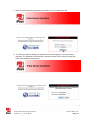
Remote Comput ers Windows-based PC with Compatible Web Browser The computer(s) that will be accessing the store systems must be Windows-based PC’s (Windows 2000, NT, XP, Vista or Win7) with Internet access running Microsoft’s Internet Explorer version 6.X, 7.X or 8.X or Mozilla’s Firefox version 2.X and 3.X. Additionally, your PC will need to have Java installed. Verify if your PC is running Java at the following link: http://www.java.com/en/download/installed.jsp. If you need to download and install Java, please access the following link: www.java.com. iPass provides iSA users with an unlimited PC license meaning a single user can use multiple remote computers (i.e., home office and office computers) to access multiple store(s) backroom PC’s, DVR’s and other allowed systems. You cannot share user credentials however; each user must have a separate license. Any remote computers must meet the compliance requirements outlined in the Payment Card Industry’s Data Security Standard which includes but is not limited to, an active anti-virus client and firewall software. pcAnywhere pcAnywhere versions 9.2 through 12.1 are the only versions compatible with the POSX backroom PC. No other version will work. If you do not already own a copy, you may purchase applicable and licensed versions of pcAnywhere from Amazon: http://www.amazon.com/Symantec-12132368PCanywhere-12-1-User/dp/B000QJ09QA. NOTE: The pcAnywhere version you purchase does not have to match the version running on the backroom PC. Validating Store S ystems Backroom PC (Primar y Ser ver) Before attempting to connect using iSA, you will need to validate that the systems you wish to connect to (backroom PC and surveillance camera DVR’s) are ready to accept connections remotely. Your remote PC (the PC you use to access your store) also requires special configuration. Hallmark maintains the latest information, along with information about remote printing, on the Retail Technology web site. You can find this information after logging into HallmarkLink (http://www.hallmarklink.com). HallmarkLink Hallmark Links Retail Technology Broadband FAQ and Tips Tips Preparing to Use iPass Secure Anywhere Using iPass Secure Anywhere Version 1.7, 12.20.2012 2012 iPass Inc. Page 4