1
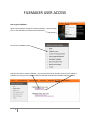
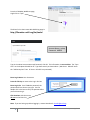
FILEMAKER USER ACCESS How to get to FileMaker ‐ Open Internet Explorer and go to the district website ‐ www.unit5.org. Click on the Staff Menu and Select Special Education Then click on FileMaker Access And now click here to launch FileMaker. Also note that the link for the PDF version of this handout is available by clicking on the FileMaker Web User Manual link below the FileMaker Web Access link. 3 Updated 8/2/2015