1
M a s t e r
c o d e
p r o g r a m m i n g
m o d e
Changing code with the user code
Any user can change his own code with [*] command, if a code has access level 2
or 4.
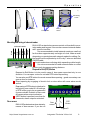
Enter [*], DLK-641Plus stand-alone access control unit sounds together with LED 2
blinking. Enter [Old User Code][#], then [New User Code][#] and confirm [New
User Code][#].
New code is accepted, if code changing is allowed, and new code is not identical to
any enrolled user or duress code.
Press [#] to exit code programming.
Chief code and Engineer code are changed in the same way.
If there was no keystrokes during 40 seconds, unit returns to main or restricted mode.
In this case user code does not change.
Example User has code [1] [2] [3] [4] [5] and wants to change code to [4] [3] [2] [1].
In this case access level of the code should be 2 or 4.
Press [*], three beeps sound and LED 2 flashes RED.
Enter old user code [1] [2] [3] [4] [5] [#], long beep sounds. If code has access level
2 or 3 error signal sounds (one long and two short beeps).
Enter new user code - [4] [3] [2] [1] [#], long beep sounds. If the same user code or
duress code exists, error signal sounds and unit quits code programming.
Confirm by entering [4] [3] [2] [1] [#], long beep sounds.
The unit switches to the main mode on successful code changing automatically.
http://www.itvsystems.com.ua
Integrated Technical Vision Ltd
21