1
CAT-5 4000
Extender
EXT-CAT5-4000
User Manual
www.gefen.com
f
ASKING FOR ASSISTANCE
Technical Support:
Telephone
Fax
(818) 772-9100
(800) 545-6900
(818) 772-9120
Technical Support Hours:
8:00 AM to 5:00 PM Monday thru Friday.
Write To:
Gefen Inc.
c/o Customer Service
20600 Nordhoff St
Chatsworth, CA 91311
www.gefen.com
[email protected]
Notice
Gefen Inc. reserves the right to make changes in the hardware, packaging and
any accompanying documentation without prior written notice.
CAT5•4000 Extender is a trademark of Gefen Inc.
© 2009 Gefen Inc., All Rights Reserved
All trademarks are the property of their respective companies
Rev A2
CONTENTS
1
Introduction
2
Operation Notes
3
Features
4
Sender Panel Layout
5
Sender Panel Descriptions
6
Sender Panel Descriptions
7
Notes (Intensionally Left Blank)
8
Receiver Panel Layout
9
Receiver Panel Descriptions
10 Connecting The CAT5•4000 Extender Analog (VGA)
11 Connecting/Adjusting The CAT5•4000 Analog (VGA)
12 Connecting The CAT5•4000 Extender Digital (DVI)
13 Connecting/Adjusting The CAT5•4000 Digital (DVI)
14 RS-232 Serial Communication Configuration
15 Specifications
16 Warranty
INTRODUCTION
Congratulations on your purchase of the CAT5•4000 Extender. Your complete
satisfaction is very important to us.
Gefen
Gefen delivers innovative, progressive computer and electronics add-on solutions
that harness integration, extension, distribution and conversion technologies.
Gefen’s reliable, plug-and-play products supplement cross-platform computer
systems, professional audio/video environments and HDTV systems of all sizes
with hard-working solutions that are easy to implement and simple to operate.
The Gefen CAT5•4000 Extender
The Gefen CAT5•4000 Extender is an exceptional solution for extending up to
three individual analog or digital sources to up to four remote locations. The first
input is mirrored to two outputs. RS-232 serial communication (four individual
inputs) and stereo analog audio (available for the mirrored outputs) are also
provided for extension.
How It Works
The CAT5•4000 Extender employs DVI-I inputs which will support both an
analog and digital signals. This will allow the user to connect VGA and DVI
sources. Connect the source devices to the CAT5•4000 sender unit using DVI-A
cables (analog) and DVI-D cables (digital). Connect up to four RS-232 sources
and a single audio analog stereo to the CAT5•4000 sender unit. Then, using
inexpensive and widely available CAT-5, CAT-5e or CAT-6 cables, connect up
to four CAT5•4000 receiver units to the CAT5•4000 sender unit at the remote
locations. Connect a display to the CAT5•4000 receiver at each location. If using
the RS-232 or analog stereo extension, connect the corresponding equipment
to each CAT5•4000 receiver. Once all devices are connected and are receiving
power a perfectly reproduced video signal should appear on the displays at the
remote locations.
1
OPERATION NOTES
READ THESE NOTES BEFORE INSTALLING OR
OPERATING THE CAT5•4000 EXTENDER
•
Maximum distance ratings:
•
VGA 1920x1200 60Hz is 330 feet.
•
DVI 1920x1200 60Hz is 130 feet.
•
DVI 1280x1024 60Hz is 300 feet.
•
VGA Supported resolutions: 640 x 480 through 1920 x 1200
•
DVI Supported resolutions: 640 x 480 through 1920 x 1080
•
The CAT5•4000 Extender can send only one video type, either analog or
digital, from each input. While the DVI-I input can accept both types, please
ensure that only one type of signal is being used by using either a DVI-A or
DVI-D cable.
•
The channel 1 video input will be mirrored to two separate outputs on the
CAT5•4000 sender unit. However, two separate RS-232 inputs are provided
and will accommodate an individual RS-232 device for each of the two
mirrored video outputs.
•
Analog stereo audio connected via the 3.5mm mini-stereo input jack will be
transmitted through the mirrored outputs on channel 1 only.
•
Channels two and three do not support audio extension.
•
Channels two and three have individual RS-232 connections for use.
•
When analog video is used on channels two and three, only a single CAT-5,
CAT-5e or CAT-6 will be required for full video and RS-232 extension. When
digital video is being used, two CAT-5, CAT-5e or CAT-6 cables will be
required for full video and RS-232 support.
•
When analog or digital video is used on channel one (this applies to either
of the mirrored outputs), two CAT-5, CAT-5e or CAT-6 cables will be required
for full video, audio, and RS-232 support.
•
The CAT5•4000 receiver units need to be configured for use on either
channel 1 (dual outputs) or for use on channels 2 and 3. There is a
DIP (Dual In-line Package) switch bank located on the underside of the
CAT5•4000 receiver that will set the unit for proper operation for either
channel 1 (both outputs) or for channels 2 or 3. Please see page 14 for
details on how to change these DIP switches.
2
FEATURES
Features
•
Both analog and digital video signals are supported through the use of DVI-I
inputs.
•
DVI video is transmitted digitally for zero signal loss
•
Supports resolutions up to 1080p, 2K, and 1920 x 1200
•
Supports DDWG standard for DVI compliant monitors
•
Analog audio extension (For channel 1 only)
•
RS-232 serial communications extension for all channels
•
Uses industry-standard CAT5/CAT6 cable
•
Extends VGA up to 330 feet (100m) with RS-232
•
Extends DVI up to 130 feet (40m) with RS-232
•
DVI Video EQ enhancement controls (brightness, sharpness)
Package Includes
(1) CAT5•4000 Extender Sender Unit
(3) 6 Foot DVI-D Cable (M-M)
(3) 6 Foot VGA to DVI-A Cable (M-M)
(4) 6 Foot DB-9 RS-232 Cable (M-F)
(1) 6 Foot 3.5mm Stereo Mini-Jack Audio Cable (M-M)
(2) 5V DC Power Supply
(1) User’s Manual
3
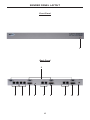
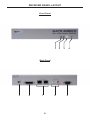
SENDER PANEL LAYOUT
Front Panel
1
Back Panel
2
3
4
5
6
7
8
4
9
10
11
SENDER PANEL DESCRIPTIONS
1
Power LED Indicator
This LED will become active once the included 5V DC power supply is properly
connected between the unit and an open wall power socket.
2
RS-232 Serial Communication Input 1-4
These inputs will support RS-232 serial communications devices. Only pins
2 (RX), 3 (TX), and ground (5) are supported. Four inputs are provided. The
CAT5•4000 receiver units must be configured for RS-232 operation for either
channel 1 (both outputs) or for channels 2 and 3. Please see page 14.
3
Channel 1 VGA and Audio RJ-45 Port 1-2
When the input video source is analog, these RJ-45 ports connect the
CAT5•4000 sender to a CAT5•4000 receiver unit using CAT-5, CAT-5e or CAT-6
cabling. Analog video and audio are transmitted through this connector. Two
ports are provided for mirrored video output of the channel 1 source to two
separate locations. If RS-232 extension is required, a second CAT-5 cable must
be connected using the channel 1 DVI/RS-232 RJ-45 port. Once a link between
the sender and receiver unit has been established, the green LED indicator
located on these ports will become active.
4
Channel 1 DVI and RS-232 RJ-45 Port 1-2
When the input video source is digital, these RJ-45 ports connect the
CAT5•4000 sender to a CAT5•4000 receiver unit using CAT-5, CAT-5e or CAT-6
cabling. Digital video and RS-232 are transmitted through this connector. Two
ports are provided for mirrored video output of the channel 1 source to two
separate locations. If audio extension is required, a second CAT-5 cable must be
connected using the channel 1 VGA/RS-232 RJ-45 port. Once a link between
the sender and receiver unit has been established, the green LED indicator
located on these ports will become active.
5
Channel 1 DVI Input
Connect an analog or digital source to this DVI-I input port. Depending on the
input video signal type, analog or digital, a mirrored signal will be output to either
the dual VGA or DVI RJ-45 ports.
6
3.5mm Analog Stereo Audio Mini-Jack Input
Connect an analog stereo audio source to this input port. The audio source
connected to this input will be mirrored and output through both of the VGA/
Audio RJ-45 ports. This audio source will not be output through any of the
channel 2 and 3 RJ-45 output ports.
7
Channel 2 VGA/RS-232 and DVI/DDC RJ-45 Ports
These RJ-45 ports connect the CAT5•4000 sender to a CAT5•4000 receiver unit
using CAT-5, CAT-5e or CAT-6 cabling. When the input source is analog, the
VGA/RS-232 port is used. When the input source is digital, the DVI/DDC port
is used. If RS-232 is required when using a digital input source, use both RJ-45
ports.
8
Channel 2 DVI Input
Connect an analog or digital source to this DVI-I input port.
5
SENDER PANEL DESCRIPTIONS
9
Channel 3 VGA/RS-232 and DVI/DDC RJ-45 Ports
These RJ-45 ports connect the CAT5•4000 sender to a CAT5•4000 receiver unit
using CAT-5, CAT-5e or CAT-6 cabling. When the input source is analog, the
VGA/RS-232 port is used. When the input source is digital, the DVI/DDC port
is used. If RS-232 is required when using a digital input source, use both RJ-45
ports.
10 Channel 3 DVI Input
Connect an analog or digital source to this DVI-I input port.
11 5V DC Power Receptacle
Connect the included 5V DC power supply between this input and an open wall
power socket.
6
NOTES (INTENTIONALLY LEFT BLANK)
7
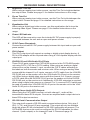
RECEIVER PANEL LAYOUT
Front Panel
1
2
3
4
Back Panel
5
6
7
8
8
9
RECEIVER PANEL DESCRIPTIONS
1
Brightness Trim Pot
When using an analog input video source, use this Trim Pot to brighten/darken
the output video. Please see page 11 for detailed instructions on the usage.
2
Focus Trim Pot
When using an analog input video source, use this Trim Pot to blur/sharpen the
output video. Please see page 11 for detailed instructions on the usage.
3
Equalization Dial
When using a digital input video source, use this equalization dial to tune the
incoming video signal. Please see page 13 for detailed instructions on the
usage.
4
Power LED Indicator
This LED will become active once the included 5V DC power supply is properly
connected between the unit and an open wall power socket.
5
5V DC Power Receptacle
Connect the included 5V DC power supply between this input and an open wall
power socket.
6
DVI-I Output
This DVI-I output port will support an analog or digital output display device. A
DVI to VGA adapter will be required when using a VGA capable display with this
output port.
7
DVI/RS-232 and VGA/Audio RJ-45 Ports
These RJ-45 ports connect the CAT5•4000 receiver to the CAT5•4000 sender
unit using CAT-5, CAT-5e or CAT-6 cabling. When using an analog or digital
video source on the channel 1 input, connect the CAT-5 cables according to
the labels on both the sender and receiver units. When using an analog video
source with the channel 2 or 3 inputs, connect a CAT-5 cable from the VGA/RS232 RJ-45 port on the sender unit to the VGA/Audio RJ-45 port on the receiver
unit. When using a digital video source with the channel 2 or 3 inputs, connect
a CAT-5 cable from the DVI/DDC RJ-45 port on the sender unit to the DVI/RS232 RJ-45 port on the receiver unit. Additionally, if RS-232 extension is required
when using a digital video source on channel 2 or 3, a second CAT-5 cable must
be used to connect the VGA/RS-232 RJ-45 port on the sender unit to the VGA/
Audio RJ-45 port on the receiver unit.
8
Analog Stereo Audio RCA Outputs
When using the CAT5•4000 receiver unit with channel 1, audio will be
transmitted to these RCA outputs. Connect an amplified audio output device to
these RCA output connectors.
9
RS-232 Serial Communication Output
This output will support a RS-232 serial communications device. Only pins 2
(RX), 3 (TX), and ground (5) are supported. This output will only be available
when the proper RJ-45 connections for RS-232 functionality are present. The
CAT5•4000 receiver units must be configured for RS-232 operation for either
channel 1 (both outputs) or for channels 2 and 3. Please see page 14.
9
CONNECTING THE CAT5•4000 EXTENDER ANALOG (VGA)
How to Connect the CAT5•4000 Extender Using an Analog (VGA) Source
1.
Connect up to three analog (VGA) sources to the DVI-I inputs on the
CAT5•4000 sender unit. VGA to DVI-A cables/adapters will be necessary to
make these connections. 3 VGA to DVI-A cables are supplied.
2.
Connect an analog stereo audio source to the 3.5mm stereo audio mini-jack
port on the CAT5•4000 sender unit.
3.
Connect up to four RS-232 source devices to the RS-232 input ports on the
CAT5•4000 sender unit.
NOTE: Only pins 2 (RX), 3 (TX), and ground (5) are supported for RS-232 serial
communication. Although there are two mirrored video outputs for channel 1, there
are 2 separate RS-232 connectors available for individual extension. RS-232 1
corresponds to the Mon 1 output and RS-232 2 corresponds to the Mon 2 output. To
enable the RS-232 on channel 1’s dual RS-232 ports, the CAT5•4000 receiver must
be configured properly. Please see page 14 for instructions on how to do this.
4.
Using CAT-5, CAT-5e or CAT-6 cables, connect the CAT5•4000 receiver
units to the sender unit. Up to 4 receiver units can be used. Please use the
specific instructions below for connecting channels 1 through 3.
•
Channel 1 (2 mirrored outputs are available. These are labeled Mon 1 and Mon 2)
1.
Connect the port labeled VGA/Audio on the sender unit to the port
labeled VGA/Audio on the receiver unit.
2.
Connect the port labeled DVI/RS-232 on the sender unit to the port
labeled DVI/RS-232 on the receiver unit. (This cable connection will
not be necessary if RS-232 extension is not needed)
NOTE: These outputs will mirror the single input on channel 1. When
making connections from the sender to receiver, please ensure that
both CAT-5 cables for the outputs labeled Mon 1 are sent to the same
location and both CAT-5 cables for Mon 2 are sent to the same location.
•
5.
Channels 2 and 3
1.
Connect the port labeled VGA/RS-232 on the sender unit to the port
labeled VGA/Audio on the receiver unit.
2.
When using analog (VGA) sources, the RJ-45 port labeled DVI/
DDC will not need to be connected.
Connect an analog (VGA) capable display to the DVI-I output on the
CAT5•4000 receiver unit. A DVI to VGA cable/adapter will be necessary to
make this connection.
10
CONNECTING/ADJUSTING THE CAT5•4000 ANALOG (VGA)
How to Connect the CAT5•4000 Extender Using an Analog (VGA) Source
(Continued from the previous page)
6.
For receivers connected to channel 1, connect a amplified stereo output
device to the RCA analog stereo audio outputs on the receiver unit.
Channels 2 and 3 do not support audio extension.
7.
Connect a RS-232 device to the RS-232 connector on the CAT5•4000
receiver unit.
8.
Connect the included 5V DC power supplies both the CAT5•4000 sender
and receiver units.
9.
Power on all displays first and the source devices second. Once all
connections have been properly made and power has been applied, the
green LED indicators above the VGA RJ-45 ports should be lit on the sender
unit and all receiver units.
NOTE: There are status indicators above each RJ-45 port. Green indicators
will be active on “Sync Detect”. Red indicators will be active when the “Analog
Power” is detected.
Adjusting the CAT5•4000 Extender Using an Analog (VGA) Source
The CAT5•4000 was designed for plug-and-play installation. However,
differences in CAT-5 cabling quality and skew rates may require the user to
adjust the brightness and focus of the resulting video output. If the output video
is too blurry/sharp or dark/bright please use the instructions below to adjust the
output quality.
1.
Locate the Brightness (Br) and Focus (Fo) Trim Pots on the front panel of
the CAT5•4000 receiver.
2.
Insert a small flat-head tool into the desired Trim Pot receptacle.
3.
Turn the Trim Pot in either a clockwise or counter-clockwise motion until the
desired adjustment level is reached. The Trim Pot has a limited range in
both directions. Please do not force the Trim Pot beyond the point at which it
stops turning as this may break the Trim Pot.
4.
Remove the adjustment tool from the Trim Pot receptacle.
11
CONNECTING THE CAT5•4000 EXTENDER DIGITAL (DVI)
How to Connect the CAT5•4000 Extender Using an Digital (DVI) Source
1.
Connect up to three digital (DVI) sources to the DVI-I inputs on the
CAT5•4000 sender unit. DVI-D cables should be used to ensure that digital
video is being transmitted.
2.
Connect an analog stereo audio source to the 3.5mm stereo audio mini-jack
port on the CAT5•4000 sender unit.
3.
Connect up to four RS-232 source devices to the RS-232 input ports on the
CAT5•4000 sender unit.
NOTE: Only pins 2 (RX), 3 (TX), and ground (5) are supported for RS-232 serial
communication. Although there are two mirrored video outputs for channel 1, there
are 2 separate RS-232 connectors available for individual extension. RS-232 1
corresponds to the Mon 1 output and RS-232 2 corresponds to the Mon 2 output. To
enable the RS-232 on channel 1’s dual RS-232 ports, the CAT5•4000 receiver must
be configured properly. Please see page 14 for instructions on how to do this.
4.
Using CAT-5, CAT-5e or CAT-6 cables, connect the CAT5•4000 receiver
units to the sender unit. Up to 4 receiver units can be used. Please use the
specific instructions below for connecting channels 1 through 3.
•
Channel 1 (2 mirrored outputs are available. These are labeled Mon 1 and Mon 2)
1.
Connect the port labeled DVI/RS-232 on the sender unit to the port
labeled DVI\RS-232 on the receiver unit.
2.
Connect the port labeled VGA/Audio on the sender unit to the port
labeled VGA/Audio on the receiver unit. (This cable connection will
not be necessary if audio extension is not needed)
NOTE: These outputs will mirror the single input on channel 1. When
making connections from the sender to receiver, please ensure that
both CAT-5 cables for the outputs labeled Mon 1 are sent to the same
location and both CAT-5 cables for Mon 2 are sent to the same location.
•
5.
Channels 2 and 3
1.
Connect the port labeled DVI/DDC on the sender unit to the port
labeled DVI/RS-232 on the receiver unit.
2.
When using digital (DVI) sources, the RJ-45 port labeled VGA/RS232 will need to be connected to the port labeled VGA/Audio on the
receiver unit. This cable is not necessary if RS-232 extension is not
required.
Connect an digital (DVI) capable display to the DVI-I output on the
CAT5•4000 receiver unit. DVI-D cables should be used to ensure that digital
video is being transmitted.
12
CONNECTING/ADJUSTING THE CAT5•4000 DIGITAL (DVI)
How to Connect the CAT5•4000 Extender Using an Analog (VGA) Source
(Continued from the previous page)
6.
For receivers connected to channel 1, connect a amplified stereo output
device to the RCA analog stereo audio outputs on the receiver unit.
Channels 2 and 3 do not support audio extension. Connect a RS-232 device
to the RS-232 connector on the CAT5•4000 receiver unit.
7.
Connect the included 5V DC power supplies both the CAT5•4000 sender
and receiver units.
8.
Power on all displays first and the source devices second. Once all
connections have been properly made and power has been applied, the
green LED indicators above the DVI RJ-45 ports should be lit on the sender
unit and all receiver units.
NOTE: There are status indicators above each RJ-45 port. Green indicators will
be active when the “DVI Clock” is present. Red indicators will be active when the
receiver detects a display or “Hot Plug Detect”. The receiver’s Red indictor will
indicate the current position for DIP switch 1 on the receiver (please see page 14
for more information).
Adjusting the CAT5•4000 Extender Using an Digital (DVI) Source
The CAT5•4000 was designed for plug-and-play installation. However,
differences in CAT-5 cabling quality and skew rates may require the user to
adjust the equalization setting to obtain a video output. If there is no video output,
or if the video output is not stable, please follow the instructions below to adjust
the equalization.
1.
Locate the Equalization adjustment dial on the front panel of the CAT5•4000
receiver.
2.
Insert a small flat-head tool into the Equalization dial.
3.
Turn the dial in either a clockwise or counter-clockwise direction until the
desired adjustment level is reached. The Equalization has 16 positions (0-9
and then A-F) that can be set. The dial will “click” into each position. Please
ensure that the dial is set to one of the positions and is not in-between two
positions.
4.
Remove the adjustment tool from the Equalization dial.
13
RS-232 SERIAL COMMUNICATION CONFIGURATION
RS-232 Serial Control
The RS-232 transmission from the CAT5•4000 receiver units must be configured
for use on either channel 1 or on channels 2 and 3. By default, the CAT5•4000 units
are configured to work on channels 2 and 3. To enable the RS-232 transmission for
channel 1, a DIP (Dual In-line Package) switch must be enabled. This DIP switch is
located on the underside of the CAT5•4000 receiver unit beneath a piece of metallic
colored tape.
When using the CAT5•4000 receiver unit for the dual outputs on channel 1, please
use the instructions below to enable the proper RS-232 transmission between the
sender and receiver units.
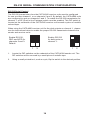
Enable RS-232,
DDC and HPD for
channels 2 and 3:
Default
Enable RS-232
for both ports on
channel 1:
1
1
2
2
1.
Locate the DIP switches on the underside of the CAT5•4000 sender unit. The
DIP switches will be covered by a small piece of metallic tape.
2.
Using a small pointed tool, such as a pin, flip the switch to the desired position.
14
SPECIFICATIONS
Analog Video Amplifier Bandwidth ........................................................... 350 MHz
Digital Video Amplifier Bandwidth ............................................................ 165 MHz
VGA Video Input / Output Connectors .................................... DVI-I 29-pin female
VGA Video Frequency Ranges ............... 15-70 KHz Horizontal, 30-75 Hz Vertical
VGA DDC signal .............................................................................. 0.75V p-p TTL
DVI Video Input / Output Connectors ...................................... DVI-I 29-pin female
DVI DDC signal .................................................................................... 5V p-p TTL
Audio In ..................................................... 3.5mm female mini-phone jack, stereo
Audio Out ......................................................................... 2 x RCA (L/R red/white)
Audio Frequency response ............................................. 20 Hz to 20 kHz, +/-1 dB
THD ................................................................................................................ 0.1%
Link Connector ............................................................................................. RJ-45
Serial Communication Protocol ................................................................RS-232C
RS-232 ............................................................... Supports RX, TX, RTS protocols
Max. baud rate .................................................................................... 115200kbps
Power Consumption (Each Unit) ................................................... 20 Watts (max.)
Power Supply (Each Unit) ........................................................... 5V DC (External)
Dimensions Sender ..........................................................17” W x 1.75” H x 5.5” D
Dimensions Receiver ............................................... 8.375” W x 1.75” H x 4.25” D
Rack Mountable ............................................................................. 1 Rack Spaces
Shipping Weight ............................................................................................ 8 Lbs
15