1
ECM ® 830 Electroporation System
Appendix L: Connecting Electrodes
(Continued)
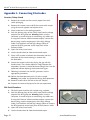
4. Prepare tissue and sample for electroporation. Grasp the
tissue between the Tweezertrode electrodes and measure
the interelectrode distance. Adjust generator settings if
necessary. Inject the sample into the tissue.
5. Deliver the electroporation pulse (s) to the sample.
Warning: Use proper eye protection during electroporation.
6. Remove the tissue carefully, clean as appropriate and
prepare for the next experiment.
2-Needle Array
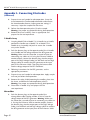
1. Grasping Model 530 or Model 532 2-Needle Array Handle,
position the handle over a Model 531 or Model 533 2
Needle Array Assembly and push to secure the 2-needle
array to the handle.
2. Push the banana plugs at the opposite end of the 2-Needle
array handle into the voltage output of the BTX generator.
Warning: Make sure the Generator is turned off prior to
connecting any cables to it. If using the Enhancer 3000 to
monitor output, connect the banana plugs into the output
ports of the High Voltage Probe. Use the black and red high
voltage cables to connect the BTX generator to the input
ports of the Enhancer 3000. Then plug the banana cable
into the voltage output of the BTX Generator.
3. Following instructions for the BTX generator, set the
appropriate parameters.
4. Prepare tissue and sample for electroporation. Apply sample
to tissue just before electroporation.
5. Remove the safety shield protecting the needles, place into
the tissue, and deliver the electroporation pulse(s).
Warning: Use proper eye protection during electroporation.
6. Discard the 2-needle array and prepare for the
next experiment.
Microslides
1. Push the banana plugs at the opposite end of the
micrograbber cable (catalog number 45-0216) into the
voltage output of the BTX generator. Warning: Make sure
the Generator is turned off prior to connecting any cables to
it. If using the Enhancer 3000 to monitor output, connect
the banana plugs into the output ports of the High Voltage
Probe. Use the black and red high voltage cables to connect
the BTX generator to the input ports of the Enhancer 3000.
Page 48
www.btxonline.com