1
Configuration
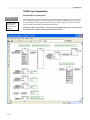
Changing/Adapting the T6200 Configuration
Before changing the configuration file, you should consider the pre-defined structure of the T6200
application. Also, make sure to take the following T6200 database Syntax Rules into account. For
new applications, you can use an existing application, saving it under different names.
Database Updates/Additions Recommendation:
For most applications there are no update or addition requirements of the pre-defined Tags.
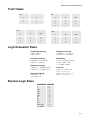
If updating/changing Application Tags or Labels is required, keep the following syntax rules in
mind:
•
•
•
•
Although the maximum Tag and Label length is 16 characters, Tags and Labels should be as
short as possible (typically not exceeding 12 characters)
Tags and Labels must begin with a letter. They can be composed of letters, numbers, and
the underscore (_) character. They cannot contain spaces (blanks)
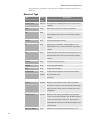
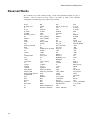
The Tag or Label name must be different from the Function Compilers’ Reserved Tag
names
While Tag names are NOT case sensitive, both uppercase and lowercase characters should
be used to make tag names more clear. For internal processing lower case letters are
converted to upper case (therefore on-line Tag monitoring will show all upper case letters)
Global Tags/Variables Global Tags/Variables, or Tags for short, are assigned to system variables and can be
used/accessed anywhere within the system network. Each tag must be unique and must end with a
period (example: AIN_10.).
Local Tags –
Local Tags are defined in the firmware and consist of two parts, the loop tag (a Global Tag) and a tag
such as PV, SP_TARG, DEV, etc. For example the Local Tag for the Process Variable (PV) of a loop
whose tagname is LOOP_1 is: LOOP_1.PV
Local Tags such as… PV, SP_CUR, SP_TARG, DEV, RATIO, BIAS, OUT, MODE, CGAIN,
CRESET, CRATE, MANUAL_RESET, PERIOD, SCAN_TIME exist in each loop.
Peer-to-Peer Tags –
Peer-to-Peer tags use the Controller Tag, a double colon, followed by the Global Tag. For example
C0001::AIN_15 or C001::!DI_23.
Labels –
Labels are not tags, they are user-defined symbols or code names that are assigned to configuration steps
and are used only as address reference for “go to” or “read” (access) functions.
When changing/adding configuration, make sure that any and all new Tags are defined.
8-23