1
ITEM
1.
FUNCTION
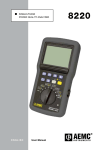
External power supply jack
2.
Four-pin input for current sensor (MN, SR, AmpFlex, etc.)
3.
Negative terminal
4.
Positive terminal
5.
Electroluminescent backlit digital display
6.
Function Buttons:
Photograph Button
Photographs measurements, viewable by pressing the View or
Print buttons.
Print Button
Prints all measurements currently displayed on an external printer.
Left Arrow Button
Selects the previous page, returns to previous step or (if only one
page) selects the value.
Right Arrow Button
Selects the following page, advances to the next step or (if only one
page) selects the value.
View Button
Views saved screen photographs.
Delete Button
Deletes one or all of the saved photographs or re-initializes the
effective maximum and minimum half-cycle values in Inrush mode.
White Button
Accesses voltage, power, voltage harmonic, motor start current,
rotation speed, temperature and information modes and reduces
the value in the configuration mode.
Yellow Button
Accesses the current, balanced three-phase, current harmonic,
phase rotation and resistance modes, reduces the value in the
configuration mode. Also inhibits automatic extinction.
NOTE: For detailed information on these buttons, see § 2.6
Power Quality Analyzer Model 8220
9