1
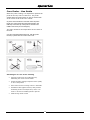
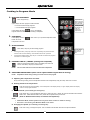
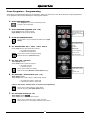
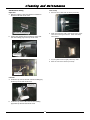
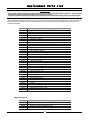
30DSERIES E33D5 (Digital Operation) (2 Speed Fan) Installation and Operation Manual 235862-2 MANUFACTURED BY Moffat Limited Christchurch New Zealand INTERNATIONAL CONTACTS AUSTRALIA Moffat Pty Limited Web: E.Mail: Main Office: Service: Spares: Customer Service: www.moffat.com.au [email protected] (tel) +61 (03) 9518 3888 (fax) +61 (03 9518 3833 (tel): 1800 622 216 (tel): 1800 337 963 (tel): 1800 335 315 (fax): 1800 350 281 CANADA Serve Canada Web: E.Mail: Sales: Service: www.servecanada.com [email protected] (tel): 800 551 8795 (Toll Free) (tel): 800 263 1455 (Toll Free) NEW ZEALAND Moffat Limited Web: E.Mail: Main Office: www.moffat.co.nz [email protected] (tel): 0800 663328 UNITED KINGDOM Blue Seal Web: E.Mail: Sales: Spares: Service: www.blue-seal.co.uk [email protected] (tel): +44 121 327 5575 (fax): +44 121 327 9711 (tel): +44 121 322 6640 (fax): +44 121 327 9201 (tel): +44 121 322 6644 (fax): +44 121 327 6257 UNITED STATES Moffat Web: Sales: Service: www.moffat.com (tel): 800 551 8795 (Toll Free) (tel): +1 336 661 1556 (fax): +1 336 661 9546 (tel): 800 858 4477 (Toll Free) (tel): +1 336 661 1556 (fax): +1 336 661 1660 REST OF WORLD Moffat Limited Web: E.Mail: www.moffat.co.nz [email protected] The reproduction or copying of any part of this manual by any means whatsoever is strictly forbidden unless authorized previously in writing by the manufacturer. In line with policy to continually develop and improve its products, Moffat Ltd. reserves the right to change the specifications and design without prior notice. © Copyright Moffat Ltd. February 2013. Contents List E33 Turbofan Convection Oven. Model Numbers Covered in this Manual E33D5 - Turbofan Oven - 5 Tray Convection Oven. Introduction............................................................................................................ 2 Safety Information Specifications.......................................................................................................... 3 Installation ............................................................................................................. 4 Installation Requirements Unpacking Location Clearances Stand Mounted Ovens Electrical Connection Water Connection Positioning and Levelling of Oven Initial Start-Up Commissioning Operation ................................................................................................................ 6 Operation Guide Oven Control Panel Starting the Oven Oven Shut-Down Cooking in Manual Mode Cooking in Core Temp Mode Moisture Mode Core Probe Cooking Cooking in Program Mode Oven Programs - Programming Controller - User Settings ..................................................................................... 13 User Settings Cleaning and Maintenance ................................................................................... 14 Cleaning Guidelines Oven Cleaning Periodic Maintenance Fault Finding ......................................................................................................... 17 Electrical Schematics ............................................................................................ 18 Replacement Parts List ......................................................................................... 19 Introduction Before using your new oven, please read this instruction manual carefully, pay particular attention to any information labelled ‘WARNING’, ‘CAUTION’, ‘IMPORTANT’ or ‘NOTE’ in this manual. Warning Indicates a hazardous situation which, if not avoided, will result in death or serious injury. Caution Indicates a hazardous situation which, if not avoided, will result in minor or moderate injury. This manual must be kept by the owner for future reference. A record of Date of Purchase, Date of Installation and Serial Number of the oven should be recorded in the area provided below. The serial number of this oven can be found on the Technical Data Plate located on the front right hand side panel, see diagram in ‘Installation Section’. Model Number: Serial Number: If you are unsure of any aspect of the installation, instructions or performance of your oven, contact your TURBOFAN dealer promptly. In many cases a phone call could answer your question. Dealer: Service Provider: Should you contact your TURBOFAN dealer on any matter concerning this oven, please have the information provided opposite, readily available. Date Purchased: Date Installed: Safety Information For your safety, please pay attention to the following symbols marked on the appliance. - Risk of electric shock. No user serviceable parts inside. Qualified service person access only. Disconnect from power before servicing. 2 Specifications E33D5 Oven Specifications. USA / Canada Oven Power Ratings Oven Tray Details Water Connection Other Markets 208V, 60Hz, 5.4kW. 220V, 50Hz or 60Hz, 6.0kW. 220 - 240V, 60Hz, 6.0kW. 230 - 240V, 50Hz or 60Hz, 6.0kW. Tray Capacity 5 Shelf - 13” x 18” Bun Pan. 12” x 20” Steam Pan. 5 Shelf, 1/1 GN Pan. Tray Spacing 31/3” / 85mm. 85mm / 31/3”. 80psi / 550kPa. 80psi / 550kPa. Max Water Pressure 3 Connection Size 3 /4” GHT. 3 /4” BSP. Installation Installation Requirements Important: Installation shall comply with local electrical, health and safety requirements. It is most important that this oven is installed correctly and that oven operation is correct before use. If you have any questions regarding the proper installation and / or operation of this oven, please contact your local Turbofan distributor. Unpacking Clearances 1. Remove all packaging and transit protection including all protective plastic coating from the exterior stainless steel panels. 2. Check the oven and supplied parts for damage. Report any damage immediately to the carrier and distributor. 3. Check that the following parts have been supplied with your oven:4 x Leg Adjustable. Adaptor Brass. USA / Canada only. Washer Rubber. To ensure correct ventilation for the motor and controls, the following minimum installation clearances are to be adhered to:Rear Left-hand side Right-hand side 50mm / 2”. 50mm / 2”. 75mm / 3”. Clearance From Source of Heat. A minimum distance of 300mm (12”) from the appliance sides is required. 4. Report any deficiencies to the distributor who supplied your oven. 5. Securely fit the 4 legs supplied with the oven. 6. Check that the available electrical supply is correct to that shown on the Technical Data Plate located on the front right hand side panel. NOTE: Fixed installations require at least 500mm (20”) clearance for service access. Important: The vent located on the top of the oven must NOT be obstructed. Refer to ‘Specifications’ section, ‘Oven Specifications Table’ on previous page. Oven Vent Location Location 1. Position the oven in its approximate working position. 2. The unit should be positioned so that the control panel and oven shelves are easily reachable for loading and unloading. Stand Mounted Oven For stand mounted ovens, the oven feet are used to level the oven on the stand. Refer to the instructions supplied with separately ordered stands for mounting details. Technical Data Plate - Data and Location 4 Installation Electrical Connection Positioning and Levelling of Oven 1. Correctly locate the oven into its final operating position and using a spirit level, adjust the oven feet so that the oven is level and at the correct height. Warning This oven must be earthed / grounded. Each oven should be connected to an adequately protected power supply with an appropriate three wire power cord. Initial Start-Up An isolation switch must be mounted adjacent to, but not behind the oven and must be readily accessible to the operator. This switch must be clearly marked and readily accessible in case of fire. 1. When using the oven for the first time, operate oven for about 1 hour at 200°C / 400°F to remove any fumes or odours which may be present. 2. Please refer to the Operation Section of this manual for details on how to correctly operate and shutdown the oven. Before using the new oven; Check the electricity supply is correct to as shown on the Technical Data Plate on the front right hand corner of the oven side panel. Commissioning NOTE: All electrical connections must only be carried out by a suitably qualified person. Before leaving the new installation; Check the oven functions in accordance with the operating instructions specified in the ‘Operation’ section of this manual. 1. Remove oven right hand side panel. 2. Bring the supply cable up through the grommet at the back of oven and through the compression gland on the electrical switchgear panel. 3. Connect the mains supply to the appropriately marked terminals on the terminal block. Ensure that the operator has been instructed in the areas of correct operation and shutdown procedure for the appliance. NOTE: If it is not possible to get appliance to operate correctly, turn ‘Off’ power at the mains supply and contact supplier of this appliance. Water Connection - Optional (Not required for Main Oven Operation) 1. If the manual addition of water into the oven for humidification or steaming effect on baked product is required, the unit’s water connection can be used. 2. Tighten the 2 screws securing the water connection to the rear of the oven. (These have purposely been left loose to prevent damage to the water connection during transit). Tighten Screws. 3. A cold water supply should be fitted to the ¾” BHP water inlet which is located on the rear, right hand side of the oven. (USA / Canada only, supplied with ¾” GHT adaptor). 4. Connect to the water supply. - Max Inlet Pressure 80psi / 550kPa. 5. Turn ‘On’ the water supply and check for leaks. 5 Operation Operation Guide Warning Warning Take care when opening the oven door during baking. Let the hot air and steam escape before removing or replacing food as the steam produced can cause steam burns. Some parts of this oven will become VERY HOT during use and could cause burns if touched. Turbofan Ovens have been designed to provide simple operation. This oven is intended for use in a commercial kitchen and must only be put to the use for which it was intended, i.e. cooking food product. To use this oven correctly please read the following sections carefully:- Oven Control Panel Temperature Display - Programming Key and LED - Shows the pre-set chamber temperature. When used with the ‘Temperature’ key, display shows actual oven temperature for 5 seconds. Shows Cooking Modes and Error Codes. Used to enter the ‘Programming’ mode. Temperature Key and LED - Steam Key and LED - Shows actual oven temperature for 5 seconds on the Temperature Display, LED ‘On’ when heating. Activates the ‘Steam Mode’. LED flashes when showing actual temperature. Temperature Adjustment Control NOTE; In Core Temp Mode, this key is used to display Actual Oven and Core Probe temperatures. Time Display - Fan Lo/High Speed Key and LED - Shows cook time in full minutes only from 180 - 1, and in seconds for the final minute only. Switches oven fan from high to low speed. LED is ‘On’ when fan is in Low Speed mode. NOTE; In Core Temp Mode, the display shows ‘CP’ and Core Temperature of item being cooked. Start / Stop Key and LED On / Off / Key and LED Press ‘On / Off’ key once to turn the oven ‘On’. Press and hold ‘On / Off’ key for 2 seconds to turn the oven ‘Off’. Time Adjustment Control. NOTE; In Core Temp Mode, Timer Knob is used to set Core Probe Temperature. The ‘Start / Stop’ key is used to control the following functions:Cancelling Buzzer (All Modes). Starting Core Temp Mode (Core Temp Mode). Starting Timer (Manual Mode). Pausing Timer (Manual / Program Modes). Resetting Timer (Manual Mode). Starting Program (Program Mode). Cancelling Program (Program Mode). Core Probe Connection Point Starting the Oven Oven Shut-Down 1. Turn ‘On’ electrical power to the oven. The controller will carry out a self check of the LED’s. 1. To turn the oven ‘Off’ , press and hold the ‘On / Off’ key for 3 seconds, the oven controller will go to ‘StandBy’ mode. 2. Press the ‘On / Off’ key. 3. The Heating ‘On’ Indicator will illuminate and the oven will heat to the pre-programmed pre-heat temperature. 6 Operation Cooking in Manual Mode 1. SETTING OVEN TEMPERATURE. + to increase the temperature. - to decrease the temperature. NOTE: 2. The Oven can be used without using the timer. Heating ‘On’ LED will remain ‘On’ until oven reaches Set Temperature. SETTING TIMER. + to increase the time. - to decrease the time. NOTE: 3. Steam ‘On’ LED will illuminate when Moisture Mode is ‘On’. The Timer can be set to Infinity. If ‘Timer’ is set to ‘Infinity’, timer will count elapsed time to a max of 999 minutes and elapsed time be shown on the lower display. STARTING TIMER. Press ‘Start / Stop’ key to start timer operation. Pressing the ‘Start / Stop’ key when timer is operating will pause the timer and turn ‘Off’ Fan and Heating. LED will flash when timer is paused. Pressing and Holding ‘Start / Stop’ key for 3 seconds will reset the timer. 4. ‘Lo Fan’ LED is ‘On’ when Lo Speed Fan is ‘On’. ‘Start / Stop’ LED is ‘On’ when Timer is running. ADJUSTING TEMPERATURE AND TIME. At any time during cooking, the oven temperature and time can be adjusted by using the ‘Temp’ and ‘Timer’ controls. 5. VIEWING ACTUAL OVEN TEMPERATURE. Press ‘Act Temp’ key, during cooking. Actual temperature will display briefly on upper display before the display reverts to the pre-set temperature. 6. MOISTURE MODE / STEAM. Press ‘Steam’ key, to turn the Moisture Mode ‘On’ or ‘Off’ at any time. ‘Steam’ ‘On’ LED will illuminate when Moisture Mode is ‘On’. When Moisture Mode is ‘On’, steam will be injected at the pre-set level. (Refer to ‘Moisture Mode’ section, for moisture level adjustment). NOTE: In Moisture Mode, steam injection will only occur when a Timer is started / running. If a Timer is not running, the Moisture Mode is not active. 7. CHANGING FAN SPEED. Press ‘Fan Lo’ key, to change fan speed. ‘Fan Lo’ indicator will illuminate when fan low speed is selected. 8. CANCELLING TIME UP BUZZER (Cooking Time completed). When the set Cooking Time is completed, the buzzer will sound and lower display flashes. Press Start / Stop key to cancel buzzer. NOTE: The oven will continue to cook at the Oven Set Temperature. 7 Operation Cooking in Core Temp Mode (Requires Optional Core Temp Probe Kit #236060). Entering the Core Temperature Cooking Mode 1. CONNECT CORE PROBE. Connect the Core Probe to the connector on the lower right side of the control panel. In Core Temp Mode, pressing ‘Act Temp’ key will also display Actual Core Probe temperature in the lower display. will be displayed on the lower display. 2. SET OVEN TEMPERATURE. + to increase the temperature. - to decrease the temperature. 3. SET CORE PROBE TEMPERATURE. + to increase the temperature. - to decrease the temperature. Min Core Probe Temp = 50°C / 122°F. Max Core Probe Temp = 90°C / 195°F. START CORE TEMP MODE COOKING. In Core Temp Mode, the lower display will show Core Probe connected and Core Probe Temperature. Press ‘Start / Stop’ key to start Core Temp Mode cooking operation. The lower display will alternately flash between and the set core probe temperature during cooking. ‘Start / Stop’ LED is ‘On’ when Cook Mode in Progress. The lower display will alternately flash between and the set core probe temperature, once temperature is set. 4. 5. ADJUSTING TEMPERATURES. At any time during cooking, the oven and core set temperatures can be adjusted by using the ‘Temp’ and ‘Timer’ controls. 6. In Core Temp Mode, the Timer Knob is used to set Core Probe Temperature. VIEWING ACTUAL OVEN AND CORE TEMPERATURES. Press ‘Act Temp’ key, during cooking to check ‘Actual’ temperature of oven on upper display and ‘Actual’ temperature of Core Probe, on lower display. 7. ADDING MOISTURE / STEAM (If required). Press ‘Steam’ key, to turn the Moisture Mode ‘On’ or ‘Off’ at any time. ‘Steam’ ‘On’ LED will illuminate when Moisture Mode is ‘On’. When Moisture Mode is ‘On’, steam will be injected at the pre-set level. (Refer to ‘Moisture Mode’ section, for moisture level adjustment). NOTE: In Moisture Mode, steam injection will only occur when a Timer is started / running. If a Timer is not running, the Moisture Mode is not active. 8. CHANGING FAN SPEED (If required). Press ‘Fan Lo’ key, to change fan speed. ‘Fan Lo’ indicator will illuminate when fan low speed is selected. 9. CANCELLING CORE TEMP BUZZER (Core Temp Setting reached). When the set Core Probe temperature is reached, the buzzer will sound and lower display flashes. Press Start / Stop key to cancel buzzer. NOTE: The oven will continue to cook at the Oven Set Temperature and the Set Core Temperature will still be shown on the lower display. Exiting the Core Temperature Cooking Mode. Disconnect the Core Probe from the connector on the lower right side of the control panel. Lower Display and Timer Control Knob will revert to normal Timer Mode operation. 8 Operation Moisture Mode Moisture Mode Settings The Moisture Mode can be pre-set to 5 levels of moisture / steam injection. The setting level sets the number of steam injection pulses that occur in the oven during operation. H-0 The moisture mode is disabled. H-1 Level 1 - Minimum moisture/steam injection setting. H-2 Level 2. H-3 Level 3. H-4 Level 4. H-5 Level 5 - Maximum moisture/steam injection setting. NOTE: Moisture Mode will only operate when a Timer is running in Manual or Program Modes, or when the Core Temp Mode is running. Setting Moisture Mode Pre-Set Level Press and hold the STEAM Key until the ‘H-X’ level is displayed and flashing in the upper display. Rotate the TEMP Knob -/+ to select Moisture Mode level required. Press the STEAM Key to confirm setting. Changing the Moisture Mode Level The Moisture Mode level can be changed at anytime during operation by following the setting method as described above. Using Moisture Mode Press the STEAM key to activate Moisture Mode. The STEAM key LED will illuminate when Moisture Mode is ‘On’. Moisture Mode will operate at the preset level during the cooking cycle. NOTE: Moisture Mode will only operate when a Timer is running in Manual or Program Modes, or when Core Temp Mode is running. 9 Operation Core Probe - Use Guide With core probe cooking, it is important to position the probe in the very centre of the food. The probe should always be positioned from the top downwards at the centre of the food to be cooked. In pieces whose thickness is less than twice the probe length, the probe should be inserted horizontal to the table top so that the tip of the probe is located in the middle of the food (see second figure). The probe measures the temperature at the centre of the food. It is also recommended that the food, with the probe inserted, is placed into the centre of the oven. Advantages of Core Probe Cooking Improves control over the cooking process, eliminating the risk of loss and waste. Permits accurate cooking irrespective of the quality or size of the product. Saves time because cooking control is automatic. Guarantees strict hygiene because, with precision monitoring of the core temperature, there is no need for food to be handled, poked or pierced. Ideal for large items of food. 10 Operation Cooking in Program Mode 1. SELECTING A PROGRAM. Press ‘Programs’ key. Program Mode LED is ‘On’ when Oven operating in ‘Program Mode’. Upper Display will show program number selected. + to scroll forward through programs. - to scroll backward through programs. Heating ‘On’ LED will remain ‘On’ until oven reaches set temperature. Lower Display will show , oven is ‘Pre-Heating’. Program cannot be started until pre-heating is completed. 2. OVEN READY. Lower display will show buzzer will sound. when oven is up to pre-heat temperature and a Load product into oven. 3. START PROGRAM. Press ‘Start / Stop’ key to start cooking program. 4. Pressing the ‘Start / Stop’ key when timer is operating will pause the timer and turn ‘Off’ Fan and Heating. LED will flash when timer is paused. Pressing and Holding ‘Start / Stop’ key for 3 seconds will cancel the program and return to Preset Program. ‘Lo Fan’ LED is ‘On’ when Lo Speed Fan is ‘On’. PROGRAM ‘TIME UP’ / BUZZER (Cooking Time completed). When the programmed Cooking Time is completed, the buzzer will sound. Press Start / Stop key to cancel buzzer. NOTE: 4. The oven will continue to cook at the Oven Set Temperature. ADDITIONAL ADJUSTMENTS (These can be adjusted whilst Program Mode is running). NOTE: Adjustments made during cooking will not be saved to the program. A. Adjusting the Temperature and Time. At any time during cooking, the oven temperature and time can be adjusted by using the ‘Temp’ and ‘Timer’ controls. B. Viewing Actual Oven Temperature. Press ‘Act Temp’ key, during cooking. Actual temperature will display briefly on upper display before the display reverts to the program selected. C. Moisture Mode (If not already part of Program). Press ‘Steam’ key, to turn the Moisture Mode ‘On’ or ‘Off’ at any time. ‘Steam’ ‘On’ LED will illuminate when Moisture Mode is ‘On’. When Moisture Mode is ‘On’, steam will be injected at the pre-set level. (Refer to ‘Moisture Mode’ section, for moisture level adjustment). NOTE: In Moisture Mode, steam injection will only occur when a Timer is started / running. If a Timer is not running, the Moisture Mode is not active. D. Changing Fan Speed (If not already part of Program). Press ‘Fan Lo’ key, to change fan speed. ‘Fan Lo’ indicator will illuminate when fan low speed is selected. 11 Operation Oven Programs - Programming Oven can be pre-programmed with up to 20 Program’s. When you receive your oven, the controller is not pre-programmed. To set programs, carry out the following for each program required:- 1. SELECT PROGRAMS MODE. Press ‘Programs’ key to enter ‘Programming’ mode. ‘Programs’ LED will illuminate. 2. SELECT PROGRAM REQUIRED (P01 - P20). Programs Mode LED is ‘On’ when Oven is operating in ‘Programs Mode’. Rotate ‘Temp’ Knob to program required. Upper display will show program selected. 3. ENTER PROGRAMMING MODE. Press and hold ‘P’ key until temperature flashes in the Upper display. 4. In Programs Mode, Temp Knob is used to select:- SET TEMPERATURE (60°C - 260°C / 140°F - 500°F). Program. Rotate ‘Temp’ Knob to select temperature required. And to set:- + to increase the temperature. - to decrease the temperature. Cook Temperature. Moisture Level. Press ‘P’ key to confirm temperature setting. Controller will step to Cook Time setting. 5. Fan Speed Option. SET TIME (INF - 180 Mins). Lower display flashing. Rotate ‘Timer’ Knob to select time required. + to increase the time. - to decrease the time. Press ‘P’ key to confirm time setting. Controller will step to Moisture / Steam Option setting. In Programs Mode, Timer Knob is used to set:Program Time. 6. SET MOISTURE / STEAM OPTION (H-0 - H-5). Upper display flashing. Rotate ‘Temp’ Knob to select moisture / steam setting required. + to increase the moisture / steam level. - to decrease the moisture / steam level. (Refer to Sub-section, ‘Moisture Mode’, for moisture level adjustment). Press ‘P’ key to confirm moisture / steam setting. Controller will step to Fan Speed Option setting. 7. SET FAN SPEED OPTION (LO - HI). Upper display flashing. Rotate ‘Temp’ Knob to select fan option required. Press ‘P’ key to confirm fan option. Buzzer will sound. Controller will return to the program selected at Item 2 above. 12 Controller - User Settings User Settings Oven Pre-Heat; - (Automatic pre-heat temp on oven start-up). Factory default pre-heat setting is 150°C/302°F. In ‘User Settings’ the temperature setting can be changed to user preference. Setting Range, 60 - 260°C / 140 - 500°F. Buzzer Volume; Factory default buzzer volume is set to Level 5. In ‘User Settings’, the buzzer volume can be changed to user preference. Setting Range Levels, 0 -10. Pre-Heat Ready; - This setting allows for the pre-heating ‘Ready’ temperature in ‘Program Mode’ mode to be set higher than the Program Set Temperature. The Factory Default setting is ‘0’ (Equal to Program Setting). Setting Range for Pre-Heat above Set Point is, 0-30°C / 0-30°F Changing User Settings With the Oven in ‘Stand-By’ Mode:- 1. ENTER OPERATOR PARAMETER MODE. Press 'Steam' and 'Start / Stop' keys together. 2. Upper Display will show . Lower Display will flash . SET PASSWORD (Operator Password - 123). Rotate ‘Timer’ Knob to set password . Press ‘Fan Lo’ key to confirm password. Upper Display will show one of the Parameter Codes . Lower Display will show the value of the parameter 3. . SETTING THE PARAMETERS. Rotate ‘Timer’ Knob to the parameter required. Press ‘Fan Lo’ key to confirm parameter. ‘Time’ display will flash. While Lower Display is flashing, rotate ‘Timer’ Knob to select value required. Press ‘Fan Lo’ key to confirm value. Lower Display will stop flashing. 4. EXITING THE PARAMETER MODE. Press ‘On-Off’ key, to return to ‘Stand-By’ mode. 13 Cleaning and Maintenance Cleaning Guidelines b. .Tilt the top of the rack inwards and lift the rack off the lower mounting brackets. Caution Always turn ‘Off’ electrical power at the mains supply before commencing cleaning. This oven is not water proof. Do not use water jet spray to clean interior or exterior of the appliance. To achieve the best results, cleaning must be regular and thorough. If any small faults occur, have them looked at promptly. Don't wait until they cause a complete breakdown. R/Hand Rear Locating Peg NOTE: Left Rack Carefully read and follow the safety instructions on a. Lift the LH rack off the front locating peg. the label of the cleaning product to be used. DO NOT use harsh abrasive scouring pads or abrasive detergents as they could damage the oven. Ensure that any detergent or cleaning material has been completely removed after each cleaning. To keep your oven clean and operating at peak efficiency, follow the procedures shown below:Oven Cleaning L/Hand Front Locating Peg NOTE: If oven usage is very high, the cleaning procedure should be carried out more frequently. b. Pull the rack forward out of the oven to disengage the rear of the rack from the rear location peg and remove the rack from the oven. Allow the oven interior to cool to approx 50˚C / 120˚F before commencing cleaning. L/Hand Rear Locating Peg Stainless Steel Surfaces a. Thoroughly clean the exterior surfaces of the oven with, a damp cloth moistened with a mild detergent solution, or a soft bristled brush. b. Baked on deposits or discolouration may require a good quality stainless steel cleaner. Always apply cleaner when the oven is cold and rub in the direction of the grain. Side Racks Removal c. Clean the racks with a mild anti bacterial detergent and hot water, using a soft bristled brush. Right Rack / Fan Baffle a. Lift up and unhook the RH side rack from the locating pegs on the RH side of the oven. The fan baffle is an integral part of the RH Side Rack. d. Dry the racks thoroughly with a dry cloth. 14 Cleaning and Maintenance Side Racks Re-Fitting Oven Lamp a. Remove the LH side rack as shown previously. Right Rack a. Align the bottom of the rack with the 2 brackets in the bottom RH side of the oven. RH Lower Mounting Brackets b. Wash the glass lens with a soft sponge using warm water and a detergent solution. Rinse with clean, warm water. b. Tilt the rack upwards and hook the top of the rack onto the locating pegs in the top of the oven. R/Hand Rear Locating Peg c. Dry the glass lens thoroughly with a dry cloth. d. Refit LH side rack as shown previously. R/Hand Front Locating Peg Left Rack a. Locate the top rear of the rack onto the locating peg at the top rear LH side of the oven. L/Hand Rear Locating Peg b. Locate the top front of the rack over the locating peg at the top front LH side of the oven. 15 Cleaning and Maintenance Door Glass Cleaning Door Seal a. To remove the door seal, pull the 1 piece seal forward until it pulls out of the location groove around the oven. Note the way the seal is fitted to the oven, with the lip facing inwards. Ensure that the oven door is cool before cleaning the oven door glass. a. Open the oven door. b. Lift up the bottom of the inner glass at the centre of the door to unlock from the inner glass retaining catches and swing the glass inwards towards the oven. b. Check the door seal for wear and damage and replace as required. c. Wash the door seal in a sink, taking care not to cut or damage the seal. d. Dry the door seal thoroughly. e. Refit the door seal with lip facing into centre of the oven. Top Locking Catches Push Seal carefully into locating channel c. Clean both sides of the inner glass and the inner side of the outer door glass with a conventional glass cleaner. d. Dry the oven door thoroughly with a soft dry cloth. e. Swing the inner glass back towards the outer door. f. Whilst holding the outer door, lift the inner glass back onto the locking catches until the inner glass is securely held. f. Press the door seal into the locating groove in the front face of the oven until the seal is properly located all around the oven. Oven Interior Allow the oven interior to cool to approx 50˚C / 120˚F before commencing cleaning. Periodic Maintenance a. Remove the oven racks as shown previously. NOTE: All maintenance operations should only be carried out by a qualified service person. b. Clean any build up of grease from the oven interior, using a soft bristled brush with a solution of hot water and a mild anti bacterial detergent. Controls and mechanical parts should be checked and adjusted periodically by a qualified service person. It is recommended that the appliance is serviced every 6 months. c. Dry the oven thoroughly with a soft dry cloth. d. Clean the oven regularly with a good quality oven cleaner. 16 Fault Finding You may encounter a problem not covered in this section, please contact your service provider who will require the following information:- This section provides a reference to the more common problems that may occur during the operation of your oven. This fault finding guide is intended to help you correct and accurately diagnose problems with your oven. The Model and Serial Number of the oven, can be When fault finding a problem, always use a process of elimination starting with the simplest solution and working through to the most complex. Never overlook the obvious. Fault Oven does not operate. Oven Controller operates but No Heat in Oven. found on the Technical Data Plate located on the front right hand side panel of the oven. Possible Causes Remedy Mains isolating switch, circuit breaker or fuses are 'Off' at the power board. Turn 'On'. Overtemp tripped (No lights, no power light). Call for service. Overtemp faulty. Call for service. Digital Controller faulty Call for service. Element faulty. Digital Controller faulty Call for service. Refer to ‘Digital Controller Fault Codes’. Call for service. Door not closed fully (display shows ‘dor’). Close door. (Refer ‘Door does not close fully’). Door Switch faulty (display shows ‘dor’). Call for service. Heating Contactor faulty. Call for service. Fan motor faulty. Call for service. Fan or fan motor obstructed. Call for service. Controller faulty. Call for service. Fan Contactor faulty. Call for service. Fan Capacitor faulty. Steam Mode not selected. Call for service. Check Steam Mode settings. Injector Nozzle blocked. Call for service. Water Solenoid faulty. Call for service. Controller faulty. Tray in way of door (display shows ‘dor’). Call for service. Door misaligned (display shows ‘dor’). Re-align door. Door seal obstruction (display shows ‘dor’). Correctly install door seal. (Refer to the ‘Cleaning’ Section). Blown bulb (one bulb not working). Call for service. Blown fuse (both bulbs not working). Call for service. Too high a temperature selected. Select a lower temperature. Oven or racks not level. Check oven racks and level. Insufficient air space around trays or baking tins. Ensure oven racks are spaced to allow air flow around baking on all shelves. Oven overloaded with too much product. Re-load oven. Opening oven door un-necessarily. Ensure oven door is closed during baking. Oven door seal damaged or faulty. Check seals and replace if damaged. Oven vent restricted. Ensure oven vent not blocked or shrouded. Control Panel does not indicate ‘CP’ when Core Probe connected. Core Probe Faulty Replace Core Probe. ‘Err 001’ on display. Probe failure. Call for service. ‘Err 003’ on display. Motor Thermal Cut-Out tripped. Call for service. Oven heats up but Fan does not operate. Oven does not Steam. Door does not close fully. Oven light not illuminating. Uneven cooking. 17 Correctly position tray in rack. Electrical Schematics Electrical Schematic E33D5 Turbofan Oven 18 Replacement Parts List Important: Only genuine authorized replacement parts should be used for the servicing and repair of this oven. The instructions supplied with the parts should be followed when replacing components. For further information and servicing instructions, contact your nearest authorized service provider or Turbofan Dealer. When ordering replacement parts, please quote the part number and the description as listed below. If the part required is not listed below, request the part by description and quote model number and serial number which is shown on the Technical Data Plate. Item 236256 234429 234460 234434 234821 231738 231742 236109 236110 236264 235625 235610 234138 236053 236054 Description Digital Control Board Kit E33D. Transformer, 208 / 240V x 12V AC SEC, 20VA. Cooling Fan 230V. Oven Temperature Probe. Overtemp Thermostat 355°C / 670°F. Contactor - Heating. Contactor - Motor Speed. Oven Element, 5800W, 230 - 240V. Oven Element, 5800W, 208 - 220V. Element Gasket (included in Oven Element Kit). Fan Motor, 2 Speed. Motor Shaft Seal. Fan - Dia 8½” / 220mm. Motor Capacitor 6.3uF, 60Hz Only. Motor Capacitor 8uF, 50Hz Only. 021352 231814 021354 234803 234447 020851 021057 Oven Glass Lens. Lamp Bulb G9 25W, Halogen, 230V. Oven Lamp Gasket. Fuse 10A, 250V. Control Knob. Water Solenoid. Spray Nozzle Assembly. 235615 235652 235859 231804 235851 235852 232379 232380 Oven Door Seal - E33. Door Inner Glass Assembly. Door Handle Assembly. Single Step Locking Dog. Door Hinge Set Top Door Hinge Set Bottom Foot Adjustable (73 - 80mm). O-Ring. 235669 235670 236057 Side Rack LH, 5 Tray - E33. Side Rack RH, 5 Tray - E33. Oven Rack - E33. Optional Extras Item 236060 235845 235847 236271 Description Core Temperature Probe Kit. Core Temperature Probe. Dust Cap - Core Temperature Socket. Core Temperature Probe Holder. 19