1
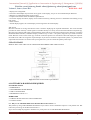
International Journal of Application or Innovation in Engineering & Management (IJAIEM) Web Site: www.ijaiem.org Email: [email protected], [email protected] Volume 2, Issue 6, June 2013 ISSN 2319 - 4847 2.1 FEATURES Operating voltage : 3.3v 32 bit microcontroller 120MHz clock frequency 3 stage pipelining Harvard architecture 512 kb flash memory 10/100 mbps Ethernet USB 2.0 full-speed device 3. LPC 1788 CONTROLLER The LPC1788 is an ARM Cortex M3 based microcontroller for embedded applications requiring a high level of integration and low power dissipation [5]. The LPC1788 adds a specialized flash memory accelerator to accomplish optimal performance when executing code from flash. The LPC1788 operates at up to 120MHz CPU frequency. The pin out of LPC1788 is intended to allow pin function compatibility with the LPC24xx and LPC23xx. 4. BLOCK DIAGRAM Fig 1 Block Diagram of GUI based Liquid Indicator 4.1 I/O’S Here by using some I/O’s like Serial cables, ADC, Ethernet ,and etc from these only we will take the inputs from the field (So, they are called as field inputs). After taking the inputs from the field it will sends information to the Cortex M3 processor .By using that information only it will do the required operation. 4.2 CORTEX M3 Here for this purpose we used LPC1788 controller. We already explained in detailed about that controller as above. Why we used this controller means it having some features they are better than the remaining controllers and also it having Cortex M3 processor. Here the Cortex M3 will take information from the I/O’s. Here the controller is having some add-on-cards.by using that add-on-card only it will collect the data from field, depending upon that data it will do the specific operation and computes the required controller output and sends output to the field. That output field is nothing but GUI. 4.3 GUI Here GUI is nothing but the graphical user interface. Here for this purpose we use GLCD (Graphical LCD) which is having touch screen. A graphical user interface (GUI) is a graphical display in one or more windows containing controls, called components that enable a user to perform interactive tasks. The user of the GUI does not have to create a script or type commands at the command line to accomplish the tasks. Unlike coding programs to accomplish tasks, the user of a GUI need not understand the details of how the tasks are performed.GUI components can include menus, toolbars, push buttons, radio buttons, list boxes, and sliders—just to name a few. For this purpose we use emWin software. 4.4 emWin emWin is designed to provide an efficient, processor- and display controller-independent graphical user interface for any application that operates with a graphical display. It is compatible with single-task and multitask environments, with a proprietary operating system or with any commercial RTOS. emWin is shipped as C source code. 4.4.1 Features of emWin: • Any (monochrome, grayscale or color) display with any controller supported (if the right driver is available). • May work without display controller on smaller displays. • Any interface supported using configuration macros. Volume 2, Issue 6, June 2013 Page 409