1
C • User Interface
C.2.6
Wavelength Verification
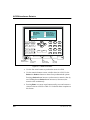
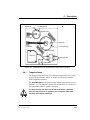
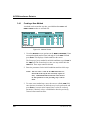
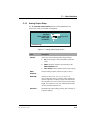
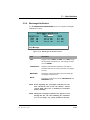
Use the WAVELENGTH VERIFICATION screen to verify the wavelength
calibration accuracy.
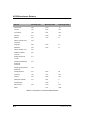
WAVELENG TH VERIFICATION
TEST READY
THEO RETICAL
M EASURED
DELTA
n n n . n nm
n . n nm
360.9 n m
.
n n n .n
n . n nm
nm
418.7 n m
n . n nm
n n n . n nm
536.2 nm
Help M essage
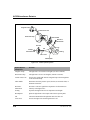
Figure C-14. Wavelength Verification Screen
Field
Description
TEST
Toggles between READY and RUN. Select RUN to begin
the wavelength verification test. After testing, the field
reverts to READY.
THEORETICAL
Indicates which maxima absorbance of the built-in
holmium oxide filter are used to determine wavelength
accuracy.
MEASURED
Reports the maxima absorbance measured during the
wavelength verification test.
DELTA
Reports the deviation between the THEORETICAL and
MEASURED values.
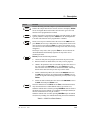
NOTE Before beginning the wavelength verification test, the
flow cell must be clear. If the cell contains a colored
reagent, flush with water or methanol at 1.0 mL/min
before continuing.
NOTE During the wavelength verification test, signals are read
through the flow cell. After initiating the verification
test, do not change any system parameters that may
Doc. 031611-01 11/99
C-17