1
2
Device and function over
overview
This provides you with an initial overview of the operating controls, displays and indicators of the SecuSignal® System and a brief description of the system's instructions
for use.
2.1
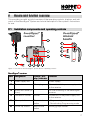
Installation components and operating controls
®
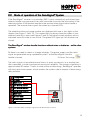
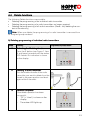
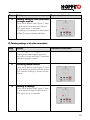
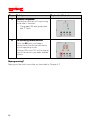
Figure 1: Overview of the SecuSignal System device: operating controls
SecuSignal® receiver
Item Designation
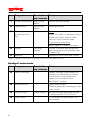
Control / disFunction
display / indicator
1
Power supply unit
Power supply
2
Connector
3
Screw with dowel (Ø
6 mm)
4
Connection socket
Socket
Connection of the power supply unit
to the receiver
5
Memory button
Short-stroke
button
- Programming window handles
- De-activating Programming mode
6
"Arrow Up" button
Short-stroke
button
Raising group number
Elbow plug
Connection of the power supply unit
to the receiver
For wall mounting of the SecuSignal®
receiver
7