1
Advanced Features
Night Mode
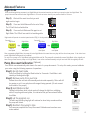
Enter the following button sequence to set Night Mode at the precise time when you desire your pump to enter into Night Mode. The
pump’s internal timer will then enter Night Mode for 10 hours and return back to your previous mode for 14 hours.
hold
Step 1)
Wait until the exact time that you wish
night mode to begin.
+
Step 2)
Press and hold Mode and Set to enter Setup.
The LED will blink red/white/blue
hold
Step 3)
Press and hold Mode and Set again to set
Night Mode. The LED will now switch to breathing white.
+
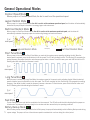
Night mode will operate in constant speed mode at 50% of the day mode speed.
Example 1:
Day Mode
Reef Crest
Random
Night Mode
g
Example 2:
Day Mode
Constant
Speed Mode
Short Pulse
Mode
Day Mode
g
Constant
Speed Mode
80% of
40% of
50% of
100% of
max speed
max speed
max speed
max speed
After programming Night Mode, the pump will enter Night Mode at the same time every day until the driver loses power. If the driver loses
power, Night Mode setting must be re-enabled.
You can force a pump out of Night Mode holding both Mode and Set. The pump will automatically resume Night Mode at the originally set
time. Once you have forced a pump out of Night Mode, it can not be re-entered manually and you must wait until the originally set time.
Pump Disconect Calibration
(Optional)
Your VorTech can automatically shut down in the event of a pump disconnect. To set-up this mode, you must calibrate
your motor using the following sequence of operations:
Step 1) Go into feed mode
hold
Enter Feed Mode by holding the Mode button for 3 seconds. Feed Mode is indicated by a blinking white light.
Step 2) Remove pump from your tank
Remove the motor and wet side assembly and set aside separately. Motor will still
be running so set it in a safe place with magnet facing upwards. (Do not connect
both halves of the pump!)
Step 3) Hold Mode and Set
Holding both buttons while in feed mode will change the light from a blinking
white to a cycling white and yellow, this indicates that you have entered Calibration Mode.
Remove
Pump
hold
+
Step 4) Let the program run
The white and yellow cycling light will continue for about sixty seconds and then
the pump will restart.
Wait
60sec
Step 5) Re-attach the pump to tank
You have now completed the Pump Disconnect Calibration and now have error
codes enabled
Re-attach
4