1
Step
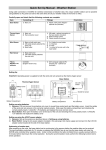
Insert Battery
Set Time Zone
Display
Description
ET (WWVB Eastern Time Zone for USA) flashes on LCD.
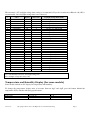
Press [–] to adjust down, [+] to adjust up (reference Table 4) on the back
of the housing.
Press ZONE button to confirm.
If no buttons are pressed for 10 seconds, the clock will proceed to the
initialization step.
Hour:minute Clock
hand initialization
HM (hour:minute) and the WAIT symbol ( ) flashes and the clock
hands move to the reception search position (08:05)).
Please wait…
Month clock
hand initialization
MO (month) and the WAIT symbol ( ) flashes and the clock hands
move to the reception search position (December), if this hand is
available with your clock.
Please wait…
Day clock hand
initialization
DA (day) and the WAIT symbol ( ) flashes and the clock hands move to
the reception search position (31st), if this hand is available with your
clock.
Please wait…
Day of week clock
hand initialization
WK (day of week) and the WAIT symbol ( ) flashes and the clock
hands move to the reception search position (Sunday), if this hand is
available with your clock.
Please wait…
Radio controlled
clock
synchronization
The radio controlled clock icon (
) will flash and seconds will be
displayed. Do not touch any buttons during synchronization.
Refer to Section 0 for more details on radio reception mode and issues
related to lack of reception and incorrect clock setting.
Table 1
Radio Signal Search Mode
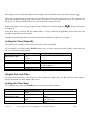
To perform a manual search for the radio controlled clock signal, press and hold the + button for two seconds to
begin.
The radio controlled clock icon (
during synchronization.
Version 1.0
) will flash and seconds will be displayed. Do not touch any buttons
©Copyright 2014, Torinnov. All Rights Reserved and Patents Pending.
Page 5