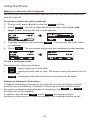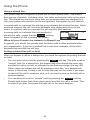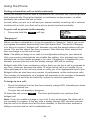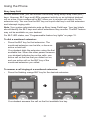
1
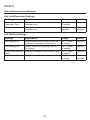
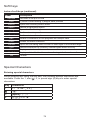
User Guide
VSP715
SIP Endpoint Deskset
2
Congratulations
on your purchase of this VTech product. Before using this product, please read
Important Safety Information on page 4 of this manual. Please thoroughly
read this user’s manual for all the feature operations and troubleshooting
information necessary to install and operate your product. You can also visit our
website at businessphones.vtech.com or call 1 (888) 370-2006.
Please note the serial number of your product, which can be found on the back
of the deskset. Save your sales receipt and original packaging in case it is
necessary to return your telephone for warranty service.
3
Important Safety Information
This symbol is to alert you to important operating or servicing
instructions that may appear in this user’s manual. Always follow basic
safety precautions when using this product to reduce the risk of injury,
fire, or electric shock.
Important safety instructions
When using your telephone equipment, basic safety precautions should always be
followed to reduce the risk of fire, electric shock and injury, including the following:
1. This product should be installed by a qualified technician.
2. This product should only be connected to the host equipment and never
directly to the network such as Public Switch Telephone Network (PSTN) or
Plain Old Telephone Services (POTS).
3. Read and understand all instructions.
4. Follow all warnings and instructions marked on the product.
5. Unplug this product from the wall outlet before cleaning. Do not use liquid or
aerosol cleaners. Use a damp cloth for cleaning.
6. Do not use this product near water such as near a bath tub, wash bowl,
kitchen sink, laundry tub or swimming pool, or in a wet basement or shower.
7. Do not place this product on an unstable table, shelf, stand or other unstable
surfaces.
8. Slots and openings in the back or bottom of the telephone base and handset
are provided for ventilation. To protect them from overheating, these
openings must not be blocked by placing the product on a soft surface such
as a bed, sofa or rug. This product should never be placed near or over a
radiator or heat register. This product should not be placed in any area where
proper ventilation is not provided.
9. This product should be operated only from the type of power source indicated
on the marking label. If you are not sure of the type of power supplied at the
premises, consult your dealer or local power company.
10. Do not allow anything to rest on the power cord. Do not install this product
where the cord may be walked on.
11. Never push objects of any kind into this product through the slots in the
telephone base or handset because they may touch dangerous voltage
points or create a short circuit. Never spill liquid of any kind on the product.
12. To reduce the risk of electric shock, do not disassemble this product, but
take it to an authorized service facility. Opening or removing parts of the
4
telephone base or handset other than specified access doors may expose
you to dangerous voltages or other risks. Incorrect reassembling can cause
electric shock when the product is subsequently used.
13. Do not overload wall outlets and extension cords.
14. Unplug this product from the wall outlet and refer servicing to an authorized
service facility under the following conditions:
A. When the power supply cord or plug is damaged or frayed.
B. If liquid has been spilled onto the product.
C. If the product has been exposed to rain or water.
D.
If the product does not operate normally by following the operating
instructions. Adjust only those controls that are covered by the
operation instructions. Improper adjustment of other controls may
result in damage and often requires extensive work by an authorized
technician to restore the product to normal operation.
E. If the product has been dropped and the telephone base and/or
handset has been damaged.
F. If the product exhibits a distinct change in performance.
15. Avoid using a telephone (other than cordless) during an electrical storm.
There is a remote risk of electric shock from lightning.
16. Do not use the telephone to report a gas leak in the vicinity of the leak. Under
certain circumstances, a spark may be created when the adapter is plugged
into the power outlet, or when the handset is replaced in its cradle. This is a
common event associated with the closing of any electrical circuit. The user
should not plug the phone into a power outlet if the phone is located in an
environment containing concentrations of flammable or flame-supporting
gases, unless there is adequate ventilation. A spark in such an environment
could create a fire or explosion. Such environments might include: medical
use of oxygen without adequate ventilation; industrial gases (cleaning
solvents; gasoline vapors; etc.); a leak of natural gas; etc.
17. Only put the handset of your telephone next to your ear when it is in normal
talk mode.
18. The power adapters are intended to be correctly oriented in a vertical or floor
mount position. The prongs are not designed to hold the plug in place if it is
plugged into a ceiling, under-the-table or cabinet outlet.
19. Use only the power cord and batteries indicated in this manual. Do not
dispose of batteries in a fire. They may explode. Check with local codes for
possible special disposal instructions.
20. For pluggable equipment, the socket-outlet shall be installed near the
equipment and shall be easily accessible.
5
21. In wall mounting position, make sure to mount the telephone base on the wall
by aligning the eyelets with the mounting studs of the wall plate. Then slide
the telephone base down on both mounting studs until it locks into place.
Refer to the full instructions in Deskset Installation in this user guide.
22. CAUTION: Keep small metallic objects such as pins and staples away from
the handset receiver.
SAVE THESE INSTRUCTIONS
6
For cETL compliance only
Mesures de sécurité importantes
Ce symbole vous alertera d’informations importantes ou d’instructions
d’entretien pouvant apparaître dans ce guide d’utilisation. Respectez
toujours les mesures de sécurité et de sécurité de base lorsque vous
utilisez ce produit, afin de réduire les risques de blessures, d’incendie,
ou d’électrocution.
Mesures de sécurité importantes
Afin de réduire les risques d’incendie, de blessures corporelles ou
d’électrocution, suivez toujours ces mesures préventives de base lorsque vous
utilisez votre téléphone :
1. Cet appareil doit être installé par un technicien qualifié.
2. Cet appareil doit être branché à un équipement hôte et jamais branché à un
réseau, tel qu’un réseau PSTN publique ou un réseau téléphonique standard
(POTS).
3. Lisez et comprenez bien toutes les instructions.
4. Observez toutes les instructions et mises en garde inscrites sur l’appareil.
5. Débranchez ce téléphone de la prise murale avant de le nettoyer. N’utilisez
pas de nettoyeurs liquides ni en aérosol. N’utilisez qu’un chiffon doux et
légèrement humecté.
6. N’utilisez pas ce produit près de l’eau, tel que près d’un bain, d’un lavabo,
d’un évier de cuisine, d’un bac de lavage ou d’une piscine, ou dans un soussol humide ou sous la douche.
7. Ne déposez pas ce téléphone sur un chariot, support ou table chancelants.
L’appareil pourrait tomber et être sérieusement endommagé.
8. Le boîtier de l’appareil est doté de fentes et d’ouvertures d’aération situées
à l’arrière ou en dessous. Afin d’empêcher la surchauffe, ces ouvertures ne
doivent pas être obstruées en plaçant l’appareil sur un lit, divan, tapis ou
autre surface similaires. Ne placez pas cet appareil à proximité d’un élément
de chauffage ni d’une plinthe électrique. De plus, ne l’installez pas dans une
unité murale ou un cabinet fermé qui ne possède pas d’aération adéquate.
9. Ne faites fonctionner cet appareil qu’avec le type d’alimentation indiqué sur
les étiquettes de l’appareil. Si vous ne connaissez pas le voltage de votre
maison, consultez votre marchand ou votre fournisseur d’électricité.
10. Ne déposez rien sur le cordon d’alimentation. Installez cet appareil dans
un endroit sécuritaire, là où personne ne pourra trébucher sur la ligne
d’alimentation ni le cordon téléphonique modulaire.
11. N’insérez jamais d’objets à travers les fentes et ouvertures de cet
appareil, car ils pourraient toucher à des points de tension dangereux
ou court-circuiter des pièces, ce qui constituerait un risque d’incendie ou
7
d’électrocution. N’échappez pas de liquides dans l’appareil.
12. Afin de réduire les risques d’électrocution, ne démontez pas l’appareil, mais
apportez-le plutôt à un centre de service qualifié s’il doit être réparé. En
enlevant le couvercle, vous vous exposez à des tensions dangereuses ou
autres dangers similaires. Un remontage inadéquat peut être à l’origine d’une
électrocution lors d’une utilisation ultérieure de l’appareil.
13. Ne surchargez pas les prises de courant ni les rallonges électriques, car ceci
peut constituer un risque d’incendie ou d’électrocution.
14. Débranchez cet appareil de la prise de courant et communiquez avec le
département de service à la clientèle de VTech dans les cas suivants:
A. Lorsque le cordon d’alimentation est endommagé ou écorché.
B. Si du liquide a été échappé dans l’appareil.
C. Si l’appareil a été exposé à une source d’humidité telle que la pluie ou l’eau.
D. Si l’appareil ne fonctionne pas normalement en suivant les directives
du guide. N’ajustez que les commandes couvertes dans le guide
d’utilisation, car un mauvais réglage de celles-ci peut être à l’origine de
dommages, ce qui nécessiterait des réparations considérables pour
remettre l’appareil à son état de fonctionnement normal.
E. Si l’appareil a été échappé ou son boîtier, endommagé.
F. Si le produit affiche une nette diminution de sa performance.
15. Évitez d’utiliser un téléphone (autre qu’un sans fil) pendant un orage. Les
éclairs peuvent être à l’origine d’une électrocution.
16. N’utilisez pas le téléphone pour rapporter une fuite de gaz à proximité de
celle-ci. Sous certaines circonstances, une inteincelle pourrait survenir
lorsque l’adaptateur est branché à une prise de courant, ou lorsque le
combiné est déposé sur le combiné. Ceci est un événement commun
associé avec la fermeture d’un circuit électrique. L’utilisateur ne devrait
pas brancher le téléphone dans une prise de courant, et ne devrait pas
déposer le combiné chargé sur le socle, si le téléphone se trouve dans un
environnement ou la concentration de gaz inflammables, sans ventilation
adéquate. Une étincelle dans ces endroits pourrait provoquer un incendie ou
une explosion. Ces environnements pourraient être l’utilisation médicale de
l’oxygène sans ventilation adéquate; le gaz industriel (dissolvants, vapeurs
d’essence, etc.); une fuite de gaz naturel, etc.
17. Placez uniquement le combiné de votre appareil près de votre oreille lorsqu’il
est en mode de conversation normal.
18. Les adaptateurs sont conçus pour être orientés en position verticale ou en
position horizontale sur le plancher.
19. Les fiches ne sont pas conçues pour maintenir la prise en place si celle-ci est
branchée au plafond, sous la table ou les armoires.
20. N’utilisez que cordon d’alimentation et les piles indiquées dans ce guide
d’utilisation.
8
21. Pour les PRODUITS À BRANCHER À UNE PRISE DE COURANT, la prise
de courant doit être installée près du produit, afin d’assurer une accessibilité
sécuritaire à la prise de courant.
22. En position de montage mural, assurez-vous de monter le socle du
téléphone sur le mur en alignant les oeillets avec les goujons de fixation de
la plaque murale. Ensuite, faites glisser le socle vers le bas sur les deux
goujons de fixation jusqu’à ce qu’il se verrouille en place. Reportez-vous aux
instructions complètes dans la section Installation dans ce guide d’utilisation.
23. MISE EN GARDE : Éloignez les petits objets métalliques tels que les
broches de l’écouteur du combiné.
CONSERVEZ CES INSTRUCTIONS
FCC part 15
This device complies with Part 15 of the FCC rules. Operation is subject to the
following two conditions: (1) This device may not cause harmful interference, and
(2) this device must accept any interference received, including interference that
may cause undesired operation.
This equipment has been tested and found to comply with the limits for a
Class A digital device, pursuant to Part 15 of the FCC Rules. These limits are
designed to provide reasonable protection against harmful interference when the
equipment is operated in a commercial environment. This equipment generates,
uses, and can radiate radio frequency energy and, if not installed and used in
accordance with the instruction manual, may cause harmful interference to radio
communications. Operation of this equipment in a residential area is likely to
cause harmful interference in which case the user will be required to correct the
interference at the user’s expense.
WARNING: Changes or modifications to this equipment not expressly approved
by the party responsible for compliance could void the user’s authority to operate
the equipment.
Industry Canada
This Class A digital apparatus complies with Canadian requirements:
CAN ICES-3 (A)/NMB-3(A).
Cet appareil numérique de la classe A est conforme à la norme NMB-003 du
Canada.
Operation is subject to the following two conditions: (1) this device may not cause
harmful interference, and (2) this device must accept any interference, including
interference that may cause undesired operation of the device.
Privacy of communications may not be ensured when using this telephone.
The term ‘’IC:‘’ before the certification/registration number only signifies that the
Industry Canada technical specifications were met.
This product meets the applicable Industry Canada technical specifications.
9
User Guide
VSP715 SIP Endpoint Deskset
Table of Contents
Answering calls................................ 23
Important Safety Information
Forwarding calls............................... 25
Putting a call on hold........................ 24
Transferring calls.............................. 27
Important safety instructions.............. 4
Making a conference call.................. 29
Introduction
Retrieving messages........................ 31
Deskset features................................ 9
Using a shared line........................... 32
Quick Reference Guide
Putting a shared-line call on hold..... 32
Front panel features......................... 10
“Barging in”....................................... 33
Navigation Controls, Audio Controls
and Dial Pad .................................... 11
Busy lamp field................................. 34
Paging.............................................. 35
Programmable keys......................... 11
Automatic Call Distribution............... 35
Programmable feature key lights...... 12
Programmable key options............... 13
Phone Features
Deskset Installation
Navigating menus............................. 36
Using the Features menu................. 36
Overview.......................................... 14
Using the Call menu......................... 37
Network requirements...................... 14
Using the local directory................... 41
Location............................................ 15
Blacklist............................................ 44
Rear panel features.......................... 16
Call history........................................ 44
Connecting the phone...................... 16
Speed Dial
Using the Phone
Entering speed dial numbers............ 47
Idle screen........................................ 19
Status
Idle mode screen icons.................... 19
Active call screen icons.................... 19
Finding the software version............ 48
Using the menu................................ 20
Configuring the Phone
Main menu items.............................. 21
Using the User Settings menu.......... 49
Making calls...................................... 21
Preferences...................................... 50
10
Setting the language........................ 50
Troubleshooting
Setting the date and time................. 50
General issues................................. 68
Display.............................................. 52
Specifications
Audio................................................ 53
Electrical and environmental
specifications.................................... 69
Configuring the programmable
keys.................................................. 54
Soft Keys
WebUI
Index of soft keys............................. 70
Using the WebUI.............................. 55
Special Characters
Status............................................... 56
Call Settings..................................... 57
Entering special characters.............. 71
User Preferences............................. 59
Maintenance
Programmable Keys......................... 61
Taking care of your telephone.......... 72
Directory........................................... 64
GPL License Information
Speed Dial........................................ 67
GPL code requests........................... 73
11
Introduction
This user guide contains detailed instructions for using your VSP715 deskset.
Please read this guide before using your telephone.
Deskset features
The VTech VSP715 deskset is full-featured SIP endpoint business phone designed
to work with popular hosted IP PBX services and on-premise SIP PBXs. Once
you have ordered and configured your PBX service, the deskset enables you to
make and receive calls as you would with any other business phone. The deskset
provides calling features such as hold, transfer, conferencing, speakerphone,
quick-dial numbers and one-touch voicemail access.
There are two ports, known as the Ethernet port and PC port, at the back of
the deskset. The Ethernet port allows the VSP715 deskset to connect to the
hosted IP PBX via a router. The PC port is for another device such as a personal
computer to connect to the local area network through the deskset.
The VSP715 deskset supports paging and call transfers between system extensions
and can connect you and two other parties on the same conference call.
The telephone also has two programmable keys. You or your system
administrator can program these keys for functions such as quick dial, redial, Do
Not Disturb, call forwarding, message retrieval, and call parking.
For more information about the programmable keys, see page 14.
The VSP715 IP Phone Features include:
•
Backlit Liquid Crystal Display
•
Speakerphone and Mute
•
Up to 2 lines
•
Up to 6 active calls
•
3-way conferencing
•
2 programmable keys
•
Message waiting alert LED
•
Dual 10/100 Mbps Ethernet ports
•
Power over Ethernet enabled
•
200-entry local directory
12
Quick Reference Guide
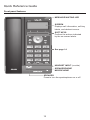
Front panel features
MESSAGE WAITING LED
SCREEN
Displays call information, soft key
labels, and deskset menus.
SOFT KEYS
Perform the actions indicated
by the on-screen labels.
See page 14
HEADSET INPUT (on side)
SPEAKERPHONE
MICROPHONE
SPEAKER
Press to turn the speakerphone on or off.
13
Quick Reference Guide
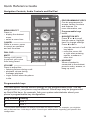
Navigation Controls, Audio Controls and Dial Pad
PROGRAMMABLE KEYS
Can be programmed to
access various functions
and features. For
more information, see
Programmable keys
below.
MENU/SELECT
Press to:
• display the deskset
menu.
• select a menu item.
NAVIGATION KEY
Press q or p to scroll
through menus, highlight
items or change settings.
Press t or u to:
• view the next set of soft
key labels.
• move the cursor left
or right when entering
names, numbers or
other text.
CANCEL
While in a menu, press
to cancel an operation
and exit the menu.
DIAL PAD
MUTE
During a call, press
to prevent your voice
from being heard.
HEADSET
When a headset is
connected to the deskset,
press to make, answer, or
hang up a call.
VOLUME
Press to adjust the:
• listening volume during a call.
• playback volume during
message playback.
• ringer volume when the phone
is idle.
Programmable keys
The table below lists the default settings for the programmable keys. The key
assignments on your phone may be different. Some keys may be programmed
as Quick Dial keys, for example. Ask your system administrator about your
phone’s programmable key configuration.
Key Number Setting
1
Line 1*
2
Line 1
* Your system administrator can assign more than one key to a line. For example, you might be
able to activate Line 1 with keys 1 and 2. Consult your administrator regarding your phone’s line
configuration.
14
Quick Reference Guide
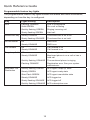
Programmable feature key lights
The programmable feature key lights indicate call status and other information,
depending on how the key is configured.
Key
Light Activity
Description
Line
Flashing ORANGE
Line is unregistered
Solid GREEN
On a call or dialing
Quickly flashing GREEN
Ringing incoming call
Slowly flashing GREEN
Held call
Steady ORANGE
The shared line is on a call
Slowly flashing ORANGE
The shared line is on hold
Off
DND is off
Steady ORANGE
DND is on
Off
Call forward is off
Steady ORANGE
Call forward is on
Off
Monitored phone is idle
Steady ORANGE
Monitored phone is on a call or has a
held call
Quickly flashing ORANGE
The monitored phone is ringing
Flashing ORANGE
Registration error. See your system
administrator.
Quickly flashing GREEN
ACD agent “wrap up” state
Steady GREEN
ACD agent ready state
Slow Flash GREEN
ACD agent unavailable state
Steady ORANGE
ACD logged on
Slowly flashing ORANGE
ACD logged off
Quickly flashing ORANGE
ACD subscription error
Shared line key
Do not disturb
Call forward
Busy lamp field
Automatic Call
Distribution
15
Quick Reference Guide
Programmable key options
To configure your programmable keys, see “Configuring the programmable keys”
on page 57.
•
Line
•
Directory—pressing the key displays the Directory menu.
•
Call History—pressing the key displays the Call history menu.
•
Redial—pressing the key displays the redial list.
•
Messages—pressing the key displays the Message menu.
•
Do Not Disturb—pressing the key enables or disables Do Not Disturb for Line
1 or Line 2.
•
Call Forward All—pressing the key enables or disables Call Forward All.
Ensure you have completed the Call Forward All settings. See “Using the
Call menu” on page 40.
•
Call Forward No Answer—pressing the key enables or disables Call Forward
No Answer. Ensure you have completed the Call Forward No Answer
settings. See “Using the Call menu” on page 40.
•
Call Forward Busy—pressing the key enables or disables Call Forward Busy.
Ensure you have completed the Call Forward Busy settings. See “Using the
Call menu” on page 40.
•
Quick Dial—pressing the key dials the number programmed for the key.
•
BLF—Busy lamp field keys let you monitor activity at other phones. The key LED
indicates call status. See “Programmable feature key lights” on page 15.
•
ACD—If you are subscribed to this feature, pressing the Automatic Call
Distribution (ACD) key displays the ACD state menu.
•
Page—If this feature is enabled, press the Page key to call one or a group of
phones. Your system administrator can configure a page to be automatically
answered.
•
Multicast Page—this feature allows you to call up to ten paging zones.
•
Park Call—Dials the access code to park your current call.
•
Retrieve Parked Call—Dials the access code to retrieve a parked call.
•
In Call DTMF—Dials a string of numbers while you are on a call. For
example, pressing the key might dial a conference access code.
•
Call Return—Dials the number of the last missed call.
•
Group Call Pickup—Dials the Group Call Pickup code, allowing you to
answer a call ringing at another extension.
•
Direct Call Pickup—Dials the Direct Call Pickup code, allowing you to answer
a call ringing at a specific extension. After pressing the button, you may need
to enter the extension number manually.
16
Deskset Installation
Overview
This section assumes that your network infrastructure is established and that
your IP PBX service has been ordered and configured for your location.
Install the phone close to a router or network switch. You can power the phone
using a compatible VTech power adapter or Power over Ethernet (PoE—Class
1). If you are not using PoE, install the phone near a power outlet not controlled
by a wall switch. The phone can be placed on a flat surface or vertically mounted
on the wall.
For customer service or product information, visit our website at
businessphones.vtech.com or call 1 (888) 370-2006.
Network requirements
A switched network topology is recommended for your LAN (using standard
10/100 Ethernet switches that carry traffic at a nominal rate of 100 Mbit/s).
The office LAN infrastructure should use Cat.-5/Cat.-5e cable.
The LAN connections to the deskset(s) should all be wired. However, wireless
connections to other devices (such as laptops) in your office will not impede
performance.
All desksets must reside on a single subnet. A Dynamic Host Configuration
Protocol (DHCP) server is recommended and must be on the same subnet as
the desksets so that IP addresses can be auto-assigned. In most cases, your
network router will have a DHCP server. By default, the deskset has DHCP
enabled for automatic IP address assignment.
Note: Some DHCP servers have default settings that limit the number of network
IP addresses assigned to devices on the network. You should log in to your
server to confirm that the IP range is sufficient.
If no DHCP server is present, you can assign static IPs to desksets. You can
assign a static IP address using the deskset menus. Go to Admin settings >
Network setting > Set static IP. See the Administrator and Provisioning Guide
for more information. If you do not have a DHCP server or do not manually
assign static IPs, you will not be able to access the WebUI and/or enable
automatic time updates from an NTP server.
A DNS server is recommended to resolve the path to the Internet and to a server
for firmware and configuration updates. If necessary, the system administrator
can also download upgrade files and use the WebUI to update the deskset
firmware and/or configuration settings manually.
For users whose computers require a GigE Ethernet frame rate (a gigabit per
second), use separate Ethernet connections for the deskset and the computer.
The Ethernet connection through a deskset is limited to 100 Mbits/s.
17
Location
Avoid placing the deskset too close to:
•
Communication devices such as television sets, DVD players, or cordless
telephones
•
Excessive heat sources
•
Noise sources such as a window with traffic outside, motors, microwave
ovens, refrigerators, or fluorescent lighting
•
Excessive dust sources such as a workshop or garage
•
Excessive moisture
•
Extremely low temperature
•
Mechanical vibration or shock such as on top of a washing machine or work
bench
18
Deskset Installation
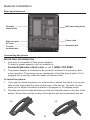
Rear panel features
Deskset
stand slots
Wall mounting slots
Ethernet port
PC port
Power jack
Handset jack
Corded
headset jack
Connecting the phone
IMPORTANT INFORMATION
1. Use only a compatible VTech power adapter.
To order a power adapter, visit our website at
businessphones.vtech.com, or call 1
(888) 370-2006.
2. The power adapter is intended to be correctly oriented in a vertical or floor
mount position. The prongs are not designed to hold the plug in place if it is
plugged into a ceiling, under-the-table or cabinet outlet.
To install the phone:
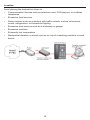
1. If you plan to place the phone on a flat surface, attach the stand. Line up the
tabs on the stand with the slots on the rear of the phone. Two sets of slots
allow you to attach the stand at either a 45-degree or 35-degree angle.
2. Plug the end of the coiled handset cord into the Handset jack on the rear of the
phone. Secure the cord by routing it through the slot and underneath the tab.
45°
35°
19
3. Plug one end of the Ethernet cable into the Ethernet port on the rear of the
deskset (marked by
), and plug the other end of the cable into your
network router or switch.
Note: You may need to use a network switch connected to your router if your
router does not have sufficient ports for the number of phones you want to
install. If you use a network switch, connect the phone to the switch instead
of the router in the previous step.
4. If the deskset is not using power from a PoE-capable network router or switch:
a. Connect a compatible VTech power adapter to the deskset power jack.
b. Plug the power adapter into an electrical outlet not controlled by a wall
switch.
If there is a networked computer and no extra Ethernet wall jacks near the phone,
then the phone and PC can share the same network connection.
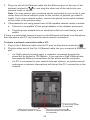
To share a network connection with a PC:
1. Plug a Cat.-5 Ethernet cable into the PC port on the phone (marked by
).
2. Plug the other end of the Cat.-5 Ethernet cable into your computer’s Ethernet
port.
•
If a GigE network is being used, a computer connected through the
phone will be limited to 100 Mbits/s. If you require a GigE Ethernet rate,
use separate Ethernet connections for the phone and the computer.
•
If a PC is connected to your network through a phone, any phone resets
and power or network interruptions will disrupt the PC’s connection to the
network.
To electrical outlet
(if required)
To network switch or router
Shared network connection
to computer
20
Deskset Installation
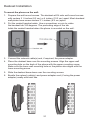
To mount the phone on the wall:
1. Prepare the wall-mount screws. The deskset will fit onto wall-mount screws
with centers 3 ¼ inches (8.2 cm) or 4 inches (10.2 cm) apart. Most standard
wall plates have screw centers 3 ¼ inches (8.2 cm) apart.
2. Put the corded handset aside. Use a screwdriver or coin to rotate
the handset tab 180 degrees. The protruding edge of the tab
holds the corded handset when the phone is mounted on the wall.
3. Connect the network cable(s) and, if required, the power adapter.
4. Place the deskset base over the mounting screws. Align the upper wall
mounting hole on the back of the phone with the upper mounting screw.
Make sure the lower wall mounting hole on the phone also aligns with the
lower mounting screw.
5. Slide the deskset base down over the mounting screws.
6. Bundle the network cable(s) and power adapter cord (if using the power
adapter) neatly with twist ties.
21
Using the Phone
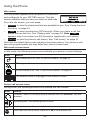
Idle screen
The Idle screen appears after the phone is connected
and configured for your SIP PBX service. The Idle
screen indicates that you have no active or held calls.
From the Idle screen, you can press:
•
Directory to view the directories that are available to you. See “Using the local
directory” on page 44.
•
Line to select another line (SIP Account). When you make a call, the
phone will use this line. See “Making calls” on page 24. Note: Line
appears only if more than one SIP account is registered to your phone.
•
Call Log to view the phone’s call history. See “Call history” on page 47.
Note that the default Idle screen soft keys are shown above. Your phone’s soft
keys are programmable and may differ from what is shown here.
Idle mode screen icons
In idle mode, the following screen icons indicate your phone’s current settings.
Icon
Status
Call Forward All is on. See “To set Call forward:” on page 41.
The ringer is off
Do Not Disturb is on. See “To set Do Not Disturb:” on page 41.
The Ethernet cable is unplugged or the network is down.
Active call screen icons
During a call, the following screen icons indicate the call’s status.
Icon
Status
Headset—audio is coming through a headset after the HEADSET key was
pressed
Speakerphone—the speakerphone is active
1/2
Call counter—more than one call is active
More than one call is active. Press q or p to view another call.
22
Using the Phone
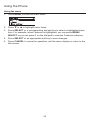
Using the menu
1. Press MENU to show the main menu.
2. Press q or p to highlight menu items.
3. Press SELECT or a corresponding dial pad key to select a highlighted menu
item. For example, when Features is highlighted, you can press MENU/
SELECT or you can press 1 on the dial pad to view the Features submenu.
4. Press SELECT or an appropriate soft key to save changes.
5. Press CANCEL to cancel an operation, exit the menu display or return to the
idle screen.
23
Using the Phone
Main menu items
1. Features (see page 39)
3. User settings (see page 52)
2. Status (see page 51)
4. Admin settings (available
only to your system administrator)
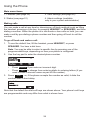
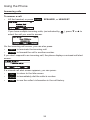
Making calls
You can make a call at any time by choosing an off-hook method (such as lifting
the handset, pressing a Line key, or pressing HEADSET or SPEAKER), and then
dialing a number. When the phone is in idle mode or has calls on hold, you can
make a call by pre-dialing a phone number and then going off hook to call the
number.
To go off hook and make a call:
1. To use the default line, lift the handset, press HEADSET, or press
SPEAKER. You hear a dial tone.
Note: You may be able to select a specific line by pressing one of the
programmable keys, depending on how your phone is configured.
2. Use the key pad to enter the desired phone number.
•
Press Backspc if you enter an incorrect digit.
•
Press 123 to change from entering digits to entering letters (if you
need to enter a domain name as part of the number).
3.Press Dial , or, if the phone accepts the number as valid, it dials the
number after a short delay.
Note that the default live dial soft keys are shown above. Your phone’s soft keys
are programmable and may differ from what is shown here.
24
Using the Phone
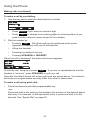
Making calls (continued)
To make a call by pre-dialing:
1. Use the key pad to enter the desired phone number.
•
Press Backspc if you enter an incorrect digit.
•
Press 123 to change from entering digits to entering letters (if you
need to enter a domain name as part of the number).
2. Dial the number by:
•
Pressing Dial . The phone will use the preferred audio mode
(speaker or headset) until you lift the handset.
•
Lifting the handset.
•
Pressing the desired Line key.
•
Pressing SPEAKER or HEADSET.
When the call is answered, the active call screen appears.
To end the call, hang up or press End . If you are on speakerphone and the
handset is “on hook,” press SPEAKER to end your call.
Note that the default active call screen soft keys are shown above. Your phone’s
soft keys are programmable and may differ from what is shown here.
To make a call using quick dial:
•
Press the desired quick dial programmable key.
–or–
Press and hold a dial pad key that matches the number of the desired speed
dial entry. For example, to dial speed dial entry 4, press and hold 4 on the
dial pad. See “Speed Dial” on page 50.
25
Using the Phone
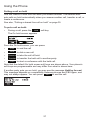
Answering calls
To answer a call:
•
Lift the handset, or press Answer , SPEAKER, or HEADSET.
If you have multiple incoming calls, (as indicated by
select the call you want to answer.
), press q or p to
On the incoming call screen, you can also press:
•
•
Reject to terminate the incoming call.
Forward to forward the call to another number.
If you don’t respond to an incoming call, the phone displays a missed-call alert
screen.
If a missed call alert screen appears, you can press:
•
•
•
Exit
to return to the Idle screen.
Callback to immediately dial the caller’s number.
View
to see the caller’s information in the call history.
26
Using the Phone
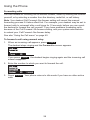
Putting a call on hold
Use this feature to hold one call while you access another. The deskset also
puts calls on hold automatically when you answer another call, transfer a call, or
create a conference.
See also, “Putting a shared-line call on hold” on page 35.
To put a call on hold:
•
During a call, press the
Hold
soft key.
The On hold screen appears.
From the On hold screen, you can press:
•
End
to end the call
•
New
to dial a new call
•
Resume to take the call off hold.
•
Transfer to transfer the held call to another party.
•
Conf
to start a conference with the held call.
Note that the default On hold screen soft keys are shown above. Your phone’s
soft keys are programmable and may differ from what is shown here.
If another party puts you on hold, you may see the message Held by far end.
This message depends on compatibility between phones and PBX types, and
may not always appear. You can press End to end the call.
27
Using the Phone
Forwarding calls
You can forward an incoming call to another number, either by entering the number
yourself, or by selecting a number from the directory, redial list, or call history.
Note: Your deskset Call Forward–No Answer setting will cancel the manual
forwarding process if it takes effect first. For example, your deskset may be set to
forward calls to voicemail after a call rings for 10 seconds, before you can reach
the deskset to forward the call yourself. If you have problems forwarding calls
because of the Call Forward–No Answer setting, ask your system administrator
to extend your Call Forward–No Answer delay.
See also “Using the Call menu” on page 40.
To forward a call using manual entry:
1. When an incoming call appears, press Forward .
The deskset stops ringing and the Forward to screen appears.
If you press Cancel , the deskset begins ringing again and the incoming call
screen reappears.
2. Enter the number to which you want to forward the call.
3. Press Forward . Your phone returns to idle mode if you have no other active
calls.
28
Using the Phone
Forwarding calls (continued)
To forward a call using the directory, redial list, or call history:
1. When an incoming call appears, press Forward .
The deskset stops ringing and the Forward to screen appears.
2. Press a programmable key (if available) to display the directory or call
history. You can also navigate to the call history or directory using the
deskset Features menu.
Select the call history folder or directory you want to access.
3. If necessary, press or until
Dial
appears and then press
Dial
.
The Call Forwarded screen appears. Your phone returns to idle mode if you
have no other active calls.
29
Using the Phone
Transferring calls
You can transfer a call to someone else at another phone.
If you talk to the transfer recipient before completing the transfer, you are making
a “supervised” transfer.
However, you do not have to talk to the transfer recipient before transferring the
call. If you do not talk to the transfer recipient before transferring the call, you are
making a “blind” transfer.
You can also transfer a call to a held call.
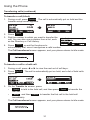
To transfer a call (supervised):
1. During a call, press Transfer . The call is automatically put on hold and the
transfer setup screen appears.
â
2. Dial the number to which you want to transfer the call. You can also use a
number from a list, such as the Directory or Call History.
3. When the second caller answers, you can talk to the caller to notify them of
the transfer, then press Transf to transfer the call.
The Call transferred screen appears, and your phone returns to idle mode.
To cancel the transfer, press:
•
•
•
Cancel on the transfer setup screen. The active call screen reappears.
End
when the second call is active. You will hang up on the second call.
when the second call is active. You will stay connected to the
second call. Your first call remains on hold.
Split
30
Using the Phone
Transferring calls (continued)
To transfer a call (blind):
1. During a call, press Transfer . The call is automatically put on hold and the
transfer setup screen appears.
â
2. Press
Blind
.
3. Dial the number to which you want to transfer the
call. You can also use a number from a list, such
as the Directory or Call History.
4. Press Transf , or wait for the phone to
automatically dial, once it recognizes a valid number.
The Call transferred screen appears, and your phone returns to idle mode.
To transfer a call to a held call:
1. During a call, press t or u to view the next set of soft keys.
2. Press XferCall . The call is automatically put on hold, and a list of held calls
appears.
â
3. On the Transfer to screen, press:
•
•
Select to talk to the held call, and then press Transf to transfer the
first call.
Blind , and then Select to transfer the first call to the held call
immediately.
The Call transferred screen appears, and your phone returns to idle mode.
31
Using the Phone
Making a conference call
You can hold a conference call between yourself and two other callers.
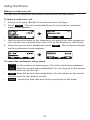
To make a conference call:
1. During a call, press t or u to view the next set of soft keys.
2. Press Conf . The call is automatically put on hold and the conference
setup screen appears.
â
3. Dial the second number for the other party you want to join your conference.
You can also use a number from a list, such as the Directory or Call History.
4. When the second call is established, press
and the conference screen appears.
Conf
. The conference begins
â
To cancel the conference setup, press:
•
Cancel on the conference setup screen. The active call screen reappears.
•
End when the second call is established. You will hang up on the second
call and return to your first call.
•
Split when the second call is established. You will remain on the second
call and your first call remains on hold.
•
Bridge , which joins both calls and returns your phone to idle mode.
32
Using the Phone
Making a conference call (continued)
When you have an active call and a held call, you can also create a conference
with the held call.
To create a conference with a held call:
1. During a call, press t or u to view the ConfCall soft key.
2. Press ConfCall . The call is automatically put on hold, and a Conf. with
target screen showing all calls on hold appears.
â
3. Highlight the desired call and press Select . You can now talk to the caller
you selected.
4. Press
Conf
. The conference begins and the conference screen appears.
â
To end a conference call:
Press one of the following soft keys:
•
•
•
End
, which hangs up on both calls.
Split , which puts both calls on hold. The screen shows information for the
second call.
Bridge , which joins both calls and returns your phone to idle mode.
Setting up a Network Conference:
A Network Conference is hosted by your service provider and allows multiple
parties to join a conference. A Network Conference works in a similar way to
the regular conference described above, except that the Split and Bridge
functions will not be available.
In addition, the soft keys Add and/or AddCall will appear during a
conference, allowing you to add more parties to the ongoing conference call.
33
Using the Phone
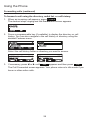
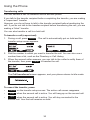
Retrieving messages
The phone alerts you when you have a new message. The MESSAGE WAITING
LED also turns on whenever you have new messages.
On the New Message alert screen, you can press:
•
Exit
to return to the Idle screen.
•
View
to access your messages. The Message menu appears.
The Message menu displays the mailboxes you can access from your phone.
If your phone has more than one line, you may be able to access multiple
mailboxes. Press p or q to highlight the desired mailbox and press MENU/
SELECT to access messages in that mailbox.
When there is no New Message alert screen, you can access the Messages
menu using the deskset menu.
To view the Message menu:
1. When the phone is idle, press MENU/SELECT.
2. With Features highlighted, press MENU/SELECT.
3. Press q to highlight Message, and then press MENU/SELECT.
The Message menu appears.
4. On the Message menu, highlight the desired line and then press SELECT.
34
Using the Phone
Using a shared line
Your phone may be configured to have one or more shared lines. This means
that a group of phones, including yours, can make and receive calls on the same
line. The shared line can have more than one programmable key assigned to it.
Ask your system administrator for the configuration that applies to your deskset.
Incoming calls on a shared line will ring every deskset that shares that line. When
someone answers the call, the other desksets stop ringing and return to idle
mode. In contrast, calls on a private line will ring only your deskset.
Incoming calls on a shared line look identical to
private-line calls, except that the Forward soft key
does not appear on the incoming call screen.
When to Use a Private Line Instead of a Shared Line
In general, you should use private lines for direct calls to other desksets within
your organization. If you use a shared line to call other desksets, all the other
desksets that use that line will ring.
Putting a shared-line call on hold
After you answer a call on a shared line, you have two options for putting that call
on hold.
•
You can put a call on hold by pressing the Hold soft key. This puts a call on
“normal” hold. On a shared line, this means that other shared-line users can
see that the call is on hold, as indicated by the flashing orange Line key LED.
Other users can retrieve the call by pressing a Line key. Your deskset will
return to idle mode. Putting a call on hold this way can be useful if you want
to hand off the call to someone else, or if you want to pick up the held call at
another deskset.
•
You can also put a call on “private” hold by pressing the Priv hold soft key.
Private hold means that other users cannot see that the call is on hold. This
is useful if you plan to resume the held call on the same deskset.
35
Using the Phone
Putting a shared-line call on hold (continued)
When you transfer a call or start a conference call, the other call is put on private
hold automatically. During the transfer or conference setup process, no other
desksets can retrieve the call on hold.
As well, when you are on a call and you answer another incoming call or retrieve
another call on hold, your first call is put on private hold automatically.
To put a call on private hold manually:
•
Press and hold the
Hold
soft key.
“Barging in”
When you have a shared line, it may be possible to “barge in,” that is, join a call
in progress at another deskset that uses that shared line. The result of barging
in is that you create a “bridged call” between you and the people whose call you
joined. You and the others can then converse. Note that any other shared-line
user can barge in on the call as well.
Note: The ability to barge in on calls is a configurable setting for your deskset.
Only your system administrator can enable this setting. Your deskset may have
shared lines, but be unable to barge in on calls. If barging in is disabled on your
deskset, pressing the key with the steady orange LED will do nothing.
Bridged calls differ from conference calls in that you can join a call in progress at
any time. However, because the caller ID of the active call is not visible to you,
other participants in the call may need to notify you of an appropriate time to join.
Bridged calls can also have any number of participants, unlike conference calls.
The number of participants on a bridged call depends on the number of desksets
sharing that line and may be limited by system or network capabilities.
To barge in on a call:
•
Press the desired line key that has a steady orange LED, indicating an active
call on a shared line.
You join the call already in progress.
To leave the call, press
bridged call.
End
. The other participants can continue their
Note: If you are unable to barge in on a call, it may be because the other call is
not currently in progess. A line key with a steady orange LED can also indicate
that the call is on private hold at the other deskset, or that the other deskset is
dialing a number and no call is established yet.
36
Using the Phone
Busy lamp field
As with shared lines, you can monitor call activity using Busy Lamp Field (BLF)
keys. However, BLF keys and LEDs represent activity on an individual deskset,
not on a line. Keys configured for BLF allow you to monitor call activity for the
extension only. You can use the BLF key as a quick dial key to call the extension
and intercept ringing calls.
Note: Your system administrator sets up Busy Lamp Field keys. Your key labels
should identify the BLF keys and which extensions they monitor. The BLF feature
may not be available on your deskset.
For BLF LED states, see “Programmable feature key lights” on page 15.
To dial a monitored extension:
•
Press the BLF key for that extension. The
monitored extension can be idle, or have an
active or held call.
Your deskset dials the extension using the first
available line. When the other person answers,
your deskset indicates two active calls: one
active call on the line that you dialed out on,
and one active call on the BLF key of the
monitored extension you called.
To answer a call ringing at a monitored extension:
•
Press the flashing orange BLF key for the desired extension.
â
Ext. 201
Line 1
Ext. 201
Your deskset answers the call on the first available line key.
37
Line 1
Using the Phone
Paging
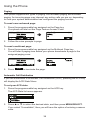
Your phone supports two types of paging: server-based paging and multicast
paging. An incoming page may interrupt any active calls you are on, depending
on how your system administrator has configured the paging function.
To send a server-based page:
1. Press the programmable key assigned as the Page key.
Your phone will dial out the Page Feature Access Code.
â
2. Follow the voice prompts to page.
To send a multicast page:
1. Press the programmable key assigned as the Multicast Page key.
You will hear a paging tone before your phone broadcasts a page to the
assigned paging zone.
â
2. Press
End
to terminate the page.
Automatic Call Distribution
If you are subscribed to Automatic Call Distribution (ACD), pressing the ACD key
will display the ACD State Menu:
To set your ACD state:
1. Press the programmable key assigned as the ACD key.
The ACD State list menu appears.
2. Press p or q to select the desired state, and then press MENU/SELECT.
If you select “Unavailable”, then you will have the option of entering a reason
code.
38
Phone Features
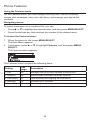
Using the Features menu
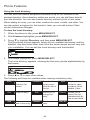
On the Features menu, you can manage incoming calls, use the Directory,
access your messages, view your call history, and manage your speed dial
numbers.
Navigating menus
To select a submenu on a numbered list, you can:
•
Press p or q to highlight the desired menu, and then press MENU/SELECT.
•
Press the dial pad key that matches the number of the desired menu.
To access the Features menu:
1. When the phone is idle, press MENU/SELECT.
The Main Menu appears.
2. If necessary, press p or q to highlight Features, and then press MENU/
SELECT.
The Features menu appears.
The Features menu includes the following items:
Setting
See
Description
page…
1. Call
40
Manages how your phone handles incoming calls.
2. Directory
44
Stores contact information and call contacts.
3. Call History
47
Lists incoming and outgoing call information.
4. Message
34
Accesses your voicemail.
5. Speed dial
50
Accesses your list of speed dial numbers.
39
Phone Features
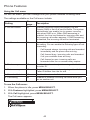
Using the Call menu
On the Call menu, you can manage how your phone handles incoming calls.
The settings available on the Call menu include:
Setting
See
Description
page…
1. Do Not Disturb
41
Silences incoming ringing and paging. Do Not
Disturb (DND) is set on a per-line basis. The system
administrator can enable you to answer incoming
calls when DND is on. When DND answering is
enabled, the Line key flashes for incoming calls and
the incoming call screen appears. If DND answering
is disabled, the incoming call will be terminated.
2. Call forward
41
Automatically forwards incoming calls depending on
the setting. You can enable the following types of call
forwarding:
•
Call forward always: incoming calls are forwarded
immediately and the phone does not ring.
•
Call forward busy: incoming calls are forwarded
if all your available lines are busy.
•
Call forward no ans: incoming calls are
forwarded after the no answer delay expires.
3. Block anonymous
42
Enables the phone to reject incoming calls that have
no caller ID.
4. Dial as anonymous
42
Enables the phone to make outgoing calls with the
Caller ID hidden from the far end.
4. Missed call alert
43
Enables the missed call alert screen.
5. Call waiting
43
Enables or disables incoming call alerts while you
are on another call.
To use the Call menu:
1. When the phone is idle, press MENU/SELECT.
2. With Features highlighted, press MENU/SELECT.
3. With Call highlighted, press MENU/SELECT.
The Call menu appears.
40
Phone Features
Using the Call menu (continued)
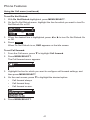
To set Do Not Disturb:
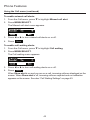
1. With Do Not Disturb highlighted, press MENU/SELECT.
2. On the Do Not Disturb menu, highlight the line for which you want to turn Do
Not Disturb On or Off.
3. When the desired line is highlighted, press t or u to turn Do Not Disturb On
or Off.
4. Press
Save
.
When Do Not Disturb is on, DND appears on the idle screen.
To set Call forward:
1. From the Call menu, press q to highlight Call forward.
2. Press MENU/SELECT.
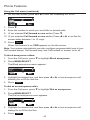
The Call forward menu appears.
3. Highlight the line for which you want to configure call forward settings, and
then press MENU/SELECT.
4. On the next screen, press q to highlight the desired option:
•
Call forward always
•
Call forward busy
•
Call forward no ans.
5. Press MENU/SELECT.
41
Phone Features
Using the Call menu (continued)
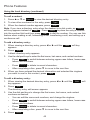
6. On the next screen, press t or u to turn call forwarding On or Off.
7. Press q.
8. Enter the number to which you would like to forward calls.
9. (If you selected Call forward no ans earlier) Press q.
10. (If you selected Call forward no ans earlier) Press t or u to set the No
answer delay between 1 to 10 rings.
11. Press
Save
.
When Call forward is on, FWD appears on the idle screen.
Note: Your system administrator can also configure programmable keys to turn
Call forward always, Call forward busy, and Call forward no answer on or off.
To block anonymous callers:
1. From the Call menu, press q to highlight Block anonymous.
2. Press MENU/SELECT.
The Block anonymous menu appears.
3. Highlight the desired line, and then press t or u to turn anonymous call
blocking On or Off for that line.
4. Press
Save
.
To dial as an anonymous caller:
1. From the Call menu, press q to highlight Dial as anonymous.
2. Press MENU/SELECT.
The Dial as anonymous menu appears.
3. Highlight the desired line, and then press t or u to turn anonymous call
dialing On or Off for that line.
4. Press
Save
.
42
Phone Features
Using the Call menu (continued)
To enable missed call alerts:
1. From the Call menu, press q to highlight Missed call alert.
2. Press MENU/SELECT.
The Missed call alert menu appears.
3. Press t or u to turn missed call alerts on or off.
4. Press
Save
.
To enable call waiting alerts:
1. From the Call menu, press q to highlight Call waiting.
2. Press MENU/SELECT.
The Call waiting menu appears.
3. Press t or u to turn call waiting alerts on or off.
4. Press
Save
.
When Show alert is on and you are on a call, incoming calls are displayed on the
screen. When Show alert is off, incoming calls are rejected and no notification
appears on the screen. See also “Call Waiting Settings” on page 63.
43
Phone Features
Using the local directory
You can store the names and phone numbers for up to 200 contacts in the
deskset directory. Once directory entries are saved, you can dial them directly
from the directory. You can also search directory entries by first or last name.
When adding an entry, you can enter numbers for work, mobile, and other. You
can also select a ringtone for that contact. Later, you can edit entries if their
contact information changes.
To view the local directory:
1. When the phone is idle, press MENU/SELECT.
2. With Features highlighted, press MENU/SELECT.
3. Press q to highlight Directory, and then press MENU/SELECT.
The Directories screen appears, listing all your available directories and the
blacklist. Any directories other than Local are server-based and will vary with
your installation. You can edit the Local directory and the blacklist.
4. With Local highlighted, press MENU/SELECT.
The Local directory appears, showing the first entry (sorted alphabetically by
first name).
5. Press p or q to view other entries.
The following soft keys are available when viewing a directory entry:
Back
Returns to
Directory list
screen
Dial
Dials the entry
Add
Allows you to
add a new entry
LastNme
Sorts the list
by last name
from the top of
the list
Type
Displays the
contact’s other
numbers: Work,
Mobile, Other
Edit
Allows you to
change the
entry
Search
Allows you to
search the list
alphabetically by
first or last name
Deletes the
entry
Del. all
Deletes all entries
Delete
44
Phone Features
Using the local directory (continued)
To call a contact:
1. Press p or q or Search to view the desired directory entry.
2. To view other numbers for the entry, press
Type
.
3. When the desired number appears, press
Dial
.
Note: If you view a directory entry when the deskset is in dial mode, an Insert
soft key appears instead of Dial . Press Insert to place the entry’s number
into the number field and then press Dial to dial the number. You can use this
feature when making a call, forwarding a call, transferring a call, and setting up a
conference call.
To add a directory entry:
1. When viewing a directory entry, press t or u until the
appears.
Add
soft key
2. Press Add .
A blank directory entry appears.
3. Use the dial pad keys to enter the first name, last name, and contact numbers.
•
Press ABC to switch between entering upper-case letters, lower-case
letters, and numbers.
•
Press Backspc to delete incorrect characters.
•
After completing a line, press q to move to the next line.
4. When you have entered the desired information and selected the ringtone
you want to use for this contact, press Save .
To edit a directory entry:
1. When viewing the desired directory entry, press t or u until the
key appears.
Edit
soft
2. Press Edit .
The directory entry edit screen appears.
3. Use the dial pad keys to change the first name, last name, and contact
numbers as desired.
•
You can edit the name and numbers, and change the ringtone.
•
Press ABC to switch between entering upper-case letters, lower-case
letters, and numbers.
•
Press Backspc to delete incorrect characters.
•
After completing a line, press q to move to the next line.
4. Press
Save
.
45
Phone Features
Using the local directory (continued)
To search directory entries:
1. From the Directories screen or from a directory entry, press Search .
The Local directory search screen appears.
2. To filter your search by first name or last name, press t or u.
3. Press q to move to the Search field.
4. Press a dial pad key to enter a letter for your first name or last name search.
Press 2 once for A, or three times for C, for example.
5. Press Search . The deskset searches for the first name or last name
beginning with the letter you entered.
The first entry found appears. If more than one entry was found, press p or
q to view other entries.
To delete a directory entry:
1. Press p or q or Search to view the desired directory entry.
2. Press t or u until the Delete soft key appears.
3. Press Delete .
4. When the confirmation screen appears, press
Yes
.
To delete all directory entries:
1. From a directory entry, press p or q until the Del. all soft key appears.
2. Press Del. all .
3. When the confirmation screen appears, press
46
Yes
.
Phone Features
Blacklist
The directory also includes a blacklist, which is a list of numbers that cannot
reach your phone. If you experience nuisance calls, you can add the callers’
contact information to the blacklist. Calls from blacklisted numbers will not ring
your phone, or be recorded in your call history. The Blacklist can be viewed
and edited in the same way as the Local directory but is a completely separate
directory listing.
Call history
The call history provides available name and number information for the last 200
incoming and outgoing calls. The newest entries replace the oldest. You can view
call history information for:
•
All calls—all categories of calls
•
Missed calls—incoming calls that were not answered
•
Received calls—incoming calls that you answered, forwarded or rejected
•
Dialed calls—all outgoing calls. You can use this as a redial list.
To view the call history:
1. When the phone is idle, press MENU/SELECT.
2. If necessary, press p or q to highlight Features, and then press MENU/
SELECT.
3. Press p or q to highlight Call History, and then press MENU/SELECT.
The Call History screen appears.
4. Press q to highlight the desired call history folder.
5. Press View to see call history entries in the highlighted folder.
The first entry appears.
If the folder has no entries, a “history is empty” notification message appears.
6. Press q to view more entries.
The call history entry screen shows the time, date, name and number of the call,
the number of entries in the folder, along with an icon indicating the type of call.
Received call
Dialed call
47
Missed call
Phone Features
Call history (continued)
The following soft keys are available when viewing a call history entry:
Delete
Deletes the entry
Save
Saves the call
information to the
local directory
Dial
Dials the
entry
Edit Dial
Displays the predial
screen so you can
edit the number
before dialing
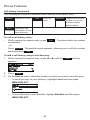
To call a call history entry:
•
While viewing the desired entry, press
immediately.
Dial
. The phone dials the number
–or–
Press Edit Dial . The predial screen appears, allowing you to edit the number
before pressing Dial .
To add a call history entry to the directory:
1. While viewing the desired entry, press t or u until the
appears.
2. Press
Save
Save
soft key
.
3. On the Save to menu, select the location to which you want to save the entry.
•
To save the entry to your directory, highlight Local and then press
MENU/SELECT.
•
To save the entry to your blacklist, highlight Blacklist and then press
MENU/SELECT.
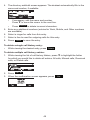
48
4. The directory add/edit screen appears. The deskset automatically fills in the
name and number, if available.
•
If necessary, edit the name and number.
Press q to move the cursor to the next line.
•
Press Backspc to delete incorrect characters.
5. Enter any additional numbers (entries for Work, Mobile, and Other numbers
are available).
6. Select a ringer for calls from this entry.
7. Select a line to used for outgoing calls for this entry.
8. Press
Save
to save the entry.
To delete a single call history entry:
•
While viewing the desired entry, press Delete .
To delete multiple call history entries:
1. While viewing the list of call history folders, press q to highlight the folder
for which you would like to delete all entries: All calls, Missed calls, Received
calls, or Dialed calls.
2. Press Del. all .
3. When the confirmation screen appears, press
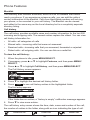
49
Yes
.
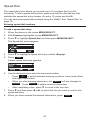
Speed Dial
The speed dial menu allows you to enter up to 10 numbers that you dial
frequently. To dial a speed dial number, press and hold the dial pad key that
matches the speed dial entry number (for entry 10, press and hold 0).
You can also enter speed dial numbers using the WebUI. See “Speed Dial” on
page 70.
Entering speed dial numbers
To add a speed dial entry:
1. When the phone is idle, press MENU/SELECT.
2. With Features highlighted, press MENU/SELECT.
3. Press q to highlight Speed dial, and then press MENU/SELECT.
The Speed dial menu appears.
4. Press q to highlight a speed dial entry marked <Empty>.
5. Press
Add
.
A blank speed dial entry appears.
6. Use the dial pad keys to enter the name and number.
•
Press 123 to switch between entering numbers, lower-case letters,
and upper-case letters.
•
When you start entering characters, the Cancel soft key changes to
Backspc . Press Backspc to delete incorrect characters.
•
After completing a line, press q to move to the next line.
7. Press q and then press t or u to select the line you want to use for this
speed dial entry.
8. When you have entered the desired information, press
50
Save
.
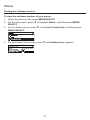
Status
Finding the software version
To view the software version of your phone:
1. When the phone is idle, press MENU/SELECT.
2. On the Main menu, press q to highlight Status, and then press MENU/
SELECT.
3. On the Status screen, press q to highlight Product Info, and then press
MENU/SELECT.
4. On the Product Info screen, press q until Software Ver. appears.
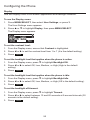
51
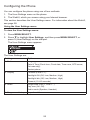
Configuring the Phone
You can configure the phone using one of two methods:
1. The User Settings menu on the phone
2. The WebUI, which you access using your Internet browser.
This section describes the User Settings menu. For information about the WebUI,
see page 58.
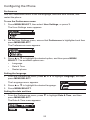
Using the User Settings menu
To view the User Settings menu:
1. Press MENU/SELECT.
2. Press q to highlight User Settings, and then press MENU/SELECT, or
press 3 (User Settings) on the dial pad.
The User Settings menu appears.
The User Settings are:
Setting
Options
1. Preferences
Language
Date & Time (Clock time, Clock date, Time zone, NTP server,
Set manually)
Restart phone
2. Display
Contrast (Level 1–7)
Backlight ON (Off, Low, Medium, High)
Backlight idle (Off, Low, Medium, High)
Timeout (10–60 seconds)
3. Audio
Ringer tone (Line 1, Line 2…)
Key tone (On, Off)
Audio mode (Speaker, Headset)
4. Programmable keys
Keys 1 and 2
52
Configuring the Phone
Preferences
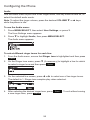
Use the Preferences menu to set the language, date and time formats, and
restart the phone.
To use the Preferences menu:
1. Press MENU/SELECT, then select User Settings, or press 3.
The User Settings menu appears.
2. On the User Settings menu, ensure that Preferences is highlighted and then
press MENU/SELECT.
The Preferences menu appears.
3. Press p or q to highlight the desired option, and then press MENU/
SELECT. The available options are:
•
Language
•
Date & Time
•
Restart phone
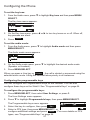
Setting the language
1. From the Preferences menu, press p or q to highlight Language, and then
press MENU/SELECT.
The Language menu appears.
2. Press p or q to highlight the desired language.
3. Press MENU/SELECT.
Setting the date and time
•
From the Preferences menu, press q to highlight Date & Time, and then
press MENU/SELECT.
The Date & Time menu appears.
53
Configuring the Phone
Setting the date and time (continued)
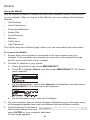
To set the time format:
1. From the Date & Time menu, ensure that Clock Time is highlighted.
2. Press t or u to select a 12-hour clock (12am/pm) or 24-hour clock.
3. Press
Save
.
To set the date format that appears on the idle screen:
1. From the Date & Time menu, press q to highlight Clock date.
2. Press t or u to select the desired date format (DD/MM/YY, MM/DD/YY, YY/
MM/DD)
3. Press
Save
.
To set the Time Zone:
1. From the Date & Time menu, press q to highlight Time Zone.
2. Press
Edit
.
3. Press p or q to select a setting. The time zone is set as an offset from GMT.
For example, EST is -5, and PST is -8.
4. Press
Save
.
To enable or disable the NTP (Network Time Protocol) server:
1. From the Date & Time menu, press q to highlight NTP server.
2. Press t or u to select Enabled or Disabled.
3. Press
Save
.
Note: If the NTP server is disabled, you must manually set the time and date.
This setting is valid only if the system administrator has already configured
the Network Time settings. For more information, see the VSP715 Deskset
Administrator and Provisioning Guide.
To manually set the Year, Month, Day, Hour and Minute:
1. From the Date & Time menu, press q to highlight Set manually.
2. Press MENU/SELECT.
Note: If the NTP server is enabled, you cannot modify this setting. See “To
enable or disable the NTP (Network Time Protocol) server” above.
3. For each setting, press t or u to select the desired setting, and then press
q to move to the next line.
4. When you have finished, press
Save
54
.
Configuring the Phone
Display
Use the Display menu to set screen appearance and backlight behavior.
To use the Display menu:
1. Press MENU/SELECT, then select User Settings, or press 3.
The User Settings menu appears.
2. Press p or q to highlight Display, then press MENU/SELECT.
The Display menu appears.
To set the contrast level:
1. From the Display menu, ensure that Contrast is highlighted.
2. Press t or u to set the contrast level from 1 to 7 (4 is the default setting).
3. Press
Save
.
To set the backlight level that applies when the phone is active:
1. From the Display menu, press q to highlight Backlight ON.
2. Press t or u to select Off, Low, Medium, or High (High is the default
setting).
3. Press
Save
.
To set the backlight level that applies when the phone is idle:
1. From the Display menu, press q to highlight Backlight idle.
2. Press t or u to select Off, Low, Medium, or High (Off is the default setting).
3. Press
Save
.
To set the backlight off timeout:
1. From the Display menu, press q to highlight Timeout.
2. Press t or u to select between 10 and 60 seconds at 5-second intervals (30
seconds is the default setting).
3. Press
Save
.
55
Configuring the Phone
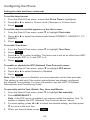
Audio
Use the Audio menu to pick one of ten ringer tones, turn key tones on and off, or
select the default audio mode.
Note: To adjust the ringer volume, press the deskset VOLUME q or p keys
while the phone is idle.
To use the Audio menu:
1. Press MENU/SELECT, then select User Settings, or press 3.
The User Settings menu appears.
2. Press q to highlight Audio, then press MENU/SELECT.
The Audio menu appears.
To select different ringer tones for each line:
1. From the Audio menu, ensure that Ringer tone is highlighted and then press
Select .
2. On the Ringer tone menu, press q (if necessary) to highlight a line for which
to select a ringer tone and then press Select .
3. On the selected line screen, press t or u to select one of ten ringer tones.
The default is 1. Ringer tone samples play when selected.
4. After selecting the desired ringer tone, press
a new ringer tone, press Cancel .
56
Save
. To exit without saving
Configuring the Phone
To set the key tone:
1. From the Audio menu, press q to highlight Key tone and then press MENU/
SELECT.
The Key tone menu appears.
2. On the Key tone menu, press t or u to turn key tones on or off. When off,
key presses are silent.
3. Press
Save
.
To set the audio mode:
1. From the Audio menu, press q to highlight Audio mode and then press
MENU/SELECT.
The Audio mode menu appears.
2. On the Audio mode menu, press q to highlight the desired audio mode
(Speaker or Headset).
3. Press MENU/SELECT.
When you press a Line key or Answer , the call is started or answered using the
selected audio mode. Lifting the handset takes priority in all instances.
Configuring the programmable keys
You can configure the Programmable Keys on the Deskset. You can also
configure these keys on the WebUI. See “Programmable Keys” on page 64.
To configure the programmable keys:
1. Press MENU/SELECT, then select User Settings, or press 3.
The User Settings menu appears.
2. Press q to highlight Programmable keys, then press MENU/SELECT.
The Programmable keys menu appears.
3. Select the key to configure, then press
Edit
.
4. Select a PFK type, then press MENU/SELECT, or
configure additional settings and press Save . For more details on PFK
types, see “Programmable Keys” on page 64.
57
WebUI
Using the WebUI
Use an Internet browser to access the Web User Interface (WebUI) that resides
on your deskset. After you log on to the WebUI, you can configure the following
features:
•
Call Settings
•
User Preferences
•
Programmable Keys
•
Speed Dial
•
Local Directory
•
Blacklist
•
Call History
•
User Password
The WebUI also has a Status page, where you can view status and information.
To access the WebUI:
1. Ensure that your computer is connected to the same network as your
deskset. Your computer may already be connected to the network through
the PC port on the back of your deskset.
2. Find the IP address of your phone:
a. When the phone is idle, press MENU/SELECT.
b. Press q to highlight Status, and then press MENU/SELECT. The Status
menu appears.
c. On the Status menu, ensure that Network is highlighted, and then press
MENU/SELECT. The Network screen appears.
d. On the Network screen, note the IP Address.
3. On your computer, open an Internet browser. Depending on your browser, some
of the pages presented here may look different and have different controls.
4. Type the phone IP address in
the browser address bar and
press ENTER on your computer keyboard.
A Login page appears.
58
5.Under User Name, enter user.
6.Under Password, enter user, or your own password, if you have created
one. You can create or change a password after you log on.
7.Click Log In. The WebUI appears.
Click topics from the navigation bar at the top of the page, and then click the
desired setting on the left side of the WebUI to see the page for that setting. You
view and change settings in two different types of fields: drop-down lists and
entry fields into which you type information. For your security, the WebUI times
out after 10 minutes, so if it is idle for that time, you must log on again.
The remaining procedures in this section assume that you have already logged
on to the WebUI.
Status
The Status page shows:
•
General information about your phone, including model, MAC address, and
software version.
•
Account Status information about your SIP account registration.
•
Network information regarding your phone’s network address and network
connection.
The Status page has no settings that you can change. You may need some of
the status information for troubleshooting purposes.
59
WebUI
Call Settings
To view the call settings, click SYSTEM in the WebUI header, and then click Call
Settings in the sidebar. You can configure call settings for each account that is
available to your phone. Click Account 1 or Account 2 to select the call settings
page for the desired account.
Call Settings include Do Not Disturb and Call Forward settings. You can also set
Do Not Disturb and Call Forward using the desket. See “Using the Call menu” on
page 40.
When you have finished changing settings on this page, click Save to save them.
General Call Settings
Setting
Description
Anonymous Call Reject
Select to block incoming calls that have no caller ID.
Enable Anonymous Call
Select to make outgoing calls that remove your own caller
ID information.
Do Not Disturb Settings
Setting
Description
Range
Default
Enable DND
Turns Do Not Disturb on or off.
n/a
Disabled
Incoming Calls
Selects whether the phone displays
incoming call information while Do Not
Disturb is on.
Show, Reject
Reject
60
Call Forward Settings
Setting
Description
Enable Call Forward Select to enable call forwarding for all calls on that account.
Always
Target Number
Enter a number to which all calls will be forwarded.
Enable Call Forward Select to enable call forwarding for calls when you are on another
Busy
call on that account.
Target Number
Enter a number to which calls will be forwarded when the line is
busy.
Enable Call Forward Select to enable call forwarding for unanswered calls on that
No Answer
account.
Target Number
Enter a number to which unanswered calls will be forwarded.
Delay
Select the number of rings before
unanswered calls are forwarded.
61
Range: 1 to 10 rings
Default: 6 rings
WebUI
User Preferences
On the User Preferences page, you can configure some basic settings for your
phone and set how your phone responds to calls.
After changing any settings on this page, click Save to save them.
General User Settings
Setting
Description
Range
Default
WebUI
Language
Sets the language that
appears on the WebUI.
Any language supported
by your phone. For
example, English,
French, Spanish, etc.
English
Phone
Language
Sets the language that
appears on your phone.
Any language supported
by your phone. For
example, English,
French, Spanish, etc.
English
Backlight Timer
Sets how long the screen
backlight stays on after the last
button press.
10 to 60 seconds
30
seconds
Ringer Volume
Sets the ringer volume for
Off, 1–9
incoming calls. You can also
use the VOLUME q or p keys
on the deskset.
5
Default Audio
Mode
Sets how calls are answered
when you press a line key or
Answer . See also “Audio” on
page 56.
Speaker
62
Speaker, Headset
WebUI
User Preferences (continued)
Call Hold Reminder Settings
Setting
Description
Range
Default
Enable Call Hold
Reminder Tone
Enables or disables the call hold
reminder tone.
n/a — Select
to enable
Enabled
10–300
seconds
30
seconds
Tone Interval (secs) Sets the interval for the call hold
reminder tone.
Call Waiting Settings
Setting
Description
Range
Default
Call Waiting Off
Rejects additional incoming calls. No
notification appears on the screen.
n/a — Select
to enable
Disabled
Call Waiting On
Shows additional incoming calls on
the screen.
n/a — Select
to enable
Enabled
Enable Call Waiting
Tone
Enables or disables Call Waiting Tone. n/a — Select
to enable
Enabled
Tone Interval (secs) Sets the interval for the call waiting tone. 10–60
seconds
63
30
seconds
WebUI
Programmable Keys
The deskset has two programmable keys. You can assign functions to the
programmable keys on the Programmable Keys page.
Keys can have identical functions, depending on the “Type” of key. For example,
you can assign two “Line”-type keys to Account 1 so that you can manage
multiple calls on Account 1. You can also assign Quick Dial keys.
For the programmable key default settings, see “Programmable keys” on page 14.
Type
Description
Line
Configures the key for accessing an account. You can make
or answer calls by pressing these keys. The key LED will
change according to call activity.
After selecting Line in the Type column, select the account
number in the Account column.
Directory
Configures the key to access the Directory menu. You can
then press the key to view the Directory menu.
Call History
Configures the key to access the Call History list. You can
then press the key to view the Call History list.
Redial
Configures the key to access the Redial list. You can then
press the key to view the Redial list.
Messages
Configures the key to access the Message menu. You can
then press the key to view the Message menu.
Do Not Disturb
Configures the key to turn Do Not Disturb on or off. The key
is lit orange when DND is on.
Call Forward All
Configures the key to turn Call Forward All on or off. In the
Account column, select the account for which Call Forward
All will apply. Before assigning the key, ensure that you
configure Call Forward settings on the Call Settings page.
Call Forward No Answer
Configures the key to turn Call Forward No Answer on or off.
In the Account column, select the account for which Call
Forward No Answer will apply. Before assigning the key,
ensure that you configure Call Forward settings on the Call
Settings page.
64
Type
Description
Call Forward Busy
Configures the key to turn Call Forward Busy on or off.
In the Account column, select the account for which Call
Forward Busy will apply. Before assigning the key, ensure
that you configure Call Forward settings on the Call Settings
page.
Quick Dial
Configures the key to dial a number on the selected line.
After selecting Quick Dial, enter the number to be dialed
in the Value column. In the Account column, select the
account on which the number will be dialed out.
BLF (Busy Lamp Field)
Configures the key to monitor another extension. In the
Value column, enter the URI of the extension you want
to monitor with this key. For example, 2325552001@
sipservice.com.
ACD (Automatic Call
Distribution)
Configures the key to display the ACD State menu. In the
Account column, select the account that is subscribed to
the ACD service.
Page
Configures the key to call one or a group of phones.
Pressing the key dials the Paging feature access code. Your
System Administrator must configure the feature access
code for Paging.
Multicast Page
Configures the key to make outgoing multicast pages. In the
Value column, enter a valid Paging Zone ID (ranging from 1
to 10). Multicast paging differs from standard paging in that
it is handled locally by the Deskset and does not require
a subscription through the hosted server. To use multicast
paging, your System Administrator must first set up paging
zones on the WebUI.
Park Call
Enables you to park a call. Pressing the key dials the Call
Park feature access code (FAC). Your System Administrator
must configure the feature access code for Call Park. In
the Account column, select the account on which the
feature access code will be dialed out. For example, choose
Account 1 if you wish to use the Call Park FAC that your
System Administrator entered for account 1.
Retrieve Park Call
Enables you to retrieve a parked call. Pressing the key
dials the Parked Call Retrieval feature access code (FAC).
In the Account column, select the account on which the
feature access code will be dialed out. For example, choose
Account 1 if you wish to use the Parked Call Retrieval FAC
that your System Administrator entered for account 1.
In Call DTMF
Configures the key to dial a string of numbers while you
are on a call. For example, pressing the key might dial a
conference access code. After selecting In Call DTMF, enter
the number to be dialed in the Value column.
Call Return
Configures the key to dial the number of the last missed call.
65
Type
Description
Group Call Pickup
Enables you to answer a call ringing at another extension.
The call can be ringing at any extension in your phone’s call
pickup group. Pressing the key dials the Group Call Pickup
feature access code (FAC).
Direct Call Pickup
Enables you to answer a call ringing at a specific deskset.
Pressing the key dials the Direct Call Pickup feature access
code (FAC). Depending on the server requirements, you
may then need to enter the number of the ringing extension.
66
WebUI
Directory
To view the local directory, click CONTACTS in the WebUI header, and then click
Local directory in the sidebar.
On the Local Directory page, you can manage your local directory entries. You
can sort, edit, delete, and add contact information for up to 200 entries. The page
also allows you to export your phone’s local directory or import a local directory
file. The export function lets you back up your contacts to your computer.
Phone numbers appear as links. If your service provider’s click to dial feature is
enabled, you can dial a number by clicking its link.
The Local Directory lists entries on up to 10 pages, with 20 entries per page.
Click Next, First, Last, or a page number to view the desired page of entries.
Note: You can also use the phone menu to manage your local directory entries.
For more information, see “Using the local directory” on page 44.
67
Local Directory
Click
To...
Sort the list by last name.
Edit information for an entry.
View the last page of entries.
View the next page of entries.
Delete selected entries from the directory. Click Select All to select
every entry on the page you are viewing.
Add a new directory entry.
Delete all Directory entries
To add a new directory entry:
1. Click Add New Entry.
The Create Local Directory Entry page appears.
2. Enter the required information. At minimum, a first and last name are
required.
Setting
Description
Range
Default
First Name
Enter the appropriate names in these
fields.
n/a
n/a
Ringer Tone
Sets a unique ringer tone for calls from
this directory entry.
Auto,
Tone 1–10
Auto
Account
Sets the account used when you dial this Default
directory entry.
Account,
Account 1,
Account 2
Default
Account
Home Number
Enter the appropriate numbers in these
fields.
n/a
Last Name
Work Number
Mobile Number
3. Click Save.
68
n/a
WebUI
To edit a directory entry:
1. Click Edit for the entry you want to edit.
The Edit Local Directory Entry page appears.
2. Edit or add the desired information.
3. Click Save.
Import Local Directory
You can import an existing local directory file. Importing a directory file replaces
all your previous local directory entries. After importing a directory file, you can
add, edit, or delete entries as desired.
Note: Directory files are .xml files containing contacts and contact information.
For more information about creating or editing a directory file, consult your
system administrator.
To import a local directory file:
1. Click Choose File.
2. In the Choose File to Upload window, navigate to the directory file.
3. Click the file, and then click Open.
4. On the WebUI, click Import.
Export Local Directory
You can export the directory and save it as an .xml file on your computer.
To export the local directory:
1. Click Export.
2. At your browser’s prompt, save the file to the desired location on your
computer.
69
WebUI
Speed Dial
The speed dial keys are used for dialing numbers with one key press. To view the
speed dial keys, click SYSTEM in the WebUI header, and then click Speed Dial
in the sidebar.
On the Speed Dial page, you can enter up to 10 numbers that you dial frequently.
To dial a speed dial number, press and hold the dial pad key that matches the
speed dial entry number (for entry 10, press 0). For each speed dial number you
enter, you must assign the account on which the number will be dialed out.
You can also add speed dial entries using the deskset. The Speed dial list is
accessed through the Features menu. See “Speed Dial” on page 50.
After entering information on this page, click Save to save it.
Note: Your system administrator can also assign programmable function keys to be
quick dial keys, but you cannot add or edit phone numbers for these keys. Use the
Speed Dial page to enter numbers that you personally want to dial often.
To enter speed dial numbers:
1. In the Name column, enter a speed dial label for the desired key.
2. In the Value column, enter a phone number for the desired key.
3. In the Account column, select the account that this speed dial number will
use.
4. Click Save.
70
Troubleshooting
If you have difficulty with your telephone, please try the suggestions below. For
customer service, visit our website at businessphones.vtech.com or call
1 (888) 370-2006.
General issues
Screen is blank.
•
Ensure power is connected. If powered by an AC adapter, check that adapter
is plugged into a wall socket and the Deskset power jack. If powered by PoE,
ensure that the network switch is providing power through the correct ports.
Intercom calls (Pages) are not received.
•
Your phone can be configured to answer intercom calls (pages)
automatically. See your system administrator if your phone doesn’t answer
intercom calls automatically.
Calls are answered on the headset rather than the speakerphone after I
press a Line key or Answer to answer a call.
•
Change the audio mode from Headset to Speaker. See “To set the audio
mode:” on page 57.
My computer can’t connect to the network after plugging the Ethernet cable
through the PC port.
•
Make sure the deskset is connected to power. The PC port does not work
when the deskset does not have power source or during a power outage.
•
Make sure you plug the Ethernet cable connected to the router into the
deskset Ethernet port and the Ethernet cable connected to the computer into
the deskset PC port.
The network connection speed on my computer drops significantly after
plugging the Ethernet cable through the PC port.
•
If you are using a Gigabit Ethernet system, the connection speed drops to
100 Mbps after plugging the Ethernet cable through the PC port.
My caller ID isn’t working.
•
Caller ID is a subscription service. Your telephone service provider may
require subscription to this service for this feature to work.
•
The caller must be calling from an area that supports caller ID.
•
Both your telephone service provider and your caller’s service provider must
use caller ID compatible equipment.
71
Specifications
Electrical and environmental specifications
Operating temperature
32–122 °F (0–50 °C)
AC adapter output voltage
5.0 Vdc @ 700 mA
Ethernet network jacks
10/100 Mbps RJ-45 Jacks
72
Soft Keys
Index of soft keys
The table below provides an alphabetical list of the labels that appear above the
deskset soft keys.
Label
Description
abc/ABC/123
Selects the text format for input
Add
Enters a new directory group editor
Add dot
Enters dot in IP editing field
Answer
Answers an incoming call
Back
Backspc
Blind
Bridge
Callback
Cancel
Shows the previous screen
Moves cursor back to correct entries in text editing fields
Starts the blind transfer process for the active call
Joins the two active calls in a conference and returns to idle screen
Dials the last missed caller
Quits the current screen without saving any settings
Conf.
Opens the live dialing editor to enter digits for the conference target
ConfCall
Displays a list of held calls as a target for conferencing with the active call
Del. All
Deletes all records in a list
Delete
1) Deletes current entry 2) Deletes assignment 3) Deletes Directory group
Dial
Directory
Edit
EditDial
Sends and dials currently displayed/highlighted digits
Opens the list of available directories
Displays the entry/group editor
Edits a number stored in a list before dialing
End
1) Closes the current page 2) Ends the current call
Exit
Exits the current screen and returns to the previous menu
FirstNme
Sorts the directory by first name
Forward
Opens the predial editor to begin forwarding a call
Hold
LastNme
Puts the call on hold
Sorts the directory by last name
Line
Switches between registered lines
New
Press to predial a new call during a call currently put on hold
No
Priv hold
Reject
Returns to the previous screen
Puts the call on hold (on a shared line only)
Rejects an incoming call
73
Soft Keys
Index of soft keys (continued)
Label
Description
Resume
Save
Resumes a call put on hold
1) Saves current setting 2) Begins save process
Search
Opens the Directory search editor
Select
Selects a highlighted option
Settings
Opens the User settings menu
Conf
Confirms to set up conference
Transf
Split
Status
Transfer
Confirms to transfer call
Breaks a conference or call progress into multiple calls
Access the status submenu
Opens the live dialing editor to enter or insert digits of the transfer target
Type
Switches between the Directory number types within an entry
View
Displays a database/list
XferCall
Yes
Displays a list of held calls as a transfer target for the active call
Confirm
Special Characters
Entering special characters
When entering text using the dial pad, the following special characters are
available. Press the 1, star ( ), 0, or pound sign (#) keys to enter special
characters.
Key
Characters
1
~^`%!&-_+=|
.@*
0
[space] : ; “ , ?
#
()[]{}<>/\#
74
Maintenance
Taking care of your telephone
•
Your telephone contains sophisticated electronic parts, so you must treat it
with care.
•
Avoid rough treatment.
•
Place the corded handset down gently.
•
Save the original packing materials to protect your telephone base if you ever
need to ship it.
Avoid water
•
You can damage your telephone if it gets wet. Do not use the corded handset
in the rain, or handle it with wet hands. Do not install the telephone near a
sink, bathtub or shower.
Electrical storms
•
Electrical storms can sometimes cause power surges harmful to electronic
equipment. For your own safety, take caution when using electric appliances
during storms.
Cleaning your telephone
•
Your telephone has a durable plastic casing that should retain its luster for
many years. Clean it only with a soft cloth slightly dampened with water or a
mild soap.
•
Do not use excess water or cleaning solvents of any kind.
Remember that electrical appliances can cause serious injury if used when you
are wet or standing in water. If the telephone should fall into water, DO NOT
RETRIEVE IT UNTIL YOU UNPLUG THE POWER CORD AND NETWORK
CABLE FROM THE WALL, then pull the unit out by the unplugged cords.
75
GPL License Information
GPL code requests
Portions of the software associated with this product are open source, and fall
within the scope of the GNU General Public License (GPL). Accordingly, those
portions of code are available to the public, consistent with the requirements
of the GPL, in either source code format or object code format, depending
upon the nature of the code at issue. If you would like to exercise your right to
receive the available code, please send a cashier’s check, payable to VTech
Communications, Inc., in the amount of $15.00 (U.S.$) to:
VTech Communications, Inc.,
9590 SW Gemini Drive, Suite 120
Beaverton OR 97008
ATTN: Information Technology Group—VSP715 GPL code request
along with a written request for the available code. If your request does not
fully comply with the foregoing requirements, VTech reserves the right to reject
your request. Further, by requesting and receiving the available code, you
release VTech, its affiliates, and its and their officers, directors, employees,
and representatives (“VTech Parties”) from any liability or responsibility
relating to such code, and you acknowledge that the VTech Parties make no
representations with respect to the origin, accuracy, usability, or usefulness of
such code, and the VTech Parties have no responsibility to you whatsoever
concerning the code, including without limitation any responsibility to provide
explanation, support, upgrade, or any communication whatsoever. Your review or
use of the available code is at your sole risk and responsibility.
VTECH COMMUNICATIONS LTD.
A member of THE VTECH GROUP OF COMPANIES.
Distributed in the U.S.A. by VTech Communications Inc., Beaverton, Oregon 97008.
VTech is a registered trademark of VTech Holdings Limited.
Copyright © 2015 for VTECH COMMUNICATIONS LTD. All rights reserved.
Version 1, 07/15
76