1
5.3
Cutting an Opening in the Table
To cut an opening in the table:
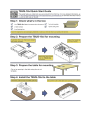
1. Place the cut-out template (that is included with your TBUS-18xl) on the
surface of the table exactly where you want to install the TBUS-18xl.
2. Attach the template to the table with the included screws (if using the cut out
template).
3. Following the inside edge of the template, cut a hole in the table surface
with a sabre or keyhole saw according to the dimensions shown in Figure 3
(not to scale).
i
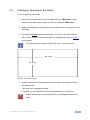
The thickness of the table should be 76.2mm / 3 inches or less.
366 +2mm
178 +2mm
Figure 3: Cut out Dimensions
4. Unscrew and remove the template from the surface of the table and clean
the table surface.
Take care not to damage the table.
If needed, you can download a full-scale template from our Web site.
!
Kramer Electronics is not responsible for any damage caused to the
table.
TBUS-18xl - Installing the TBUS-18xl
11