1
1
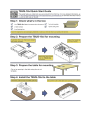
#
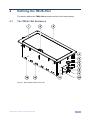
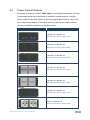
Feature
Outer Rim
Function
Fits over the table surface.
A protective rubber guard protects the outer rim during
shipping. Remove it before installing the unit
2
Inner Frame
Installed within the TBUS-18xl enclosure
3
Black Anodized/Brushed Includes an opening for cable pass-through; covers the inner
Clear Textured Lid
frame, leaving the table surface neat and tidy
4
Lid Housing
When opened, the lid retracts into the lid housing
5
Height Adjustment
Screw holes
The screw holes on each side panel are used for mounting
and adjusting the height of the Inner Frame
Protect the table surface when mounting the unit (one for
each clamp)
Mounting Screws
For mounting onto table (one for each clamp)
Locking Butterfly
Screws
Tighten to lock the mounting butterfly screw (one for each
clamp)
Mounting Butterfly
Screws
Tighten to secure the unit to the table surface (one for each
clamp)
Mounting Brackets
Fit in the bracket slits after inserting the enclosure into the
table – to secure the unit to the table surface (one for each
clamp)
10
11
Bracket Slits
For attaching the two mounting brackets on opposite sides
12
Tie Holes
Insert the self-locking tie through the holes to fix the passthrough cables to the inside walls of the unit (4)
13
Enclosure
Inserted into the table cut out
7
8
9
4.2
Rubber Protectors
Table Clamping Set
6
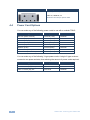
TBUS-18xl Optional Inner Frames
The following inner frames can be installed in the TBUS-18xl enclosure:
Inner Frames for TBUS-18xl
Specifications (defines what you
can include in this inner frame):
T18F-84 (P/N: 80-000064)
4 openings for four dual power sockets
4 pass-through inserts
i
6
Custom made inner frames can be designed if required.
Contact Kramer Electronics for more details.
TBUS-18xl - Defining the TBUS-18xl