1
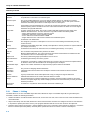
Using the Utilities
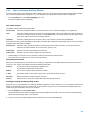
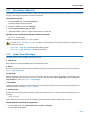
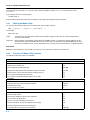
Description
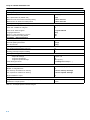
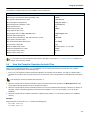
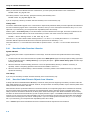
Option
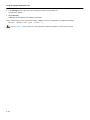
Error messages
Redirect error messages and verbose messages to a file
−err file
Ignore error codes returned by commands
−i
Redirect messages to standard out instead of standard error
−w
Show extended error messages
−x
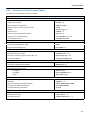
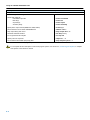
Table 6−2: Overview of control program options
For a complete list and description of all make utility options, see section 4.5, Make Utility Options, in Chapter Tool
Options of the reference manual.
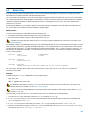
6.3.3
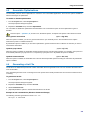
Writing a MakeFile
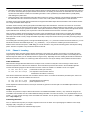
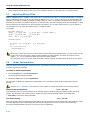
In addition to the standard makefile makefile, the make utility always reads the makefile tmk.mk before other inputs. This
system makefile contains implicit rules and predefined macros that you can use in the makefile makefile.
With the option −r (Do not read the tmk.mk file) you can prevent the make utility from reading tmk.mk.
The default name of the makefile is makefile in the current directory. If you want to use other makefiles, use the option −f
my_makefile.
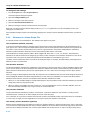
The makefile can contain a mixture of:
•
•
•
•
•
•
targets and dependencies
rules
macro definitions or functions
comment lines
include lines
export lines
To continue a line on the next line, terminate it with a backslash (\):
# this comment line is continued\
on the next line
If a line must end with a backslash, add an empty macro.
# this comment line ends with a backslash \$(EMPTY)
# this is a new line
Targets and dependencies
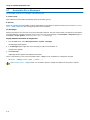
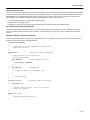
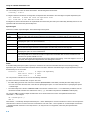
The basis of the makefile is a set of targets, dependencies and rules. A target entry in the makefile has the following format:
target ... : [dependency ...] [; rule]
[rule]
...
Target lines must always start at the beginning of a line, leading white spaces (tabs or spaces) are not allowed. A target line
consists of one or more targets, a semicolon and a set of files which are required to build the target (dependencies). The target
itself can be one or more filenames or symbolic names:
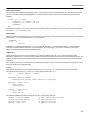
all:
demo.abs final.abs
demo.abs final.abs:
test.obj demo.obj final.obj
You can now can specify the target you want to build to the make utility. The following three invocations all have the same effect:
tmk
tmk all
tmk demo.abs final.abs
If you do not specify a target, the first target in the makefile (in this example all) is built. The target all depends on demo.abs
and final.abs so the second and third invocation have the same effect and the files demo.abs and final.abs are built.
6−7