1
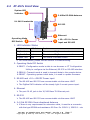
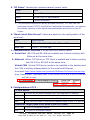
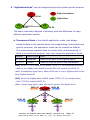
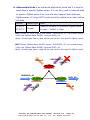
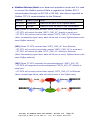
3.2 ZT-257x Front View System LED Indicator 1 6 2.4GHz RP-SMA Antenna 5 RS-232 4 Ethernet UL 94V-0 materials Operating Mode DIP Switch 3 2 +10~+30 VDC Power input and RS-485 1. LED Indicator Status LED Indicator LED Color Explain ZigBee Net Green The status of ZigBee network. ZigBee RxD Yellow The status of ZigBee communication ZigBee PWR Red The status of module board ※ For more details, please see the section 6 troubleshooting. 2. Operating Mode DIP Switch ZBSET:Configuration mode is able to use browser or ZT Configuration Utility to configure via the Ethernet, RS-232 or RS-485 interface. ZBRUN:Transmit mode is used to transmit data to the remote device. ZBINIT:Operating system initial state, it is used to update firmware. 3. RS-485 and +10~+30VDC Power input The RS-485 and RS-232 are communicable via the same UART. The ZigBee PWR indicator will be steady light if correct power input. 4. Ethernet The port RJ-45 jack is the 10/100 Base-TX Ethernet port. 5. RS-232 The RS-485 and RS-232 are communicable via the same UART. 6. 2.4 GHz RP-SMA Omni-directional Antenna If there is any requirement for extension cable, it must be a connector with the type RPSMA and resistance 50 Ohm. Ex. 3S001-1, 3S003-1...etc ICP DAS, ZT‐2570/ZT‐2571 User Manual, Version 1.0 Page 7 Copyright @ 2012 by ICP DAS Co., Ltd. All Rights Reserved.