1
Camera and Multimedia 185
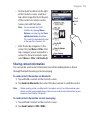
3. Select a media file that you want, then tap Menu > Queue Up. This adds the
file to the Now Playing list. Repeat this step until you have added all desired
media files to the Now Playing list.
Note You cannot select multiple files simultaneously.
4. After adding the media files, tap Menu > Now Playing.
5. On the Now Playing screen, tap Menu > Save Playlist.
6. Enter the playlist name, then tap Done.
7. To play back the playlist you created, tap My Playlists in the Library, select
your playlist, then tap Play.
Troubleshooting
For troubleshooting information, visit http://www.microsoft.com/windowsmobile/
en-us/help/more/windows-media-player.mspx