1
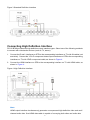
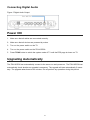
Connecting Digital Audio
Figure 5 Digital Audio Output
Power ON
1. Make sure that all cables are connected correctly.
2. Make sure that all devices are powered by mains.
3. Turn on the power switch on the TV.
4. Turn on the power switch on the ZXV10 B700.
5. Press TV/AV button to switch the system mode of TV until the EPG page is shown on TV.
Upgrading Automatically
The ZXV10 B700 can automatically connect to the server on each power-on. The ZXV10 B700 can
automatically check whether an upgrade is necessary. The upgrade will start automatically if necessary. The upgrade takes three to five minutes. Do not perform any operation during this period.
8