1
GVG Device Manager Guide
5
Before the GVG Device Manager can be installed, some of the Profile software must be installed.
Here are the steps for that installation.
1.
On the computer used for the GVG DM, install the Profile Software for computers that are not
Profiles. Refer to the Profile Software installation guide from Grass Valley Group for details.
2.
If you do not have EditStar installed on the Profiles to be controlled by the GVG DM, do the
following:
a.
On the Profiles to be controlled, install the GVG Profile or ProfileXP option of the
ControlAir Setup program, depending on the version of the Profile Software. Refer
to the ControlAir Installation and Operations Manual for details.
b. There are no more pre-installation steps. Proceed with the installation of the GVG
Device Manager.
3.
If you have EditStar 2.0 installed on the Profiles to be controlled by the GVG DM, you must
also install the EditStar Server Interface for ControlAir. Run the EditStar Server Setup
program.
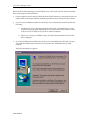
The Welcome dialog box appears.
0130-05528-01