1
2. Installation and connection
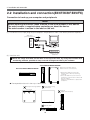
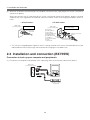
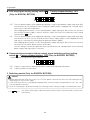
(3) Connect devices that require backup to the unit’s power supply output receptacle.
When the unit’s 3 output receptacles (the BX35F/50F has 3, the BX50FW has 2) are insufficient, increase
the number of output receptacles by attaching a separately purchased power strip.
<Connection example 1>
<Connection example 2>
Modem or other peripheral
External HD
Separately purchased
power strip
PC
PC
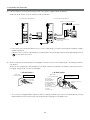
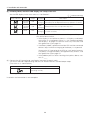
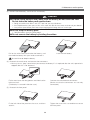
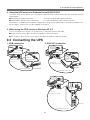
• Even when the connected device has a 2P AC input plug, it can be connected to the power supply
output receptacle.
However, when a 2P AC input plug has a ground wire, attach the ground wire to the grounding terminal
(
) on the back of the unit.
<When connected device has 3P plug>
Connect directly
<When connected device has 2P plug>
Connect directly
Plug of connected
device
Plug of connected
device
<When connected device has 2P plug + ground>
Connect the plug directly
Plug of connected
device
The unit’s power
supply output
receptacle
Connect the ground wire to the
grounding terminal (
) on the unit
19