1
9. Description of related products
9. Description of related products
9-1 Using the Network Line Surge Protection Function
(BX75SW Only)
Using the optional BT75XSX, you can protect your modem, TA, and network card from damage due to surge by
absorbing surge voltage (abnormally high voltage) that may occur on the telephone line, ISDN line or network
cable due to thunder.
* If you do not use the Network Line Surge Protection Function, this section is not required.
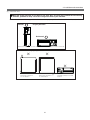
The following 2 types of connectors are available for the Network Line Surge Protection Function.
- RJ45 (8 Pins)
- RJ11 (2 Pins, 4 Pins, or 6 Pins)
Notes
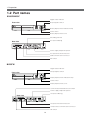
Do not reverse the connection of Line/Hub Side and Modem/TA/PC Side of the
Network Line Surge Protection.
● If a failure of the protection circuit occurs, the ISDN line and so on may be damaged.
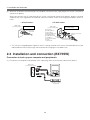
1. When connecting to the telephone line
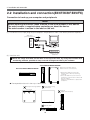
Connect the telephone line from the wall to the Line/Hub Side jack of the Network Line Surge Protection.
Use the telephone cable (modular cable) included with the BT75XSX to connect between the unit’s Modem/
TA/PC Side jack of the Network Line Surge Protection and your modem, FAX, etc.
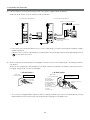
2. When connecting to the ISDN line
Connect the ISDN line that comes out of the wall to the Line/Hub Side of the Network Line Surge Protection
of the UPS.
Use the telephone cable (modular cable) attached to the BT75XSX to connect between the Modem/TA/PC
Side Jack of the Network Line Surge Protection of the UPS and your DSU (or terminal adaptor with built-in
DSU).
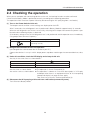
3. When connecting to LAN 10Base-T/100 Base-Tx
To protect your 10Base-T/100 Base-Tx (twisted pair cable without shielding) network interface, you need to
separately purchase a cable equivalent to your cable in use. Connect the 10Base-T/100Base-Tx cable from
the HUB to the unit’s Line/Hub Side jack of the Network Line Surge Protection. Connect between the Modem/TA/PC Side jack of the Network Line Surge Protection and the network interface of your computer with
a separately purchased cable.
49